

Kick Live Streams & Viewer Count (Official API), No Login
Pricing
from $1.40 / 1,000 channels
Kick Live Streams & Viewer Count (Official API), No Login
Check live status, viewer count, stream title, category and paid subscribers for up to 1,000 channels, or the top live streams of any category. Official Kick API with your own free key. No login.
Pricing
from $1.40 / 1,000 channels
Rating
0.0
(0)
Developer

Cliqto Media
Maintained by CommunityActor stats
0
Bookmarked
2
Total users
1
Monthly active users
a day ago
Last modified
Categories
Share
Kick Live Streams & Viewer Count gets live status, viewer count, stream title, category, language and paid subscriber count for a list of Kick channels, or the top live streams of any Kick category. You paste channel names or kick.com links, or type a category such as Just Chatting, and add your own free Kick Client ID and Client Secret. You get one clean table row per channel, with numbers as numbers.
The Actor uses only the official Kick Public API: no login to Kick, no cookies, no proxy and no page scraping. One run can check up to 1,000 channels plus up to 20 categories with up to 100 live streams each. A Kick key is required. Without a key the run returns one api_key_required row and stops.
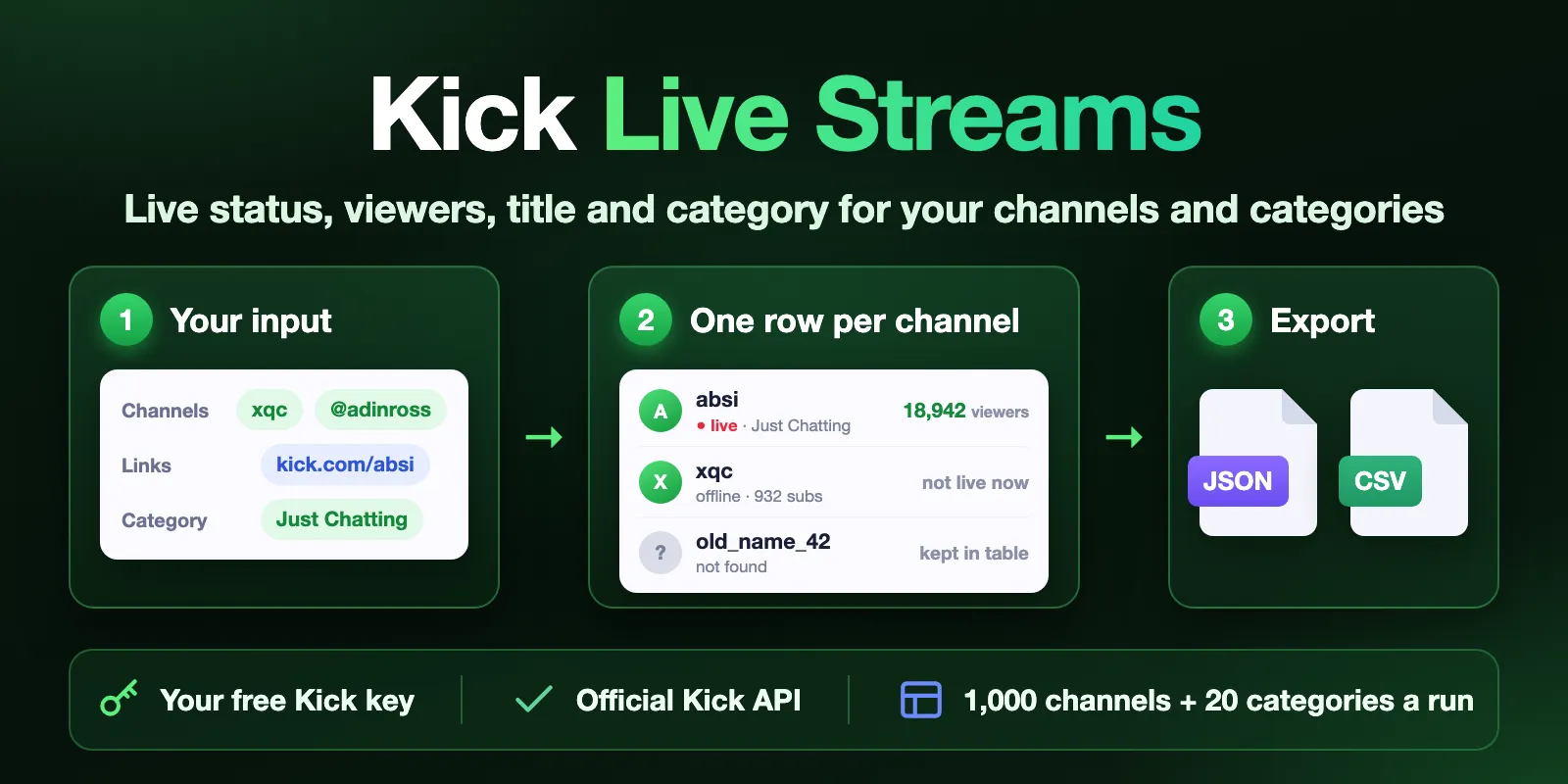
Table of contents
- What it does
- Get your Kick key
- Quick start
- Input
- Input examples
- Output example
- Output fields
- Pricing and cost examples
- Use cases
- Scheduling and monitoring
- API, export and AI agents
- Limits and partial results
- Troubleshooting
- FAQ
- Related Actors
- Support
What it does
You give a list of Kick channels, a list of categories, or both. The Actor asks the Kick Public API and saves one row per channel:
| Group | Fields |
|---|---|
| Live now | is live, viewer count, stream title, category, language, mature flag, start time, thumbnail |
| Channel | channel name, display name, user ID, description, paid subscriber count, avatar, banner, channel link |
| Category rows | place among the category's live streams by viewers (rank) |
- Accepts channel names (
xqc), handles (@adinross) and links (https://kick.com/xqc). Upper and lower case do not matter. - Channel rows come in the order of your list. A channel that appears twice is looked up once.
- For a category, the Actor saves the channels live in it right now, most viewers first, up to
maxItems. A channel that is already in your list is not saved twice. - A channel that Kick does not have gets a
not_foundrow with your original line. A line that is not a Kick channel name gets aninvalid_inputrow. - An offline channel has
isLive: falseandnullviewers, title and category.nullis never written as0. - E-mail addresses in a channel description are replaced with
[email removed]. The Actor does not collect contacts.
Good fit
- You track a list of streamers and need to know who is live, with how many viewers, right now.
- You want the biggest live streams of a category (for example Slots & Casino or Just Chatting) as a table.
- You want an official, stable data source instead of page scraping.
Not a fit
- You need follower counts. The official Kick API does not give followers, so this Actor does not have them. It gives the paid subscriber count instead.
- You need clips, past broadcasts (VODs), chat messages or viewer lists.
- You need e-mails or other contacts of streamers. This Actor does not collect them.
- You have no Kick account with two-factor authentication. You need it to make the free key.
Get your Kick key
The key is free. It takes about 5 minutes. See also Kick's own guide: App Setup.
- Log in to kick.com and turn on two-factor authentication (2FA) in your account settings. Kick asks for it before you can make an app.
- Open Settings → Developer (kick.com/settings/developer) and create an app.
- Type any app name and description. For Redirect URL use
http://localhost. The Actor does not use it. You do not need to pick any scopes: public channel and stream data need none. - Copy the Client ID into the Client ID field of this Actor and the Client Secret into the Client Secret field.
Your Kick limits. Kick API calls are free; Kick does not bill you. Kick does not publish an exact request limit. In our tests one app got "rate limit exceeded" after about 250 requests in a few minutes, and the limit came back after 15–30 seconds. The Actor uses about one request per 25 channels and one per category, waits when Kick says "too many requests", and stops politely if the limit does not come back (see Limits). The largest run (1,000 channels + 20 categories) used 174 requests.
Both fields are secret: Apify stores them encrypted. The Actor sends them only to Kick to get a short-lived app token, and cancels that token when the run ends. It never writes the key or the token to the dataset, the logs or the run summary. The Actor does not log in to your Kick account and cannot change anything in it.
Quick start
- Get a key (see above).
- Paste your Client ID and Client Secret.
- The Channels field already has
xqc. Add more names or links, one per line, or add a category in Categories. - Click Start. A few channels take about 3 seconds.
- Open the Channels view of the dataset, or download it as CSV, Excel or JSON.
If you click Start without a key, the run still ends as SUCCEEDED, with one api_key_required row that tells you how to get a key. No channel is looked up and no data event is charged. Apify charges the Actor start fee for every run, including this one (see Pricing).
Input
| Field | Type | Required | Default | Range | What it does |
|---|---|---|---|---|---|
clientId | string, secret | yes, for real data | none | — | Client ID of your Kick app. |
clientSecret | string, secret | yes, for real data | none | — | Client Secret of your Kick app. |
channels | array of strings | one of channels or categories | prefill: xqc | up to 1,000 lines | Channel names, @handles or kick.com links, one per line. |
categories | array of strings | one of channels or categories | none | up to 20 lines | Kick category names (at least 3 characters) or numeric category IDs. |
maxItems | integer | no | 50 | 1–100 | How many live streams to save from each category, most viewers first. It does not limit channels. |
You can use channels and categories in the same run. The list is checked first, then the categories.
A category name is matched by Kick's own search, and the Actor takes Kick's first match. For example gta finds GTA RP, and Grand Theft Auto V finds Grand Theft Auto V (GTA). The run summary says which category was used. If you need an exact category, use its numeric ID (it is in categoryId of any stream row).
Input examples
A list of channels (the prefill plus your key)
The top 100 live streams of two categories
Output example
A live stream from a category:
A channel from your list that is offline:
(Other fields are filled as in the first row; live fields are null while offline.)
A channel that Kick does not have:
(Other fields of this row are null too.)
Output fields
The Channels view shows the main columns. Export the dataset (JSON, CSV or Excel) to get every field.
| Field | Type | Can be null | Example | Meaning |
|---|---|---|---|---|
status | string | no | complete | Row status, see the table below. |
input | string | yes | Just Chatting | Your original line (channel or category). null only for api_key_required. |
matchedBy | string | yes | category | channel for your list, category for a category's live streams. |
rank | integer | yes | 1 | Place among the category's live streams by viewers. null for list rows. |
channelSlug | string | yes | absi | Channel name as in kick.com/<channel>. |
userId | integer | yes | 27894320 | Kick user ID. Stays the same when a streamer renames the channel. |
displayName | string | yes | Absi | Name as shown on Kick. |
isLive | boolean | yes | true | Live right now, at fetchedAt. |
title | string | yes | Live stream title. null when offline. | |
viewerCount | integer | yes | 18942 | Current viewers. null when offline. |
category | string | yes | Just Chatting | Category of the live stream. |
categoryId | integer | yes | 15 | Kick category ID. Use it in categories for an exact match. |
language | string | yes | ar | Stream language as Kick reports it. |
isMature | boolean | yes | false | Stream is marked for mature audiences. |
startedAt | string, ISO date UTC | yes | 2026-10-22T08:59:29.000Z | When the live stream started. |
thumbnailUrl | string | yes | https://images.kick.com/… | Live stream thumbnail. |
description | string | yes | Channel description. E-mail addresses are replaced with [email removed]. | |
activeSubscribers | integer | yes | 1593 | Active paid subscribers, as Kick reports them. Not followers. |
profilePictureUrl | string | yes | https://files.kick.com/… | Avatar link. |
bannerPictureUrl | string | yes | Banner image link. | |
url | string | yes | https://kick.com/absi | Channel link. |
source | string | no | kick-public-api | Data source. |
fetchedAt | string, ISO date UTC | no | 2026-10-22T10:31:40.720Z | When the row was read. |
message | string | yes | Reason, for rows that are not complete. |
Row statuses
status | When | Charged |
|---|---|---|
complete | Channel found, all fields saved | channel event |
partial | Channel found, but Kick did not send some fields (see message) | channel event |
not_found | Kick has no channel or category with this name or ID: renamed, banned, deleted or never existed | small empty-result event |
invalid_input | The line is not a Kick channel name or link, or a category shorter than 3 characters | small empty-result event |
api_key_required | No Client ID or Client Secret in the input (one row per run) | no event |
Run summary
The run's key-value store has a RUN_SUMMARY record: run status (COMPLETE, PARTIAL, NO_RESULTS, API_KEY_REQUIRED, INVALID_INPUT, ERROR, CANCELLED), stop reason, counts, the Kick category each of your categories matched (with its ID and number of live streams), moreAvailable (a category had more live streams than maxItems) and warnings. counts.skippedDuplicate counts category streams that were already saved from your list. The run's status message says the same in one line, for example Saved 2 channels (3 not found, 4 invalid entries).
Pricing and cost examples
Pay per event. Apify platform usage is included. Kick does not charge for the API.
| Event | When | Free | Bronze | Silver | Gold and above |
|---|---|---|---|---|---|
| Actor start | once per run, charged by Apify automatically | $0.0008 | $0.0008 | $0.0008 | $0.0008 |
| Channel | per complete or partial row | $0.002 | $0.0018 | $0.0016 | $0.0014 |
| Empty result | per not_found or invalid_input row | $0.00003 | $0.00003 | $0.00003 | $0.00003 |
That is $2.00 per 1,000 channels on the Free plan and $1.40 on Gold.
| Example run | Free | Bronze | Silver | Gold+ |
|---|---|---|---|---|
No key (one api_key_required row) | $0.0008 | $0.0008 | $0.0008 | $0.0008 |
| 1 channel (the prefill) | $0.0028 | $0.0026 | $0.0024 | $0.0022 |
| 10 channels | $0.021 | $0.019 | $0.017 | $0.015 |
| 100 channels | $0.20 | $0.18 | $0.16 | $0.14 |
| 1,000 channels | $2.00 | $1.80 | $1.60 | $1.40 |
| 1,000 channels + 20 categories × 100 streams (up to 3,000 rows) | up to $6.00 | up to $5.40 | up to $4.80 | up to $4.20 |
| 1,000 channel names, none found | $0.031 | $0.031 | $0.031 | $0.031 |
Honest note: every run pays the $0.0008 start fee, also a run without a key or with a wrong key. Apify charges it automatically when a paid Actor starts. Put many channels in one run instead of many small runs.
Set Maximum cost per run in the run options to cap a run. The Actor checks the limit before each row. It stops before a charge would go above it, keeps what it saved and ends as PARTIAL with reason CHARGE_LIMIT. The run still SUCCEEDED.
Use cases
| Buyer job | Input | Key fields | Next step |
|---|---|---|---|
| Check which of your streamers are live | the creators' channel names | isLive, viewerCount, title, category | Alert your team or update a dashboard |
| Find top streamers of a category for a campaign | categories, maxItems: 100 | rank, viewerCount, language, activeSubscribers | Shortlist channels of the right size and language |
| Track viewers over time | the same list every 15 minutes or every hour | viewerCount, fetchedAt, userId | Chart peak and average viewers in a sheet |
| Clean a creator list | a list from a sheet or CRM | status, channelSlug, url | Remove renamed or banned channels |
| Enrich data for BI or a model | many channels | all fields | Join on userId |
Scheduling and monitoring
Use an Apify Schedule to run the same list every hour or every 15 minutes. Each run saves the current numbers with fetchedAt. Join rows of different runs on userId to see when a channel goes live and how many viewers it gets. The Actor does not keep data between runs.
API, export and AI agents
- Export: download the dataset as JSON, CSV, Excel, XML or HTML.
- API: start a run with
POST https://api.apify.com/v2/acts/cliqtomedia~kick-channels/runsand the input JSON. Read rows from the run's default dataset. - Integrations: Make, Zapier, n8n, webhooks and Google Sheets work through the standard Apify integrations. Use
userIdas a stable key.
Use with AI agents (MCP)
- MCP server with only this Actor:
https://mcp.apify.com?tools=cliqtomedia/kick-channels - Smallest useful input:
{"channels": ["xqc"], "clientId": "<the user's Client ID>", "clientSecret": "<the user's Client Secret>"} - Key output fields:
channelSlug,isLive,viewerCount,title,category,url,status. - A few channels take about 3 seconds. 100 channels took about 6 seconds and 500 channels about 22 seconds in our tests. 1,000 channels plus 20 categories × 100 streams took about 2 minutes.
- The agent needs the user's own Kick Client ID and Client Secret. Without them the run returns
api_key_required.
Limits and partial results
- Up to 1,000 lines in
channelsand up to 20 categories with up to 100 live streams each per run. We tested both at once: 1,449 rows saved in about 118 seconds (the other category streams were already in the channel list). - Kick gives at most 100 live streams per category, most viewers first.
- Kick marks its old live streams endpoint (the only one sorted by viewers) as deprecated. If Kick turns it off, the Actor switches by itself to the newer endpoint, reads all live streams of the category and sorts them by viewers. Results stay the same; a big category takes a few more requests.
- If Kick says "too many requests" and the limit does not come back after about 45 seconds of waiting, the Actor keeps the saved rows and ends as
PARTIALwith reasonQUOTA_LIMIT. The run still SUCCEEDED. Run again a few minutes later, or split the list. - The Actor stops looking up channels 15 seconds before the run timeout so it can save the results. It keeps the saved rows and ends as
PARTIALwith reasonTIME_LIMIT. The default timeout of 300 seconds is enough for the maximum input. - If Kick fails again and again, the run keeps saved rows and ends with reason
SOURCE_ERROR. isLiveandviewerCountare live atfetchedAtand change all the time.- No follower counts: the official Kick Public API does not give them.
- A renamed, banned or deleted channel comes back as
not_found. Look it up by its new name.
Data comes from the Kick Public API under your own Kick app. Please follow the Kick Developer Terms. This Actor is not affiliated with or endorsed by Kick.
Troubleshooting
I got one api_key_required row
Symptom: the run SUCCEEDED with one row and status API_KEY_REQUIRED. Reason: the Client ID or Client Secret field is empty. Action: get a key and run again.
The run failed with API_KEY_INVALID
Symptom: status ERROR, code API_KEY_INVALID, no rows. Likely reasons: a typo, or the secret was changed in Settings → Developer. Action: open your app in kick.com/settings/developer, copy both values again and paste them.
The run ended with QUOTA_LIMIT
Kick's request limit for your app was used up, for example by another tool with the same app. Saved rows are kept. Wait a few minutes and run the rest again.
Some rows are not_found
Likely reason: the channel was renamed, banned or deleted, or the name has a typo. Check: open https://kick.com/<channel> in a browser. For a category, check the name on Kick or use its numeric ID.
Some rows are invalid_input
The line is not a Kick channel name or link, for example a name with spaces or other letters than a–z, 0–9, _ and -. For categories, a name must have at least 3 characters. Check the input field and fix the line. If no line is valid, the run fails with INVALID_INPUT and saves no rows. Only the start fee is charged.
A category gave the wrong streams
Kick matched your name to another category (see warnings in RUN_SUMMARY). Use the numeric category ID instead.
FAQ
Do I need a Kick account?
Yes, to make the free key, with two-factor authentication on. The Actor does not log in to your account and does not use cookies.
Does it cost Kick money?
No. The Kick API is free. You pay only the Apify price above.
Why are there no follower counts?
The official Kick Public API does not give followers. Tools that show them read Kick's private website API. This Actor uses only the official API, so it gives activeSubscribers (paid subscribers) instead.
Can I switch from another Kick scraper without changes?
Not without changes. Field names differ (for example viewerCount, channelSlug, title), and there are no followers. In return you get one row format for channels and categories, clear not_found / invalid_input rows and ISO UTC times.
Is personal data included?
Only public channel and stream data that Kick shows on the channel page. E-mail addresses in descriptions are removed. No viewer or chat data.
Related Actors
- YouTube Search Results Scraper — find YouTube videos and creators by keyword.
- Bluesky Scraper — posts and profiles from Bluesky.
- Threads Scraper — posts and profiles from Threads.
Support
For a bug, question or feature request, open an issue on the Actor's Issues tab. Add the run ID and your input, but never post your Client Secret.


