

OnlyFans Scraper — Bulk Profile Data (No Login)
Pricing
from $0.85 / 1,000 profile lookups
OnlyFans Scraper — Bulk Profile Data (No Login)
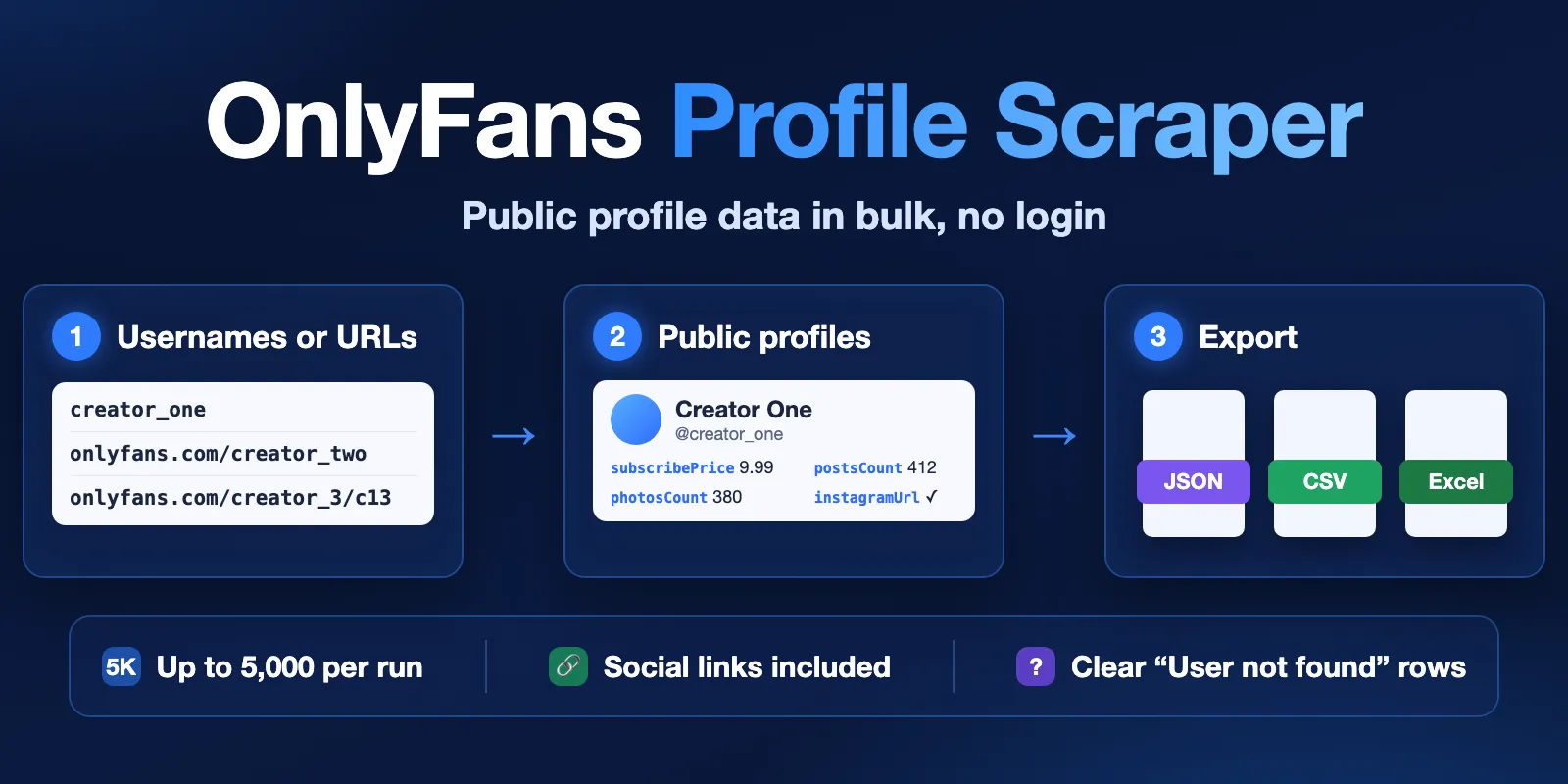
Scrape up to 5,000 public OnlyFans profiles per run from usernames or URLs. Get the complete public profile object, pricing, content counts, images, and published social links—without login, cookies, or paid content. Rotating proxies and platform usage are included, from $0.85 per 1,000 results.
Pricing
from $0.85 / 1,000 profile lookups
Rating
5.0
(1)
Developer

Cliqto Media
Maintained by CommunityActor stats
1
Bookmarked
20
Total users
13
Monthly active users
3 days ago
Last modified
Categories
Share
Scrape public OnlyFans profile data in bulk without an OnlyFans account: send up to 5,000 usernames or profile URLs per run and get the complete public profile object plus the social media links each creator published.
The smallest useful run is two usernames: it finishes in about 10 seconds and costs well under one cent. A recorded 1,000-profile run finished in 174 seconds. Pricing starts at $0.85 per 1,000 returned results.
This is an unofficial, independent tool. It is not affiliated with, endorsed by, or sponsored by OnlyFans or Fenix International Limited.
Table of contents
- What it does
- Quick start
- Use cases
- Input
- Output
- Pricing and limits
- API, export and integrations
- Troubleshooting
- FAQ
- Visual guide
- Related Actors
- Support
What it does
The Actor reads public OnlyFans profile metadata for every username or profile
URL you send. For each unique valid input it returns one dataset row: the
public profile with every field OnlyFans provides, normalized social links,
the canonical inputUrl, and a row status. Deleted or misspelled profiles
return a clear User not found row instead of stopping the run.
One canonical input gives at most one row and one charge per run, including
when the Apify platform migrates or reboots the run: the Actor keeps a
RUN_STATE record in the run's own key-value store, checks the rows already in
the dataset, and continues only with the profiles that are left.
Good fit
- Build or refresh a public creator directory from a list of usernames.
- Track public subscription prices, promotions and posting-volume counts.
- Find the Instagram, X, TikTok, YouTube and other links creators publish.
- Check which profiles in an old list still exist.
Not a fit / limits
- No login, no cookies: it does not read posts, messages, paid content or media files, and it does not download images.
- Accepts up to 5,000 inputs per run (tested at 5,000 in one run); split larger lists across runs.
- OnlyFans controls the public response, so the set of fields can differ between profiles and over time.
Quick start
- Open the Input tab.
- Add usernames or profile URLs to Profile URLs (
profileUrls). The form is prefilled with two examples. - Click Start.
- Open the Output tab and check the
statuscolumn:complete,partialornot_found.
Expected result: one row per unique valid input, usually within seconds for a short list.
Use cases
| Buyer job | Input path | Output entity | Key fields | Next integration |
|---|---|---|---|---|
| Creator directory | profileUrls | Public profile | username, name, avatar, about, location | Dataset export or API |
| Price tracking | profileUrls | Public profile | subscribePrice, promotions, subscriptionBundles | Scheduled run + export |
| Social discovery | profileUrls | Public profile | instagramUrl, xUrl, tiktokUrl, youtubeUrl | CRM or spreadsheet |
| List cleanup | profileUrls | Profile or not-found row | status, inputUrl, error.message | Filter by status |
Input
Input fields
| Field | Plain name | Type | Required | Default / prefill | Allowed values | Effect | Example | Recommendation |
|---|---|---|---|---|---|---|---|---|
profileUrls | Profile URLs | array of strings | yes | no default; UI prefill heyninarei, https://onlyfans.com/ho11y_girl/c13 | 1–5,000 usernames or onlyfans.com profile URLs | Each unique valid input is looked up once | ["heyninarei"] | Mix usernames and URLs freely |
profileUrls is the only input. Inputs are lowercased and normalized to
https://onlyfans.com/<username>/. Tracking suffixes such as /c13 and
?c13 are removed. Duplicates and invalid entries (for example a different
host) are skipped, produce no row, are not charged as results, and are counted
in RUN_SUMMARY. An input with no valid entry stops the run before any
OnlyFans request.
Pacing, timeouts and retries are fixed by the owner so every buyer gets the tested speed and cost safeguards. The public Actor does not accept a callback URL.
Input example
Expected behavior: two profile lookups plus two social-link lookups.
Expected output: two rows with status complete, username,
subscribePrice, postsCount and social *Url fields.
Limit or cost note: two result events plus one start event.
Output
Output fields
The table in the Output tab highlights common fields. JSON, CSV and Excel exports keep the complete row; a captured reference profile has more than 80 fields.
| Field | Meaning | Type | Can be empty? | Example / enum | Source / notes |
|---|---|---|---|---|---|
status | Row result | string | no | complete, partial, not_found | Added by the Actor |
inputUrl | Canonical input | string | no | https://onlyfans.com/example/ | Normalized input |
id, username, name | Profile identity | number / string | name can be empty | example | OnlyFans public profile |
subscribePrice | Current subscription price | number | can be 0 or absent | 9.99 | OnlyFans public profile |
postsCount, photosCount, videosCount | Public content counts | number | yes | 412 | OnlyFans public profile |
avatar, header | Image URLs | string | yes | https://... | OnlyFans public profile |
instagramUrl, xUrl, tiktokUrl, ... | Published social links | string | absent when not published | https://x.com/example | Social-links request, normalized |
error.message | Not-found reason | string | only on not-found rows | User not found | Added by the Actor |
Social platforms are not a fixed list: a new platform appears as
<socialMedia>Url when OnlyFans provides a usable link.
Output entities and surfaces
| Situation | Dataset/API/KVS/live view | Result shape | User action |
|---|---|---|---|
| Normal item | Dataset | Profile fields + social *Url + status: "complete" | Use or export |
| Profile deleted or wrong username | Dataset | {"error": {"code": 0, "message": "User not found"}, "inputUrl": ..., "status": "not_found"} | Check the spelling; confirm with a second run before deleting it from your records |
| Social links failed after retries | Dataset | Profile row with status: "partial" | Re-run that profile later if links matter |
| Technical failure, time or charge limit | Status message + RUN_SUMMARY in the key-value store | No row for that profile; counters and unprocessedInputs/failedInputs | Re-run only the listed profiles |
Output example
This example is trimmed and anonymized. A field that OnlyFans does not return for a profile is absent from that row; it does not mean zero.
Run summary
Every run writes RUN_SUMMARY to its key-value store: status, stopReason,
stopCode, counts (requested, deduplicated, succeeded, notFound,
technicallyFailed, unprocessed), HTTP status counts, timings and the lists
of profiles that were not returned. stopCode is null on a normal run and
CHARGE_LIMIT, DEADLINE, ABORTED, SOURCE_ERROR, STORAGE_ERROR,
INPUT_ERROR or INTERNAL_ERROR otherwise. migrationCount and resumedInputs show
whether the platform restarted the run and how many profiles the restarted run
kept from before; the counts always cover the whole run. If OnlyFans gives no successful
answer for about 45 seconds (server errors, timeouts), the run stops with
SOURCE_ERROR and lists the unprocessed profiles instead of retrying until the
timeout.
Pricing and limits
Pricing unit
You pay per returned dataset row (Profile lookup) plus a $0.0025 start
event (one event per run at the fixed 1 GB memory). Platform usage and rotating proxy traffic are included; there is no
monthly rental. Both complete/partial rows and User not found rows are
billable because both need a profile lookup. Duplicates, invalid inputs and
technical failures produce no row and are not charged as results.
| Apify plan tier | Price per 1,000 returned rows |
|---|---|
| Free | $1.00 |
| Starter | $0.95 |
| Scale | $0.90 |
| Business and higher | $0.85 |
The Pricing tab of the Actor always shows the price in effect.
Cost examples
| Scenario | Input scope | Rows | Charge on Free tier | Charge on Business tier | Stop/cap behavior |
|---|---|---|---|---|---|
| Prefill | 2 usernames | 2 | $0.0045 | $0.0042 | — |
| Catalog | 1,000 usernames (measured: 782 profiles + 218 not found, 174 s) | 1,000 | $1.0025 | $0.8525 | — |
| No valid input | 1 non-OnlyFans URL | 0 | $0.0025 | $0.0025 | Run fails before any lookup |
| Charge cap | 1,000 usernames with a low maximum cost per run | until the cap | at most your cap | at most your cap | Stops gracefully, stopCode: CHARGE_LIMIT |
If you set a maximum cost per run, the Actor stops before exceeding it and
keeps every row already returned. When the run is close to its timeout it also
stops on its own a little early (stopCode: DEADLINE) so the summary is always
written.
API, export and integrations
- API: start a run with
POST https://api.apify.com/v2/acts/cliqtomedia~onlyfans-scraper/runsand body{"profileUrls": [...]}, then read the dataset items and theRUN_SUMMARYrecord of that run. - Export: JSON, CSV, Excel, XML and RSS from the Output tab or the dataset API.
- Scheduling: create a task with your list and add an Apify schedule.
- Webhooks / no-code: Apify platform webhooks and integrations (Make, Zapier, n8n) can react to a finished run and read the dataset.
- SDK: Apify JavaScript and Python clients.
Use with AI agents (MCP)
- MCP server URL with only this Actor:
https://mcp.apify.com?tools=cliqtomedia/onlyfans-scraper. - Smallest useful input:
{"profileUrls": ["heyninarei", "https://onlyfans.com/ho11y_girl/c13"]}. - Key output fields:
status(row result),username,subscribePrice,postsCount, and the social*Urlfields. - A two-profile call returns in about 10 seconds and costs under $0.005. Lists up to 5,000 per run; 5,000 profiles took about 24 minutes in testing, so poll the run.
Troubleshooting
Fewer rows than inputs
Symptom: the dataset has fewer rows than you sent.
Likely reason: duplicates or invalid inputs were skipped, or some profiles hit
a technical failure, the time limit or your charge cap.
Check: RUN_SUMMARY fields duplicate, invalid, technicallyFailed,
unprocessed and the list unprocessedInputs.
Action: re-run only the profiles listed as failed or unprocessed.
Run stopped with "maximum charge limit reached"
Symptom: status message mentions the charge limit, stopCode is CHARGE_LIMIT.
Likely reason: your maximum cost per run was lower than the list needs.
Action: raise the limit or split the list. Rows already returned are kept.
Run failed with "No valid deduplicated profile URLs"
Symptom: run fails within seconds with no rows.
Likely reason: no entry was an OnlyFans username or onlyfans.com URL.
Action: fix the input; only the $0.0025 start event was charged.
Many profiles marked not_found
Symptom: lots of User not found rows.
Likely reason: old lists contain deleted or renamed profiles. not_found means
OnlyFans answered "User not found" for that username; a timeout or blocked
request is never reported this way. OnlyFans occasionally gives this answer
for a profile that exists: in two runs of the same 5,000 usernames, 11
(about 0.2%) changed between complete and not_found.
Action: check the username spelling. Before deleting a profile from your
records, confirm not_found with a second run later.
FAQ
Do I need an OnlyFans account?
No. The Actor reads public profile metadata and never logs in.
Can it retrieve posts, photos, videos or messages?
No. It returns public profile metadata, including aggregate counts, but not the content itself.
Why are social links requested separately?
The public hasLinks flag is not reliable enough to skip the request: profiles
marked hasLinks: false can still publish social links. The Actor checks links
after every found profile.
Is a green SUCCEEDED run always complete?
Not always. A run stays SUCCEEDED when a few profiles fail technically or a
cap is reached. Check the status message or RUN_SUMMARY (see the visual
guide below) before treating the result as complete.
Can the public Actor call my webhook URL?
No. Use an Apify platform webhook or integration, or read the dataset through the API after the run finishes.
Visual guide
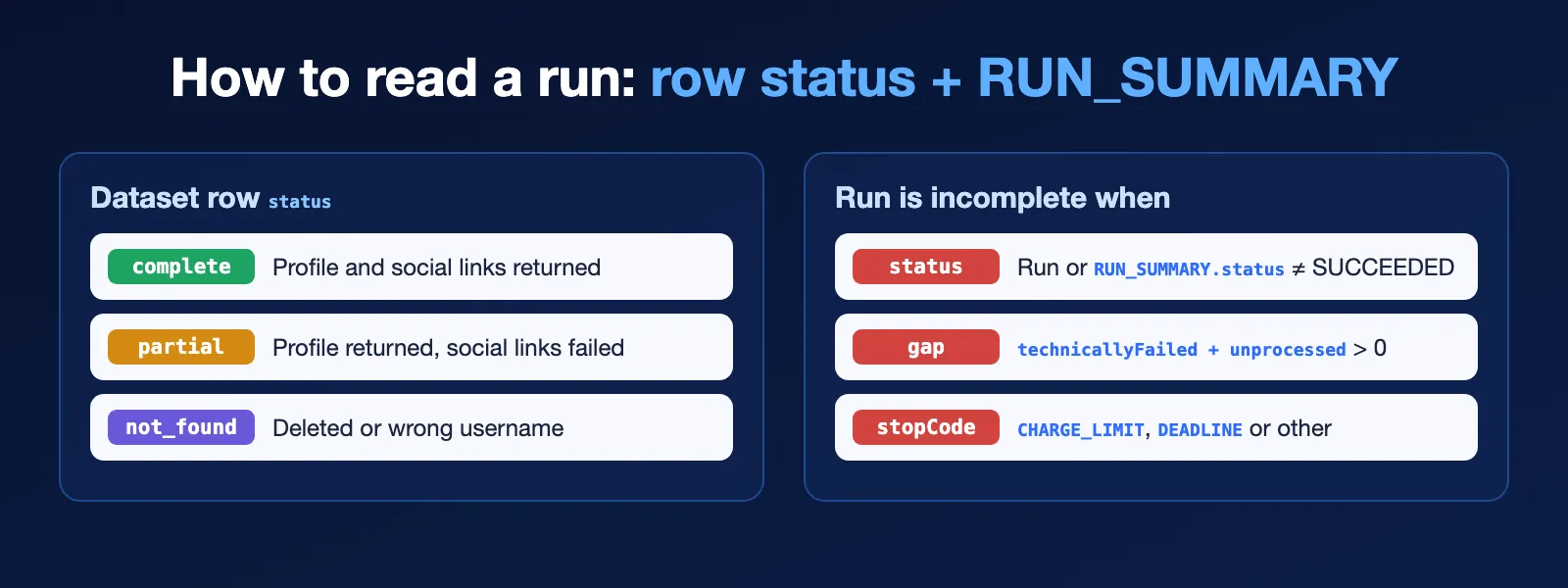
Use the row status to filter results and the three RUN_SUMMARY checks to
decide whether to re-run part of the list.
Related Actors
- OnlyFans Free Trial Checker — check OnlyFans free-trial links and the offered trial period.
- Website Contact Scraper — get contacts from the websites listed in creator profiles.
- Bluesky Scraper — collect public profiles and posts from another social network.
Support
For bugs, questions or feature requests, open an Issue on this Actor's Apify Store page. Include the Run ID, the final status message and a short description of the expected result. Never post tokens, cookies or private customer data.
Legal and usage notice
This Actor is not affiliated with, associated with, authorized by, endorsed by, or officially connected to OnlyFans or Fenix International Limited. All trademarks belong to their respective owners.
The Actor collects publicly available profile information only. By using it, you confirm that you meet the age requirements for adult platforms in your jurisdiction and that your collection and use of the data comply with applicable laws, platform terms, and data-protection obligations.


