

SEO Site Audit: Broken Links, Meta Tags & Speed
Pricing
from $2.80 / 1,000 audited pages
SEO Site Audit: Broken Links, Meta Tags & Speed
Crawl a website and get a prioritized SEO audit: status codes, redirect chains, broken links, titles, meta descriptions, canonical, hreflang, headings, page size and optional PageSpeed scores.
Pricing
from $2.80 / 1,000 audited pages
Rating
0.0
(0)
Developer

Cliqto Media
Maintained by CommunityActor stats
0
Bookmarked
2
Total users
1
Monthly active users
3 days ago
Last modified
Categories
Share
SEO Site Audit crawls one website from a start URL and checks every page it finds: HTTP status, redirect chain, broken links, title, meta description, canonical, hreflang, headings, noindex and page size. You get one row per page with a list of issues sorted by priority, plus one readable report for the whole site. No login and no API key are needed; a 20-page audit of apify.com took about 10 seconds and costs about $0.08.
Use it before a release, after a migration or every week to catch broken links and meta tag problems. The smallest useful run is one website URL with maxPages 20.
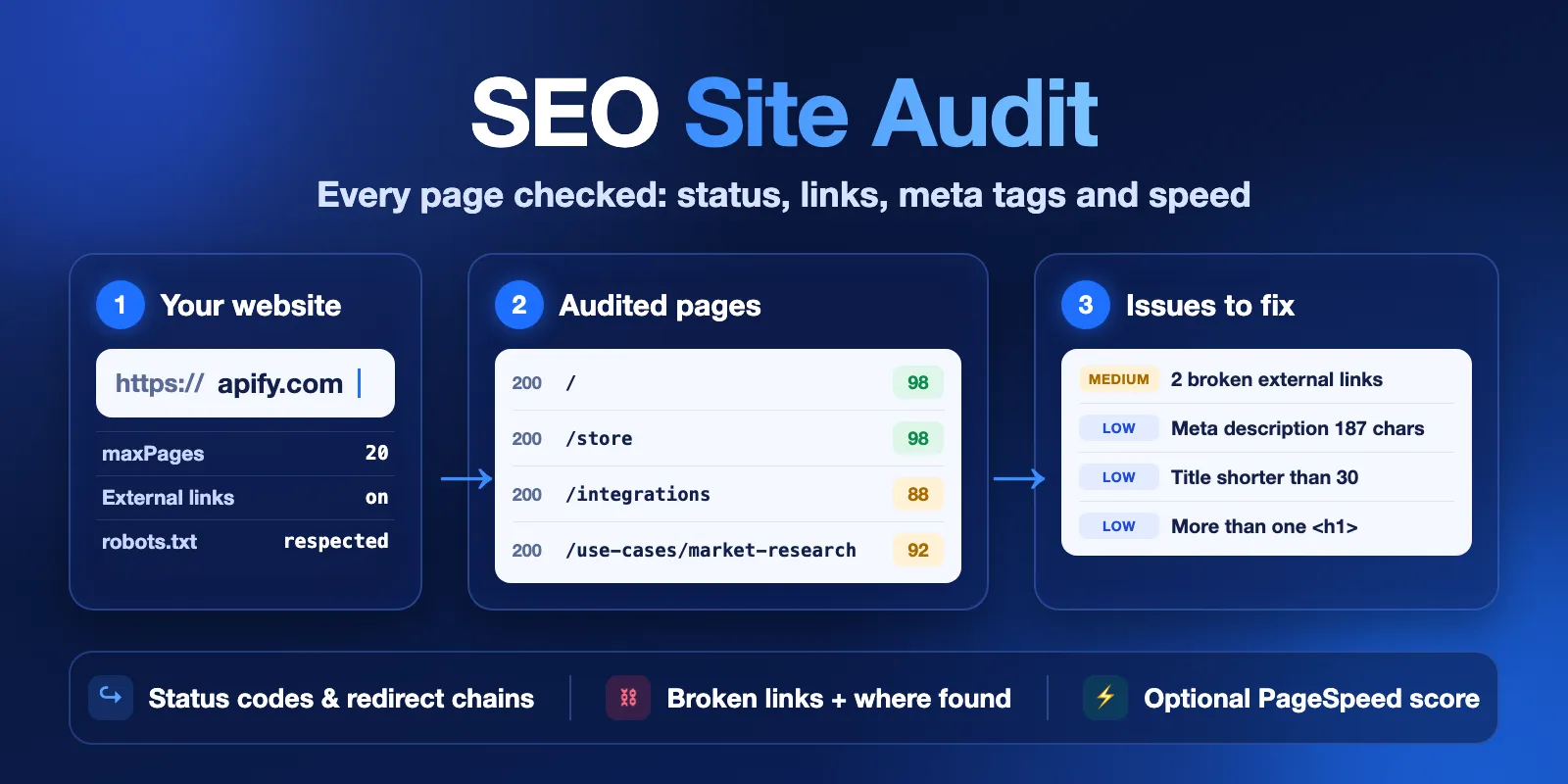
Table of contents
- What it does
- Quick start
- Input
- Output
- Pricing
- Use cases
- Scheduling and monitoring
- API, export and integrations
- Limits and partial results
- Troubleshooting
- FAQ
- Related Actors
- Support
What it does
The Actor works like a small search-engine crawler. It opens the start URL, follows links to other pages on the same site and checks each page. It does not run a browser: it reads the HTML that the server sends.
For every page it returns:
- Status and redirects: the HTTP status code, every redirect hop (
redirectChain) and the final URL. - Links: broken internal links (4xx, 5xx or no answer) and broken external links (4xx, 5xx or a domain that does not exist), with the page where each one was found.
- Meta tags: title and its length, meta description and its length, canonical, meta robots and
X-Robots-Tag, noindex, nofollow,lang, hreflang. - Content: the first H1, H1 and H2 counts, word count, images without an
altattribute. - Speed signals: response time, time to first byte and HTML size. Optional Google PageSpeed (Lighthouse) score and Core Web Vitals with your own free Google API key.
- Issues: a list of found problems (
issues[]) with a code, severity (critical,high,medium,low) and a short message, plus a page score from 0 to 100.
After the crawl, the Actor writes a site report: issues grouped by type and sorted by priority and number of pages, site-level issues (duplicate titles, missing sitemap, robots.txt problems), the worst pages and all broken links.
The crawler respects robots.txt (RFC 9309) and Crawl-delay, sends at most 5 requests at the same time and uses an honest User-Agent: seo-site-audit-apify-actor/0.1 (+https://apify.com/cliqtomedia/seo-site-audit).
Good fit
- Find broken links and the pages that contain them before users or search engines do.
- Check titles, meta descriptions, canonical tags and noindex on every page after a redesign or migration.
- Find redirect chains and internal links that point to redirects.
- Get a quick technical SEO health check of a client or competitor site.
Not a fit
- Sites that build their content with JavaScript only. The Actor reads the server HTML, so text and links added later by scripts are not seen.
- Pages behind a login, a paywall or bot protection that blocks normal crawlers.
- Keyword research, rankings, backlinks or traffic data. This Actor checks your pages, not search results.
- Many websites in one run. Use one run per website.
Quick start
- Open the Input tab.
- Add your website to Website URL (
startUrl), for examplehttps://example.com. - Keep Max pages (
maxPages) at the suggested 20 for a first test. - Click Start.
- Open the Output tab. The Pages by priority view shows the pages with the lowest score first (rows are saved in that order). Open the Audit report (HTML) for a readable summary.
Expected result: one row for each page that was checked, each with a status code, score and issue list.
Input
Input fields
| Field | Name in the form | Type | Required | Default | Allowed values | What it changes | Recommendation |
|---|---|---|---|---|---|---|---|
startUrl | Website URL | string | yes | — (form suggests https://apify.com) | public http or https URL, port 80 or 443, no login data | Where the crawl starts. Only pages on the same host are crawled; www and non-www count as the same host. Without https:// the Actor adds it. | Use the homepage. |
maxPages | Max pages | integer | no | 100 (form suggests 20) | 1–2000 | Maximum number of URLs to check. This is also the maximum number of charged pages. | Start with 20, then use the real size of the site. |
maxDepth | Max link depth | integer | no | empty = no limit | 0–50 | How many clicks away from the start URL to go. 0 checks only the start URL. | Leave empty for a full audit. |
checkExternalLinks | Check external links | boolean | no | true | true / false | Checks links to other websites and reports broken ones. | Keep on; turn off for a faster run. |
maxExternalLinks | Max external links to check | integer | no | 300 | 0–5000 | Unique external URLs to check in one run (at most 20 per checked page). External checks are free. | Raise it for large sites with many outbound links. |
includeSubdomains | Include subdomains | boolean | no | false | true / false | Also crawls linked subdomains such as blog.example.com. | Turn on when the blog or shop lives on a subdomain. |
excludeUrlPatterns | Exclude URLs | array of strings | no | empty | up to 50 strings, each up to 200 characters, * is a wildcard | Skips URLs that contain any of these strings. The start URL is always checked. | Use for */tag/*, ?page=, search pages and calendars. |
maxConcurrency | Concurrent requests | integer | no | 5 | 1–5 | Requests to the site at the same time. When robots.txt has Crawl-delay, the Actor uses 1 and waits between pages (up to 10 s). | Lower it for small or slow servers. |
userAgent | User-Agent | string | no | the Actor's own name (see above) | one line, up to 300 characters; names of search-engine bots are not allowed | The User-Agent header sent to the site. robots.txt rules for this name apply. | Keep the default unless your firewall needs a special name. |
pagespeedApiKey | Google PageSpeed API key (optional) | string, secret | no | empty | Google API key (letters, digits, -, _) | Adds a Lighthouse performance score and Core Web Vitals for the first pages. The key is never logged or saved. | Get a free key in Google Cloud. |
pagespeedMaxPages | PageSpeed pages | integer | no | 1 | 1–10 | How many checked pages get a PageSpeed test, in crawl order (start URL first). A test usually takes 10–30 s; a test that runs over 60 s is stopped. | 1–3 pages are enough for a template check. |
pagespeedStrategy | PageSpeed device | string (enum) | no | mobile | mobile, desktop | Lighthouse device profile. | Google ranks with mobile; keep mobile. |
Unknown input fields are rejected with a clear message, so a typo never starts a paid crawl. Duplicate URLs, URLs with #fragments and links that end on an already checked page are checked once.
Settings that work together
| When | Field A | Field B | What happens |
|---|---|---|---|
| Both are set | maxPages | maxDepth | The crawl stops at whichever limit comes first. |
| No API key | pagespeedApiKey | pagespeedMaxPages, pagespeedStrategy | No PageSpeed tests and no PageSpeed charges; the other two fields are ignored. |
| External checks off | checkExternalLinks = false | maxExternalLinks | No external URLs are checked; maxExternalLinks is ignored. |
robots.txt has Crawl-delay | maxConcurrency | — | The Actor uses 1 request at a time and waits between pages, so the run is slower. |
| A run charge limit is set | Max total charge (run option) | maxPages | The Actor checks only as many pages as the limit pays for and stops with CHARGE_LIMIT. |
Input examples
Quick check of a site
The Actor checks 20 pages of apify.com and their external links. This is the form example; in our tests it finished in about 10 seconds and returned 20 rows.
Full audit with PageSpeed, without tag pages
The Actor checks up to 500 pages, skips tag and pagination URLs and runs PageSpeed for the first 3 pages. In our test a 500-page audit took about 85 seconds without PageSpeed; your time depends on the site.
Output
Where the results are
| What | Where | What it contains |
|---|---|---|
| One row per page | Dataset, views Pages by priority, Issues, Status, redirects & links | All fields below. |
| Readable report | Key-value store, REPORT_HTML | Issues sorted by priority, worst pages, broken links, PageSpeed. |
| Report as JSON | Key-value store, REPORT | The same report for scripts and AI tools. |
| Run summary | Key-value store, RUN_SUMMARY | status, stopReason, message, page and link counters, siteHealthScore, issuesBySeverity, pagesCharged. |
Output example
One row from the apify.com example run (some fields left out):
null means "not available", not zero: for example, canonical is null when the page has no canonical tag, and content fields are null for non-HTML files and failed pages. pagespeed is null when no test was run for the page.
Output fields
| Field | Meaning | Type | Can be null? | Example |
|---|---|---|---|---|
url | Checked URL | string | no | https://apify.com/store |
finalUrl | URL after all redirects | string | no | https://apify.com/store |
status | ok = got an HTTP answer, error = no answer (DNS, timeout) or blocked | string | no | ok |
statusCode | HTTP status of the final answer | integer | yes, when no answer | 200 |
redirectChain | Every redirect hop: url, statusCode | array | no (empty when no redirect) | [{"url":"http://…","statusCode":301}] |
depth | Clicks from the start URL | integer | no | 1 |
linkedFrom | First page that links here | string | yes, for the start URL | https://apify.com/ |
contentType, isHtml | Response type | string, boolean | contentType yes | text/html, true |
responseTimeMs, ttfbMs | Time to download the HTML / to the first byte | integer | yes | 162, 12 |
pageSizeBytes | HTML size (counted up to 5 MB) | integer | yes | 949320 |
title, titleLength | Page title and its length in characters | string, integer | yes | "Connect Apify with your apps · Apify", 36 |
metaDescription, metaDescriptionLength | Meta description and its length | string, integer | yes | "Connect Apify…", 187 |
h1, h1Count, h2Count | First H1 text and heading counts | string, integer | yes | "Connect Apify with your apps", 1, 1 |
canonical, isCanonicalSelf | Canonical URL and whether it points to the page itself | string, boolean | yes | https://apify.com/integrations, true |
noindex, nofollow | From meta robots or X-Robots-Tag | boolean | yes | false, false |
robotsMeta, xRobotsTag | Raw values | string | yes | index,follow, null |
lang | <html lang> value | string | yes | en |
hreflang | Alternate language links: lang, url | array | yes | [] |
wordCount | Words of visible text in <body> | integer | yes | 1674 |
imagesMissingAlt | <img> tags without an alt attribute (alt="" is fine for decorative images) | integer | yes | 0 |
internalLinksCount, externalLinksCount | Links on this page | integer | yes | 45, 103 |
inlinksCount | Checked pages that link to this page | integer | no | 20 |
brokenLinks | Broken links on this page: url, type (internal/external), statusCode, error | array | no (empty when none) | see example |
brokenLinksCount | Number of broken links | integer | no | 2 |
pagespeed | PageSpeed result: performanceScore, largestContentfulPaintMs, cumulativeLayoutShift, totalBlockingTimeMs, field data and more | object | yes | null |
issues | Problems found: code, severity, message; most severe first | array | no | see example |
issuesCount, topSeverity | Number of issues and the worst severity | integer, string | topSeverity yes | 3, medium |
score | Page score 0–100; each issue type lowers it (critical 40, high 20, medium 8, low 2) | integer | no | 88 |
error | Why the page has no answer, for example dns_failed, timeout, blocked_by_robots_txt | string | yes | null |
fetchedAt | When the page was checked (UTC) | string | no | 2026-10-17T08:21:08Z |
Issue codes
Critical: http_4xx, http_5xx, fetch_failed, redirect_loop. High: too_many_redirects, invalid_redirect, broken_internal_links, missing_title, canonical_to_broken, start_url_not_https, robots_txt_unavailable. Medium: redirect_chain, broken_external_links, missing_meta_description, missing_h1, multiple_titles, multiple_canonicals, canonical_invalid, noindex, hreflang_invalid, mixed_content, missing_viewport, slow_response, large_html, pagespeed_poor, duplicate_title, duplicate_meta_description. Low: restricted_external_links, redirected_internal_link, title_too_long (over 60), title_too_short (under 30), meta_description_too_long (over 160), meta_description_too_short (under 70), multiple_h1, missing_canonical, canonicalized, nofollow_meta, hreflang_missing_self, missing_lang, images_missing_alt, thin_content (under 200 words), missing_robots_txt, missing_sitemap.
The HTML report explains each issue and how to fix it.
Pricing
You pay per checked page, plus a small start fee. External link checks and robots.txt are free.
| Event | What it is | Free plan | Bronze | Silver | Gold |
|---|---|---|---|---|---|
apify-actor-start | Once per run | $0.002 | $0.002 | $0.002 | $0.002 |
audited-page | A page that returned an HTTP answer (any status code, including 404 and 301) | $0.004 | $0.0036 | $0.0032 | $0.0028 |
pagespeed-check | A successful PageSpeed test (only with your API key) | $0.015 | $0.0135 | $0.012 | $0.0105 |
Pages that gave no answer (DNS error, timeout, connection error) and pages blocked by robots.txt are not charged. When the start URL answers 4xx or 5xx, that row is free and only the start fee is charged. Failed PageSpeed tests are not charged. Platform usage (compute, storage) is included in these prices.
Cost examples
| Scenario | Pages | Free plan | Bronze | Gold |
|---|---|---|---|---|
| Quick check | 20 | $0.082 | $0.074 | $0.058 |
| Small site | 100 | $0.402 | $0.362 | $0.282 |
| Medium site | 500 | $2.002 | $1.802 | $1.402 |
| Large site | 2000 | $8.002 | $7.202 | $5.602 |
| Start URL not found | 0 | $0.002 | $0.002 | $0.002 |
| + PageSpeed for 3 pages | — | +$0.045 | +$0.0405 | +$0.0315 |
If you set Max total charge for a run, the Actor checks only as many pages as that amount pays for, stops with CHARGE_LIMIT and keeps all results.
Use cases
| Job | Input | Key fields |
|---|---|---|
| Fix broken links | startUrl, checkExternalLinks | brokenLinks, brokenLinksCount, url |
| Check meta tags after a redesign | startUrl, maxPages | title, titleLength, metaDescription, canonical, noindex |
| Clean up redirects after a migration | startUrl (old domain or new) | redirectChain, finalUrl, statusCode |
| Check hreflang on a multi-language site | startUrl, includeSubdomains | hreflang, lang, issues |
| Weekly site health check | startUrl on a schedule | RUN_SUMMARY.siteHealthScore, issuesBySeverity |
| Speed check of key templates | pagespeedApiKey, pagespeedMaxPages | pagespeed.performanceScore, pagespeed.largestContentfulPaintMs |
Scheduling and monitoring
Create a task with your site, then add a schedule in Apify (for example every Monday). Each run is a fresh full audit. Compare RUN_SUMMARY.siteHealthScore and issuesBySeverity between runs, or connect a webhook that sends you the REPORT_HTML link when a run finishes. The Actor does not compare runs by itself.
API, export and integrations
- API: start a run with
POST https://api.apify.com/v2/acts/cliqtomedia~seo-site-audit/runsand the input JSON; read rows from the run's default dataset and the report from the key-value store keysREPORTandRUN_SUMMARY. See the Apify API docs. - Export: download the dataset as JSON, CSV, Excel or HTML from the Output tab or the API.
- No-code: use the Apify integrations for Make, Zapier, n8n or Google Sheets to send rows with
brokenLinksCount > 0to a sheet or a ticket.
Use with AI agents (MCP)
- MCP server with only this Actor:
https://mcp.apify.com?tools=cliqtomedia/seo-site-audit - Smallest useful input:
{"startUrl": "https://example.com", "maxPages": 20} - Key output:
url,statusCode,score,issues(code, severity, message),brokenLinks. For a site overview read theREPORTrecord. - In our tests a 20-page run took about 10 seconds and cost $0.058–$0.082, and a 500-page run took about 1.5 minutes. Times depend on the site.
maxPagesis at most 2000.
Limits and partial results
- HTML only, no JavaScript. Titles, headings, links and text are read from the HTML the server sends. On sites that render content in the browser, H1, word count and links can be missing.
- One site per run, up to 2000 pages. Subdomains only with
includeSubdomains. - robots.txt is always respected. If
robots.txtanswers with a server error, the Actor checks only the start URL and reportsrobots_txt_unavailable. - Internal links are checked when the linked page is crawled in the same run. Links to files (PDF, images and similar) are checked separately, up to 500 per run. Pages beyond
maxPagesare not checked. - External links: up to
maxExternalLinksand up to 20 per checked page. Answers 401, 403, 429 and 999, timeouts and loops are reported asrestricted_external_links(could not verify), not as broken, because many sites block automated checks. Link checks stop after 10 timeouts in a row and take at most about 60 s plus 1 s per checked page; links left unchecked are counted inRUN_SUMMARY.externalLinksSkipped. - A redirect to another website (for example to a login service) is a normal row with status 301 or 302 and is charged as one page.
- HTML larger than 5 MB is checked by its first 5 MB.
- PageSpeed depends on your Google key and quota. A failed test is saved as
pagespeed.status = "error"with a reason such asinvalid_api_keyorquota_exceeded, and is not charged. Tests stop after 2 failures in a row, after a wrong key or quota error, or after a failed test that took over 30 s (a test is stopped at 60 s). PageSpeed is skipped when the site stopped answering (SOURCE_ERROR). - Run memory is fixed at 1024 MB; the default run timeout is 3600 s.
RUN_SUMMARY.status tells you how complete the run is:
status | stopReason | Meaning |
|---|---|---|
complete | COMPLETED | All reachable pages within your limits were checked. |
partial | MAX_PAGES | maxPages reached; the site has more pages. |
partial | TIME_LIMIT, CHARGE_LIMIT, ABORTED | The run timeout, charge limit or a manual abort stopped the crawl. All checked pages are saved. |
partial | SOURCE_ERROR | 10 pages in a row failed; the site stopped answering. Sitemap and file checks are skipped. The run fails, saved rows stay. |
error | START_URL_HTTP_ERROR | The start URL answered 4xx (run succeeds) or 5xx (run fails). One free row. |
error | START_URL_FAILED, ROBOTS_BLOCKED | The start URL could not be loaded or robots.txt blocks it. |
error | INPUT_ERROR | The input is not valid; the message says which field to fix. |
Troubleshooting
Only one row, with status 404 or 500
Symptom: the dataset has one free row and stopReason is START_URL_HTTP_ERROR.
Reason: the start URL itself answers with an error.
Action: open the URL in a browser and use the address of a working page, usually the homepage.
Fewer pages than expected
Check RUN_SUMMARY.stopReason and the counters blockedByRobots, excludedByPattern and urlsNotCrawled. Common reasons are maxPages, maxDepth, excludeUrlPatterns, robots.txt rules, or links that are added by JavaScript only.
Missing H1 or very low word count on every page
The site probably renders its content with JavaScript. The Actor sees the server HTML only, so these numbers describe what a crawler without JavaScript gets.
Many restricted_external_links
Social networks and some large sites block automated requests. Open these links in a browser to confirm they work. They are not counted as broken.
The run is slow
robots.txt may set Crawl-delay, so the Actor checks one page at a time and waits. PageSpeed tests also add about 10–30 seconds each.
FAQ
Do I need an account on the site or an API key?
No. The Actor checks public pages without login. A Google API key is needed only for the optional PageSpeed tests.
Does it run JavaScript like a browser?
No. It reads the HTML that the server returns, like most search-engine crawls do first. This keeps it fast and cheap, but content added by scripts is not seen.
Am I charged for 404 pages and redirects?
Yes, when they are on your site: a page that answers 404 or 301 is a checked page and an important finding. Pages that give no answer at all are free. When the start URL itself fails, only the start fee is charged.
Can I audit several websites in one run?
No, one start URL per run. Start one run per site, or create a task for each site.
Is the result complete?
It is complete for the pages the crawler can reach by links from the start URL, within your limits and robots.txt. Pages that no link points to (orphan pages) are not found.
Related Actors
- Bulk URL Status & Redirect Checker — check status codes and redirects for your own list of URLs, without crawling.
- XML Sitemap URLs Extractor — get every URL from a sitemap, then compare it with the crawled pages.
- Website Metadata & Open Graph Scraper — Open Graph and social preview tags for a list of URLs.
- Tech Stack Detector — find the CMS, frameworks and tools a website uses.
Support
For bugs, questions or feature requests, open an issue on the Issues tab of this Actor. Add the run ID, your input without the API key and the RUN_SUMMARY message. Never share your Google API key or other secrets.


