

SSL Certificate Checker: Expiry, Chain & CT, No Login
Pricing
from $0.56 / 1,000 certificate reads
SSL Certificate Checker: Expiry, Chain & CT, No Login
Bulk SSL/TLS certificate checker: validity verdict, days to expiry, issuer, SANs, TLS version and cipher grade, chain, optional check of each TLS version (1.0 to 1.3) and Certificate Transparency history for up to 5,000 domains or host:port values. No login, no API key.
Pricing
from $0.56 / 1,000 certificate reads
Rating
0.0
(0)
Developer

Cliqto Media
Maintained by CommunityActor stats
0
Bookmarked
2
Total users
1
Monthly active users
10 days ago
Last modified
Categories
Security
Limited permissionsShare
Check the SSL/TLS certificate of many websites in one run. For each host you get a clear verdict (valid, expiring soon, expired, wrong name or untrusted), the days left, issuer, all names on the certificate (SANs), TLS version, a cipher grade and the certificate chain. Optional: which TLS versions (1.0 to 1.3) the server accepts, and certificates logged for the host in Certificate Transparency (crt.sh). No login and no API key.
Paste up to 5,000 domains, host:port values, URLs or public IPs. The prefilled run with two hosts finishes in a few seconds and costs about $0.0033.
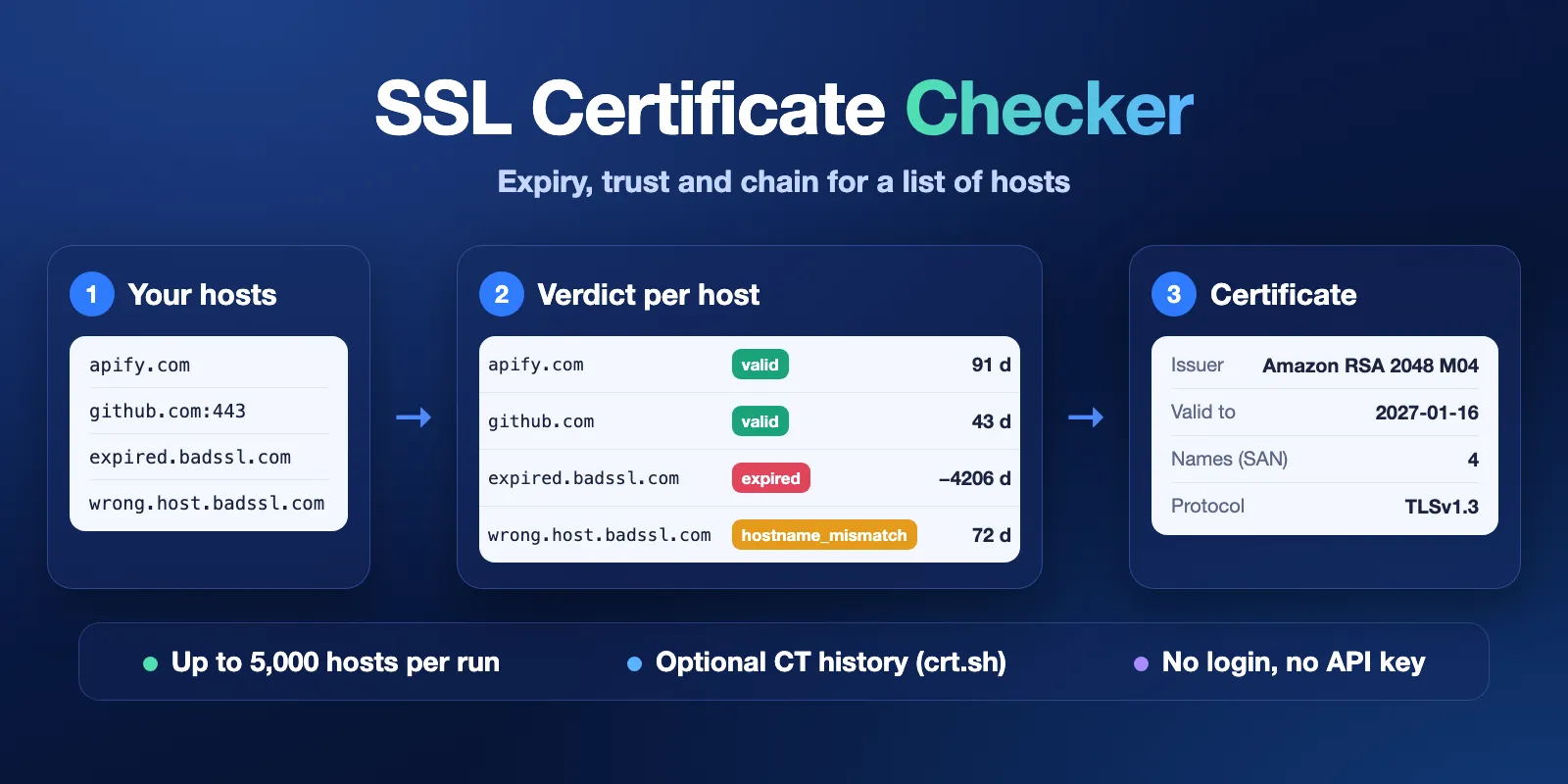
Table of contents
- What it does
- How it works
- Quick start
- Use cases
- Input
- Output
- Pricing
- Limits
- API, export and integrations
- Troubleshooting
- FAQ
- Related Actors
- Support
What it does
The Actor reads the certificate each server sends during the TLS handshake, the same way a browser does, and tells you whether it is fine. It does not open the web page.
- Trust comes from the standard list of trusted root certificates (the same check that makes a browser show a warning).
- Name match checks that the host name is on the certificate.
- Dates are compared with the time of the check.
daysLeftis negative for an expired certificate. - TLS shows the version and cipher the server chose, with a grade (
strong,medium,weak). WithcheckTlsVersionson, it also lists every TLS version the server accepts and flags old TLS 1.0/1.1. - CT history (optional) comes from crt.sh, a free public search over Certificate Transparency logs.
Every row has a clear checkStatus (ok, not_found, error). When the certificate was read, certStatus gives the verdict.
Good fit
- Find certificates that expire soon across many client sites (
daysLeft,certStatus: expiring_soon). - Find broken HTTPS: expired, self-signed, wrong host name, missing intermediate (
certStatus,validationError). - Find servers that still accept TLS 1.0/1.1 or choose a CBC cipher without AEAD (
deprecatedTlsEnabled,cipherStrength: medium). - Make an inventory of who issued your certificates and which names they cover (
issuer,sanList). - Check mail and admin ports over TLS, for example
imap.gmail.com:993or:8443. - See which certificates were issued for a name in the past (CT history).
How it works
- You give a list of hosts. The Actor cleans it: URLs become host and port, duplicates and invalid values are dropped.
- For each host it looks up the address in DNS, skips private addresses, and opens a TLS connection to read the certificate. If the server only speaks old TLS, it tries once more with old settings.
- It checks trust, name and dates and gives a verdict. If you asked, it tries each TLS version one by one and asks crt.sh for the CT history.
- It saves one Dataset row per host, and a
RUN_SUMMARYwith counts and the certificates that need attention.
Quick start
-
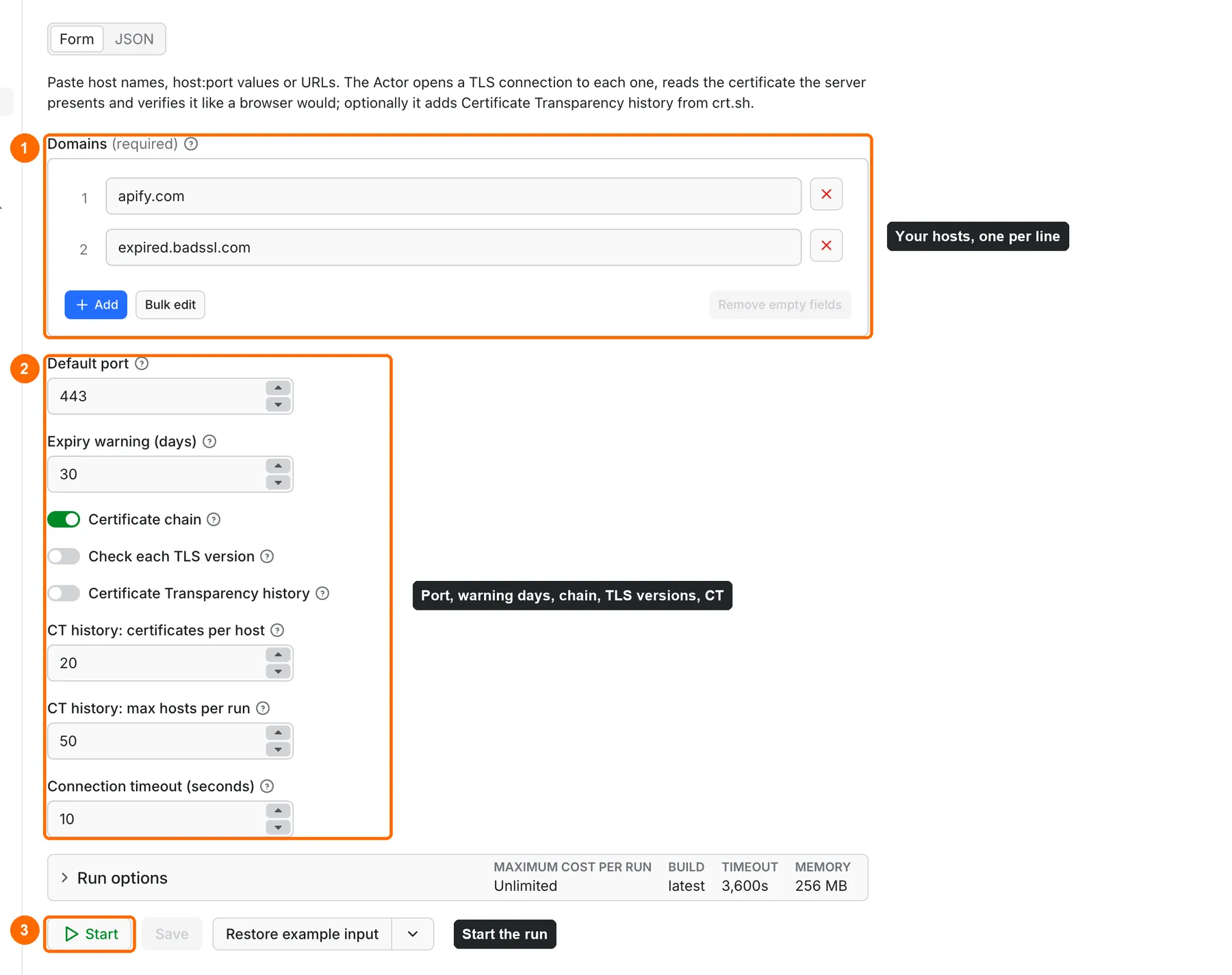
Open the Input tab. Domains (
domains) is prefilled withapify.comandexpired.badssl.com(box 1 in the picture). Put your own hosts there, one per line. -
Keep the defaults: port 443, chain on, TLS version check off, CT history off, warning at 30 days (box 2).
-
Click Start (box 3).
-
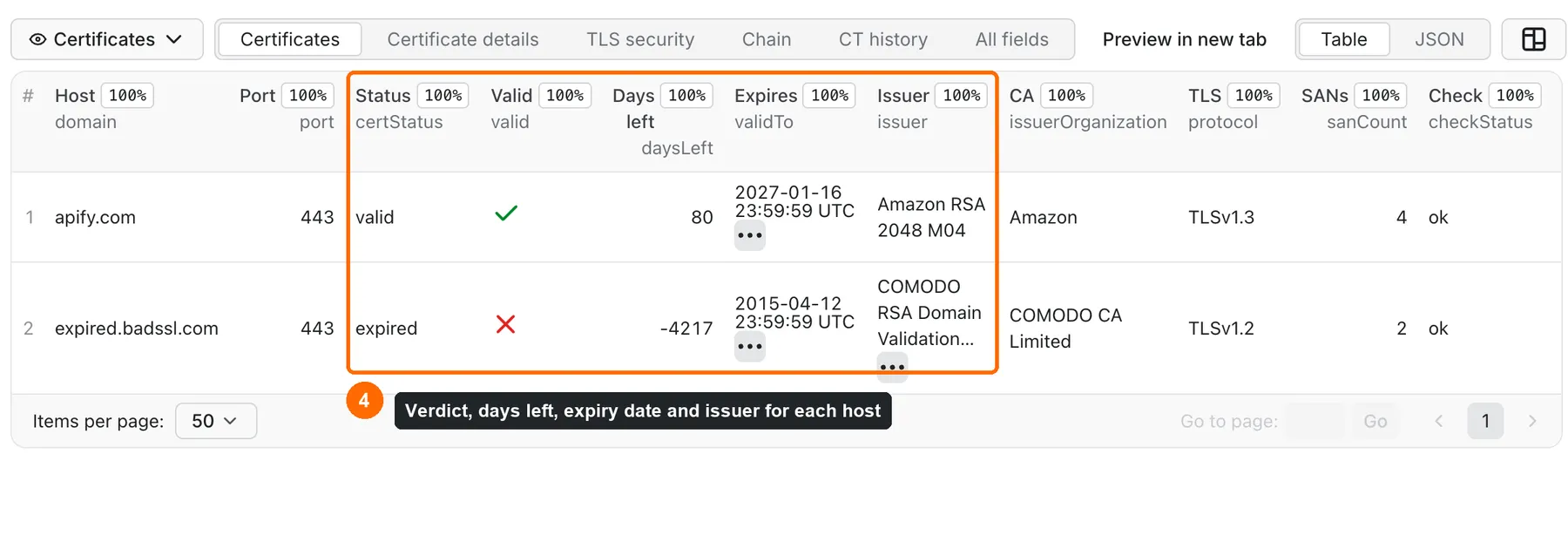
Open the Output tab. The Certificates view shows the verdict, days left, expiry date and issuer for each host (box 4).
-
Other views: Certificate details (SANs, key, fingerprint, cipher), TLS security (version, cipher grade, accepted versions), Chain and CT history.
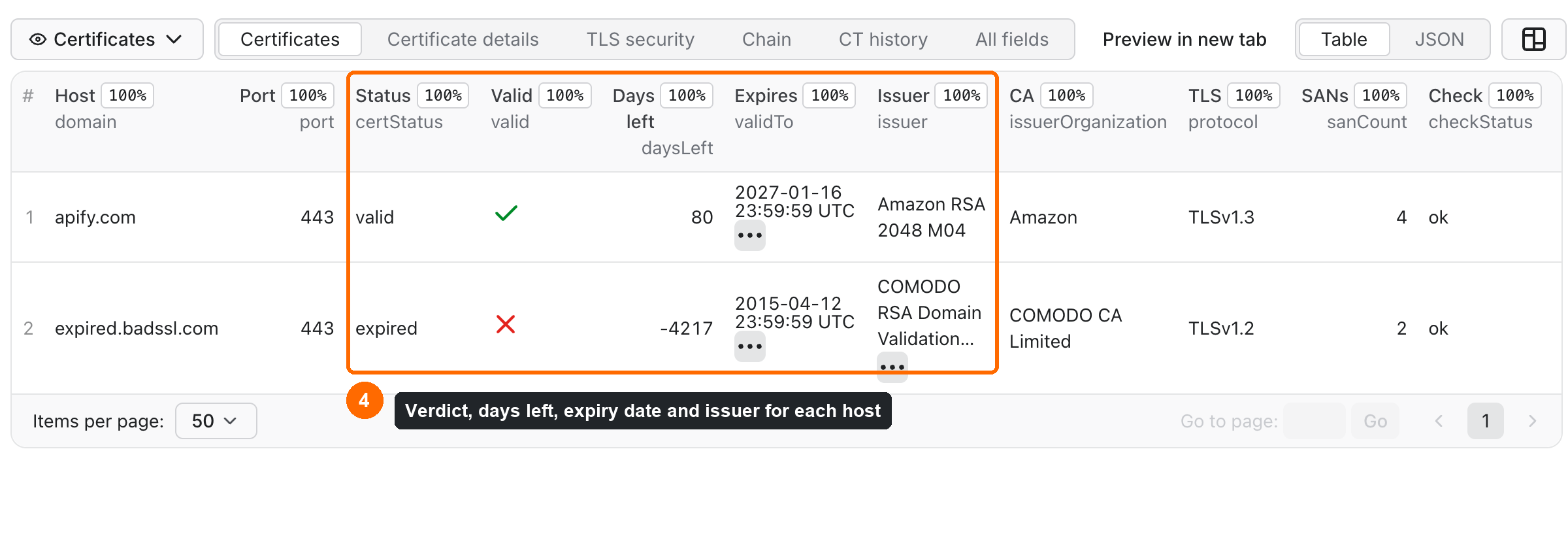
Expected result: two rows. apify.com is valid. expired.badssl.com is expired with a negative daysLeft.
Use cases
| Buyer job | Input path | Key fields | Next step |
|---|---|---|---|
| Expiry watch for client sites | domains, warnDays | certStatus, daysLeft, validTo | Sort by daysLeft; run on a schedule |
| Find broken HTTPS | domains | certStatus, trusted, hostnameMatch, validationError | Filter rows where valid is false |
| Old TLS and CBC ciphers | domains, checkTlsVersions: true | supportedTlsVersions, deprecatedTlsEnabled, cipherStrength | Filter rows where deprecatedTlsEnabled is true |
| Certificate inventory | domains, includeChain | issuer, issuerOrganization, sanList, keyType | Export to CSV or Excel |
| Mail and admin ports | domains with host:port, or port | certStatus, protocol, daysLeft | Same as above |
Input
Input fields
| Field | Plain name | Type | Required | Default / prefill | Allowed values | Effect |
|---|---|---|---|---|---|---|
domains | Domains | array of strings | yes | prefill: apify.com, expired.badssl.com | 1–5,000 host names, host:port, URLs or public IPs | The hosts to check |
port | Default port | integer | no | 443 | 1–65535 | Used for values without their own port |
warnDays | Warn when fewer days left | integer | no | 30 | 0–365 | Below this, a valid certificate is expiring_soon |
includeChain | Include chain | boolean | no | true | true / false | Adds the chain list; chainLength is always filled |
checkTlsVersions | Check each TLS version | boolean | no | false | true / false | Tries TLS 1.0, 1.1, 1.2 and 1.3 one by one; fills supportedTlsVersions and deprecatedTlsEnabled |
includeCtHistory | CT history from crt.sh | boolean | no | false | true / false | Adds certificates logged for the host name |
ctHistoryLimit | CT entries per host | integer | no | 20 | 1–100 | Newest CT entries kept per host |
ctMaxHosts | CT hosts per run | integer | no | 50 | 1–500 | CT is looked up only for the first N certificates read |
connectTimeoutSecs | Connection timeout | integer | no | 10 | 3–15 | Wait time for a TLS answer from each host |
How domains is cleaned:
- A URL becomes its host and port:
https://shop.example.org:8443/pagebecomesshop.example.orgon port 8443. - Each host name is checked as given.
www.example.comandexample.comare two different checks, because they can have different certificates. - Internationalised names become punycode:
münchen.debecomesxn--mnchen-3ya.de. - Duplicates (also in different letter case) are checked once.
- Invalid values (for example
localhost, port99999, or text with spaces or HTML) get no row and are not charged. They are listed inRUN_SUMMARY.invalidInputswith a reason. - If no value is valid, the run fails at once with a message that names the bad values.
Interacting settings
| When | Setting | Effect |
|---|---|---|
| CT history is on | ctMaxHosts | Only the first N certificates read get CT history. The other hosts get the full TLS check, ctStatus: skipped and no CT charge. |
| CT history is on | run timeout | Each CT lookup takes about 13 seconds, and the host waits for it. 50 hosts add about 11 minutes. For more than about 200 CT hosts, raise the run timeout above 1 hour. |
| A value has its own port | port | The value's own port wins. |
| TLS version check is on | connectTimeoutSecs | Up to 3 more handshakes per host, at the same time. A version the server ignores waits up to connectTimeoutSecs and is listed in uncheckedTlsVersions. |
Input example
Expected output: 2 rows. apify.com has certStatus: valid. expired.badssl.com has certStatus: expired, valid: false and a negative daysLeft.
Output
Output fields
| Field | Meaning | Can be empty? |
|---|---|---|
input | The value as you entered it | no |
domain, port | Host and port that were checked | no |
ipAddress | IP address the Actor connected to | yes |
checkStatus | ok (certificate read), not_found (name not in DNS) or error | no |
certStatus | valid, expiring_soon, expired, not_yet_valid, hostname_mismatch, untrusted | yes, when no certificate was read |
valid | true only when the certificate is trusted, matches the name and is in its dates | yes |
trusted | Chain leads to a trusted root | yes |
hostnameMatch | Host name is on the certificate | yes |
expiringSoon | Fewer than warnDays days left | yes |
daysLeft | Whole days until expiry; negative when expired | yes |
validFrom, validTo | Certificate dates, ISO 8601 UTC | yes |
validationError | Reason from the trust check, for example CERT_HAS_EXPIRED | yes |
issuer, issuerOrganization | Who issued the certificate | yes |
subject, subjectOrganization | Who the certificate was issued to | yes |
sanList, sanCount | All names on the certificate | yes |
serialNumber, fingerprintSha256 | Certificate identity | yes |
keyType, keyBits | Public key, for example RSA 2048 or EC 256 | yes |
selfSigned | Certificate signed by itself | yes |
protocol, cipher | TLS version and cipher the server chose | yes |
cipherStrength | strong (TLS 1.3, or AEAD with forward secrecy), medium (CBC, or no forward secrecy), weak (RC4, 3DES, NULL, export). Servers that offer only RC4/3DES/export ciphers cannot be read at all and come back as TLS_HANDSHAKE_FAILED, so weak is rare in practice | yes |
legacyTlsOnly | true when only an old TLS 1.0/1.1 handshake worked | yes |
supportedTlsVersions | TLS versions the server accepted, for example ["TLSv1.2", "TLSv1.3"] | null when checkTlsVersions is off |
deprecatedTlsEnabled | true when TLS 1.0 or 1.1 is still accepted | null when the check is off or an old version gave no answer |
uncheckedTlsVersions | Versions that gave no answer either way (timeout) | null when the check is off |
chain, chainLength | Certificates the server sent, with dates and fingerprints | yes |
handshakeMs | Time of the TLS handshake | yes |
ctStatus | found, none, unavailable or skipped | no |
ctCertificatesFound, ctHistory | Count and newest entries from crt.sh | yes |
ctError | Why CT history is missing | yes |
error, errorCode | What failed, for example CONNECTION_TIMEOUT | yes |
checkedAt, source | Check time and source | no |
When no certificate was read, all certificate fields are null. They are never 0 or false in that case. An expired or untrusted certificate is a fact about the site, so its row is ok, not error.
trusted can be null for an expired certificate: the trust check stops at the date problem, so trust is unknown.
Row status and charges
checkStatus | Meaning | Example errorCode | Charged |
|---|---|---|---|
ok | Certificate read | — | host check + certificate |
not_found | Host name does not exist in DNS | DNS_NOT_FOUND | host check only |
error | Host could not be reached over TLS | CONNECTION_TIMEOUT, CONNECTION_REFUSED, TLS_HANDSHAKE_FAILED, DNS_ERROR | host check only |
error | Private or reserved address | BLOCKED_ADDRESS | nothing |
Output example
Trimmed row for apify.com from a real run (chain shortened to one entry):
Rows appear in the order the checks finish, not in input order. Sort by input or domain if you need a fixed order.
Run summary
Each run also writes RUN_SUMMARY to the Key-value store. It has:
- the run status (
COMPLETE,PARTIALorERROR) and the reason for a partial run; - counts by
checkStatusandcertStatus, hosts with old TLS (deprecatedTls) and with aweakcipher grade (weakCipher, rare: see Limits); attention: the certificates that are expired, expiring soon, untrusted or for the wrong name;- invalid inputs, hosts that were not checked, and warnings.
Pricing
Pricing unit
You pay per event. Prices are for the Free plan; on Bronze, Silver and Gold plans the certificate and CT prices are lower.
| Event | Free plan price | When |
|---|---|---|
| Actor start | $0.0015 per run | Once per run |
| Host check | $0.0001 per host | Every host the Actor tried to reach (DNS + TLS), whatever the answer |
| Certificate read | $0.0008 per host (Gold: $0.00056) | Each row with checkStatus: ok |
| CT history | $0.002 per host (Gold: $0.0014) | Each row with ctStatus: found |
A host with a certificate costs $0.0009 in total on the Free plan. Not charged: invalid values, duplicates, private addresses, CT lookups that failed or found nothing, and hosts over ctMaxHosts. Platform usage (compute, storage) is included in these prices. The start fee is per run on the default 256 MB memory; it grows with memory (one start event per GB). The TLS version check has no extra charge.
Cost examples (Free plan price)
| Scenario | Hosts | Charge |
|---|---|---|
| Prefill | 2 | about $0.0033 |
| Client list | 100 | about $0.09 |
| Portfolio | 1,000 | about $0.90 |
| Maximum input | 5,000 | about $4.50 |
| 50 hosts with CT history | 50 | about $0.15 |
Set Maximum cost per run in the run options to cap the spend. When the cap is reached, the Actor stops, keeps the rows it has, and marks the run PARTIAL with CHARGE_LIMIT.
Limits
What the Actor does not do
- No revocation check. The Actor does not ask OCSP or CRL servers. A revoked certificate can still show
valid. - No full cipher scan and no security score. You get the cipher the server chose with a grade, and, if you ask, the TLS versions it accepts. The Actor does not try every cipher and does not test for vulnerabilities.
- No RC4, 3DES or export ciphers. The Actor's TLS library does not offer them. A server that accepts only these ciphers returns
TLS_HANDSHAKE_FAILED, and a TLS version the server accepts only with them shows as not accepted.deprecatedTlsEnabled: falsemeans "not accepted with the ciphers the Actor can offer". - No STARTTLS. Ports that start in plain text (SMTP on 25/587, IMAP on 143) are not supported. Use the TLS ports (465, 993, 995).
- Public hosts only. Private, loopback, link-local and reserved addresses (for example
10.0.0.1,127.0.0.1,169.254.169.254) are not checked. - CT history is slow. crt.sh is a free community service. It answers in 5–20 seconds per host and allows about 5 requests a minute, so CT history is meant for short lists.
Speed and volume
- Up to 5,000 values per run (counted before duplicates are removed). For more, split the list.
- Measured on 256 MB: 500 hosts in about 1 minute, 5,000 hosts in about 7 minutes.
- A host that does not answer takes up to
connectTimeoutSecs(default 10 s). - With
checkTlsVersionson: 500 hosts in about 1.5 minutes. A server that ignores an old version silently adds up toconnectTimeoutSecsper host. 5,000 hosts with this option were not measured. - CT history adds about 13 seconds per host (50 hosts: about 11 minutes).
- If more than 250 hosts cannot be reached and they are more than 10 times the certificates read, the run stops early with
TOO_MANY_FAILURES. This protects you from paying for a wrong list. Names missing from DNS do not count here: they are a normalnot_foundresult. - The default run timeout is 1 hour. When the time runs out, the Actor saves what it has and marks the run
PARTIALwithDEADLINE.
API, export and integrations
- API: start the Actor with the Apify API and read the Dataset items.
- Export: download the Dataset as JSON, CSV, Excel or XML from the Output tab.
- Scheduling: create a schedule in Apify Console to check the same list every week and catch certificates before they expire.
- Webhooks / no-code: send a webhook when the run finishes, or use the Apify integrations for Make, Zapier or n8n.
Use with AI agents (MCP)
- MCP server URL with only this Actor:
https://mcp.apify.com?tools=cliqtomedia/ssl-certificate-inspector - Smallest useful input:
{"domains": ["apify.com"]}. Add"checkTlsVersions": trueto see the accepted TLS versions. - Key output fields:
certStatus(valid / expiring_soon / expired / not_yet_valid / hostname_mismatch / untrusted),daysLeft,validTo,issuer,cipherStrength. - A run with a few hosts takes a few seconds. Cost: $0.0009 per host with a certificate plus $0.0015 per run on the Free plan.
- Limits: up to 5,000 hosts per run; public hosts only; no revocation check; CT history adds about 13 seconds per host.
Troubleshooting
A host shows CONNECTION_TIMEOUT
Reason: nothing answered with TLS on that port within connectTimeoutSecs. Often the port is closed by a firewall, or the service is not TLS (for example SSH on port 22).
Action: check the port. For a slow server, raise connectTimeoutSecs up to 15.
TLS_HANDSHAKE_FAILED on a mail port
Reason: the port starts in plain text and needs STARTTLS (for example 25, 587, 143). The Actor does not support STARTTLS. Action: use the TLS port (465 for SMTP, 993 for IMAP, 995 for POP3).
uncheckedTlsVersions is not empty
Reason: for that version the server neither finished the handshake nor refused it within connectTimeoutSecs. Some firewalls drop old TLS silently.
Action: treat the version as unknown, not as off. Run the host again with a higher connectTimeoutSecs.
deprecatedTlsEnabled is false, but a scanner says TLS 1.0 is on
Reason: the server accepts TLS 1.0/1.1 only with RC4, 3DES or export ciphers, which the Actor cannot offer. A busy server that resets the connection during a version check also shows that version as not accepted.
Action: read false as "not accepted with modern and CBC ciphers". Check such a host with a full cipher scanner.
ctStatus: unavailable
Reason: crt.sh did not answer or returned an error. This happens often, because it is a free and busy service. ctError gives the reason.
Action: run the same hosts again later. Failed CT lookups are not charged.
A site works in my browser, but the row says untrusted
Reason: the server does not send its intermediate certificate. Some browsers download it on their own, but most other software does not. validationError shows UNABLE_TO_VERIFY_LEAF_SIGNATURE then.
Action: ask the site owner to install the full chain.
FAQ
Do I need an account on another site or an API key?
No. The Actor connects to each host directly and uses the public crt.sh service for CT history.
Why is daysLeft null for some rows?
No certificate was read: the host does not exist (not_found) or did not answer (error). A null value means "unknown". It is never set to 0.
Why does a revoked certificate show valid?
The Actor does not check revocation lists (OCSP or CRL). It checks trust, name and dates only.
Is a strong cipher a full security audit?
No. cipherStrength grades only the one cipher the server chose for this connection. A server can still offer weaker ciphers to old clients.
Is CT history complete?
It is what crt.sh returns at run time. crt.sh covers the main public CT logs, but it can be slow, can time out, and may not show the newest certificates yet.
I used another SSL checker. Are the field names the same?
Not exactly. The meaning maps like this: expiry days → daysLeft; expired → certStatus: expired; self-signed → selfSigned; chain valid → trusted; host name matches → hostnameMatch; TLS version → protocol (Node naming, for example TLSv1.3); supported protocols → supportedTlsVersions; issued by → issuer. Failed checks here give null, not 0 or empty strings.
Related Actors
- Domain WHOIS (RDAP) & DNS Lookup, No Login — domain expiry, registrar and DNS records for the same list of domains.
- Bulk URL Status & Redirect Checker — HTTP status codes and redirect chains, for example the HTTP to HTTPS redirect.
- Website Tech Stack Detector — which CMS, server and tools a site uses.
- Website Metadata & Open Graph Scraper — titles, descriptions and Open Graph tags of the same sites.
Support
For a bug, question or feature request, open an issue on the Issues tab of this Actor. Include the run ID, the hosts you checked and the error text. Do not send passwords, tokens or private data.


