

Skool Scraper: Communities, Posts & Comments
Pricing
from $1.82 / 1,000 community records
Skool Scraper: Communities, Posts & Comments
Search Skool communities by keyword or category to find niches, competitors and creators: members, price, owner and counters. Read public posts with likes and comments, courses and events by community URL. No login.
Pricing
from $1.82 / 1,000 community records
Rating
0.0
(0)
Developer

Cliqto Media
Maintained by CommunityActor stats
0
Bookmarked
2
Total users
1
Monthly active users
5 days ago
Last modified
Categories
Features
Share
Find Skool communities by keyword or category and get one row per community: name, members, price, owner, posts count and rating. Read the public posts, comments, courses and events of any public Skool community by its URL.
Use it to map a niche, study competitor communities or collect creator leads. The smallest run is one keyword, for example ai automation, with 20 results: it takes about 10 seconds and costs about $0.055. No login and no Skool account.
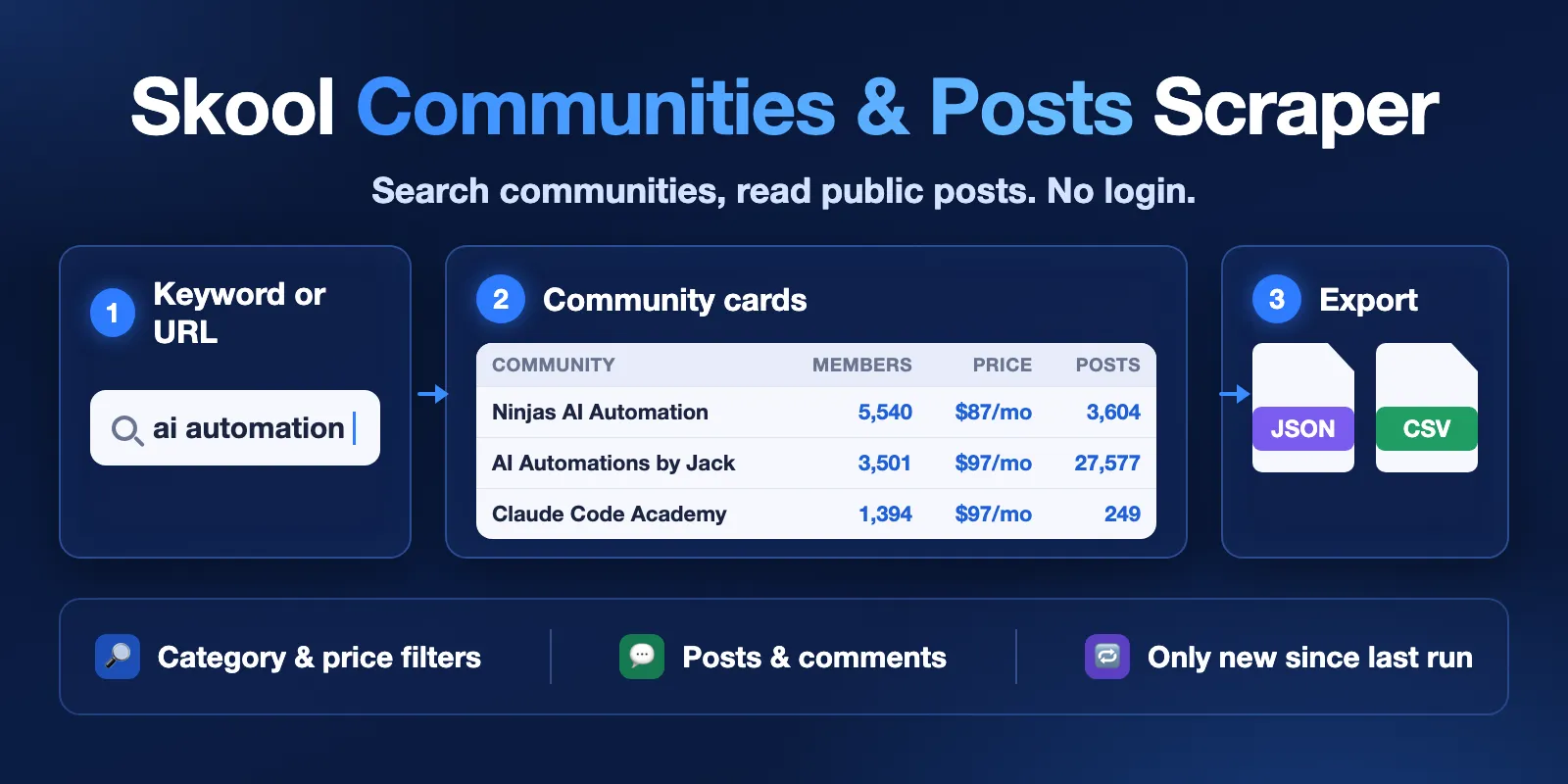
Table of contents
- What it does
- How it works
- Quick start
- Use cases
- Input
- Output
- Pricing
- Limits
- API, export and integrations
- Troubleshooting
- FAQ
- Support
What it does
The Actor reads public pages of Skool, the community platform. It works in five modes:
| Mode | You give | You get one row per |
|---|---|---|
discovery | a keyword, a category or both | community: name, URL, members, price, owner, posts count, courses, rating |
community | community URLs | community, with the same full card |
posts | community URLs | public post: title, text, likes, comments count, author, date, labels. With includeComments, also one row per comment |
classroom | community URLs | course: title, description, modules, open without membership or not |
events | community URLs | calendar event: title, start, end, time zone |
It reads only what Skool shows to a visitor who is not logged in. Private posts, member lists, emails and phone numbers are not read.
Good fit
- Find communities in a niche and compare their size and price.
- Track new posts in a community and see which topics get comments.
- Build a list of community owners with their public profile links.
- Check courses and events that a community offers.
How it works
- You choose a mode and give a keyword, a category or community URLs.
- The Actor reads Skool's public discovery pages and community pages. With filters (price, language, minimum members, public or private), it keeps only the communities that match.
- It saves one row per community, post, comment, course or event in the Dataset. It also writes a run summary with the status of each keyword or URL.
Quick start
-
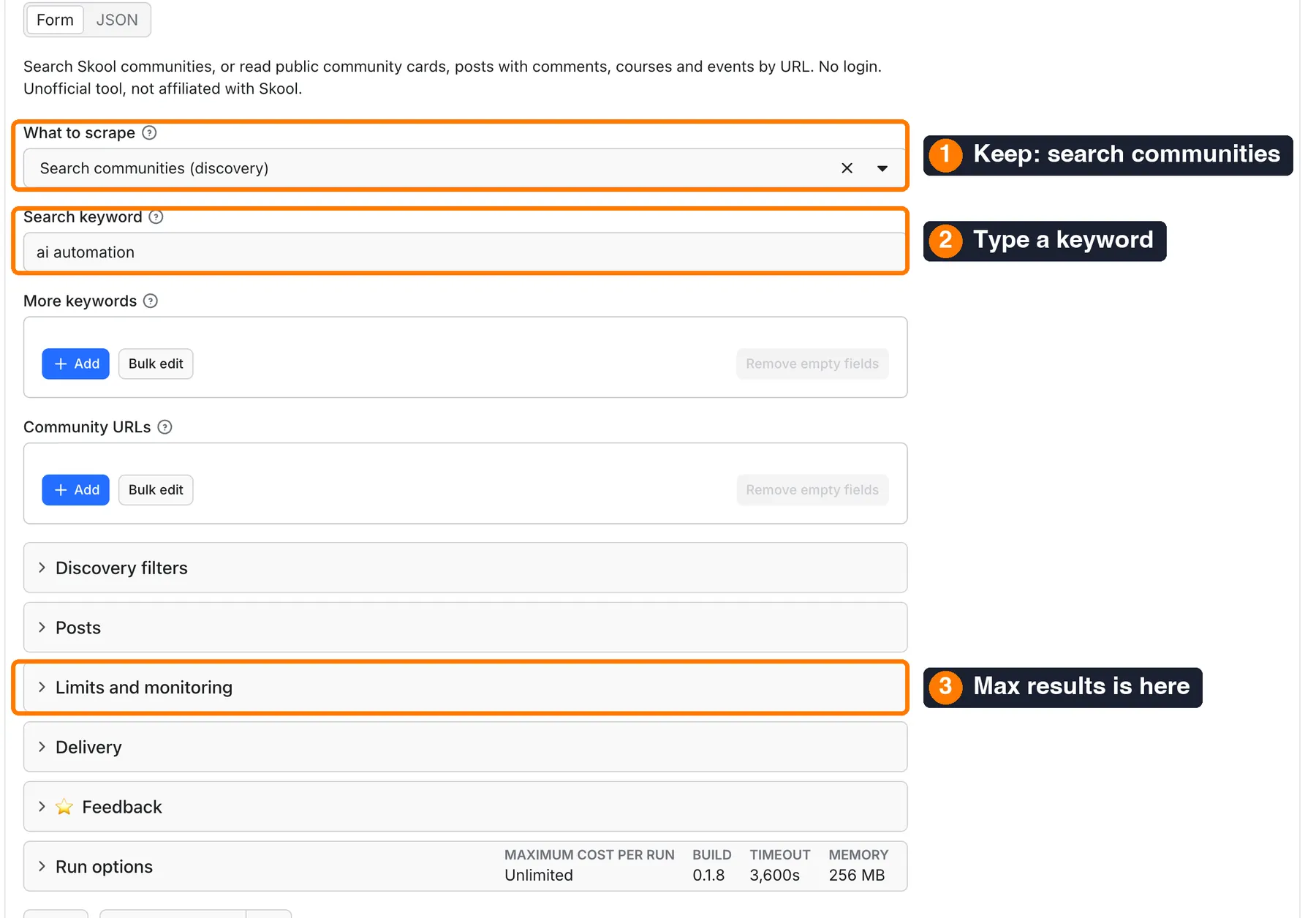
Open the Input tab. Keep What to scrape on Search communities (discovery) (box 1).
-
Type a keyword in Search keyword, for example
ai automation(box 2). -
Keep Max results at 20, the form's prefill. To change it, open Limits and monitoring (box 3).
-
Click Start.
-
Open the Output tab. The Communities view shows name, members and price first (box 5).
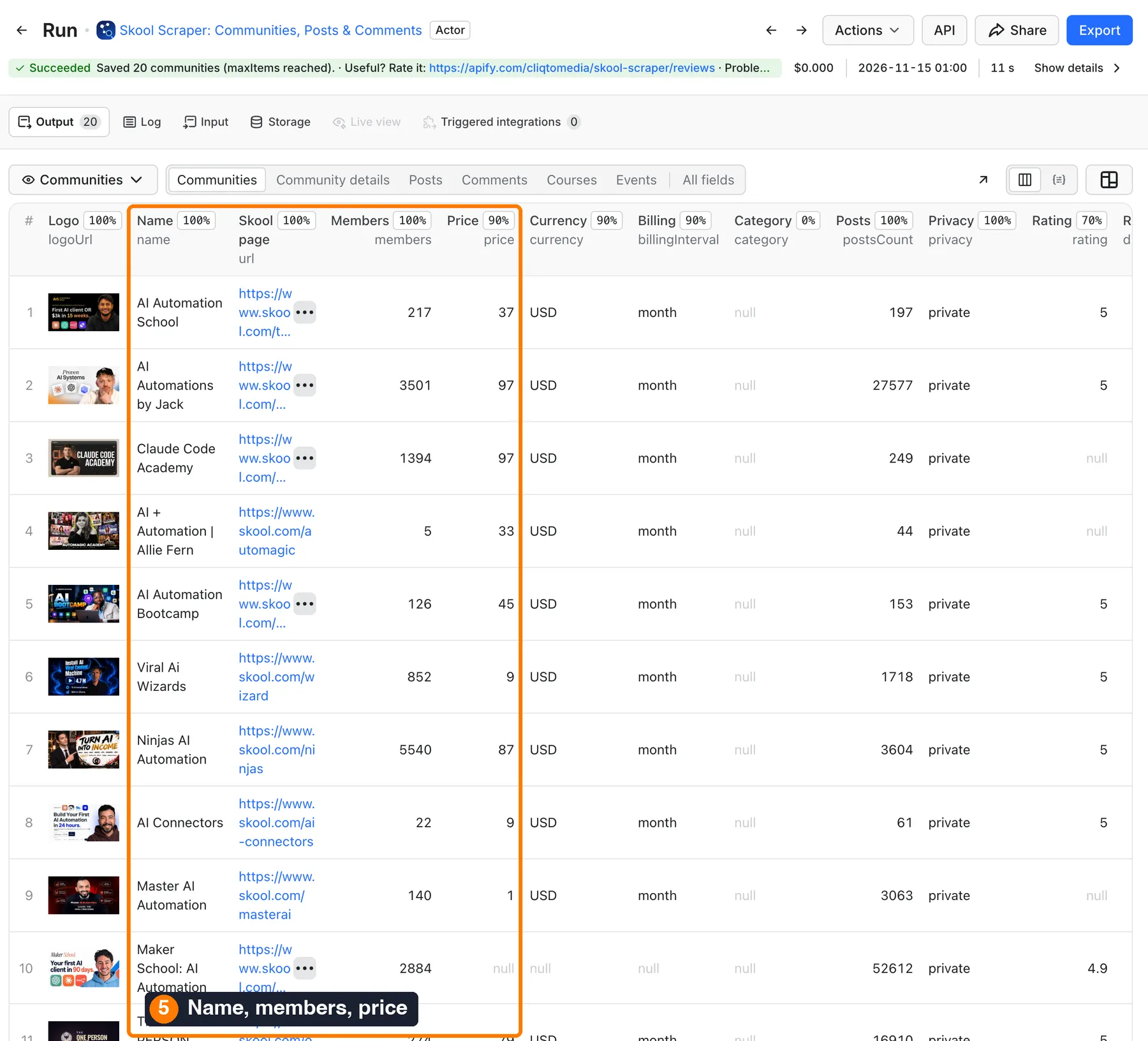
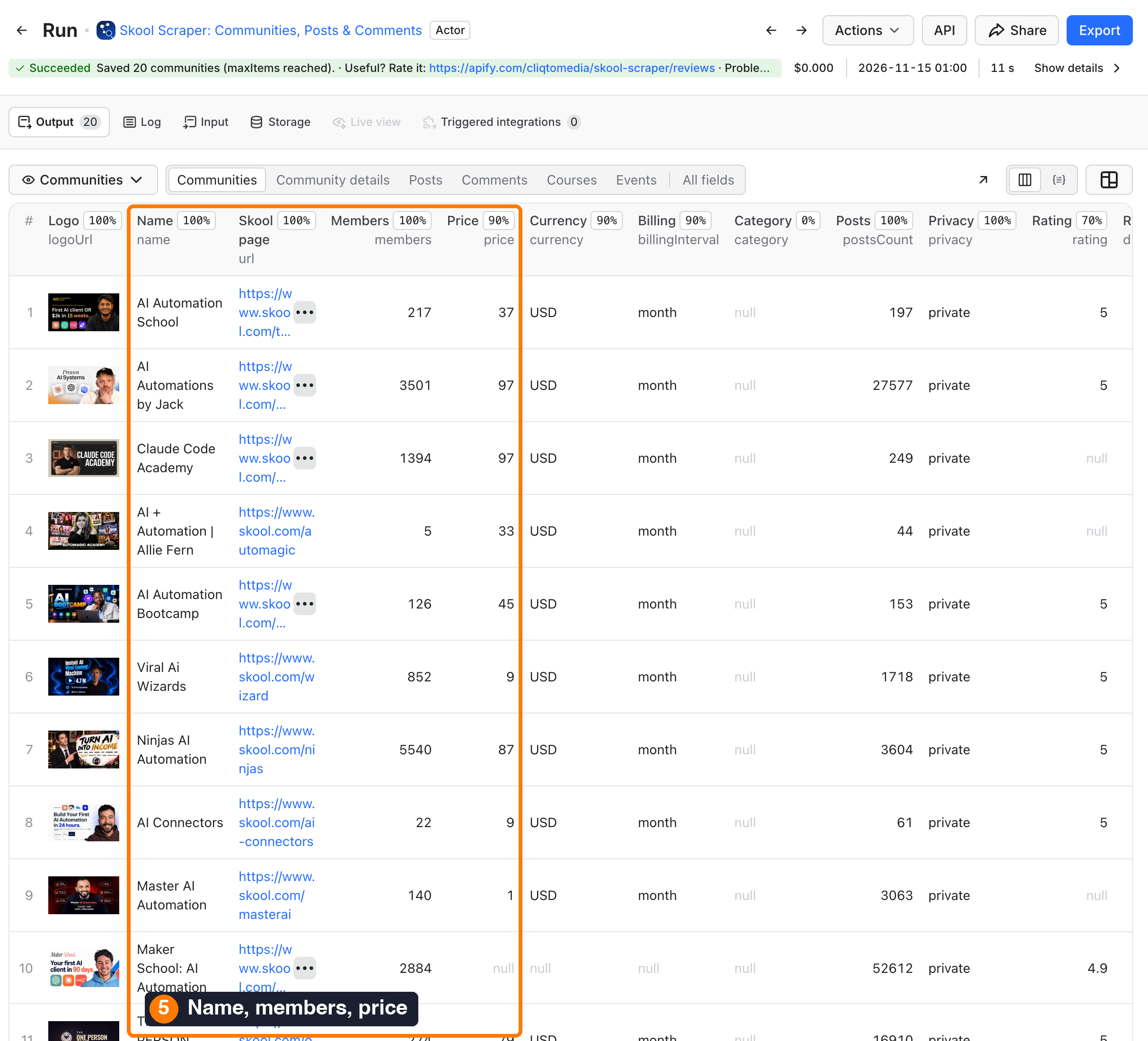
Expected result: 20 community rows for ai automation, sorted as Skool's discovery shows them, in about 10 seconds.
Use cases
| Buyer job | Input path | Output entity | Key fields | Next integration |
|---|---|---|---|---|
| Map a niche | mode: discovery, searchQuery or category | community | name, members, price, postsCount | export to CSV or Google Sheets |
| Find paid communities to partner with | discovery, price: paid, minMembers | community | price, billingInterval, owner.profileUrl, affiliateCommissionPercent | CRM import |
| Watch new posts | mode: posts, communityUrls, onlyNew | post | title, text, comments, createdAt | schedule + Slack or Notion |
| Study what members discuss | posts, includeComments | post, comment | text, likes, authorName | AI summary, spreadsheet |
| Compare courses and events | classroom or events | course, event | title, modulesCount, startTime | spreadsheet |
Input
Input fields
| Field | Plain name | Type | Default / prefill | Allowed values | Effect |
|---|---|---|---|---|---|
mode | What to scrape | string | prefill discovery | discovery, community, posts, classroom, events | Without a mode, a run with only communityUrls reads the community cards |
searchQuery | Search keyword | string | prefill ai automation | any text, up to 100 characters | Discovery keyword; up to 1,000 communities per keyword |
searchQueries | More keywords | array of strings | empty | up to 100 characters each | Each keyword is searched on its own; duplicate communities are removed |
communityUrls | Community URLs | array of strings | empty | https://www.skool.com/<slug> or just <slug> | Communities for community, posts, classroom, events |
category | Category | string | all | 31 Skool categories, e.g. ai_automation, health__fitness | Limits discovery to one category; with no keyword, lists the category |
price | Price | string | any | any, free, paid, free-trial | Discovery price filter |
language | Language | string | all | languages as Skool lists them | Discovery language filter |
minMembers | Minimum members | integer | 0 | 0 – 100,000,000 | Skips smaller communities |
communityType | Community type | string | any | any, public, private | Keeps only public or only private communities |
includeDetails | Full community card | boolean | true | Off: only discovery card fields (faster, no owner and counters) | |
includeComments | Include comments | boolean | false | posts mode: also saves comments and replies | |
maxCommentsPerPost | Max comments per post | integer | 25 | 1 – 25 | Top-level comment threads per post |
postsSince | Posts since | string | empty | 2026-01-31 or 30 days | Only newer posts |
maxPostsPerCommunity | Max posts per community | integer | empty | 1 – 10,000 | Newest posts per community |
maxItems | Max results | integer | 100 (prefill 20) | 1 – 10,000 | The run stops when this many results are saved |
onlyNew | Only new results | boolean | false | Skips results saved by earlier runs with this on | |
stateName | Memory name | string | empty | letters, digits, -, _ | Separate "only new" memory per search |
deliveryConnector | Send results to | string | empty | your MCP connector | Posts a short summary after the run |
deliveryTarget | Notion page or channel | string | empty | Notion page link or Slack channel ID | Where the summary goes |
proxyConfiguration | Proxy | object | Apify datacenter proxy | Change it only if you have a reason |
An empty input runs discovery without a keyword: it lists Skool's communities up to maxItems. The community, posts, classroom and events modes need at least one community URL; without one, the run stops with INVALID_INPUT and an example of a valid URL. Duplicate URLs and duplicate communities from several keywords are saved once.
Interacting settings
| When | Input A | Input B | Effective behavior |
|---|---|---|---|
| Keyword and category | searchQuery | category | Searches the keyword inside the category |
| Filter for public or private | communityType | includeDetails: false | The type is read from the community page, so the filter reads it anyway |
| Comments | includeComments | maxItems | Comments count toward maxItems, like posts |
| Repeat runs | onlyNew | stateName | Each memory name keeps its own list of saved results |
Input examples
Find communities
Expected behavior: reads Skool discovery for the keyword and the card of each community.
Expected output: 20 community rows with name, members, price, postsCount, owner.
Read posts of one community, with comments
Expected behavior: reads the feed from newest to oldest and stops at 30 days or 200 results.
Expected output: post rows and comment rows with text, likes, authorName, createdAt.
Output
Output fields
Every row has type (community, post, comment, course, event), status, url, sourceInput (the keyword or URL that found it), fetchedAt and error.
| Field | Meaning | Type | Can be empty? |
|---|---|---|---|
name | Community name | string | no |
members | Member count | number | rarely |
price, currency, billingInterval | Membership price | number, string | yes: some Skool plans show no public price |
isFree, freeTrial | Free community, free trial offered | boolean | yes |
privacy | public or private (paid or closed group) | string | no |
postsCount, coursesCount, rating, reviewsCount | Counters from the community page | number | yes |
owner | Public name, handle, profile URL, bio and social links | object | some links are null |
category | Skool category | string | filled when you filter by category |
discoveryRank | Place in Skool's discovery list | number | discovery only |
title, text, likes, comments, authorName | Post or comment content | string, number | likes can be null |
createdAt | When the post, comment or community was created | ISO date | no |
Output entities and surfaces
| Situation | Where | Result shape | What to do |
|---|---|---|---|
| Normal item | Dataset | one row per community, post, comment, course or event | open the Output tab or export |
| Unknown community URL | Dataset + RUN_SUMMARY | one row with status: not_found | check the URL |
| Private community | Dataset | one row with status: partial and the public card fields | posts and courses are not public |
| Filter with no matches | RUN_SUMMARY | status not_found, no rows | loosen the filters |
onlyNew with nothing new | RUN_SUMMARY | status complete, message "No new results since the last run" | nothing to do |
| Skool error | Dataset + RUN_SUMMARY | status: error for that URL; other URLs still run | retry later |
RUN_SUMMARY in the key-value store has the run status, rows by type, the status of each keyword or URL, warnings and request counts.
Output example
One community row from the Quick start run, trimmed (long landingPageDescription, image URLs and social links removed):
category is null because this run had no category filter. null means Skool did not show the value; it never means zero.
Send results to Slack or Notion
Pick your connector in the optional deliveryConnector field. After the run saves its data, the Actor posts a short summary (up to 25 rows and a link to the full dataset) there. Put a Notion page link or a Slack channel ID in deliveryTarget: in Notion every run is added on top of that one page, so your workspace does not fill up with new pages. Without a page link, Notion delivery is skipped and the log says so. A delivery error never fails the run and costs nothing extra. Connect a service once in Apify Console → MCP connectors.
Use case → fields
| Buyer job | Input path | Output entity | Key fields | Next integration |
|---|---|---|---|---|
| Niche map | searchQuery | community | name, members, price | CSV |
| Partner list | price: paid, minMembers | community | owner.profileUrl, affiliateCommissionPercent | CRM |
| Post monitor | communityUrls, onlyNew | post | title, createdAt, url | Slack or Notion |
Pricing
Pricing unit
You pay per result, plus a small fee for each Skool page the Actor reads:
| Event | Price (free plan) | When |
|---|---|---|
| Actor start | $0.0005 | once per run |
| Community | $0.0026 ($2.60 per 1,000) | each community row |
| Post, comment, course or event | $0.00095 ($0.95 per 1,000) | each content row |
| Skool page read | $0.0001 ($0.10 per 1,000) | each discovery page, community page, feed page or comment thread |
Higher Apify plans get lower result prices: Bronze −10 %, Silver −20 %, Gold and above −30 %. The start fee scales with run memory (per GB); the default 256 MB keeps it at the price above. Platform usage is included.
A run with no results still pays the start fee and the pages read: for example, a keyword with a filter that matches nothing costs about $0.003. Unknown and private communities are not charged as results, only the page read. A repeat onlyNew run with nothing new reads one page per community. The run stops at Max results or at the maximum cost per run you set.
Cost examples
Free plan, measured page counts:
| Scenario | Input scope | Results | Pages | Total |
|---|---|---|---|---|
| 1 community | 1 URL in community mode | 1 | 1 | $0.0032 |
| 10 communities | discovery, maxItems: 10 | 10 | 11 | $0.028 |
| 20 communities (Quick start) | discovery, maxItems: 20 | 20 | 21 | $0.055 |
| 100 communities | discovery, maxItems: 100 | 100 | ~104 | $0.27 |
| 1,000 communities | discovery, maxItems: 1000 | 1,000 | 1,034 | $2.70 |
| 50 posts | posts, 1 community | 50 | 2 | $0.048 |
| 10,000 posts | posts, maxItems: 10000 | 10,000 | 334 | $9.53 |
Limits
- Discovery returns up to 1,000 communities per keyword, as skool.com does. Use more keywords or categories for more.
- Up to 25 comment threads per post.
- Up to 10,000 results per run. About 1,000 community cards take 7 minutes; 10,000 posts take about 8 minutes.
- Max paid results in Run options also caps the run: it stops at that number of results and says so in the status message.
- The default run timeout is 60 minutes. If a run hits its timeout, it stops early, keeps the rows saved so far and ends as partial (
DEADLINE_REACHED). - Some communities show no public price:
priceandisFreeare null. Set the Price filter (Free or Paid) in discovery to fillisFree. - Only public data visible without logging in. No private posts, member lists, emails or phone numbers.
- One failing community URL does not stop the others: it gets a row with
status: errorand the run goes on.
API, export and integrations
- API: start a run with the input JSON above through the Apify API and read the Dataset items.
- Export: JSON, CSV, Excel, XML or HTML from the Output tab or the API.
- Scheduling: create a schedule in Apify Console and turn on
onlyNewto get only new communities or posts each time. - Webhooks / no-code: use Apify integrations (Make, Zapier, n8n, webhooks) to send each finished run's Dataset to the next tool.
- Slack or Notion: set
deliveryConnector(see Output).
Use with AI agents (MCP)
- MCP server URL with only this Actor:
https://mcp.apify.com?tools=cliqtomedia/skool-scraper. - Smallest useful input:
{"mode": "discovery", "searchQuery": "ai automation", "maxItems": 20}. - Key output fields:
name(community),members(size),pricewithbillingInterval(membership cost),postsCount(activity),url(link to open). - Typical run: about 10 seconds and $0.055 for 20 communities. Keep
maxItemsat 10,000 or less; discovery gives at most 1,000 communities per keyword.
Troubleshooting
The run saved no rows
Symptom: status not_found and an empty Dataset.
Likely reason: the filters (minimum members, price, language, type) match no community, or the keyword finds nothing.
Check: RUN_SUMMARY shows how many communities were checked for each keyword.
Action: loosen one filter or try another keyword.
A community URL shows not_found or partial
Symptom: one row with status: not_found or partial.
Likely reason: the slug is wrong, or the community is private, so posts and courses are hidden.
Check: open the URL in a browser without logging in.
Action: fix the URL; private content is not available.
The run stopped early with partial
Symptom: status partial and a message about the cost limit, the time limit or a Skool error.
Likely reason: the maximum cost per run or the timeout was reached, or Skool did not answer after retries.
Check: the run message and RUN_SUMMARY warnings.
Action: raise the cost limit or timeout, or run again later. Rows already saved stay in the Dataset.
FAQ
Do I need a Skool account or cookies?
No. The Actor reads only public pages that Skool shows without login.
Why is the price empty for some communities?
Some Skool plans do not show a public price. Then price and isFree are null. Use the Price filter to get isFree for those communities.
How fresh is the data?
Each run reads Skool at that moment. Member counts and posts change all the time; fetchedAt shows when a row was read.
Is it legal to scrape Skool?
The Actor reads only public pages. Skool's terms restrict automated access, and author names are personal data. You are responsible for using the data in line with Skool's terms and the laws that apply to you (for example GDPR). This is an unofficial tool, not affiliated with Skool.
Support
For a bug, question or feature request, open the Actor's Issues tab on Apify. Include the run ID, the mode and the error text. Never send tokens, cookies or private data.
⭐ Found it useful? Rate this Actor. Something wrong? Report a problem — we fix reported problems.


