

TikTok Creative Center Trending Hashtags by Industry
Pricing
from $0.98 / 1,000 trending hashtags
TikTok Creative Center Trending Hashtags by Industry
Get TikTok Creative Center trending hashtags by country, period and industry: rank, posts, views, popularity curve and top creators. Spot rising hashtags for your niche and track weekly changes. No login.
Pricing
from $0.98 / 1,000 trending hashtags
Rating
0.0
(0)
Developer

Cliqto Media
Maintained by CommunityActor stats
0
Bookmarked
2
Total users
1
Monthly active users
8 days ago
Last modified
Categories
Features
Share
Get the trending hashtags from TikTok Creative Center for any of 26 countries, a 7, 30 or 90 day window and every industry. Each row has the rank, posts, views, a daily popularity curve and the top creators.
Use it for TikTok trend research by niche and country, or for a weekly report of new and rising hashtags. The smallest run is one country and one period: {"countries":["US"],"periods":["7"]}.
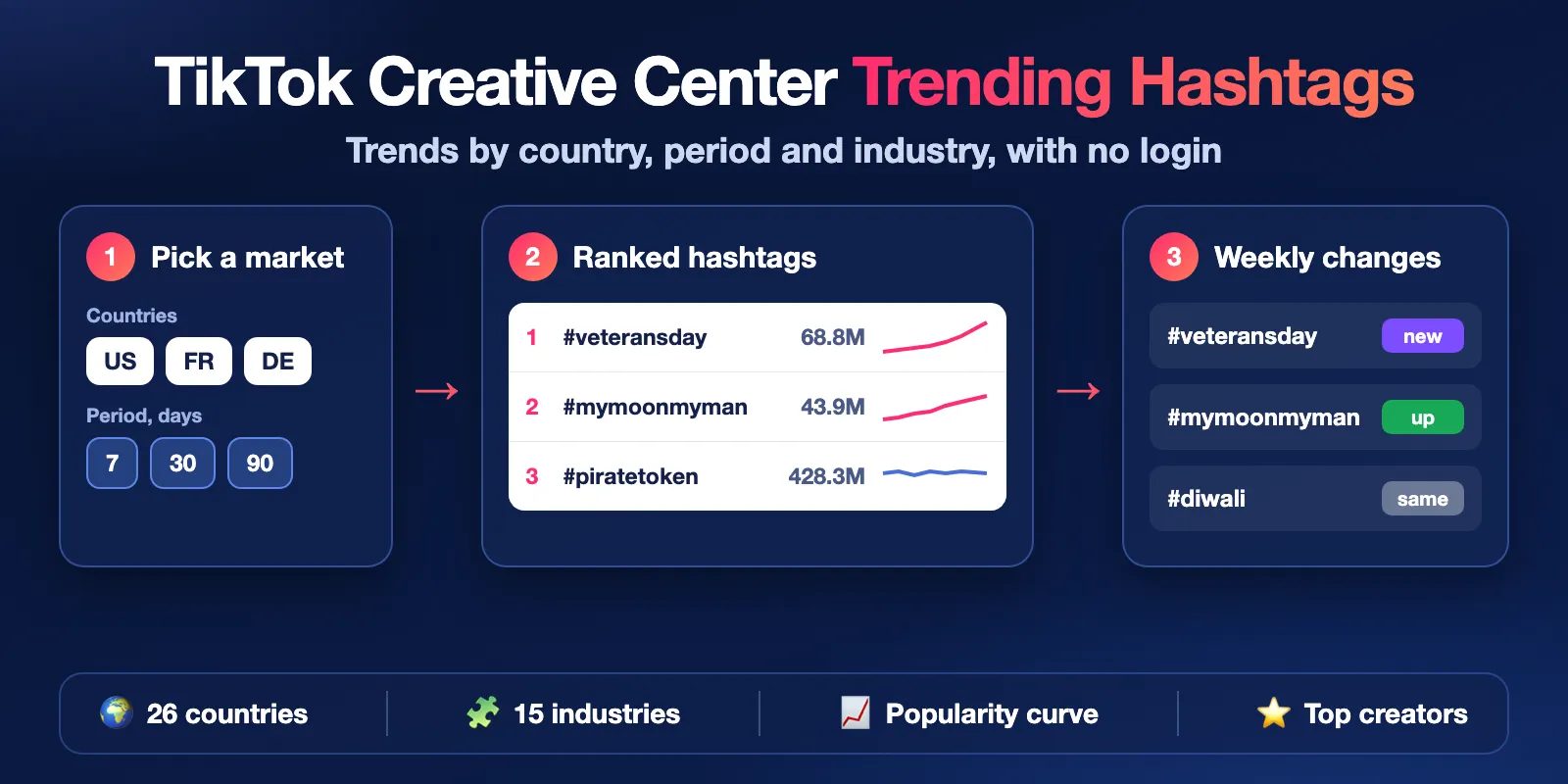
Table of contents
- What it does
- How it works
- Quick start
- Use cases
- Input
- Output
- Pricing
- Limits
- API, export and integrations
- Troubleshooting
- FAQ
- Related Actors
- Support
What it does
The Actor reads the public hashtag trends of TikTok Creative Center (now part of TikTok One). It works without a TikTok login. For each country and period it reads the overall top and the top of each of the 15 industries. Then it merges them into one list of about 40–45 hashtags.
Each hashtag is one row with its rank, posts, views, popularity curve, industries and top creators. One row is one hashtag in one country and one period.
TikTok shows only 3 hashtags in each list without a login. The Actor reads all 16 lists, so you get about 44 hashtags per country and period, not 3.
Good fit
- See which hashtags grow in your niche, for example Beauty & Personal Care in France, before you plan content.
- Compare trends across countries and 7, 30 and 90 day windows in one table.
- Get a weekly list of hashtags that are new, up or down since the last run.
- Find creators who already post with a trending hashtag.
How it works
- You choose countries, periods and, if you want, industries. You can also paste Creative Center trend links.
- For each country and period the Actor reads the overall top and the industry tops from TikTok Creative Center, one list after another.
- It merges the same hashtag from different lists into one row, keeps its best rank and the list of industry ranks.
- It saves one Dataset row per hashtag and a run summary (
RUN_SUMMARY) with counts and a status. - In monitoring mode it compares the ranks with the last run and marks each hashtag as
new,up,downorsame.
Quick start
-
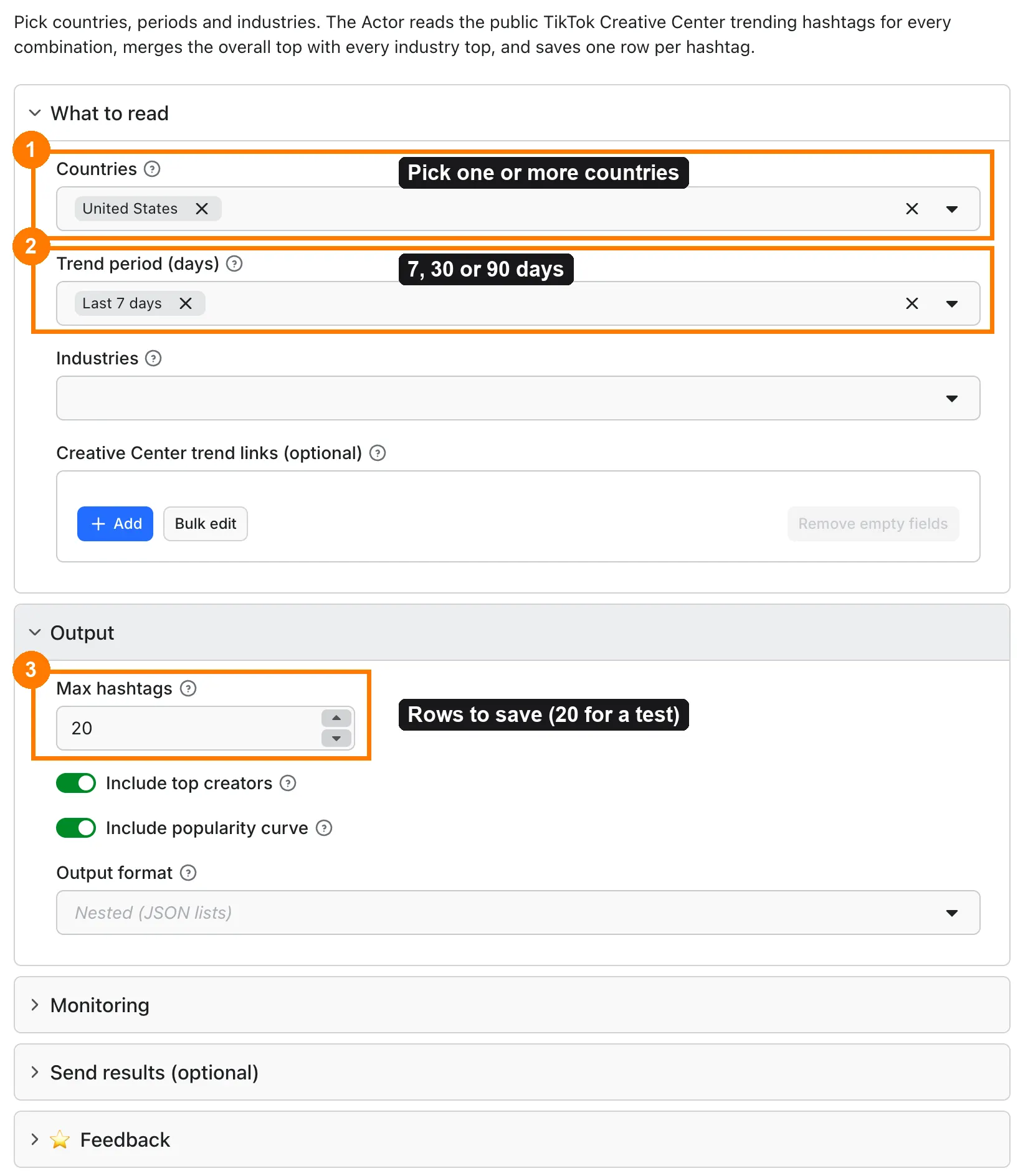
Open the Input tab. Countries is prefilled with United States (box 1 in the picture).
-
Trend period (days) is prefilled with 7 days (box 2). Add 30 or 90 days if you want.
-
Max hashtags in the Output section is prefilled with 20 (box 3). Leave it empty to get up to 100 rows.
-
Click Start.
-
Open the Output tab and check the
title,rank,viewsandpopularitycolumns (box 4).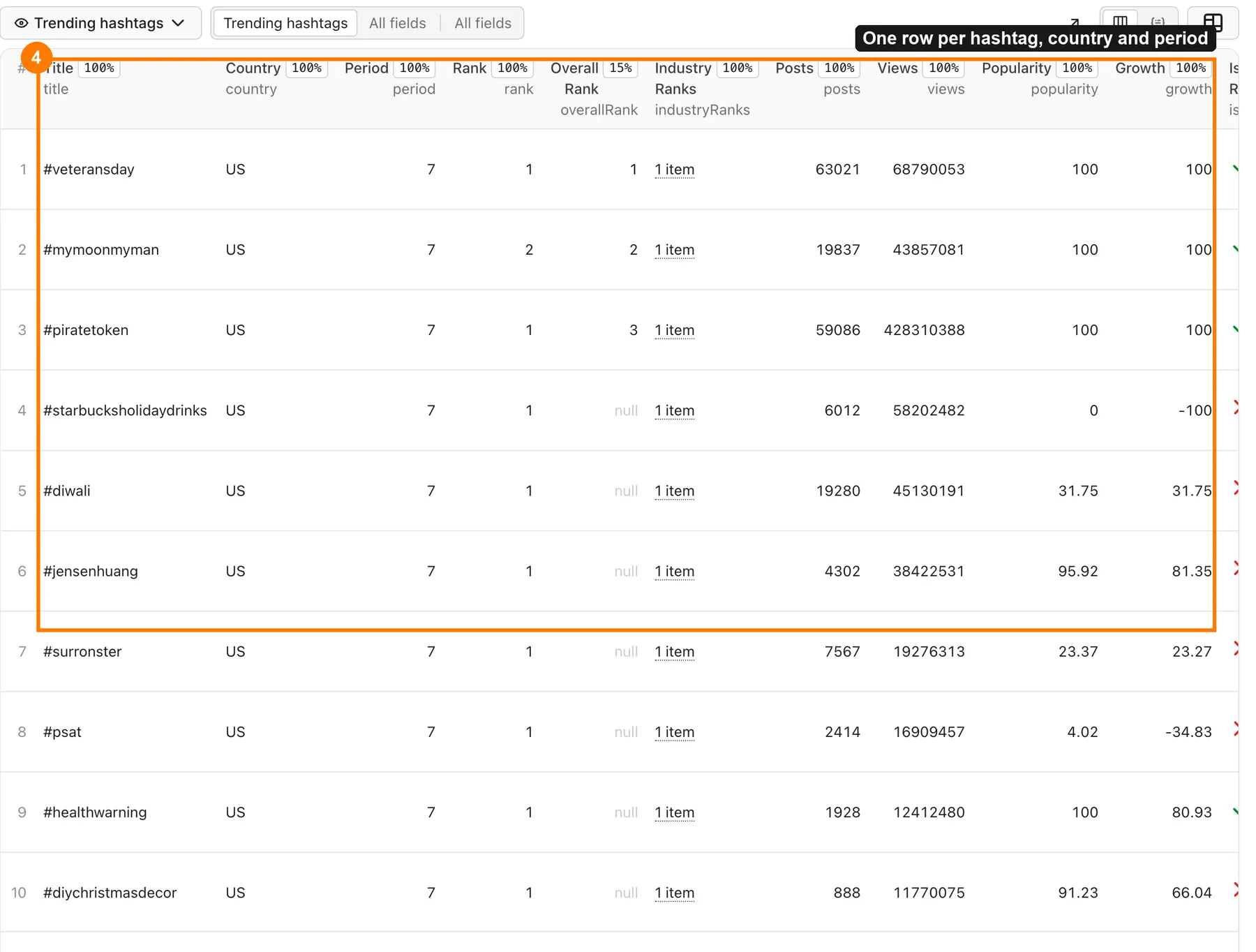
Expected result: 20 hashtag rows for the United States in the last 7 days, sorted by rank, in about 20–30 seconds.
Use cases
| Buyer job | Input path | Output entity | Key fields | Next integration |
|---|---|---|---|---|
| Trend research for one market | countries, periods | hashtag row | hashtag, rank, views, popularity, isRising | Google Sheets, CSV |
| Trends in one niche | industries | hashtag row | industryRanks, posts, growth | content plan |
| Compare countries | countries with several values | hashtag row | country, rank, views | Excel, BI tool |
| Weekly trend monitor | monitoringMode, stateName | hashtag row + summary | changeStatus, rankChange, droppedFromTop | Slack, Notion, schedule |
| Find creators for a trend | includeTopCreators | hashtag row | topCreators.handle, topCreators.followers | outreach list |
Input
Input fields
| Field | Plain name | Type | Required | Default / prefill | Allowed values | Effect | Example | Recommendation |
|---|---|---|---|---|---|---|---|---|
countries | Countries | array of codes | no | empty = US; prefill US | 26 codes: US, FR, DE, IT, ES, AR, AU, BR, CA, CO, EG, ID, IL, JP, KR, MY, MX, PH, SA, SG, ZA, TW, TH, TR, AE, VN | which markets to read | ["US","FR"] | United Kingdom is not offered by TikTok |
periods | Trend period (days) | array | no | empty = 7; prefill 7 | 7, 30, 90 (days) | trend window; each period is read on its own | ["7","30"] | 7 for fresh trends, 90 for stable ones |
industries | Industries | array | no | empty = overall top + all 15 industries | 15 names, for example Beauty & Personal Care, Games, Pets | read only these industry tops | ["Food & Beverage"] | leave empty for the widest list |
creativeCenterUrls | Creative Center trend links (optional) | array of links | no | none | up to 50 TikTok Creative Center or TikTok One hashtag trend links | adds the country, period and industry from each link | ["https://ads.tiktok.com/business/creativecenter/inspiration/popular/hashtag/pc/en?countryCode=FR&period=30"] | handy when you copy a view from the site |
maxItems | Max hashtags | integer | no | empty = 100; prefill 20 | 1–5000 | stops the run after this many rows | 500 | set it to cap the cost |
includeTopCreators | Include top creators | boolean | no | true | true / false | adds topCreators | false | turn off for a smaller table |
includePopularityCurve | Include popularity curve | boolean | no | true | true / false | adds popularityCurve | false | turn off for a smaller table |
outputFormat | Output format | string | no | nested | nested, flat | flat turns lists into short text | "flat" | flat for spreadsheets |
monitoringMode | Compare with the previous run | boolean | no | false | true / false | compares ranks with the last run | true | use with a schedule |
stateName | State name | string | no | default | lowercase letters, digits, -, up to 40 | separate history per name | "weekly-us" | one name per schedule |
deliveryConnector | Send results to (optional) | connector | no | none | your Slack, Notion or other MCP connector | posts a short summary after the run | — | optional |
deliveryTarget | Notion page or channel (optional) | string | no | none | Notion page link or Slack channel ID | where the summary goes | "C0123456789" | Notion needs a page link |
The Actor makes one country × period pair from every country and every period. Links in creativeCenterUrls add their own pairs. If you give only links, the default US and 7 are not added. The same pair is read only once. Each pair gives about 44 rows. The largest run is 26 countries × 3 periods, about 3,400 rows.
Interacting settings
| When | Input A | Input B | Effective behavior | Example | Cost/result effect |
|---|---|---|---|---|---|
| Links and countries together | creativeCenterUrls | countries | pairs from both are read | link FR/30 + ["US"] → FR/30 and US/7 | one trend-list charge per pair |
| Industries picked | industries | — | only those industry tops are read, the overall top is skipped | ["Pets"] → up to 3 rows per pair | fewer rows, same trend-list charge |
| Row limit reached | maxItems | countries, periods | the run stops and SUCCEEDED with status complete and limitReached MAX_ITEMS; whole pairs not requested are in RUN_SUMMARY.unprocessed | maxItems: 20 on US/7 | you pay only for saved rows |
| Monitoring | monitoringMode | stateName | history is kept per state name | weekly-us | no extra charge |
Input examples
Weekly trends in one niche
Expected behavior: the Actor reads the Beauty & Personal Care top for each country and compares it with the last run named beauty-weekly.
Expected output: up to 3 hashtag rows per country with rank, views, changeStatus and rankChange.
Limit or cost note: 3 trend lists and up to 9 hashtag rows, about $0.019.
Output
Output fields
| Field | Meaning | Type | Can be empty? | Example / enum | Source / notes |
|---|---|---|---|---|---|
id | TikTok hashtag ID | string | no | "667655" | TikTok |
type | row type | string | no | hashtag, status | status rows explain a problem |
status | row status | string | no | ok, not_found, invalid_input, error | |
hashtag | name without # | string | no | "veteransday" | |
title | name with # | string | no | "#veteransday" | |
url | hashtag page | string | no | https://www.tiktok.com/tag/veteransday | built from the name |
country, countryName | market | string | no | US, United States | |
period | trend window in days | integer | no | 7 | |
rank | best rank in all read lists (1–3) | integer | no | 1 | |
overallRank | rank in the overall top | integer | yes | 1 | empty when the hashtag is only in industry tops |
industryRanks | industry tops with this hashtag | array | no | [{"industry":"News & Entertainment","rank":1}] | |
industries | industries TikTok links to the hashtag | array | no | ["News & Entertainment"] | |
posts | posts in the period | integer | yes | 63021 | TikTok |
views | video views in the period | integer | yes | 68790053 | TikTok |
popularity | last point of the curve, 0–100 | number | yes | 100 | |
growth | last point minus first point | number | yes | 100 | |
isRising | the curve goes up at the end | boolean | yes | true | |
popularityCurve | daily popularity, 0–100 | array | yes | [{"date":"2026-11-11","value":100}] | off with includePopularityCurve: false |
topCreators | creators TikTok lists for the hashtag | array | yes | [{"handle":"fallontonight","followers":30255432}] | off with includeTopCreators: false |
changeStatus | change since the last run | string | yes | new, up, down, same | only in monitoring mode |
previousRank, rankChange | last rank and the difference | integer | yes | 3, 2 | only in monitoring mode |
message | explanation for status rows | string | yes | "TikTok returned no trending hashtags for Egypt, 7 days." | |
source, scrapedAt | source list and time | string | no | GetHashtagList, ISO time |
Output entities and surfaces
| Situation | Dataset/API/KVS/live view | Result shape | User action |
|---|---|---|---|
| Normal item | Dataset, view Hashtags | one hashtag row | open, export or filter by country and period |
| Domain-empty result | Dataset + RUN_SUMMARY | one status row not_found for the pair, RUN_SUMMARY.status not_found | try another country, period or industry |
Row limit (maxItems) | Dataset + RUN_SUMMARY | saved rows, status complete, limitReached MAX_ITEMS, whole pairs not requested in unprocessed | rerun with a higher maxItems |
| Partial result | Dataset + RUN_SUMMARY | saved rows, RUN_SUMMARY.status partial, stopReason set, unprocessed pairs | rerun later or raise Max cost per run |
| Source failure | run status FAILED + RUN_SUMMARY | stopReason SOURCE_ERROR after 3 attempts per request; saved rows stay, no fake rows; the failed pair is not charged | run again later |
| Apify storage failure | run status FAILED + RUN_SUMMARY | stopReason WRITE_ERROR; saved rows stay; a pair is never charged twice | run again later |
| Time limit | RUN_SUMMARY | stopReason DEADLINE, status partial, unprocessed pairs; the run SUCCEEDED if rows were saved, otherwise FAILED | raise the run timeout or split the input |
| Bad input | run status + RUN_SUMMARY.error | the run fails with a clear message, nothing is charged; a bad link among good ones gives a free invalid_input row | fix the field named in the message |
Output example
This example is trimmed: the real curve has 7 daily points and there are 3 creators. It comes from the Quick start run (US, 7 days). null in changeStatus means monitoring was off. null in posts, views or the curve means TikTok did not send that value.
Send results to Slack or Notion
Pick your connector in the optional deliveryConnector field. After the run saves its data, the Actor posts a short summary (up to 25 rows and a link to the full dataset) there. Put a Notion page link or a Slack channel ID in deliveryTarget: in Notion every run is added on top of that one page, so your workspace does not fill up with new pages. Without a page link, Notion delivery is skipped and the log says so. A delivery error never fails the run and costs nothing extra. Connect a service once in Apify Console → MCP connectors.
Use case → fields
| Buyer job | Input path | Output entity | Key fields | Next integration |
|---|---|---|---|---|
| Weekly report | monitoringMode | hashtag row | changeStatus, rankChange | Slack summary |
| Content plan | industries | hashtag row | hashtag, growth, isRising | Notion page |
| Creator list | includeTopCreators | hashtag row | topCreators.handle, topCreators.followers | CSV |
Pricing
Pricing unit
You pay per result. There is no start fee and no fee for Apify platform usage.
- Trending hashtag — $1.40 per 1,000 hashtag rows ($0.0014 per row). Only saved
hashtagrows are charged;statusrows are free. - Trend list — $0.002 for each country × period pair the Actor reads. This is charged even when TikTok has no hashtags for that pair, because the lists are still read. An empty run and a monitoring run therefore cost $0.002 per pair plus the rows.
A pair that fails on TikTok's side (an error or a rate limit) is not charged: the run stops and keeps the rows it already saved. Bad input stops the run before any charge. Monitoring mode costs nothing extra: unchanged hashtags are normal rows with changeStatus: same. Discounts for higher Apify plans apply to both events.
Cost examples
| Scenario | Input scope | Expected item/event count | Base charge | Optional charge | Stop/cap behavior |
|---|---|---|---|---|---|
| Quick start | US, 7 days, maxItems: 20 | 1 list + 20 rows | $0.030 | none | stops at 20 rows |
| One market | US, 7 days, maxItems empty | 1 list + 44 rows | $0.064 | none | up to 100 rows |
| Three markets, two periods | US, FR, DE × 7, 30 | 6 lists + about 260 rows | about $0.38 | none | maxItems 500 |
| One niche, no data | EG, 7 days, Pets | 1 list + 0 rows | $0.002 | none | status row not_found is free |
| All countries and periods | 26 × 3 | 78 lists + about 3,400 rows | about $4.90 | none | set maxItems 5000 and Max cost per run above $5 (default $1) |
The run also stops when it reaches your Max cost per run limit. It then saves what it has and sets stopReason to CHARGE_LIMIT.
Limits
- TikTok shows only 3 hashtags in each list without a login. The Actor reads the overall top and 15 industry tops, so you get about 44 hashtags per country and period, not 100.
- 26 countries only: the ones the public Creative Center trends page offers. United Kingdom is not offered.
- Hashtags only. Top Ads, songs, creators lists, videos and Keyword Insights need a TikTok One login and are not included.
- Periods are 7, 30 and 90 days. TikTok sets the numbers; the Actor does not count views itself.
- The Actor reads lists one by one with a 1.1-second pause. Each request waits up to 15 seconds and is tried up to 3 times. That is about 20 seconds per country and period. A test run with 10 countries × 3 periods (1,327 rows) took 9 minutes. All 26 × 3 is about 25 minutes by the same speed, inside the default 60-minute timeout.
- No login, no cookies and no video download.
API, export and integrations
- API: start a run with
POST https://api.apify.com/v2/acts/cliqtomedia~tiktok-creative-center/runsand the input JSON; read rows from the run's default Dataset. - Export: download the Dataset as JSON, CSV, Excel or XML. Use
outputFormat: "flat"for spreadsheets. - Scheduling: create an Apify schedule with
monitoringMode: trueand onestateNameper schedule; each run marksnew,up,downandsame. - Webhooks / no-code: connect the run to Make, Zapier or n8n with an Apify webhook on
ACTOR.RUN.SUCCEEDED; the next step readshashtag,rankandviews. - SDK / MCP / agent: call the Actor from the Apify JavaScript or Python client, or from an AI agent through MCP.
Use with AI agents (MCP)
- MCP server URL with only this Actor:
https://mcp.apify.com?tools=cliqtomedia/tiktok-creative-center. - Smallest useful input:
{"countries":["US"],"periods":["7"],"maxItems":20}. - Key output fields:
hashtag(name),rank(best rank, 1–3),views(video views in the period),popularity(0–100 now),isRising(the trend goes up). - A Quick start run takes about 20–30 seconds and costs $0.030. One country and period gives about 44 rows; 26 countries and 3 periods is the maximum.
Troubleshooting
Only 3 rows for a country
Symptom: the Dataset has 3 rows or fewer.
Likely reason: you picked one industry, so only that list is read.
Check: the industries field.
Action: leave industries empty to read the overall top and all 15 industries.
A not_found row
Symptom: a status row with not_found and a message.
Likely reason: TikTok has no trending hashtags for that country, period and industry.
Check: the message field names the pair.
Action: try a longer period or another industry. The free status row is not charged.
The run stopped early
Symptom: RUN_SUMMARY.stopReason is SOURCE_ERROR, WRITE_ERROR, DEADLINE or CHARGE_LIMIT.
Likely reason: TikTok did not answer 3 attempts in a row (15 seconds each) or limited requests — then the run ends as FAILED with SOURCE_ERROR; the run reached its time limit (DEADLINE, partial; FAILED if no rows were saved); Apify storage failed (WRITE_ERROR, FAILED; rare); or it reached your cost limit (CHARGE_LIMIT, run SUCCEEDED as partial).
Check: RUN_SUMMARY.unprocessed lists the pairs that were not read.
Action: run again later, or raise Max cost per run. Pairs that TikTok did not answer are not charged.
The run fails with "Invalid input"
Symptom: the run fails at once, or a link gives a status row invalid_input.
Likely reason: a country code, period, maxItems value or link the Actor cannot use.
Check: the run status message and RUN_SUMMARY.error (or the row message) name the field and the reason.
Action: fix that field and start again.
FAQ
Do I need a TikTok account or cookies?
No. The Actor reads the public trend lists that TikTok Creative Center shows without a login.
Why not 100 hashtags in one list like on the site after login?
Without a login TikTok shows 3 hashtags per list. The Actor reads 16 lists per country and period and merges them, so you get about 44 different hashtags.
What does rank mean?
rank is the best place of the hashtag in any list that was read (1–3). overallRank is the place in the overall top, the same as the main list on the site. industryRanks shows each industry list.
How fresh is the data?
Each run reads the lists at that moment. The curve has one point per day; its last point shows the last day TikTok counted, often one to three days before the run.
What does an empty run cost?
$0.002 for each country × period pair, because the lists are still read. Rows that were not found cost nothing.
Related Actors
- TikTok Shop Scraper — products, sales and prices from TikTok Shop for the niche you found.
- TikTok Transcript Scraper — captions and speech text of TikTok videos that use a trend.
- Social Video Downloader — save TikTok, Instagram and X videos.
- Google Trends Scraper — check the same topic in Google search interest.
Support
For a bug, question or feature request, open the Actor's Issues tab on Apify. Include the run ID, your input (countries, periods, industries) and the RUN_SUMMARY status. Never send tokens, cookies or billing data.
⭐ Found it useful? Rate this Actor. Something wrong? Report a problem — we fix reported problems.


