
TikTok Shop Scraper: Products, Sales & Prices, No Login
Pricing
from $1.40 / 1,000 product saveds
TikTok Shop Scraper: Products, Sales & Prices, No Login
Collect TikTok Shop products, prices, units sold, ratings, variants, shipping and shop stats from keywords, categories or links. Find what sells and track price and sales changes between runs. No login or cookies.
Pricing
from $1.40 / 1,000 product saveds
Rating
0.0
(0)
Developer

Cliqto Media
Maintained by CommunityActor stats
0
Bookmarked
2
Total users
1
Monthly active users
3 days ago
Last modified
Categories
Security
Limited permissionsShare
Give this Actor search keywords or public TikTok Shop links, and get one table row per product with price, units sold, rating, variants, shipping and shop stats. It needs no login or cookies, and a typical run of 10 products costs about $0.03.
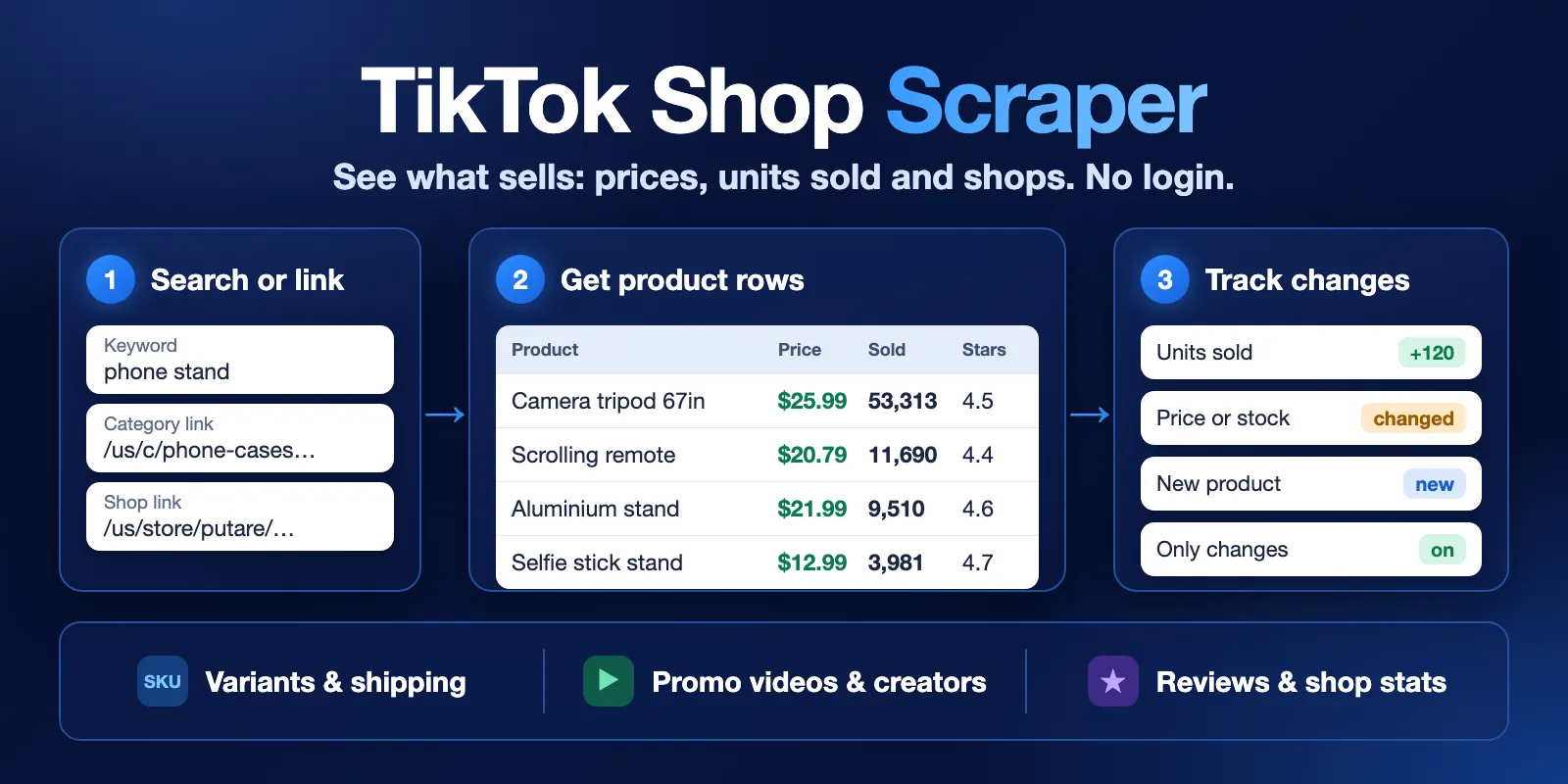
Table of contents
- What it does
- How it works
- Quick start
- Use cases
- Input
- Output
- Pricing
- Limits
- API, export and integrations
- Troubleshooting
- FAQ
- Related Actors
- Support
What it does
You want to know which TikTok Shop products sell, at what price, and who sells them. This Actor reads the public US storefront and saves each product as one row. You can search by keyword or start from product, category or shop links. You can then filter, sort and download the rows, or run the same input again to see what changed.
Good fit
- You research products before you sell them.
- You compare prices and units sold across shops.
- You watch a list of products or a shop every day.
- You need public data in a spreadsheet or an API, without a TikTok account.
It is not a good fit if you need markets other than the US, every review of a product, or a sales rank across all of TikTok Shop.
How it works
- You add keywords or public links, and set how many products you want.
- The Actor opens the public result pages. It opens each product too, if you keep full details on.
- You get a table of products, a shop summary and a short run report. With Track changes on, each row also shows what is new or different since the last run.
Quick start
You need a free Apify account. The form below opens with a small example, so you can run it as it is.
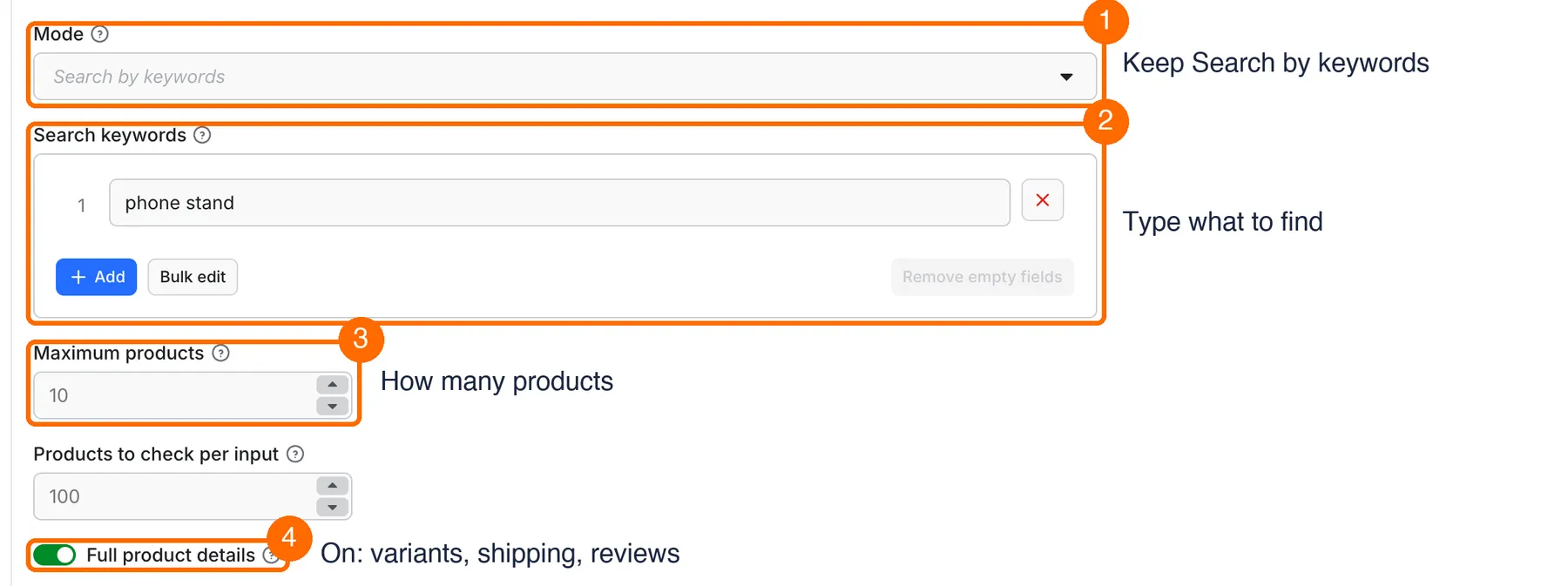
- Open the input form. In box 1, keep Search by keywords.
- In box 2, type what you want to find, one phrase per line. The example is
phone stand. - In box 3, set Maximum products. The example is
10. - In box 4, keep Full product details on to get variants, shipping and reviews. Turn it off for a faster and cheaper list.
- Click Start. When the run ends, open the Output tab and download the table. Box 5 shows the main columns.
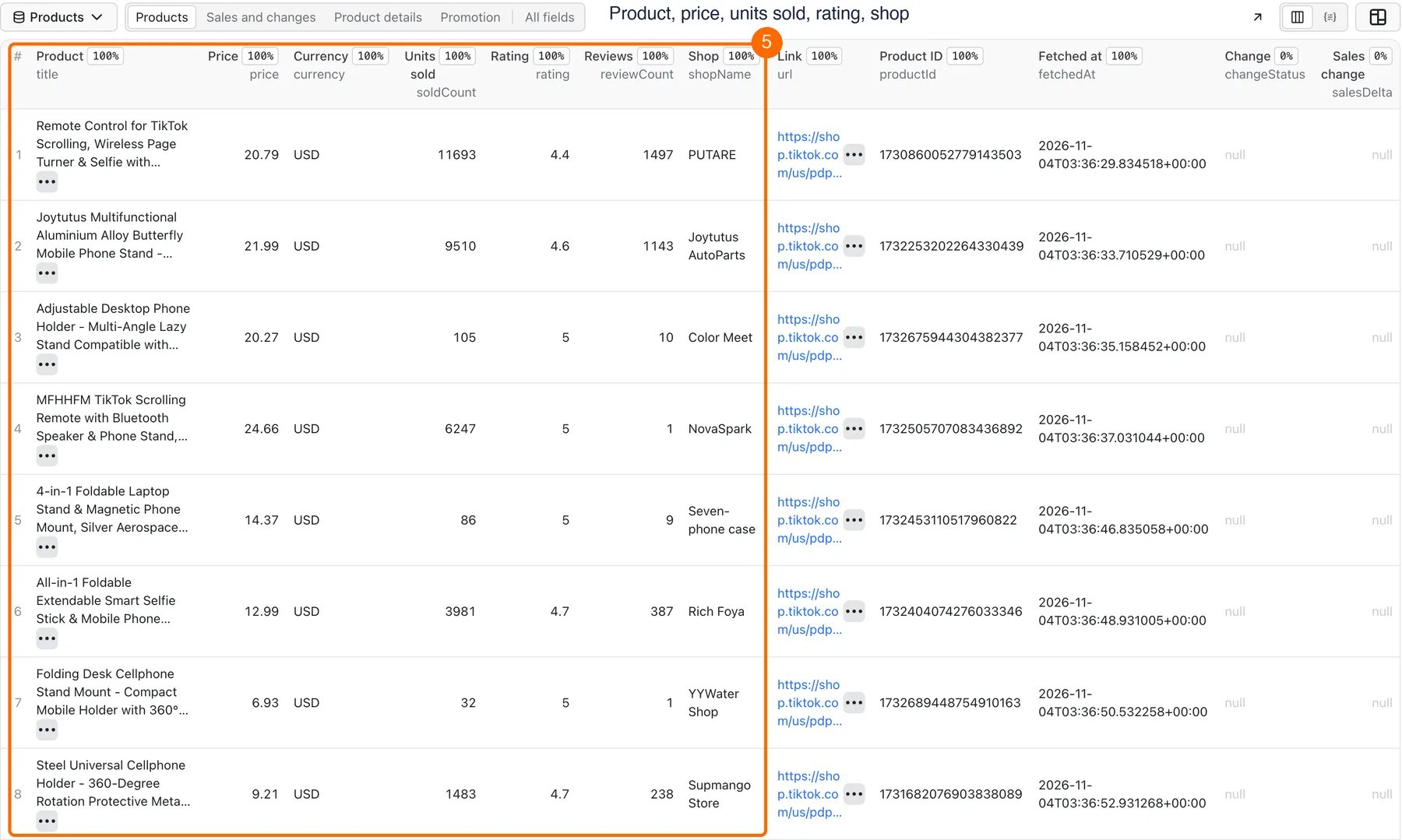
Expected result: 10 product rows in about 40 seconds, for about $0.03 on the Free plan. The products and numbers are live, so they change over time.
Use cases
| Buyer job | Input path | Output entity | Key fields | Next integration |
|---|---|---|---|---|
| Find products that sell | Keywords, sort by Most units sold | One product row | title, price, soldCount, rating, shopName | Google Sheets, CSV |
| Check a competitor shop | Shop links | Product rows and a shop summary | price, soldCount, shop, skus | Excel, API |
| Watch prices and sales every day | Product links, Track changes on, schedule | Rows with a change status | changeStatus, salesDelta, price, previousFetchedAt | Slack, Notion, webhook |
| Explore one category | Category links, price and rating filters | Filtered product rows | categories, price, rating, reviewCount | Dataset API |
| Find creators who promote a product | Keywords, Full product details off | Rows with a promotional video | video, soldCount, url | CSV |
Input
Start with Mode and one list of keywords or links. All other fields are optional.
Input fields
| Field | Plain name | Type | Required | Default or prefill | Allowed | Effect | Example | Recommendation |
|---|---|---|---|---|---|---|---|---|
mode | Mode | Text | No | search | search, product, category, shop | Picks what to start from | search | Keep Search unless you only use links |
keywords | Search keywords | List | No | Prefill phone stand | Any phrases | Runs one search per phrase, in Search mode only | phone stand | Use a few words, as a shopper would |
maxItems | Maximum products | Whole number | No | 10 | 1 or more | Stops after this many saved rows, across all inputs | 50 | Start small, then raise it |
scanLimit | Products to check per input | Whole number | No | 100 | 1 or more | Limits how many products each input looks through for filters, sorting and changes | 300 | Raise it when a filter finds too little |
includeProductDetails | Full product details | Yes or no | No | Yes | Yes, no | Opens each product for variants, shipping and reviews | Yes | Turn off for long lists |
regions | Markets | List | No | Prefill US | US | Picks the storefront | US | Keep US |
region | Primary market | Text | No | US | US | Used when Markets is empty | US | Keep US |
monitor | Track changes | Yes or no | No | No | Yes, no | Compares each run with the last one | Yes | Use with a schedule |
stateName | Monitor name | Text | No | Made from the inputs | Letters, numbers, dashes, up to 63 | Names the saved comparison | phone-stands-daily | Set one name per watch list |
onlyChanges | Only changed products | Yes or no | No | No | Yes, no | Saves new and changed products only | Yes | Needs Track changes |
outputFormat | Output format | Text | No | nested | nested, flat | flat stores lists as JSON text in a cell | flat | Use flat for Google Sheets |
sortBy | Sort products | Text | No | relevance | relevance, sales, priceAscending, priceDescending | Ranks the checked products, then saves the top ones | sales | Set scanLimit with it |
productUrls | Product links | List | No | Empty | Public links | Adds these products in any mode | See the form | Use for a fixed watch list |
categoryUrls | Category links | List | No | Empty | Public links | Adds these categories in any mode | See the form | Add filters for large categories |
shopUrls | Shop links | List | No | Empty | Public links | Adds these shops in any mode | See the form | Use for competitor checks |
minPrice | Minimum price | Number | No | Empty | 0 or more | Keeps this price or higher | 10 | Rows with no price are left out |
maxPrice | Maximum price | Number | No | Empty | 0 or more | Keeps this price or lower | 30 | Rows with no price are left out |
minRating | Minimum rating | Number | No | Empty | 0 or more | Keeps this rating or higher | 4.5 | Rows with no rating are left out |
minSoldCount | Minimum units sold | Number | No | Empty | 0 or more | Keeps at least this many units sold | 1000 | Rows with no count are left out |
titleContains | Title must contain | List | No | Empty | Any words | Keeps titles with all of these words | magnetic | Upper or lower case does not matter |
excludeKeywords | Exclude title words | List | No | Empty | Any words | Leaves out titles with any of these words | case | Upper or lower case does not matter |
deliveryConnector | Send results to | Connector | No | Empty | Your MCP connector | Sends a few lines about the finished run | Your Slack | See Send results to Slack or Notion |
deliveryTarget | Notion page or channel | Text | No | Empty | Notion link or Slack channel ID | Picks where the summary goes | A channel ID | Leave empty to let the connector decide |
Empty input: a run with no input searches for phone stand and saves up to 10 products.
Duplicates: the same product found twice in one run is saved and charged once.
Interacting settings
- Links always run, in any mode. Keywords only run in Search mode.
- Filters look only at the products an input checks. Raise
scanLimitif a filter finds too few rows. sortByranks the checked products for each input, not the whole store. It also makes the Actor check up toscanLimitproducts before it saves any.onlyChangesneedsmonitor. Without it, the run stops with a clear error and only pays the start fee.- A new
stateNamestarts with no history, so every product shows asnew. - Full details add one paid page check per product and about 3 seconds per product.
Input examples
Find top sellers for a keyword
Expected behavior: the Actor checks up to 50 products, ranks them by units sold and saves the top 5.
Expected output: 5 rows, without variants or shipping. scanLimitReached is true if it stopped at 50.
Limit: this ranks the 50 checked products, not all of TikTok Shop.
Check one shop
Expected behavior: the Actor opens the shop and saves 3 products with full details.
Expected output: 3 rows and one shop in the SHOPS record.
Limit: a small shop can have fewer products than you ask for.
Track changes every day
Expected behavior: the first run saves the product as new. Later runs save it only if its title, price, units sold, rating, review count or stock changed.
Expected output: one row when something changed. No rows and the status No changes since the last run. when nothing changed.
Limit: page checks are paid even when nothing changed. Do not run two runs with the same stateName at the same time.
Output
The Output tab shows the products. Download them as JSON, CSV or Excel. The table has five views: Products, Sales and changes, Product details, Promotion and All fields.
Output fields
A value is null when TikTok Shop does not show it for that product. Without full details, description, shipping and ratingDistribution are null, and skus and reviews are empty lists.
| Field | Type | What it means | Example |
|---|---|---|---|
productId | Text | TikTok Shop product ID | 1730860052779143503 |
title | Text | Product title | Remote Control for TikTok Scrolling… |
price | Number or null | Lowest current price | 20.79 |
currency | Text or null | Currency of the price | USD |
originalPrice | Number or null | Price before the discount | 45.49 |
discountPercent | Number or null | Discount on the cheapest variant | 54 |
soldCount | Number or null | Total units sold, as the store shows it | 11690 |
rating | Number or null | Average stars, from 1 to 5 | 4.4 |
reviewCount | Number or null | Number of reviews the store reports | 1497 |
ratingDistribution | Object or null | Review count per star | {"5": "1149"} |
reviews | List | A public sample of reviews, without buyer names | First page only |
reviewsHasMore | Yes, no or null | More reviews exist beyond the sample | true |
shopName | Text or null | Shop that sells the product | PUTARE |
sellerId | Text or null | TikTok Shop seller ID | 7495880414145841487 |
shop | Object or null | Shop totals: units sold, products, reviews, followers, rating | {"sold_count": 576817} |
url | Text | Public product link | https://shop.tiktok.com/us/pdp/… |
images | List | Gallery images. These links can expire | Image links |
descriptionImages | List | Images inside the description | Image links |
description | Text or null | Product description | Text |
specifications | List | Name and value pairs, such as material | Brand: PUTARE |
brand | Text or null | Brand, when the store shows one. Often empty | PUTARE |
categories | List | Category path | Phones & Electronics |
variants | List | Variant names and values | Color: Green, Black |
skus | List | Price, stock and properties of each variant | Stock may be empty |
shipping | Object or null | Delivery days, fee and free shipping, without a buyer address | {"delivery_min_days": 7} |
available | Yes, no or null | The store says it can deliver the product | true |
video | Object or null | Promotional video from search, with creator and views | {"creatorName": "…"} |
productVideo | Object or null | Video on the product page | {"durationSeconds": 21} |
sourceGenerated | Object | Text that TikTok Shop generated, kept apart from the description | Summary text |
region | Text | Market | US |
source | Text | Website | shop.tiktok.com |
fetchedAt | Text | UTC time of the read | 2026-11-04T02:50:11+00:00 |
detailsFetched | Yes or no | The product page was opened | true |
changeStatus | Text or null | With Track changes: new, changed, unchanged or unknown | changed |
salesDelta | Number or null | Units sold since the last run. Null when new or when the counter was reset | 120 |
salesTrend | Text | rising, flat or unknown | rising |
salesCounterReset | Yes or no | The sold counter went down between runs | false |
previousFetchedAt | Text or null | Time of the last run that saw this product | A UTC time |
Output entities and surfaces
| Surface | Normal | Domain-empty | Partial | Technical failure |
|---|---|---|---|---|
| Dataset (Products) | One row per product | No rows | The rows saved before the stop | The rows saved before the failure, or none |
RUN_SUMMARY record | status: complete and counts | emptyReason: NO_MATCHING_PRODUCTS or NO_CHANGES | status: partial, stopReason, failedInputs, unprocessedInputs | sourceError and the same lists |
SHOPS record | Shop stats by seller ID | Empty | Shops seen so far | Shops seen so far |
| Run status | SUCCEEDED | SUCCEEDED, with a message | SUCCEEDED, with a message | FAILED, with a message |
The empty cases are not errors. A search with no results and a filter with no matches both end as SUCCEEDED.
Output example
This row comes from the Quick start input, shortened:
Send results to Slack or Notion
You can get a short summary after each run, with the run status and the first products.
- Connect Slack, Notion or another service once in Apify Console, under MCP connectors.
- Pick the connector in Send results to.
- Optional: in Notion page or channel, paste the link of your Notion page, or the ID of your Slack channel. Each run is added on top of a Notion page.
If sending fails, your data stays safe in the Dataset and the run keeps its status. RUN_SUMMARY shows the result under delivery.
Use case → fields
| Use case | Fields to use |
|---|---|
| Product research | title, price, soldCount, rating, reviewCount |
| Competitor shop check | shopName, shop, price, soldCount, skus |
| Daily price and sales watch | changeStatus, salesDelta, salesTrend, price, previousFetchedAt |
| Listing analysis | description, specifications, variants, images, reviews |
| Creator research | video, soldCount, url |
Pricing
You pay per event, and Apify platform usage is included in these prices.
Pricing unit
| Event | Free plan price | When you pay |
|---|---|---|
| Actor start | $0.002 | Once per run. Apify charges it per GB of memory, and this Actor uses at most 512 MB, so you pay it once |
| Product | $0.002 | For each saved row |
| Page check | $0.0005 | For each result page or product page the Actor opens. Automatic retries of the same page are free |
On paid Apify plans, product and page check cost 10% to 30% less, and the Actor start price stays the same. The Store page shows the price for your plan.
- Empty run: a search with no results pays the start fee and its page check.
- Filter with no matches: you pay the start fee and each checked page, but no product.
- Unchanged monitor: you pay the start fee and the page checks, but no product.
- Partial or failed run: you pay for rows already saved and pages already opened. Rows stay in the Dataset.
- Spending limit: set Maximum cost per run in the run options. The Actor saves rows up to that limit and stops as a partial run. The lowest limit it accepts is $0.005.
Cost examples
These are Free plan prices.
| Run | Events | Cost | Source |
|---|---|---|---|
| Quick start: 10 products, full details | 1 start, 10 products, 11 page checks | $0.0275 | Measured |
| One product link | 1 start, 1 product, 1 page check | $0.0045 | Measured |
| Search with no results | 1 start, 1 page check | $0.0025 | Measured |
| Filter with no matches | 1 start, 2 page checks | $0.003 | Measured |
| Monitor, 3 products, no changes | 1 start, 4 page checks | $0.004 | Measured |
| 110 products, full details | 1 start, 110 products, 115 page checks | $0.2795 | Measured |
| 114 products, details off | 1 start, 114 products, 6 page checks | $0.233 | Measured |
| 200 products from 5 keywords, details off | 1 start, 200 products, 10 page checks | $0.407 | Measured |
| 1,000 products, full details | 1 start, 1,000 products, about 1,050 page checks | About $2.53 | Estimate |
Limits
- Market: only the US storefront is verified. Any other market, in Markets or in a link, stops the run with an error before any page is paid for.
- Speed: full details take about 3 seconds per product. With the default Timeout of 300 seconds, three tests stopped at 89, 96 and 110 products. The source can block a run sooner when many runs go at the same time. The run then stops as partial and keeps the saved rows. For more, raise Timeout or turn off full details. With details off, 114 products took 24 seconds.
- Inputs run in order: in one test with 4 inputs and 300 seconds, the first keyword used the whole time and saved 89 products. The other inputs are listed in
unprocessedInputs, and the run ends as a partial SUCCEEDED. Use a longer Timeout for many inputs. - One keyword has a limited list: TikTok Shop gave 50 to 114 different products for one keyword on the test dates. Add more keywords or category links to get more.
- Products to check:
scanLimitis 100 by default, per input. - Retries: each page gets up to 3 tries. A product page that still fails keeps its row from the list, with
detailsFetched: falseand a warning. After 3 blocked product pages in a row, or one blocked list page, the run stops as partial and keeps the saved rows. A bad link goes tofailedInputs, and the next input runs. - Reviews: you get the public sample and the star counts, not the full history.
- Sales rank and videos: there is no rank across all of TikTok Shop.
videoshows the one video that search gives, not every promo video. - Sales numbers:
soldCountis the counter that the store shows.salesDeltais the difference we saw between two runs, not a verified sales report. - Stock and shipping: these depend on the storefront, with no buyer address. Stock may be empty.
- Image and video links can expire. Save the files soon if you need them.
- Monitor: the comparison is kept in a named store under your Apify account. If the name is taken by another store, the Actor uses a new name and writes a warning.
- Source terms: this Actor reads public pages only. TikTok's Terms of Service limit automated collection without written approval. You are responsible for how you use the data, so check these terms and your local law first.
API, export and integrations
API: start a run and get the rows in one call. Use your Apify API token in the Authorization header.
Export: save the Dataset in JSON, CSV, Excel, XML or HTML format. Use Flat cells for Google Sheets.
Scheduling: create a Schedule in Apify Console, with Track changes on and a fixed Monitor name.
Webhooks: add a webhook to your Task or run, and call your own link when the run ends.
SDK: use the Apify client for Python or JavaScript.
Use with AI agents (MCP)
Add this Actor to any MCP client with this link:
The smallest useful input:
Read these fields first: title, price, soldCount, rating, url. A run like this takes about 5 seconds and costs about $0.013. It reads the US storefront only, and the limits above apply.
Troubleshooting
The run succeeded but there are no rows
Likely reason: TikTok Shop has no results for the search, or your filters removed everything.
Check: emptyReason and scanLimitReached in RUN_SUMMARY.
Action: use wider words, or remove a filter, or raise Products to check per input.
I got fewer rows than I asked for
Likely reason: the list for this keyword ended, or the Timeout ended, or your spending limit ended.
Check: stopReason and unprocessedInputs in RUN_SUMMARY.
Action: add keywords, or raise Timeout, or raise Maximum cost per run.
A link is in failedInputs
Likely reason: the product is gone, or the link is not a public TikTok Shop page. Check: paste the link into an incognito window. Action: remove the link. The other inputs still run.
The run failed
Likely reason: the input is not valid, or TikTok Shop blocked the run before any product was saved.
Check: the status message, and sourceError in RUN_SUMMARY.
Action: fix the input, or try again later.
The run stopped early with SOURCE_ERROR
Likely reason: TikTok Shop answered with a security check or a network error. It is rare, and more likely when you start many runs at once.
Check: stopReason, sourceError and unprocessedInputs in RUN_SUMMARY.
Action: the saved rows stay in the Dataset. Run the unprocessed inputs again, one run at a time.
salesDelta is empty
Likely reason: this is the first run for the product, or salesCounterReset is true.
Check: changeStatus and previousFetchedAt.
Action: run again with the same Monitor name.
Brand or stock is empty
Likely reason: the store does not show this value for the product.
Check: open the product link.
Action: use shopName or specifications instead.
FAQ
Do I need a TikTok account or cookies? No. Only public pages are read, so you stay logged out.
Do I need my own proxy? No. The Actor uses Apify proxy, and the price includes it.
Can I get markets other than the US? Not in this version. Only the US storefront is verified.
Is soldCount the real number of sales?
It is the counter that TikTok Shop shows on the page. We do not verify it.
How do I get only what changed? Turn on Track changes and Only changed products, and keep the same Monitor name in each run.
Why did I pay when I got no rows? The page checks were still done. An empty result costs $0.0025 to $0.004 in most cases.
How many products can I get? It depends on Timeout and on how many products the source lists. See Limits. The most we saved in one test run is 200 products, from several keywords.
Does it collect buyer data? No. Reviews come without buyer names, and the Actor does not collect personal contacts.
Related Actors
- TikTok Transcript Scraper: get the text of a product video that you found here.
- AliExpress Scraper: compare a product with its supplier prices.
- Shopify Store Products Export: compare a TikTok shop with a brand's own store.
- Google Trends Scraper: check if interest in a product is growing.
Support
Open the Issues tab on this page and write what happened. Add the run ID, the mode and the error text. Do not send API tokens, cookies or passwords.


