

WeChat Articles Scraper: Search & Full Text, No Login
Pricing
from $1.82 / 1,000 articles
WeChat Articles Scraper: Search & Full Text, No Login
Scrape WeChat (微信公众号) articles with no login by keyword, official account, article link or album. Get title, account, date, digest, cover and optional full text to track Chinese media, brands and topics. Export to JSON, CSV or Excel.
Pricing
from $1.82 / 1,000 articles
Rating
0.0
(0)
Developer

Cliqto Media
Maintained by CommunityActor stats
0
Bookmarked
2
Total users
1
Monthly active users
a day ago
Last modified
Categories
Features
Share
Get public WeChat (微信公众号) articles by keyword, official account name, article link or album link, with title, account, date, digest, cover and optional full text. Results come from Sogou Weixin search and Baidu, with no WeChat login or cookies.
For marketers, analysts and researchers who follow Chinese media. One keyword with 10 results takes a few seconds and costs about $0.027 on the Free plan.
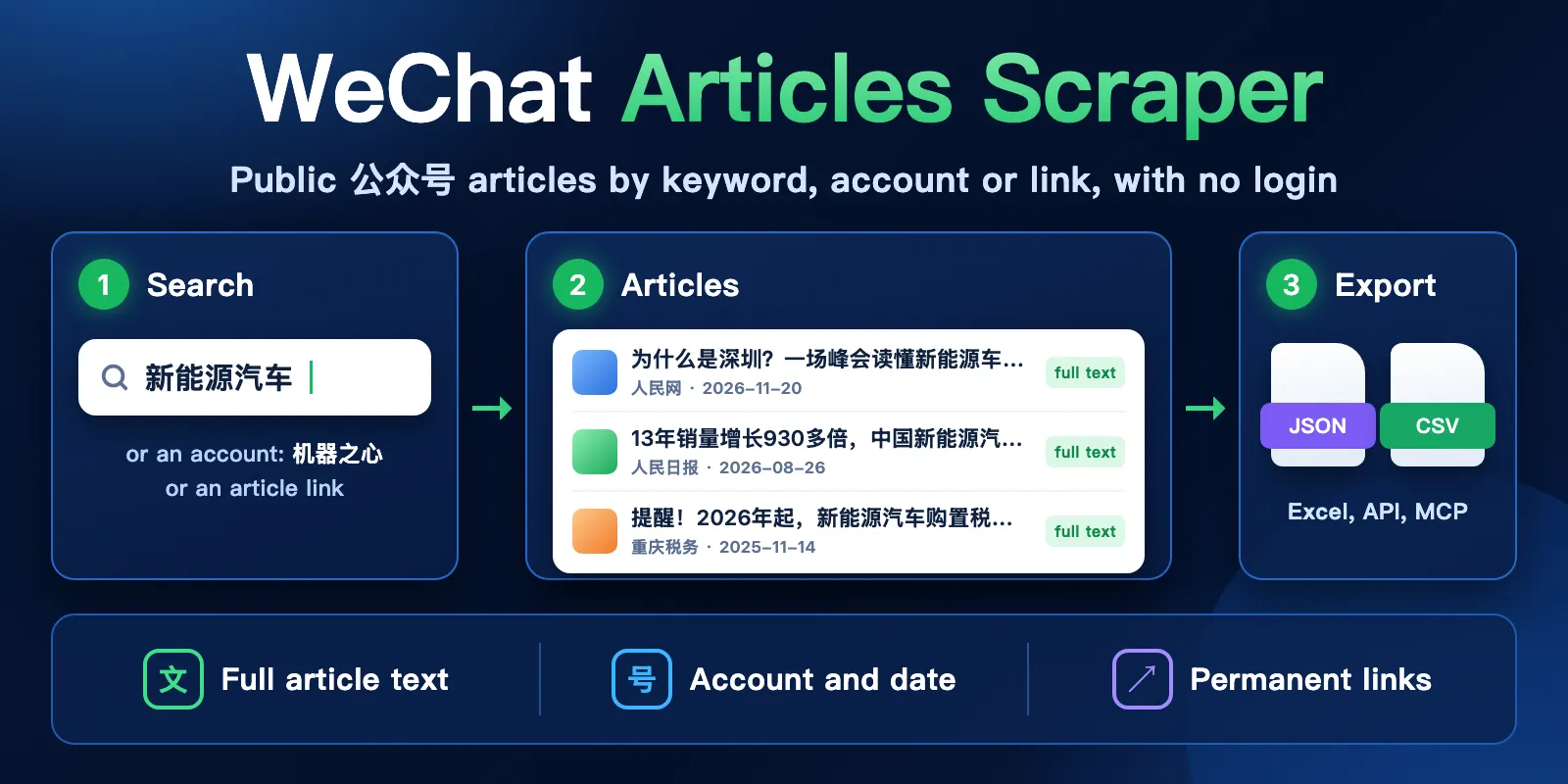
Table of contents
- What it does
- How it works
- Quick start
- Use cases
- Input
- Output
- Pricing
- Limits
- API, export and integrations
- Troubleshooting
- FAQ
- Related Actors
- Support
What it does
WeChat articles are hard to search from outside WeChat. This Actor finds them through two public search engines, Sogou Weixin search and Baidu, and reads public article pages on mp.weixin.qq.com. It does not log in to WeChat and does not solve CAPTCHAs.
Each article is one row: title, official account name, publication time, digest, cover image and link. With Include full text on, a row also has the full article text, the body HTML, image links, the author and the account's WeChat ID.
An input that gives no article (a broken link, a query with no results) gets one free note row that says why.
Good fit
- Follow what Chinese media write about a brand, product or topic, by keyword.
- Collect the latest articles of known official accounts (量子位, 机器之心).
- Turn a list of WeChat article links into clean text for reading, translation or an AI model.
- Save every article of a WeChat album (合集).
How it works
- You give keywords, account names, article links or album links.
- For keywords and accounts the Actor searches Sogou Weixin search or Baidu. Auto mode picks the engine for you: Baidu when you want full text (its links are permanent), Sogou when you do not (its results are the newest).
- With full text on, it opens each article page on WeChat and reads the text, author and account ID.
- It saves one row per article to the dataset, a free note row for each input with no article, and a run summary with the status and counts.
Quick start
-
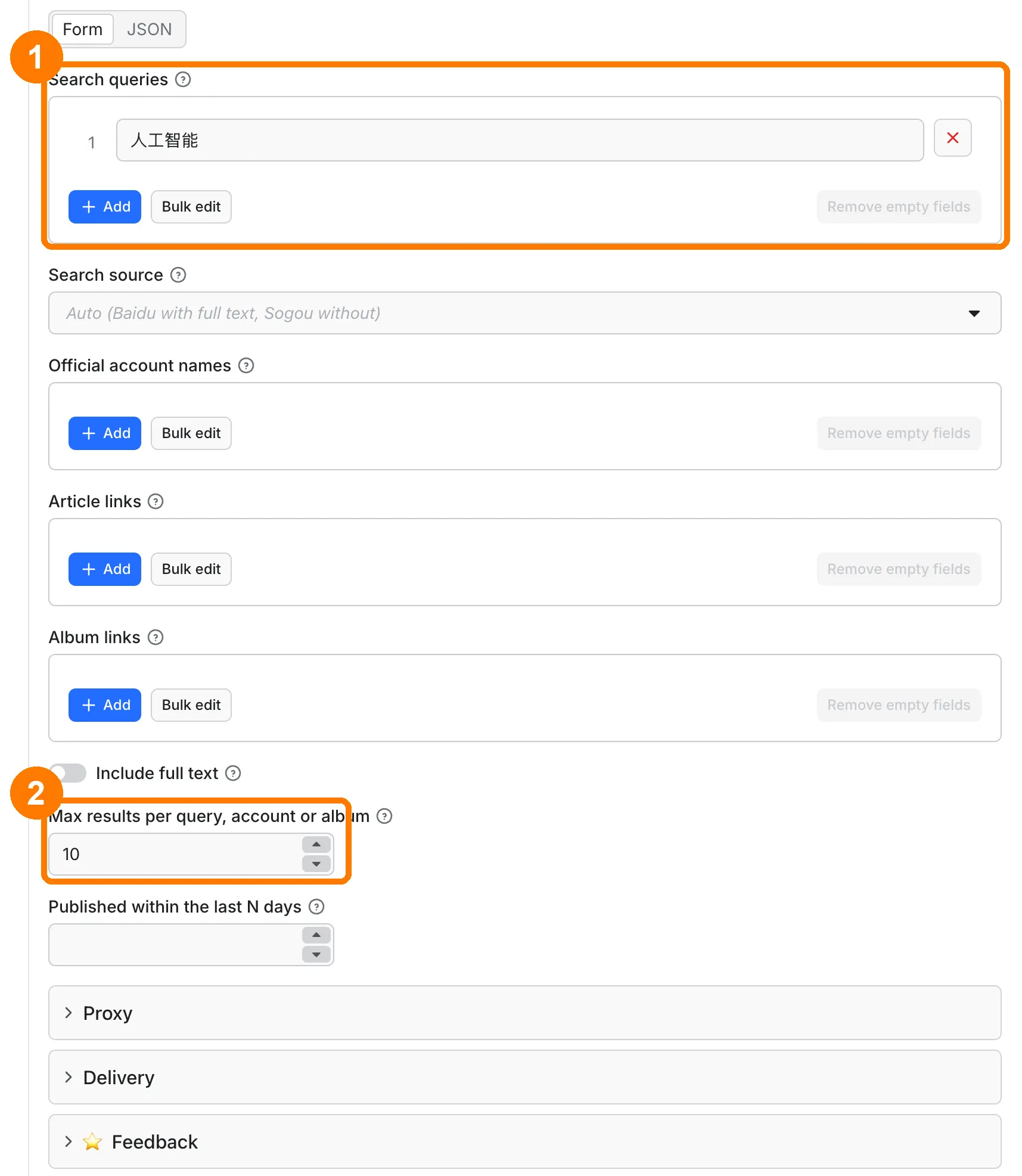
Open the input form. Search queries already has
人工智能(box 1 in the picture). -
Keep Max results per query, account or album at 10 (box 2).
-
Click Start.
-
When the run finishes, open the Output tab and check the
title,accountNameandpublishedAtcolumns.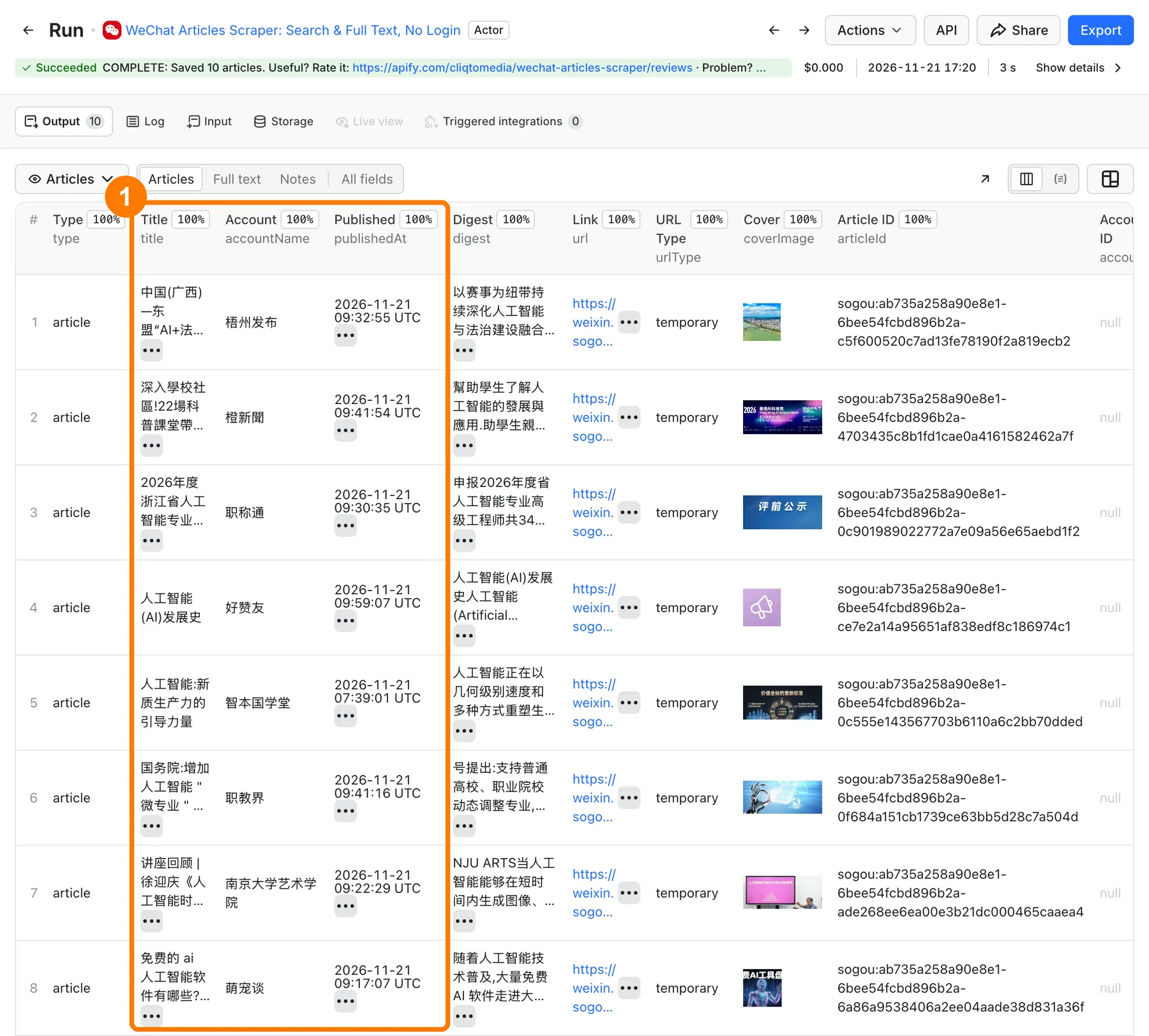
Expected result: 10 of the newest WeChat articles about 人工智能 (artificial intelligence), each with title, account, date, digest, cover and a Sogou link. To get full text and permanent links, turn on Include full text.
Use cases
| Buyer job | Input path | Output entity | Key fields | Next integration |
|---|---|---|---|---|
| Track a topic or brand in Chinese media | searchQueries | Article | title, accountName, publishedAt, digest, url | Google Sheets, Slack or Notion summary |
| Read full articles for analysis or AI | searchQueries + includeFullText | Article with text | title, content, author, publishedAt, url | LLM, translation, search index |
| Follow official accounts | accountNames | Article | accountName, title, publishedAt, url | Scheduled run + webhook |
| Clean up a list of article links | articleUrls + includeFullText | Article with text | title, content, accountId, coverImage | Your database via API |
| Save a whole album | albumUrls | Article | position, title, publishedAt, url | JSON or CSV export |
Input
Input fields
You need at least one of searchQueries, accountNames, articleUrls or albumUrls. Duplicates are removed. HTML in a query is removed with a warning.
| Field | Plain name | Type | Required | Default / prefill | Allowed values | Effect | Example | Recommendation |
|---|---|---|---|---|---|---|---|---|
searchQueries | Search queries | array of strings | one input is required | prefill ["人工智能"] | up to 50 | Searches WeChat articles by keyword | ["新能源汽车"] | Chinese keywords give the most results |
searchSource | Search source | string | no | auto | auto, sogou, baidu | Picks the search engine for queries and accounts | "baidu" | Keep auto |
accountNames | Official account names | array of strings | no | none | up to 50 | Gets the latest articles of these accounts | ["机器之心"] | Use the exact account name |
articleUrls | Article links | array of strings | no | none | up to 1,000 mp.weixin.qq.com links | Reads these articles | ["https://mp.weixin.qq.com/s/…"] | Turn on full text with links |
albumUrls | Album links | array of strings | no | none | up to 50 appmsgalbum links | Saves every article of the album | ["https://mp.weixin.qq.com/mp/appmsgalbum?__biz=…&album_id=…"] | Set maxItems to the album size |
includeFullText | Include full text | boolean | no | false | true, false | Opens each article and saves text, HTML, images, author | true | Turn on when you need the text |
maxItems | Max results per query, account or album | integer | no | 10 (prefill 10) | 1–200 | Stops each query, account or album at this number | 50 | Sogou gives at most 100 |
publishedWithinDays | Published within the last N days | integer | no | none | 1–365 | Drops older articles | 7 | Leave empty for no date limit |
proxyConfiguration | Proxy | object | no | Apify Proxy | Apify Proxy settings | Proxy for Sogou and Baidu | {"useApifyProxy": true} | Keep the default |
deliveryConnector | Send results to | MCP connector | no | none | your Slack or Notion connector | Posts a short summary after the run | — | Optional |
deliveryTarget | Notion page or channel | string | no | none | Notion page link or Slack channel ID | Where the summary goes | — | Needed for Notion |
Interacting settings
| When | Input A | Input B | Effective behavior | Example | Cost/result effect |
|---|---|---|---|---|---|
| Full text with search | includeFullText: true | searchSource: auto | Search goes through Baidu: permanent links and full text | {"searchQueries":["光伏"],"includeFullText":true} | Rows cost the same; the run is slower |
| No full text | includeFullText: false | searchSource: auto | Search goes through Sogou: the newest articles, temporary links | prefill | Fastest |
| Sogou chosen by hand | searchSource: sogou | includeFullText: true | Sogou rows keep only the digest; the run warns and marks contentStatus: not_resolved | — | No text for Sogou rows |
| Date filter | publishedWithinDays | maxItems | Older articles are skipped, so you can get fewer than maxItems | 7 | You pay only for saved rows |
Input examples
Newest articles about a topic
Expected behavior: one Sogou search, about 5 seconds.
Expected output: 10 articles with title, accountName, publishedAt, digest, coverImage, url (temporary Sogou link).
Limit or cost note: Sogou gives at most 100 results per query.
Full text for a topic
Expected behavior: Baidu search, then each article page is opened. 100 articles took about 4 minutes in our test (225 seconds); Baidu blocks can make it slower.
Expected output: articles with content, contentHtml, images, author, accountId and a permanent mp.weixin.qq.com link.
Limit or cost note: Baidu's index lags behind WeChat by days, so today's articles may be missing.
Output
Output fields
| Field | Meaning | Type | Can be empty? | Example / enum | Source / notes |
|---|---|---|---|---|---|
type | Row kind | string | no | article, note | note rows are free |
articleId | Stable ID | string | no | MzA3MzI4MjgzMw==_2651234567_1 | __biz_mid_idx when known, else sogou:… or url:… |
title | Article title | string | no | 为什么是深圳?… | Search result or article page |
accountName | Official account name | string | yes | 人民网 | |
accountId | Account's WeChat ID | string | yes | gh_… | Only from the article page (full text or links) |
accountBiz | Account __biz ID | string | yes | MzA3MzI4MjgzMw== | From permanent links |
author | Author on the page | string | yes | 刘霞 | Many articles show no author |
publishedAt | Publication time, UTC | string | yes | 2026-11-20T07:21:38Z | From the article page when opened |
digest | Short summary | string | yes | ◎ 科技日报记者… | Some articles have none |
content | Full text | string | yes | plain text | Only with includeFullText |
contentHtml | Body HTML | string | yes | HTML | Only with includeFullText |
images | Image links in the body | array | empty array | ["https://mmbiz.qpic.cn/…"] | Only with includeFullText |
coverImage | Cover image link | string | yes | https://mmbiz.qpic.cn/… | |
url | Article link | string | only on some note rows | https://mp.weixin.qq.com/s?__biz=… | |
urlType | Link kind | string | no | permanent, temporary | Sogou links expire |
source | Where the row came from | string | no | sogou, baidu, article, album | |
input | The query, account or link | string | no | 人工智能 | |
inputType | Input kind | string | no | searchQuery, accountName, articleUrl, albumUrl | |
position | Place in results or album | number | yes | 1 | |
contentStatus | Full text state | string | no | complete, not_requested, captcha, not_resolved, error | |
status | Row status | string | no | ok, not_found, error, invalid_input | |
error | Why a note row has no article | string | yes | The article is no longer available: WeChat says the link is broken (参数错误)… | null on articles |
fetchedAt | When the row was saved, UTC | string | no | 2026-11-21T09:31:28.049Z |
null means the source did not show the value. The Actor never puts 0 or an empty string in its place.
Output entities and surfaces
| Situation | Dataset/API/KVS/live view | Result shape | User action |
|---|---|---|---|
| Normal item | Dataset, Output tab | One article row per article | Export or use title, content, url |
| Domain-empty result | Dataset + RUN_SUMMARY | One free note row, status NO_RESULTS | Try another keyword or source |
| Partial result | Dataset + RUN_SUMMARY | Saved rows stay; status PARTIAL with the reason | Read the summary; run the rest again |
| Technical failure or retry | RUN_SUMMARY, log | Status ERROR and a note row per failed input | Retry later or use residential proxy |
RUN_SUMMARY in the key-value store holds the run status (COMPLETE, PARTIAL, NO_RESULTS, ERROR, INVALID_INPUT), counts, warnings and limitReached (MAX_ITEMS when the run's paid row limit stopped it).
Output example
This is one row from the prefill run, trimmed (contentHtml and images are left out, the link is shortened). It has no full text, so content, accountId and author are null.
Send results to Slack or Notion
Pick your connector in the optional deliveryConnector field. After the run saves its data, the Actor posts a short summary (up to 25 rows and a link to the full dataset) there. Put a Notion page link or a Slack channel ID in deliveryTarget: in Notion every run is added on top of that one page, so your workspace does not fill up with new pages. Without a page link, Notion delivery is skipped and the log says so. A delivery error never fails the run and costs nothing extra. Connect a service once in Apify Console → MCP connectors.
Use case → fields
| Buyer job | Input path | Output entity | Key fields | Next integration |
|---|---|---|---|---|
| Topic monitoring | searchQueries | Article | title, accountName, publishedAt | Slack summary |
| Text for AI | articleUrls + includeFullText | Article with text | content, title, url | LLM via API |
| Account tracking | accountNames | Article | accountName, title, publishedAt | Notion summary |
Pricing
Pricing unit
You pay per event. Platform usage is included in these prices.
| Event | When it is charged | Free | Bronze | Silver | Gold and higher |
|---|---|---|---|---|---|
| Actor start | Once per run, per GB of run memory (minimum one) | $0.0005 | $0.0005 | $0.0005 | $0.0005 |
| Input checked | Once for each search query, account, album or article link sent to the source | $0.0002 | $0.0002 | $0.0002 | $0.0002 |
| Article | Once for each saved article | $0.0026 | $0.00234 | $0.00208 | $0.00182 |
| Article with full text | Once for each saved article that has its full text | $0.0026 | $0.00234 | $0.00208 | $0.00182 |
Full text costs the same as a plain article. The default memory (512 MB, or 1 GB with full text) counts as one start fee.
- Query or account with no articles, or a source failure on it: you pay the start fee and the input fee, and nothing for articles. The free note row explains why.
- Article page behind a CAPTCHA: the row is saved and charged as a plain article, not as an article with full text.
- Rejected or duplicate links: free. A run with only invalid input costs just the start fee.
- Source stops answering: after two failed requests in a row the Actor stops sending inputs to that source. The rest are skipped and not charged.
- Note rows: always free.
Cost examples
| Scenario | Input scope | Expected item/event count | Free | Bronze | Silver | Gold and higher | Stop/cap behavior |
|---|---|---|---|---|---|---|---|
| Smallest | 1 query | 1 article | $0.0033 | $0.0030 | $0.0028 | $0.0025 | Stops at maxItems |
| First test (prefill) | 1 query | 10 articles | $0.0267 | $0.0241 | $0.0215 | $0.0189 | Stops at maxItems |
| Normal | 10 queries | 100 articles | $0.2625 | $0.2365 | $0.2105 | $0.1845 | Stops at maxItems or your cost cap |
| Large, full text | 10 queries, Baidu | 1,000 articles with text | $2.6025 | $2.3425 | $2.0825 | $1.8225 | About 4 minutes per 100 articles, slower when Baidu blocks |
A run needs a maximum cost of at least $0.0035. Apify refuses a lower cap before the run starts. When the money left is not enough for the next input or article, the Actor stops, keeps what it saved and says why in RUN_SUMMARY.
Limits
- No login: the Actor sees only what Sogou, Baidu and public WeChat pages show. It cannot read comments, likes, read counts, private accounts or paid articles.
- Sogou gives at most 100 results per query or account (10 pages). Its links are temporary and stop working after a while. Sogou rows have no full text.
- Baidu gives permanent links and full text, but its index lags behind WeChat by days. Today's articles may be missing.
- WeChat sometimes asks for a CAPTCHA on an article page. The Actor does not solve it: the row is saved without text and
contentStatusiscaptcha. - An article page larger than 6 MB is saved with its title, account and date but without the full text, and the summary has a warning.
- Up to 50 queries, 50 accounts, 1,000 article links and 50 albums per run;
maxItemsfrom 1 to 200 per query, account or album. accountNamesfinds articles by account name. An account with a common name can bring articles of other accounts with the same words in the name.- Search engines change their results. Two runs with the same input can give different articles.
- Max items in the run options (Console Run options or the API
maxItems) caps paid rows for the whole run. When it is reached, the run stops with statusCOMPLETE,limitReached: MAX_ITEMS, and inputs not yet started are markednot_processedinRUN_SUMMARYand are not charged.
API, export and integrations
- API: start a run with
POST https://api.apify.com/v2/acts/cliqtomedia~wechat-articles-scraper/runsand the input JSON, then read rows from the run's dataset. - Export: JSON, CSV, Excel, XML, RSS or HTML from the Output tab or the dataset API.
- Scheduling: add a schedule in Apify Console, for example a daily search for your brand with
publishedWithinDays: 1. - Webhooks / no-code: a webhook on "run succeeded" can send the dataset link to Zapier, Make or n8n; the next step reads
title,urlandcontent. - SDK / MCP / agent: use the Apify client for JavaScript or Python, or the MCP server below.
Use with AI agents (MCP)
MCP server URL with only this Actor:
Smallest useful input:
Key output fields: title is the article title, accountName is the official account, publishedAt is the publication time in UTC, content is the full text (with includeFullText), and url is the article link.
A typical agent call (one query, 10 articles, no full text) costs about $0.027 on the Free plan and finishes in under a minute.
Limits for agents: at most 200 results per query, account or album (Sogou gives at most 100); full text takes about 4 minutes per 100 articles, more when Baidu blocks; Sogou links are temporary, so ask for full text when you need permanent links.
Troubleshooting
Blocked or empty search results
Symptom: the run ends with NO_RESULTS or PARTIAL and the summary mentions blocks.
Likely reason: Sogou or Baidu blocked the proxy IPs for a while.
Check: open RUN_SUMMARY and look at the warnings.
Action: run again later, or choose a residential proxy group in Proxy.
Rows have no full text
Symptom: content is null and contentStatus is not_requested or not_resolved.
Likely reason: full text is off, or the search source is Sogou.
Check: see includeFullText and searchSource in your input.
Action: turn on Include full text and keep Search source at auto.
Some inputs were skipped with "source stopped answering"
Symptom: the run ends with PARTIAL, and some note rows say "The source stopped answering earlier in this run".
Likely reason: Sogou, Baidu or WeChat failed two requests in a row, so the Actor stopped sending requests to that source. Those inputs are not charged.
Check: the warnings in RUN_SUMMARY name the source and the error.
Action: run the skipped inputs again later.
contentStatus is captcha
Symptom: an article row has title and link but no text.
Likely reason: WeChat asked for a CAPTCHA on that page.
Check: the row's contentStatus.
Action: run those links again later in articleUrls.
A Sogou link does not open
Symptom: a url with weixin.sogou.com/link shows an error page.
Likely reason: Sogou links are temporary (urlType: temporary).
Check: the row's urlType.
Action: use the link soon after the run, or turn on full text to get permanent links.
FAQ
Do I need a WeChat account or cookies?
No. The Actor uses only public search pages and public article pages.
Why do I get fewer articles than maxItems?
The search engine found fewer, the date filter dropped some, or a source blocked part of the run. The run summary says which. You pay only for saved article rows.
Are the results complete?
No search engine shows every WeChat article. Sogou shows the newest ones (up to 100 per query), Baidu shows what it has indexed. For a full list of one account, use an album link if the account has one.
Is the publication time exact?
With full text or article links it comes from the article page. Sogou and Baidu rows show the time from the search result, which can differ by a minute or two.
Related Actors
- Weibo Scraper: Posts, Comments & Profiles, No Login — public Weibo posts, comments and profiles.
- Zhihu Scraper: Question Answers, Votes & Authors, No Login — answers to Zhihu questions.
- Xiaohongshu (RedNote) Notes Scraper, No Login — public Xiaohongshu notes.
- Bilibili Scraper: Videos, Comments & Creators, No Login — Bilibili videos, comments and creators.
- News Article Extractor: RSS, URLs & Clean Text — clean text from news links and RSS feeds.
Support
For a bug, question or feature request, open the Actor's Issues tab on Apify. Include the run ID, the input fields you used and the error text from the log or RUN_SUMMARY. Never send tokens, cookies or private data.
⭐ Found it useful? Rate this Actor. Something wrong? Report a problem — we fix reported problems.


