

Wikipedia Pageviews Monitor: Top Articles & Spikes
Pricing
from $0.21 / 1,000 view records
Wikipedia Pageviews Monitor: Top Articles & Spikes
Track Wikipedia article views by day or month. Get daily top articles, rolling spike ratios and per-article totals, averages and peaks. No API key; up to 50 articles and 90 days.
Pricing
from $0.21 / 1,000 view records
Rating
0.0
(0)
Developer

Cliqto Media
Maintained by CommunityActor stats
0
Bookmarked
2
Total users
1
Monthly active users
2 days ago
Last modified
Features
Share
Get daily or monthly Wikipedia article views, daily top articles and interest spikes from Wikimedia metrics. Add exact article titles; no API key is needed. The three-article, 30-day sample costs $0.057 at the base tier. Unavailable source data is marked clearly; a spending limit can produce a partial result.
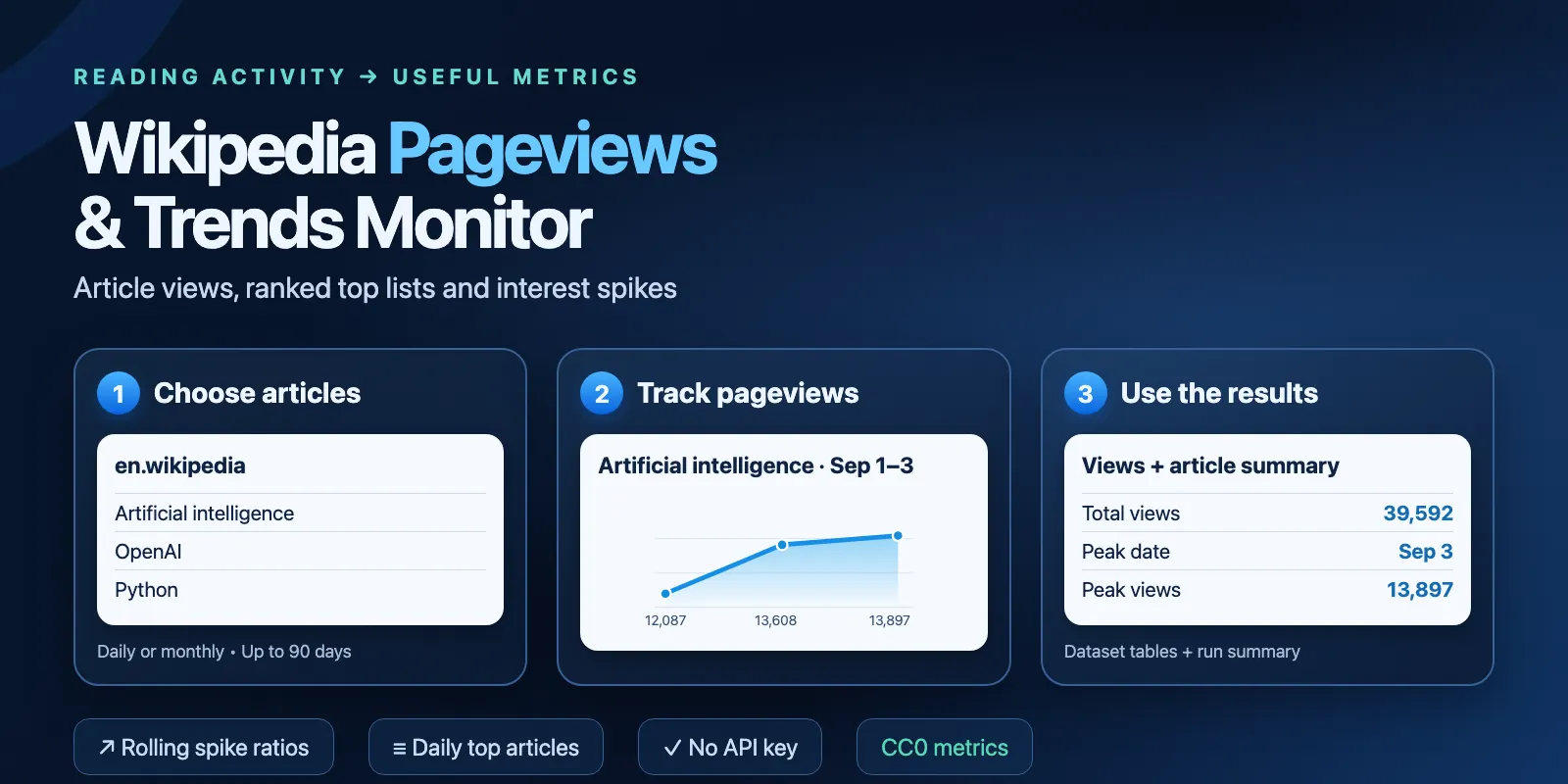
Table of contents
- What it does
- Quick start
- Input
- Output
- Pricing and limits
- Use cases
- Repeated runs and scheduling
- API, export and integrations
- Limits and partial results
- Troubleshooting
- FAQ
- Source and support
What it does
- Articles: one row per article and UTC day, or per calendar month. Get total views, average, peak date and spike counts in the run summary.
- Top: get the most-viewed pages for one Wikipedia project and UTC day. Keep the source ranks, including ties and rank gaps.
- Spikes: compare each point with the average of the previous points. The default baseline is seven points; a spike starts at twice that average.
Views measure reading activity. They do not measure unique readers, sales or buying intent. Top lists include main pages and namespaces such as Special:. This Actor does not remove them or change their rank. It does not combine redirects, old article names or visits across titles.
Quick start
- Open Input.
- Keep the three sample
articles: Artificial intelligence, OpenAI and Python (programming language), onen.wikipedia. - Keep
modeasarticlesandgranularityasdaily. Leave dates blank for the recent 30-day window. - Click Start.
- Open Pageviews. Check
article,dateandviews. Open Run summary for totals and peaks.
Expected result: 90 view points when the source has all 30 days for each article. The window ends two UTC days ago to allow time for source updates. The sample is a UI prefill; an empty API input {} is invalid.
Input
Input fields
| Field | Type | Required | Runtime default / UI prefill | Values and effect | Recommendation |
|---|---|---|---|---|---|
mode | string | No | articles | articles or top | Use articles for history; top for a daily ranking. |
articles | array of objects | In articles mode | No runtime default; UI prefill has three articles | 1–50 objects, each with title and optional project. Title is an exact Wikipedia title, at most 255 characters. Spaces and underscores are equivalent. Identical project/title pairs are removed. | Copy the page title; do not paste a URL. |
project | string | No | en.wikipedia | Wikipedia language project for top and articles without their own project. en.wikipedia.org is also accepted. | Set project in each article for mixed languages. |
startDate | string | No | 29 days before endDate | Inclusive YYYY-MM-DD, from 2015-07-01 | For monthly, use the first day of a month. |
endDate | string | No | Two UTC days ago | Inclusive YYYY-MM-DD, no later than yesterday; at most 90 inclusive days after startDate | For monthly, use the last day of a month. |
date | string | No | Two UTC days ago | YYYY-MM-DD, top mode only, from 2015-07-01 to yesterday | A missing source day is reported; it is not silently changed. |
access | string | No | all-access | all-access, desktop, mobile-web, mobile-app | Keep all-access for combined access channels. |
agent | string | No | user | Article mode: user, all-agents, spider, automated | Keep user for human-classified traffic. Top has no agent filter; keep the default. |
granularity | string | No | daily | daily or monthly; top requires daily | Monthly requires complete calendar months within 90 days. |
spikeThreshold | number | No | 2 | 1.1–100; views divided by the rolling average must reach this multiplier | Increase it to flag larger changes. |
spikeWindow | integer | No | 7 | 1–30 previous points; days for daily, months for monthly | Set 1 for a month-to-month comparison. |
maxResults | integer | No | 4500 | 1–4500 saved rows, including not-found checks | Lower it to limit output. Top returns at most 1000 source entries. |
Empty strings, null field values, empty articles in articles mode, unknown keys and invalid dates are rejected. Article titles may include Unicode. No content or contact details are collected.
Interacting settings
| Settings | Behavior |
|---|---|
Article project + global project | Article project wins; the global project supplies missing article projects. |
endDate without startDate | Start is 29 days before the supplied end date. |
monthly + dates | Only full calendar months are allowed. Counts are for the full month; date is its first day. |
spikeWindow + date window | Only returned earlier points are used. No extra baseline dates are fetched. The first spikeWindow points have null spikes. |
top + series settings | Articles and start/end dates do not select top entries. Keep agent=user and granularity=daily. All supplied dates and objects must still be valid. Spikes and article totals are not calculated for top. |
maxResults + maximum charge | The first reached limit stops saving rows. The summary names the reason. |
Input examples
Three daily points with a one-point baseline:
This returns three daily points and an article total of 39,592 views. Base cost: $0.0309.
Daily top list:
That source list has 999 entries. Main Page is rank 1 with 6,785,879 views. Base cost: $0.3297. The source may return fewer than 1000 entries.
Monthly points:
Two complete months return 355,079 and 540,333 views. Base cost: $0.0306.
Output
Output example
The first row for the daily input above is shown below. The fetch time is from a real run. The first point has no previous baseline, so its spike values are null.
Dataset fields
| Field | Type | Null / empty | Meaning |
|---|---|---|---|
project | string | No | Normalized project, such as en.wikipedia. |
article | string | Empty on an unavailable top list | Title with spaces. |
date | string | No | UTC day; first day of the month for monthly counts. On not_found, the requested start date or top date. |
views | integer or null | Null on not_found | Source view count. Zero is kept as zero. |
access | string | No | Requested access channel. |
agent | string or null | Null for top | Requested article traffic agent. Top endpoint has no agent filter. |
granularity | string | No | daily or monthly. |
rank | integer or null | Null for articles or not_found | Source top rank; ties and gaps are kept. |
status | string | No | complete or not_found. |
reason | string or null | Null for complete | NO_DATA_FOR_TITLE_PROJECT_OR_DATE on a source 404. |
spike | boolean or null | Null for top, unavailable or missing/zero baseline | True when spikeRatio reaches spikeThreshold. |
spikeRatio | number or null | Null without a positive full baseline | Views divided by the mean of the previous spikeWindow points. |
baselineAverage | number or null | Null without enough previous points or for top | Rolling mean; a zero baseline stays zero. |
provider | string | No | Wikimedia Analytics API. |
licence | string | No | CC0-1.0 for the numeric metrics. |
sourceUrl | string | No | Metrics request URL for this query. |
articleUrl | string | Empty on an unavailable top list | Link to the exact title, without resolving redirects. |
fetchedAt | string | No | UTC time of reading the result. |
sourceUpdatedAt | string or null | Always null | Source endpoint does not provide a revision timestamp. |
Tables and run records
- Pageviews table: project, article, date, views, access, agent, granularity, rank, status and articleUrl.
- Spikes table: project, article, date, views, baselineAverage, spikeRatio, spike and status. It shows all points, including those without a spike.
- RUN_SUMMARY: status, reason, provider, licence, mode, rows, usefulRows, notFound, requests, retries, bytes, startedAt, finishedAt and articleSummaries.
- OUTPUT: status, rows, reason and articleSummaries.
Each articleSummaries item has project and article (strings), points, total, peakViews and spikes (integers), average (number), peakDate (UTC date string), complete (boolean) and missingDates (array of UTC date strings). Totals use saved points only. An item is absent for unavailable articles and in top mode. A truncated article, or one with dates the source does not have, has complete=false; totals are for that delivered subset.
RUN_SUMMARY.status is complete, partial, not_found or error. reason is null or an error/limit code. Row and request counters are integers; timestamps are UTC strings. A not_found result has one paid check row per unavailable query, with null views. It does not prove that the page does not exist.
Pricing and limits
One automatic start costs $0.03. Each saved daily/monthly point, top entry or not-found check is one view-record event. Article summaries have no extra charge.
| Tier | Per 1000 saved rows | Per row |
|---|---|---|
| FREE / base | $0.30 | $0.000300 |
| BRONZE | $0.285 | $0.000285 |
| SILVER | $0.270 | $0.000270 |
| GOLD / PLATINUM / DIAMOND | $0.255 | $0.000255 |
The FREE tier is the base price, not a promise of free rows. Standard run platform usage is included in the event price.
| Scenario | Saved rows | Base total | GOLD total |
|---|---|---|---|
| Unavailable article check | 1 | $0.0303 | $0.030255 |
| Small series | 10 | $0.033 | $0.03255 |
| Three-article sample, 30 days | 90 | $0.057 | $0.05295 |
| Series or top subset | 100 | $0.060 | $0.05550 |
| Top list with 1000 entries | 1000 | $0.330 | $0.285 |
| 50 articles × 90 days | 4500 | $1.380 | $1.1775 |
| Runtime input error before rows | 0 | $0.030 | $0.030 |
Set Maximum cost per run to control events. The minimum is $0.03. At that limit, the start can use the budget and no source requests are made. A higher limit may return fewer points. Saved rows and the start remain charged on failed, partial, repeated or cancelled runs. An input rejected before a run starts has no Actor start event.
Use cases
| Job | Input | Useful output |
|---|---|---|
| Follow reading activity for a brand or topic | Exact titles in articles | date, views, total, average, peakDate |
| Prepare a daily editorial topic list | top + project + date | article, rank, views, articleUrl |
| Compare language editions | Per-article projects | project, article, date, views |
| Flag changes in reading activity | spikeWindow + spikeThreshold | baselineAverage, spikeRatio, spike |
Repeated runs and scheduling
Every run reads the requested metrics again and charges for saved rows. No baseline, only-new filter or rank movement history is kept between runs. Wikimedia can revise historical data.
To monitor recent activity, save your input in an Apify task and set a schedule yourself. Use the Spikes table or store each run's output in your own system. This Actor does not create schedules or webhooks.
API, export and integrations
Start it through the Apify API with your own token in the Authorization header:
Poll the returned run ID, then read its Dataset and RUN_SUMMARY. Export the flat Dataset as JSON or CSV. Use project, article and date to join rows in your spreadsheet or data pipeline.
Use with AI agents (MCP)
Open this Actor in Apify MCP. Apify authentication is required to run it.
Small UI sample input:
Check project and article for identity, date for the UTC period, views for the count and spike for the rolling alert. The 90-point sample costs $0.057 at base tier and normally takes under 30 seconds. Respect the limits of 50 articles, 90 inclusive days and 4500 rows; larger work may need polling. The Actor uses limited permissions and pay-per-event pricing.
Limits and partial results
- Wikipedia language projects only. No country charts, article text, unique readers or edit counts.
- Up to 50 input articles and 90 inclusive days. Monthly mode needs full months; partial months are rejected.
- Top lists are for one project/day, with up to 1000 source entries. They include namespaces and may contain fewer entries.
useris the default series agent. Top has no configurable agent filter.- Source data starts in July 2015 and arrives after the UTC day ends. Two-day lag is a safe default, not a source availability guarantee.
- Renames and redirects remain separate titles. Counts can differ from a tool that combines redirect views.
- Insufficient or zero spike baseline returns null, not infinity or an invented spike.
- maxResults or charge limit: run succeeds with partial and MAX_RESULTS or CHARGE_LIMIT.
- Dates the source does not have (before an article was created or renamed, or not yet processed): no row is written for them, and they are not filled with zero. They are listed in
missingDates; the run succeeds with partial and SOURCE_DATES_MISSING. Spike baselines need the preceding periods to be present. - Source, format, deadline or graceful cancellation: run fails. Saved rows remain; summary is partial if rows exist, otherwise error.
- Internal source work is bounded to 240 seconds, 160 attempts, 16 MiB per response and 64 MiB per run. A shorter platform timeout reduces work. Use 256 MB memory.
- A forced platform kill can stop the process before it writes final diagnostics. Dataset writes and event charges are separate platform operations; no exactly-once guarantee is made after a lost storage response.
Troubleshooting
| Symptom | Check | Action |
|---|---|---|
| INVALID_INPUT | Exact titles, object arrays, date format/order, supported project and numeric limits | Correct input. Monthly needs full calendar months. Empty API input is invalid. |
| not_found with null views | Title, project and requested date | Try a known earlier date or the exact current/old title. Do not read null as zero. |
| partial / MAX_RESULTS | Saved row count and article summary complete flag | Raise maxResults within the 4500 limit or split the input. |
| partial / CHARGE_LIMIT | Maximum cost and saved row count | Raise the spending cap for a rerun; the rerun bills again. |
| partial / SOURCE_DATES_MISSING | missingDates in the article summary | New or renamed article, or a very recent date. Gaps are not zero views. |
| SOURCE_ERROR or DEADLINE | Run summary and smaller known input | Retry later or reduce input size. Do not treat failure as no interest. |
| SOURCE_FORMAT | Source response has an unexpected shape or identity | Report the run ID. |
| No spikes | Baseline length, zero baseline and multiplier | Use enough periods or reduce spikeWindow; top does not calculate spikes. |
FAQ
Do I need a Wikimedia key or proxy? No.
Does zero mean the same as null? No. Zero is a supplied count. Null means no available metric or no valid baseline.
Does top mean fastest-growing? No. It means most-viewed for the selected day. Use article series for spike ratios.
Can I ask for yesterday? Yes, but data may not yet be available. Missing days are listed in missingDates and the run ends as partial. The default ends two days ago.
Are redirects combined? No. Query each exact title you want to measure.
Does a spike predict sales or searches? No. It reports a change in Wikipedia view counts only.
Does repeating the same input cost money? Yes. Each run starts again and charges for saved results.
Source and support
Source: Wikimedia Analytics API. Numeric data is available under CC0 1.0, as stated in the access policy. The Actor reads and reshapes these counts; Wikimedia does not endorse this product.
For a bug or question, use the Actor's Issues tab on Apify. Include the run ID, mode, title/project, requested dates and a short error code. Send no tokens, cookies or billing details.


