

Australia Hiring Intelligence Scraper
Pricing
from $1.80 / 1,000 job-results
Australia Hiring Intelligence Scraper
Scrape public Australian job listings from supported sources such as SEEK and Jora. Extract titles, companies, locations, salaries, job types, remote/hybrid signals, skills, and hiring-signal scores - no login or cookies required.
Pricing
from $1.80 / 1,000 job-results
Rating
0.0
(0)
Developer

Delowar Munna
Maintained by CommunityActor stats
0
Bookmarked
5
Total users
1
Monthly active users
4 months ago
Last modified
Categories
Share

Scrape public Australian job listings from supported sources such as SEEK and Jora — by keyword + location or by direct search/listing/career URL — and turn them into clean, flat, CSV-friendly rows with Australia-first normalization (state, city, salary range, work arrangement, seniority, skills, occupation tags) and a transparent hiring-signal score. Built for recruiters, staffing agencies, B2B sales teams, lead-gen, and market researchers.
No login, no cookies, no Apify Residential proxy, no expensive paid APIs. The actor uses public HTTP over Crawlee CheerioCrawler + Cheerio, preferring embedded structured data (JSON-LD JobPosting) and falling back to visible HTML. You pay one flat event per unique job row that passes your filters.
✨ Why this scraper
- Australia-first, not a generic global scraper — every row carries normalized
state,city, parsed AUD salary, work arrangement, seniority, and occupation/skill tags. - Three input modes — keyword + location search, direct source URLs, or public career/ATS pages.
- 31 flat fields — job identity, company, AU-normalized location, salary parsing, posting details, and hiring signals. No nested objects; drops straight into Sheets/Excel/CRMs.
- Streaming output — rows are written to the dataset as soon as they're ready, so you see results early instead of waiting for the whole run.
- Pay-Per-Event — one flat
job-resultevent per saved unique job. Duplicates, filtered-out rows, and unsupported URLs are never charged. - Transparent hiring-signal score — rule-based (no AI), explained below.
🚀 Quick start — sample inputs
Example 1 — keyword + location across SEEK and Jora
Example 2 — direct source URLs + custom residential proxy via your own provider
Provide at least one of
searchTerms(with optionallocations) orsourceUrls. If you provide both, the actor runs both and deduplicates across the whole run. Search-mode queries run onseek/jora;public_atsis parsed only from directly-suppliedsourceUrls.
The actor blocks Apify Residential proxy; if you need residential routing, supply your own provider via
proxyConfiguration.proxyUrlsas shown. See 🚦 Proxy policy below.
📦 Output
The dataset has one view: Jobs & hiring signals — a 31-column flat table.
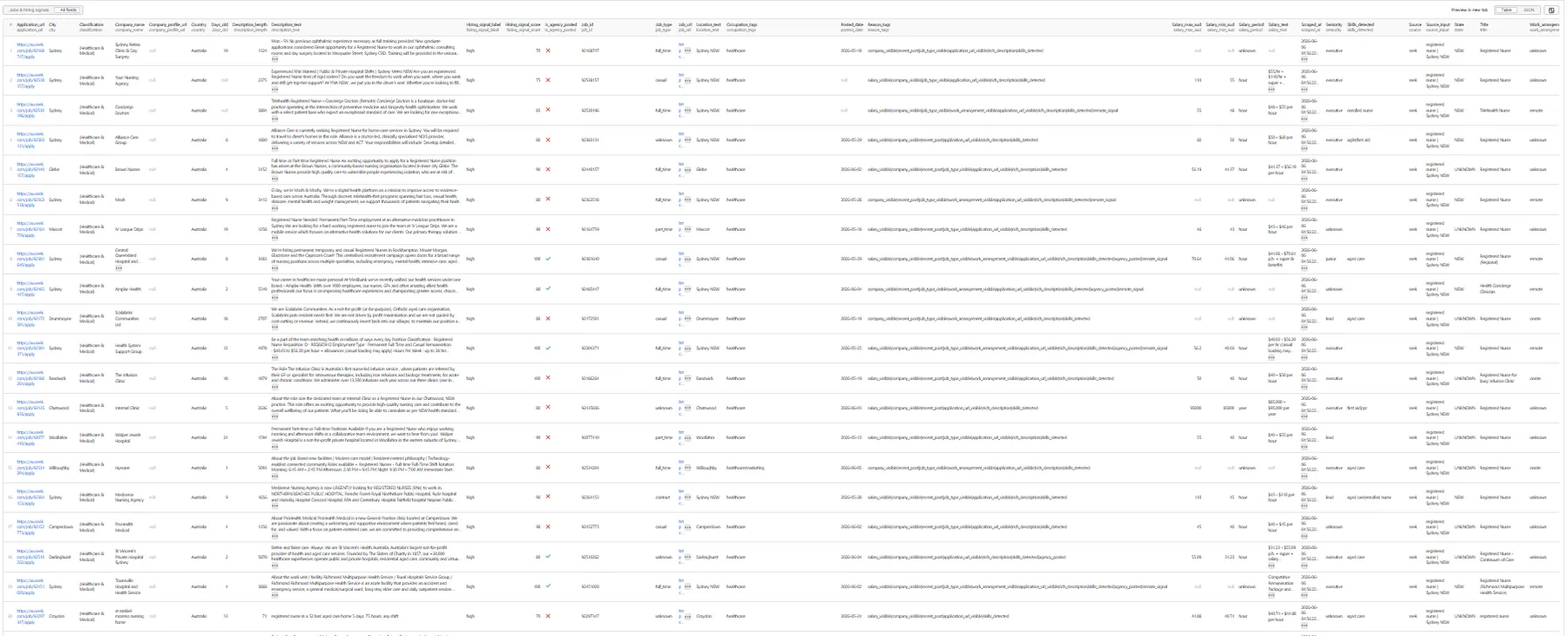
Output fields (31)
job_id, job_url, source, source_input, title, company_name, company_profile_url, location_text, city, state, country, work_arrangement, job_type, salary_text, salary_min_aud, salary_max_aud, salary_period, posted_date, days_old, classification, seniority, skills_detected, occupation_tags, description_text, description_length, application_url, is_agency_posted, hiring_signal_score, hiring_signal_label, reason_tags, scraped_at.
Sample record — Jobs & hiring signals
A real row from a live run (description_text truncated here for readability):
🎯 Hiring-signal score
Transparent rule-based score (0–100) computed from extracted fields — no AI, no external enrichment.
| Signal | Points |
|---|---|
| Salary visible | +20 |
| Company name visible | +15 |
Posted within postedWithinDays | +15 |
Job type known (not unknown) | +10 |
Work arrangement known (not unknown) | +10 |
| Application URL visible | +10 |
| Description length ≥ 500 chars | +10 |
| Skills or occupation tags detected | +10 |
Score is capped at 100.
Labels: high (70–100) · medium (40–69) · low (0–39).
reason_tags is a pipe-separated list explaining the row — e.g. salary_visible, company_visible, recent_post, job_type_visible, work_arrangement_visible, application_url_visible, rich_description, skills_detected, plus agency_posted, remote_signal, hybrid_signal.
💰 Pricing
Pay-Per-Event. One flat event per saved row (final per-event price is configured on the Apify console):
| Event | Charged when |
|---|---|
job-result | Once per unique job row that passed all filters and was successfully written to the dataset. |
So your bill is simply results_saved × price_per_event. The actor honors the user-configured per-run spending cap (Apify eventChargeLimitReached): it both caps how many results it collects up-front to what the limit can pay for, and stops cleanly the moment the cap is reached during charging.
Not charged:
- Duplicates (deduplicated by
source + job_id, canonicaljob_url, and title+company keys). - Rows filtered out by
postedWithinDays/workArrangements/jobTypes/states. - Rows missing a minimum valid set (
title,job_url,source, and one ofcompany_name/location_text). - Unsupported URLs, failed, or blocked requests.
🚦 Proxy policy
Use Apify Datacenter proxy or no proxy for normal runs — both work for public Australian job sources at this actor's conservative concurrency.
Apify Residential proxy is not supported. The actor will fail at startup if proxyConfiguration.apifyProxyGroups includes RESIDENTIAL. Reason: in pay-per-event actors, residential bandwidth (~/GB) is billed to the developer, not the run user, so a single bandwidth-heavy run could exceed the per-result event revenue.
If you genuinely need residential routing, supply your own residential provider via the proxy editor's Custom proxy URLs field — that traffic goes through your provider, not Apify, and is unaffected:
📊 Run summary
After each run, a RUN_SUMMARY entry is written to the key-value store:
charged_events equals the number of successfully saved unique rows. time_to_first_result_seconds, detail_pages_visited, and detail_skipped are timing/throughput counters: rows stream to the dataset as soon as they are ready (not in one batch at the end), and a detail-page fetch is skipped whenever the listing already carries the full description.
⚙️ Filters
| Filter | Effect |
|---|---|
postedWithinDays | Keep rows posted within N days where date is known; rows with unknown date are kept. |
workArrangements | Keep remote / hybrid / onsite / unknown. Missing matches only if unknown included. |
jobTypes | Keep full_time / part_time / contract / casual / temporary / internship / unknown. |
states | Keep ACT/NSW/NT/QLD/SA/TAS/VIC/WA/UNKNOWN after location normalization. |
deduplicate | Drop duplicates across sources/queries; the richer of two duplicate rows is kept. |
Filters are applied before any dataset push or event charge.
🚧 Limitations (V1)
- Public data only: no login, cookies, or member-only content. Some fields (full description, application URL) come from the job detail page and only populate when
includeDescriptionis on. - SEEK is heavily bot-protected. The actor uses an HTTP-first strategy (no browser): it parses SEEK's embedded structured data where reachable and degrades gracefully — logging blocks, returning partial results, and relying on Jora — rather than failing the run. Jora is the most reliable HTTP source.
salary_*parsing is best-effort and AUD-only (no currency conversion in V1); fields staynull/unknownwhen salary is missing or unparseable.public_atsis a best-effort, vendor-agnostic JSON-LDJobPostingparser for directly-supplied career/ATS URLs.- No recruiter/contact extraction, email enrichment, company-website crawling, or AI scoring.
maxResultscaps saved unique rows across the whole run (not per query).
❓ FAQ
Do I need an account or cookies? No. The actor only uses public job listings over HTTP.
Why are some rows missing description / application URL?
Those come from the job detail page. They populate when includeDescription: true (default). With it off, runs are faster but return listing-card fields only.
How is state determined?
From the listing's location text via Australian heuristics (state abbreviations, full names, and major-city → state mapping such as Sydney → NSW, Melbourne → VIC). Unresolvable locations get UNKNOWN.
Can I paste a SEEK or Jora search URL?
Yes — put it in sourceUrls. The actor classifies it, preserves its filters, and paginates it for you.
Can I export to CSV?
Yes — every field is flat (no nested objects). Use Apify's CSV / Excel export, or call the dataset API with format=csv.
🛠️ Technical notes
- Stack: Node.js 22 · Apify SDK 3 · Crawlee
CheerioCrawler· Cheerio. No browser. - Extraction: prefers embedded JSON-LD
JobPosting/__NEXT_DATA__; falls back to visible HTML cards per source. - Sources: SEEK (
seek.com.au), Jora (au.jora.com), and best-effort public ATS / career pages. - Streaming: rows are pushed + charged the moment they're ready (during the crawl), not in a batch at the end — low time-to-first-result.
- Detail-skip: the per-job detail page is fetched only when the listing card lacks a full description (≥500 chars), cutting redundant requests on SEEK.
- Concurrency:
min=1,max=8;maxRequestRetries=3(tune after real runs). - Memory: 1 GB min · 2 GB default · 4 GB max.
- Proxy: Apify Proxy enabled by default; custom configs accepted; Apify Residential rejected at startup.


