

Facebook Marketplace Scraper
Pricing
from $1.00 / 1,000 listing results
Facebook Marketplace Scraper
Scrape public Facebook Marketplace listings by keyword, category, city or URL: prices, discounts, condition, photos, location, seller and vehicle details, with location checking and only-new monitoring. No Facebook login or cookies needed.
Pricing
from $1.00 / 1,000 listing results
Rating
0.0
(0)
Developer

Delowar Munna
Maintained by CommunityActor stats
0
Bookmarked
6
Total users
2
Monthly active users
24 days ago
Last modified
Categories
Features
Share
Facebook Marketplace Scraper — Listings, Prices, Sellers, Photos & Vehicle Details
Search public Facebook Marketplace like a buyer — by keyword, category, city, filters, Marketplace URL or listing ID — and get one clean row per listing: price and discount, condition, location and coordinates, listing time, availability, photos, full description, public seller details and structured vehicle fields. Export to JSON, CSV or Excel, or call it from the API.
- 🔓 No Facebook login, cookies or account — nothing to hand over, nothing to get banned
- 📍 Location you can trust — every row records the place you asked for, the place Facebook used, and how sure the match is. A city Facebook does not know returns a
LOCATION_NOT_RESOLVEDrow — never another city's listings - 📚 Deep search — results are paged well past the first screen (measured: 288 unique listings over 12 pages for one search, no repeats)
- 🧾 Normalized prices — number + ISO currency + Facebook's own text, original (struck-through) price and discount %,
0kept distinct from "unknown" - 🚗 Vehicle details — make, model, year, mileage, transmission, fuel, colours, title status, owners — exactly as Facebook states them, never guessed from the title
- 🔔 Only-new monitoring — schedule a saved search and get just the listings that appeared since the last run
- 💸 Pay only for listings delivered — searches, pagination, retries, location lookups and empty searches are never charged
What can I scrape?
| Mode | You give | You get |
|---|---|---|
SEARCH | search terms + cities (+ optional categories) | listings matching each term in each city |
CATEGORY | categories (Vehicles, Property for rent, Electronics …) + cities | the category's listings in each city |
URL | Marketplace search / category / listing URLs from your browser | the same results, with the URL's filters kept |
LISTING | listing IDs or facebook.com/marketplace/item/<id>/ URLs | each listing with full details |
MONITOR | a saved search + a monitor key | only listings that are new since the previous run |
Filters (applied by Facebook itself): price range, condition, listed within (24 h / 7 days / 30 days), sort order, radius.
Quick start
Run it with the defaults — iphone 15 in New York, up to 20 listings with full details:
More examples
Used cars under 20,000 in Sydney, listed this week, with vehicle details
Several products in several cities, newest first, search cards only (fast)
The run behind the screenshot and samples below — a New York search and the Los Angeles Vehicles category, 10 listings each, every detail on. The third URL is not a search page, so it returns one free INVALID_MARKETPLACE_URL status row:
A search you set up in your browser — copy the URL; its filters are kept:
Specific listings
Get new listings every morning — schedule this input daily:
Input
| Field | What it does |
|---|---|
mode | SEARCH, CATEGORY, URL, LISTING or MONITOR (see above). |
searchTerms | Up to 25 keywords. Each is searched in each location (× each category, if any). |
categories | Vehicles, Property for rent / for sale, Electronics, Furniture, Home goods, Home improvement, Garden, Clothing, Family, Toys, Hobbies, Entertainment, Sporting goods, Musical instruments, Office supplies, Pet supplies, Classifieds, Free stuff. |
locations | Up to 25 cities ("New York", "Austin, TX", "Wagga Wagga"), Marketplace city IDs, or "latitude,longitude". |
country | Optional two-letter code. Disambiguates names like Manchester or Springfield and names the currency when Facebook shows a bare $. |
radiusKm | Optional search radius (Facebook's default is about 65 km). |
minPrice / maxPrice | In the location's own currency. No conversion. |
conditions | NEW, LIKE_NEW, GOOD, FAIR, USED (= any used). |
listedWithin | ANY, 24_HOURS, 7_DAYS, 30_DAYS. |
sortBy | RELEVANCE, NEWEST, PRICE_ASC, PRICE_DESC, DISTANCE. |
maxListingsPerSearch | Up to 1,000 unique listings per search (term × location × category). |
includeListingDetails | Read each listing's page for description, condition, category, coordinates, seller and vehicle fields. Off = search-card fields only. |
maxDetailsToEnrich | Optional cap on detailed listings per run (0 = all). |
includeAllPhotos / includeSellerDetails / includeVehicleDetails / includeCoordinates | Output toggles. |
monitorKey / emitBaselineListings | Monitoring (see below). |
Why might I get fewer listings than I asked for?
Facebook may simply have fewer listings for that search in that area — the run ends when Facebook says the list is finished (coverage: COMPLETE_OR_HIGH in the run summary). A listing found by two of your searches is returned once. And one Facebook quirk: "Listed within" combined with a price sort returns nothing on Facebook's side, so when you set both, the price sort is dropped (with a warning in the log) rather than returning an empty run.
How location works
Facebook Marketplace is local, and a scraper that quietly hands you the wrong city is worse than one that fails. So:
- Big cities (New York, LA, Chicago, London, Sydney, Toronto …) open their own Marketplace city page.
- Other places (Canberra, Wagga Wagga, Austin TX …) are looked up through Facebook's own place search, and the listings are searched around that place's coordinates. The pick must actually be named like the place you asked for — the Actor never takes "the first suggestion".
latitude,longitudeis used as given.- Page 1 is then checked: if none of its listings is in the requested place, the search returns a
LOCATION_MISMATCHstatus row and no listings (and nothing is charged). If only a few are — Facebook often files listings under the nearby town they are in — the listings are kept and markedlocationConfidence: MEDIUM.
Every listing row carries source.requestedLocation, source.resolvedMarketplaceLocation, source.locationMethod and locationConfidence (HIGH / MEDIUM / LOW).
Output
One row per listing. Every row has every column (empty where it does not apply), so CSV exports line up.
| Group | Fields |
|---|---|
| Listing | listingId, url, title, description, category, categoryPath, condition (+ conditionRaw), attributesRaw |
| Price | price, currency, priceText, isFree, originalPrice, isDiscounted, discountAmount, discountPct |
| Place | location.text, .city, .state, .latitude, .longitude |
| Time | createdAt (exact), timestampQuality, ageHours, ageDays |
| Status | availabilityStatus (ACTIVE / PENDING / SOLD / UNAVAILABLE / UNKNOWN), isSold, isPending |
| Media | thumbnailUrl, photos[], photoCount, videos[] |
| Seller | seller.name, .id, .profilePictureUrl, .sellerType, .joinedYear, .rating, .ratingCount — public fields only |
| Vehicle | vehicle.make, .model, .year, .trim, .mileage, .mileageUnit, .transmission, .fuelType, .exteriorColor, .interiorColor, .condition, .titleStatus, .ownerCount, .vin (where stated) |
| Delivery | deliveryTypes (as Facebook lists them, e.g. IN_PERSON), isShippingOffered |
| Provenance | source (mode, term, category, requested/resolved location, URL), locationConfidence, position, detailsStatus, scrapedAt |
| Monitor | eventType (NEW_LISTING / BASELINE_LISTING), monitorKey, isBaseline |
detailsStatus says whether a row has full details: ENRICHED, NOT_REQUESTED (details off), SKIPPED_LIMIT (past maxDetailsToEnrich) or UNAVAILABLE (the listing page could not be read — the row keeps its search-card fields and is charged as a card only).
Search cards vs full details. With details off you still get title, price (+ original price), city/state, exact listing time, availability, main photo, seller name and delivery type. Description, condition, category, coordinates, seller join year/rating, all photos and vehicle fields come from the listing page.
Listings view
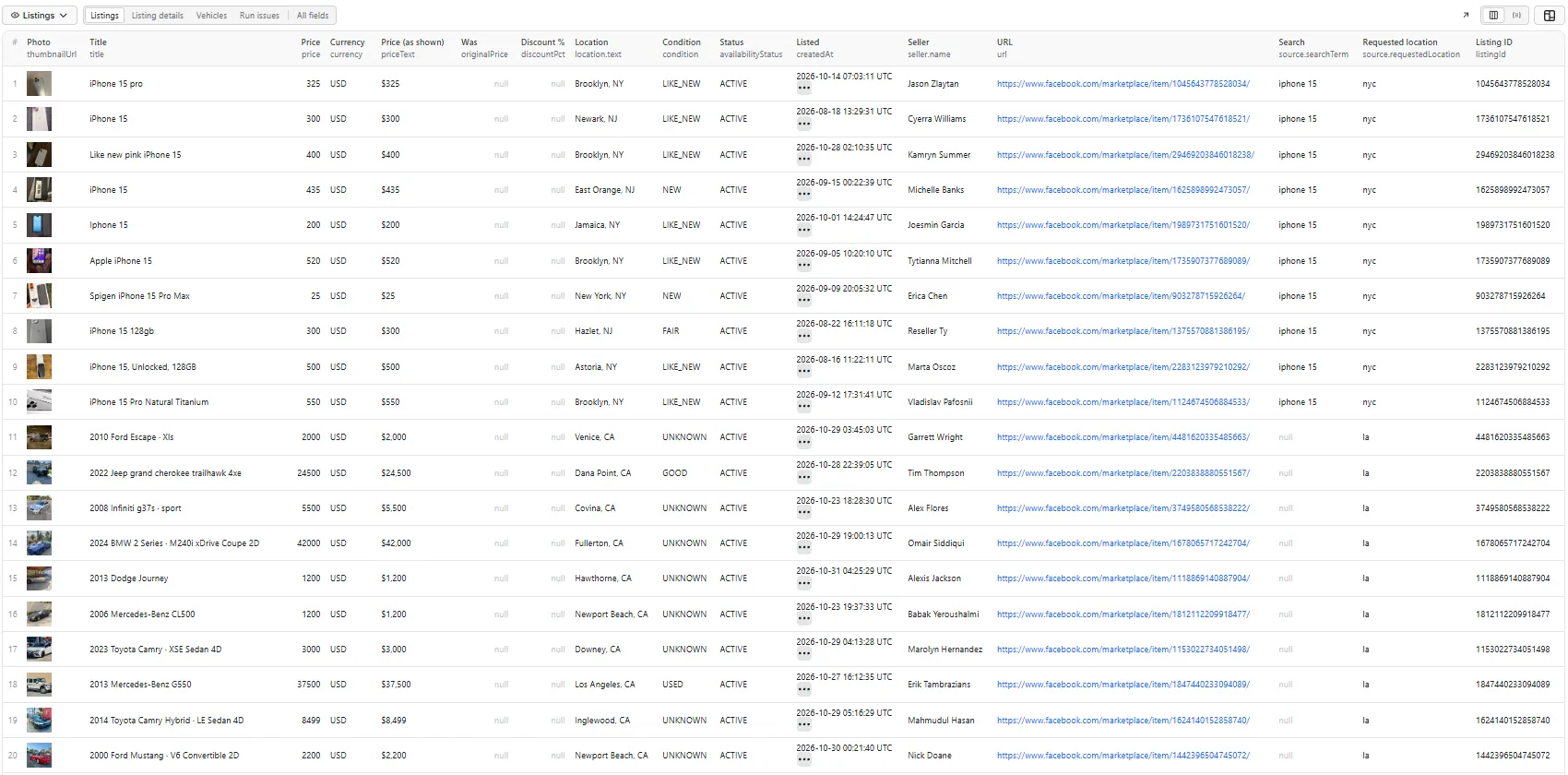
The dataset has four views: Listings (above), Listing details (description, category, coordinates, photos, seller), Vehicles (make, model, year, mileage and the rest) and Run issues (status rows).
Sample records (from the run above, shortened)
Listings / Listing details: a New York search result with full details:
Vehicles: a Los Angeles Vehicles category result:
Run issues: the status row for the URL that is not a search page:
Status rows
A search or listing that produces no listings adds one rowType: "status" row saying why — LOCATION_NOT_RESOLVED, LOCATION_MISMATCH, LISTING_NOT_FOUND, INVALID_MARKETPLACE_URL, RATE_LIMITED, BLOCKED or PROVIDER_ERROR. They come after the listings, appear in the Run issues view and are never charged.
Run summary and retries
The key-value store's RUN_SUMMARY lists every search with its status, pages read, listings found, why it stopped and its coverage (COMPLETE_OR_HIGH, CAPPED, PARTIAL, LOCATION_MISMATCH, BLOCKED, UNKNOWN), plus totals (raw listings seen, unique listings, details enriched, sold listings). If anything failed for a temporary reason, RETRY_INPUT holds a ready-to-run input with just those searches or listings.
Monitoring — only new listings
Set mode to MONITOR, give the saved search a monitorKey, and schedule it.
- First run = baseline. It records what is listed now and returns nothing (unless
emitBaselineListingsis on, which returns them markedBASELINE_LISTING). - Every later run returns only listings it has not seen before, marked
NEW_LISTING, sorted newest first. - Change the saved search (term, location, category, price, condition, age or radius) and the next run starts a new baseline instead of reporting the whole market as "new". Changing
maxListingsPerSearchdoes not. - Seen listings are remembered for 60 days.
You pay only for the new listings returned.
💸 How is pricing calculated?
Pay per event — no start fee, no monthly rental:
- Listing result — once per unique listing delivered to your dataset.
- Listing detail — once per delivered listing whose full details were read (only when Include listing details is on).
Never charged: search requests, pagination, retries, location lookups, duplicates, status rows, failed or empty searches, and monitor baseline listings that are not returned. A listing whose details could not be read is charged as a listing result only. Your spending limit is respected: the run stops cleanly when it is reached and keeps everything already delivered.
This README deliberately quotes no figures — see the Pricing tab for current rates.
Do I need a Facebook login or cookies?
No. Everything comes from what Facebook Marketplace shows a logged-out visitor. You never provide an account, cookie or token.
Why are results different from what I see when logged in?
Marketplace is personalised and local. Logged-in results depend on your account, history and saved location; this Actor sees what a logged-out visitor in the requested place sees. Coverage is best effort — Facebook does not publish how many listings exist, and no scraper can promise every listing.
Can I call it through the API or MCP?
Yes — like any Apify Actor, through the Apify API, the JavaScript/Python clients, integrations (Make, Zapier, n8n), or the Apify MCP server for AI agents. Example:
🚦 Proxy policy
Apify Residential proxy is on by default, and it is required on Apify. Facebook refuses Marketplace data from Apify datacenter addresses (pages redirect to login and the data queries are rate-limited), so if you pick Apify Datacenter the run switches to Residential and logs a warning. Residential bandwidth is included in the listing-details price; you are not billed for proxy traffic separately.
To route through your own provider instead, enter it in the proxy editor's Custom proxy URLs field. That traffic goes through your provider's account:
Limitations
- Unofficial. Not affiliated with, endorsed by or connected to Meta or Facebook.
- Availability varies by region, and Marketplace is not available in every country.
- Fields differ by category — vehicle and property fields exist only where Facebook states them; nothing is inferred.
- Search results are personalised and geographically influenced; coverage is best effort, never guaranteed exhaustive.
- Seller fields are limited to public Marketplace information. There is no public seller profile URL for logged-out visitors, so none is returned.
- Currency: taken from the listing page when details are on. On search cards Facebook shows a symbol; an ambiguous
$is named from the location's country (or yourcountryinput) — or left empty rather than guessed. - No currency conversion, and price filters use the location's own currency.
Privacy and responsible use
This Actor collects only what Facebook Marketplace shows any logged-out visitor. It does not log in, read messages, contact sellers, or reveal hidden contact details. Seller names are personal data in many jurisdictions — process them lawfully (e.g. GDPR / CCPA), for a legitimate purpose, and do not use them for spam or harassment.
Need something else?
Missing a field, a filter or a country? Open an issue on the Actor's Issues tab — requests with an example URL get looked at first.


