

SEO Service Area Visibility Checker
Pricing
from $0.50 / 1,000 results
SEO Service Area Visibility Checker
Checks how visible a business is in Google across multiple service areas and generates an SEO visibility report.
Pricing
from $0.50 / 1,000 results
Rating
0.0
(0)
Developer

Solutions Smart
Maintained by CommunityActor stats
0
Bookmarked
5
Total users
0
Monthly active users
6 months ago
Last modified
Categories
Share
What does SEO Service Area Visibility Checker do?
SEO Service Area Visibility Checker helps you measure how visible your business is in Google Search across multiple cities and service areas. You can track keyword rankings, spot visibility gaps, and see which competitors dominate local search results.
The Actor can extract:
- Keyword rankings for your domain across multiple cities
- Competitor websites appearing in search results
- Service area visibility gaps and missing rankings
- Detailed SERP data with position tracking
- Diagnostic reports when anti-bot or consent pages are encountered
Why check SEO visibility across service areas?
Businesses that operate in multiple cities or service areas need to understand how visible they are in local search results. Geographic SEO performance directly impacts customer acquisition, as users often search with local intent, for example plumber in Hannover.
Here are some ways you could use this visibility data:
- Monitor your local SEO performance across all service areas
- Identify which cities or keywords need SEO improvement
- Track competitor presence in your target markets
- Optimize content strategy based on visibility gaps
- Prove SEO results to clients with structured reports
- Make data-driven decisions about geographic expansion
Best for
- Local SEO agencies
- Plumbers, HVAC companies, electricians, roofers, and other local service businesses
- Businesses expanding into nearby cities
- Teams reporting local SEO performance to clients
How to check SEO visibility
It is easy to check SEO visibility across service areas with SEO Service Area Visibility Checker:
- Click on Try for free.
- Enter your target domain, for example
example.de, together with the keywords and cities or service areas you want to analyze. - The prefilled sample is intentionally lightweight so the Actor can validate quickly. Expand the keyword and city lists for production runs, and optionally configure country, language, maximum number of results, retries, retry backoff, sticky proxy behavior, proxy rotation, homepage warmup, and debug artifact storage.
- Click Run.
- When the Actor finishes, review the final report in the Dataset tab or open the HTML report from the key-value store output.
Input parameters
| Parameter | Type | Required | Description |
|---|---|---|---|
targetDomain | string | Yes | Bare domain to track, for example example.de |
keywords | array | Yes | Service keywords to check in each city |
cities | array | Yes | Cities or service areas to analyze |
country | string | No | Google country code, default DE |
language | string | No | Google interface language code, default de |
maxResults | integer | No | Maximum number of organic results to inspect per query, default 5 |
maxQueryRetries | integer | No | Number of retries after anti-bot pages or transient failures, default 0 for the lightweight sample run |
retryBackoffMs | integer | No | Base delay in milliseconds before each retry, default 1500. Stronger blockers such as anti-bot pages, CAPTCHAs, and HTTP 429 responses use a longer cooldown automatically |
stickyProxySession | boolean | No | Keep one proxy session for a full query and rotate after stronger failure signals such as HTTP 429, anti-bot pages, CAPTCHAs, or navigation timeouts |
rotateProxySession | boolean | No | Use a fresh proxy session for retries when rotation is needed |
warmupGoogleHome | boolean | No | Open the country-specific Google homepage before the SERP request to create a more natural session. Default false because some proxy profiles are blocked before search navigation begins |
warmupOnRetries | boolean | No | Repeat homepage warmup on retry attempts. Default false to reduce extra requests on already blocked sessions |
disableWarmupAfterBlock | boolean | No | Turn off homepage warmup for the rest of the run after the first anti-bot or CAPTCHA signal |
saveDebugArtifacts | boolean | No | Save screenshots and HTML diagnostics for blocked or unexpected pages. Default false for the lightweight sample run |
saveDebugArtifactsOnRetries | boolean | No | Continue saving screenshots and HTML diagnostics on retry attempts. Default false to reduce storage noise |
proxyConfiguration | object | No | Optional Apify proxy settings for reducing Google anti-bot blocking |
Output
The Actor produces a visibility report containing:
- summary: Overall visibility metrics and run statistics, including
visibilityScore, data quality, failure breakdowns, and sample URLs for troubleshooting - visibilityByCity: Ranking visibility broken down by city
- missingCities: Service areas where your domain was not found
- competitors: Domains appearing frequently in organic results
- pricing: Metered visibility checks, pricing model details, and spending-limit status
- recommendations: Suggested next steps for SEO improvement or technical troubleshooting
- detailedResults: Complete keyword-by-keyword SERP data, attempt history, and diagnostics
Output is stored in:
- The default dataset as a final report item
- The default key-value store under the
OUTPUTkey - A styled HTML dashboard report under the
OUTPUT.htmlkey - Persistent run history under the
REPORT_HISTORYkey - Debug screenshots and diagnostics when anti-bot or consent pages are encountered
HTML report example
You can preview a live example of the generated HTML dashboard here:
Snapshot of the HTML report:
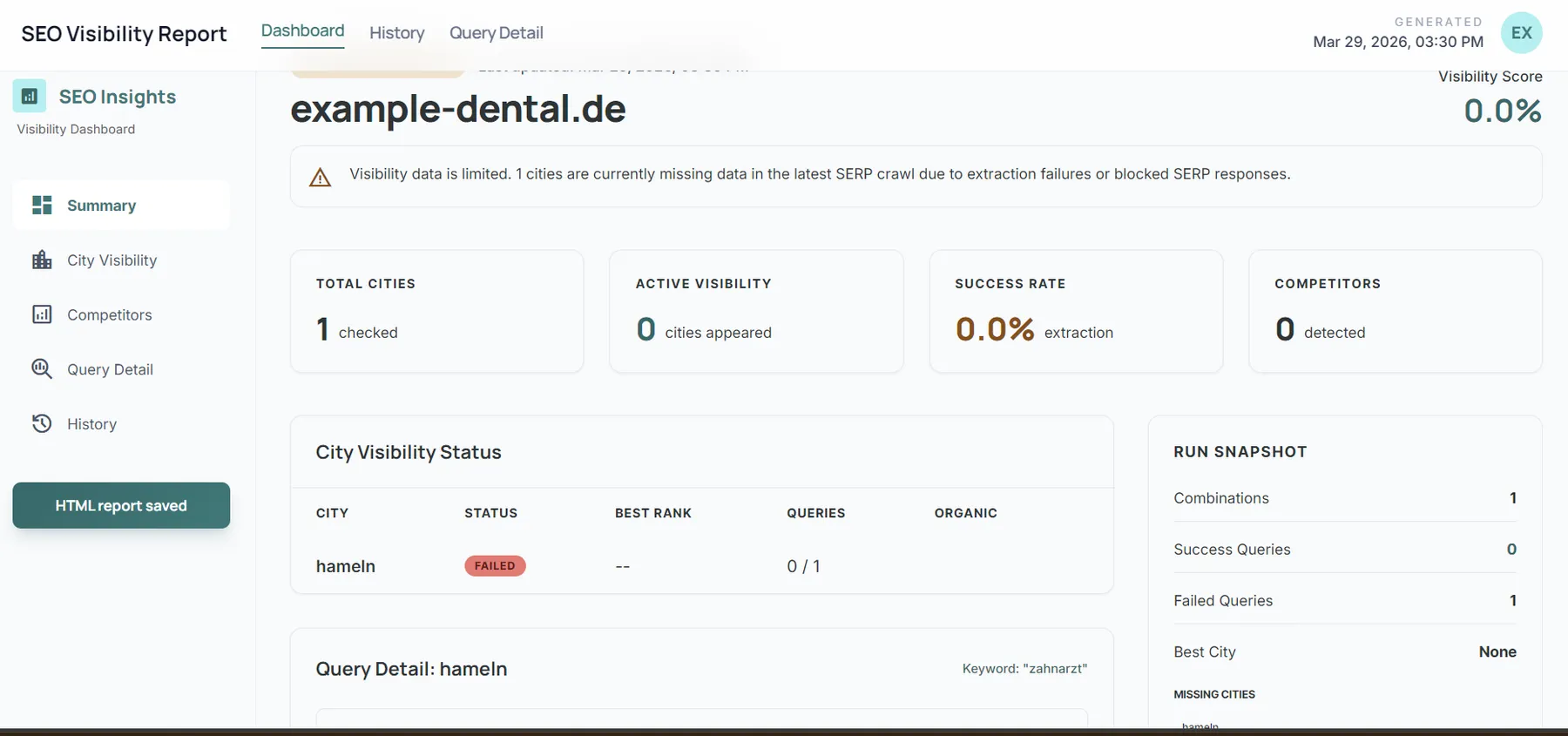
Results example
In this example, the domain ranks in some cities and is missing in others, highlighting a service-area gap.
How much will it cost?
This Actor uses Apify pay-per-event monetization with one visibility-check event for each keyword-plus-city analysis that returns parseable SERP data.
That means a run with 3 keywords across 4 cities plans 12 billable visibility checks. The exact event price is configured in Apify Console, and the Actor respects the maximum spend allowed for the run.
Apify gives you $5 in monthly credits on the Apify Free plan, which can be enough to test the Actor or run smaller checks.
For ongoing monitoring across larger keyword and city sets, the Starter plan or Scale plan may be a better fit depending on your usage.
Tips for checking SEO visibility
- Run checks regularly, for example weekly or monthly, to track ranking changes over time
- Start with your most important keywords and service areas
- Use competitor data to analyze what is working in your market
- Check both branded and service-based keywords for a fuller visibility picture
- Review the recommendations section for actionable next steps
- If diagnostic reports appear, use them to understand whether drops are caused by ranking changes or technical blocking
Recommended Google settings
For Google SERP checks, this is the recommended starting configuration:
This avoids spending the first attempt on a homepage session that may already be blocked, reduces extra request noise on retries, and avoids filling storage with near-duplicate retry diagnostics.
Technical notes
- The Actor uses Playwright because Google SERPs often require browser automation
- Google anti-bot measures can vary, so some runs may return partial data
- When extraction fails because of consent pages or CAPTCHAs, detailed diagnostics are saved to help troubleshoot
- Results use Google UULE location targeting for city-specific search simulation
- For better reliability against blocking, you can enable
proxyConfiguration - Sticky proxy sessions help keep one residential identity for a full query, while stronger failure signals can still trigger a fresh session on retry
- Retries can relaunch the browser with a fresh proxy session when blocking is detected
- Repeated anti-bot or CAPTCHA pages use a longer exponential cooldown before retrying
- The Actor attempts to accept Google consent dialogs before classifying a run as failed
- Each run refreshes an HTML dashboard and stores recent report history for comparison
- Each query that returns parseable SERP data can be metered through Apify pay-per-event pricing
Is it legal to check SEO visibility?
Checking search visibility for websites is a standard SEO activity. If you combine these results with personal data in your own workflows, make sure you comply with applicable privacy laws. For more information, see Apify's blog post on web scraping and the law.
Feedback and rating
If SEO Service Area Visibility Checker helps you, please consider leaving a rating on Apify and sharing a short review about your experience.
If you have ideas for improvements, want additional features, or run into issues, your feedback is very welcome. User feedback helps improve the Actor and prioritize the next updates.


