
Instagram Creator Leads Scraper
Pricing
from $4.00 / 1,000 lead results
Instagram Creator Leads Scraper
Find outreach-ready Instagram creators and business accounts by niche, hashtag, keyword, or seed profile. Export flat CSV-friendly leads with profile metrics, bio signals, recent activity, and contact hints.
Pricing
from $4.00 / 1,000 lead results
Rating
1.0
(1)
Developer

Delowar Munna
Maintained by CommunityActor stats
2
Bookmarked
90
Total users
15
Monthly active users
a month ago
Last modified
Categories
Share
Finding the right Instagram creators takes hours of scrolling, tab-switching, and copy-pasting bios into a spreadsheet — and you still end up with a list of handles, not a list of leads.
Instagram Creator Leads Scraper finds accounts by keyword, hashtag, seed profile, or URL and returns one flat, CRM-ready row per lead: public contact details, follower and engagement metrics, posting activity, niche, location, and a transparent lead-quality score with the reasons behind it.
No Instagram login, no cookies, public data only — and a run that returns fewer than 5 leads is not charged for any of them.
What does this actor do?
Instagram Creator Leads Scraper is an Apify Actor that discovers and exports Instagram creator and business account leads in a flat, stable, CSV-friendly format. It is designed for influencer discovery, outreach list building, creator sourcing, UGC prospecting, and local business prospecting.
Unlike generic Instagram scrapers, this actor is lead-generation-first — it finds commercially relevant accounts and outputs one clean lead per row, ready for CRM import, outreach, or analysis.
Each lead row includes:
- Profile identity — username, full name, profile URL, user ID
- Classification — account type, category, verified/business/creator flags
- Bio signals — email hints, phone hints, WhatsApp hints, location hints, keywords
- Audience metrics — followers, following, posts, size buckets
- Engagement snapshot — average likes/comments/views, engagement rate, posting frequency
- Lead quality — rule-based quality scoring with transparent reasons
- Commercial context — niche classification, creator size class, brand safety flags
- Geography hints — country, city, language derived from bio and profile data
How it works
- Discovery — Finds Instagram usernames via search engines, with a hosted-API fallback if those are blocked
- Enrichment — Fetches full public profile data via Instagram's public profile API (no login required)
- Analysis — Parses bios for contact hints, computes engagement metrics, scores lead quality
- Export — Outputs flat, CSV-friendly lead rows with all derived fields
The actor runs browserless — no Chromium, no page rendering. Every request is a direct HTTP call, which keeps runs fast and cheap.
Discovery modes
Keyword discovery
Search by niche terms to find matching Instagram accounts.
Hashtag discovery
Find active creators from hashtag-related searches.
Seed account discovery
Start from seed accounts and discover related creators via bio keywords, category, and niche expansion.
seedDiscovery must be set to true — without it, usernames and profileUrls are enriched directly and no expansion happens.
Direct profile enrichment
Enrich a list of known usernames or URLs into standardized lead rows.
Mixed inputs are supported — all provided input types are processed in a single run.
Sample input
Example 1 — Keyword search for beauty creators in Australia
Example 2 — Mixed discovery with filters
Input reference
| Field | Type | Default | Description |
|---|---|---|---|
searchTerms | string[] | [] (Console prefills an example) | Niche/market search phrases |
hashtags | string[] | [] | Hashtags for discovery (with or without #) |
usernames | string[] | [] | Direct usernames — or seeds, when seedDiscovery is on |
profileUrls | string[] | [] | Direct profile URLs — or seeds, when seedDiscovery is on |
seedDiscovery | boolean | false | Treat usernames/profileUrls as seeds and discover related creators from them. Off = enrich only the profiles you listed |
maxLeads | integer | 25 | Max total leads to return |
maxLeadsPerSearchTerm | integer | 25 | Max profiles per individual search term, hashtag or seed |
maxProfilesScanned | integer | 500 | Safety cap on total profiles fetched, including ones your filters reject |
analysisDepth | string | "standard" | profileOnly · standard (6 posts) · deep (12 posts) · custom |
recentPostsLimit | integer | 6 | Posts to analyze — only used when analysisDepth is custom |
deduplicateProfiles | boolean | true | Remove duplicate profiles |
minFollowers | integer | 100 | Minimum followers. Skips abandoned and near-empty accounts — set to 0 to include every size |
maxFollowers | integer | — | Maximum followers |
minEngagementRate / maxEngagementRate | integer | — | Engagement rate range, as a percentage (e.g. 2 = 2%) |
minPostsCount | integer | — | Skip near-empty and dormant accounts |
contactRequirement | string | "any" | any · email · phone · whatsapp · externalLink · anyContact |
validateEmails | boolean | true | MX + disposable check on extracted emails (no per-lead cost) |
excludePrivateAccounts | boolean | true | Skip private accounts (never billed) |
excludeVerifiedAccounts | boolean | false | Skip blue-tick accounts |
excludeUsernames | string[] | [] | Skip accounts already in your CRM — re-run weekly without paying twice |
requireBusinessOrCreator | boolean | false | Only business/creator accounts |
requireExternalLink | boolean | false | Only profiles with external link |
requireEmailHint | boolean | false | Superseded by contactRequirement |
preferredCountry | string | — | Two-letter country code; also pins the proxy exit country |
preferredLanguage | string | — | Two-letter language code (e.g. en, es, fr) |
sortBy | string | "relevance" | Sort: relevance, followers, engagement, recentActivity |
proxyConfiguration | object | — | Apify proxy settings |
Renamed fields keep working: maxProfilesPerInput, countryHint, languageHint and includeRecentPosts are still accepted, so existing API calls and saved tasks do not break.
Output
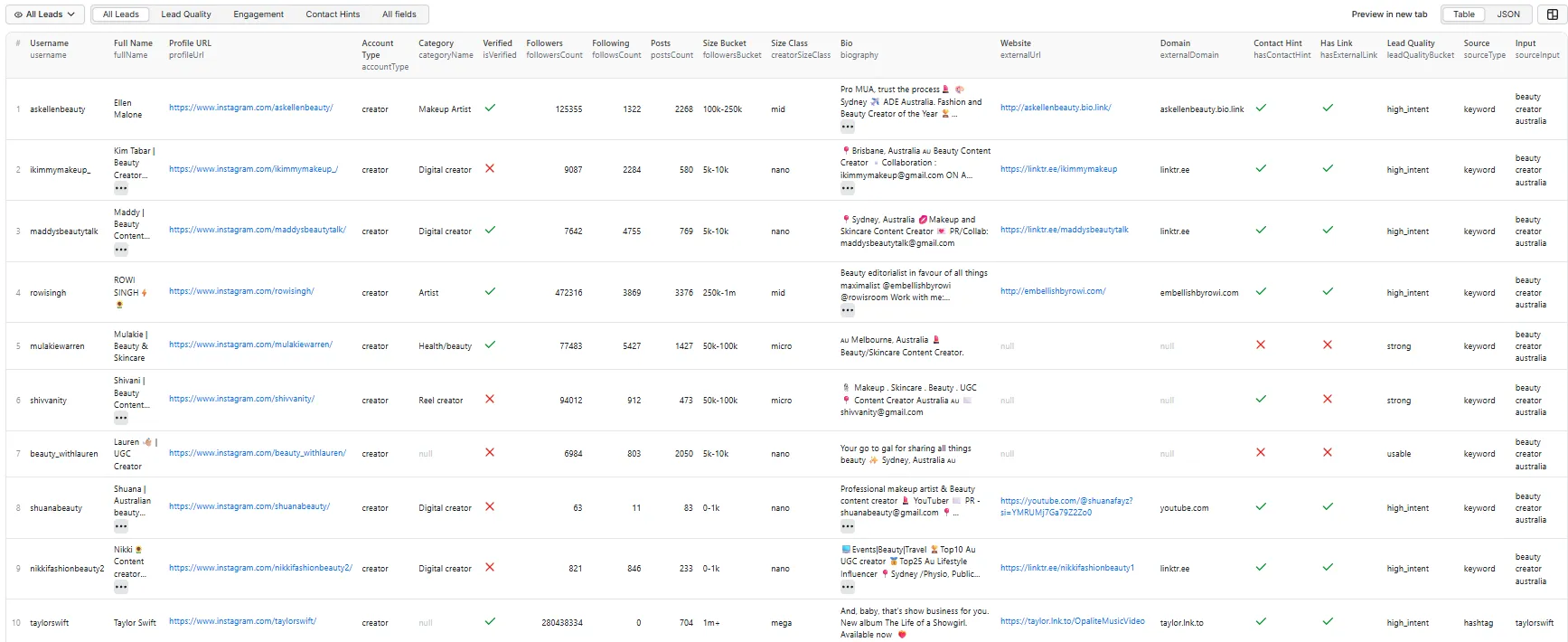
Each lead row is flat and CSV-friendly — no nested JSON arrays. The output is organized into four views on Apify:
All Leads (default view)
Overview of every lead with key profile details, audience metrics, and quality signals.
Lead Quality
Lead scoring details with quality bucket, reason, niche classification, and brand safety.
Engagement
Recent post engagement metrics including likes, comments, views, engagement rate, and content format mix.
Contact Details
Parsed contact values (email / phone / WhatsApp), a contactability rating, email-domain validation, external links, and geography for outreach.
Full output record
Each lead contains all fields across all views. Here is a complete record:
discoveryMethod records which source actually found that particular creator, so it varies row to row within one run:
| Value | Found by |
|---|---|
instagram_search | Instagram's own search |
external_search | Web search fallback, when Instagram search is unavailable or thin |
tikhub_search | Paid keyword-search fallback, used to top up a short result set |
tikhub_hashtag | Paid hashtag feed, in hashtag mode |
direct_profile | You supplied the username or profile URL directly |
A creator found by more than one source is credited to the first one that found it.
Use cases
- Influencer discovery — find creators in a specific niche for partnerships
- UGC outreach — build lists of UGC creators by hashtag or keyword
- Local business prospecting — find local businesses by search terms (e.g. "melbourne cafe", "sydney dentist")
- Competitor research — discover creators similar to competitor accounts using seed mode
- CRM import — export flat CSV directly into your CRM or outreach tool
- Agency workflows — automate lead list building for client campaigns
Lead quality scoring
Every lead gets a leadQualityScore from 0–100, a leadQualityBucket, and a
leadQualityReason explaining exactly which signals produced the number. The score
and the explanation are derived from the same signal list, so they can never disagree.
Published rubric
| Signal | Points | Meaning |
|---|---|---|
contact_value | 25 | A real, parsed email / phone / WhatsApp number |
recent_activity | 15 | Posted within the last 45 days |
professional_account | 12 | Business or creator account |
has_followers | 10 | At least 100 followers |
has_link | 10 | External link in bio |
engagement_present | 10 | Measurable engagement on recent posts |
has_category | 8 | Instagram business category set |
contact_hint | 5 | Bio signals contact intent |
public | 5 | Public account |
Contactability carries the most weight because an unreachable lead cannot be outreached however good it looks on paper.
| Bucket | Score |
|---|---|
high_intent | 80–100 |
strong | 60–79 |
usable | 35–59 |
weak | 0–34 |
leadScoreVersion is emitted on every row (currently 2.0). If we change the
rubric, that number changes — so a saved workflow thresholding on leadQualityScore
can tell a scoring change from a market change.
Engagement is benchmarked by creator size
Engagement rate falls predictably as an audience grows, so engagementBucket
compares each account against others of its own size, not against a fixed
number. A 0.8% rate is below_average for a nano creator and average for a
mega one.
| Size class | Followers | top | above_average | average |
|---|---|---|---|---|
nano | < 10k | ≥ 8% | ≥ 4% | ≥ 2% |
micro | 10k–100k | ≥ 6% | ≥ 3% | ≥ 1.5% |
mid | 100k–500k | ≥ 3.5% | ≥ 1.8% | ≥ 0.8% |
macro | 500k–1M | ≥ 2.5% | ≥ 1.2% | ≥ 0.5% |
mega | 1M+ | ≥ 2% | ≥ 1% | ≥ 0.4% |
engagementConfidence (0–100) tells you how much to trust the figure — it rises
with the number of posts analysed and falls when a single viral post distorts the
average.
Contactability — can you actually reach them?
leadQualityScore answers "is this a good lead?". contactabilityScore (0–100)
answers a different question: "can I reach them, and how directly?" A perfect-fit
creator with no contact route is unworkable; a mediocre one with a business email can
be pitched today. Sort by both.
| Bucket | Meaning |
|---|---|
direct | A usable email, phone or WhatsApp number is in the row |
indirect | Only an external link, a DM invitation, or an email whose domain is dead |
none | No route at all |
contactabilityReason lists the channels found. Emails sourced from Instagram's own
business-contact field score higher than ones parsed out of bio text, and an address
whose domain cannot receive mail is penalised rather than counted.
Email validation — domain, not mailbox
When validateEmails is on (default), each extracted address is checked for syntax,
a disposable/throwaway provider, and whether its domain publishes MX records
— i.e. whether it can receive mail at all.
| Field | Meaning |
|---|---|
contactEmailDomain | The domain part |
contactEmailDomainValid | Domain publishes MX records — null if the lookup was inconclusive |
contactEmailIsDisposable | Known throwaway provider |
contactEmailIsFreeProvider | Gmail, Outlook, etc. — not a negative, just useful for segmentation |
This checks the domain, not the mailbox. It cannot tell you whether anyone reads that inbox, and no address is ever marked "verified" — confirming a mailbox requires intrusive SMTP probing we deliberately do not do. This adds no per-lead cost: it is DNS only, cached per domain for the run.
Brand collaboration — demonstrated, not stated
worksWithBrands tells you whether a creator has actually done disclosed commercial
work, detected from disclosure markers in their recent captions — #ad,
#sponsored, #gifted, [gifted PR], "paid partnership with", affiliate codes.
| Field | Meaning |
|---|---|
worksWithBrands | True / false — null when no captions were available |
brandCollabPostsRecent | How many recent posts were disclosed collaborations |
brandCollabShareRecent | That count as a share of analysed posts |
recentBrandMentions | Brand handles from those posts, pipe-delimited |
brandCollabEvidence | Which markers matched, so you can audit the call |
lastBrandCollabTimestamp | Most recent disclosed collaboration |
This is evidence, not intent. A bio saying "DM for collabs" is a creator
offering; #gifted on a post is proof they have already been booked, know how to
disclose properly, and are used to working to a brief. Brand handles are only
collected from posts already identified as commercial, so tagging a friend in a
holiday photo does not register as a partnership.
Audience quality — signals to review, never a verdict
audienceQualityFlag surfaces statistical patterns associated with inflated
audiences: engagement far below the norm for the account's size, follow/unfollow
ratios, unusual comment-to-like ratios, large audiences with almost no posts, erratic
per-post performance.
| Flag | Meaning |
|---|---|
review_recommended | Strong signals — worth a manual look before outreach |
minor_signals | Something to note, not to act on alone |
no_signals | Nothing unusual detected |
insufficient_data | Too small or too little engagement data to judge |
This does not detect fake followers and must not be read as doing so. Every
signal has an innocent explanation — a viral post, a revived dormant account, a niche
where lurking is normal. audienceQualitySignals lists exactly what fired and
audienceQualityConfidence reflects how much evidence backed it, so you can judge
rather than take a verdict on trust.
Brand safety flags
brandSafetyFlags is a keyword-based triage signal, not a compliance decision.
It scans the bio for terms associated with adult content, gambling, alcohol,
tobacco/vaping, weapons, and crypto-promotion, and returns a pipe-delimited list of
categories matched, or none. Because it is keyword-driven it produces both false
positives (a bar review account flags alcohol) and false negatives (visual-only
content is invisible to it). Treat it as a prompt to review a profile manually, never
as an automated reject.
How much time this saves
| Task | Manual | With this actor |
|---|---|---|
| Find 50 niche creators | 4–6 hours | ~10 minutes |
| Pull follower + engagement figures | ~30 s per profile | Automatic |
| Read every bio for a contact email | Copy-paste per profile | Automatic |
| Filter by size, engagement, contactability | Eyeballing | Pre-filtered before you pay |
| Rank by fit | Subjective | 0–100 score with reasons |
| Record where each lead came from | Manual notes | sourceType / sourceInput per row |
Proxy configuration
The actor works without proxy for small runs. Apify Datacenter proxy is the default and is enough for higher volume — the actor sends only small JSON requests.
🚦 Proxy policy
Use Apify Datacenter proxy or no proxy for normal runs — both work reliably for Instagram profile/search JSON at this actor's conservative concurrency. The actor sends only small JSON requests — no images, no video, no page rendering — so bandwidth per run is tiny.
Apify Residential proxy is not supported. The actor will fail at startup if
apifyProxyGroups includes RESIDENTIAL. Reason: in pay-per-event actors, residential
bandwidth (~$8/GB) is billed to the developer, not the run user, so a single
bandwidth-heavy run could exceed the per-result event revenue.
The exit country is pinned to US. An unpinned exit can land on an IP that
Instagram serves a localized redirect to, which returns no data — pinning avoids that
failure mode. This is independent of Preferred Country: that setting shapes result
ranking and geo hints only, because Apify Datacenter has usable exit IPs in just a few
countries and pinning to an unsupported one would fail every request.
If you genuinely need residential routing, supply your own residential provider via the proxy editor's Custom proxy URLs field — that traffic goes through your provider, not Apify, and is unaffected:
Pricing
Pay-per-event: you are charged per unique lead row, not for runtime, compute, or requests. See the Pricing tab for the current rate on your plan.
A run that doesn't deliver isn't charged for leads
If a run returns fewer than 5 leads, you are charged for none of them — not a reduced number, none. A run that does deliver is charged for every lead it returns.
That is the opposite way round from a per-run free allowance, and deliberately so. An allowance discounts every run a little, including the ones that worked perfectly, and still leaves you paying something for a run that disappointed you. This puts the risk on the run failing: the searches that work cost full price, and the ones that don't cost nothing in lead charges.
| Leads returned | You are charged for |
|---|---|
| 0 | 0 |
| 4 | 0 — below the 5-lead minimum |
| 5 | 5 |
| 12 | 12 |
| 25 | 25 |
Rows that are never billable at all — private accounts with no usable data, errors, profiles your filters rejected, duplicates — don't count toward the 5 either, so they can't push a thin run over the line.
There is also a small per-run start fee, charged whenever a run starts, however it turns out. On every paid Apify plan it is a fraction of a cent — set as low as the platform permits, since zero is not an accepted value — so in practice a thin or empty run still costs you essentially nothing. On the Apify Free plan it is materially higher; see Free plan.
What is and isn't billable
| ✅ Charged | A unique lead row with real profile data |
| 🆓 Free | The first 5 billable leads of every run |
| ❌ Never charged | Empty runs · failed runs · accounts not found · blocked or unavailable profiles · duplicates removed by deduplication · profiles filtered out by your criteria · private accounts with no usable data · error rows |
Because charging happens per row written, a run that returns nothing costs nothing.
Free plan
No features are restricted on the Apify Free plan. Discovery, extraction, filters, contact and email discovery, email validation, engagement and audience analysis, and lead scoring all run exactly as they do on a paid plan, with the same limits you set. The 5-lead minimum before any lead is charged applies on every plan too.
Pricing does differ by plan. Both the per-lead price and the per-run start fee are higher on the Free plan than on any paid plan, which is what funds the third-party discovery service each run uses — a service Free-plan runs use in full. Current amounts for every plan are shown in the pricing section on this Actor's Apify Store page. Upgrading to any paid Apify plan moves you to the lower rate; nothing about what the Actor does changes either way.
How many leads you receive depends on discovery yield and your filters. When Max Profiles Scanned is genuinely what stopped a run, the log says so explicitly: Scan cap reached: N profiles fetched. Without that line, your scan budget was not the limiting factor.
If the cap binds, you'll see it in the log and in the run's status message — the run is never failed because of it.
Worked examples
| Run | Leads returned | Billed leads |
|---|---|---|
| Search barely matched anything | 4 | 0 leads — under the 5-lead minimum |
Testing with maxLeads: 10 | 10 | 10 |
Typical run, maxLeads: 25 | 25 | 25 |
Larger run, maxLeads: 100 | 100 | 100 |
| Run with strict filters | 100 scanned → 12 passed | 12 |
| Run with strict filters | 100 scanned → 3 passed | 0 |
| Search returns nothing | 0 | 0 leads |
Every row in this table is lead charges only; the per-run start fee described above applies to all of them.
Filtering happens before billing — profiles that fail your minFollowers, requireEmailHint or other criteria are never charged, even though the actor had to fetch them to evaluate them.
The actor also respects your Apify spending limit: when it is reached, the run stops gracefully and keeps everything collected so far.
This README deliberately quotes no currency amounts — rates vary by subscription plan and change over time. The Pricing tab is always authoritative.
FAQ
Why did I get fewer leads than maxLeads?
maxLeads is a ceiling, not a target. Deduplication, your filters, private accounts and Instagram's rate limits all reduce the final count. Broader search terms and a higher maxProfilesPerInput both help.
Am I charged for leads that got filtered out? No. Filters are applied before billing. You are only charged for rows that actually appear in your dataset.
What happens if I hit my spending limit? The run stops gracefully and everything collected up to that point is kept and available for export.
Why is contactEmail empty for some leads?
Not every creator publishes an email. We extract addresses from the public bio and from Instagram's business-contact field; when neither exists, the field is empty rather than guessed. Use requireEmailHint to keep only profiles with a contact signal.
Do I need an Instagram login or session cookies? No. This actor reads only public data and never asks for your credentials, so there is no risk to your Instagram account.
Do I need a residential proxy? No. The actor sends only small JSON requests, so Apify Datacenter proxy or no proxy is fine at any volume. Apify Residential is not supported (the run fails at startup); if you specifically need residential routing, supply your own provider via the proxy editor's Custom proxy URLs field.
Why does your engagement rate differ from other tools?
engagementRateApprox is (avg likes + avg comments) ÷ followers, computed from the most recent posts only. Tools that sample different post counts, or include views, will report different figures. It is a comparison signal, not an audited metric.
Can I re-run weekly without paying for the same leads twice? Within a single run, deduplication guarantees one row per account. Across runs, keep your own list of already-seen usernames for now — a built-in suppression list is on the roadmap.
Known limitations
- Public profiles only. Private accounts are detected and excluded from results (and never billed).
- Engagement filters need engagement data.
minEngagementRate/maxEngagementRaterequire recent-post analysis, so they reject profiles where no engagement could be measured. SettinganalysisDepth: "profileOnly"together with an engagement filter will return nothing. statuson every row. Rows carrysuccess/partial/private/not_found/blocked/errorpluserrorCodeanderrorMessage, so a bulk API caller can reconcile every input rather than inferring from an absent row.- Contact details are extracted, not verified. No mailbox, MX or deliverability check is performed. An extracted address is what the creator published publicly — it may be stale or unmonitored.
contactEmailConfidencereflects the source: Instagram's own business-contact field scores higher than a value parsed out of free-text bio. - Location and language are inferred hints, not verified fields.
countryHint,cityHintandlanguageHintare derived from bio text and profile signals. They can be incomplete or wrong, and are named "hint" for that reason. - Engagement is a sample. Metrics come from the most recent posts available on the profile, not lifetime history. Accounts with very few posts may return partial or empty engagement data.
- Instagram rate limits apply. Large runs are paced deliberately to stay within them. This is why a 500-lead run takes considerably longer than 10× a 50-lead run.
- Discovery breadth varies by niche. Specific phrases ("beauty creator australia") consistently outperform broad ones ("beauty").
- Niche and brand-safety flags are heuristic — derived from bio text and category, and intended for triage rather than compliance decisions.
Integrations
Output is flat, one row per lead, so it drops straight into whatever you already use — no reshaping, no nested JSON to flatten.
Export formats: CSV, JSON, Excel (XLSX), HTML, JSONL, RSS.
Connect directly to: Google Sheets · Make · Zapier · Slack · Airbyte · GitHub · AWS S3 · Google Cloud Storage · Azure Blob Storage · Keboola · Webhooks.
Call it from code — the actor works with the standard Apify clients and the REST API:
Recipe: a weekly creator pipeline into Google Sheets
- Create a Task with your search terms,
contactRequirement: "anyContact"and your follower range. - Schedule it weekly.
- Add a Google Sheets integration on the task so each run appends to your sheet.
- Paste the usernames you have already contacted into
excludeUsernamesso repeat runs return only new creators — and you are not billed for leads you already have.
Recipe: push new leads straight to your CRM
Add a webhook on the ACTOR.RUN.SUCCEEDED event pointing at your CRM or automation tool. The payload carries the dataset ID; fetch the rows and map contactEmail, fullName, profileUrl and leadQualityScore onto your contact fields. Use status == "success" to skip the non-billable status rows.
Tips for best results
- Start small — test with
maxLeads: 10to verify results before running large batches - Use specific search terms — "beauty creator australia" works better than "beauty"
- Enable recent posts —
includeRecentPosts: truegives you engagement data for lead scoring - Use filters —
minFollowersalready defaults to100to skip abandoned accounts; raise it to target bigger creators, or setrequireBusinessOrCreatorto focus on professional profiles - Proxy — Apify Datacenter proxy (the default) is enough even for large runs; Apify Residential is not supported
Local development


