

Tiktok Sound Music Scraper
Pricing
from $2.00 / 1,000 video results
Tiktok Sound Music Scraper
TikTok Sound / Music Scraper extracts TikTok sound pages, music metadata, and videos using a sound, including captions, creators, stats, and URLs. Use it for trend tracking, viral audio discovery, campaign monitoring, creator research, and analytics.
Pricing
from $2.00 / 1,000 video results
Rating
0.0
(0)
Developer

Delowar Munna
Maintained by CommunityActor stats
0
Bookmarked
68
Total users
17
Monthly active users
5 days ago
Last modified
Categories
Share
TikTok Sound / Music Scraper
Extract TikTok sound pages, music metadata, and videos using a sound for trend tracking, campaign monitoring, creator discovery, and analytics workflows.

What does this actor do?
TikTok Sound / Music Scraper is an Apify Actor that extracts public TikTok data for one or more sounds/music, including:
- Video records — video metadata, engagement metrics (plays, likes, comments, shares, saves), creator info, hashtags, mentions, and content classification
- Sound summary records — sound-level stats with usage counts, top hashtags, top creators, and run health fields
- Sound lineage — every output row traces back to the exact source sound that produced it
This actor is designed for sound intelligence — not just fetching videos, but providing analytics-ready output for viral audio discovery, campaign monitoring, creator research, and AI workflows.
Why use this actor?
- Multi-sound batching — scrape one or many sounds in a single run
- Keyword-based sound search — discover sounds by keyword without knowing exact URLs
- Rich structured output — video-level and sound-level data with creator details and engagement metrics
- Sound lineage — every row shows which source sound produced it, making cross-sound comparison easy
- Sound summaries — per-sound summary rows with usage counts, top hashtags, top creators, and run status
- Optional cross-sound deduplication — remove duplicate videos when the same video appears under multiple sounds
- Consistent null handling — missing optional fields return
null, never omitted unpredictably - Structured error handling — failed sounds emit error records instead of breaking the run
- AI-ready datasets — feed results into clustering, summarization, trend scoring, and reporting pipelines
How this actor is different
Most TikTok sound scrapers take a sound URL and return its videos. This actor is built as a sound intelligence tool — it also discovers sounds, summarizes them, and keeps full lineage so batch and campaign analysis are effortless.
| Capability | This actor | Typical sound scrapers |
|---|---|---|
| Start from a keyword (no URL needed) | ✅ discovers sounds automatically | ❌ require a sound URL/ID |
| Per-sound analytics summary (usage count, top hashtags, top creators, run health) | ✅ | ❌ raw rows only |
| Source lineage on every row (traces back to its source sound) | ✅ | ❌ |
| Cross-sound deduplication for batch/campaign runs | ✅ | ❌ |
| Reliable sound usage count | ✅ | ⚠️ often missing |
| Analytics-ready flat schema (camelCase, ISO-8601, sheet-ready) | ✅ | ⚠️ nested/raw |
| Combine URL + ID + keyword inputs in one run | ✅ | ⚠️ usually one mode |
Input
inputMode picks how the run starts: Sound URLs / IDs or Keywords (one input box, each line auto-detected), Trending: Top 50, or Trending: Viral 50.
| Parameter | Type | Default | Description |
|---|---|---|---|
inputMode | string | "sounds" | "sounds" (Sound URLs / IDs or Keywords), "trending_top" (Trending: Top 50, global), or "trending_viral" (Trending: Viral 50, global). |
sounds | string[] | [] | The input box (used in sounds mode). Mix freely — each line is auto-detected: a TikTok music URL or numeric ID is scraped directly; anything else is treated as a search keyword. Ignored in the trending modes. |
searchKeywords | string[] | [] | Legacy alias (API only). Its entries are appended to sounds and classified the same way. Prefer putting everything in sounds. |
maxSounds | integer | 5 | How many sounds to take from a discovery source: max sounds per keyword search, and how many chart sounds in a trending mode (1–50). Not used for URLs/IDs you provide directly. |
maxVideosPerSound | integer | 30 | Maximum videos to extract per sound (1–500) — applies to all modes |
maxTotalResults | integer | 0 | Run-level cap on total video records across all sounds (0 = no cap) |
onlyPostsNewerThan | string | "all" | Date filter — one of all, 1 day, 7 days, 30 days, 90 days |
minPlayCount | integer | 0 | Keep only videos with at least this many plays (0 = no minimum) |
minEngagement | integer | 0 | Keep only videos whose engagementTotal is at least this value (0 = no minimum) |
includeSoundSummary | boolean | true | Emit sound summary records |
includeVideoFields | boolean | true | Include video records in output (off = only summary rows) |
enrichCreators | boolean | false | Fetch each creator's full profile to fill follower/following/like counts + bio (extra API call per creator, billed separately) |
downloadCovers | boolean | false | Download video + sound cover images to the key-value store and add stored-URL fields (billed per image) |
deduplicateVideosAcrossSounds | boolean | false | Deduplicate videos across sounds in a batch |
stopOnError | boolean | false | Stop entire run on first sound failure |
debugMode | boolean | false | Enable verbose logging |
Input modes
inputMode chooses how the run starts:
-
Sound URLs / IDs or Keywords (
"sounds", default) — put anything in the input box; each line is detected automatically:- a TikTok music URL (
https://www.tiktok.com/music/original-sound-1234567890123456789) → that sound is scraped - a numeric sound ID (
1234567890123456789) → that sound is scraped - anything else → treated as a search keyword; matching sounds are discovered and scraped (up to
maxSoundseach)
You can mix all three kinds freely in one run, and everything is combined into a single dataset. (API callers may also pass the legacy
searchKeywordsfield — it's merged in and classified the same way.) - a TikTok music URL (
-
Trending: Top 50 (
"trending_top") — scrape TikTok's main global trending chart (up tomaxSounds). The input box is ignored. -
Trending: Viral 50 (
"trending_viral") — scrape TikTok's fast-rising global chart (up tomaxSounds). The input box is ignored.
TikTok's public chart is global — there is no per-country or per-period option. If you omit inputMode, it is auto-detected (sounds by default). Duplicate URLs/IDs and duplicate keywords are removed automatically, and a sound found by a keyword search is not re-scraped if you also provided it directly (or another keyword already found it) — each sound is scraped once per run.
Empty input: in sounds mode, if the input box is empty the actor scrapes a single demo sound so you can see example output. As soon as you add input, the demo sound is not included.
Sample input: Viral sound tracking
Track videos that use a specific sound and monitor how widely it spreads.
Sample input: Mix URLs, IDs, and keywords
Put any combination in the input box — the actor detects each line and combines everything into one dataset. Here, two known sounds (a URL and a numeric ID) are scraped directly while swift and trending beat are treated as keyword searches.
Sample input: Trending sounds
Discover the currently trending sounds from TikTok's global chart and scrape each one's videos. Every row carries its trendRank so you can see chart position alongside performance.
Note: TikTok's public sound chart is global — there is no per-country or per-period option.
"trending_top"returns the main Top 50;"trending_viral"returns fast-rising sounds.
Output
The actor outputs a dataset where each video is one row with full sound lineage. Results are available in five dataset views:
- Overview — combined view with record type, sound info, key metrics, and creator data
- Videos — full video details with engagement data
- Engagement — engagement metrics for quick comparison
- Creators — creator/author data with their video performance
- Sound Summary — sound-level stats, usage counts, top hashtags, and run health
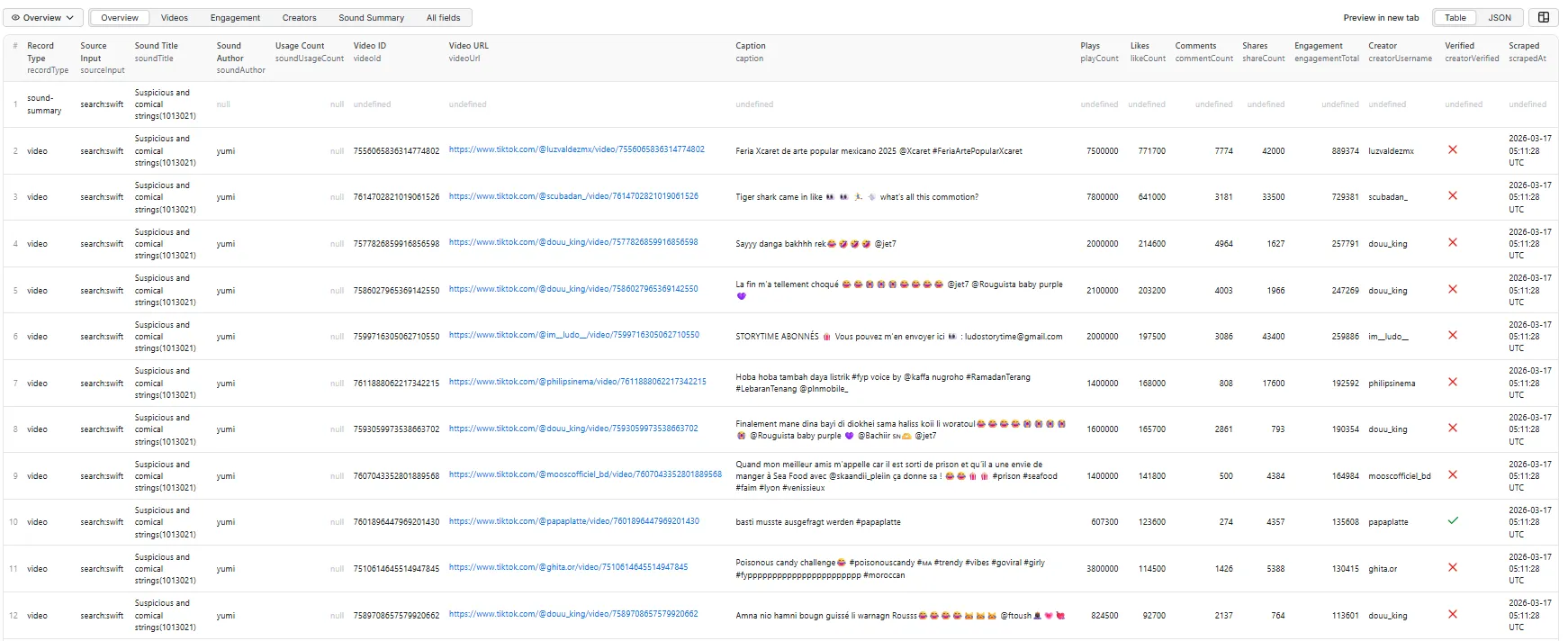
Sound summary record
When includeSoundSummary is enabled, the actor emits one summary record per sound. This record appears first in the dataset with recordType: "sound-summary".
(soundCoverStoredUrl is populated because this run had downloadCovers enabled; it is null otherwise.)
Video record
Each video record carries full sound lineage, video metadata, engagement metrics, creator info, and content classification. This example is a video using a sound provided by URL, with enrichCreators and downloadCovers enabled:
(creatorFollowersCount / creatorFollowingCount / creatorLikesCount / creatorBio are filled only when enrichCreators is on; videoCoverStoredUrl only when downloadCovers is on — otherwise null. videoThumbnailUrl is a TikTok-signed HEIC — see Limitations.)
Trending video record
In a Trending mode, each video carries its chart lineage (sourceType: "trending", trendRank, trendChartType); all other fields are identical to the video record above. Example from trending_top:
Engagement view record
The engagement view highlights metrics for quick comparison.
Creators view record
The creators view surfaces author details alongside their video performance.
Error record
Failed sounds emit structured error records so individual failures don't break the run.
Output fields
Source sound lineage (all video records)
| Field | Description |
|---|---|
recordType | "video", "sound-summary", or "error" |
sourceInput | The original sound input as provided (or "search:keyword" for keyword-discovered sounds) |
sourceType | How the sound entered the run: "sound_url", "sound_id", "keyword", or "trending" |
sourceKeyword | The search keyword that discovered this sound (null for direct URL/ID inputs) |
trendRank | Rank on the trending chart (1 = top), when discovered via a Trending mode; otherwise null |
trendChartType | "top" or "viral" when discovered via trending; otherwise null |
sourceSoundUrl | Full TikTok sound/music URL |
sourceSoundId | TikTok internal sound/music ID |
soundTitle | Sound/music title |
soundAuthor | Sound/music author name |
soundDuration | Sound duration in seconds |
soundCoverUrl | Sound cover art URL |
soundUsageCount | Number of videos using this sound (if available) |
soundIsOriginal | Whether the sound is original audio (vs. an official/licensed track) |
soundAlbum | Album name for the track, when available |
scrapedAt | ISO 8601 timestamp of extraction |
Video fields
| Field | Description |
|---|---|
videoId | TikTok video ID |
videoUrl | Full video URL |
caption | Video caption/description |
createTime | Video creation time (ISO 8601) |
durationSeconds | Video duration in seconds |
Engagement fields
| Field | Description |
|---|---|
playCount | Play/view count |
likeCount, commentCount, shareCount, saveCount | Engagement counts |
engagementTotal | Sum of likes + comments + shares + saves |
Creator fields
| Field | Description |
|---|---|
creatorUsername, creatorDisplayName, creatorId | Creator identification |
creatorProfileUrl | Creator profile URL |
creatorVerified | Verified badge status |
creatorFollowersCount, creatorFollowingCount, creatorLikesCount | Creator stats — null by default; populated when enrichCreators is enabled |
creatorBio | Creator bio/signature — populated only when enrichCreators is enabled |
Content classification
| Field | Description |
|---|---|
hashtags | Array of hashtag strings on the video |
mentions | Array of @mentions in the caption |
effectsUsed | Array of visual effect/sticker names used in the video (when available) |
videoCoverStoredUrl | Key-value store URL of the downloaded video cover — populated only when downloadCovers is enabled |
isAd | Sponsored/ad indicator |
region | Region/country code (best-effort) |
language | Content language (if available) |
videoThumbnailUrl | Thumbnail URL |
Quality fields
| Field | Description |
|---|---|
position | Position of this video in the sound page listing |
isPartial | Whether this record has incomplete data |
errorType | Error type (null when no error) |
errorMessage | Error message (null when no error) |
Sound summary fields
| Field | Description |
|---|---|
soundId, soundUrl, soundTitle, soundAuthor | Sound identification |
soundDuration, soundCoverUrl, soundUsageCount | Sound metadata |
soundIsOriginal, soundAlbum | Original-audio flag and album name (when available) |
soundCoverStoredUrl | Key-value store URL of the downloaded sound cover — populated only when downloadCovers is enabled |
requestedMaxVideos | Configured max videos per sound |
returnedVideos | Actual number of videos returned |
deduplicatedVideos | Number of videos removed by deduplication |
topCreatorsCount | Count of unique creators across returned videos |
topHashtags | Top 20 hashtags ranked by frequency across returned videos |
runStatus | "completed" (videos returned), "no_videos" (sound found but no videos), or "not_found" (sound could not be resolved — removed, invalid, or region-locked) |
startedAt, finishedAt | Run timing |
durationSeconds | Elapsed time for this sound |
Best-effort fields
The following fields depend on what TikTok includes in its responses. They are extracted when available and returned as null when not:
region, language, videoThumbnailUrl
creatorFollowersCount, creatorFollowingCount, creatorLikesCount, and creatorBio are null by default (TikTok omits them from a sound's video list). Enable enrichCreators to fetch each creator's profile and fill them in (billed per unique creator — see Pricing).
Pricing
This actor uses Apify's pay-per-event pricing — you are billed for the results you receive, not for time or compute.
| Event | Charged |
|---|---|
sound-result | Once per video record returned in the dataset |
creator-detail-result | Once per unique creator enriched — only when enrichCreators is enabled |
media-download-result | Once per cover image stored — only when downloadCovers is enabled |
Free — never charged:
- Sound summary records (
recordType: "sound-summary") — the per-sound analytics summary is included at no cost. - Error records — failed sounds never cost you anything.
You control spend with maxVideosPerSound (videos per sound) and maxSounds (sounds per keyword search or per trending chart). Setting includeVideoFields to false returns only the free summary rows.
See the actor's Pricing tab on Apify for the current per-event rate.
Free plan limitations
enrichCreators requires a paid Apify plan. On the Free plan it is skipped and you are not charged for it — creator follower/following/like counts and bio come back as null, exactly as they do when the option is off.
| Free plan | Any paid plan | |
|---|---|---|
| Video records, all video fields | ✅ Full, no row cap | ✅ Full |
| Sound summaries, engagement stats, filters, dedup | ✅ Included | ✅ Included |
Cover image downloads (downloadCovers) | ✅ Included | ✅ Included |
Creator profile enrichment (enrichCreators) | ❌ Skipped, not charged | ✅ Included |
Why only that one: creator enrichment costs one upstream API call per unique creator, while the video list amortises a single call across up to 50 rows. Cover downloads come straight from TikTok's CDN and are left available on every plan.
Runs are never failed because of this — you'll see it in the log and in the run's status message.
Use cases
- Viral sound tracking — track videos that use a specific sound and monitor how widely it spreads
- Campaign monitoring — track brand or campaign audio usage across creators and videos
- Music promotion research — analyze creator adoption of a track, content style, and performance
- Sound discovery — search for sounds by keyword, or pull TikTok's global trending chart, to find relevant or rising audio
- Trending audio tracking — scrape the Top 50 / Viral 50 sounds and their videos to see what's breaking out right now
- Trend intelligence — find which sounds are associated with emerging niches, hashtags, and creators
- Creator discovery — identify creators repeatedly using certain sounds or campaign audio
- Enrichment pipeline — use sound-derived videos as inputs for video, profile, comment, or hashtag scraping
Tips and best practices
- Use
sourceSoundIdto trace results — every record includes the sound that produced it - Check
recordType— the Overview tab shows"sound-summary","video", and"error"so you can easily distinguish record types - Start small — use
maxVideosPerSound: 10–20for initial exploration, then increase - Batch multiple sounds — scrape many sounds in a single run for comparative analysis
- Use keyword search — just type keywords into the input box (sounds mode); they're detected as searches and discover sounds without knowing exact URLs
- Schedule for monitoring — run on a schedule to track sound momentum over time
- Trim output — turn off
includeVideoFieldsto return only per-sound summary rows, orincludeSoundSummaryto return only video rows - Use deduplication — enable
deduplicateVideosAcrossSoundswhen batching multiple sounds that may share videos - Filter to cut noise and cost — use
minPlayCount,minEngagement, oronlyPostsNewerThanto keep only the videos you care about; filtered-out videos are never returned or charged - Cap large runs — set
maxTotalResultsto bound total output (and cost) across many sounds or keyword searches; the run stops once the cap is reached
No proxy required
This actor fetches all data through an API — there is no browser and no page scraping — so you don't need to configure a proxy. Runs are fast, deterministic, and low-cost.
Integrations
- Google Sheets — export sound data to spreadsheets for team dashboards
- Slack/email — set up notifications when new content appears using a sound
- Webhooks — trigger downstream workflows when a run completes
- API — access results programmatically via the Apify API
- Other actors — feed discovered video URLs into TikTok Video Scraper, creator usernames into TikTok Profile Scraper, or hashtags into TikTok Hashtag Scraper for deeper analysis
Run it from code
Call the actor and read its dataset programmatically with the Apify client. Replace YOUR_APIFY_TOKEN with your token from Settings → Integrations in the Apify Console.
JavaScript (npm install apify-client):
Python (pip install apify-client):
CLI (npm install -g apify-cli):
Limitations
- Results per sound depend on how much data TikTok returns on the sound page. The actual number may be lower than
maxVideosPerSound. - Some fields are best-effort and may be
nulldepending on what TikTok includes in its page data (see "Best-effort fields" above). - This actor scrapes public sound pages. It does not access private or restricted content.
- TikTok sound pages do not reliably support sorting; results reflect TikTok's default ordering.
- Very large sounds may return partial results depending on platform constraints.
- Keyword search results depend on TikTok's search ranking and may vary by region and session.
- Video cover images (
videoThumbnailUrl, and files saved bydownloadCovers) are served by TikTok as HEIC — viewable on macOS/iOS and HEIC-aware tools, but not natively in most browsers or Google Sheets. The URLs are signed to that format and cannot be converted to JPEG. Sound/music cover images are JPEG. - Trending sounds come from TikTok's global chart only — there is no per-country or per-period option.
FAQ
How many results can I get per sound? Up to 500 per sound. The actual number depends on how much data TikTok returns for that sound page.
Why are some fields null?
Fields like region, language, and videoThumbnailUrl depend on what TikTok returns for a given sound and are best-effort. Creator follower/following/like counts and bio are null by default — enable enrichCreators to fill them (see below). Core fields — sound usage count, engagement metrics, captions, and creator identity — are populated reliably.
How do I get creator follower counts?
TikTok doesn't include follower/like counts in a sound's video list, so they're null by default. Set enrichCreators: true and the actor fetches each unique creator's profile to fill creatorFollowersCount, creatorFollowingCount, creatorLikesCount, and creatorBio. This makes one extra API call per unique creator and is billed via the creator-detail-result event (each creator charged once, even if they appear in many videos).
What is the first record with mostly empty video fields?
That's the sound-summary record (recordType: "sound-summary"). It contains sound-level metadata only — not video data. Use the recordType column in the Overview tab to identify it.
Can I use sound IDs instead of URLs?
Yes. You can provide numeric sound IDs directly (e.g., "7128404587937007618") and the actor will resolve the sound page.
How does keyword search work?
In sounds mode, any input-box line that isn't a TikTok music URL or numeric ID is treated as a keyword. For each keyword, the actor searches TikTok's music catalog, extracts the matching sounds (up to maxSounds), and then scrapes each discovered sound's videos — combined into the same dataset as any URLs/IDs you provided. The sourceInput field on those records shows "search:your keyword" so you can trace which keyword discovered each sound. (API callers may also pass the legacy searchKeywords field.)
I got a summary with all null fields and runStatus: "not_found" — what does that mean?
The sound could not be resolved on TikTok — it was most likely removed, the ID/URL is invalid, or it's region-locked. This is different from "no_videos" (the sound exists but currently has no videos). Not-found sounds are not charged. Double-check the sound URL/ID, or try a different sound.
What happens if a sound fails?
Failed sounds emit a structured error record with error: true and errorMessage, so you can identify failures without the whole run breaking. Set stopOnError: true if you want the run to stop on the first failure.
Is the sound-summary record charged?
No. Only video records are billable (the sound-result event). Sound-summary records and error records are free — see the Pricing section.
How does cross-sound deduplication work?
When deduplicateVideosAcrossSounds is enabled, if the same video appears under multiple sounds in a batch run, it is only included once (for the first sound that returned it).


