

TikTok Sound Scraper
Pricing
from $2.00 / 1,000 videos
TikTok Sound Scraper
Scrape TikTok videos with a chosen sound. Just add one or more sound URLs and extract tiktoks that have it: URLs, likes, country of creation, video and music metadata, creator data. Export scraped data, run the scraper via API, schedule and monitor runs or integrate with other tools.
Pricing
from $2.00 / 1,000 videos
Rating
5.0
(11)
Developer

Clockworks
Maintained by ApifyActor stats
37
Bookmarked
2.4K
Total users
204
Monthly active users
3 hours ago
Last modified
Categories
Share
What is TikTok Sound Scraper?
TikTok Sound Scraper extracts data from TikTok videos that use a chosen sound. Add one or more sound URLs or IDs, set how many videos you want per sound in Max results, and the Actor returns them as structured data you can export or pipe into another tool.
Here's what you get for each video:
- 🎬 Video data: caption, language, video URL, creation timestamp, hashtags, mentions, effects used, and flags for ads, sponsored posts, slideshows, and TikTok Shop products.
- 📊 Engagement metrics: plays, likes, comments, shares, saves, and reposts.
- 🗣 Creator profile: name, nickname, ID, profile URL, avatar, bio, bio link, follower and following counts, total likes, video count, and verification status.
- 🎵 Sound metadata: name, author, ID, album, whether the sound is original, plus a direct link to the audio and its cover image.
- 🎞 Video file details: duration, dimensions, definition, format, cover image, and subtitle or transcript links when you turn transcription on.
- 📥 Optional downloads: the videos themselves, thumbnails, slideshow images, and sound covers, saved to your key-value store.
How can I use data extracted from TikTok sounds?
🎵 Sound trend tracking: Each video using a sound comes with its playCount and createTimeISO, so you can chart how a track spread and when it peaked, the core of TikTok trend analysis.
🎤 Music and artist marketing: musicMeta tells you whether a sound is original, who authored it, and which album it belongs to, so labels and artists can track how their track is actually being used.
🔍 Finding creators riding a trend: Each video carries full authorMeta with follower counts and verification status, so you can spot the right TikTok creators using a sound before it saturates.
📣 Spotting paid placements: The isAd, isSponsored, and hasTikTokShopProduct flags show which videos behind a sound are promotions rather than organic posts.
🎬 Creative intelligence: Captions, hashtags, effect stickers, and video duration come with every item, so you can see which formats work with a sound and analyze what makes video content perform.
How much does it cost to scrape videos under a TikTok sound?
TikTok Sound Scraper uses the pay-per-event pricing model, so your costs can be easily calculated: it will cost you $5 to scrape 1,000 videos on the Free plan, so $0.005 per video. Apify provides you with $5 free usage credits every month on the Apify Free plan, so you can get 1,000 videos from TikTok Sound Scraper for free. Discounts per video apply on paid plans, so you pay less as you scale. Check the full pricing for every plan.
Transcription is charged on top, as a separate optional add-on per started minute of each video: $0.048 per minute on the Free plan, less on paid plans. It only applies when you set Subtitles & Transcription to transcribe videos, so leave that option off if you don't need transcripts.
How do I scrape videos by TikTok sound?
Here's how you can scrape videos that use a specific TikTok sound:
- Create a free Apify account using your email.
- Open TikTok Sound Scraper.
- Add one or more TikTok music or sound URLs to scrape TikTok videos.
- Click Start and wait for the data to be extracted.
- Download your data in JSON, XML, CSV, Excel, or HTML.
Every result includes musicMeta.playUrl, a direct link to the sound on TikTok's CDN. You can also tick Include videos to save the videos that use the sound, and Include sound covers to save the sound's cover image to your key-value store.
Watch this video for guidance:
Input
TikTok Sound Scraper needs TikTok sound URLs as input. Located at the top of the TikTok web app, these URLs point to specific sounds. For instance, this URL references the sound a negroni sbagliato w prosecco l hbo max.
You can also pass sound IDs instead of full URLs, which makes it easy to chain Actors: run TikTok Scraper over a profile or hashtag, take musicMeta.musicId from the results, and feed those IDs into Music URL(s) to scrape the videos using the sounds you found.
Visit the input tab for complete input documentation.
Example JSON:
Output sample
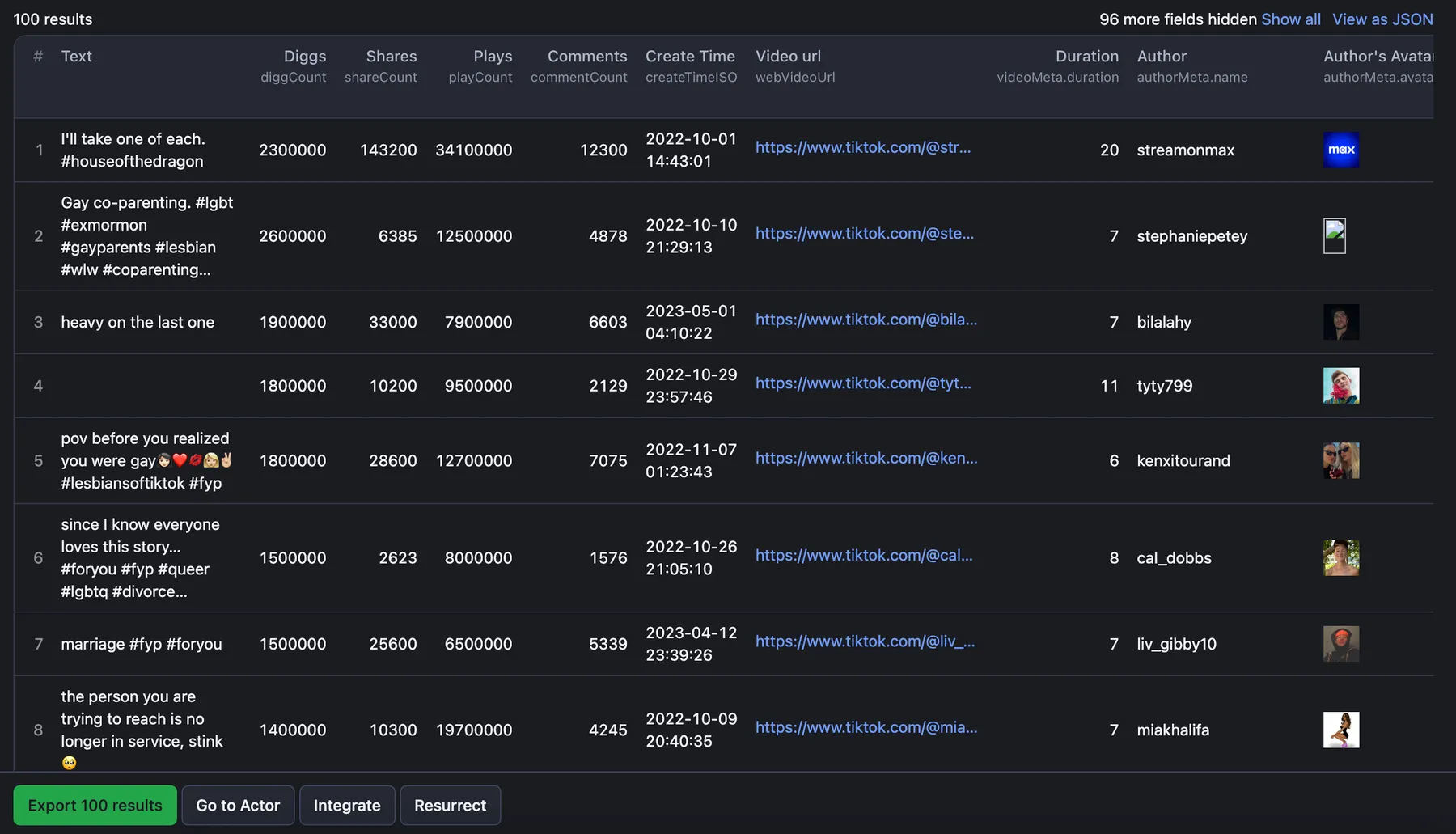
Results are saved to a dataset, which you can preview and download from the Output tab in JSON, JSONL, Excel spreadsheet, HTML table, CSV, or XML.
Below is a single video result, trimmed to the most useful fields. See the output schema for the full list.
Want to scrape TikTok profiles, hashtags or comments?
If you want to scrape TikTok beyond just TikTok music data, you can use one of the specialized web scrapers below, each built particularly for the relevant TikTok scraping case, whether it's profiles, comments, ads or all data at once:
Can I integrate TikTok Sound Scraper with other apps?
TikTok Sound Scraper connects with n8n, Make, Zapier, Slack, Airbyte, GitHub, Google Drive, and more via Apify integrations.
Alternatively, you can use webhooks to carry out an action whenever an event occurs, e.g. get a notification whenever TikTok Sound Scraper successfully finishes a run.
Can I use TikTok Sound Scraper with the API?
The Apify API gives you programmatic access to the Apify platform. The API is organized around RESTful HTTP endpoints that enable you to manage, schedule, and run Apify actors. The API also lets you access any datasets, monitor actor performance, fetch results, create and update versions, and more.
You can use the apify-client NPM package to access the API using Node.js, or the apify-client PyPI package to access the API using Python.
Check out the Apify API reference docs for full details, or click on the API tab for code examples.
Is it legal to scrape data from TikTok sounds?
Our TikTok scrapers are ethical and do not extract any private user data, such as email addresses, gender, or location. They can only extract what the user has chosen to share publicly. However, you should be aware that your results might contain personal data.
Personal data is protected by GDPR in the European Union and other laws and regulations around the world. You should not scrape personal data unless you have a legitimate reason to do so. If you’re unsure whether your reason is legitimate, consult your lawyers. You can also read our blog post on the legality of web scraping and ethical scraping.
Your feedback
We're always working on improving the performance of Apify Actors. So if you've got any technical feedback for TikTok Sound Scraper or simply found a bug, please create an issue on the Actor's Issues tab.
Error items
When the scraper cannot retrieve data for a given sound, for example when the music page no longer exists, it pushes an error item to the dataset instead of silently skipping it. Normal output items are never affected; you can tell them apart by the presence of an errorCode field.
Error item structure
Error codes reference
errorCode | Meaning |
|---|---|
MUSIC_NOT_FOUND | No videos found for the music tag |
INVALID_INPUT | Actor failed due to bad configuration (run is also terminated) |


