

YouTube Channel Lookup – Stats, Upload Cadence & Videos
Pricing
from $8.00 / 1,000 channel lookups
YouTube Channel Lookup – Stats, Upload Cadence & Videos
Give an AI agent a YouTube channel and get back, in seconds, its size, how often it uploads, how its recent videos perform and the newest videos with links, in one record. One channel per call. No login, no API keys.
Pricing
from $8.00 / 1,000 channel lookups
Rating
0.0
(0)
Developer

Delowar Munna
Maintained by CommunityActor stats
0
Bookmarked
2
Total users
1
Monthly active users
2 hours ago
Last modified
Categories
Features
Share
📺 YouTube Channel Lookup – Stats, Upload Cadence & Videos (API for AI agents)
Is this creator still active, and what do their videos get? Give this Actor one YouTube channel and get back, in seconds, its size, how often it uploads, how its recent videos perform and the newest videos with links, in one record.
Built as a tool for AI agents (Claude, ChatGPT, Cursor, n8n or your own) through Apify's MCP server, and for developers calling the Apify API from creator-vetting and prospecting pipelines. One channel per call, a compact response, and a predictable price per lookup. No login, no cookies, no API keys.
✨ What you get
- Channel stats: title, handle, description, subscribers, total views, video count, country, joined date, verified badge and the links on the channel page.
- A recent-activity summary: uploads in the last 30 and 90 days, days since the last upload, average days between uploads, and the median and average views of recent videos.
- The newest videos, up to 60: title, link, estimated publish date (plus the date text as YouTube shows it), views and duration. Or list the channel's Shorts instead.
- Any way you know the channel:
@handle, channel URL (/@handle,/channel/UC…,/c/…,/user/…), channel ID, or a plain name.
🧑💼 Who it's for
- Influencer-marketing and sponsorship agents: "Is this creator worth sponsoring? Are they still uploading? What does a typical video get?" as one tool call.
- Competitor and market research: how often a brand's channel posts and how it performs.
- Sales prospecting: qualify creators and brands before outreach.
- Developers: one API call per channel to enrich a creator list.
🤖 Use it from an AI agent (MCP)
Connect Apify's MCP server with just this Actor as a tool, using this URL:
- Claude (claude.ai or Claude Desktop): Settings → Connectors → Add custom connector, paste the URL, and sign in with Apify when asked.
- Claude Code:
claude mcp add youtube-channel-lookup "https://mcp.apify.com?tools=coregent/youtube-channel-lookup" -t http - ChatGPT: add a custom MCP server with the same URL and choose OAuth.
- Cursor, VS Code and other clients that take a remote URL:
Sign-in uses your own Apify account (the free plan works), and runs are billed there. The agent sees one tool,
coregent--youtube-channel-lookup, with four inputs, plus Apify's helpers for reading run results. Already using
Apify's MCP server with other Actors? Add coregent/youtube-channel-lookup to your tools= list, comma-separated.
Try asking your agent:
- "How often does @mkbhd upload, and what does a typical recent video get?"
- "Is this creator still active? Check @veritasium and tell me the days since the last upload."
- "Compare upload cadence and median views for @LinusTechTips and @mkbhd over the last 90 days."
- "We're considering sponsoring @aliabdaal. Summarise the channel's size and recent performance."
A typical tool call:
The agent gets back one JSON object (below), small enough to reason over directly. Set "maxVideos": 0 for the
channel and activity summary only, the cheapest call.
If a plain name matches several channels (say, "Tesla"), the call returns status: "ambiguous" with up to 5
candidates, free of charge, and the agent calls again with the right handle or channel ID.
🚀 Use it from the API
Run it synchronously and read the result in one request:
The same object is also saved to the run's OUTPUT record.
📥 Input
| Field | Description |
|---|---|
channel (required) | @handle, channel URL, channel ID (UC…) or name, e.g. @mkbhd. |
maxVideos | 0–60, default 10. 0 returns the channel and activity summary only. |
videoType | long (regular uploads, default) or shorts. The activity summary always uses regular uploads. |
sinceDays | Window for the activity summary and the regular-upload list, 7–365, default 90. |
Example inputs
A channel's stats, activity and its 20 newest videos from the last 180 days (the run behind the sample output and screenshots below):
A channel's stats, activity and its newest videos from the last 90 days:
Summary only, by channel ID:
By name, last 30 days:
The channel's Shorts:
📦 Output
One record per call. This is the real record from { "channel": "@mkbhd", "maxVideos": 20, "sinceDays": 180 }, with
the description, links and videos trimmed here:
truncated: true means the channel had more videos in the window (33) than maxVideos returned (20).
Channel summary
The stats and activity in one row:

Videos
One row per video returned. A row from the same run:
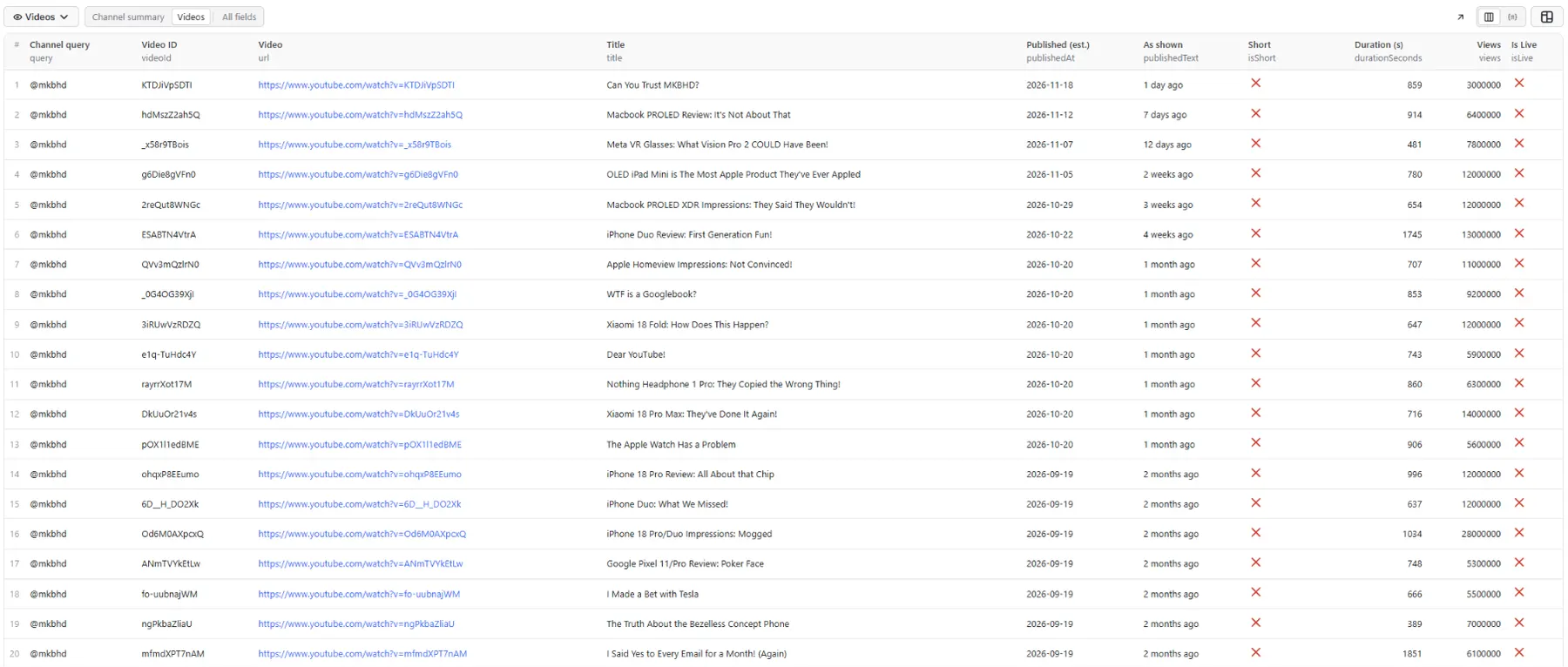
Status values:
ok: the channel was found and read.ambiguous: a plain name matched several channels, or none exactly;candidateslists up to 5. Not charged.not_found: no channel exists for that handle, URL, ID or name. Not charged.error: the data source failed after a retry;notesgives the reason. Not charged.
Good to know:
- Rounded numbers: subscribers, video count and per-video views are rounded the way YouTube displays them ("21.4M"). Total views are exact.
- Estimated dates: YouTube shows upload dates as "2 weeks ago" or "3 months ago".
publishedAtis estimated from that text andpublishedTextkeeps the original. Counts within about 30 days are close; longer windows work in month steps.notessays when a figure is approximate or a minimum. - Shorts have no upload date on YouTube, so Shorts come back with
publishedAt: nulland don't count toward the activity summary. - Name lookups: a name resolves only on an exact match of the channel's title or handle. The result includes
resolvedBy: "name"and up to 4 othercandidates, so the agent can check it picked the right channel. - Hidden subscriber counts return
subscribers: null, subscribersHidden: true. Fields that can't be read arenull, never guessed. No commenter data is returned.
💳 Pricing
Pay per event, designed so an agent can budget per channel:
- Lookup: once per call that returned the channel (
ok). - Video: once per video returned.
maxVideos: 0costs the lookup only.
ambiguous, not_found and error lookups aren't charged, and there's no start fee. Your run's spending limit is
respected: videos are trimmed to fit it. See the Pricing tab for current rates (this README deliberately doesn't
quote figures).
❓ FAQ
How fast is it? Usually a few seconds; a name lookup or a very active channel takes one more request.
Can I look up many channels? Call it once per channel; agents loop. For bulk video exports across channels, see YouTube Channel Videos Scraper.
Does it return contact emails? It doesn't look for or extract emails. It returns the public links on the channel page, and the channel description as the creator wrote it, which sometimes includes a business email.
Does it use the YouTube Data API? No. The data comes from a third-party YouTube data provider, so you don't need a Google API key or quota.
🔗 Related
- YouTube Channel Videos Scraper: every video of a channel as rows, for bulk exports.
⚖️ Disclaimer
This Actor returns public channel and video information through a third-party YouTube data provider. It is not affiliated with, endorsed by or sponsored by YouTube or Google. You are responsible for using the data in line with applicable laws and terms.


