
Google Ads Transparency Scraper: Competitor Ads & New Ad Alerts
Pricing
from $1.05 / 1,000 ad results
Google Ads Transparency Scraper: Competitor Ads & New Ad Alerts
Google Ads Transparency Center (Google Ad Library) scraper and API. Export any advertiser's Search, image and YouTube ads by brand, domain or advertiser ID, with first and last shown dates and countries. Schedule it with alerts to get only new and stopped ads each run. $1.50 per 1,000 ads.
Pricing
from $1.05 / 1,000 ad results
Rating
0.0
(0)
Developer

Kendall Sorenson
Maintained by CommunityActor stats
1
Bookmarked
2
Total users
1
Monthly active users
2 days ago
Last modified
Categories
Features
Share
Google Ads Transparency Center Scraper & API (by crunchy_galaxy_qcr)
This Google Ads Transparency Center Scraper & API is published by crunchy_galaxy_qcr on Apify. It collects creatives from the Google Ads Transparency Center (Google Ad Library) by brand name, domain, advertiser ID, or Transparency Center link — Search, image/display and YouTube formats, run dates, countries, optional preview text, advertiser summaries, and new/stopped-ad alerts versus a prior run.
Try it: the form is filled with HubSpot, nike.com, and 50 ads each. If both return 50 ads, that is 100 ad events, $0.15 on the Free plan. Advertiser summaries are free. Change alerts are not part of that example. Fewer ads cost less.
Watch a competitor's new Google ads
- Enter the competitor's domain (for example
hubspot.com) and keep 50 ads per advertiser. - Save the input as a task and schedule it daily or weekly.
- From the second run on, set
previousRunDatasetIdto the last run's dataset. The Changes view then lists onlyNEW_ADandSTOPPED_ADrecords. - In the task's Integrations tab, send the Changes view to Slack, email or Google Sheets.
Cost: one advertiser with 50 ads is $0.075 in ad events; the advertiser summary is free. Each new or stopped alert is $0.005. The ready-made script is python/new_ads_alert.py.
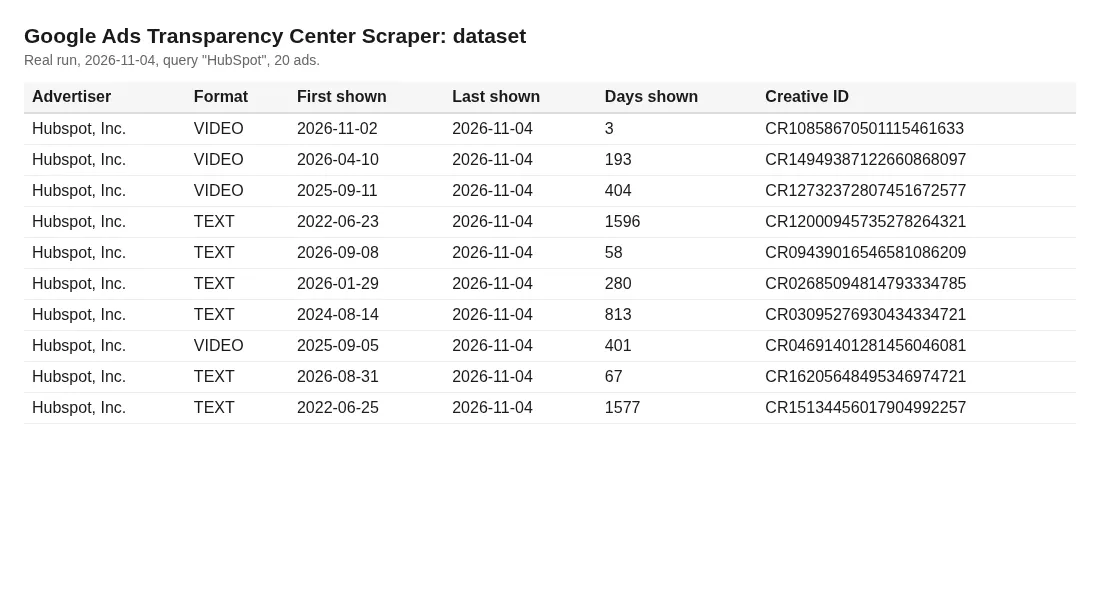
Real ads from a small test run, rendered as a table.
Why use this Google Ads Transparency scraper
- Search by brand name, domain, or
AR…advertiser ID. A domain in the name box is already a domain search. The separate Domains box is the same search.matchQualitytells you how a brand name was matched. - Paste an adstransparency.google.com link: an advertiser page, a domain search (
?domain=), or one ad (/creative/). The link is parsed locally and is not opened. - Change tracking:
NEW_AD/STOPPED_ADalerts when you pass an earlier dataset. - EU impression ranges and per-country last-shown dates when you turn on per-region details. Google publishes those ranges for ads shown in the EU.
- The Free-plan ad event is $1.50 per 1,000 ads. The $1.50 per 1,000 ads is the ad event only. The advertiser summary is free. Each new/stopped alert costs $0.005, and only when change tracking is on.
What you can do with it
- Competitor ads research: see the creatives a rival is running and how long each has run, up to the ad cap.
- Ad spy monitoring: schedule it daily with
previousRunDatasetIdto getNEW_AD/STOPPED_ADalerts. - Agency pitches and audits: export the ads Google lists for a brand, up to the cap you set.
- Market and regional analysis: filter by country and format.
Input
| Field | What it does |
|---|---|
queries | Brand names (HubSpot) or domains (nike.com). A domain here is a domain search, not a visit to that website. Names are fuzzy-matched; see matchQuality in the summary. An advertiser link is treated as an AR… id. A single-ad link in this box still selects the advertiser. |
domains | Optional. The same domain search as a domain in queries. Use it when you want domains kept apart from brand names. |
advertiserIds | Exact AR… IDs (most precise). An advertiser page URL works here too. |
startUrls | Links copied from adstransparency.google.com. Advertiser page, domain search, or one ad. Other hosts are skipped and not requested. |
region | Country filter (US, GB, DE, …) or anywhere. |
format | ALL, TEXT, IMAGE, VIDEO. |
dateFrom / dateTo | Keep ads active in this window. |
maxAdsPerAdvertiser | Cap per advertiser (newest first). |
extractAdText | Experimental. Tries to read headline, display URL and description from Google's HTML preview. Not demonstrated in current validation runs; expect adText to be empty. |
includeRegionDetails | Per-country last-shown dates and EU impression ranges (one extra lookup per ad). |
previousRunDatasetId | Turns on change tracking against an earlier run. |
How to use the Google Ads Transparency Center scraper
- Enter one or more competitors under Advertiser names or domains (for example
nike.com,HubSpot), put domains in Exact domains, pasteAR…advertiser IDs, or paste an adstransparency.google.com link into Transparency Center links. - Optionally choose a Region, an Ad format and a date window. On a pasted link, those three are taken from the link only when you leave the filters on their defaults.
- Click Start. The prefilled two-name, 50-ad example is $0.15 on the Free plan when both names return 50 ads (100 ad events; advertiser summaries are free). It costs less when Google returns fewer ads. Change alerts are extra and only if you set a previous dataset.
- Download the Ads, Advertiser summaries and Changes views as JSON, CSV or Excel, or pull them through the API.
- Ad spy mode: schedule a daily run and set
previousRunDatasetIdto the previous run's dataset to get only NEW_AD / STOPPED_AD alerts. You can push those alerts to Slack, Google Sheets or email with Apify integrations (Zapier, Make, n8n).
Run it every week
If you track a few competitors, a weekly run is usually enough to spot new creatives.
- Add your brands or domains, keep maxAdsPerAdvertiser modest, and click Save as a new task.
- On the task, click Schedule and pick weekly, e.g. Monday at 8:00 AM (cron
0 8 * * 1). - Each run saves its own dataset. To get only new and stopped ads, put last week's dataset ID in
previousRunDatasetIdbefore the run. The task's Integrations tab can send results to Slack, Google Sheets, email or a webhook.
Use it from AI agents (MCP)
This Actor works with the Apify MCP server. Ask your agent, for example: "Find all Google ads Nike ran in Germany this month." The agent can search for this Actor, read its input schema and call it, with a spending cap set through maxTotalChargeUsd.
FAQ
Is scraping the Google Ads Transparency Center legal? The Transparency Center is a public library that Google publishes so anyone can inspect ads. This Actor only collects that public information. Check your local rules for how you use the data.
How much does it cost? On the Free plan the ad event is $1.50 per 1,000 ads, the advertiser summary is free, and a change alert is $0.005. A run that saves 1,000 ads and one advertiser summary is $1.50. Change alerts are added only when previousRunDatasetId is set. Plans above Free pay lower prices for the same paid events; the Pricing tab lists them. On a pay-per-event run the customer pays these events. There is no separate customer line for proxies.
Why does a name return the wrong company? Brand names are ambiguous. Use the domain (canva.com) or the AR… ID from the advertiser's Transparency Center URL. Typing the domain in Advertiser names and typing it in Exact domains run the same domain search.
Can I paste a link from the Transparency Center? Yes. Put it in Transparency Center links. An advertiser page (/advertiser/AR…) selects that advertiser. A domain search (?domain=nike.com) is the same domain search as typing the domain. A single ad (/advertiser/AR…/creative/CR…) returns that ad when Google still lists it in the newest 400 ads for that advertiser under your filters. If it is not in that window, the run says so and does not charge for that link. The link is checked and parsed locally. Redirects are not followed, and any host other than adstransparency.google.com is skipped. This actor does not filter by platform (Search, YouTube, Shopping, Maps, or Play). A platform on the pasted link is ignored.
Why do the public success numbers still show failures? The public 30-day window still includes failures from before the limited-permission cache fix in builds 1.0.11 and 1.0.12. Those older runs stay in the rolling stats. This does not by itself say how the current build behaves.
Can I get impressions and spend? Google publishes impression ranges only for ads shown in the EU. Turn on Include per-region details to get them.
How is this different from the Meta Ad Library? Meta's Ad Library covers Facebook and Instagram ads. This scraper covers Google's own ads: Search, image (Display) and YouTube ads from the Google Ads Transparency Center. If a competitor advertises on both, you'll need a separate Meta scraper for that side.
Something broke? Open an issue on the Issues tab. We monitor it daily.
Output
The dataset holds three record types (type field), each with its own view: Ads, Advertiser summaries and Changes.
Example ad:
adText is experimental and is empty in current validation runs. See Notes and limits.
Advertiser summary fields: totalAdsEstimate (Google's range), adsScraped, adsByFormat, activeLast48h, newestFirstShown, longestRunning (top 5), newAds, stoppedAds, matchQuality, alternativeAdvertisers.
Notes and limits
An empty adText does not by itself mean a preview download failed. Google may provide no preview URL at all, or a preview may contain no supported text block. A network or HTTP error while fetching an available preview is a separate failure case. Headline extraction has not been demonstrated in our current live validation; do not rely on a populated headline, display URL or description. This clarification does not add a new runtime status field.
- Proxy: this actor uses Apify Residential Proxy (Google blocks datacenter IPs quickly). If your account has no Residential access it falls back to datacenter proxy and warns you; if no proxy is available it stops with a clear message and charges nothing. If a run ends with "No ads scraped", check Console > Proxy.
- Domains and links: a domain is sent to Google as a search term. The actor does not open the advertiser's website. Start URLs have to be
https://adstransparency.google.comadvertiser, domain-search, or single-ad links. Anything else is skipped and is not requested. - One pasted ad: a single-ad link looks through the newest 400 ads Google returns for that advertiser (10 pages, newest first). Older ads are reported as not found and are not charged. Paste the advertiser page if you want the capped library instead.
- The input form shows 50 ads per advertiser. An API call that omits
maxAdsPerAdvertiseruses 200. Change tracking matches on thequerytext, so keep the same input style from run to run. A single-ad link and an advertiser or domain search in the same run save that creative once. The advertiser does not get an empty summary for ads that were already saved by the single-ad link. - Charges are sent once. If Apify does not confirm a charge, that saved row is kept and the charge is not sent again. A lost response can still have been billed once. It is not sent a second time, because a repeat after Apify's 3 minute idempotency window would be a new charge. A restart of the same run does not send that charge again.
- Text extraction is off unless
extractAdTextis true, sopreviewOkstays 0 on a normal run. When it is on, the actor downloads onlyhttps://displayads-formats.googleusercontent.com/ads/preview/content.js. Any other preview address, a redirect off that script, a private or metadata address, or a response over 512 KB is skipped.adTextis set only when that script contains the known text block. A loaded script without that block, or an error page, leavesadTextempty. The actor does not invent a headline from the advertiser name or the image.imageUrlis stored and is not downloaded. - Impression ranges exist only for ads shown in the EU (Google publishes them only there).
- Many text ads are archived as rendered images. For those,
imageUrlis set andadTextis empty. stoppedAdsis reported only when the advertiser's full list was scraped (it is not capped bymaxAdsPerAdvertiser).- Uses residential proxies with automatic session rotation and retries.
Pricing
Free plan, pay per event:
- $1.50 per 1,000 ads (
ad-result). This does not include the other events. - Advertiser summary: free, one per advertiser you saved ads for.
- $0.005 per change alert (
NEW_ADorSTOPPED_AD), only when a previous dataset is set.
A full 1,000-ad result with one summary and no change alerts is $1.50. Higher plans pay less per event. The Pricing tab is the source for those tiers. Prices are not changed by this README.
Other Google Ads Transparency actors on the Apify Store (list prices on Nov 12, 2026): scrapesage/google-ads-transparency-scraper $2.00 per 1,000 ads, solidcode/ads-transparency-scraper $1.50 per 1,000 results, memo23/google-ad-transparency-scraper-cheerio $2.00 per 1,000 ads.
Code examples (Python, Node.js, API)
Ready-to-run scripts, including a daily new-ads alert, are on GitHub: https://github.com/kendallcoding202/google-ads-transparency-api-examples.
Related
- AI Visibility Tracker: see whether ChatGPT, Gemini and Perplexity recommend your competitors instead of you.
- Microsoft Ads Library Scraper: the same competitors' Bing and Microsoft Advertising ads in the EU, with dates, impressions and targeting.
A Store review or an Issue is welcome, including criticism and praise: review or open an Issue.


