

🔥 LinkedIn Jobs Scraper ⚡
Pricing
from $1.00 / 1,000 jobs
🔥 LinkedIn Jobs Scraper ⚡
Scrape LinkedIn jobs by keyword, location, remote or hybrid, experience level and more. Choose how fresh you want them, down to the last few minutes, so a scheduled run brings back only what is genuinely new. Full description, applicant count and company details included.
Pricing
from $1.00 / 1,000 jobs
Rating
0.0
(0)
Developer

Digital User
Maintained by CommunityActor stats
0
Bookmarked
2
Total users
1
Monthly active users
11 days ago
Last modified
Categories
Share
Get LinkedIn job postings minutes after they go up, not the next morning. Search by role, city and working arrangement — several of each at once — and every job arrives with the company, salary, applicant count and full description attached, as JSON, CSV or a sheet.
What is LinkedIn Jobs Scraper?
It is a LinkedIn jobs scraper that turns a search into a feed. Instead of checking LinkedIn and wondering what you missed, you say what you are looking for once and the openings come to you — while they are still worth acting on.
You decide how fresh: the last 15 minutes, the last hour, the last month. Put it on a schedule and each run returns only what has appeared since the last one, so nothing repeats and nothing goes stale.
People use it to apply before the crowd, to watch who is hiring in a sector, and to keep a job board stocked without anyone touching it.
Nobody has applied yet
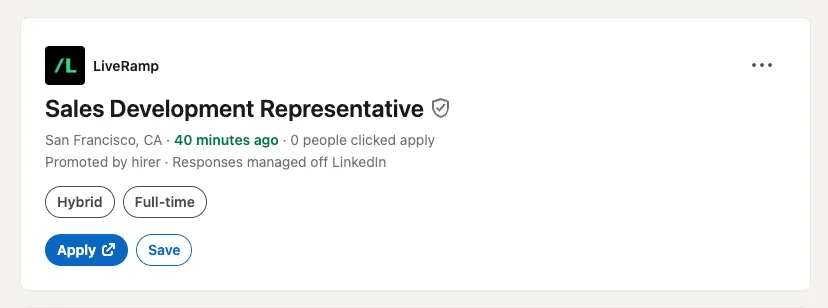
Sample: 40 minutes old. 0 people clicked apply. (Could have been 1 minute — it depends how often you run it.)
⚡ Put it on a schedule that checks every 5 minutes, or 1 minute, and jobs land in front of you while they are still minutes old. How early you hear is your setting, not a limit of this scraper.
🥇 Be applicant number one. Most job alerts arrive the next morning — by then that listing reads 200 applicants and your application is buried in the middle of the pile. Nothing about your CV changed. You were just late.
🎯 Tips: Keep Max applicants low, sort by fewest applicants first, and the only jobs you ever see are the ones nobody has reached yet.
What can LinkedIn Jobs Scraper do?
⏱️ Get only jobs posted in the last N minutes — down to a single minute
🔁 Search several job titles across several locations in one run — every title is crossed with every location, each one good for up to 1,000 jobs
🎯 See jobs before the applicant pile grows — cap the applicant count and anything past it never reaches you
🏡 Keep only remote, hybrid or on-site roles — or any mix of them
🎚️ Filter by experience level and employment type
🏷️ Narrow to Easy Apply only, or to specific companies
📌 Search a city and the miles around it — exactly the place you meant, with a warning if LinkedIn reads it as somewhere else
🔗 Already have searches you like? Paste the URLs — each keeps the filters and date range you set on LinkedIn
🌍 Cover a whole country, not one city — the search splits across every major market so you are not capped at a single city's results
🧹 Read every job once — employers repost one opening city by city, and we watched a single role show up 27 times. Collapse the copies and that is 27 rows you never have to look at
↕️ Sort your results by newest, oldest, or fewest applicants
📋 Pull the full description, applicant count, seniority and employment type
🏢 Enrich with company industry, size, headquarters, website and followers
🔓 Run it with no login, no cookies and no proxy — nothing to configure
📄 Export as JSON, JSONL, CSV, XML, HTML table, or Excel
🔌 Send results to n8n, Make, Zapier, Google Sheets, Slack, or a webhook
🕒 Put it on a schedule and every run brings only what is new
🤖 Using LinkedIn Jobs Scraper with an AI agent
This Actor runs from Claude Code, ChatGPT, Cursor or any other agent that speaks MCP, because every Apify Actor is exposed through Apify's MCP server. Point your agent at it and ask in plain language:
"Find remote product manager jobs in Berlin posted in the last two hours, with fewer than 25 applicants, and put them in a table."
The agent fills in the input, runs it and reads the dataset back. Nothing to wire up — your Apify token is the only thing it needs.
It works just as well from a script: see the API example further down, or use the JavaScript and Python clients.
What LinkedIn job data can I extract?
Forty-one columns per job. The company half only fills in when you switch on company details.
💼 Job fields
| 💼 Job title and company | 📍 Location |
| ⏱️ Age in minutes when fetched | 🕒 Exact posting time |
| 🧹 How many listings a row stands for | 🏷️ Badges like Actively Hiring |
| 💵 Salary, split into min, max, currency and period | 👥 Applicant count |
| 📋 Full description, as text and as HTML | 🎚️ Seniority level |
| 📝 Employment type | 🏭 Industries |
| ✉️ Apply link and apply type | 🔗 Permanent job link |
| 🏢 Company page link | 🔎 The search that found it |
🏢 Company fields
| 🆔 Company ID | 🖼️ Company logo |
| 🏭 Industry | 📏 Size and headcount |
| 📅 Year founded | 💬 Tagline |
| 📌 Headquarters | 🌐 Website |
| 👣 Followers | 📝 Description |
How do I scrape LinkedIn jobs?
Option 1 — fill in the filters
- Click Save & Start. The keyword and location fields are already filled in, so this works before you change anything.
- Add your own. Type the job titles you care about and the places you want them. Each title is searched in each location.
- Set how fresh. Only jobs newer than 15 minutes, 60, whatever suits you.
- Pick remote, hybrid or on-site if that matters to you — or leave it for all.
- Narrow it. Applicant cap, experience level, employment type, Easy Apply.
- Schedule it. From then on, each run returns only the new postings.
Option 2 — paste a LinkedIn search URL
Run the search you want on LinkedIn Jobs, click the filters you like, then copy the address bar into Search URLs. Every filter you clicked comes with it. Paste several and each one runs as its own search, keeping its own filters and its own date range.
Ready-made setups
Each of these is this scraper already configured for one job. Open one, press Save & Start, and change the keyword or city afterwards if you want something else.
| setup | what it pulls |
|---|---|
| LinkedIn jobs posted in the last hour | everything new across the US, last 60 minutes |
| Remote software engineer jobs | remote only, filtered by LinkedIn rather than by keyword |
| Hybrid jobs near me | hybrid roles within 25 miles of one city |
| LinkedIn jobs with under 25 applicants | postings while the applicant pile is still small |
| Easy Apply jobs | only the ones you finish without a company portal |
| Entry level jobs | entry level and internships, read off each posting |
| LinkedIn jobs across the whole US | one role, split across 40 US cities, past the 1,000-job ceiling |
| LinkedIn jobs in New York | pinned by Geo ID so the city is really the city |
| LinkedIn jobs in London | remote and hybrid together, in one run |
| Jobs at specific companies | watch hiring at the companies you follow |
Input
That is four searches in one run — two titles across two cities. Every field except the search itself is optional.
Landing in the wrong city? LinkedIn matches a typed location loosely and
never says so. Pin it down with a Geo ID: open LinkedIn Jobs, pick your location
from the suggestions, and copy the geoId= number out of the address bar. Add a
distance in miles to search the area around it.
Already have a search you like? Paste its address into Search URLs — several if you want. Each one runs as its own search and keeps the filters and date range it carries.
Output sample
Forty-one columns in all. Salary arrives split into salaryMin, salaryMax,
salaryCurrency and salaryPeriod where a posting states one, and the
description comes as readable text and as descriptionHtml with the employer's
own formatting intact.
ageMinutes is derived from LinkedIn's own caption, and postedCaption keeps
that caption alongside it so you can check the two against each other.
Who uses LinkedIn jobs data?
🏃 Job seekers who would rather be the fifth applicant than the five hundredth. A posting with 5 applicants is a different proposition entirely.
🧲 Recruiters and agencies watching which companies are opening which roles, and getting there the hour a req goes live.
🗂️ Job boards and aggregators that need a steady feed of fresh postings with descriptions, not a weekly dump.
📊 Analysts and founders measuring a market — who is hiring, for what, where, and how fast that changes.
🔔 Anyone who wants an alert rather than a dashboard: new matches pushed to Slack, email or an app you wrote yourself.
How fresh can it get?
LinkedIn's own filter offers Past 24 hours at its finest. This Actor takes any window you name, so 15 minutes works, and so does 5.
A real run, asking for the last 30 minutes:
The youngest posting it returned was 3 minutes old.
The server-side window is approximate at the edges, so an exact cutoff is applied to what comes back. Nothing older than you asked for reaches your dataset.
It is quick with it: forty postings land in about a second and a half.
How much does scraping LinkedIn jobs cost?
$1.00 per 1,000 jobs, plus $0.001 per check — and $1.00 per 1,000 company lookups if you turn enrichment on.
You pay for the check, then only for the postings that check actually found. A check costs a tenth of a cent, so running every quarter of an hour instead of once a day costs you pennies: when nothing new has gone up, there is almost nothing to charge for.
What a month looks like depends far more on how broad your search is than on how often you run it. Measured on this Actor: software engineer across the whole United States produces about 87 new postings an hour. One role in one city produces a small fraction of that.
| your search | once a day | hourly | every 15 min |
|---|---|---|---|
| one role, one city | ~$5 | ~$6 | ~$8 |
| a role across a whole country | ~$63 | ~$63 | ~$66 |
Read the rows, not the columns: checking a hundred times as often costs a couple of dollars more, because the postings are the same postings either way — you just see them sooner. Widening the search is what multiplies the bill.
Maximum results per search is the cap: 25 means 25 from each search and no more. With four searches that is at most 100 jobs, which is also what bounds the bill. Whatever comes back is sorted the way you asked — newest first unless you pick otherwise. Apify lets you set a hard spending cap on any run or schedule as well — use both.
One search reaches 1,000 jobs, in under a minute. Need more than that? Two ways: add keywords and locations, since each pairing is its own search with its own thousand — or switch on Split the search by city and pick a country, and one search becomes one per major market. The United States list alone turns a single role into forty searches.
Two things about that limit. Experience level, employment type and the applicant cap are read from each posting, so they narrow your results after this limit is applied — if a run with those set comes back thinner than you expected, raise the maximum and the filters will have more to choose from. And a remote, hybrid or on-site search returns up to 60 jobs per search however high you set it.
Does LinkedIn have a jobs API?
Not a public one you can sign up for. LinkedIn's official API is partner-only, with no job-search access for general developers, which is why people look for a LinkedIn jobs scraper instead.
This Actor is the practical answer: one endpoint, clean JSON, nothing for you to maintain.
Integrations: n8n, Make, Zapier and more
Results land in a standard Apify dataset, so they go wherever you already work. No glue code — pick the tool, point it at this Actor, and new postings arrive on their own.
How do I connect LinkedIn Jobs Scraper to n8n?
n8n talks to Apify directly, so a workflow is three nodes: a schedule, this
Actor, and wherever you want the jobs to land — Postgres, Airtable, a Slack
message, your own HTTP endpoint. Point the Apify node at
digital_user/linkedin-jobs-scraper, paste the same JSON input you see above,
and read the dataset items back as the node's output.
Self-hosting n8n works the same way; all it needs is your Apify token.
Make, Zapier and Google Sheets
Make and Zapier both have Apify integrations: trigger on a finished run, then map the job fields onto whatever comes next — a spreadsheet row, a CRM record, an email. Google Sheets is the one most people start with, because watching fresh postings fill a sheet needs no explanation to anyone you share it with.
Webhooks and your own code
Every run can fire a webhook on completion with the dataset id in the payload, which is the lightest way to push jobs into something you wrote yourself. A posting can reach your phone while it still has single-digit applicants.
For anything custom there is the API below, with official clients for JavaScript and Python — and the Actor runs from Claude Code, ChatGPT and Cursor through MCP, as described further up.
Using this LinkedIn scraper with the Apify API
Official clients exist for JavaScript and Python. The Apify CLI works too.
FAQ
Do I need a LinkedIn account to scrape LinkedIn jobs?
No. No login, no cookies, no session token and no proxy configuration. It reads the job pages that LinkedIn shows to anyone, which is also why there is nothing for you to set up and nothing of yours at risk.
Is there a free LinkedIn jobs scraper?
Apify gives every new account free monthly usage, so small runs cost you nothing to try. Beyond that this Actor charges $0.001 per check and $1.00 per 1,000 jobs — a monitoring run that finds a handful of postings is under a cent.
Is it legal to scrape LinkedIn jobs?
Web scraping is legal when you are collecting publicly available data, and a job posting is public by design — it is published so that candidates can find it. What you should respect are the boundaries around it: personal data and intellectual property.
This scraper stays inside both. It reads only the logged-out job pages anyone can open, and returns no personal data — no candidate profiles, no recruiter contact details, no email addresses. Every row links back to the original posting on LinkedIn.
If your own plans go further than that, check the rules that apply where you are before you start.
How many jobs can I scrape at once?
1,000 per search, in under a minute — that is LinkedIn's own ceiling, not ours. Every keyword crossed with every location is its own search with its own thousand, so three titles in two cities is six searches and up to six thousand jobs.
For bulk collection, Split the search by city does this for you: pick a country and one search becomes one per major market — forty of them in the United States. A remote, hybrid or on-site search returns up to 60 per search.
How do I get alerted when a job is posted?
Set Only jobs newer than to the window you want — 15 minutes, an hour — then put the Actor on a schedule. Each run returns only what went up since, and a webhook or an n8n, Make or Zapier step pushes it to Slack, email or your phone. No dashboard to check.
Can I track which companies are hiring?
Yes. Give one or more company IDs and you get every opening they post, nothing else. Switch on company details and each row carries industry, size, headcount, headquarters and follower count — enough to watch a sector rather than a single employer.
Why do I see the same job more than once?
Because employers repost it — the same opening, city after city. In one run a single role turned up 27 times, and a quarter of everything collected was a copy of something else.
Switch on Collapse duplicate postings and you read each job once: one row per
company and job title, with duplicateCount showing how many listings it stood
in for. You are not billed for the copies either — they are dropped before
anything is charged.
Can I get the salary for every job?
Only where the employer states one, which is a minority of postings. When it is
there you get it split into salaryMin, salaryMax, salaryCurrency and
salaryPeriod; when it is not, those columns are empty rather than guessed.
Why did my run return fewer jobs than I expected?
The applicant cap is read from each posting, so it filters after the maximum has been applied — raise the maximum and it has more to choose from. A narrow date window does the same thing for a good reason: there genuinely may be nothing newer.
Experience level and employment type work differently. They only remove postings that state a different value, and most employers leave those fields blank — LinkedIn then shows "Not Applicable". Blank postings are kept rather than dropped, so these filters narrow much less than you might expect, and the run log says exactly how many stated a value and how many did not.
Why are my company columns empty?
Company details are fetched separately, so switch on Company details. Job description, applicant count and seniority work the same way with Job details.
Something is not working — where do I get help?
I keep improving this scraper. If something breaks, a search returns nothing, or you want a field it does not return yet, open an issue on the Actor's Issues tab.
You can also write to goto.nature.mood@gmail.com. I read everything.
More scrapers
| Actor | what it does |
|---|---|
| Craigslist Cars and Trucks Scraper | cars and trucks on Craigslist, about 20 seconds after they are posted |


