

Trademe Cars Search Scraper
Pricing
Pay per usage
Trademe Cars Search Scraper
Automate vehicle data extraction from TradeMe.co.nz, New Zealand's largest online marketplace. Collect comprehensive car listings including specs, pricing, dealer info, and vehicle history across all categories - from everyday cars to classic vehicles and specialist motors.
Pricing
Pay per usage
Rating
0.0
(0)
Developer

ecomscrape
Maintained by CommunityActor stats
0
Bookmarked
6
Total users
0
Monthly active users
22 days ago
Last modified
Categories
Share
Contact
If you encounter any issues or need to exchange information, please feel free to contact us through the following link: My profile
TradeMe.co.nz Cars Scraper: Extract New Zealand Vehicle Listings with Complete Details
Introduction
TradeMe.co.nz stands as New Zealand's premier online marketplace and the country's most visited website, with its Motors section serving as the primary platform for buying and selling vehicles nationwide. With thousands of active listings spanning cars, motorbikes, boats, and commercial vehicles, TradeMe Motors contains extensive vehicle data that proves invaluable for automotive dealers, market researchers, price analysts, and vehicle buyers.
Manual collection of vehicle data from TradeMe is impractical when conducting market analysis, tracking inventory trends, monitoring competitor pricing, or building automotive databases. The TradeMe Cars Scraper automates this process, enabling systematic extraction of detailed vehicle listings with specifications, pricing history, dealer information, and comprehensive vehicle details.
Whether you're an automotive dealer analyzing market pricing, a researcher studying New Zealand's vehicle market trends, or a buyer monitoring specific vehicle types, this scraper provides efficient access to TradeMe's comprehensive vehicle database without the need for time-consuming manual data collection.
Scraper Overview
The TradeMe.co.nz Cars Scraper is a specialized data extraction tool designed to collect detailed vehicle listings from New Zealand's largest automotive marketplace. The scraper navigates through search results and extracts comprehensive vehicle profiles including specifications, pricing, dealer information, and vehicle history data.
Key advantages include configurable retry mechanisms for reliable data collection, flexible pagination controls for managing large datasets, and proxy support for consistent access. The tool is particularly valuable for automotive dealers conducting competitive analysis, market researchers tracking pricing trends, vehicle importers analyzing market demand, and automotive consultants requiring structured New Zealand vehicle market data.
The scraper handles various vehicle categories including cars, motorbikes, boats & marine, trailers, caravans & motorhomes, trucks, buses, and specialist cars. It supports multiple search parameters including vehicle condition filters (new, used, classic, ex-demo, certified pre-owned), sorting options, and keyword-based searches, enabling precise targeting of specific vehicle segments within New Zealand's automotive market.
Input and Output Details
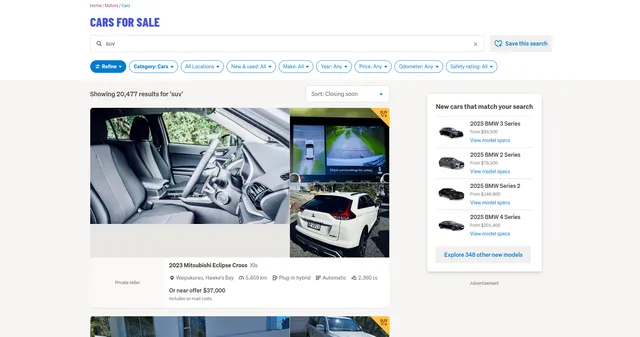
Example url 1: https://www.trademe.co.nz/a/motors/cars/search?search_string=suv&sort_order=motorsexpiryasc
Example url 2: https://www.trademe.co.nz/a/motors/search?search_string=suv&sort_order=motorsexpiryasc&page=2
Example url 3: https://www.trademe.co.nz/a/motors/cars/search?sort_order=motorsexpiryasc
Example Screenshot of automotive list by query page:
Input Format
The scraper accepts JSON configuration allowing precise control over data extraction from TradeMe Motors.
Scrape with URLs:
The urls parameter: Add TradeMe Motors search page URLs you want to scrape. Paste URLs individually or use Bulk edit for prepared lists. This is ideal when you have specific search result pages configured with your desired filters.
The ignore_url_failures parameter: If true, the scraper continues running even if some URLs fail after maximum retries. Essential for large-scale scraping jobs where one problematic URL shouldn't halt the entire operation.
When providing URLs, all "Scrape with search filters" options are disabled. The system only collects data from specified URLs.
Scrape with Search Filters:
The keyword parameter: Enter search keyword to find vehicles (e.g., "suv", "toyota", "camry", "diesel", "4wd"). Use terms matching common vehicle descriptions, makes, models, or features.
The vehical_type parameter: Select vehicle category to search:
""- All vehicles"cars"- Cars"motorbikes"- Motorbikes"boats-marine"- Boats & Marine"trailers"- Trailers"caravans-motorhomes"- Caravans & Motorhomes"trucks"- Trucks"buses"- Buses"specialist-cars"- Specialist Cars
The vehical_state parameter: Filter by vehicle condition:
""- All conditions"brandnew"- Brand New"used"- Used"classic"- Classic"exdemo"- Ex-Demo"certifiedpreowned"- Certified Pre-Owned
The sort_by parameter: Sort results by:
"motorsfeaturefirst"- Featured First (default)"motorspriceasc"- Price: Low to High"motorspricedesc"- Price: High to Low"motorsbuynowasc"- Buy Now: Low to High"motorsbuynowdesc"- Buy Now: High to Low"motorsoldestvehicle"- Oldest Vehicle"motorsnewestvehicle"- Newest Vehicle"motorslowestkilometres"- Lowest Kilometres"motorshighestkilometres"- Highest Kilometres"motorslatestlistings"- Latest Listings"motorsexpiryasc"- Expiry: Soonest
The page parameter: Specify starting page number for scraping. Useful for resuming interrupted scrapes or targeting specific result ranges.
When using search filters, leave the urls field empty.
General Options:
The max_items_per_url parameter: Limit items per URL or search to scrape. Default is 20, balancing comprehensive collection with manageable batch sizes.
The max_retries_per_url parameter: Maximum retry attempts per URL if scraping fails or bot detection occurs. Default is 2, providing reliability without excessive delays.
The proxy parameter: Proxy configuration for maintaining access and avoiding detection. Essential for large-scale data collection from TradeMe.
Output Format
The scraper returns comprehensive vehicle data with each field serving specific purposes for automotive market analysis and vehicle research:
-
Listing ID: Unique TradeMe listing identifier. Essential for tracking specific listings, database management, and referencing vehicles across time.
-
Title: Vehicle listing headline. Primary identification of make, model, and key features for quick vehicle recognition.
-
Category: TradeMe category classification. Used for organizing vehicles by type and filtering results by vehicle category.
-
Start Price: Auction starting price (if applicable). Important for auction strategy analysis and price tracking.
-
Start Date: Listing start timestamp. Tracks how long vehicles have been listed, indicating market demand and seller urgency.
-
End Date: Listing expiration timestamp. Critical for time-sensitive purchases and understanding listing duration patterns.
-
Listing Length: Duration of listing period. Reveals seller listing strategies and urgency levels.
-
Has Gallery: Boolean indicating photo gallery presence. Signals listing quality and seller investment in presentation.
-
As At: Data extraction timestamp. Important for historical tracking and ensuring data freshness.
-
Category Path: Full category hierarchy. Enables precise vehicle classification and filtering.
-
Picture Href: Primary listing image URL. Visual identification and enriched database records.
-
Region: Geographic region in New Zealand. Essential for local market analysis and regional pricing trends.
-
Suburb: Specific suburb location. Enables hyper-local market research and buyer proximity analysis.
-
Note Date: Timestamp for listing notes or updates. Tracks listing modifications and seller engagement.
-
Reserve State: Auction reserve status. Important for understanding true pricing intentions in auctions.
-
Is Classified: Boolean indicating classified ad format. Differentiates between auction and fixed-price listings.
-
Subtitle: Additional listing description. Provides extra context about vehicle features or condition.
-
Price Display: Formatted price display string. Shows how price is presented to buyers (e.g., "Buy Now", "Reserve Met").
-
Photo URLs: Array of all listing images. Comprehensive visual documentation for detailed vehicle assessment.
-
Additional Data: Supplementary listing information. Contains extra details not captured in standard fields.
-
Canonical Path: Standard URL path to listing. Used for generating direct links and tracking listings.
-
Member ID: Seller's TradeMe member identifier. Enables seller analysis, tracking dealer inventories, and identifying high-volume sellers.
-
Listing Platform: Platform where listing was created. Indicates mobile vs. desktop listing creation patterns.
-
Allows Pickups: Boolean for pickup option availability. Important for buyers and logistics planning.
-
Search Result Attributes: Highlighted features in search results. Shows which features sellers emphasize for visibility.
-
Showroom: Dealer showroom name (if applicable). Identifies professional dealers vs. private sellers.
-
Is Dealer: Boolean indicating dealer status. Critical for separating dealer inventory from private sales in analysis.
-
Dealer Name: Professional dealer business name. Essential for competitive dealer analysis and market share tracking.
-
Has Search Card Branding: Boolean for branded search appearance. Indicates premium dealer listings.
-
Search Card Tier: Dealer advertising tier level. Shows dealer investment in TradeMe advertising.
-
On Road Costs Included: Boolean for on-road costs inclusion. Important for true price comparison.
-
Dealer Settings: Dealer-specific configuration data. Contains dealer preferences and listing settings.
-
Body Style: Vehicle body type (sedan, SUV, hatchback, etc.). Essential for vehicle segmentation and market analysis by body style.
-
Doors: Number of doors. Basic specification for vehicle classification.
-
Engine Size: Engine displacement in litres/cc. Critical specification for performance assessment and market segmentation.
-
Make: Vehicle manufacturer (Toyota, Ford, Honda, etc.). Primary classification for brand-based analysis and inventory tracking.
-
Model: Specific vehicle model. Essential for precise vehicle identification and model-specific market research.
-
Odometer: Mileage/kilometres reading. Critical for vehicle valuation, condition assessment, and price correlation analysis.
-
Year: Manufacturing year. Essential for age-based pricing analysis and market trends by model year.
-
Transmission: Transmission type (automatic, manual, CVT). Important specification affecting vehicle value and buyer preferences.
-
Fuel: Fuel type (petrol, diesel, hybrid, electric). Critical for environmental analysis, running cost calculations, and market trend tracking.
-
Number Plate: Vehicle registration number. Used for vehicle history checks and verification.
-
Best Contact Time: Preferred seller contact hours. Facilitates successful buyer-seller communication.
-
Cylinders: Number of engine cylinders. Technical specification for performance analysis.
-
Owners: Number of previous owners. Important factor in vehicle history and value assessment.
-
VIN: Vehicle Identification Number. Essential for comprehensive vehicle history verification and fraud prevention.
-
WOF Expires: Warrant of Fitness expiry date. Critical for New Zealand compliance and immediate cost assessment.
-
Registration Expires: Vehicle registration expiry date. Important for ownership transfer cost calculation.
-
Stereo Description: Audio system details. Feature detail for equipment assessment.
-
Exterior Colour: Vehicle color. Important for inventory diversity analysis and buyer preference tracking.
-
Import History: Vehicle import status and history. Critical for New Zealand market understanding (many vehicles are imports).
-
Has MotorWeb Basic Report: Boolean for report availability. Indicates professional listing with verified vehicle history.
-
Model Detail: Specific model variant or trim level. Precise vehicle identification for accurate comparisons.
-
Seats: Seating capacity. Important specification for family vehicles and commercial use.
-
Is 4WD: Boolean for four-wheel drive. Critical feature for New Zealand market where 4WD is highly valued.
Each field enables comprehensive automotive market research, competitive pricing analysis, dealer inventory tracking, and vehicle valuation across New Zealand's primary automotive marketplace.
Example Output:
Usage Guide
Option 1: Scraping with URLs
Navigate to TradeMe Motors, configure your search using their interface with filters for vehicle type, condition, location, price range, and other criteria, then copy the resulting URL. This method is ideal when you need specific pre-configured searches.
Best practices:
- Test URLs individually before batch processing
- Monitor for blocked requests during extraction
- Use appropriate delays between large batches
- Keep backup URLs as TradeMe may update URL structures
- Verify URL parameters generate expected results
Common troubleshooting:
- Adjust proxy settings if encountering access restrictions
- Reduce retry counts for timeout issues
- Verify current URL format matches TradeMe's structure
- Check that filter parameters are properly encoded
Option 2: Scraping with Search Filters
Setting Up Vehicle Search Criteria
Use search filters to automatically generate vehicle searches without manual URL creation.
Step 1: Define Search Keyword
Enter keyword parameter for specific searches:
- Make/model combinations: "toyota camry", "ford ranger", "mazda cx-5"
- Vehicle types: "suv", "sedan", "ute", "hatchback", "wagon"
- Features: "turbo", "diesel", "hybrid", "4wd", "leather"
- Specific models: "hilux", "swift", "outlander"
Step 2: Select Vehicle Type
Choose vehical_type to focus on specific categories:
- Cars: Everyday passenger vehicles, SUVs, and light commercial
- Motorbikes: Motorcycles, scooters, and two-wheelers
- Boats & Marine: Boats, jet skis, and marine equipment
- Trucks: Commercial trucks and heavy vehicles
- Specialist Cars: Classic cars, race cars, and unique vehicles
Step 3: Configure Vehicle Condition
Set vehical_state to target specific market segments:
- Used: Largest segment, best for market analysis
- Brand New: New vehicle pricing and dealer inventory
- Classic: Collector vehicle market analysis
- Certified Pre-Owned: Premium used vehicle segment
- Ex-Demo: Former demonstration vehicle market
Step 4: Choose Sorting Method
Select sort_by based on research objectives:
- motorsfeaturefirst: See premium dealer listings first
- motorspriceasc/desc: Price-based market analysis
- motorslowestkilometres: Low-mileage vehicle tracking
- motorsnewestvehicle: Latest model year availability
- motorslatestlistings: Track new market entries
Step 5: Set Starting Page
Use page parameter for pagination control:
- Set to 1 for comprehensive scraping from start
- Use higher values to resume interrupted scrapes
- Track progress with incremental page numbers
Best Practices for Filter-Based Scraping
Keyword Strategy:
- Use specific make/model combinations for precise targeting
- Combine features with types for niche markets ("diesel suv", "manual sedan")
- Test keywords on TradeMe before bulk scraping
- Use New Zealand terminology ("ute" not "pickup truck")
Vehicle Type Selection:
- Start with Cars category for general automotive research
- Use Specialist Cars for classic/collector market analysis
- Combine Trucks with commercial keyword searches
- Explore Boats-Marine for comprehensive marine market data
Condition-Based Segmentation:
- Analyze Used market for price trends and availability
- Track Brand New for dealer inventory and MSRP data
- Monitor Classic for collectible vehicle valuation
- Compare Certified Pre-Owned vs Used for pricing premiums
Sorting Strategies:
- Use price sorting for market pricing analysis
- Sort by kilometres for vehicle condition assessment
- Use latest listings to track market dynamics
- Featured first reveals dealer advertising strategies
Data Validation and Quality Control
Verify extracted data:
- Vehicle specifications match search criteria
- Odometer readings are reasonable for vehicle age
- WOF and registration dates are current/valid
- Dealer information is complete for dealer listings
- Pricing data is correctly formatted
- Location data matches New Zealand regions
Common Issue Resolution
Search Returns No Results:
- Broaden keyword terms
- Remove restrictive filters
- Verify vehicle type selection is appropriate
- Test search directly on TradeMe website first
Incomplete Vehicle Data:
- Some listings have partial specifications
- Private sellers provide less detail than dealers
- Older listings may have limited information
- Use VIN lookup for additional verification when available
Regional Filtering:
- TradeMe covers all New Zealand regions
- Some remote areas have fewer listings
- Major cities (Auckland, Wellington, Christchurch) have highest density
- Consider nationwide searches for rare vehicles
Advanced Search Techniques
Market Segmentation:
- Run separate searches for each major manufacturer
- Segment by price ranges using sorting options
- Compare dealer vs. private seller pricing
- Track regional pricing variations
Competitive Analysis:
- Monitor specific dealer inventories using dealer names
- Track feature listings and premium placements
- Analyze pricing strategies across dealers
- Identify market leaders by listing volume
Trend Analysis:
- Regular scraping reveals price movements
- Track days on market through listing dates
- Monitor inventory turnover rates
- Identify seasonal pricing patterns
Import Market Research:
- Filter for import history data
- Compare NZ New vs. imported vehicle pricing
- Analyze Japanese import market dominance
- Track import trends by vehicle type
Proxy Configuration
For reliable TradeMe access:
- Use New Zealand-based proxies when possible
- Residential proxies recommended for large-scale scraping
- Rotate proxies to avoid rate limiting
- Monitor proxy performance across scraping sessions
Benefits and Applications
The TradeMe Cars Scraper delivers substantial time savings for automotive market research. Manual data collection requiring days or weeks is reduced to hours of automated extraction.
Primary Applications:
Automotive Dealer Intelligence: Track competitor inventory, pricing strategies, and listing optimization. Monitor regional dealer activity and market share. Analyze premium listing investments and advertising strategies.
Market Pricing Analysis: Build comprehensive pricing databases by make, model, year, and condition. Track price movements over time. Identify pricing anomalies and market opportunities. Establish fair market values for inventory valuation.
Vehicle Import Research: Analyze import vs. NZ New pricing differentials. Track which models are commonly imported. Assess import market demand. Identify profitable import opportunities.
Buyer Market Research: Monitor specific vehicle availability and pricing. Track how long vehicles remain listed. Identify negotiation opportunities through listing age. Compare dealer vs. private seller options.
Automotive Consultancy: Provide clients with data-driven market insights. Conduct vehicle valuation reports. Analyze market trends for manufacturer clients. Support due diligence for automotive businesses.
Competitive advantages:
- Access to New Zealand's largest vehicle marketplace data
- Comprehensive specifications including WOF, registration, and VIN
- Dealer vs. private seller segmentation
- Regional market insights across all New Zealand
- Import history tracking for market analysis
Structured output integrates with automotive CRM systems, pricing tools, and business intelligence platforms for immediate analysis and decision-making.
Conclusion
The TradeMe.co.nz Cars Scraper transforms manual vehicle research into efficient automated data collection. By providing structured access to New Zealand's premier automotive marketplace, it empowers dealers, researchers, and automotive professionals to make data-driven decisions about pricing, inventory, and market strategy.
Whether conducting competitive analysis, tracking market pricing, researching vehicle availability, or building comprehensive automotive databases, this scraper delivers the systematic extraction capabilities needed for professional automotive market intelligence in New Zealand.
Ready to streamline your TradeMe vehicle data collection? Start extracting valuable automotive insights today and transform your New Zealand market research capabilities.
Your feedback
We are always working to improve Actors' performance. So, if you have any technical feedback about trademe.co.nz Property Search Scraper or simply found a bug, please create an issue on the Actor's Issues tab in Apify Console.


![Trade Me Scraper [Just 💰$1.5] — NZ marketplace listings avatar](https://images.apifyusercontent.com/eccj9R-GbMmhuQ4EObukFNLEAsc0G--Wxslhzg_wy70/rs:fill:76:76/cb:1/aHR0cHM6Ly9hcGlmeS1pbWFnZS11cGxvYWRzLXByb2QuczMudXMtZWFzdC0xLmFtYXpvbmF3cy5jb20vclB1SjNjc1NCUjVsaTVmd1QtYWN0b3ItRklMbHlCcHYzOFRpSXVkTUwtcjZ5bHJ2SkV6My1UcmFkZW1lX2xvZ28uanBn.webp)


