

Google Hotels Scraper - Prices, OTA Rates, Room Rates & Reviews
Pricing
from $3.20 / 1,000 hotels
Google Hotels Scraper - Prices, OTA Rates, Room Rates & Reviews
Rising starScrape Google Hotels for any destination and dates: live per-night prices, the full OTA price ladder (Booking.com, Agoda, Expedia, Hotels.com and more) with booking links, per-room rates, star class, guest ratings and reviews. Structured JSON/CSV - no code, no login, no Google API key.

Google Hotels Scraper
Google Hotels Scraper extracts hotels, live prices and guest reviews from Google Hotels at scale. Search any destination and dates, and get one row per hotel with the live per-night price, the full OTA price ladder (Booking.com, Agoda, Expedia, Hotels.com, Priceline and more), each with its booking link, plus per-room rates, star class, guest rating & review count, coordinates, and optional guest reviews. Export to CSV, JSON, Excel, or pull it via API. No code, no login, no Google API key, and you pay only for what you pull (no start fee).
⭐ Found this useful? Please rate & bookmark the actor; it helps other travelers and analysts find it.
Discovery + prices + reviews in one actor. Paste a destination ("hotels in New York") and dates and get every matching hotel with its complete price comparison ladder. Or add exact hotels by name, link, or ID to price a known set across a range of dates. Prices and reviews are optional toggles, so you pay only for what you pull.
Runs on the Apify platform: scheduling, a REST API, webhooks & integrations, proxy rotation, and
run monitoring out of the box, plus an LLM-ready markdownContent field on every row for RAG pipelines.
What does Google Hotels Scraper do?
Give it one or more destination searches (e.g. hotels in New York, Paris 5 star hotels, resorts in Bali)
and/or exact hotels (by name, Google Maps/Hotels link, or ID), pick your dates and occupancy, and it returns:
- Hotel discovery: every hotel matching the search, paginated and de-duplicated, with name, star class, guest rating, review count, property type, coordinates and a Google Hotels deep link.
- Prices (toggle): the cheapest per-night lead price plus the full per-source OTA ladder (typically 15 to 25 booking sites), with each source's per-night and total price and a direct booking link.
- Per-room rates: the room × source matrix (room name, per-night, total) for OTAs that feed room data to Google. Included automatically whenever prices are on (no extra request, no extra charge).
- Guest reviews (toggle): reviewer, rating, review text, date and owner response, into a separate
reviewsdataset. - Multi-date price windows: set a "track prices until" date to reprice the same hotels across a range
(added to
offersas dated rows).
What data can I extract from Google Hotels?
Per hotel, one row, with nested arrays so a hotel and its whole price ladder stay in a single record (no row explosion):
| Field | Description |
|---|---|
name, entityToken | Hotel name + Google Travel entity token (the stable de-dup key). |
starClass, rating, reviewCount | Hotel-class stars, average guest rating (/5), total reviews. |
propertyType, latitude, longitude | Property type + coordinates. |
leadPrice, leadPriceTotal, currency | Cheapest per-night + whole-stay price for the base stay. |
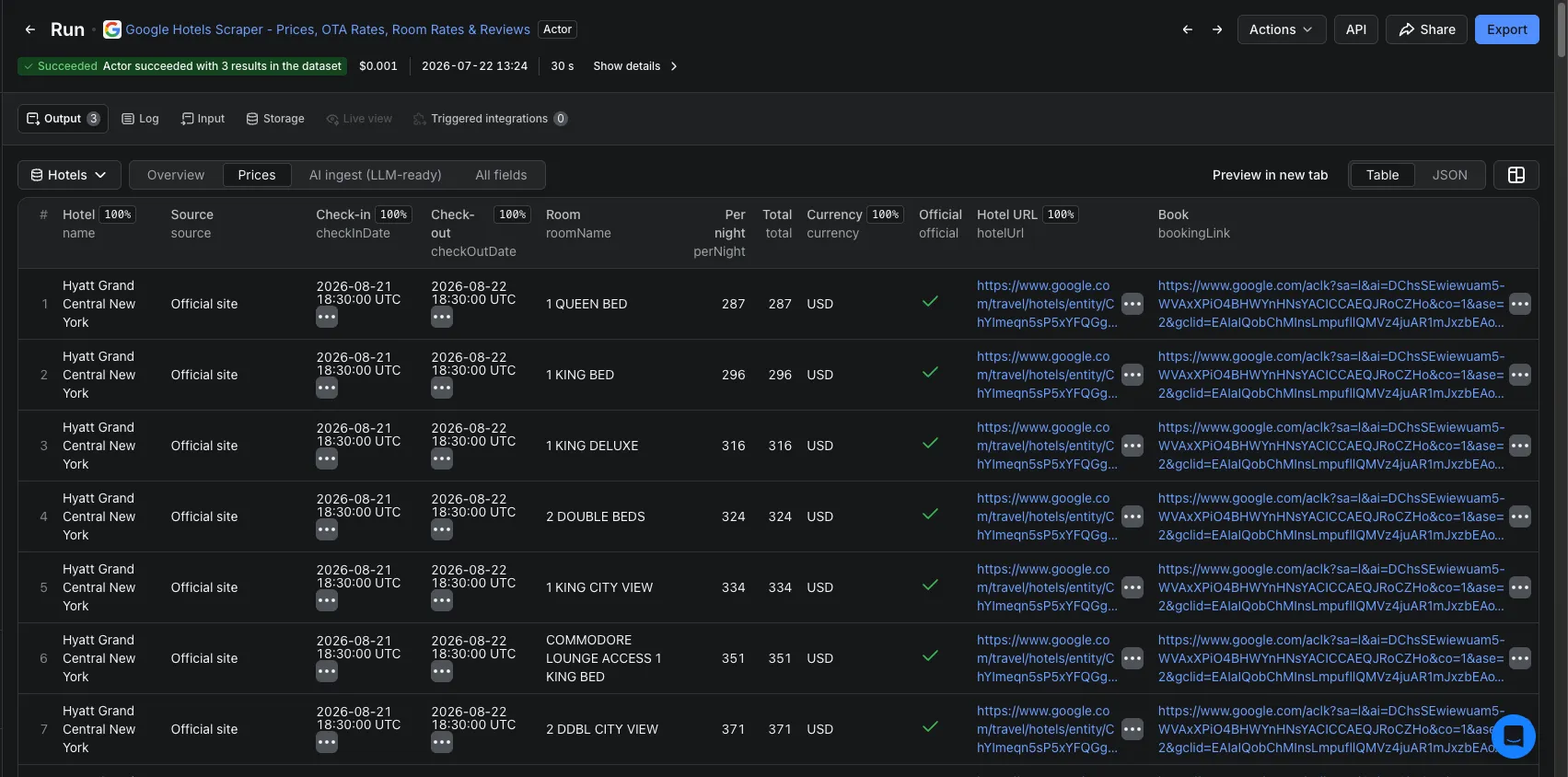
offers[] | The prices table: one self-contained row per booking source × stay-date × room-if-available: {source, checkInDate, checkOutDate, roomName, perNight, total, currency, official, hotelUrl, bookingLink}. Includes the base stay and every price-window date. The hotel's direct-booking row is labelled Official site (official: true). |
vendors[] | Booking directory: one object per source: {source, bookingLink, official} (no prices; prices live in offers). |
vendorCount, nights | Number of distinct booking sources selling this hotel + the length of the priced stay (nights). |
cid, cidDecimal, hotelUrl | Google feature-id (hex) / decimal Maps CID + a deep link. |
reviewsExtracted, scrapedAt | Reviews pushed to the reviews dataset for this hotel this run + ISO 8601 timestamp of the scrape. |
markdownContent | Self-contained, LLM-ready hotel + price summary for RAG ingestion. |
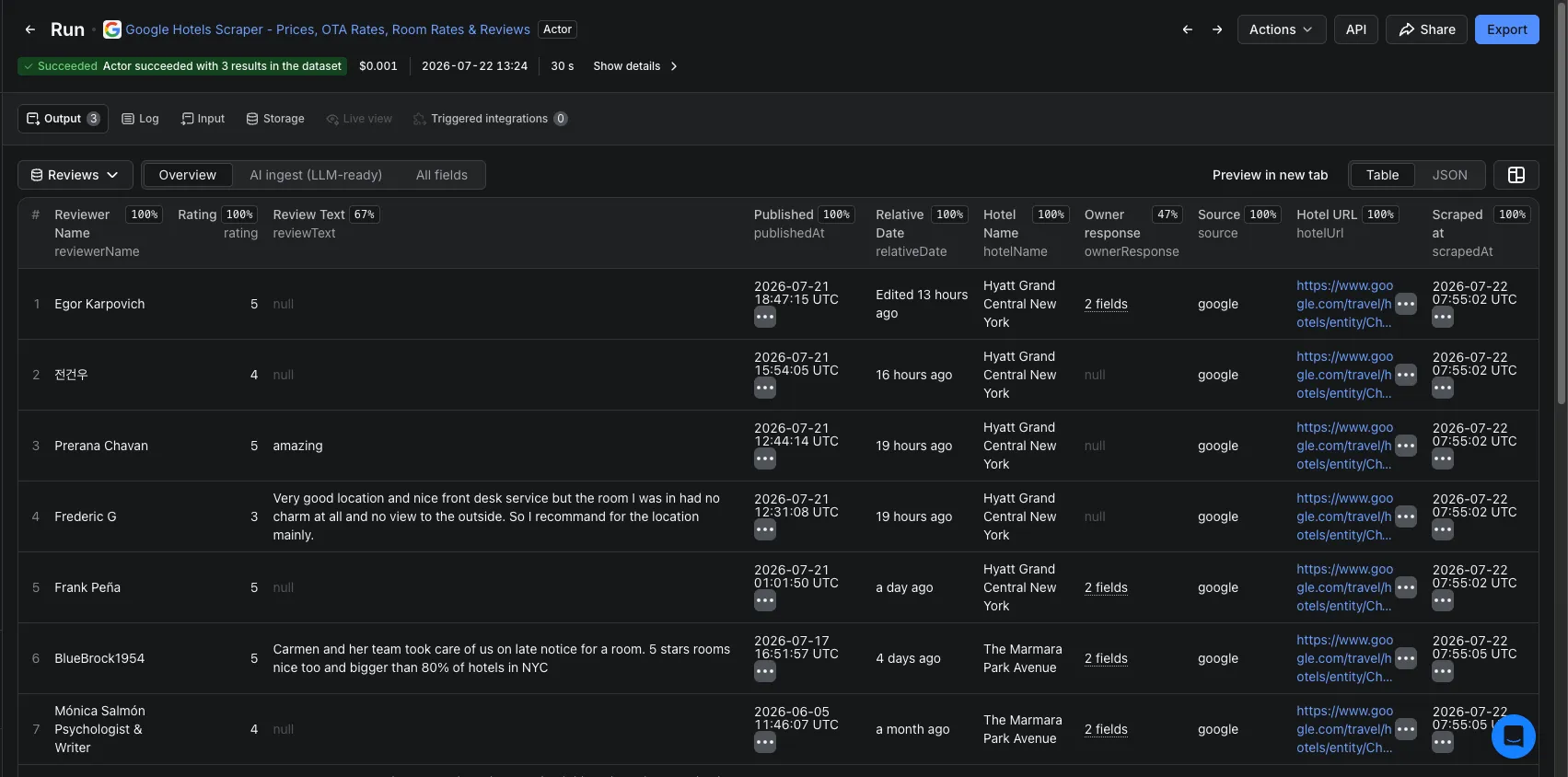
Reviews land in a separate reviews dataset (one row per review): reviewerName, rating, reviewText,
relativeDate, ownerResponse, hotelName, entityToken and an LLM-ready markdownContent.
What makes this different?
| Google Hotels Scraper | Typical single-purpose scrapers | |
|---|---|---|
| Coverage | Discovery + prices + reviews in one run | Prices or reviews, rarely both |
| Row shape | One row per hotel with nested price ladder | One row per price/offer (row explosion) |
| Price detail | Full OTA ladder + booking links + per-room matrix (always) | Single lead price |
| Dates | Single stay or a multi-date price window (all in offers) | Single date |
| AI-ready | markdownContent on every row (RAG) | Raw fields only |
| Billing | Per hotel base + opt-in prices/reviews, no start fee | Often per result/offer |
| Reliability | Datacenter-first, with automatic residential fallback only if Google blocks datacenter | Fixed proxy; a block just returns an empty run |
How to scrape Google Hotels step by step
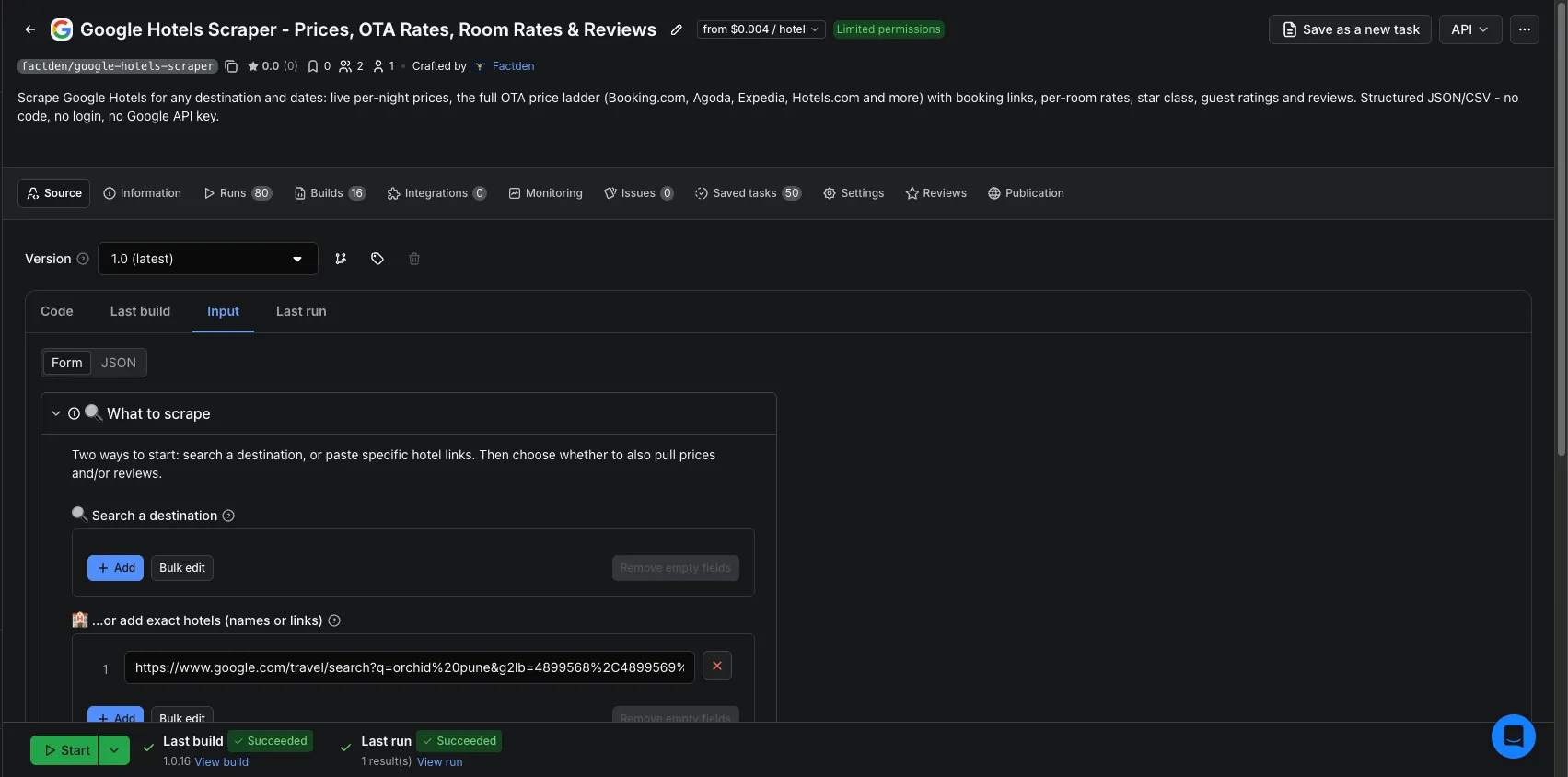
- Open the actor and in 🔍 Search a destination type one destination per line (e.g.
hotels in New York). Or, in 🏨 …or add exact hotels, add specific hotels by name (e.g.The Manhattan at Times Square), Google Maps/Hotels link, or ID. You get exactly those, one row each. - Set 📅 Check-in / Check-out and guests / rooms. (Leave dates empty and, with prices on, the actor prices tomorrow's 1-night stay; turn off Include prices for hotel info + reviews only.)
- Toggle 💵 Include prices (OTA ladder + per-room rates) and ⭐ Include reviews to taste.
- Optionally set discovery filters (min/max price, minimum guest rating, stars, property type) and max hotels.
- Click Start, then download the results as JSON, CSV or Excel, or fetch them from the API.
Google Hotels API vs this scraper
Google does not offer a public Hotels API for this data. The official Hotel Center / Hotel Prices APIs are for hotel partners feeding their own rates in, not for pulling the public comparison results out, and they require partner onboarding. This actor reads the same public Google Hotels results a visitor sees, with no API key, no partner account, and no per-call quota, just structured JSON/CSV out.
Who is it for?
- Travel & OTA analysts: track rates and the OTA price ladder across markets and dates.
- Revenue managers & hotels: monitor your own and competitors' rates and guest sentiment.
- Price-comparison & meta-search builders: bootstrap a hotel + rates dataset.
- Data / AI teams: build a hotel-and-reviews corpus with ready-made
markdownContentfor RAG.
Common use cases
Rate shopping & OTA rate parity
Add your competitive set by name or link into exact hotels, set a base stay, set a Track prices until
date, and enable prices. Each hotel's offers then include priced rows for every date in the window. It is a
pay-per-use alternative to enterprise rate-shopping suites for monitoring OTA rate parity and competitor
rates across dates, with the raw data you own.
Full-market discovery
Search hotels in <city> with a higher max hotels to sweep the destination, then enable prices to get the
whole OTA ladder for every hotel.
Guest-sentiment dataset
Turn prices off and reviews on to build a pure reviews corpus (billed $0.004 per hotel + $0.001 per review, no start fee).
Input
| Input | Description |
|---|---|
searchQueries | Destination searches, one per line (paginated + de-duplicated). |
hotelUrls | Exact hotels (one row each): a hotel name, a Google Travel/Maps URL or short link, a ChIJ… place-id, or a ChkI… entity token. |
checkInDate / checkOutDate | Stay dates (YYYY-MM-DD). Leave empty and, with prices on, it defaults to tomorrow's 1-night stay; turn off Include prices for info + reviews only. |
priceWindowEnd | Optional "track prices until" date; reprices every check-in from check-in to this date, added to offers as extra dated rows. |
adults / children / rooms | Occupancy. |
includePrices / currency | Prices toggle (OTA ladder + per-room rates) and currency. |
includeReviews / maxReviews / reviewsSort | Reviews toggle, cap per hotel, sort order. |
minPrice / maxPrice / minGuestRating | Hard filters on lead price and guest rating. |
minStars / propertyTypes | Search refinements (Google narrows the results). |
maxResults | Max unique hotels to return (0 = no cap). |
countryCode / languageCode | Google market + interface language. |
proxyConfiguration | Proxy settings. Datacenter is the default and is sufficient at typical volumes. |
useResidentialFallback | If Google blocks datacenter mid-run, auto-retry the few critical requests on residential so the run still returns results (default on; only used when datacenter fails). |
At least one of searchQueries or hotelUrls is required.
Output
hotels dataset, one row per hotel:
reviews dataset, one row per guest review:
You can download either dataset as JSON, CSV, HTML or Excel, or fetch it from the API.
How much does it cost to scrape Google Hotels?
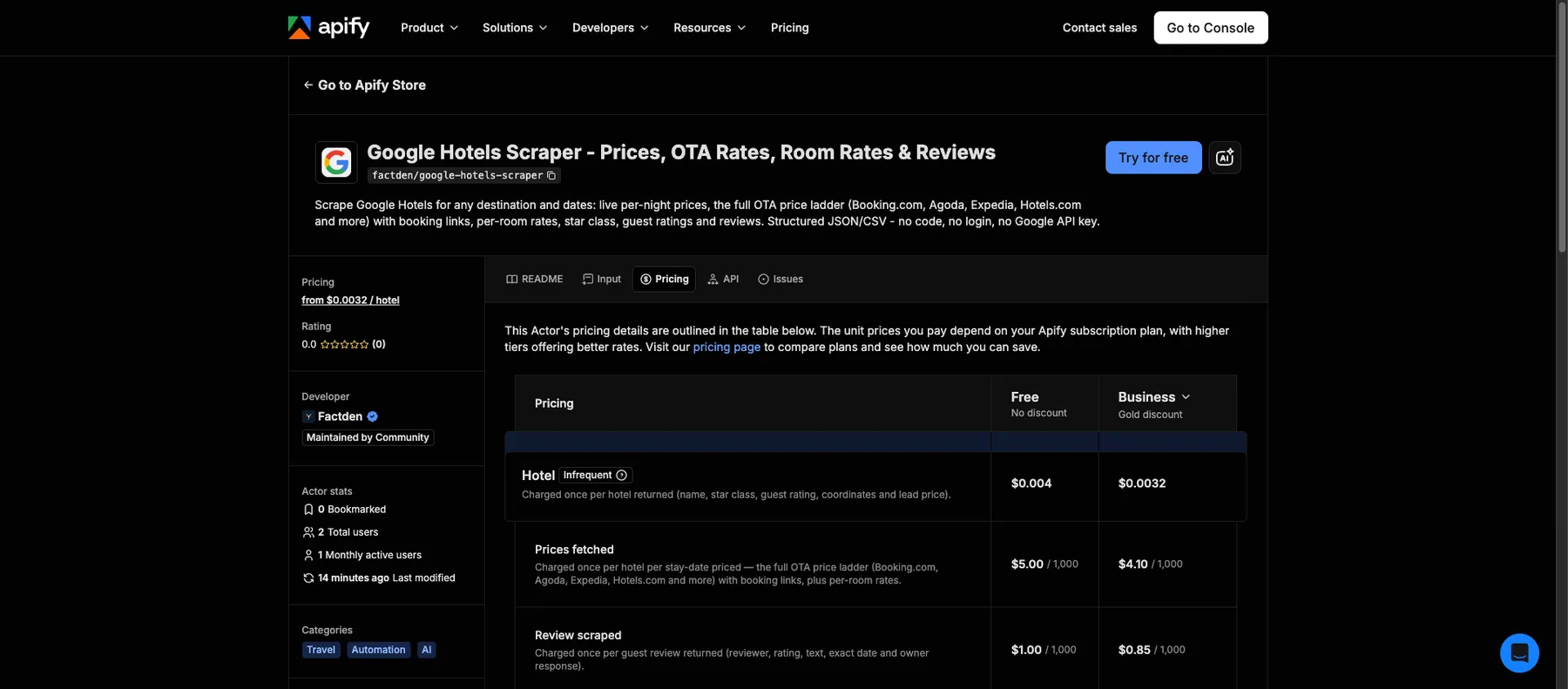
Discovery starts at $4 per 1,000 hotels, with no start fee, and you pay only for what you turn on. Prices and reviews are opt-in add-ons, so a discovery run stays cheap and you only pay more when you pull the full price ladder or reviews. Three events:
| You pay for | When | Price |
|---|---|---|
| Hotel | each hotel returned (name, stars, rating, coordinates, lead price) | $0.004 |
| Prices (opt-in) | each hotel priced: full OTA ladder + per-room rates, per date | $0.005 |
| Review (opt-in) | each guest review | $0.001 |
So discovery-only = $4 / 1,000 hotels; a hotel with its complete price ladder = $0.009; reviews add $0.001 each. The Apify $5 free credit covers ~1,250 hotels discovery-only, or ~555 fully-priced. See the Pricing tab for current rates.
What a real run costs: pricing 20 hotels once (full ladder) = 20 × $0.009 = $0.18; monitoring a 50-hotel comp set across 30 check-in dates = 50 × $0.004 + 50 × 30 × $0.005 = ~$7.70 per sweep; a discovery-only sweep of 500 hotels = $2.00.
Run it on a schedule
Use Apify Schedules to re-scrape your competitive set daily and diff the price ladder over time. Combine with webhooks to push new results into your warehouse or a Slack alert.
AI agents & RAG
Every row carries an LLM-ready markdownContent block, so you can feed the hotels or reviews dataset straight
into a vector DB. The actor is also callable from AI agents via the Apify MCP server.
Data & compliance
This actor collects only publicly available Google Hotels data, the same results any visitor sees. It does not log in or bypass access controls. You are responsible for using the data in line with applicable laws and Google's terms. Reviews are public user-generated content; handle any personal data (reviewer names) per GDPR/CCPA.
Other travel & review scrapers by FactDen
| Actor | What it does |
|---|---|
| Zomato Restaurant Reviews Scraper | Zomato restaurant reviews & owner responses, plus restaurant leads (phone, address, GPS) by city & cuisine. |
| Traveloka Hotel & Activity Reviews Scraper | Traveloka hotel & Xperience activity reviews: 1-10 ratings, category sub-scores, owner replies & English translation. |
| Qunar Hotel Reviews Scraper | Qunar (去哪儿) hotel reviews: per-review sub-scores, sentiment, owner replies, LLM-ready markdown |
| Booking.com Scraper | Hotels, live prices, per-room rates, availability & occupancy, and guest reviews across a whole city or one hotel. |
| MCA India Company & Director Data Scraper | India MCA company master data + directors' personal email & phone, by CIN, DIN, name, or industry & state. |
| Airbnb Data Scraper | Airbnb listings, prices, availability, occupancy, ADR/RevPAR & reviews; a pay-per-use AirDNA alternative. |
| Expedia Reviews Scraper | Hotel guest reviews, ratings, sub-scores & sentiment from Expedia. |
| Hotels.com Reviews Scraper | Hotel guest reviews & ratings from Hotels.com (all Expedia-Group brands). |
| Trip.com & Ctrip Reviews Scraper | Hotel reviews & ratings from Trip.com / Ctrip. |
| G2 Software Reviews Scraper | Software product reviews, ratings & switching data from G2. |
| Indeed Jobs Scraper | Job listings, salaries, filters & company data from Indeed. |
| MakeMyTrip & Goibibo Reviews Scraper | MakeMyTrip + Goibibo hotel reviews & details (India's largest OTAs). |
| TripAdvisor Hotel Reviews API | All TripAdvisor reviews for hotels, restaurants & attractions + official subratings & AI summary. |
| Agoda Hotel Reviews Scraper | Agoda hotel reviews at scale: scores, review text, traveler type & owner responses, in 33 languages. |
FAQ
Do I need a Google API key?
No. No key, no partner account, and no login. You paste a destination or hotel URLs and run it; the actor reads the same public Google Hotels results a visitor sees and returns structured JSON/CSV.
Can I scrape a specific hotel instead of a whole city?
Yes. In …or add exact hotels, enter the hotel's name (e.g. The Manhattan at Times Square), its Google
Hotels/Maps URL or short link, a ChIJ… Maps place-id, or a ChkI… entity token. You get exactly that hotel,
one row, ideal for pricing a known competitive set across dates. (A hotel name resolves to the closest match, so
use the full name; a Google Maps link is CID-matched for an exact result.)
Can I get prices for different dates in one run?
Yes. Set a Track prices until date and each hotel is repriced for every check-in day from your check-in date up
to that date, added to offers as dated rows (up to 60 extra dates per hotel). The nights are taken from your
check-in to check-out gap. Each extra date is a separate prices charge per hotel, so a wide window across a whole
city adds up; it is best paired with a short list of specific hotels.
Why do a few hotels have no price ladder?
Almost all hotels return the full OTA ladder and reviews (in testing, prices resolved for ~17 of 18 hotels on a results page and reviews for all 18). A property with no bookable offers on your dates/sources will still return its name, rating, star class and coordinates (and reviews), just an empty price ladder.
How fresh are the prices, and how often can I run it?
Prices are pulled live from Google at run time for your exact dates and occupancy, the same rates a visitor sees at that moment. Schedule the actor hourly or daily to track rate movements and OTA rate parity across booking sources over time; each run appends to your dataset, so you build a price history for revenue management and parity monitoring. It supports 25 currencies, 25 Google country markets and 17 interface languages, and the market setting shifts which hotels appear, the pricing, and the OTA mix.
Can I use Google Hotels Scraper with the Apify API?
Yes. Every actor on Apify has a full REST API: start runs, pass input, and pull the hotels and reviews
datasets as JSON, CSV or Excel. You can also schedule runs and wire webhooks to push results downstream.
Can I use it through an MCP server?
Yes. The actor is callable from AI agents via the Apify MCP server, so tools like Claude or a LangChain agent can
run it and read the structured result. Every row also carries an LLM-ready markdownContent field for RAG.
Can I integrate it with Make, Zapier, n8n or Google Sheets?
Yes. Apify offers native integrations and webhooks, so you can trigger runs and route the hotel and review data into Make, Zapier, n8n, Google Sheets, Slack, or your own warehouse without writing glue code.
Is it legal to scrape Google Hotels?
Scraping publicly available data is generally lawful, but you are responsible for how you use it. This actor collects only public results and does not log in or bypass access controls. See Apify's overview, is web scraping legal?, and handle any personal data (reviewer names) in line with GDPR/CCPA.
Support
Questions or a field you need? Open the Issues tab on this actor's Apify page.
Changelog
- 2026-07, v1.0: Initial release: discovery + OTA price ladder + per-room rates + reviews, multi-date price windows, LLM-ready markdown, three datasets (hotels / default / reviews).
- 2026-07, listing update: Added worked pricing examples, source/market coverage numbers, and a price-freshness & rate-parity FAQ.
- 2026-07, reliability: Datacenter-first proxying with automatic residential fallback only when Google blocks datacenter IPs, plus retry-on-empty so a transient block no longer returns an empty run.


