

Eventbrite Scraper — Events + Organizer Leads
Pricing
from $0.58 / 1,000 events
Eventbrite Scraper — Events + Organizer Leads
Find Eventbrite events by keyword, city and date, with the organizer's website, Facebook, X, Instagram and followers. $0.80 per 1,000 events + $2.40 per 1,000 organizer contacts found. Run it daily, weekly or monthly with n8n, Make or Zapier. Unmatched searches are free.
Pricing
from $0.58 / 1,000 events
Rating
0.0
(0)
Developer

FERMAJA
Maintained by CommunityActor stats
0
Bookmarked
2
Total users
1
Monthly active users
2 days ago
Last modified
Categories
Features
Share
Eventbrite Scraper — Events + Organizer Leads
Search Eventbrite by keyword, city and date and get one flat row per event with the date, venue and category, plus the organizer's website, Facebook, X, Instagram, LinkedIn, followers and events hosted.
- 📅 Events: name, link, start and end date and time, time zone, online or in person, category, subcategory, format, short description
- 📍 Venues: venue name, full address, city, state or region, country, postal code, latitude and longitude
- 🧑💼 Organizer leads (add-on): organizer name and Eventbrite page, website and social links, followers, events hosted, years on Eventbrite, attendees hosted
- 🗓️ Plain-word dates: "this weekend", "next 30 days", "December 2026" or any date format
- 🔗 Built for workflows: flat rows that map straight into n8n, Make, Zapier, Google Sheets or your CRM
Try it now: the prefilled input (networking events in Austin, TX) returns 20 events from 14 organizers in about 5 seconds; 14 of the 20 rows came with the organizer's website or a social link.
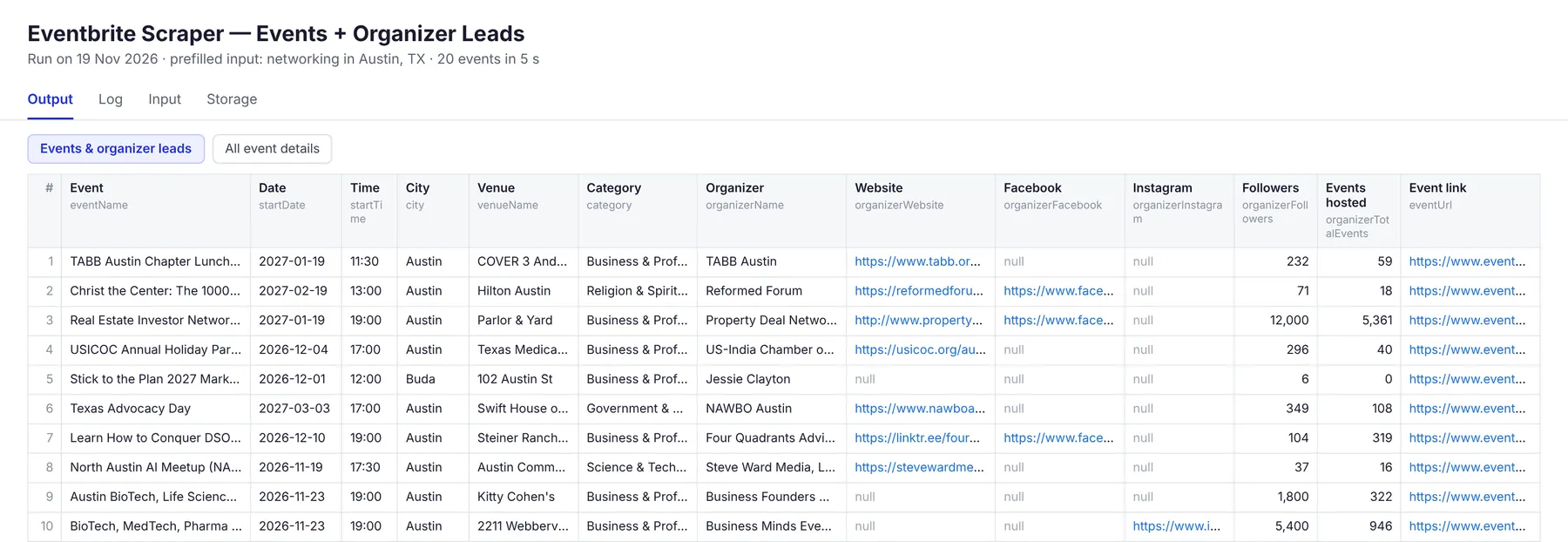
This is how your results look: the "Events & organizer leads" view of the Output tab, with the first 10 real rows from a run on 2026-11-19 (the prefilled input: "networking" in Austin, TX). Nothing is masked: these are public Eventbrite listings. Long values are cut with "…" as in the Console table.
✨ Why people pick it
- ✅ Organizer contacts, not just event titles: in our 2026-11-19 test of 200 business events in New York, 146 rows (73%) had the organizer's website or a social link, and 131 (66%) a website.
- ✅ Lead-list mode: "One row per organizer" plus "Only organizers with a website" turns any search into a clean list of event organizers to contact.
- ✅ Type it like a human: "Austin, TX", "austin tx", "London, UK", "Toronto, ON", "online", one-line pastes ("Startup, AI"), Eventbrite search, event and organizer links, and dates like "01.12.2026" or "Dec 15" all work.
- ✅ Fair billing: you pay per event row, and the organizer add-on only when a website or social link is found. Rows without one say "Organizer contact not charged".
- ✅ No login, no browser: reads public Eventbrite pages over plain HTTP, so runs are fast and cheap.
👥 Who uses it
| Who | What they do with it | |
|---|---|---|
| 🎤 | Event tech and service sellers (ticketing, AV, catering, venues, photographers) | Build lists of active organizers in a city with website and socials for outreach |
| 🤝 | Sponsors, B2B marketers and sales teams | Find the networking events, conferences and meetups their buyers attend, every week |
| 📰 | Local media, newsletters and city guides | Pull this weekend's events by category into a sheet or a newsletter |
⚙️ How it works
- You type keywords and cities (or paste Eventbrite links, or chain a dataset from another Actor).
- The Actor reads Eventbrite's public search pages (20 events per page, up to about 1,000 per search) in Eventbrite's order.
- With "Add organizer details" on, it opens each organizer's public Eventbrite page once and adds the website, social links and follower numbers to every event of that organizer.
💡 Tip: Eventbrite answers an unknown word with unrelated events. The Actor checks for this: it saves nothing (and charges nothing) for such a search and says so in the status message. Words Eventbrite knows only in one form are retried automatically ("conference" is searched as "conferences").
🧾 Input recipes
Organizer lead list: one row per organizer of business events in three cities, only organizers with a website:
This weekend's tech events in London and Berlin:
All upcoming events of specific organizers (paste their Eventbrite pages):
📦 Example output
A complete real row from a run on 2026-11-19 (the prefilled input: "networking" in Austin, TX). Every field is shown, in the order you get it; the long imageUrl is cut with "…" here only.
Every row has all fields (null when unknown). The organizer fields stay empty with an organizerNote when the organizer lists no website or social link, or when "Add organizer details" is off.
| Group | Fields |
|---|---|
| Event | eventId, eventName, eventUrl, startDate, startTime, endDate, endTime, timezone, isOnline, isCancelled, category, subcategory, format, summary, ticketsUrl, imageUrl |
| Venue | venueName, venueAddress, city, region, country, postalCode, latitude, longitude |
| Organizer | organizerName, organizerUrl, organizerId, organizerFollowers, organizerTotalEvents, organizerHostingYears, organizerAttendeesHosted, organizerVerified |
| Organizer contacts (add-on) | organizerWebsite, organizerFacebook, organizerX, organizerInstagram, organizerLinkedin, organizerTiktok, organizerYoutube, organizerContactCharged, organizerNote |
| Run | searchQuery, searchLocation, status, error, scrapedAt |
🔗 Use it in n8n
Install the official Apify node (n8n Cloud: search "Apify" in the nodes panel; self-hosted: install @apify/n8n-nodes-apify under Settings > Community Nodes) and add your Apify API token as the credential.
-
Event organizer leads into your CRM, every Monday. Schedule Trigger (Mondays) -> Apify "Run an Actor and get dataset" (this Actor) -> Filter (
organizerWebsiteis not empty) -> HubSpot / Pipedrive "Create company" or Google Sheets "Append row". Custom input:{ "searchQueries": ["networking", "conference"], "locations": ["Austin, TX", "Dallas, TX"], "when": "next 30 days", "maxEventsPerSearch": 0, "onePerOrganizer": true, "onlyWithOrganizerWebsite": true }Map
organizerName,organizerWebsite,organizerLinkedin,organizerInstagram,organizerFollowers,organizerTotalEvents,eventName,startDate,city,eventUrl. -
Cities from a Google Sheet. Google Sheets "Get rows" -> Aggregate (field
city, so all cities go into one run; set the Custom input field to Expression) -> Apify "Run an Actor and get dataset" -> Slack "Send message" witheventName,startDate,venueName,organizerName,eventUrl. Custom input:{ "searchQueries": ["startup"], "locations": {{ JSON.stringify($json.city) }}, "when": "this week", "maxEventsPerSearch": 20 } -
Organizer emails and phones from their websites. Run this Actor, then a second Apify node running Website Contact Scraper with
{ "datasetId": "{{ $json.defaultDatasetId }}", "datasetField": "organizerWebsite" }to collect emails, phones and more social profiles from each organizer's site. To feed this Actor from another Actor's dataset instead (for example cities from a lead list), pass{ "datasetId": "{{ $json.defaultDatasetId }}", "datasetField": "city", "searchQueries": ["networking"] }.
⏰ Run it on autopilot: daily, weekly or monthly
Two ways, no code:
- On Apify: save your input as a task, open Console > Schedules and run it daily, weekly or monthly. Send results anywhere from the task's Integrations tab (email, Google Drive, Slack, webhooks). No workflow tool needed.
- From n8n, Make or Zapier: trigger the Actor on a schedule and push the rows to your CRM or sheet.
Popular rhythms: every Thursday with "when": "this weekend" for a weekend events newsletter, every Monday with "when": "next 30 days" and "One row per organizer" for fresh organizer leads, and monthly per city for a market map of who runs events in your niche.
📋 Ready-made tasks
- Networking event organizers in New York (lead list): one row per organizer of networking and business events, only organizers with a website.
- Tech and startup events this month: startup and AI events in San Francisco and London in the current month, with organizer details.
- Real estate event organizers: organizers of real estate investor events in Miami and Dallas, one row per organizer.
💵 Pricing
Pay per result: a start fee of $0.005 per run, a price per event row, and an organizer contact add-on charged only when the organizer's website or a social link is found (73% of 200 rows in our 2026-11-19 New York test, 70% of the prefilled run). Unreadable rows, filtered-out events and searches Eventbrite cannot match are free.
| Your Apify plan | Per event row | Organizer contact add-on (only when found) | Per 1,000 events | Per 1,000 organizer contacts |
|---|---|---|---|---|
| Free | $0.0008 | $0.0024 | $0.80 | $2.40 |
| Starter (Bronze) | $0.000704 | $0.002112 | $0.70 | $2.11 |
| Scale (Silver) | $0.00064 | $0.00192 | $0.64 | $1.92 |
| Business (Gold) and up | $0.000576 | $0.001728 | $0.58 | $1.73 |
Worked example on the Free plan: 1,000 events, 730 of them with an organizer website or social link = 1,000 × $0.0008 + 730 × $0.0024 + $0.005 start fee = $2.56. Without organizer details (switch the add-on off): 1,000 events = $0.81.
Just testing or comparing scrapers? You're very welcome. The prefilled run (20 networking events in Austin, TX) took about 5 seconds and costs about $0.055 on the Free plan. Apify's free plan includes $5 of credit every month, enough for about 1,950 events with organizer details, or about 6,200 events without them.
❓ FAQ
Where do the organizer websites and socials come from? From the organizer's public Eventbrite page, where organizers list their website and social profiles. The Actor does not guess or look anything up elsewhere. When an organizer lists nothing, organizerNote says so and the add-on is not charged.
Does it give emails or phone numbers? No. Eventbrite does not publish organizer emails or phones. Chain Website Contact Scraper on organizerWebsite to get the public emails and phones from the organizers' own websites.
Is it legal? The Actor reads only public Eventbrite pages, with no login. You are responsible for using the data in line with your local laws (for example GDPR and anti-spam rules for outreach).
Which cities work? Every city Eventbrite has a search page for. Type "City, ST" for the US ("Austin, TX"), "City, Country" elsewhere ("London, UK", "Paris, France"), a plain city name ("Berlin"), or "online". You can also paste any Eventbrite search link.
Can I get past events? No. Eventbrite's public search lists upcoming events only; a past date window is replaced with all upcoming dates and the status message says so.
Do I need a proxy? No for normal runs. If Eventbrite blocks a request, the run retries it through Apify datacenter proxy automatically.
⚠️ Limits
- Up to about 1,000 events per keyword and city (Eventbrite shows at most 49 pages of 20), up to 5,000 events per run.
- No ticket prices: Eventbrite's search pages do not include them (open
eventUrlfor the price). - Organizer numbers (
organizerFollowers,organizerAttendeesHosted) are Eventbrite's rounded figures ("1.9k" becomes 1900). - Eventbrite decides which events match a keyword; some results are loosely related.
🆕 What's new
- 2026-11-23: a ZIP code or postcode in "Locations" (e.g.
90210) now gets a clear "type the city instead" note; a search page that times out twice is retried through Apify datacenter proxy instead of giving up. - 2026-11-19: first release. Tested on 19 platform runs: keywords, one-line pastes, cities typed many ways, plain-word and reversed dates, organizer, event and search links, n8n dataset chaining, total and spending caps, and empty or unfilled input.
🧩 Related Actors
- Website Contact Scraper: emails, phones and social profiles from the organizer websites in this Actor's output.
- Website SEO Audit: score each organizer's website and get a ready pitch line.
- BBB Business Leads Scraper: local businesses with phones and addresses by trade and city.


