

B2B Tech Stack Detector — Technographics by Domain (AI)
Pricing
from $44.00 / 1,000 domain analyzeds
B2B Tech Stack Detector — Technographics by Domain (AI)
Detect the technology stack behind any B2B domain — CMS, ecommerce, analytics, CRM/marketing, chat, ad pixels, framework, CDN/hosting, payments, email provider — with AI buying-signals and optional fit scoring. A flexible alternative to BuiltWith and Wappalyzer for technographic enrichment.
Pricing
from $44.00 / 1,000 domain analyzeds
Rating
0.0
(0)
Developer

Fredrik Hansson
Maintained by CommunityActor stats
0
Bookmarked
2
Total users
1
Monthly active users
4 hours ago
Last modified
Categories
Share
Hand it a list of company domains and it tells you exactly what technology each one runs. This Actor fingerprints every domain's homepage and DNS — CMS, ecommerce platform, analytics, tag managers, CRM and marketing automation, live-chat, ad pixels, JavaScript framework, CDN/hosting, payment provider and email provider — then uses OpenAI to read the stack and tell you how mature it is and whether that company is a fit for what you sell.
You bring the domains. It hands back a technographic profile per company — the signal most B2B targeting is missing.
🔗 Chain it after your scraper
Already building lead lists with Google Maps Scraper (compass/crawler-google-places), Google Maps Email Extractor (lukaskrivka/google-maps-with-contact-details) or LinkedIn Company Details Scraper (harvestapi/linkedin-company)? Pipe the dataset straight in — paste its dataset ID (via the Integrations tab) and get the full technology stack + buying-signals + fit score per company. Works with any Maps, LinkedIn or company scraper's output.
Quick start
- Fill in the input — set the fields in the input tab (prefilled with a working example).
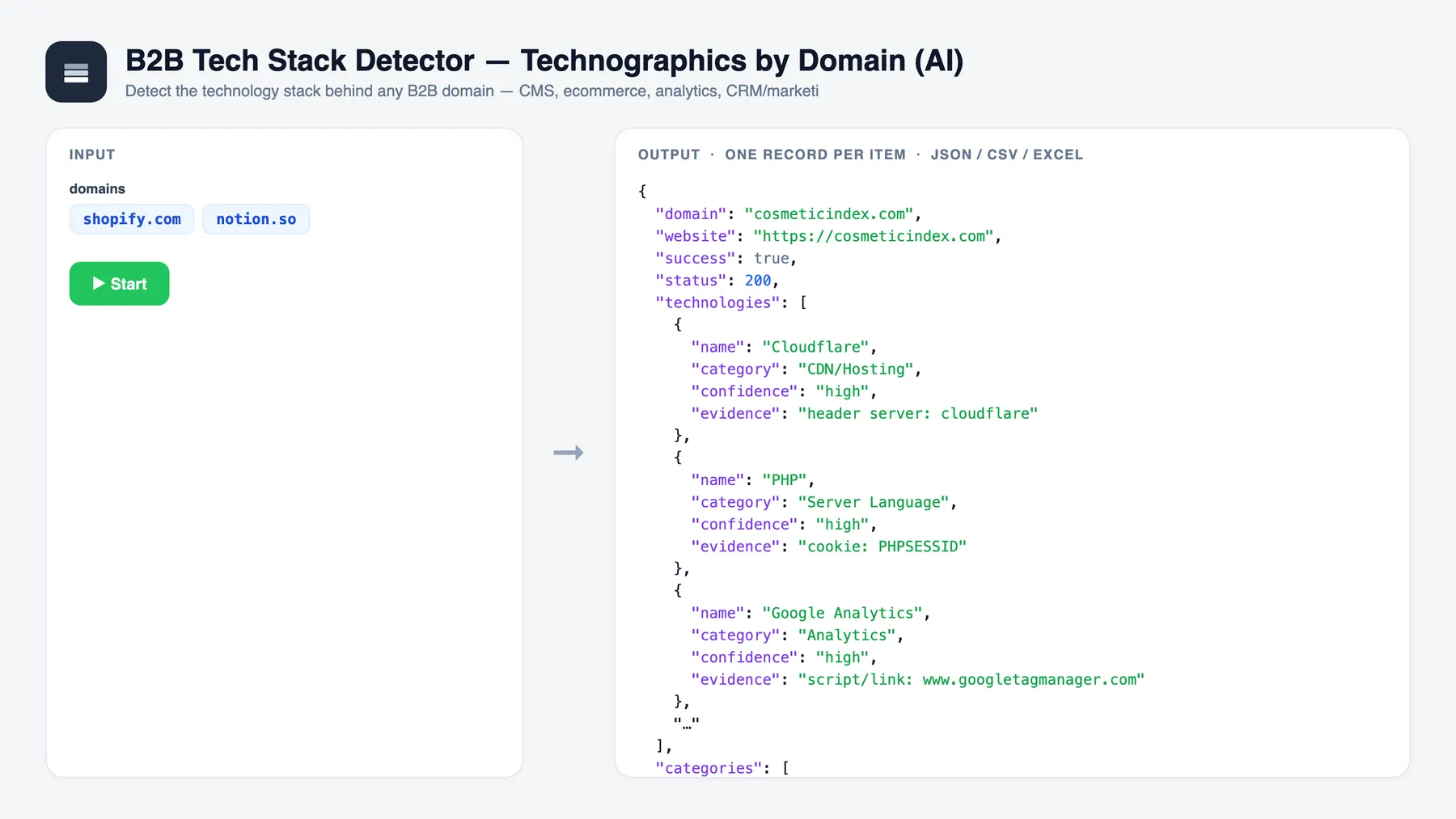
- Click Start — the Actor runs and writes one record per item to the dataset.
- Get your data — export to JSON, CSV or Excel, or pull it via the API.
The flow
- Paste the domains you want to profile — raw domains, full URLs or even emails (the domain is extracted automatically).
- Run the Actor. Each domain's homepage is fetched (headers and cookies captured even behind a 403/500) and its DNS is checked.
- Read the stack. Every company comes back with the exact technologies detected, the evidence behind each one, its email provider, an AI maturity read and — if you told it what you sell — a fit score.
What you get per domain
For every domain, the Actor:
- Fetches the homepage with a real browser-grade HTTP client that follows redirects and keeps response headers and
Set-Cookievalues even on 403/500, so WAFs, hosting and cookie-based tech are still fingerprinted. - Detects the technology stack deterministically (no AI, no guessing) from ~70 curated signatures across: response headers (
Server,X-Powered-By,X-Generator,X-Vercel-Id,CF-Ray, …),Set-Cookienames (_shopify_*,wordpress_*,hubspotutk,intercom-*, …),<meta name="generator">, script/link hostnames (cdn.shopify.com,js.hs-scripts.com,googletagmanager.com,static.klaviyo.com,snap.licdn.com,connect.facebook.net, …) and inline framework markers (__NEXT_DATA__,ng-version,__NUXT__, …). Each hit carries its category, a confidence (high/medium) and the exact evidence string that proved it. - Infers the email provider from the domain's MX records — Google Workspace, Microsoft 365, Zoho, Proofpoint, Mimecast, Fastmail or other.
Then the AI layer (OpenAI gpt-4o-mini, a fast, low-cost model) reads the detected stack and adds:
techMaturity—legacy·standard·modern·cutting-edge.summary— one sentence describing their stack.inferredTeamSignals— short buying/team signals grounded in the stack (e.g. "runs paid acquisition", "data-driven marketing team", "developer-led").fitScore(0–100) +fitReason— only when you setyourOffering: how good a prospect this company is for what you sell, and why, based on the technologies they actually run. The AI only ever reasons over the detected technologies — it never invents a tool that wasn't found.
Three ways people use it
- Sales prospecting & ICP targeting — find companies using Shopify, HubSpot, Klaviyo, Webflow, Intercom or any tool your product plugs into or replaces, and score each domain for fit before a rep ever touches it. Technographic enrichment turns a flat domain list into a prioritised call sheet.
- Competitive & market intelligence — a flexible BuiltWith / Wappalyzer alternative with no seat-based subscription: map which platforms, analytics suites and ad pixels a whole list of competitors or a market segment runs, and track how modern their stack is.
- Lead enrichment & routing — append a technology stack, email provider and maturity signal to every account in your CRM, then route or disqualify leads automatically (e.g. "still on a legacy CMS", "already runs a competing CRM", "runs LinkedIn + Meta pixels → spends on paid").
Input
| Field | Type | Notes |
|---|---|---|
domains | array | Required. Company domains, website URLs or emails — one per line. The bare domain is extracted from each. |
yourOffering | string | Optional. What you sell. If set, every domain gets a fitScore (0–100) and a fitReason based on its detected stack. |
maxResults | integer | Max domains to analyze. One pay-per-event charge per domain analyzed. Default 100. |
maxConcurrency | integer | How many domains to process in parallel. Default 5. |
model | string | Override the OpenAI model. Default gpt-4o-mini. |
Minimal input example
Output example
One record per domain, pushed to the dataset:
When yourOffering is omitted, fitScore and fitReason come back null. The deterministic technologies, categories and emailProvider are always populated.
Pay-per-event pricing
This Actor uses pay-per-event billing with a single event:
| Event | Charged when |
|---|---|
domain-analyzed | Once per domain successfully analyzed — technology stack, email provider and AI buying-signal summary. |
The deterministic detection layer is effectively free to run; only one small AI call per domain costs anything, and the Actor logs its OpenAI token usage and estimated cost at the end of every run, so the event price always stays well above the model cost.
Setup
The AI layer calls the OpenAI API. Set the environment variable / secret OPENAI_API_KEY on the Actor. Without it, the full deterministic stack — technologies, categories and emailProvider — still runs and ships; only techMaturity, summary, inferredTeamSignals, fitScore and fitReason are left empty.
Use it from an AI agent (Apify MCP server)
This Actor is available through the Apify MCP server, so AI agents (Claude, ChatGPT, or anything that speaks MCP) can call it as a tool — hand it a list of domains and an optional yourOffering, and read back each company's technology stack and fit — with no custom integration code.
Run it locally
A note on data
This Actor only reads a company's own public homepage and its public DNS/MX records — the same information any visitor's browser receives. It detects technologies from public fingerprints and never collects personal data.
Chain it
This Actor is a building block in the fuze B2B suite. Wire it to the next step with no code in the Integrations tab (trigger: Run succeeded → start the next Actor), or run them in sequence.
- ⬆️ Upstream: B2B Lead List Builder — build the target company list first.
- ⬇️ Next: B2B Intent Radar — score buying intent using the detected stack.
- ⬇️ Next: B2B Competitor Teardown and DTC Brand Teardown — feed the tech stack into a battlecard.
Related actors
- Company Enrichment (AI) — Turn a list of domains into structured company profiles: firmographics, contacts, socials and ICP fit.
- B2B Intent Radar — Orchestrates firmographic, technographic and news signals into an AI buying-intent score and outreach angle per company.
- Google Maps Lead Enricher (AI) — Turns Google Maps scraper output into sales-ready leads with emails, website signals, a lead score and an opener.


