

Glassdoor Reviews Scraper | Employee Reviews & Ratings
Pricing
from $2.13 / 1,000 reviews
Glassdoor Reviews Scraper | Employee Reviews & Ratings
Get Glassdoor employee reviews with headline, pros, cons, advice, star rating, six sub-ratings, job title, location and employer reply, plus the company's overall rating and CEO approval share. Many companies by name, URL or id; 7 languages, sort, date and employee filters.
Pricing
from $2.13 / 1,000 reviews
Rating
0.0
(0)
Developer

Flowo
Maintained by CommunityActor stats
0
Bookmarked
2
Total users
1
Monthly active users
3 days ago
Last modified
Categories
Features
Share
Get Glassdoor employee reviews of any company: the review headline, pros, cons and advice to management, the overall star rating and six sub-ratings, the recommend, CEO approval and business outlook verdicts, the reviewer's job title, location and employment status, and the employer's reply. The company's overall Glassdoor rating, its six average sub-ratings, the recommend / CEO approval / outlook shares and the CEO's name come with the review rows, so one run gives you both the reviews and the ratings summary.
What does Glassdoor Reviews Scraper do?
You give it a list of companies: names (e.g. Google), Glassdoor company URLs from any country site, or numeric employer ids. For each company it collects the reviews in the languages you pick (English, German, French, Spanish, Portuguese, Dutch, Italian), in the order you choose, and saves one flat row per review. It is built for HR and employer-branding teams, market and investment researchers, recruiters comparing employers, and data teams building sentiment datasets. No Glassdoor login or account is needed.
How to scrape Glassdoor reviews
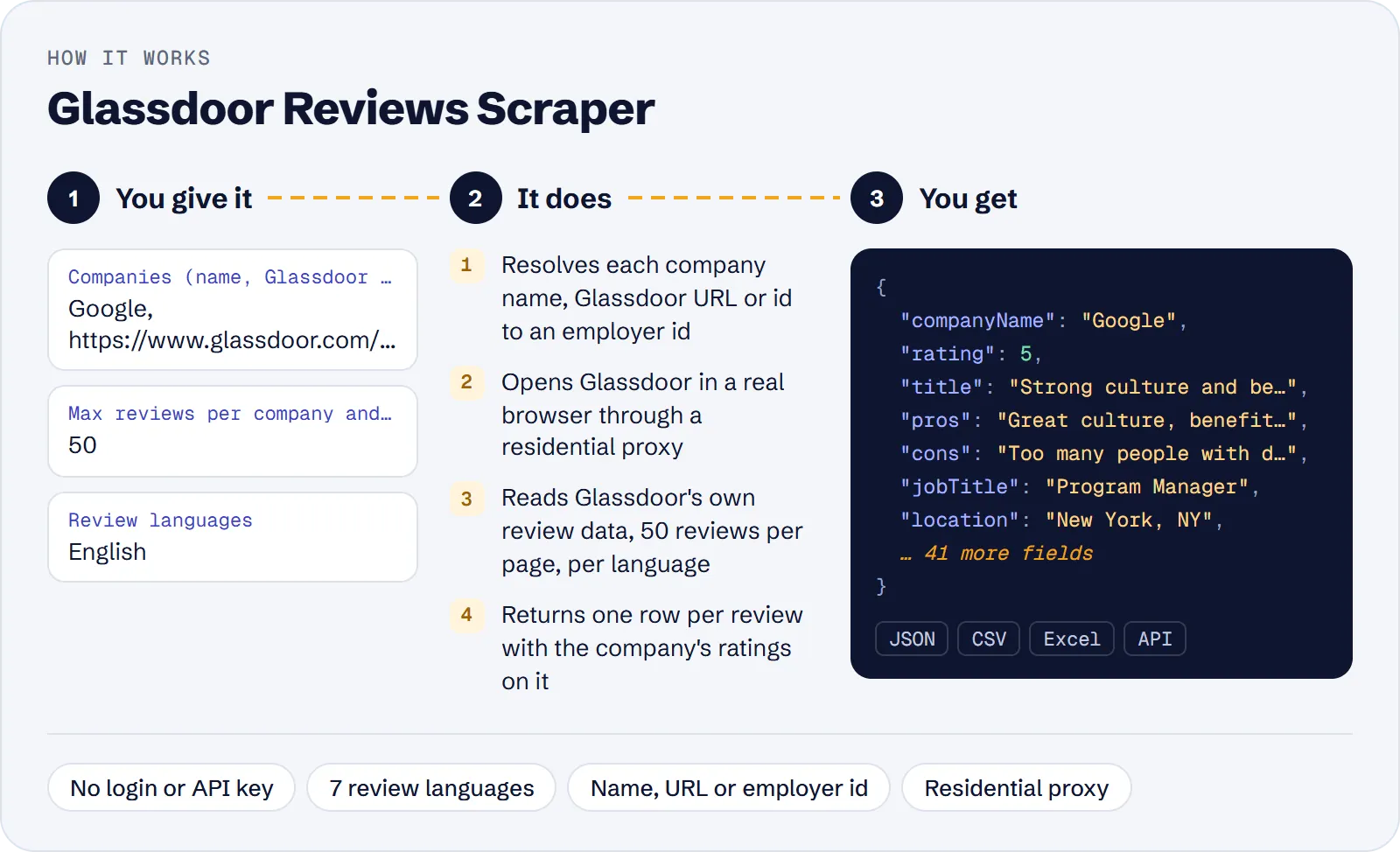
- Open the actor in Apify Console and go to the Input tab.
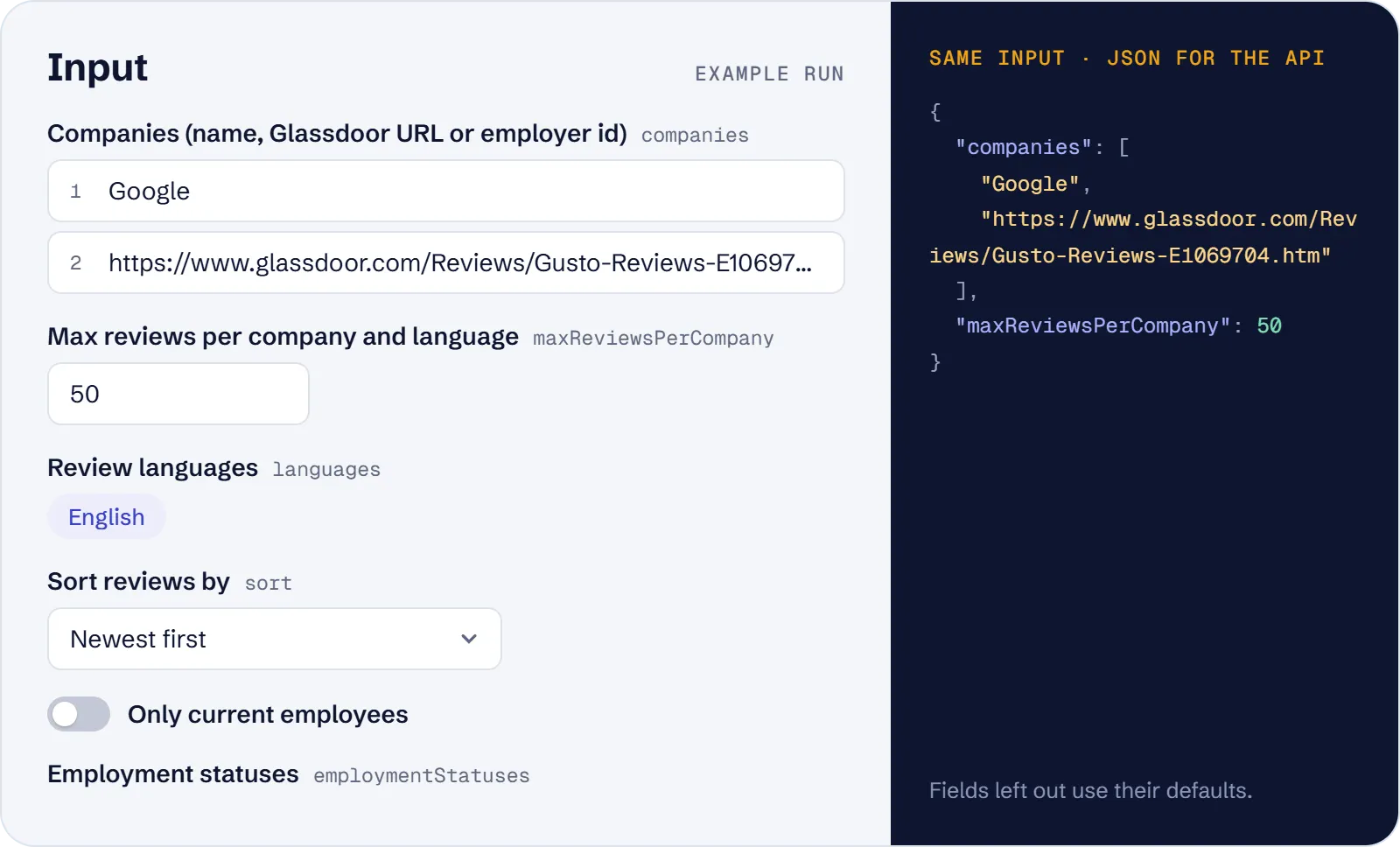
- In Companies, enter one company per line: a name, a Glassdoor company URL (for example
https://www.glassdoor.com/Reviews/Gusto-Reviews-E1069704.htm) or an employer id (9079). - Set Max reviews per company and language (default 100) and pick the Review languages (default English).
- Optionally choose a sort order, a "Posted after" date, Only current employees or Employment statuses.
- Click Start. When the run ends, download the reviews from the Output tab as JSON, CSV, Excel or HTML.
How much does it cost to scrape Glassdoor?
Price per event by Apify plan:
| Event | Free | Bronze | Silver | Gold and above |
|---|---|---|---|---|
| Review | $2.50 per 1,000 | $2.375 per 1,000 | $2.25 per 1,000 | $2.125 per 1,000 |
| Actor start | $0.0025 | $0.0025 | $0.0025 | $0.0025 |
A test run with the API example input below returned 100 rows in 36 s.
The actor is paid per event. One review event = one review row saved to the dataset ($0.0025 on the Free plan, $2.50 per 1,000 reviews). Each run also has an Actor start event of $0.0025 per GB of memory, which is $0.005 at the default 2 GB.
Not charged: companies that are not found or have no reviews in your filter produce no rows and cost nothing beyond the start event. The company ratings are part of each review row, not a separate event.
| Scenario | Review events | Cost on the Free plan |
|---|---|---|
Overall ratings of 10 companies (maxReviewsPerCompany: 1) | 10 | $0.03 |
| 100 newest reviews of 1 company | 100 | $0.255 |
| Default input: 100 reviews each of Google and Gusto | 200 | $0.505 |
| 1,000 reviews in each of 2 languages for 5 companies | 10,000 | $25.005 |
Input
| Field | What it does |
|---|---|
companies (required) | One company per entry: a name (the best Glassdoor company match is used), a Glassdoor company URL from any country site (…/Reviews/Gusto-Reviews-E1069704.htm, …/Overview/Working-at-Google-EI_IE9079.htm) or a numeric employer id. A URL without an employer id (E1234) is an input error. |
maxReviewsPerCompany | Limit per company and per language, default 100, minimum 1. Set 1 to get only each company's ratings. |
languages | eng, deu, fra, spa, por, nld, ita (English, German, French, Spanish, Portuguese, Dutch, Italian); several in one run. Default ["eng"]. |
sort | DATE (Newest first, default), DATE_ASC (Oldest first), RATING (Highest rating first), RATING_ASC (Lowest rating first), RELEVANCE (Glassdoor default). |
postedAfter | Only reviews posted on or after this date: absolute (2026-01-01) or relative (30 days, 6 months). Works only with sort DATE; a future date is an input error. |
onlyCurrentEmployees | Only reviews by people who still work at the company. Default false. |
employmentStatuses | Any of REGULAR (full-time), PART_TIME, CONTRACT, INTERN, FREELANCE, TEMPORARY; empty = all. |
maxItems | Total limit across all companies and languages. Empty = no total limit. |
proxyConfiguration | Default: Apify residential proxy. Keep it; Glassdoor blocks datacenter IPs. |
Example input:
What data can you extract from Glassdoor reviews?
| Field | Description |
|---|---|
url, id | Review link on glassdoor.com and the Glassdoor review id |
query, companyId, companyName, companyUrl | The input entry, the Glassdoor employer id, the company name and its reviews page |
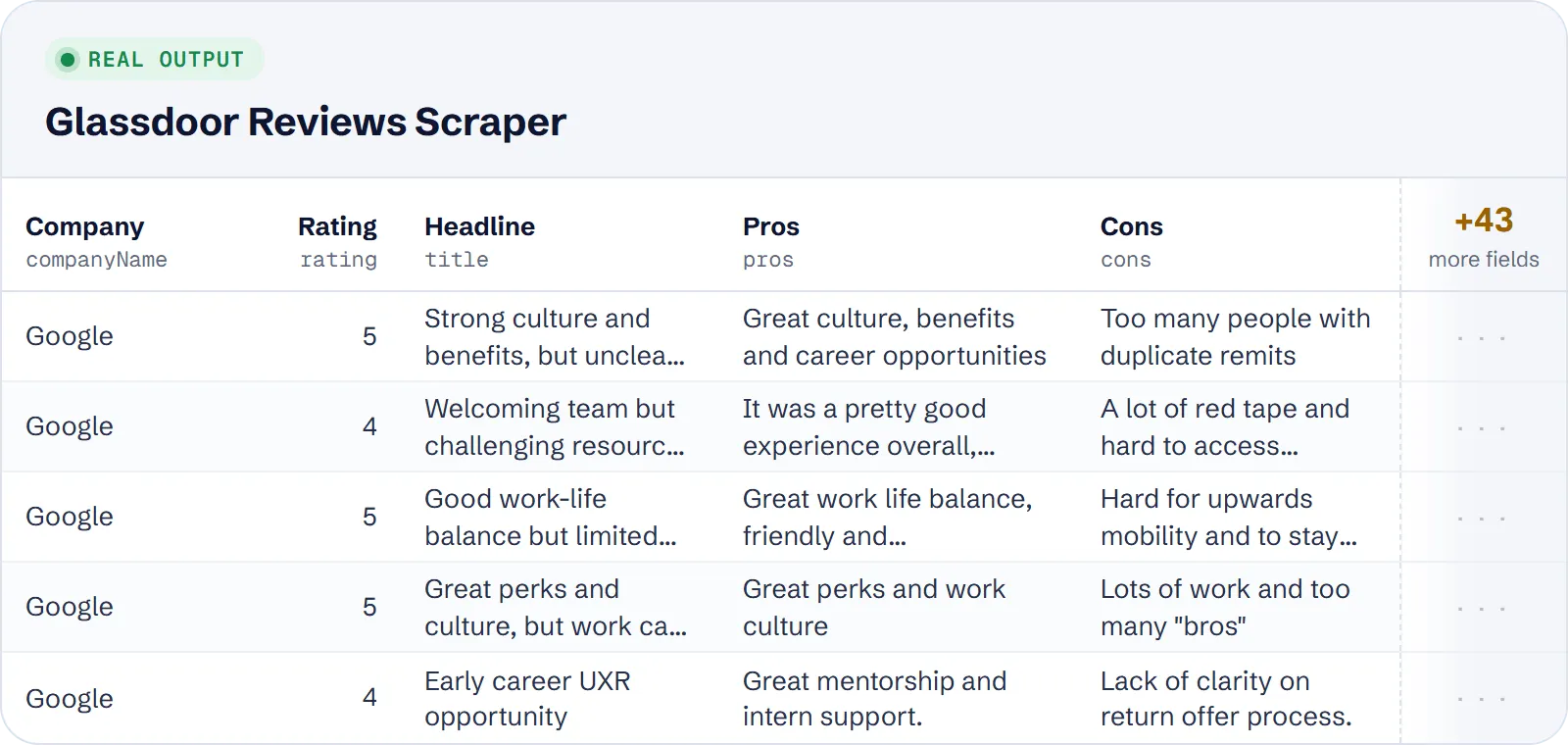
title, pros, cons, advice | Review headline, what the reviewer likes and dislikes, advice to management |
rating | Overall rating of the review, 1–5 stars |
ratingWorkLifeBalance, ratingCultureAndValues, ratingDiversityAndInclusion, ratingCareerOpportunities, ratingCompensationAndBenefits, ratingSeniorManagement | The six sub-ratings, 1–5 (null = not rated) |
recommendToFriend, ceoApproval, businessOutlook | POSITIVE / NEGATIVE; APPROVE / DISAPPROVE / NO_OPINION; POSITIVE / NEUTRAL / NEGATIVE |
publishedAt, language | Posting time (ISO 8601, UTC) and review language as ISO 639-1 (en, de, fr, es, pt, nl, it) |
jobTitle, location, employmentStatus, isCurrentEmployee, yearsOfEmployment, jobEndingYear | Reviewer's job title, work location, employment status, current employee flag, years at the company (0 = less than a year) and the year they left |
helpfulCount, notHelpfulCount, isFeatured | Readers' helpful / not helpful votes and whether Glassdoor features the review |
employerResponse, employerResponseAt, employerResponseJobTitle | The company's reply, its time and the replier's job title |
companyRating, companyReviewsCount | The company's overall Glassdoor rating and its number of rated reviews |
companyRatingWorkLifeBalance … companyRatingSeniorManagement | The company's six average sub-ratings |
companyRecommendToFriendRate, companyCeoApprovalRate, companyBusinessOutlookRate | Shares of reviewers who recommend the company, approve of the CEO and see a positive outlook, 0–1 |
ceoName, ceoTitle | The CEO rated on Glassdoor and their title |
scrapedAt | When the review was extracted |
Example row (from a real run, pros and cons shortened):
Use cases
- Employer branding and HR: schedule a weekly run with
postedAfter: "7 days"to get only the new reviews of your company and your competitors. - Benchmark a list of companies: set
maxReviewsPerCompany: 1and comparecompanyRating, the six company sub-ratings, the recommend and CEO approval shares andcompanyReviewsCountside by side. - Market and investment research: track employee sentiment of a company over time from the ratings and texts of its reviews.
- European markets: collect German, French or Italian reviews of the same employers in one run, e.g. only current employees, lowest rating first.
- Sentiment and topic datasets: export pros, cons and advice with their star ratings for analysis or AI training.
Limitations
- Always present:
url,id,query,companyId,companyUrl,rating,publishedAtandscrapedAt. Every other field can benullwhen Glassdoor has no value. Often empty:advice,jobEndingYear(only for former employees), the sub-ratings,recommendToFriend,ceoApproval,businessOutlookand the employer reply fields (many companies never reply).languageis null for reviews Glassdoor marks as "other". - Company fields follow the employee filters: with
onlyCurrentEmployeesoremploymentStatuses, Glassdoor computescompanyRating,companyReviewsCountand the other company fields over the matching reviews (across all languages), so they differ from the public rating. Without these filters they are the public rating. - Seven languages only: English, German, French, Spanish, Portuguese, Dutch and Italian.
- Not included: company profile data (headquarters, size, revenue, industry, website), logos, interviews, salaries and the star distribution.
- No keyword, location, job title or min/max rating filter: Glassdoor rejects these filters. Use sort
RATING_ASCorRATINGto get the lowest or highest rated reviews first. - Browser and residential proxy: Glassdoor blocks plain HTTP clients and datacenter IPs, so the actor runs a browser with 2 GB of memory. Expect about 10–15 seconds of start-up, then about 1 second per 50 reviews. If Glassdoor changes its protection, runs may report that Glassdoor blocked them.
Tips and troubleshooting
- Only new reviews: use
postedAfter(e.g.7 days) with sortDATE; the run stops reading a company at the first older review. With another sort,postedAfteris an input error. - More reviews: raise
maxReviewsPerCompany; companies with fewer reviews return all they have. There is no depth cap at the source, so large companies can return tens of thousands of reviews. UsemaxItemsto cap the whole run. - Several languages: the per-company limit applies to each language, so 3 languages × 100 gives up to 300 rows per company.
- Filters combine:
onlyCurrentEmployeesandemploymentStatuseswork together (AND) and with every language and sort; several statuses are combined with OR. - 0 rows or a missing company: check the log. An unknown name or employer id, or a filter with no matching reviews, is a warning, not a failed run. If a name picks the wrong company, enter its Glassdoor URL or employer id instead. A name and a URL of the same company are processed once.
- Keep the residential proxy: with a datacenter proxy or none, the later browser sessions switch to Apify residential.
API, MCP and integrations
Run the actor from your code with the same JSON input as in Console. Your API token is in Console → Settings → API & Integrations.
Python (pip install apify-client):
Node.js (npm install apify-client):
HTTP — one request runs the actor and returns the results (runs up to 5 minutes; longer ones: run asynchronously):
AI agents (MCP). Add the actor as a tool of the Apify MCP server. Claude Code:
Claude Desktop, Cursor or VS Code: {"mcpServers": {"apify": {"url": "https://mcp.apify.com?tools=genial_candlestand/glassdoor-reviews-scraper"}}}. Then ask, for example:
- "Get the 50 newest English Glassdoor reviews of Google with pros, cons and ratings"
- "Compare the Glassdoor rating and CEO approval of Tesco, Microsoft and Siemens"
- "Find the 20 lowest rated German Glassdoor reviews of Siemens by current employees"
Integrations. Run it on a schedule with Apify Schedules and send the results to Google Sheets, Slack, Zapier, Make, n8n or your webhook — see Apify integrations.
FAQ
Is it legal to scrape Glassdoor reviews?
The actor reads only reviews that Glassdoor shows publicly, without login, account cookies or solving captchas. The output has no reviewer names, only what the review page shows publicly (job title, location, employment details). You are responsible for how you use the data, including data protection and Glassdoor's terms in your country.
Do I need a Glassdoor account or API key?
No. You need only an Apify account; the actor uses Apify residential proxy by default.
Can I scrape a company from glassdoor.co.uk, glassdoor.fr or glassdoor.de?
Yes. Glassdoor employer ids are the same on all country sites, so a company URL from any of them works; the review links in the output point to glassdoor.com.
How do I get just the company's overall rating?
Set maxReviewsPerCompany to 1. Each row carries the company rating, the six company sub-ratings, the recommend, CEO approval and outlook shares, the review count and the CEO's name, for one review event per company.
How is it different from other Glassdoor review actors?
Many companies per run, each given as a name, a URL or an id; several review languages in one run; sort, posted-after, current-employee and employment-status filters; and flat rows of one kind, with the company ratings on the review rows instead of separate paid overview rows.
Also useful
- Glassdoor Jobs Scraper — find open jobs at the same employers with salary estimates and company ratings
- Indeed Jobs Scraper — collect job listings of the companies you research across many keywords and countries
- LinkedIn Job Details Scraper — get full LinkedIn job posts by URL, ID or keyword for the same employers
- G2 Reviews Scraper — add customer reviews of a company's software: ratings, pros, cons and reviewer role
- Trustpilot Reviews Scraper — compare employee sentiment with customer reviews and company replies on Trustpilot


