

Hiring.cafe Jobs Scraper | Salaries, Skills & Companies
Pricing
from $0.85 / 1,000 jobs
Hiring.cafe Jobs Scraper | Salaries, Skills & Companies
Get hiring.cafe jobs as flat rows: job title, company, location, salary range with currency and period, seniority, required tools, benefits, apply link and company profile. Search by keyword, country, US state or map radius, every job of a company, or pasted URLs. No login.
Pricing
from $0.85 / 1,000 jobs
Rating
0.0
(0)
Developer

Flowo
Maintained by CommunityActor stats
0
Bookmarked
2
Total users
1
Monthly active users
a day ago
Last modified
Categories
Features
Share
Get hiring.cafe job listings as flat rows: job title, company name, location, workplace type, seniority, salary range with currency and pay period, required tools and years of experience, benefits, the apply link on the employer's site and a company profile (industries, employee count, stock symbol, funding). Search by keyword, country, US state or a radius around any point, get every job of a company, or paste hiring.cafe search and job URLs. Full job descriptions are optional and cost nothing extra.
What does Hiring.cafe Jobs Scraper do?
You give it search terms and filters (or hiring.cafe URLs), and it runs the same searches as the hiring.cafe website and saves one row per job with 109 fields. hiring.cafe collects jobs from employers' applicant tracking systems (Workday, Greenhouse, Lever, iCIMS and others) and adds AI-extracted data to each one, such as seniority, tools, degree requirements, work conditions and benefits. The actor is built for recruiters and sourcers, job-market and salary analysts, job boards that need a feed, and AI agents that answer job-search questions.
How to scrape hiring.cafe jobs
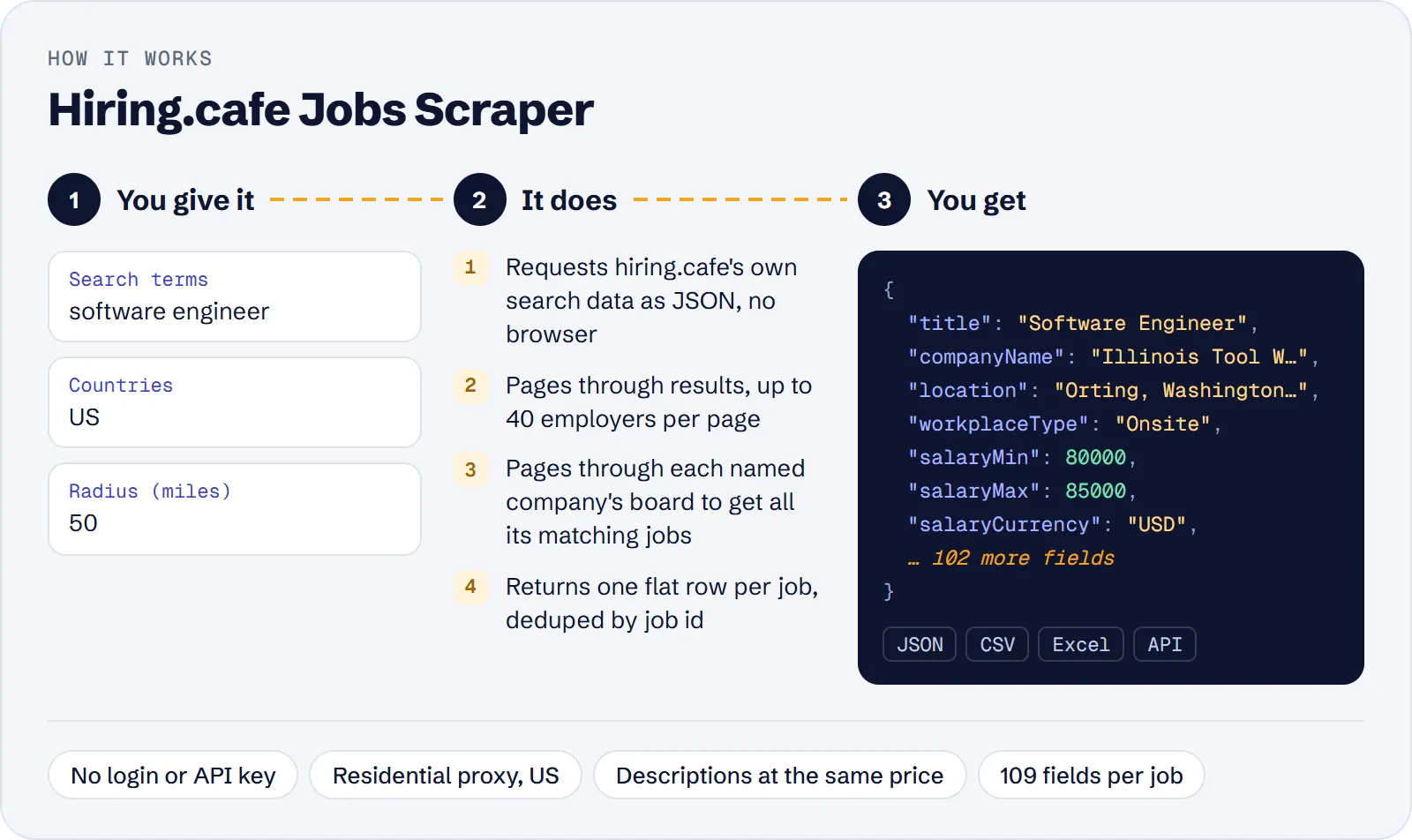
- Open the actor in Apify Console and click Try for free.
- Type one or more Search terms, e.g.
software engineerornurse(one search per line). - Pick a location: Countries (codes or English names), US states or a map point with Radius (miles). Use only one of these per run.
- Add filters if you need them: workplace type, commitment, seniority, posted within, minimum salary, years of experience, companies, job title words or technologies.
- Set Max results and, if you want the full text, tick Include full description.
- Click Start and download the dataset as JSON, CSV, Excel or HTML, or read it through the API.
How much does it cost to scrape hiring.cafe?
Price per event by Apify plan:
| Event | Free | Bronze | Silver | Gold and above |
|---|---|---|---|---|
| Job | $1.00 per 1,000 | $0.95 per 1,000 | $0.90 per 1,000 | $0.85 per 1,000 |
| Actor start | $0.00005 | $0.00005 | $0.00005 | $0.00005 |
A test run with the API example input below returned 100 rows in 12 s.
The actor uses pay-per-event pricing. One paid event is one job saved to the dataset: $0.001 per job, which is $1.00 per 1,000 jobs. The full description is included in that price when you turn it on. A job found twice in one run (by two search terms, or by a search and the company expansion) is saved and charged once. Searches that return no jobs cost nothing beyond the start fee of $0.00005 per run.
| Scenario | Events | Cost on the Free plan |
|---|---|---|
| 100 US software engineer jobs (the prefilled input) | 1 start + 100 jobs | $0.10 |
| 50 jobs with full descriptions | 1 start + 50 jobs | $0.05 |
| 1,000 remote jobs posted this week | 1 start + 1,000 jobs | $1.00 |
| 10,000 jobs across several terms and countries | 1 start + 10,000 jobs | $10.00 |
Input
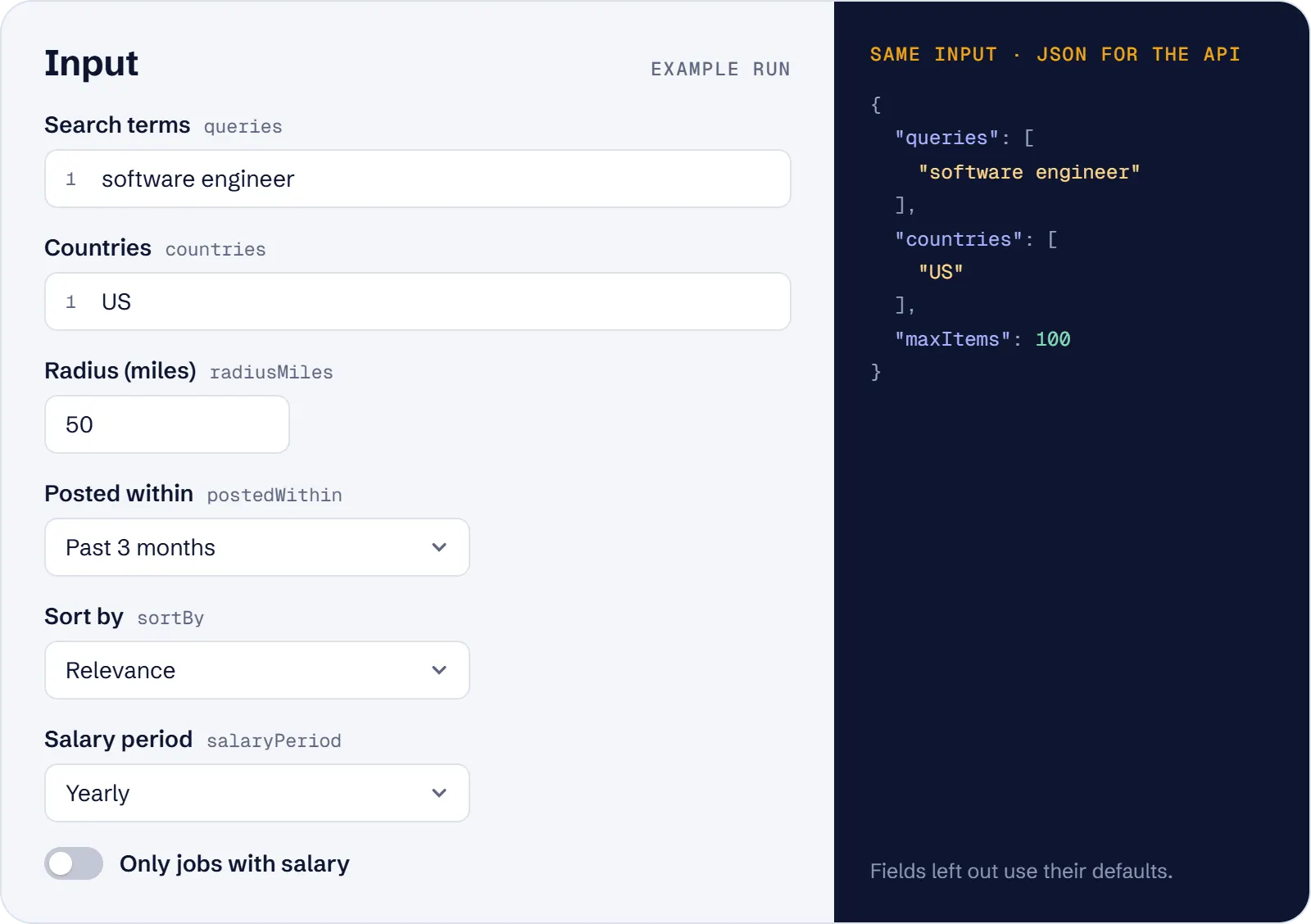
Nothing is required. An empty input {} returns the 100 most relevant jobs worldwide.
- Search terms (
queries) — one search per term; every filter applies to each term. Empty means one search with no keyword. - hiring.cafe URLs (
startUrls) — search URLs copied from hiring.cafe (they contain?searchState=…) run exactly that search; job URLs (hiring.cafe/job/…) return those jobs with full descriptions. hiringcafe.com URLs work too. The filter fields below are not applied to URLs. - Countries (
countries) — ISO codes (US, DE, GB) or English names (Germany). Several countries are combined with OR. An unknown country stops the run with an input error. - US states (
usStates) — state names such as Texas, New York or District of Columbia. An unknown name stops the run with an input error. - Near point (
latitude,longitude,radiusMiles) — jobs within 1–300 miles (default 50) of a point anywhere in the world. Both coordinates are needed. - Only one location type per run: countries, US states or the point.
- Workplace type (
workplaceTypes) — Remote, Hybrid, Onsite, Field. - Commitment (
commitmentTypes) — Full Time, Part Time, Contract, Internship, Temporary, Seasonal, Volunteer. - Seniority (
seniorityLevels) — No Prior Experience Required, Entry Level, Mid Level, Senior Level. - Posted within (
postedWithin) — 24h, 3d, 1w, 2w, 3w, 1m, 2m, 3m (default), 4m, 5m, 6m, 1y, 2y, 3y or any. - Sort by (
sortBy) — relevance (default), newest, oldest, highestSalary, lowestSalary, leastExperience, mostExperience. - Minimum salary (
minSalary) with Salary period (salaryPeriod: Yearly, Monthly, Bi-Weekly, Weekly, Daily, Hourly; default Yearly) — only jobs that publish a salary of at least this amount. - Only jobs with salary (
onlyWithSalary) — skip jobs without a published salary. - Min / max years of experience (
minYearsExperience,maxYearsExperience) — 0–20; jobs that do not state experience stay in. The minimum must not be above the maximum. - Companies (
companyNames) — only jobs of these employers; the actor then also collects every matching job from the employer's own board. - Job title contains (
jobTitleQuery) and Technologies (technologyKeywords) — words the title must match and tools the job must ask for. - Include full description (
includeDescription) — adds the description as plain text and HTML; 2 extra requests per job, same price. - Max results (
maxItems, default 100) and Max results per search (maxItemsPerSearch). - Proxy (
proxyConfiguration) — Apify residential proxy, US, by default.
Example:
What data can you extract from hiring.cafe?
| Group | Fields |
|---|---|
| Job | id, url, requisitionId, title, coreJobTitle, category, location, workplaceType, commitment, seniorityLevel, roleType, roleActivities, workplaceEnvironment, publishedAt, isExpired, requirementsSummary, description, descriptionHtml |
| Salary | salaryMin, salaryMax, salaryCurrency, salaryPeriod, salaryYearlyMin, salaryYearlyMax, salaryHourlyMin, salaryHourlyMax, isSalaryTransparent |
| Location | countries, states, cities, counties, continents, latitude, longitude, isWorldwideOk, remoteEligibleCountries, remoteEligibleStates, remoteEligibleContinents, otherLocations, alternateJobUrls |
| Requirements | minYearsExperience, minManagementYears, technicalTools, licensesOrCertifications, languageRequirements, securityClearance, driverLicenseRequired, highSchoolRequired, associatesDegreeRequirement, bachelorsDegreeRequirement, mastersDegreeRequirement, doctorateDegreeRequirement, fieldsOfStudy |
| Work conditions | physicalLaborIntensity, physicalPosition, computerUsage, cognitiveDemand, oralCommunicationLevel, overtimeRequired, onCallRequirement, airTravelRequirement, landTravelRequirement, morningShiftWork, eveningShiftWork, overnightWork, weekendAvailabilityRequired, holidayAvailabilityRequired |
| Benefits | visaSponsorship, relocationAssistance, retirement401kMatching, retirementPlan, tuitionReimbursement, generousPaidTimeOff, generousParentalLeave, fourDayWorkWeek, fairChance, militaryVeterans |
| Company | companyName, companyWebsite, companyTagline, companyAliases, companySector, companyIndustries, companyActivities, companyEmployees, companyYearFounded, companyHqCountry, companyOrganizationType, companyParent, companySubsidiaries, companyStockExchange, companyStockSymbol, companyFundingType, companyFundingAmount, companyFundingYear, companyFundingInvestors, companyClassification, positionEmployerType |
| Source and run | applyUrl, atsSource, boardToken, originalSourceId, dedupClusterId, viewsCount, appliesCount, savesCount, query, position, scrapedAt |
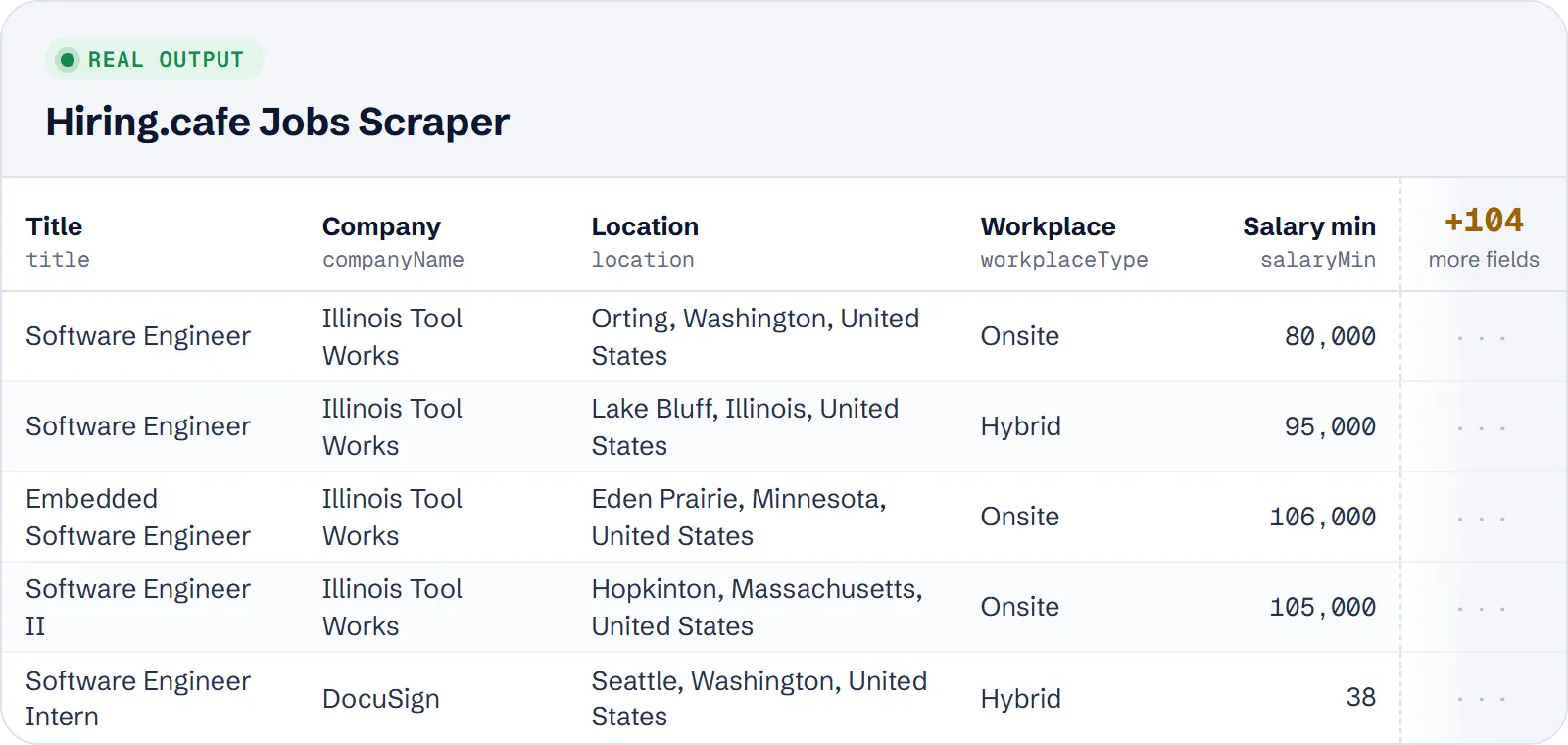
A real row from a software engineer search in the US (shortened; description and descriptionHtml are null because descriptions were off):
Use cases
- Recruiting and sourcing: find open roles by keyword and location, and list the companies that are hiring for them.
- Competitor hiring watch: put employers in Companies and schedule the run to see every job they post.
- Salary benchmarking: collect jobs with published pay (
onlyWithSalary,sortBy: highestSalary) and compare yearly and hourly ranges by title, seniority or state. - Job-market research: measure the remote share, tech demand (
technicalTools) or visa sponsorship across countries. - Job boards and aggregators: refresh a feed by keyword and country on a schedule, with apply links to the employer's site.
Limitations
- Only
id,url,requisitionId,titleandscrapedAtare always filled. Every other field can benullwhen hiring.cafe does not have the value; in the sample run, salary was missing on 22 of 50 jobs, and fields likeminManagementYears,companyParent,companyFundingInvestors,companyStockSymbolandsavesCountwere oftennull. Empty lists stay[]. - When a job has no published salary,
salaryMin,salaryMax,salaryCurrencyandsalaryPeriodare allnull(never0). descriptionanddescriptionHtmlare filled only with Include full description or for job URLs. If a description cannot be fetched, the job is still saved with these fieldsnull.- hiring.cafe stops showing results after about 250 pages per search. Very broad searches need splitting by term, country or state.
- The country filter matches jobs whose workplace countries include that country, so jobs located in several countries also appear.
- Minimum salary compares the number without converting currencies; combine it with a country.
- Companies also matches related brands (for example Waymo for Google).
- Mixing location types (countries with US states or a point) is not supported in one run.
Tips and troubleshooting
- More results for several terms: set Max results per search (e.g. 50) so every term gets its share before Max results is reached.
- Only new jobs: use Posted within (e.g. 24h or 1w) with Sort by: newest, and dedupe by
idacross scheduled runs. - 0 rows: the log shows a warning for every empty search (
No jobs for "<term>" with these filters). Loosen filters or check the spelling of the term. An unknown country or US state stops the run with an input error that names the value. - Pasted URLs: filters from the form are not applied to them; set the filters on hiring.cafe before copying the URL.
- Proxy: keep the default residential proxy. The site blocks about half of datacenter requests; with another setting, a blocked request is retried once on residential.
- Descriptions are slower: they need 2 extra requests per job, so turn them on only when you need the full text.
API, MCP and integrations
Run the actor from your code with the same JSON input as in Console. Your API token is in Console → Settings → API & Integrations.
Python (pip install apify-client):
Node.js (npm install apify-client):
HTTP — one request runs the actor and returns the results (runs up to 5 minutes; longer ones: run asynchronously):
AI agents (MCP). Add the actor as a tool of the Apify MCP server. Claude Code:
Claude Desktop, Cursor or VS Code: {"mcpServers": {"apify": {"url": "https://mcp.apify.com?tools=genial_candlestand/hiring-cafe-jobs-scraper"}}}. Then ask, for example:
- "Find remote senior Python jobs in the US paying over 150000 a year, posted this week"
- "List every open engineering job at Google with salary and apply link"
- "Get 100 pharmacist jobs in Texas with salary ranges and required licences"
Integrations. Run it on a schedule with Apify Schedules and send the results to Google Sheets, Slack, Zapier, Make, n8n or your webhook — see Apify integrations.
FAQ
Is it legal to scrape hiring.cafe?
The actor reads public job postings that anyone can see on hiring.cafe without logging in. It does not save other users' ids that the site attaches to jobs, only the counts of views, applies and saves. You are responsible for how you use the data, including your local laws and the site's terms.
Do I need a hiring.cafe account or API key?
No. The actor needs no login, cookies or API key.
Can I get all jobs of one company?
Yes. Put the employer in Companies, e.g. Google. A normal hiring.cafe search shows at most 4 jobs per employer; the actor then pages through that employer's own board to collect every matching job.
How is it different from other hiring.cafe actors?
Rows are flat, with 109 named fields instead of the site's nested raw objects, and a missing salary is null instead of 0. Full descriptions are untruncated and cost the same as a job without one. There is no cap on jobs per run, and the price is $1.00 per 1,000 jobs, while the most-used hiring.cafe actor charges $1.25 per 1,000 plus a start fee.
Why do I get fewer jobs than the site's total count?
The site stops paging after about 250 pages per search, and the actor also stops at Max results. Split a large search by term, country or US state.
Also useful
- Greenhouse Jobs Scraper — pull open jobs straight from the Greenhouse boards of the companies you name, with salaries and departments
- Workday Jobs Scraper — get open jobs from any Workday career site, with requisition IDs, locations and parsed salaries
- Indeed Jobs Scraper — compare the same searches on Indeed: company ratings, descriptions and parsed salaries
- Google Jobs Scraper — add Google Jobs listings by term and location, with descriptions and apply links
- Glassdoor Jobs Scraper — add Glassdoor listings with salary ranges, company ratings and company size in any country


