

Upwork Job Search Scraper | Jobs, Client Intel & Applicants
Pricing
from $0.85 / 1,000 jobs
Upwork Job Search Scraper | Jobs, Client Intel & Applicants
Get open Upwork jobs by keyword: title, description, hourly range or fixed budget, skills and level, plus client country, total spent, rating, payment verified and exact applicant count. Upwork's own filters, only-new-jobs mode for schedules, no login or token.
Pricing
from $0.85 / 1,000 jobs
Rating
0.0
(0)
Developer

Flowo
Maintained by CommunityActor stats
0
Bookmarked
2
Total users
1
Monthly active users
5 hours ago
Last modified
Categories
Features
Share

Search open Upwork jobs by keyword and get one flat row per job: title, full description, hourly range or fixed budget, skills, experience level, duration and posting time. By default every public job also carries client intel — client country and city, total spent, hires, rating, reviews and payment verified — plus the exact number of applicants, interviews and invites. No Upwork login, cookie or session token is needed.
What does Upwork Job Search Scraper do?
You enter one or more search terms (or none, for all open jobs) and Upwork's own filters: job type, experience level, project length, hours per week, hourly rate, client hires, client location and contract-to-hire. The actor queries Upwork's live job search and returns every matching job as a dataset row, optionally with client and activity details. It is built for freelancers and agencies who watch new jobs on a schedule, sales teams looking for companies that hire on Upwork, market researchers measuring demand for skills and rates, and AI agents that answer "find me recent Upwork jobs for X".
How to scrape Upwork jobs
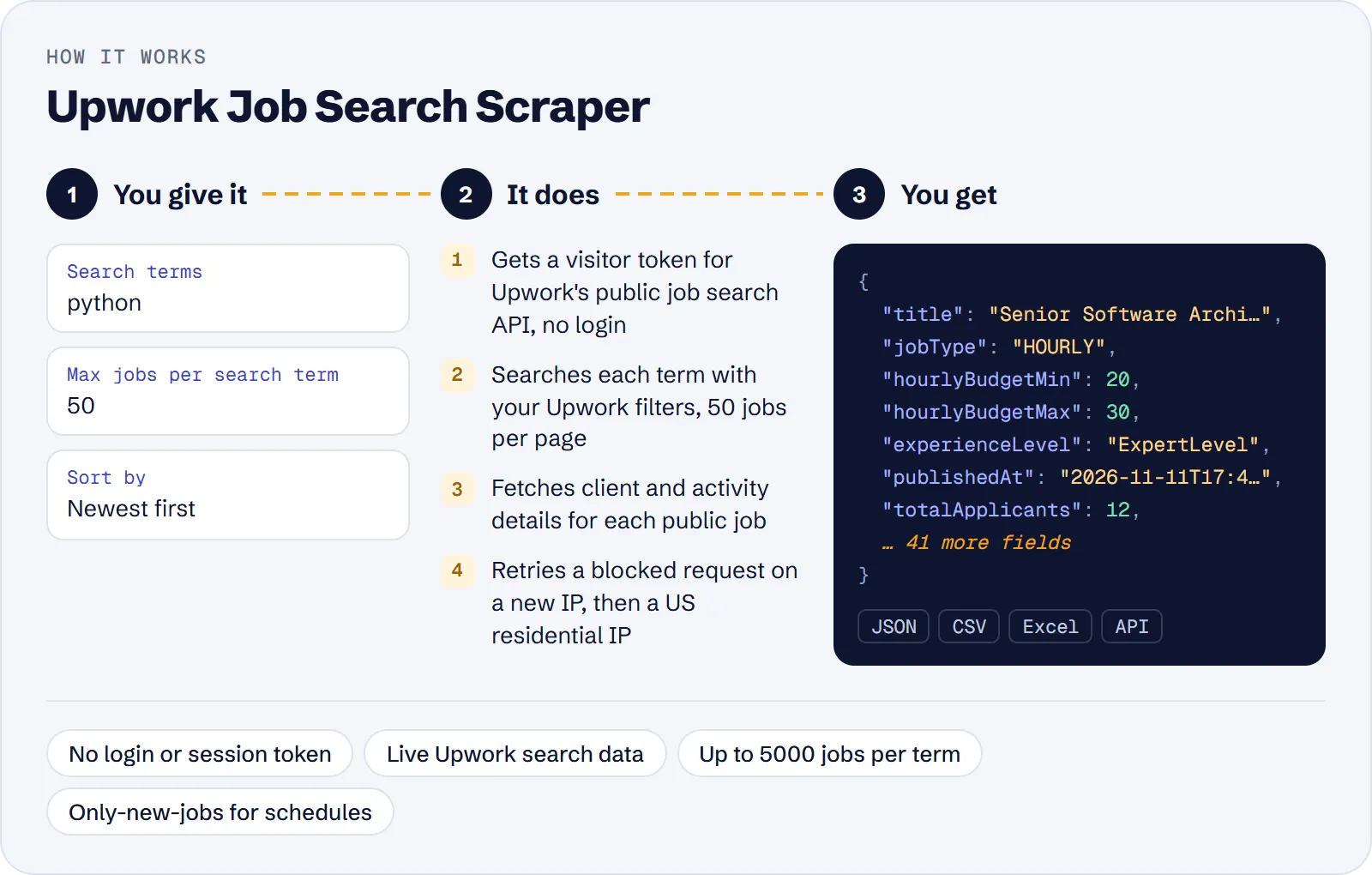
- Open the actor in Apify Console and click Try for free.
- Type your Search terms, one per line (e.g.
python,logo design), or leave the list empty to get all open jobs, newest first. - Optionally set Max jobs per search term, Sort by and the Upwork filters (job type, level, client location…).
- Keep Include client and activity details on if you need client spend, rating, payment verification and applicant counts.
- Click Start. When the run ends, download the jobs as JSON, CSV or Excel, or read them through the API.
- For a job feed, save the input as a task, turn on Only new jobs since the last run and schedule it.
How much does it cost to scrape Upwork?
Price per event by Apify plan:
| Event | Free | Bronze | Silver | Gold and above |
|---|---|---|---|---|
| Job | $1.00 per 1,000 | $0.95 per 1,000 | $0.90 per 1,000 | $0.85 per 1,000 |
| Job details add-on | $0.50 per 1,000 | $0.475 per 1,000 | $0.45 per 1,000 | $0.425 per 1,000 |
| Actor start | $0.00005 | $0.00005 | $0.00005 | $0.00005 |
A test run with the API example input below returned 50 rows in 28 s.
You pay per job saved to the dataset:
- Job — $0.001 per saved job ($1.00 per 1,000 jobs): all search fields.
- Job details add-on — $0.0005 per saved job that actually got client and activity details ($0.50 per 1,000). Private jobs, whose details Upwork hides, and jobs whose details request failed are not charged the add-on. With Include client and activity details off, the add-on is never charged.
- Actor start — $0.00005 per run start.
Jobs skipped by the client filters, by Only new jobs or as duplicates across search terms are free. In our test run, 45 of 50 jobs (90 %) had public details; Upwork hides details of the rest.
| Scenario | Events | Cost (Free plan) |
|---|---|---|
| 100 jobs with details (90 public) | 100 jobs + 90 details + 1 start | ≈ $0.145 |
| 1,000 jobs with details (≈ 880 public) | 1,000 jobs + 880 details + 1 start | ≈ $1.44 |
5,000 jobs, search fields only (includeDetails: false) | 5,000 jobs + 1 start | ≈ $5.00 |
| Scheduled run with 20 new jobs, all with details | 20 jobs + 20 details + 1 start | ≈ $0.03 |
Input
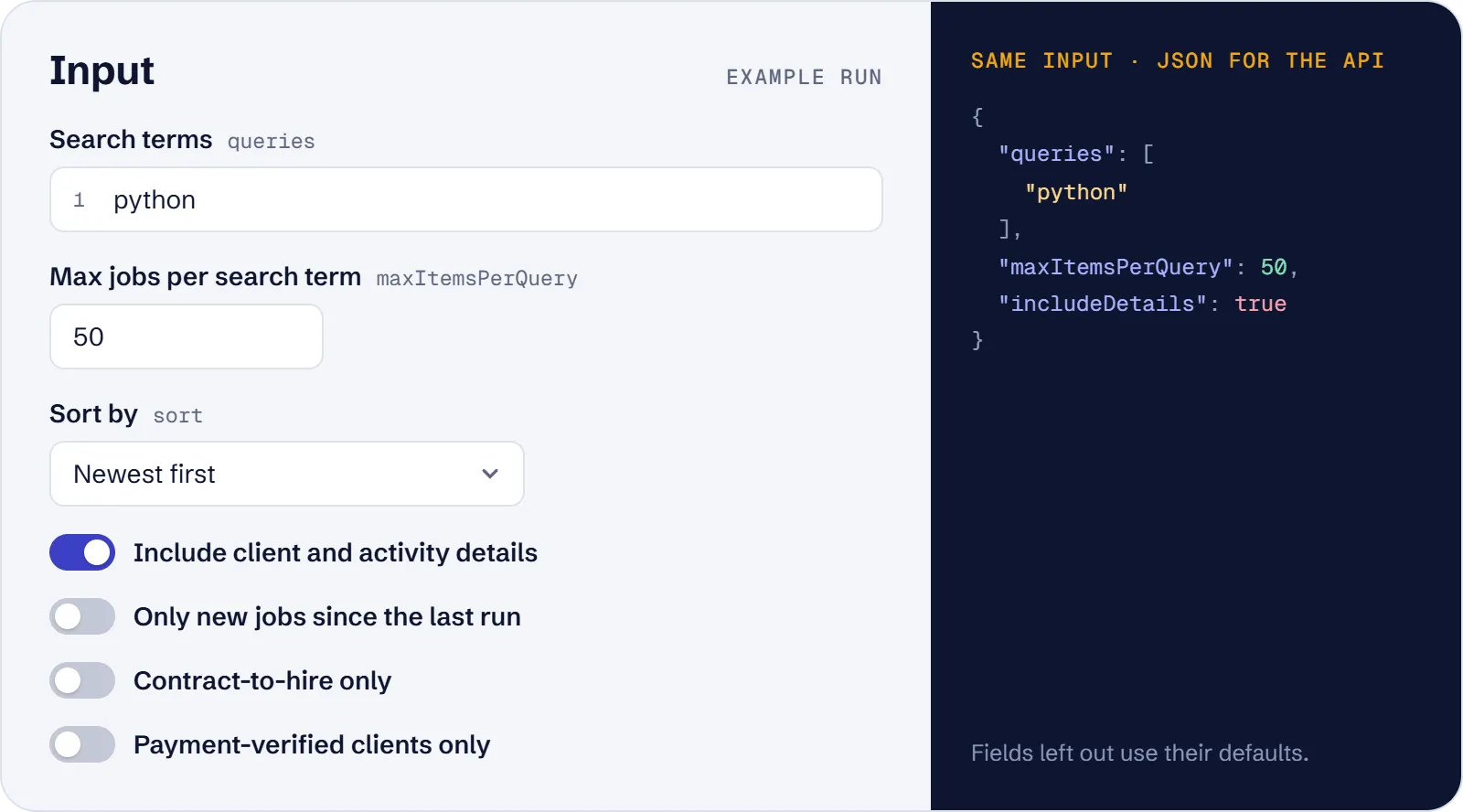
Nothing is required: {} returns the newest 50 open jobs across all of Upwork, with details.
| Field | What it does |
|---|---|
queries | Search terms, run one after another. Upwork syntax works: "logo design" in quotes for a phrase, NOT to exclude (python NOT django). Empty = all open jobs. |
maxItemsPerQuery | Saved jobs per search term, 1–5000 (default 50). |
maxItems | Optional cap on saved jobs across all terms. |
sort | recency (newest first, default) or relevance (best match). |
includeDetails | Client intel and activity counts per public job (default on). |
postedAfter | Only jobs published after a date (2026-11-01) or a relative time (24 hours, 3 days, 1 week). Needs sort: recency. |
onlyNewJobs | Skip jobs returned by earlier runs with the same terms and filters (remembered 30 days). |
jobType | hourly or fixed. Empty = both. |
experienceLevel | Any of EntryLevel, IntermediateLevel, ExpertLevel. |
duration | Hourly jobs only: any of week (less than 1 month), month (1–3 months), semester (3–6 months), ongoing (more than 6 months). |
workload | Hourly jobs only: part_time (less than 30 hrs/week) or full_time (30+ hrs/week). |
hourlyRateMin, hourlyRateMax | Hourly jobs only: rate range in USD; a job passes when its range overlaps. Min must not exceed max. |
contractToHire | Only contract-to-hire jobs. |
clientHires | Client's past hires: any of 0, 1-9, 10-. |
clientLocation | Client countries or regions as Upwork spells them in English, case-sensitive (United States, Turkey, Europe, Northern America). 2–3 letter codes (US, UK, DE) are converted. Every value is checked before the search. |
paymentVerifiedOnly, minClientTotalSpent, minClientRating | Client post-filters: payment verified, minimum spend in USD, minimum rating 0–5. They need includeDetails: true; private jobs are dropped. |
proxyConfiguration | Apify datacenter proxy by default, with automatic retries and a US residential fallback. |
Example input — a daily lead feed:
What data can you extract from Upwork?
| Group | Fields |
|---|---|
| Job | id, ciphertext, url, title, description, jobType (HOURLY / FIXED), experienceLevel, workload, duration, durationWeeks, skills (array), publishedAt, createdAt, status, category, categoryGroup, occupation, positionsToHire, englishLevel, minJobSuccessScore |
| Budget | hourlyBudgetMin, hourlyBudgetMax, fixedBudget, weeklyRetainerBudget, currency (USD) |
| Activity | totalApplicants, totalHired, totalInvitedToInterview, invitationsSent, lastClientActivity |
| Client | clientCountry, clientCountryCode, clientCity, clientTimezone, clientTotalSpent, clientTotalHires, clientTotalAssignments, clientRating, clientReviewsCount, clientMemberSince, clientIndustry, clientCompanySize, clientPaymentVerified |
| Search | query, position, totalResults, detailsStatus (ok / private / failed / skipped), scrapedAt |
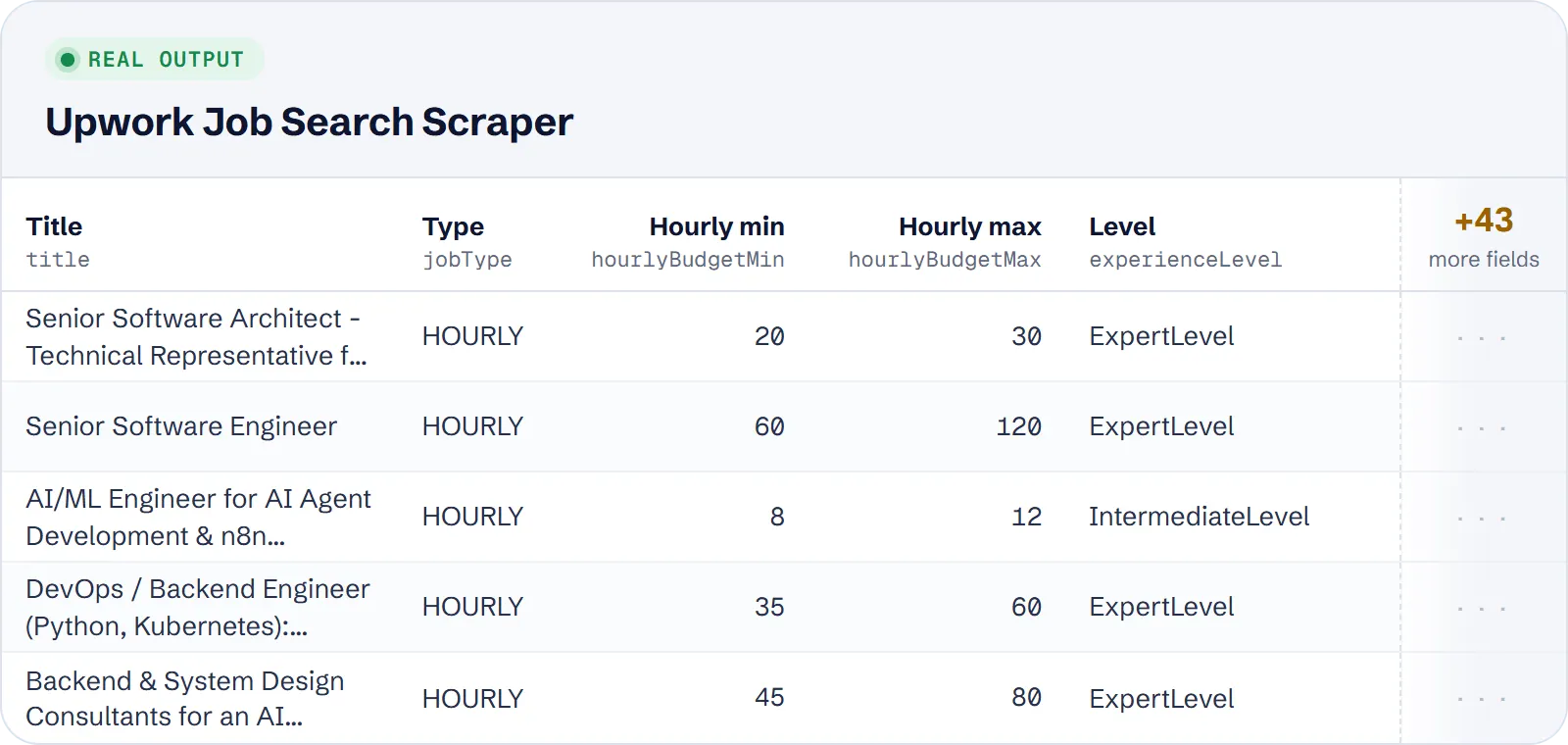
A real row (description shortened):
Use cases
- Freelancer lead feed: schedule a run every few hours with
onlyNewJobs,postedAfter: "24 hours"and the payment-verified and minimum-spend filters, and see only new jobs from paying clients with their applicant count. - Agency prospecting: find clients with many past hires and high total spend in your target countries or regions.
- Market research: pull hundreds of jobs for a skill and compare hourly ranges, fixed budgets, experience levels and client countries.
- Bulk job datasets: collect up to 5,000 jobs per search term with search fields only, at the base price.
- AI agents: answer "find recent Upwork jobs for X" with structured rows instead of web pages.
Limitations
- Upwork serves at most 5,000 jobs per search term and filter set. To get more, split a broad search with filters (job type, level, client location).
- Some jobs are private: Upwork hides their details from visitors. Such rows keep all search fields, have
detailsStatus: "private"and null client and activity fields. With client filters set, they are dropped because they cannot be checked. - Fields stated by few clients are often empty:
clientIndustry,clientCompanySize,clientCity, andclientTotalSpentfor new clients.hourlyBudgetMin/Maxare set only for hourly jobs with a range,fixedBudgetonly for fixed-price jobs,workloadonly for hourly jobs. - The hourly-only filters (
workload,duration, hourly rate) narrow hourly jobs only; fixed-price jobs are still returned unlessjobTypeishourly. WithjobType: "fixed"they are ignored with a warning. - Budgets are in USD, as on Upwork.
- The actor returns job data only: no freelancer profiles, no client contact details and no built-in alerts (connect Slack, email or webhooks through Apify integrations).
Tips and troubleshooting
- Only new jobs: combine
sort: recencywithonlyNewJobs: trueon a schedule; the memory is per search configuration, so changing terms or filters starts a fresh feed. - Input error about client location: use English names exactly as Upwork spells them, with capitals:
United States,Turkey,Czech Republic,Europe.Türkiye,Czechia,Latin Americaor lowercase values are rejected. postedAftererror: it needssort: recency, and the value must be a past date or a relative time like3 days.- Client filter error:
paymentVerifiedOnly,minClientTotalSpentandminClientRatingneedincludeDetails: true. - 0 rows: the run log names each term that found nothing, or how many jobs were already seen, filtered out or older than
postedAfter. A run with 0 jobs charges no job events, only the start fee. - Cheaper bulk runs: turn
includeDetailsoff when you only need titles, budgets and skills; the run is also faster.
API, MCP and integrations
Run the actor from your code with the same JSON input as in Console. Your API token is in Console → Settings → API & Integrations.
Python (pip install apify-client):
Node.js (npm install apify-client):
HTTP — one request runs the actor and returns the results (runs up to 5 minutes; longer ones: run asynchronously):
AI agents (MCP). Add the actor as a tool of the Apify MCP server. Claude Code:
Claude Desktop, Cursor or VS Code: {"mcpServers": {"apify": {"url": "https://mcp.apify.com?tools=genial_candlestand/upwork-job-search-scraper"}}}. Then ask, for example:
- "Find Upwork jobs for react native posted in the last 24 hours from payment-verified clients"
- "Get 100 newest Upwork python jobs with client country, total spent and applicant count"
- "List entry-level fixed-price data entry jobs on Upwork from clients in the United States"
Integrations. Run it on a schedule with Apify Schedules and send the results to Google Sheets, Slack, Zapier, Make, n8n or your webhook — see Apify integrations.
FAQ
Do I need an Upwork account or session token?
No. The actor uses Upwork's public visitor access, the same data a logged-out visitor sees. No login, cookie or token is needed, also for client details and applicant counts.
Is the data live?
Yes. Every run queries Upwork's job search at run time; nothing is served from a cached index.
Why do some jobs have no client data?
Upwork makes some jobs private to registered users. These rows have detailsStatus: "private" and are not charged the details add-on.
How is it different from other Upwork job scrapers?
Client intel and exact applicant counts come by default without a user-supplied session token, private jobs are never charged the details add-on, and the start fee is $0.00005. Rows also include fields such as clientCity, clientMemberSince, totalHired, totalInvitedToInterview, invitationsSent, category and minJobSuccessScore.
Is it legal to scrape Upwork?
The actor collects only publicly visible job posts, the data Upwork shows to any visitor without login. It does not return freelancer profiles or contact details. You are responsible for how you use the data and for complying with Upwork's terms and the laws that apply to you, such as GDPR.
Also useful
- Indeed Jobs Scraper — search Indeed for the same skills: full-time job titles, companies, descriptions and parsed salaries
- Wellfound Jobs Scraper — find startup roles for your skills with salary ranges, equity and company details
- Google Jobs Scraper — collect jobs from many boards at once: titles, companies, salaries and apply links
- Google Maps Scraper — build lead lists of local businesses with phones, websites and ratings
- Reddit Scraper — follow freelancing subreddits for client and rate discussions: posts, comments and scores


