

Google Flights Scraper - Airfare Prices & Price Tracker
Pricing
from $1.40 / 1,000 results
Google Flights Scraper - Airfare Prices & Price Tracker
Google Flights scraper for live flight prices: airlines, times, duration, stops, layover airports, aircraft and CO2. One-way or round-trip, scan up to 31 dates for the cheapest day, bulk routes, target-price flags and stable itinerary IDs for fare tracking. No API key.
Pricing
from $1.40 / 1,000 results
Rating
0.0
(0)
Developer

Group Oject
Maintained by CommunityActor stats
1
Bookmarked
2
Total users
1
Monthly active users
21 hours ago
Last modified
Categories
Share
Scrape live Google Flights results for any route and date: prices, airlines, departure and arrival times, duration, stops, layover airports, aircraft, and CO2 emissions. Search one-way or round-trip, scan up to 31 departure dates to find the cheapest day, bulk-search up to 100 route/date combinations per run, and flag fares below your target price. No Google API key, no login.
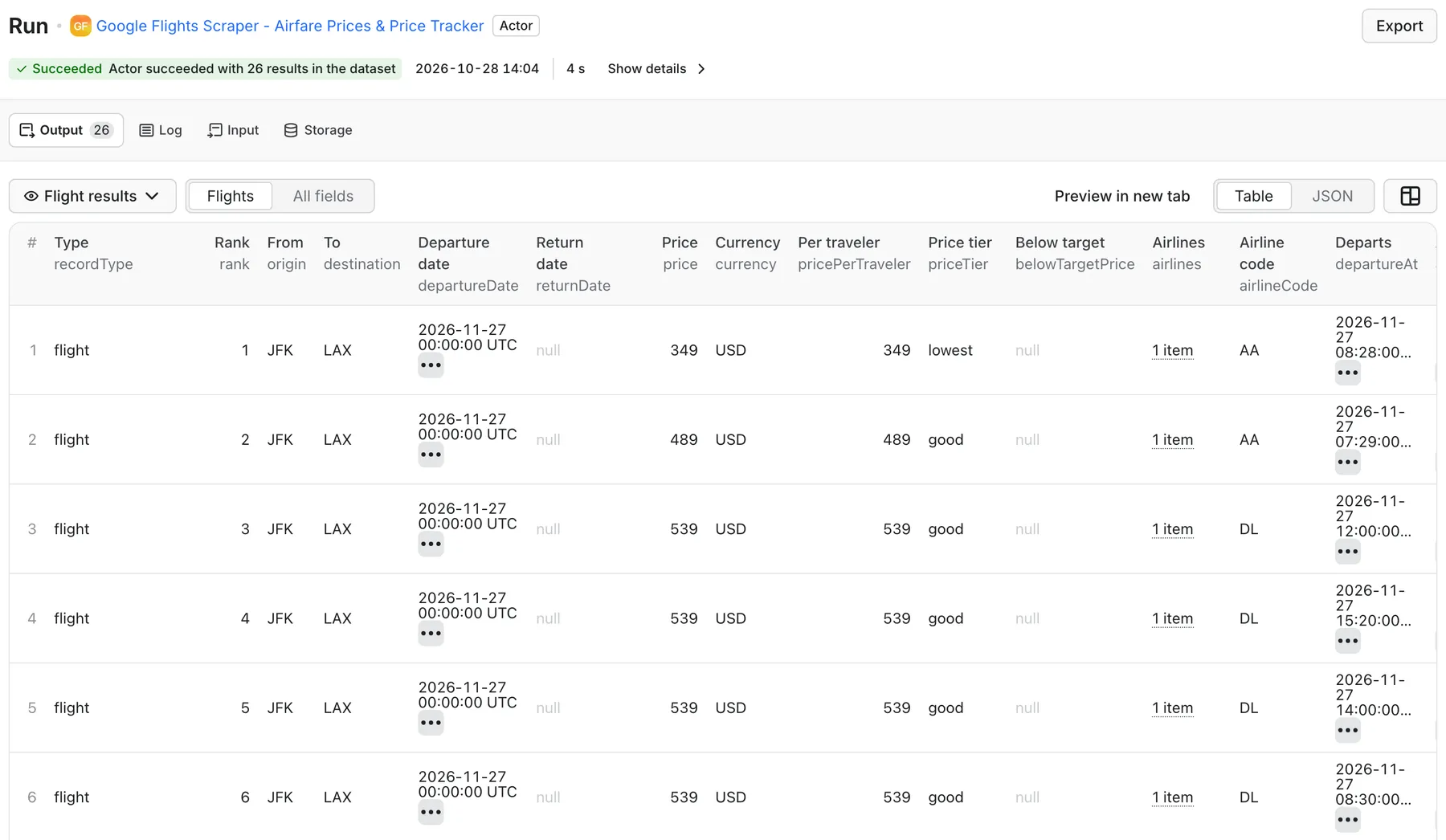
Real output from a default run of Google Flights Scraper in Apify Console.
What can this Google Flights scraper do?
- Live airfare search - every itinerary Google Flights shows for a route and date, ranked from cheapest.
- Cheapest-day finder - set a departure date range (up to 31 days) and get each day's fares plus a summary row per day.
- Bulk routes - add more origin/destination/date combinations in the same run.
- Round-trip or one-way - add a return date for round-trip pricing.
- Travelers and cabin - adults, children, infants in seat or on lap; economy, premium economy, business, or first.
- Filters - direct flights only, maximum stops, airline codes, maximum price.
- Fare alerts - set a target price and every row gets
belowTargetPrice: true/false; each fare also gets a price tier (lowest,good,typical,high) relative to that search. - Stable itinerary IDs -
itineraryIdstays the same when only the price changes, so you can track one flight's fare across scheduled runs. - Any currency and language -
USD,EUR,GBP,MAD, ... and Google language codes.
What flight data can I extract?
| Field | Description |
|---|---|
price, currency, pricePerTraveler | Total fare for all travelers and per-traveler fare |
priceTier, belowTargetPrice, rank | Fare tier within the search, target-price flag, rank by price |
airlines, airlineCode | Marketing airline names and code |
origin, destination, departureDate, returnDate, tripType | Search route |
departureAt, arrivalAt, durationMinutes | Local departure and arrival times, total travel time |
stops, isDirect, layoverAirports | Connections |
segments[] | Each leg: from/to airport code and name, times, duration, aircraft |
carbonGrams, carbonVsTypicalPercent | CO2 estimate and difference vs. typical for the route |
cabinClass, adults, children, infants | Search settings |
itineraryId | Stable ID for price tracking across runs |
googleFlightsUrl, scrapedAt | Link to the same search on Google Flights, timestamp |
With Include route summary on (default), each search also adds one route_summary row with lowestPrice, medianPrice, averagePrice, directFlightCount, and cheapestDirectPrice.
How much does it cost to scrape Google Flights?
Pay per result row saved: $2.00 per 1,000 rows ($0.002 per flight or summary row), plus an Actor start event of $0.01 per GB of memory (one event at the default 512 MB).
| Example | Rows | Approx. price |
|---|---|---|
| 1 route, 1 date, up to 100 flights + summary | up to 101 | up to $0.21 |
| 1 route, 30-day scan, 20 flights per day + summaries | up to 630 | up to $1.27 |
| 1,000 rows | 1,000 | $2.01 |
Lower Maximum flights per search to pay only for the cheapest fares you need. See the Pricing tab for current rates.
How to scrape Google Flights prices
- Enter Origin airport and Destination airport as three-letter IATA codes (
JFK,LHR,CDG,DXB,CMN). - Enter a future Departure date (
YYYY-MM-DD). Add a Return date for round trips. - Optional: set Scan departure dates through to compare every day in a range.
- Optional: travelers, cabin, filters, target price, currency.
- Click Start and export as JSON, CSV, or Excel.
Input example: cheapest day to fly
Input example: round trip with filters and a fare alert
Input example: several routes in one run
Output example
Illustrative record; prices and schedules change constantly. The run also writes a SUMMARY record with successful and failed searches.
Flight price monitoring
- Save your input as a task (one task per route set).
- Schedule it, for example daily at 06:00.
- Read
belowTargetPriceor theroute_summary.lowestPricefrom each run, and send it to Slack, email, or Google Sheets with an Apify integration or webhook. - Use
itineraryIdto follow a specific flight's fare over time.
Remember to move the departure date forward when it passes: Google Flights returns no fares for past dates.
Run the Google Flights API via code
Python
JavaScript
cURL
Also works with Make, Zapier, n8n, Google Sheets, and AI agents through the Apify MCP server.
FAQ
Do I need a Google Flights API key?
No. Google has no public Flights API; this Actor reads the public Google Flights results.
Are these live prices?
Yes, each row is the fare Google Flights showed at scrapedAt. Always confirm the price with the airline or booking site before buying.
Why did a search return no flights?
Common causes: the departure date is in the past, the airport code is wrong, filters are too strict (direct only, airlines, max price), or Google has no flights for that route and date. Check the SUMMARY record for each search's error.
Can I search by city name or multi-city trips?
Not yet. Use IATA airport codes (LON city codes are not supported; use LHR, LGW, ...). Multi-city itineraries are not supported.
Does it return booking links or baggage fees?
No. googleFlightsUrl opens the same search on Google Flights, where booking options are listed.
Do I need a proxy?
Usually not. For large or very frequent schedules, enable an Apify residential proxy in Proxy configuration.
Related Actors
- Amazon Product Scraper & Price Tracker - price-change tracking for products.
- Shopify Product & Price Scraper - catalog and price snapshots from Shopify stores.


