

Amazon Product Scraper & Price Tracker - ASIN API
Pricing
from $4.20 / 1,000 results
Amazon Product Scraper & Price Tracker - ASIN API
Amazon product scraper and price tracker: search by keyword, ASIN or URL across 12 Amazon marketplaces. Get price, list price, discount, rating, review count, Prime, stock, bullets and images, plus price-change alerts between runs. Residential proxy included, no API key.
Pricing
from $4.20 / 1,000 results
Rating
0.0
(0)
Developer

Group Oject
Maintained by CommunityActor stats
0
Bookmarked
2
Total users
1
Monthly active users
a day ago
Last modified
Categories
Security
Limited permissionsShare
Scrape Amazon products by keyword, ASIN, or product URL across 12 Amazon marketplaces and track their prices between runs. Get title, brand, price, list price, discount, rating, review count, Prime, stock status, feature bullets, image gallery, sponsored flag, and search position, plus price-change fields when monitoring is on. No Amazon API key, no Seller Central account.
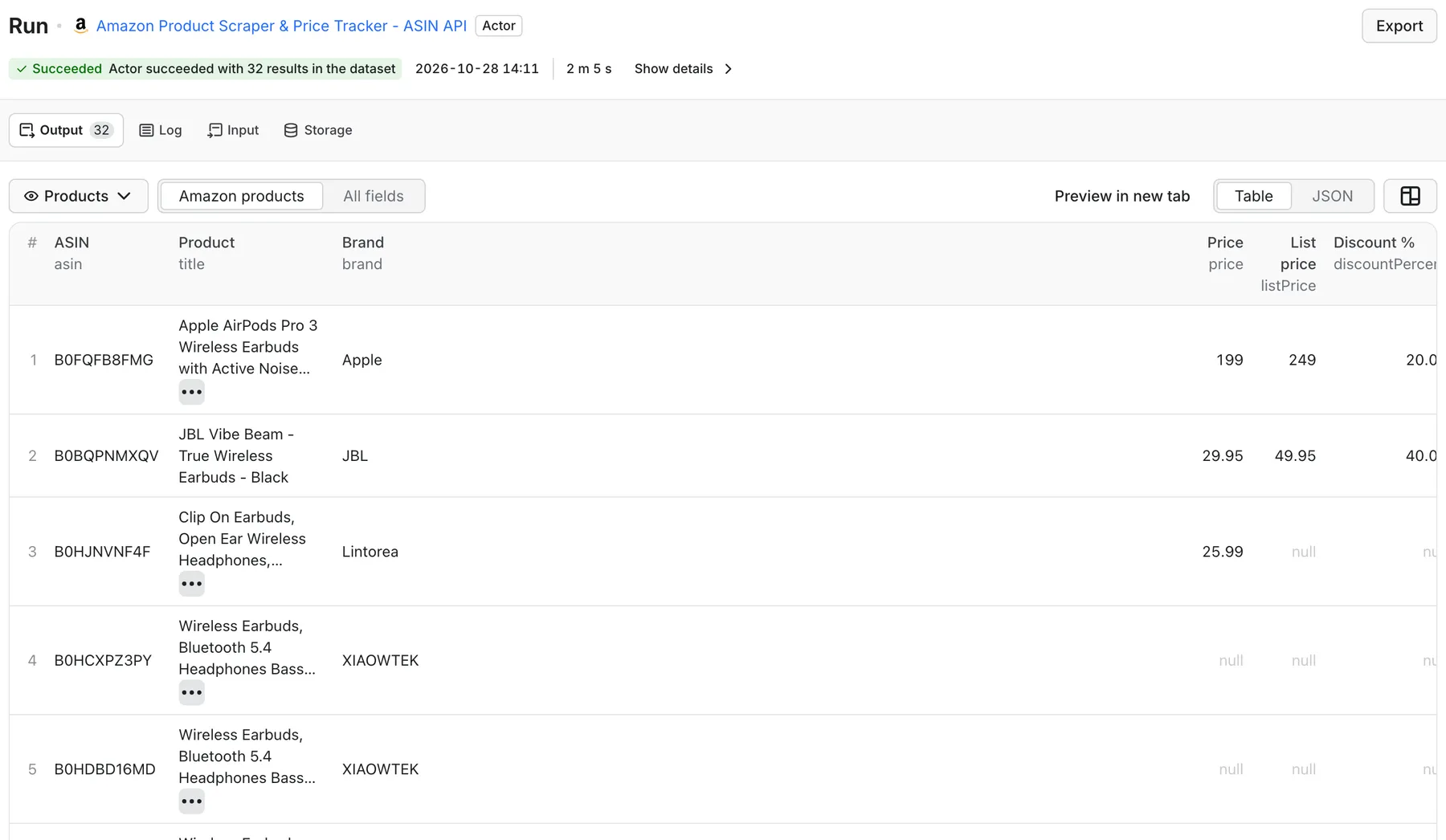
Real output from a default run of Amazon Product Scraper & Price Tracker in Apify Console.
What can this Amazon scraper do?
- Search Amazon by keyword - collect products from up to 20 result pages per keyword, with search position and sponsored-ad flag.
- Bulk ASIN lookup - paste ASINs or
/dp/URLs and get full product-page details. - Track Amazon prices over time - turn on price monitoring and every run reports
previousPrice,priceChange,priceChangePercent, andpriceDirection(up,down,unchanged). - Price-drop alerts - output only products whose price changed since the last run, ready for Slack or email.
- 12 marketplaces - amazon.com, .co.uk, .de, .fr, .it, .es, .ca, .com.au, .in, .co.jp, .com.mx, .com.br, with currency set automatically.
- Filter results - minimum rating, minimum review count, price range, include or drop sponsored listings.
- Opportunity score - a simple 0-100 score and tier (High / Medium / Low) from rating, review count, discount, Prime, and stock, useful for quick product research.
- Residential proxy built in - requests go through a residential proxy in the marketplace's country by default.
What data can I extract from Amazon?
| Field | Description |
|---|---|
asin, url, marketplace | Product identity and canonical /dp/ link |
title, brand | Product title and brand / store byline |
price, listPrice, discountPercent, currency | Current price, strike-through price, computed discount |
rating, reviewCount | Star rating and number of ratings |
isPrime, availability, inStock | Prime badge, availability text, stock flag |
features | "About this item" bullet points |
image, images | Main image and full gallery (product pages) |
isSponsored, searchQuery, searchPage, searchPosition | Search context for keyword runs |
opportunityScore, opportunityTier | Heuristic 0-100 product score |
previousPrice, priceChange, priceChangePercent, priceDirection | Filled when price monitoring is on and the ASIN was seen before |
scrapedAt | Timestamp |
Search-only runs (with Fetch product details off) return the search-card fields; product pages add availability, features, and the image gallery.
How much does it cost to scrape Amazon?
Pay per product saved:
| Products | Price |
|---|---|
| 100 | $0.60 |
| 1,000 | $6.00 |
| 5,000 | $30.00 |
Plus an Actor start event of $0.02 per GB of memory (default 1 GB = $0.02 per run). Residential proxy traffic is included in the price. Products removed by your filters and failed pages are not charged. The Actor respects your maximum run charge and stops before exceeding it. See the Pricing tab for current rates.
How to use the Amazon Product Scraper
- Choose a Marketplace (default
amazon.com). - Add Search queries, ASINs, or Product URLs (any combination).
- Set Max items and, for keyword searches, Max pages per query.
- Optional: set rating, review, or price filters.
- Optional: enable Monitor prices and give the task a unique State key.
- Click Start, then export as JSON, CSV, Excel, or via API.
Input example: keyword research
Input example: bulk ASIN lookup
Input example: daily Amazon price tracker
Save it as a task and schedule it daily. The first run stores the baseline prices; later runs output only products whose price went up or down.
Output example
Illustrative record. The run also saves SUMMARY (products, price changes, failed requests, budget stop) and ERRORS to the key-value store.
Use cases
- Competitor price monitoring for brands and Amazon sellers.
- Product and niche research - find well-rated, heavily reviewed products in a category and rank them by opportunity score.
- Catalog enrichment - fill titles, bullets, and images for a list of ASINs.
- Sponsored placement tracking - see which ASINs are paying for the top of a keyword's results.
- Deal and price-drop alerts - pipe
onlyPriceChangesoutput into Slack, email, or Google Sheets.
Amazon API alternative: run it from code
Python
JavaScript
Works with Make, Zapier, n8n, Google Sheets, and webhooks through Apify integrations, and with AI agents through the Apify MCP server.
FAQ
Can I track Amazon price history with it?
Yes. Look up ASINs or product URLs, schedule the actor, and turn monitoring on: every run reports previousPrice, priceChange and priceChangePercent, so your dataset becomes an Amazon price history and you can alert on price drops.
Do I need an Amazon API key?
No. The Actor reads public Amazon pages. You only need an Apify account.
Does it scrape individual Amazon reviews?
No. It returns the star rating and the number of ratings, not review text.
How does price monitoring work?
With Monitor prices on, the Actor stores the last seen price per ASIN in a named key-value store (amazon-price-monitor-<stateKey>) in your Apify account. Use a different state key for each watchlist.
Why are some fields null?
Amazon layouts differ by marketplace, category, and seller. Some products have no list price, Prime badge, or stock text. Turn on Fetch product details for the most complete rows.
What if Amazon shows a CAPTCHA?
Each page is retried up to three times with a fresh residential proxy session. Pages that still fail are listed in ERRORS, not charged, and the run keeps the products it already collected.
Is scraping Amazon legal?
The Actor collects publicly visible product information only. Check Amazon's terms and your local laws for your use case, and don't collect personal data.
Related Actors
- Shopify Product & Price Scraper - catalogs and prices from Shopify stores.
- Facebook Ads Library Scraper - see how competing brands advertise their products.
- Google Flights Scraper & Price Tracker - the same price-tracking approach for airfares.


