

Snapchat Scraper — Profiles, Spotlight, Stories & Lenses
Pricing
from $0.00125 / profile
Snapchat Scraper — Profiles, Spotlight, Stories & Lenses
Scrape public Snapchat creator profiles: subscribers, bio, website, verified badge, Spotlight videos with views, shares and comments, stories, highlights, lenses and related accounts. One row per profile. Export to JSON, CSV or Excel.
Pricing
from $0.00125 / profile
Rating
0.0
(0)
Developer

Hipersoft
Maintained by CommunityActor stats
0
Bookmarked
2
Total users
2
Monthly active users
15 days ago
Last modified
Categories
Features
Share
Turn public Snapchat creator profiles into clean data. Give the Snapchat Scraper a list of usernames or profile links and get one row per creator with subscriber count, verified badge, bio, website, account age, their Spotlight videos with views, shares, comments and boosts, current story snaps, saved highlights, lenses and related accounts. Export everything as JSON, CSV, Excel or XML.
What does Snapchat Scraper do?
Snapchat's public creator profiles hold a lot of marketing signal that's hard to collect by hand. This actor reads any public profile and returns:
- Profile details — display name, bio, subscriber count, verified (star) badge, category, website, address, profile and hero images, Snapcode and account creation date.
- Spotlight videos — every Spotlight shown on the profile with views, shares, comments, boosts, recommends, upload date, duration, description, hashtags, video and thumbnail URLs.
- Stories — the creator's current public story snaps with media URLs, type (image or video) and time posted.
- Highlights — saved story highlights with titles, snap counts and thumbnails (optionally every media link).
- Lenses — lenses published by the creator with preview images and videos.
- Related accounts — similar creators suggested on the profile, great for discovering more influencers.
Who uses Snapchat data?
- Influencer marketing teams vetting creators by subscribers, Spotlight reach and engagement.
- Brands and agencies benchmarking competitors and tracking campaign content.
- Talent managers monitoring their roster's growth and posting activity.
- Researchers and analysts studying short-form video trends and creator audiences.
- Lead-generation teams building lists of creators with websites and categories.
How to scrape Snapchat profiles
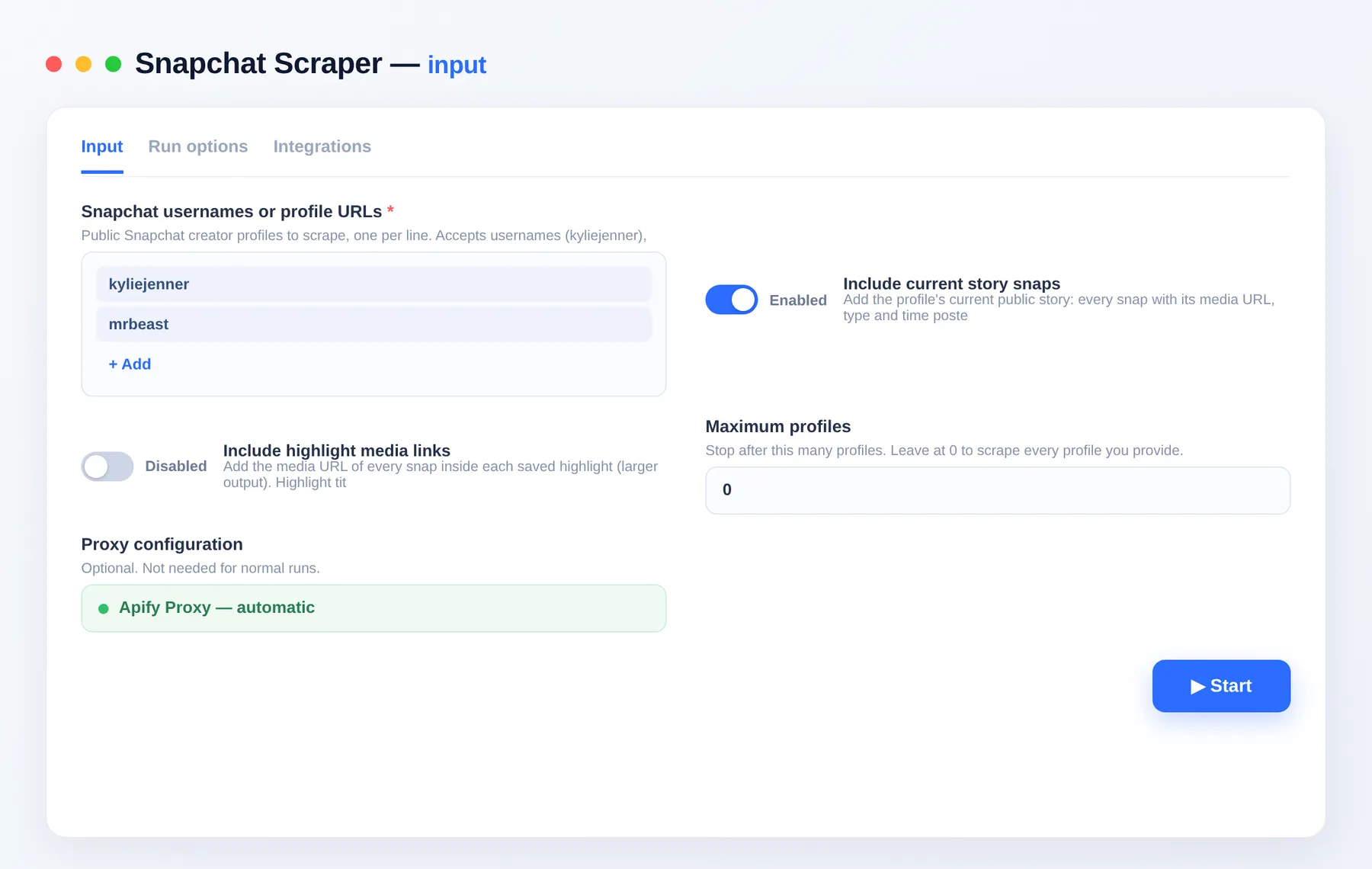
- Add one or more usernames or profile URLs (for example
kyliejennerorhttps://www.snapchat.com/add/mrbeast). - Choose whether to include the current story and highlight media links.
- Click Start — each profile becomes one row in the dataset.
- Download the results as JSON, CSV, Excel or XML, or send them to your tools.
Input
| Field | Type | Description |
|---|---|---|
usernames | array | Usernames, @handles or profile URLs. |
includeStory | boolean | Add the profile's current public story snaps. Default true. |
includeHighlightMedia | boolean | Add media links for every snap inside highlights. Default false. |
maxItems | integer | Stop after this many profiles. 0 = all. |
Output
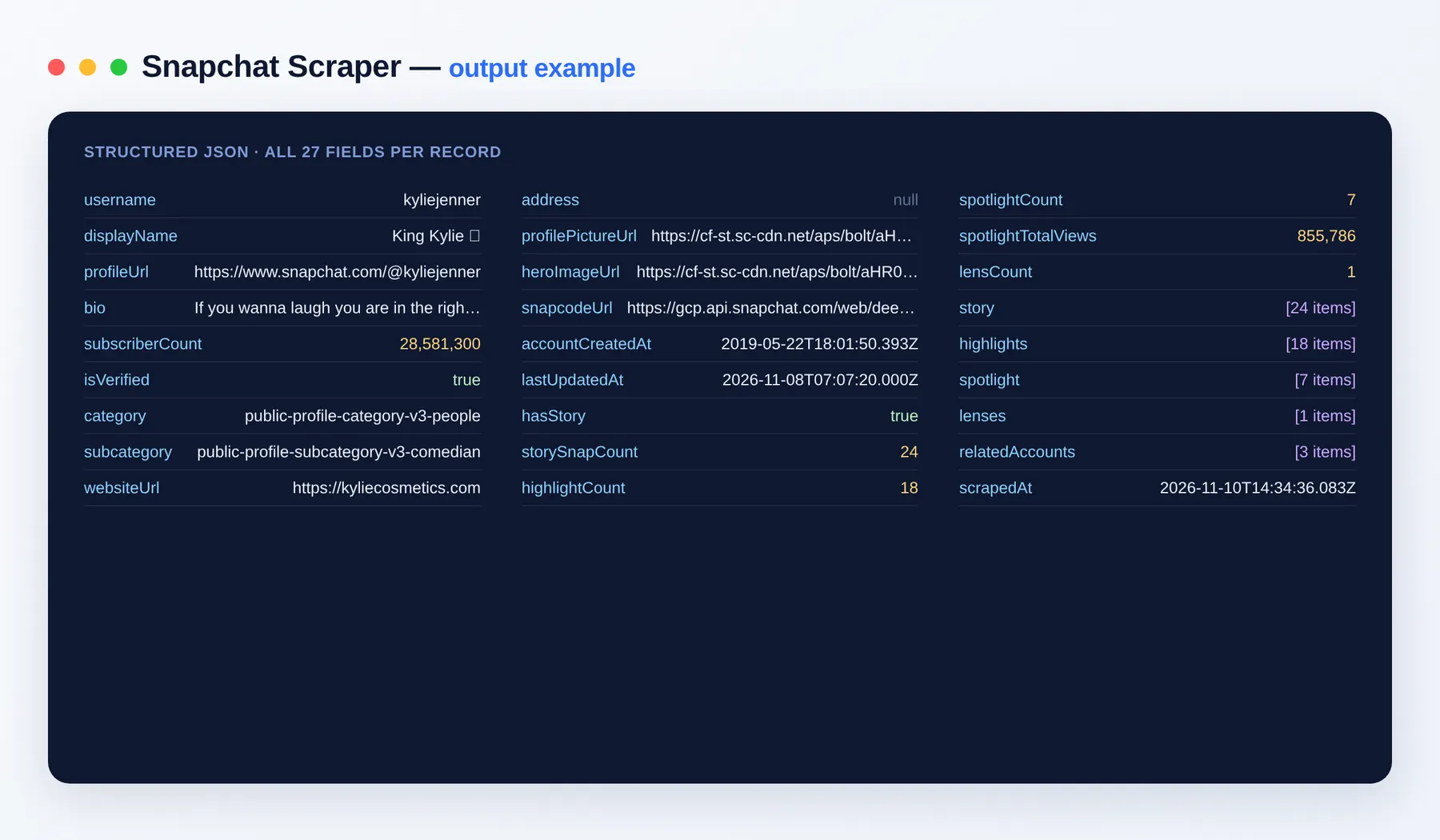
One row per profile. Example (shortened):
Data fields
| Group | Fields |
|---|---|
| Profile | username, displayName, profileUrl, bio, subscriberCount, isVerified, category, subcategory, websiteUrl, address, profilePictureUrl, heroImageUrl, snapcodeUrl, accountCreatedAt, lastUpdatedAt |
| Summary | hasStory, storySnapCount, highlightCount, spotlightCount, spotlightTotalViews, lensCount |
| Spotlight | url, description, hashtags, views, shares, comments, boosts, recommends, uploadedAt, durationSec, width, height, videoUrl, thumbnailUrl |
| Story | snapId, mediaType, mediaUrl, previewUrl, postedAt |
| Highlights | highlightId, title, snapCount, thumbnailUrl, optional snaps |
| Lenses | name, creator, previewImageUrl, previewVideoUrl, iconUrl, lensUrl |
| Related | username, displayName, profileUrl |
How much does it cost to scrape Snapchat?
You pay per profile scraped. Profiles that don't exist or aren't public are skipped and never charged. Your Apify plan's discount applies automatically, and you can cap spending with maximum cost per run in the run options.
FAQ
Which profiles can I scrape? Public Snapchat creator profiles — the ones that show a public profile page with subscribers, Spotlight or stories. Private friend-only accounts have no public page and are skipped.
How many Spotlight videos do I get? The Spotlight videos shown on the creator's public profile, with full engagement stats for each.
Do story media links expire? Story snaps are temporary on Snapchat, and their media links stop working once the story expires — download what you need soon after the run.
Is it legal to scrape Snapchat? The actor reads only publicly available profile information. Make sure your use complies with applicable laws and the platform's terms, especially when processing personal data.
Can I automate it? Yes — schedule runs to track creators over time, or trigger them from your own app via integrations on the Apify platform and the Apify API.
Related Actors
Explore more data tools from the same author:
- YouTube Scraper — Videos, Transcripts, Comments, Channels
- Bluesky Scraper — Posts, Profiles & Followers
- Reddit Scraper — Posts & Comments by Subreddit, Keyword or User
- Mastodon Scraper — Hashtags & Account Posts
Plug the results straight into your stack with Make, Zapier or any of Apify's integrations.


