

Skool Posts & Classroom Scraper: Lessons, Videos, Comments
Pricing
from $2.25 / 1,000 posts
Skool Posts & Classroom Scraper: Lessons, Videos, Comments
Skool scraper and API, no login: every free classroom course and lesson with its text, video link or Skool video stream and captions; feed posts with full text, author, likes, files and comments; the community's search. Locked courses, private groups and lesson files: listed, not read. Misses free.
Pricing
from $2.25 / 1,000 posts
Rating
0.0
(0)
Developer

Hyperbach
Maintained by CommunityActor stats
0
Bookmarked
3
Total users
2
Monthly active users
4 days ago
Last modified
Categories
Features
Share
Skool communities, logged out: the feed's posts with their full text, author, likes, comments count, category, attachments, polls and videos (and, on request, every comment and reply), the community's own post search, and the free classroom: every course and every lesson with its written text, its YouTube, Loom or Vimeo link or its Skool-hosted video stream, its resources and, on request, its captions. Community, classroom, course, lesson, post and about links in, one row per post, comment, lesson, course or community out, and one free row per link with a verdict: COMPLETE, CAPPED (your limit), TRUNCATED (Skool's own limit) or PARTIAL. No login, no cookies, no browser, proxies handled for you.
From $4.50 per 1,000 rows (post) on the Free plan, $3.825 on Starter; every row and add-on is priced under Pricing below. A run start is $0.005. The default input returns about 57 rows for about $0.2084. A value that names nothing is a free row that says why.
How it compares
- blueskyscraper's Skool Posts Scraper is 3 times cheaper: $0.88 per 1,000 posts, against our $2.49.
- 21 times faster and cheaper than scrapersdelight's Skool Classroom Scraper, with more data: 50 posts in 7.3 s, against 151 s; $2.49 per 1,000 posts, against $3.00; 28 fields per post, against 10.
Measured on 2026-11-12. Each line compares one job, run by both scrapers at the same time. Prices are per 1,000 posts: Apify Actors at the Scale plan's prices.
Tested head-to-head on 2026-11-12
The job: the first 50 rows of one public Skool community (ai-automation-society, the input schema's example): its posts and its free classroom lessons. Every Actor ran on it the same day from the same harness; every run's cost is at the Scale plan's prices: a rival's charged events at its price for that plan, this Actor's at its list price. Fields counts the filled fields of a typical row. Ours reads the community's posts and its free classroom lessons in one run (50 rows of both); each rival reads one half: the classroom (scrapersdelight) or the posts (blueskyscraper). Re-measured monthly.
| Actor | Rows | First row | Run time | Cost | Fields | Failures |
|---|---|---|---|---|---|---|
| this Actor | 50 | 6.7 s | 7.3 s | $0.12 | 28 | none |
scrapersdelight/skool-classroom-scraper | 50 | 5.6 s | 151 s | $0.15 | 10 | none |
blueskyscraper/skool-posts-scraper | 50 | 5.6 s | 6.6 s | $0.044 | 28 | none |
Why this Skool posts and classroom scraper
- The whole free classroom. Every course of the classroom, 30 a page to the last page (the leader's buyers report it stops at page one), every lesson of every free course in the course's order with its section and position, its written text as plain text and as Skool's own rich text with its links, its video (a YouTube, Loom or Vimeo link with its length and thumbnail, or the Skool-hosted stream), its resources (titles, file names and links), and the lesson's discussion post with its likes and comments.
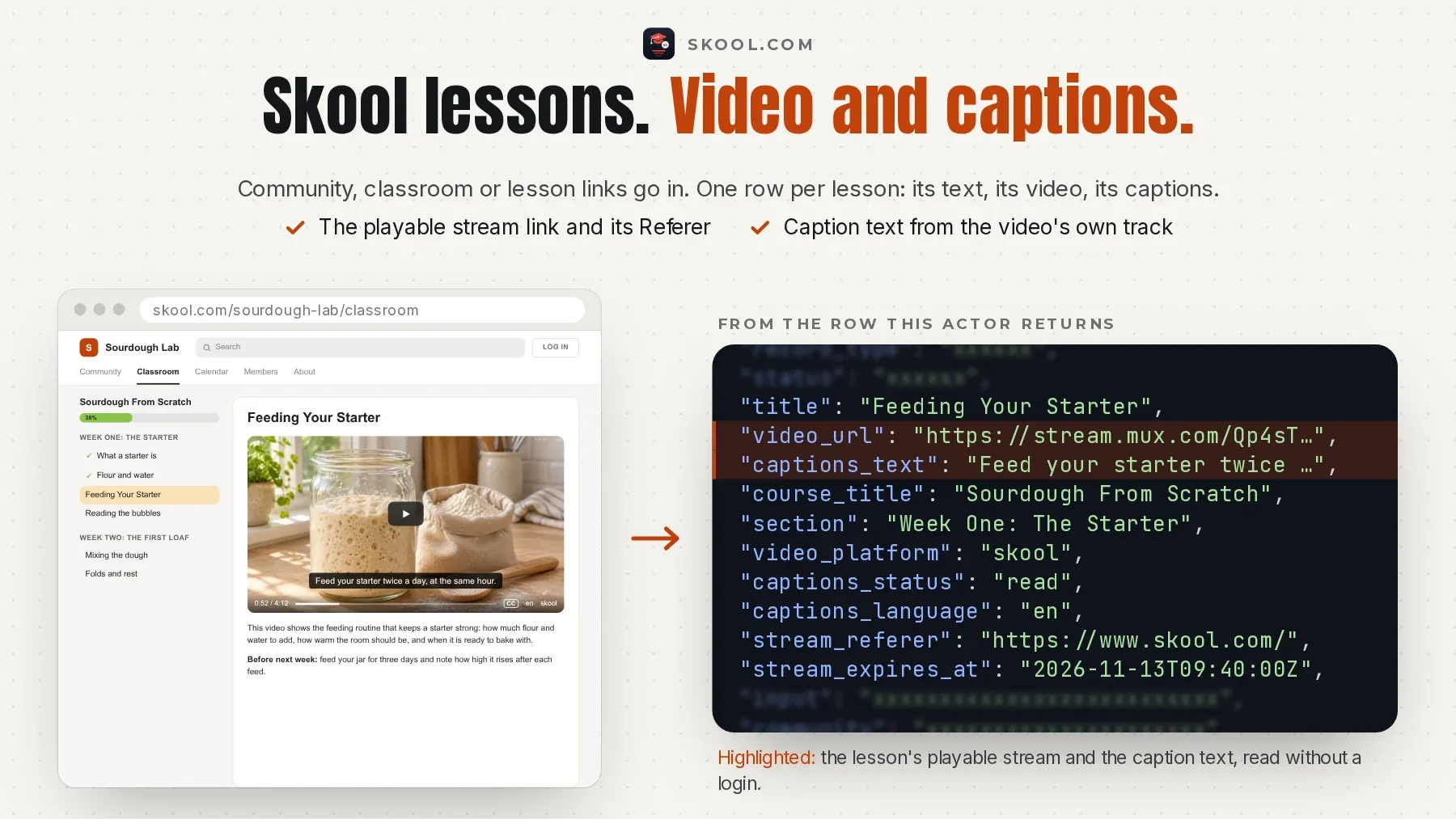
- Playable Skool-hosted video. A Skool-hosted lesson or post video comes as its HLS stream link (720p, 480p and 270p renditions, English captions where the creator has them), with the moment its token expires (
stream_expires_at, 24 hours after the read) and the Referer header a player must send (stream_referer): Skool's video host refuses a player without it. - Captions without a model. On request, the lesson video's own caption track as text and as timed cues (
captions_text,captions_cues); a video with no track says so. - The full post, not the preview. The feed cuts a long post at 2,000 characters; this Actor reads such a post's own record for the whole text (
text_sourcesays which). Each post carries its author's name, handle, level and points, its category by name, the pinned flag, its attachments with their links, its poll's options and counts, the mentioned members, its YouTube links and its Skool-hosted videos. - Comments, every one. On request, every comment and reply of each post, the pinned comment first (Skool serves it only on request), with each post's count beside what the list served.
- Honest runs. Every link gets a free
targetrow with a verdict and the source's own count: COMPLETE, CAPPED (your limit, named), TRUNCATED (Skool's search counts 1,000 posts at most) or PARTIAL (why). A private community, a missing one (checked on two connections) and a locked course are free rows that say so; a run Skool refuses ends FAILED, never green with 0 rows.
Who it's for
- Course creators and community owners — what the communities of a niche teach: every free course, lesson by lesson, with its text, its video and its resources, and what their members post and ask.
- Researchers and AI builders — a community's lessons with their captions and its posts with their full text and comments, as clean rows for analysis, search or a knowledge base.
- Agencies and marketers — the posts that get the most likes and comments in a community, by category and by week, and who writes them.
Quick start
A community's newest posts and its free classroom
One course with its captions
Posts of the last 7 days with their comments
Switching from memo23/skool-posts-with-comments-scraper?
Your input works as it is. Each name in the left column is read as this Actor's own field and the run log says so (read <theirs> as <ours>); a name marked not read is ignored with a note. A value in the other Actor's shape, an object list or its own date form, is read too.
| memo23/skool-posts-with-comments-scraper | this Actor | what to know |
|---|---|---|
startUrls | startUrls | The same links: a community, its classroom, a course, a lesson (md=) or a post; the leader's {url: …} objects are read too. |
tab | read | community → posts, classroom → classroom. |
includeComments | includeComments | Every comment and reply as its own row. |
commentsLimit | maxCommentsPerPost | Comments and replies per post; 0 = all. |
itemStartDate | postedAfter | A date or a time ago (7 days); the feed is read newest first and stops at the first older post. |
maxItems | maxItems | The charged rows of the whole run. |
includeMedia | not read | Not read: Skool-hosted videos come as playable stream links with their expiry and Referer; no file is stored. |
storeName | not read | Not read: no storage of past items (use postedAfter for new posts). |
cookies | not read | Not read: this Actor works logged out; member-only content is out of its scope. |
maxConcurrency | not read | Not read: the Actor paces itself. |
minConcurrency | not read | Not read: the Actor paces itself. |
proxy | not read | Not read: the Actor brings its own connections at no cost to you. |
What differs:
- No login and no cookies: the public groups' feeds and free classrooms are read logged out. The leader needs your Skool cookies; its
cookiesinput is not read here. Locked or paid course bodies, private groups and comments that need a login are out (free rows say so). - The leader's
tab(communityorclassroom) is read asread(postsorclassroom);bothreads the two in one run. - One row per post, lesson or comment, each with
record_type; replies are rows of their own (depth2), not nested. - Skool-hosted videos are delivered as playable stream links, not stored as files:
includeMediais not read. - Run cost: rows are charged per event (post, lesson, comment, community details); course rows and target rows are free.
Output
One row per post, comment, lesson, course or community (record_type), and one free target row per link:
| field | meaning |
|---|---|
record_type | post, comment, lesson or group (charged), course (free) or target (the free row of one link). |
status | ok; locked on a course or lesson a member level or a purchase opens; on a target row why a link gave nothing: not_found, private, no_category, invalid_input, failed, not_read (see the FAQ). |
input | The link you gave that this row answers. |
community | The community's name in its URL (skool.com/ |
community_id | Skool's id of the community. |
community_name | The community's display name. |
id | Skool's id of the post, comment, lesson, course or community. |
url | The post, lesson, course or community on Skool (a comment's row names its post). |
title | The post's, lesson's or course's title, or the community's name. |
text | The full text as plain text: a post or comment (mentions as @Name, Skool's list marks as bullets), a lesson's written text, a community's about copy. |
text_raw | The text as Skool stores it: a post's markup, or a lesson's rich-text JSON ([v2] + the document). |
text_links | The links found in the text. |
created_at | When the post, comment, lesson, course or community was created (UTC). |
updated_at | When it was last updated (UTC). |
search_term | On a post found by searchTerms or a search link: the words searched. |
author_id | The post's or comment's author: Skool's member id. |
author_name | The author's name as Skool shows it. |
author_handle | The author's handle (skool.com/@ |
author_level | The author's level in this community. |
author_points | The author's points in this community. |
author_bio | The author's public bio. |
author_location | The author's public location. |
author_links | The author's public links: website, Facebook, Instagram, LinkedIn, X, YouTube (those set). |
author_picture | The author's profile picture. |
likes | Likes (upvotes) of the post or comment. |
comments_count | The post's comment count as Skool shows it (comments and replies). |
comments_read | With includeComments: the comment and reply rows this run delivered for the post (note says why it is fewer than the count). |
category_id | The post's category id. |
category_name | The post's category name. |
pinned | The post (or comment) is pinned. |
last_comment_at | When the post's latest comment was written (UTC). |
image_preview | The post's preview image. |
attachments | The post's attached files: {id, name, content_type, url}. |
video_links | Video links in the post: {url, platform, title, duration_s, thumbnail}. |
hosted_videos | The post's Skool-hosted videos: {video_id, url (the HLS stream), thumbnail, expires_at, referer}. |
poll | The post's poll: {options: [{text, votes}], total_votes} (never the voters). |
mentions | Members mentioned in the text: {name, id}. |
contributors | The members who commented on the post, as Skool lists them on the post: {id, handle, name}. |
text_source | On a post: full (the whole post) or preview (the feed's 2,000-character preview: its full record was not served). |
post_id | On a comment: the post it belongs to. |
parent_id | On a reply: the comment it answers (null on a top-level comment). |
depth | On a comment: 1 (top-level) or 2 (a reply). |
lesson_short_id | On a lesson: its short id, as Skool names the lesson in its own links (the 8-character name). |
course_id | On a lesson or course: Skool's id of the course. |
course_name | The course's short name in its URL (classroom/ |
course_title | The course's title. |
section | On a lesson: the course section (set) it sits in. |
position | On a lesson: its place in the course; on a course: its place in the classroom; 1 = first. |
access | On a course or lesson: open (free, read), level (unlocks at a member level: min_level) or restricted (bought or granted to members). |
min_level | The member level that unlocks the course, when it has one. |
lessons_count | On a course: its lessons; on a community or target row: the lessons Skool counts or the walk listed. |
description | The course's or the community's description. |
image | The course's cover, the community's logo, or a lesson's first image. |
video_platform | On a lesson: skool (hosted by Skool), youtube, loom, vimeo, wistia or the video's host. |
video_url | The lesson's video: the external link, or the Skool-hosted HLS stream (send stream_referer; valid until stream_expires_at). |
video_id | Skool's id of a hosted video. |
video_duration_s | The video's length in seconds. |
video_thumbnail | The video's thumbnail. |
video_aspect | A hosted video's aspect ratio (16:9). |
stream_expires_at | When the hosted stream link stops working (UTC; 24 hours after the read). |
stream_referer | The Referer header a player must send for the hosted stream (https://www.skool.com/). |
captions_status | On a hosted-video lesson: read, partial (some caption segments not served), none (no caption track), failed or not_asked. |
captions_language | The caption track's language. |
captions_text | The captions as one text. |
captions_cues | The captions as timed cues: {start_s, end_s, text}. |
resources | The lesson's resources: {title, kind (file or link), file_id, file_name, content_type, link} (a file needs a membership: no link). |
linked_post | The lesson's discussion post: {id, url, title, likes, comments}. |
members_count | On a community row: its members. |
posts_count | Posts: the community's total on its row; on a target row Skool's count for the walk (the feed, a category or a search). |
courses_count | Courses: the community's on its row; on a target row the classroom's count. |
admins_count | On a community row: its admins. |
online_count | On a community row: members online when it was read. |
privacy | On a community row: public or private. |
owner | On a community row: the owner's public profile {id, handle, name, bio, picture}. |
levels | On a community row: its levels {number, name, title, percent_of_members}. |
categories | On a community row: its post categories {id, name, description, posts}. |
price | On a community row: the price the community shows to join {amount, currency, interval} (interval month, year or one_time); null for a free community. |
price_tiers | On a community row: its membership tiers {name, model, benefits, active, activated_at} ([] for a free community). Skool shows each tier's own amount to members only: the joining price is price. |
links | On a community row: the links the community shows {label, url}. |
verdict | On a target row: COMPLETE (read to the end), CAPPED (your limit), TRUNCATED (Skool's own limit) or PARTIAL (stopped: note says why). |
rows_delivered | On a target row: the charged rows the link delivered. |
note | Why a row has its status or verdict: on a target row how each walk ended with Skool's counts; on a post what its comment walk served; on a locked course what opens it. |
scraped_at | When this row was read (UTC). |
Example record:
Pricing
Pay for the posts, lessons, comments and community details a run delivers, plus one run start; no platform usage is billed to you. The prices fall with your Apify plan.
| event | unit | Free | Starter | Scale | Business |
|---|---|---|---|---|---|
Post (post) | per 1,000 | $4.50 | $3.825 | $3.15 | $2.25 |
Lesson (lesson) | per 1,000 | $3.70 | $1.2488 | $0.925 | $0.7863 |
Comment (comment) | per 1,000 | $4.50 | $3.825 | $3.15 | $2.25 |
Community details (group) | per 1,000 | $3.70 | $1.2488 | $0.925 | $0.7863 |
Run start (start) | per run | $0.005 | $0.005 | $0.005 | $0.005 |
A post is $4.50 per 1,000 on the Free plan ($0.0045 a post) and $3.825 on Starter, with its full text, author, counts, category, attachments, poll and videos inside the price; a comment or a reply is $4.50 per 1,000 ($3.825 on Starter), only when you ask for comments. A lesson is $3.70 per 1,000 ($0.0037 a lesson) and $1.2488 on Starter, with its text, its video link or Skool-hosted stream, its resources and, when you ask, its captions. A community's details row is $3.70 per 1,000 ($1.2488 on Starter). Each run that delivers a charged row also pays the run start, $0.005 once; a run that delivers none pays nothing at all.
So the example input (one community, maxItems 50) cost $0.2084 on the Free plan on our run of build 0.1.6 on 2026-11-12 (57 rows, 50 of them charged: posts and lessons); a community's 100 newest posts cost $0.4550 on the Free plan and $0.3875 on Starter; the same 100 posts with up to 20 comments each at most $9.4550 and $8.0375; a 50-lesson classroom $0.1900 and $0.0674; our test community's whole classroom (249 lessons in 14 free courses, read to its end in 29 s on our run of build 0.1.6 on 2026-11-12) $0.9263 and $0.3160; 10 community details rows $0.0420 and $0.0175. Every link of a run shares one start.
Free: every link's own target row, course rows, a locked course's and a locked lesson's rows, a link Skool does not know (not_found), a private community (private), a link this Actor does not read (invalid_input, the community's lesson search with t=courses too), a post your filters leave out, a row listed under two of your links (one row, one charge), and a link left unread at maxItems, your charge limit or the time limit (not_read). A run that stops early (a timeout, an abort) is charged for the rows it delivered.
Before the first request the log names the prices at your plan and the most the run can cost: maxPostsPerCommunity posts for each community and each search term (100 when you leave it out), one row for each post, lesson and about link, maxCommentsPerPost comments for each post (20 when you leave it out), maxItems over the whole run, and never more than your charge limit. A classroom or a course has no cap of its own: it is read to its last free lesson (249 lessons in our test community; a classroom can hold a few lessons or many hundreds), so the log says "no cap" and names the rate; set maxItems or maxLessonsPerCourse to bound it. Enterprise plans have their own rates — the Actor's Pricing tab shows the price for your plan.
Usage patterns
- Links —
startUrlstakes a community (https://www.skool.com/<community>or just its name), its classroom (/classroom), a course (/classroom/<course>), a lesson (a course link with?md=<lesson id>), a post (/<community>/<post>), the about page (/about: the community's details) or the community's own post search (/-/search?q=<words>; its lesson search,t=courses, is not read: a freeinvalid_inputrow). A community link reads whatreadsays:both(the default),postsorclassroom. - What a row is —
record_type=post,comment,lessonorgroup(charged),course(a course of the classroom, free;statuslocked with itsaccessfor a course a member level or a purchase opens) ortarget(the free row of each link: itsstatus,verdict,rows_delivered, Skool's own counts and thenotethat says how each walk ended). A lesson row names its course (course_title,course_name), itssectionandposition. - Posts: order, category, dates, search —
sortpicks the feed's order (newest by creation time, Skool's recent activity, or the most liked of a day, week, month, year or all time).categoryreads one category by its name or id.postedAfter/postedBeforekeep a date window: the feed is then read newest first and stops at the first older post.minLikes/minCommentsskip posts (skipped posts are free).searchTermsreads each community's own post search instead of its feed (Skool counts 1,000 posts a search at most: TRUNCATED); withreadboth, search words read the search only, not the classroom (give the/classroomlink to read the lessons too). - How far a run goes —
maxPostsPerCommunity(default 100; 0 = the whole feed) caps the posts of each community and each search term;maxLessonsPerCourse(default 0 = all) the lessons of each course;maxCommentsPerPost(default 20; 0 = all) the comments and replies of each post;maxItemsthe charged rows of the whole run. A cap that stopped a walk is named on its link's row (CAPPED) and in the run summary. - Skool-hosted video —
video_urlof a Skool-hosted lesson (andhosted_videosof a post) is an HLS stream link; a player must send the Refererhttps://www.skool.com/(stream_referer) and the link works untilstream_expires_at(24 hours after the read: run again for a fresh link).includeCaptionsadds the caption track's text and cues. External videos (YouTube, Loom, Vimeo, Wistia) come as their own links with their length and thumbnail.
Input configuration
| field | type | default | what it does |
|---|---|---|---|
startUrls | array | [] | One link a line: a community (https://www.skool.com/ |
read | both / posts / classroom | "both" | posts = the community's feed (or its search, when you give search terms); classroom = every free course and its lessons; both = the two (with search terms: the search only; give the /classroom link to read the lessons too). A classroom, course, lesson or post link reads only what it names. |
searchTerms | array | [] | Words to find posts with, using each community's own search instead of reading its feed. Skool counts at most 1,000 posts a search: a larger match ends TRUNCATED with the count. Empty = read the feed. |
category | string | "" | Read only the posts of one category, by its name as the community shows it (case and emoji ignored) or its id: the feed's category, or each search's hits in that category (Skool's search has no category filter: the other hits are left out free). A name the community does not have gives a free row that lists its categories. |
sort | newest / recent_activity / top_day / top_week / top_month / top_year / top_all_time | "newest" | The feed's order. newest = by creation time (reads every post once to the end); recent_activity = Skool's default, by the last comment (it moves while it is read: every post is still delivered once); top_* = the most liked posts of a day, week, month, year or all time. |
postedAfter | string | "" | Only posts created on or after this date (2026-01-31) or this long ago (7 days). With a date window the feed is read newest first and stops at the first older post. |
postedBefore | string | "" | Only posts created before this date or this long ago. |
minLikes | integer | 0 | Skip posts with fewer likes (skipped posts are not charged). 0 = no minimum. |
minComments | integer | 0 | Skip posts with fewer comments (skipped posts are not charged). 0 = no minimum. |
maxPostsPerCommunity | integer | 100 | The most posts read from each community's feed, and from each search term. 0 = every post (a large community has tens of thousands). |
includeComments | boolean | false | Add every comment and reply of each post read, as their own rows (charged per comment). Comments that need a login are not read. |
maxCommentsPerPost | integer | 20 | The most comments and replies read for each post. 0 = all. |
includeReplies | boolean | true | With comments: their replies too. Off = top-level comments only. |
maxLessonsPerCourse | integer | 0 | The most lessons read from each course, in the course's order. 0 = all. |
includeLessonText | boolean | true | Read each lesson's own page for its written text and its video. Off = faster and lighter rows from the course outline: titles, order, video links and streams, resources, no text. |
includeCaptions | boolean | false | For Skool-hosted lesson videos: the caption track's text and timed cues (English first). A video with no track says so. |
skipLockedCourses | boolean | false | Locked courses (a member level or a purchase) are listed by title as free rows. On = leave them out. |
includeGroupDetails | boolean | false | Add one row per community with its details: members, posts, courses, owner, levels, categories, links, its joining price and its membership tiers. |
maxItems | integer | 0 | The most charged rows (posts, lessons, comments, community details) of the whole run; 0 = no cap beyond your charge limit. Course rows and every row that says why a link gave nothing are free. |
feedback | string | A note to the people who maintain this Actor: what you needed and did not get. For example a missing field, a wrong or empty result, or the Actor you switch from or to, and why. The run does not read it: the rows and the charges stay the same. A person reads every note. |
Errors
A run does not fail because of your input. When an input cannot be used — a date that is not a date, an id in the wrong form, two settings that contradict each other — the run ends Succeeded, charges nothing, and says what to change:
- the status message starts with
INPUT REJECTED; - the dataset holds one row,
{"error": true, "code": "…", "message": "…"}, and no results; - the key-value store record
ERRORholds the same object.
From code, check error on the first row before reading results.
A link that is not a Skool community page (another site, a member's profile, the discovery page, the members or calendar page) is not an error: it gets one free target row with status invalid_input that says why, and the run goes on with the others. A run that ends Failed is a fault on our side, never your input; it charges nothing, and we are alerted.
FAQ
Which status is which?
A charged row's status is ok. A course or lesson row with status locked is a course a member level or a purchase opens: its titles are listed free, its body is not read. A target row's status is ok (read; see its verdict), not_found (Skool knows no such community, course, lesson or post; checked on two connections), private (a private community: its feed and classroom need a membership), no_category (no category of that name: the note lists the community's categories), invalid_input (not a Skool link this Actor reads), failed (Skool refused every try) or not_read (left at maxItems, the charge limit or the run's time limit).
Does it read locked or paid courses, private communities or member-only comments?
No. It reads what Skool shows a visitor who is not logged in: public communities' feeds, their own search and their free courses. A locked or paid course is listed by title with its access (free rows); a private community gets a free private row; a lesson's resource files need a membership (Skool refuses them to a visitor), so they are listed by name, without a link.
Why does a video link stop working?
Skool's video host signs each stream link for 24 hours and refuses a player that does not send a skool.com Referer. Each lesson row says when its link expires (stream_expires_at) and which Referer to send (stream_referer); run again for a fresh link.
Does it download the video files?
No. It delivers the playable stream link, the thumbnail and, on request, the captions; a file download is not part of this version.
Why does a post have fewer comment rows than its comment count?
Skool's count can keep comments its list no longer serves. When a walk ends under the count, it is read again on a fresh connection, and the post row's note says how many the list served.
Does it need a Skool account or cookies?
No. Everything is read from Skool's public pages and its public API, logged out.
Do I need Apify Proxy or my own proxy?
No. The Actor uses its own connections, at no extra cost to you.
Integration
JavaScript
Python
CLI
REST
AI agents and MCP
Apify's MCP server offers this Actor as a tool to Claude, Cursor, VS Code and any other MCP client. Connect https://mcp.apify.com?tools=hyperbach/skool-posts-scraper and ask, for example: "Get the posts and the free classroom lessons of the Skool community ai-automation-society, with each lesson's text and video link". The agent fills the input from the table above and reads the rows from the run's dataset. A field under the name another Actor gives it is read as this Actor's own: urls, url, links, communityUrls as startUrls; tab, mode, scrapeMode, section as read; scrapeComments, withComments, comments as includeComments; commentsLimit, maxComments, commentLimit as maxCommentsPerPost (and more). An agent or a person can add feedback to any run and say what was needed and not delivered: a missing field, a wrong or empty result, the Actor switched from or to, and why. The run returns the same rows at the same price, and a person reads every note.
n8n, Make and Zapier
The Apify node in n8n, the Apify app in Make and the Apify integration in Zapier run this Actor on a schedule or from a trigger and read its dataset. A webhook on the run's end (Integrations on the Actor page) sends the rows on to your own endpoint. Nothing to install on our side.
Support
Disagree with a charge? Write to apify@hyperbach.com with the run ID. We will ask Apify to compensate you, and the charge comes back to your Apify account as platform credit.
Did it do the job? A short review on the Store, at any rating, helps the next buyer choose.
See also
- Skool Community Scraper — Skool communities by keyword, category or URL: member and online counts, posts and courses, the price and its tiers, and the owner's public links.
- Facebook Groups Scraper — the posts of public Facebook groups by link, id or name, logged out: the text, the time, reactions by type, comments and shares, the author, media and the group's exact member count.
- Meetup Events Scraper — Meetup events by keyword and city, group or event link: the start and end with the time zone, the venue or online, the group with its members and rating, the fee and the attendee count.
This page is generated from the Actor's schemas and a live sample — it cannot describe a field the Actor does not have.


