

YouTube to MP3 & YouTube Video Downloader (MP4, MP3, Subtitles)
Pricing
from $0.40 / 1,000 videos
YouTube to MP3 & YouTube Video Downloader (MP4, MP3, Subtitles)
YouTube videos, Shorts, playlists, channels and searches: exact views, likes, comment counts, chapters, subtitles and every stream link. YouTube to MP4, WebM or MKV video (144p to 4K) or MP3, M4A, Opus, WAV or FLAC audio, with cuts and frames. Playlist scraper; no login, no cookies. Misses free.
Pricing
from $0.40 / 1,000 videos
Rating
0.0
(0)
Developer

Hyperbach
Maintained by CommunityActor stats
0
Bookmarked
1
Total users
1
Monthly active users
4 days ago
Last modified
Categories
Features
Share
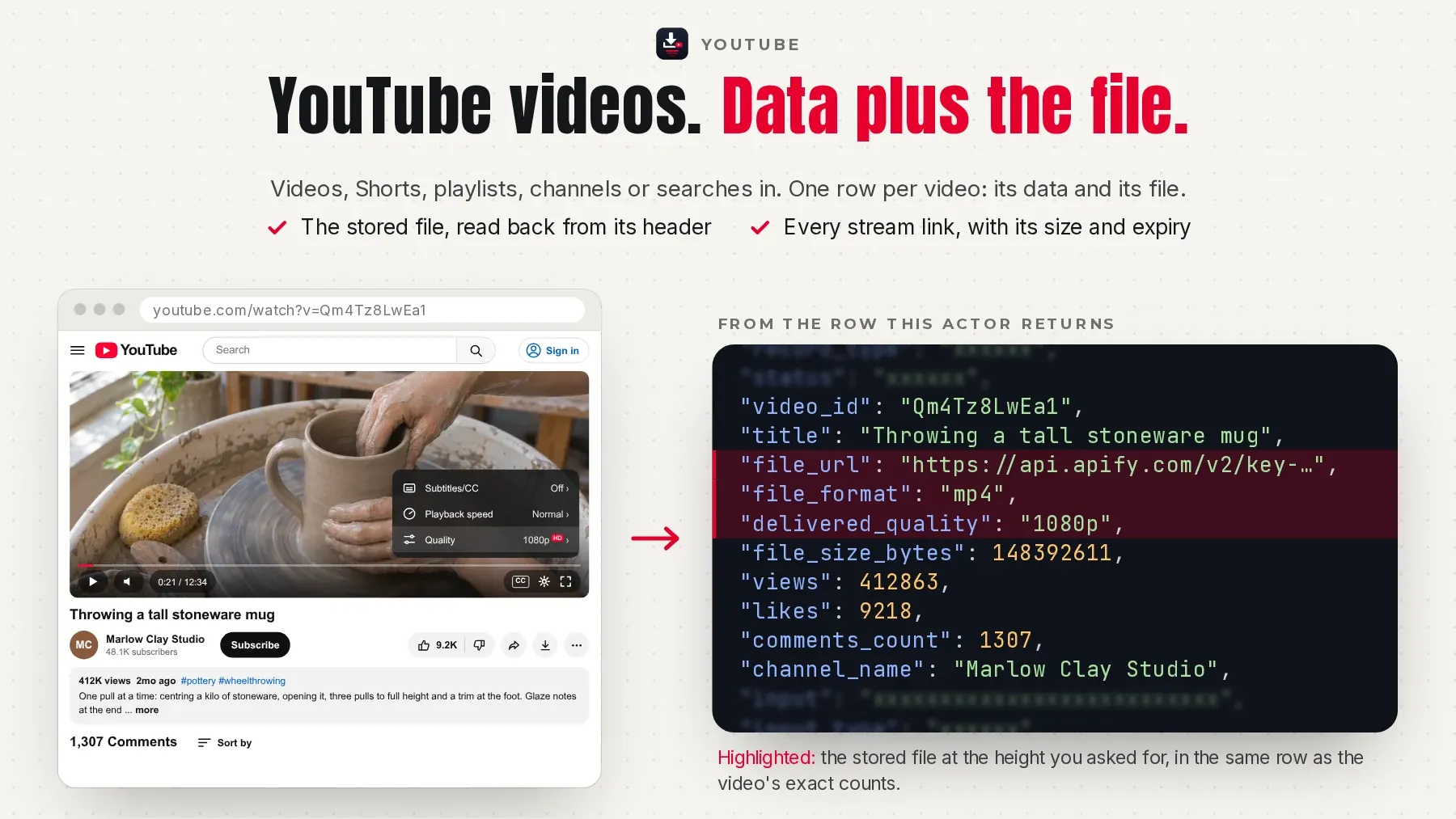
YouTube videos, Shorts, playlists, channels and searches in; one row per video out with its metadata, every stream link and, when you ask, a stored file: an MP4, WebM or MKV video at the height you pick (144p to 4K, video and audio merged), or an MP3, M4A, Opus, WAV or FLAC audio file, a time cut, frames and the thumbnail. Each row carries the exact views, likes and comment count ("413,028" where the page shows "413K"), the publish date to the second, the duration, the description, tags, category, chapters, the channel with its handle, subscribers and badges, the subtitles as text, the storyboards, and every stream with its size, its expiry and the country it opens from. A file is read back after it is stored (codecs, frame, length) and charged only when it passes. A live stream, a members-only, age-restricted or sign-in video, a missing id and a video whose file YouTube does not serve logged out are free rows with YouTube's own words. No login, no cookies, no API key; proxies handled for you.
From $0.50 per 1,000 rows (video) on the Free plan, $0.425 on Starter; every row and add-on is priced under Pricing below. A run start is $0.00671. The default input returns about 2 rows for about $0.04971. A stored file adds $0.006 a started MB of its streams and a stored frame or thumbnail $0.002; a refused or missing video is a free row with YouTube's own words.
How it compares
- 3 times faster than streamers's YouTube Video Downloader, with more data: 2 videos in 8.0 s, against 27 s; 62 fields per video, against 8. It is 2 times cheaper: $12.00 per 1,000 videos, against our $24.72.
- apidojo's Youtube Scraper is 3 times faster and 49 times cheaper: 2 videos in 3.0 s, against our 8.0 s; $0.50 per 1,000 videos, against our $24.72. We give more data: 62 fields per video, against 28.
Measured on 2026-11-15. Each line compares one job, run by both scrapers at the same time. Prices are per 1,000 videos: Apify Actors at the Scale plan's prices.
Tested head-to-head on 2026-11-15
The job: Two YouTube videos (T2, a 77-s video, and T3, a Short) stored as 360p MP4 files (the input schema's example: startUrls T2 and T3, download video, maxItems 10). Every Actor ran on it the same day from the same harness; every run's cost is at the Scale plan's prices: a rival's charged events at its price for that plan, this Actor's at its list price. Fields counts the filled fields of a typical row. Every actor read the same two videos in the same minute; apidojo returns the rows with the stream links and stores no file. Re-measured monthly.
| Actor | Rows | First row | Run time | Cost | Fields | Failures |
|---|---|---|---|---|---|---|
| this Actor | 2 | 5.7 s | 8.0 s | $0.049 | 62 | none |
streamers/youtube-video-downloader | 2 | 19 s | 27 s | $0.024 | 8 | none |
apidojo/youtube-scraper | 2 | 2.9 s | 3.0 s | $0.001 | 28 | none |
Why this YouTube scraper and downloader
- The file you asked for, checked. The streams are picked by height and codec from the video's own list (YouTube numbers the same height differently on different videos), merged by ffmpeg with no re-encode, and the stored file's own header is read back: codecs, frame and length. A file whose length or frame is off is deleted and its row is free. Another height is taken only when you allow it, and the row says which (
delivered_quality,file_note). The lane's buyers report wrong resolutions, audio without video and downloads that do not open (26 complaints over 10 rivals). - Every number exact. Views and likes come from the video's record; the comment count from the comments header ("413,028 Comments" where the panel rounds it to "413K"); the publish date to the second. The channel's subscriber count is the one YouTube itself rounds ("25.8M subscribers").
- Free rows for what YouTube refuses, with its own words. A live stream, an upcoming premiere, a members-only, age-restricted or sign-in video, a private or missing one and a made-for-kids video whose file YouTube does not serve logged out each get a free row with the record where YouTube gives it; a missing id is read twice on two connections before it is called missing. The run goes on.
- Every format, and the original audio. MP4 (H.264 + AAC; AV1 + AAC at 1440p and 2160p, said on the row), WebM (VP9 + Opus), MKV; MP3 at the bitrate you pick with its title, channel and cover, M4A and Opus as YouTube serves them, WAV and FLAC. The audio is the original track, never YouTube's dynamic-range-compressed variant or a dubbed track, unless you ask for a language.
- The stream links that open, and where. Every stream with its size, codecs, bitrate and expiry (about 6 hours);
links_countrysays when YouTube locked the links to one country (they answer 403 elsewhere). - Lists to their own end, with a verdict. A playlist, a channel's Videos and Shorts tabs and a search are read to the end of YouTube's list, the end read again on a fresh connection, and each list's free summary row says COMPLETE, CAPPED, LIST_END (a playlist's header counts hidden videos: 575 against 532 listed) or PARTIAL.
- Plain HTTP, the leader's input. No browser and no login. apidojo/youtube-scraper's input works here as it is (
startUrls,youtubeHandles,keywords,maxItems,includeShorts,uploadDate,duration,features,sort,gl).
Who it's for
- Editors, researchers and archivists — a video, a playlist or a channel's newest videos kept as MP4 at the height they need, or as MP3 / WAV / FLAC audio, with each file's codecs, length and sha256 on the row and the subtitles as text.
- Marketers and analysts — every video of a keyword, channel or playlist with exact views, likes and comment counts, the publish date, the category and the channel's subscribers, to rank creators and topics.
- AI and data teams — audio files and subtitle text for transcription and training sets, frames at chosen times for vision models, typed rows keyed by video_id with a free summary row per list.
- Developers — the direct stream links with their size, codecs, expiry and country lock, for a player or a pipeline of their own.
Quick start
One video as a 720p MP4 with its metadata
A Short as an MP3 at 192 kbps
The 20 newest videos of a channel, metadata and links only (apidojo's job)
A keyword search with YouTube's filters, 50 videos with subtitles
A 30-second cut and three frames
Switching from apidojo/youtube-scraper or streamers/youtube-video-downloader?
Your input works as it is. Each name in the left column is read as this Actor's own field and the run log says so (read <theirs> as <ours>); a name marked not read is ignored with a note. A value in the other Actor's shape, an object list or its own date form, is read too.
| apidojo/youtube-scraper / streamers/youtube-video-downloader | this Actor | what to know |
|---|---|---|
startUrls | startUrls | Video, Short, playlist, channel and search URLs, as apidojo reads them; a bare video id, a @handle or a UC… id too. |
youtubeHandles | youtubeHandles | @handles or UC… ids: each channel's Videos tab, newest first (its Shorts tab with includeShorts). |
keywords | keywords | One YouTube search each; the search filters apply. |
maxItems | maxItems | The charged video rows of the whole run; maxItemsPerInput caps each list. |
includeShorts | includeShorts | A channel's Shorts tab after its Videos tab; a search keeps the Shorts YouTube mixes in. |
uploadDate | uploadDate | The same values (all, l, t, w, m, y), sent as YouTube's own filter. |
duration | duration | The same values (all, s, l) and m (4–20 minutes). |
features | features | The same values (all, h, hd, s, c, 3d, 3, li, lo, 4). |
sort | sort | r is YouTube's order; v and u order the results read here by their own view counts or ages (YouTube's own order for these is not strict); ra is read by relevance. |
gl | gl | The country a keyword search is ranked for, as a two-letter code. |
hl | not read | Not read: titles and descriptions are the creator's own whatever the interface language. |
getTrending | not read | Not read: YouTube's trending page answers HTTP 400 logged out; search a keyword with uploadDate t or w. |
fetchLatestMetadata | not read | Not read: every row's views, likes and comment count are read live in the run. |
customMapFunction | not read | Not read: the rows have a fixed, typed shape. |
outputConnector | not read | Not read: use Apify's own integrations on the dataset. |
deliverTarget | not read | Not read: use Apify's own integrations on the dataset. |
deliverMode | not read | Not read: use Apify's own integrations on the dataset. |
deliverMaxItems | not read | Not read: maxItems caps the run. |
What differs:
- apidojo's input runs here as it is; its
hl(the interface language),getTrending(YouTube's trending page answers HTTP 400 today),fetchLatestMetadata(every row is read live),customMapFunctionand the delivery connectors are not read. - streamers'
videosandpreferredQualityare read asstartUrlsandvideoQuality; for a file setdownload(video or audio) withvideoFormatoraudioFormat(streamers'preferredFormat), and the file lands in the run's storage or the named storefileStoreName(no S3, Azure or Google Cloud upload in this version). comments_countis the exact count (apidojo'scommentsis rounded); views and likes are exact too.- A video's file is charged by the started MB of its streams (
file_billed_mbon the row), a row with metadata and links by the video.
Output
One row per video (and one free summary row per playlist, channel or search):
| field | meaning |
|---|---|
record_type | video on a video row; target on a list's free summary row. |
status | ok (a charged video row), or why the row is free: live, upcoming, members_only, age_restricted, sign_in_required, private, not_found, file_not_served, unavailable, quality_unavailable, too_large, duplicate, failed, invalid_input, not_read. |
status_message | YouTube's own words for a free row's status ("Sign in to confirm your age"), or why a list stopped. |
input | The value you gave that this row answers. |
input_type | What the value named: video, playlist, channel, search or invalid. |
video_id | YouTube's 11-character video id. |
url | The video's page (a Short's /shorts/ link). |
type | video, short (YouTube's own Shorts flag) or stream (a past or current live stream). |
title | The title, as the creator wrote it. |
channel_name | The channel's name. |
channel_handle | The channel's @handle. |
channel_id | The channel's UC… id. |
channel_url | The channel's page. |
channel_subscribers_text | The subscriber count as YouTube rounds it ("25.8M subscribers"). |
channel_badges | The channel's badges (Verified, Official Artist Channel). |
duration_seconds | The length in seconds (null for a stream that is live or scheduled). |
views | The exact view count. |
likes | The exact like count (null where the creator hides it). |
comments_count | The exact comment count from the comments header (null when comments are off). |
publish_date | When the video was published (UTC, to the second). |
upload_date | When the video was uploaded (UTC). |
category | YouTube's category. |
keywords | The tags the creator set. |
description | The full description. |
super_title | The line above the title (hashtags or a place). |
chapters | The creator's chapters: title and start second. |
thumbnail_url | The largest thumbnail. |
thumbnails | Every thumbnail size: url, width, height. |
is_family_safe | YouTube's family-safe flag. |
is_unlisted | Unlisted (reachable by link only). |
is_private | Private. |
is_live_content | A live stream or its replay. |
is_live | Live right now. |
scheduled_start | A scheduled stream's or premiere's start (UTC). |
allow_ratings | Likes shown and allowed. |
is_embeddable | Playable in an embedded player. |
embed_url | The embed link. |
views_per_day | Views divided by the days since publishing. |
engagement_rate | (likes + comments) / views. |
file_url | The stored file's lasting link (with download video or audio). |
file_key | The file's key in the store: |
file_name | The title made safe as a file name, for your own save. |
file_format | mp4, webm, mkv, mp3, m4a, opus, wav or flac. |
file_size_bytes | The stored file's size. |
file_sha256 | The stored file's SHA-256. |
file_billed_mb | The started MB (1,000,000 bytes) of the streams read for the file: the file event's count. |
source_bytes | The bytes of the streams YouTube served for the file. |
delivered_quality | The height stored (360p); another than asked only with allowLowerQuality, and file_note says so. |
file_duration_seconds | The stored file's own length, read from its header. |
file_width | The stored video's frame width, from its header. |
file_height | The stored video's frame height, from its header. |
file_fps | The stored video's frame rate. |
file_video_codec | The stored file's video codec (h264, av1, vp9). |
file_audio_codec | The stored file's audio codec (aac, opus, mp3, pcm_s16le, flac). |
video_itag | YouTube's id of the video stream read. |
audio_itag | YouTube's id of the audio stream read. |
audio_language | The audio track read (a dubbed track's id), null for the original. |
cut_start_seconds | The cut's start, when asked. |
cut_end_seconds | The cut's end, when asked. |
file_note | What differs from the ask: a lower height, AV1 at 1440p and up, no dubbed track in the asked language. |
frames | The stored frames: at_seconds, url, bytes. |
thumbnail_file_url | The stored thumbnail's lasting link (downloadThumbnail). |
images_stored | The frames and thumbnail stored for this row: the image event's count. |
video_url | The direct link of the video stream at videoQuality (expires with links_expire_at). |
audio_url | The direct link of the original audio stream. |
formats | Every stream YouTube serves: itag, kind, mime_type, codec, width, height, fps, bitrate, content_length, quality_label, audio_quality, is_drc, audio_track, url. |
links_country | The country YouTube locked the links to (they answer 403 elsewhere); null = any country. |
links_expire_at | When the stream links expire (UTC; about 6 hours). |
audio_tracks | The audio tracks a video has (id, name, is_default): dubbed languages. |
subtitle_tracks | The subtitle tracks: language, name, kind (manual or auto). |
subtitles | With subtitles: each track's text in subtitleFormat (language, name, kind, format, text). |
storyboards | The preview sheets per level: frame size, frames, grid, interval, sheet URLs. |
egress | The connections the row was read through: metadata (datacenter or residential) and file (residential). |
verdict | On a list's summary row: COMPLETE, CAPPED, LIST_END, DATE_LIMIT or PARTIAL. |
rows_delivered | On a list's summary row: the charged video rows it gave. |
list_count | On a playlist's summary row: the video count its header shows. |
note | On a list's summary row: why it ended as it did. |
scraped_at | When this row was read (UTC). |
Example record:
Pricing
Pay for what a run delivers: a video row, each started MB (1,000,000 bytes) of the streams read for a stored file, each stored frame or thumbnail, and a run start once a run delivers a charged row. A free row costs nothing.
| event | unit | Free | Starter | Scale | Business |
|---|---|---|---|---|---|
Video (video) | per 1,000 videos | $0.50 | $0.425 | $0.40 | $0.40 |
File MB (file-mb) | per started MB of a file's streams | $0.006 | $0.00599 | $0.00599 | $0.00599 |
Image (image) | per 1,000 images | $2.00 | $1.70 | $1.40 | $1.00 |
Run start (start) | per run | $0.00671 | $0.00671 | $0.00671 | $0.00671 |
Examples on the Free plan: 10 videos with their metadata and links = 10 x $0.0005 + the $0.00671 start = $0.01171. The default input (two short videos as 360p MP4, 7 started MB of streams) = 2 x $0.0005 + 7 x $0.006 + $0.00671 = $0.04971. A 60-minute video at 144p (70 MB of streams) = $0.42721; with three frames and the thumbnail, 4 x $0.002 more. A file's MB are its streams' own sizes, known before the first byte, so maxFileSizeMb (300 by default) and your charge limit hold before the read. The run's log opens with its plan: the most it can charge at your plan's prices, from one row a video link, maxItemsPerInput a list, maxItems over the run, maxFileSizeMb a file and the images; a search, channel or playlist with no cap is read to YouTube's own end, so set maxItems, maxItemsPerInput or your charge limit for a lower maximum. A file that fails its check, a quality the video does not have, a file over maxFileSizeMb and every free row cost nothing.
Usage patterns
- What to give —
startUrls: any YouTube link — a video or Short (watch, youtu.be, /shorts/, /live/, embed, or a bare 11-character id), a playlist, a channel (/@handle, /channel/UC…, /c/, /user/; /@handle/shorts reads that tab alone), a search results link (its own filters apply).youtubeHandles: channels by @handle or UC… id.keywords: one search each. A value repeated is read once; a value that names nothing is a freeinvalid_inputrow. - Links or a file — With
downloadnone (the default) each row carries the metadata and every stream link (formats, andvideo_url/audio_url: the pair atvideoQuality); the links expire in about 6 hours andlinks_countrynames a country lock. Withdownloadvideo or audio the file is stored in the run's storage (orfileStoreName) andfile_urlis a lasting link.maxFileSizeMb(300 by default) andmaxDurationMinutesrefuse a file before its first byte, as a freetoo_largerow. Files over 300 MB need the run memory raised to 2 GB or more. - How many videos —
maxItemscaps the charged video rows of the whole run;maxItemsPerInputcaps each playlist, channel tab and search (0 = to the list's end). A list is read in YouTube's order to the cap or to its own end, the end read again on a fresh connection; its summary row says COMPLETE, CAPPED, LIST_END or PARTIAL.publishedAfterstops a channel walk at its first older video and leaves out older videos elsewhere (not charged);minViewsleaves out videos with fewer views. - How long it takes — Measured on build 0.1.9 (2026-11-15): 10 video links gave their first row in 3.1 s and the tenth in 12.0 s (run c0yhqN6hzneemS7Ag); a search capped at 300 videos took 113 s, about 166 videos a minute (nwjbkaocWBRgNyH9N);
maxConcurrency(4 by default) reads that many videos at once. A file adds its streams: a 77-second video at 360p (3.5 MB) was stored in runs of 8 to 19 s (f3wVEyjWQXnGerNh6, UR3PkuhxWBk51lpLg), the two example videos in 7.4 s (uyDzUsbrQ28swvyyR). An MP3, WAV or FLAC file is encoded on the run's CPU, so those runs get 2 GB of memory by default: a 6.4-MB audio track took 11 to 30 s as an MP3 at 2 GB against 67 to 72 s at 1 GB (four runs of 0.1.9). A 60-minute video at 144p (69.9 MB of streams) was stored in 43 s, 6.1 MB/s (2GcmAHKMmrpLnezMx, build 0.1.4); a 2-hour one is about twice that (a projection, not run). Long videos at high quality take long: give the run a timeout to match.
Input configuration
| field | type | default | what it does |
|---|---|---|---|
startUrls | array | [] | Videos, Shorts, playlists, channels and search results: a watch, youtu.be, /shorts/, /live/ or embed link, a bare 11-character video id, /channel/UC…, /@handle (or /@handle/shorts for one tab), /c/ and /user/ links, /playlist?list=PL…, a /results?search_query=… link (its own filters apply). A value that names none of these is a free row that says why. |
youtubeHandles | array | [] | Channels by handle (@MrBeast) or UC… id: each one's Videos tab (and its Shorts tab with includeShorts), newest first. |
keywords | array | [] | Words to search on YouTube, one search each; the search filters below apply. |
maxItems | integer | 0 | The most charged video rows of the whole run; 0 = no cap beyond your charge limit. Free rows (a live stream, a missing video, a list's summary) do not count. |
maxItemsPerInput | integer | 0 | The most charged video rows from one playlist, channel tab or search; 0 = to the list's end. |
includeShorts | boolean | false | A channel: read its Shorts tab after its Videos tab. A search: keep the Shorts YouTube mixes into the results. |
uploadDate | all / l / t / w / m / y | "all" | YouTube's own upload-date filter for keyword searches. |
duration | all / s / m / l | "all" | YouTube's own duration filter for keyword searches. |
features | all / h / hd / s / c / 3d / 3 / li / lo / 4 | "all" | YouTube's own feature filter for keyword searches. |
sort | r / v / u / ra | "r" | Relevance is YouTube's order. View count and upload date read the results and order them here by the results' own view counts or ages (YouTube's own order for these is not strict); a view-count sort reads videos only (YouTube sorts no Shorts by views). Rating is read by relevance. |
gl | string | "us" | The country YouTube ranks a keyword search for, as a two-letter code (us, gb, de). YouTube ranks by the caller's country, so a search with another country than us is read on residential exits in that country; the search's summary row names the country it was read from. The videos' records and links are read from US exits. |
publishedAfter | string | "" | Only videos published on or after this date (2026-01-31) or within this age (30 days, 6 months). A channel walk stops at its first older video; other videos past it are left out and not charged. |
minViews | integer | 0 | Leave out videos with fewer views (the exact count); a video left out is not charged. |
download | none / video / audio | "none" | None: metadata and the stream links (they expire in about 6 hours). Video: a stored video file (video + audio merged). Audio: a stored audio file. Files are kept in the run's storage with a lasting link on the row. |
videoQuality | 144p / 240p / 360p / 480p / 720p / 1080p / 1440p / 2160p / best | "360p" | The video's height. Best = the highest the video has in the chosen format. |
videoFormat | mp4 / webm / mkv | "mp4" | MP4 = H.264 + AAC (at 1440p and 2160p, where YouTube has no H.264, AV1 + AAC). WebM = VP9 + Opus. MKV = the best codec at the height + Opus. |
allowLowerQuality | boolean | true | When the video does not have the asked height, store the nearest lower one (the row says which). Off: the video gets a free quality_unavailable row. |
audioFormat | mp3 / m4a / opus / wav / flac | "mp3" | M4A (AAC) and Opus are YouTube's own audio; MP3, WAV and FLAC are made by ffmpeg from the original track. An MP3 carries the title, the channel and the thumbnail as its cover. |
audioBitrate | integer | 192 | The MP3's bitrate; M4A and Opus keep YouTube's own. |
audioLanguage | string | "" | A dubbed audio track by language code (de, es, pt-BR). Empty: the original track. |
startTime | string | "" | Store only the part from here: seconds (90) or a time (1:30). The whole video is read; the file is cut. |
endTime | string | "" | Store only the part up to here: seconds (150) or a time (2:30). |
frameTimes | array | [] | JPEG stills cut from the stored video at these times (seconds, or 1:30); needs Download: Video. At most 20. |
downloadThumbnail | boolean | false | Store the largest thumbnail as a file beside the video or audio file. |
maxFileSizeMb | integer | 300 | A file row whose streams are larger gets a free too_large row before any byte is read (a links-only run stores no file: no effect there). Files over 300 MB need the run memory raised to 2 GB or more. |
maxDurationMinutes | integer | 0 | A longer video gets a free too_large row, on a links-only run too, before any byte is read; 0 = no limit. |
fileStoreName | string | "" | A named key-value store for the files instead of the run's own (kept after the run's storage expires). Letters, digits and '-'. |
subtitles | boolean | false | Put each subtitle track's text in the row (the creator's tracks and YouTube's auto-generated one). |
subtitleLanguages | array | [] | Only these languages (en, de, pt-BR); empty = every track the video has. |
subtitleFormat | vtt / srt / json3 / srv3 / txt | "vtt" | The subtitles' text format. |
maxConcurrency | integer | 4 | Videos read at the same time. |
feedback | string | A note to the people who maintain this Actor: what you needed and did not get. For example a missing field, a wrong or empty result, or the Actor you switch from or to, and why. The run does not read it: the rows and the charges stay the same. A person reads every note. |
Errors
A run does not fail because of your input. When an input cannot be used — a date that is not a date, an id in the wrong form, two settings that contradict each other — the run ends Succeeded, charges nothing, and says what to change:
- the status message starts with
INPUT REJECTED; - the dataset holds one row,
{"error": true, "code": "…", "message": "…"}, and no results; - the key-value store record
ERRORholds the same object.
From code, check error on the first row before reading results.
A search, channel or playlist with no video is not an error: it gets one free summary row (or not_found for a channel or playlist that does not exist), and the run goes on with the other inputs. A run that ends Failed is a fault on our side, never your input; it charges nothing, and we are alerted.
FAQ
Which statuses are free?
Every status but ok: live (a stream live now), upcoming (with scheduled_start), members_only, age_restricted, sign_in_required (YouTube asks to sign in), private, not_found (two reads agree), file_not_served (YouTube serves the record but no file logged out: the made-for-kids class), unavailable, quality_unavailable, too_large, duplicate (another input of the run delivered it), filtered (a video you named that minViews or publishedAfter leaves out; a list's videos it leaves out get no row), failed (the reason in status_message), invalid_input and not_read (the run stopped first). Only ok video rows are charged.
Can it download age-restricted or members-only videos?
No. They need a signed-in YouTube account, and this Actor never asks for yours. Each one is a free row with its title, channel and counts where YouTube shows them.
Why did a link answer 403?
A stream link opens from any IP for about 6 hours, except where YouTube locked it to a country: links_country names it, and the link answers 403 from other countries. Read the video again for fresh links, or store the file with download.
Is the audio the original?
Yes: the original track, not YouTube's dynamic-range-compressed copy and not a dubbed track. audio_tracks lists the dubbed tracks a video has; audioLanguage (de, es, pt-BR) picks one.
Does a cut read less?
No: the whole streams are read and the file is cut, so a cut is charged by the streams' MB like the whole file.
Does it need a YouTube account, cookies or an API key?
No. Everything is read logged out over plain HTTP; nothing of yours is sent to YouTube. No YouTube Data API key and its quota.
Do I need Apify Proxy or my own proxy?
No. The Actor uses its own connections, at no extra cost to you.
Integration
JavaScript
Python
CLI
REST
AI agents and MCP
Apify's MCP server offers this Actor as a tool to Claude, Cursor, VS Code and any other MCP client. Connect https://mcp.apify.com?tools=hyperbach/youtube-scraper and ask, for example: "Download this YouTube video as a 720p MP4 and give me its title, views and likes". The agent fills the input from the table above and reads the rows from the run's dataset. A field under the name another Actor gives it is read as this Actor's own: videos, urls, url, videoUrls as startUrls; handles, channels, channelHandles as youtubeHandles; searchQueries, searchKeywords, queries, query as keywords; maxResults, maxVideos, limit, resultsLimit as maxItems (and more). An agent or a person can add feedback to any run and say what was needed and not delivered: a missing field, a wrong or empty result, the Actor switched from or to, and why. The run returns the same rows at the same price, and a person reads every note.
n8n, Make and Zapier
The Apify node in n8n, the Apify app in Make and the Apify integration in Zapier run this Actor on a schedule or from a trigger and read its dataset. A webhook on the run's end (Integrations on the Actor page) sends the rows on to your own endpoint. Nothing to install on our side.
Support
Disagree with a charge? Write to apify@hyperbach.com with the run ID. We will ask Apify to compensate you, and the charge comes back to your Apify account as platform credit.
Did it do the job? A short review on the Store, at any rating, helps the next buyer choose.
See also
- YouTube Channel Search Scraper — the YouTube channels a keyword finds, with subscribers, the exact video and view counts and the country.
- YouTube Video Scraper — videos and Shorts by keyword, channel, playlist or hashtag, with views, likes and the full description.
- YouTube Transcript Scraper — the transcript of any video, channel, playlist or search, each row saying which caption track it is.
- YouTube Comments Scraper — the comments under videos, Shorts and community posts, with their replies on request.
This page is generated from the Actor's schemas and a live sample — it cannot describe a field the Actor does not have.


