

Google Maps Reviews Scraper + AI: Tripadvisor, Trustpilot
Pricing
from $50.00 / 1,000 analyzed places
Google Maps Reviews Scraper + AI: Tripadvisor, Trustpilot
Turn Google Maps, Tripadvisor, Trustpilot and Booking.com reviews into a clear report: top complaints and praises with real quotes, rating trend, response rate, actions and AI replies. Weekly alerts for new negative reviews.
Pricing
from $50.00 / 1,000 analyzed places
Rating
0.0
(0)
Developer

Ingeniela
Maintained by CommunityActor stats
0
Bookmarked
2
Total users
1
Monthly active users
13 days ago
Last modified
Categories
Features
Share
Turn hundreds of reviews from Google Maps, Tripadvisor, Trustpilot and Booking.com into a one-page answer: what customers complain about, what they love, whether the rating is going up or down, how fast the owner replies, and what to fix first. It also writes ready-to-send replies for every unanswered negative review. Add competitors to compare side by side, even across platforms. Switch on alert mode and schedule it weekly to get only the new negative reviews, each with a suggested reply, in Slack, Discord or your email.
🔁 Turn on Alert mode and schedule it daily: you only hear about new negative reviews, with a reply draft ready.
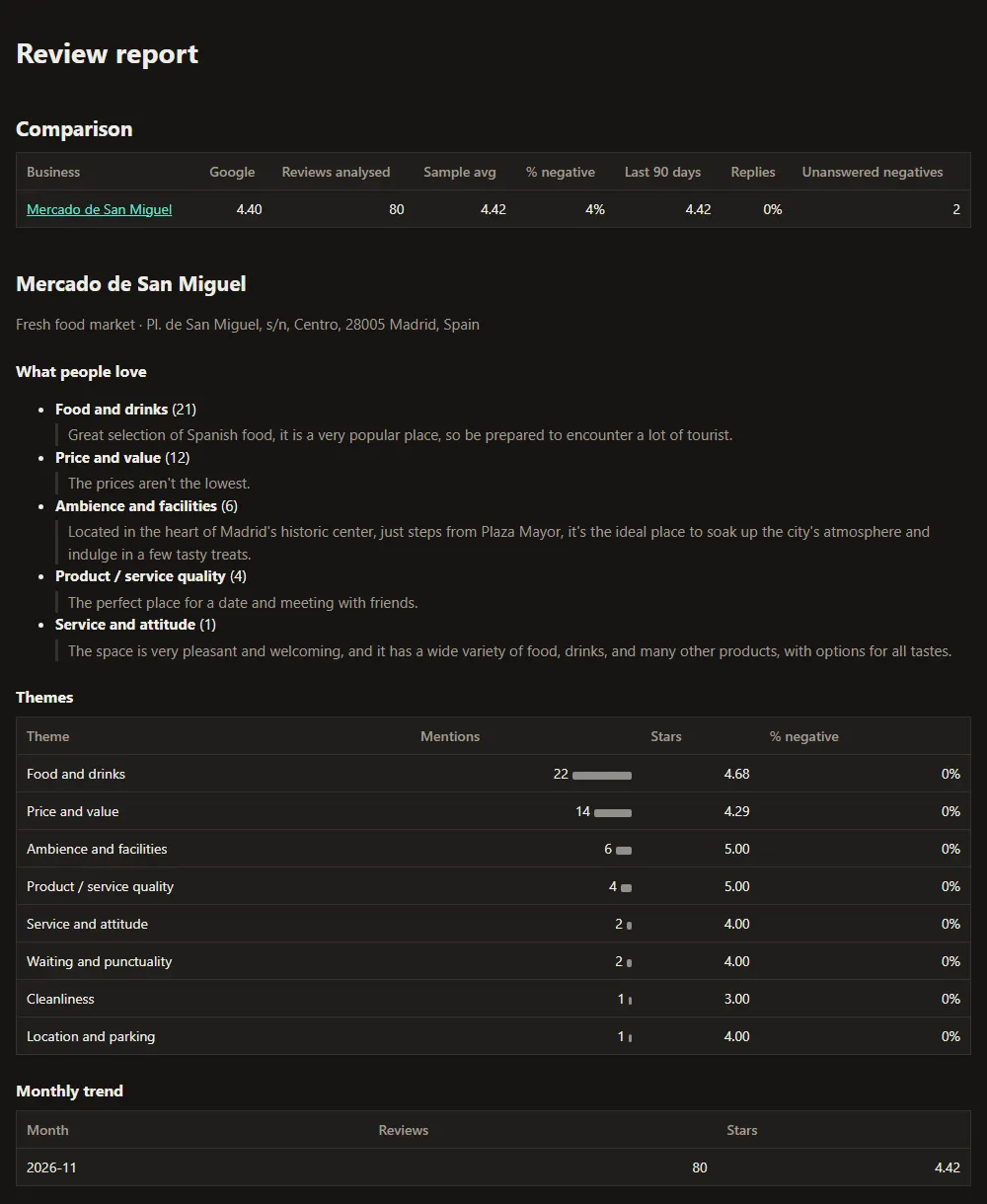
Real report for Mercado de San Miguel (Madrid) from its 80 newest reviews, with AI insights off. Reviews written in other languages are read in Google's translation, so they count toward the themes too. With AI insights on, the report also opens with a summary, the top complaints with a fix for each, a prioritised action list and reply drafts.
Tutorial (1 minute)
Every result in this tutorial comes from a real run.
What you get, per place
- Rating picture: sample average, star distribution, share of negative reviews.
- Trend: average of the last 90 days against the 90 days before, plus a monthly table.
- Response behaviour: response rate, response rate on negative reviews, median days to reply, unanswered negatives.
- Themes (12, Spanish and English): service, staff, price, quality, waiting, cleanliness, booking, communication, ambience, food, location, delivery. Each with mentions, average stars, % negative and a real quote.
- AI insights (optional): a short summary, top complaints with a concrete fix, strengths, and prioritised actions (impact × effort).
- Reply drafts: one per unanswered 1-2 star review, in the reviewer's language and your tone.
- Weekly alerts (alert mode): only new negative reviews since the last run, with a reply draft, sent to a webhook or email.
- Files: an HTML report comparing all places (
REPORT), a CSV of reviews per place, and all reviews as JSON (REVIEWS).
Input example
Output (one row per place)
How to use it
- Copy your business page link from Google Maps, Tripadvisor, Trustpilot (
trustpilot.com/review/yourdomain.com) or Booking.com and paste it in Place links. Add 2-3 competitors the same way. You can mix platforms. - Choose how many reviews per place (100-300 is a good picture) and, if you like, a date limit such as
12 months. - Optional: write a line in About your business (tone, signature, contact) so reply drafts sound like you.
- Click Start. Three places with 200 reviews each take about 3-6 minutes.
- Open REPORT in the Storage tab, or download each place's CSV from the results table.
How it works
- Detects the platform of each link and collects its reviews on your Apify account, all in parallel, newest reviews first: Google Maps (without reviewer personal data), Tripadvisor (US$0.005/review on the free plan, less on paid plans), Trustpilot (US$0.00075/review plus a start fee) and Booking.com (US$0.002/review). Cap each with Max spend on collecting reviews. Booking.com scores (out of 10) are converted to 5 stars so all platforms compare.
- Tags every review with themes and sentiment, and computes trends and response metrics.
- With AI on, the AI reads up to 200 reviews per place and writes the insights and the replies.
AI providers
AI insights work with the provider you already use. Add one key, or none to use the built-in AI.
| Provider | Key | Default model |
|---|---|---|
| Anthropic | anthropicApiKey | claude-opus-5-5 |
| OpenAI | openaiApiKey | gpt-6.1-terra |
| OpenRouter | openrouterApiKey | anthropic/claude-sonnet-5.5 (any model id from openrouter.ai/models works) |
| Google Gemini | geminiApiKey | gemini-3.6-flash |
| xAI (Grok) | xaiApiKey | grok-4.7 |
| DeepSeek | deepseekApiKey | deepseek-v4-pro |
| Mistral | mistralApiKey | mistral-large-latest |
With your own key, that provider bills you directly and the AI events below are not charged. Without any key, the AI part is skipped and you still get themes, trends, response metrics and the report.
Pricing
Pay per event, on top of collecting the reviews:
| Event | Price | When |
|---|---|---|
place-report | US$0.05 | Each analysed place |
ai-place-insights | US$0.15 | AI insights for one place (built-in AI only) |
reply-draft | US$0.02 | Each drafted reply (built-in AI only) |
negative-review-alert | US$0.02 | Each new negative review found in alert mode |
Examples: your business plus 2 competitors without AI cost US$0.15. With the built-in AI and 10 reply drafts for your business: US$0.15 + US$0.45 + US$0.20 = US$0.80.
FAQ
It says "No reviews were found". You probably used a search link. Use the place's own link, which contains /maps/place/.
Can I get an alert for each new bad review? Yes. Turn on Alert mode, add a Slack/Discord webhook or an email, save the input as a task and schedule it weekly (or daily). The first run saves a baseline. Each later run only collects recent reviews, so it stays cheap, and returns just the new reviews with 1-2 stars (configurable), each with a suggested reply. When there is nothing new you get a free status row and no message.
Which languages? Reviews in any language are read through Google's translation into the language you choose. Reports are in Spanish or English.
Are replies posted automatically? No. They are drafts for you to read, adjust and post.
Tips
- Use each place's own Google Maps link (it contains
/maps/place/). A search link can match a different place with the same name. - Reply drafts are written in the reviewer's own language, even when the review was translated for the analysis.
Privacy
Reviewer names, profile links and photos are not collected. Reply drafts are suggestions: read them before posting.
Development
Set ANTHROPIC_API_KEY, OPENAI_API_KEY or OPENROUTER_API_KEY as a secret environment variable to offer the built-in AI.


