
3D Print Cost & Time Estimator API: STL Slicer to G-code
Pricing
Pay per event
3D Print Cost & Time Estimator API: STL Slicer to G-code
Slice STL, 3MF, OBJ and STEP models with PrusaSlicer and get print time, filament in grams and metres, cost per piece, layers, support material, slicer warnings, a layer preview picture and the G-code. 200+ real printer profiles (Prusa, Creality, Voron) or your own config. For quotes and AI agents.
Pricing
Pay per event
Rating
0.0
(0)
Developer

Jumble Mog
Maintained by CommunityActor stats
0
Bookmarked
2
Total users
1
Monthly active users
13 hours ago
Last modified
Categories
Features
Share
Send a 3D model, get back how long it takes to print, how much filament it uses and what it costs. The model is really sliced, for the printer and material you name, so the numbers are the ones a slicer shows after you press Slice:
- Print time for one piece and for the whole order, from the slicer's own estimate for that printer's speeds and accelerations.
- Filament in grams, metres and cm³, split into walls, infill, solid layers and supports.
- Cost: material at your price per kg, machine time at your hourly rate, markup, setup fee and quantity, worked out per piece and in total.
- A printability check: whether the part fits the printer, the layer count, whether supports were needed, and the slicer's warnings (long bridges, loose lines, low bed adhesion).
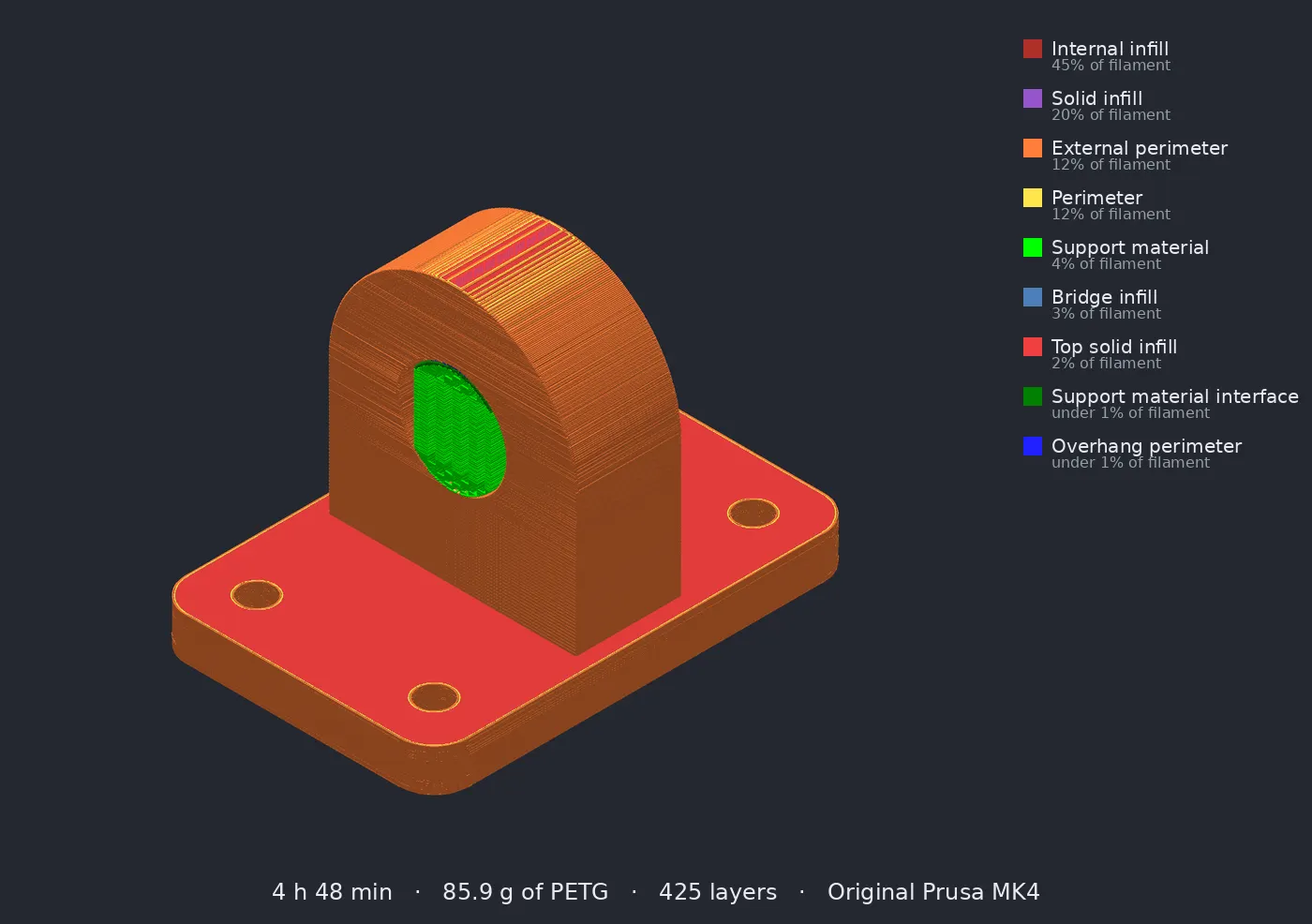
- A preview picture of the sliced part, every printed line colored by what it is, like a slicer's preview.
- The G-code, if you want to print it.
- 244 real printers by name (Prusa, Creality, Voron, Elegoo, Sovol, QIDI, AnkerMake and more), two generic ones, or your own PrusaSlicer config.
It slices with PrusaSlicer 2.9, the open-source slicer, and uses the printer, print and filament profiles that ship with it.
It's made for:
- 3D printing services and web shops that want an instant quote when a customer uploads a model.
- Print farms that need time and filament per job for planning and stock.
- Makers who want to know what a model costs before downloading a slicer, or to compare printers, materials and layer heights.
- AI agents that are handed a model and asked "how long would this take to print, and what would it cost?"
How to use it
- Add Links to 3D models (STL, 3MF, OBJ, AMF or STEP, or a ZIP of them), or upload them. Write
exampleto try the built-in bracket. - Pick the Printer (
generic,generic fast, or a name such asOriginal Prusa MK4SorEnder-3 V2) and the Material. - Optionally set layer height, infill, supports, your filament price and your hourly rate.
- Click Start. Each model is a row in the results, with its time, filament, cost and links to its preview and G-code.
What you can send
| You send | What happens |
|---|---|
A link to an .stl, .3mf, .obj, .amf, .step or .stp file | One estimate |
| A link to a ZIP archive | One estimate per model in it |
A GitHub file link, or a folder link (https://github.com/user/repo/tree/main/models) | The file, or every model in that folder |
| A Google Drive or Dropbox share link | The shared file |
| An uploaded file | The same as a link |
example | The built-in bracket, 120 × 80 × 85 mm |
Examples
All of these are real results for the built-in example.
| Input | Result |
|---|---|
{"modelUrls": ["example"]} | example-bracket: 6 h 15 min and 88.3 g of PLA on Generic (standard speed) (0.2 mm layers, 15% infill, with supports). 425 layers, 29.6 m of filament, 8.15 g of it in supports. Cost 2.21 USD. |
{"modelUrls": ["example"], "printer": "generic fast"} | The same filament in 2 h 59 min |
{"modelUrls": ["example"], "printer": "Original Prusa MK4", "material": "PETG", "ratePerHour": "2"} | 4 h 48 min and 85.9 g of PETG on Original Prusa MK4 ... Cost 11.74 USD (2.15 USD material, 9.60 USD machine time). |
{"modelUrls": ["example"], "printer": "Voron v2 300mm3", "material": "ABS", "nozzle": "0.6"} | 2 h 36 min and 82.3 g of ABS on Voron v2 300mm3 (0.3 mm layers, 15% infill, with supports). 283 layers |
{"modelUrls": ["example"], "supports": "none"} | 5 h 44 min and 80.1 g of PLA ... The slicer warns: Floating bridge anchors, Long bridging extrusions; Consider enabling supports. |
How-to examples
How to get the print time and filament of an STL file
The row has printSeconds and printTime ("6 h 15 min"), filamentG, filamentM and filamentCm3, layers, and filamentByKind, the grams in each kind of line. For the example: {"walls": 19.88, "infill": 38.04, "solid layers": 22.17, "supports": 8.15, "skirt and brim": 0.05}. generic is a standard-speed printer with a 0.4 mm nozzle, 0.2 mm layers, 2 walls and 15% infill. Use generic fast for an input-shaping or CoreXY machine.
How to price a 3D print for a customer
Result: 10 h 29 min and 128 g of PLA on Creality Ender-3 V2 (0.2 mm layers, 30% infill, with supports) ... 22.25 EUR a piece, 227.47 EUR for 10 (4 d 8 h 50 min of printing). One piece is material (127.92 g at 22 EUR/kg = 2.81) plus machine time (10.48 h at 1.50 = 15.72), plus 20% markup. The total is ten pieces plus the 5 EUR setup fee. materialCost, machineCost, costPerPiece and totalCost are separate fields, so you can apply your own pricing rules instead.
How to estimate for a specific printer
The row says which of the slicer's presets were used: printPreset: "0.20mm QUALITY @MK4 0.4" and filamentPreset: "Generic PETG @PG", with the MK4's 250 × 210 × 220 mm build space in bedMm. Part of a name is enough when it is clear: prusa mk4s, ender 3 v2, core one, sv06, neptune 3 pro, voron v2 350. To see every name, run {"listPrinters": true}: it saves all 244 with their nozzle sizes as the PRINTERS record, and is free.
How to compare layer heights, materials or printers
Run the same model with one thing changed and compare printSeconds and filamentG. For the example bracket: a Prusa MINI in TPU at 0.15 mm takes 14 h 38 min, an Ender-3 V2 in PLA at 0.2 mm and 30% infill 10 h 29 min, a generic standard printer 6 h 15 min, an Original Prusa MK4 in PETG 4 h 48 min, a generic fast printer 2 h 59 min, and a Voron v2 with a 0.6 mm nozzle and 0.3 mm layers 2 h 36 min.
How to use your own PrusaSlicer profile
Export your settings from PrusaSlicer with File > Export > Export Config and link to the file (or paste it in config). Your printer, speeds and filament are used as they are, so the estimate matches what your own slicer shows. A G-code file that PrusaSlicer wrote works as a config too: its settings are read from the end of the file. For single changes use settings with the slicer's own names: {"settings": {"fill_pattern": "gyroid", "top_solid_layers": 6, "perimeter_speed": 60}}.
How to turn an STL into G-code through an API
gcodeUrl links to the G-code, written for that printer with its own start and end sequence. Look at the preview and the warnings before you print a file nobody has looked at.
How to slice a model that is in inches, or lies the wrong way
STL and OBJ files carry no unit and are read as millimetres, so a model drawn in inches comes out 25.4 times too small: scale 2540 fixes it (the Actor says so in notes when a model is under 10 mm). The model is printed as it lies in the file. rotateX, rotateY and rotateZ turn it first: laying a part on its flat side often removes the need for supports.
How to let an AI agent estimate a 3D print
Add this Actor to the Apify MCP server with https://mcp.apify.com/?tools=jumblemog/3d-print-cost-estimator. The agent passes the model's link, a printer and a material, and reads summary, printTime, filamentG, totalCost, warnings and notes. It can open previewUrl to see the sliced part.
FAQ
How accurate is the print time? It is PrusaSlicer's own estimate: it walks through every move of the G-code with the printer's speed and acceleration limits. It is as good as the profile. Prusa's own printers carry their firmware's real limits; other makers' profiles are contributed by the community and can be further off. Heating up and bed levelling before the print starts aren't included. The generic printers are typical machines, not yours, so treat them as a good first number.
Is my printer supported? What about Bambu Lab?
244 printers that PrusaSlicer has profiles for: Original Prusa (CORE One, MK4S, MK4, MK3.9, MK3.5, MK3S+, MINI+, XL), Creality (Ender-3 family, Ender-5, CR-10, Sermoon), Voron (Zero, v1, v2, Switchwire), RatRig, Elegoo Neptune, Sovol, QIDI, Artillery, AnkerMake, Anycubic, Snapmaker, FLSun, LulzBot, Ultimaker and others. Bambu Lab printers aren't among them, because their profiles live in Bambu Studio. For a Bambu Lab or any other missing printer use generic fast (or generic) with bedSize, or send your own config. Writing Bambu Lab P1S as the printer does this for you and says so in notes.
Which materials can I pick?
PLA, PETG, ABS, ASA, TPU, PC, PA (nylon), PVA, HIPS and PP. For a named printer the slicer's own filament preset for that printer is used (filamentPreset says which). Where it has none, generic temperatures, density and melting rate are used and a note says so. For a filled or unusual plastic send its filamentDensity.
Does it choose the best orientation?
No. The model is printed as it lies in the file, the way a slicer opens it. Turn it with rotateX, rotateY and rotateZ.
What does supports: auto do?
It adds support material only under overhangs that need it. A model without steep overhangs gets none, and supports in the row is then false. With none, the slicer's warnings tell you if parts of the model would print in the air.
Can it estimate resin (SLA) prints or multi-color prints? No. Filament printers with one material per print only.
Is the cost for several pieces the same as printing them together?
quantity multiplies the single piece. Printing several on one plate saves a little time per piece (one warm-up, fewer start moves), so the total is a slight overestimate.
What happens to my model? It is downloaded into the run, sliced and deleted. The preview and the G-code are saved in the run's own storage in your Apify account, and stay as long as your account keeps run data.
Input
| Field | What it does |
|---|---|
modelUrls, uploads | The models: links or uploaded files |
printer | generic (default), generic fast, or a printer's name |
material | PLA (default), PETG, ABS, ASA, TPU, PC, PA, PVA, HIPS, PP |
layerHeight | Layer height in mm. Default: the printer's own (0.2 for the generic ones) |
infill | Infill in percent. Default: the profile's (15 for the generic ones) |
supports | auto (default: where needed), buildplate (only those standing on the bed) or none |
nozzle, walls, brim | Nozzle diameter in mm, number of wall lines, brim width in mm |
quantity | Number of pieces (default 1) |
pricePerKg, ratePerHour | Filament price per kg (default 25) and machine rate per hour (default 0) |
setupFee, markupPercent, currency | A fixed fee per order, a markup on each piece, and the currency's label (default USD) |
scale, rotateX, rotateY, rotateZ | Size in percent and turns in degrees, applied before slicing |
bedSize | The build space, such as 256x256x256. Default 220x220x250 for the generic printers |
filamentDensity | A density in g/cm³ instead of the material's own |
settings | Any PrusaSlicer settings by their config names, applied last |
configUrl, config | Your own PrusaSlicer config, as a link or as text |
outputs | preview (default) and/or gcode. An empty list gives the numbers only |
imageWidth | Width of the preview in pixels (default 1400) |
listPrinters | Save the list of printers instead of slicing. Free |
timeoutSecs, maxModels | Limits: seconds per model (default 600) and models per run (default 100) |
Output
One row per model:
| Field | Meaning |
|---|---|
name, status, summary, error | The model, ok or failed, the estimate in a sentence, or why it failed |
printSeconds, printTime, firstLayerSeconds | Print time of one piece |
filamentG, filamentM, filamentCm3, filamentDensity | Filament of one piece, and the density used |
filamentByKind, supportG | Grams in walls, infill, solid layers, supports, skirt and brim |
materialCost, machineCost, costPerPiece, totalCost, currency | The cost. totalCost is for the whole quantity, with the setup fee |
quantity, totalPrintSeconds, totalPrintTime, totalFilamentG | Totals for the quantity |
printer, printerPreset, printPreset, filamentPreset | The printer and the slicer presets that were used |
material, nozzleMm, layerHeightMm, infillPercent, walls, supports, supportsSetting | The settings the slicer really used |
layers, heightMm | The part's layers and the height of the last one |
sizeMm, volumeCm3, triangles, watertight, format | The model as printed: size after scale and turns, volume, mesh facts |
bedMm, fitsBed | The printer's build space. A model that doesn't fit is reported as failed, with what to do |
warnings, notes | The slicer's warnings, and things worth knowing about this estimate |
previewUrl, gcodeUrl | Links to the preview picture and the G-code |
slicer, sourceUrl, processingSeconds | The slicer version, where the model came from, and the time taken |
The files are in the run's key-value store, named like 001-bracket-preview.png and 001-bracket.gcode. The first row is also saved as OUTPUT.
How it works
- Settings: for a named printer, the Actor reads PrusaSlicer's profile bundles the way the program's own preset picker does: the printer preset for your nozzle, the print preset closest to your layer height, and a filament preset of your material that the bundle marks as compatible. Your own fields are applied on top.
- Checking: the model is loaded, scaled and turned, measured, and checked against the printer's build space.
- Slicing: PrusaSlicer slices it and writes G-code with its time estimate and filament totals.
- Reading: the Actor reads the totals, adds up the filament in each kind of line, and draws the preview from the G-code's own moves, layer on layer.
Pricing
You pay one low price per model sliced, at the price shown on this page, with or without the preview and the G-code. Models that can't be sliced are never charged, and listing the printers is free. If you set a maximum cost per run, the Actor stops before a model that wouldn't fit.
Speed
A typical part takes 3 to 8 seconds: the example bracket slices in about 3 seconds, a detailed 11 MB STL with 225,000 triangles in about 10. A run through the API adds a few seconds for the cloud container to start.
Tips and limits
- Start with the numbers only (
"outputs": []) when you estimate many models: the preview adds a second or two each. - Fine layers on big parts make large G-code files and slow slicing. Give such runs more memory, which also gives them more CPU.
- The time estimate leaves out heat-up, bed levelling and filament changes.
- One print per file: several objects in one 3MF are sliced together as one print.
- Not covered: resin printers, multi-material prints, automatic orientation, and arranging many copies on one plate.
- Limits: 200 MB per download, 400 MB unpacked per ZIP, 200 models per ZIP.
For AI agents and developers
This Actor works with the Apify MCP server, so AI agents can call it as a tool. Pass modelUrls, printer and material, and read summary, printSeconds, filamentG, totalCost, warnings and the links. A direct API call that waits for the answer:
run-sync instead returns the run's OUTPUT: the first model's row as JSON.
In Python, with the apify-client package:
Credits
- Slicing: PrusaSlicer by Prusa Research, based on Slic3r by Alessandro Ranellucci (AGPL-3.0), unmodified, as packaged by Debian, with the printer profiles it ships. Its source code is at the link.
- Model reading for the size check: trimesh (MIT). Preview drawing: Pillow and NumPy.
- The example model is this Actor's own design.