

Google Flights Scraper: Flight Prices, Itineraries
Pricing
from $0.70 / 1,000 flight options
Google Flights Scraper: Flight Prices, Itineraries
Flight prices from Google Flights for any route and date: each flight option's price, airlines, flight numbers, times, stops, layovers, aircraft and CO2 estimate, in Google's order. Search many routes and dates in one run, in any currency and country.
Pricing
from $0.70 / 1,000 flight options
Rating
0.0
(0)
Developer

Kaleidoscope Labs
Maintained by CommunityActor stats
1
Bookmarked
2
Total users
1
Monthly active users
4 days ago
Last modified
Categories
Features
Share
What can Google Flights Scraper do?
Google Flights Scraper: scrape flight prices and itineraries from Google Flights for any route and date, with each flight option's price, airlines, flight numbers, times, stops and layovers, as data you can export, schedule and call from an API.

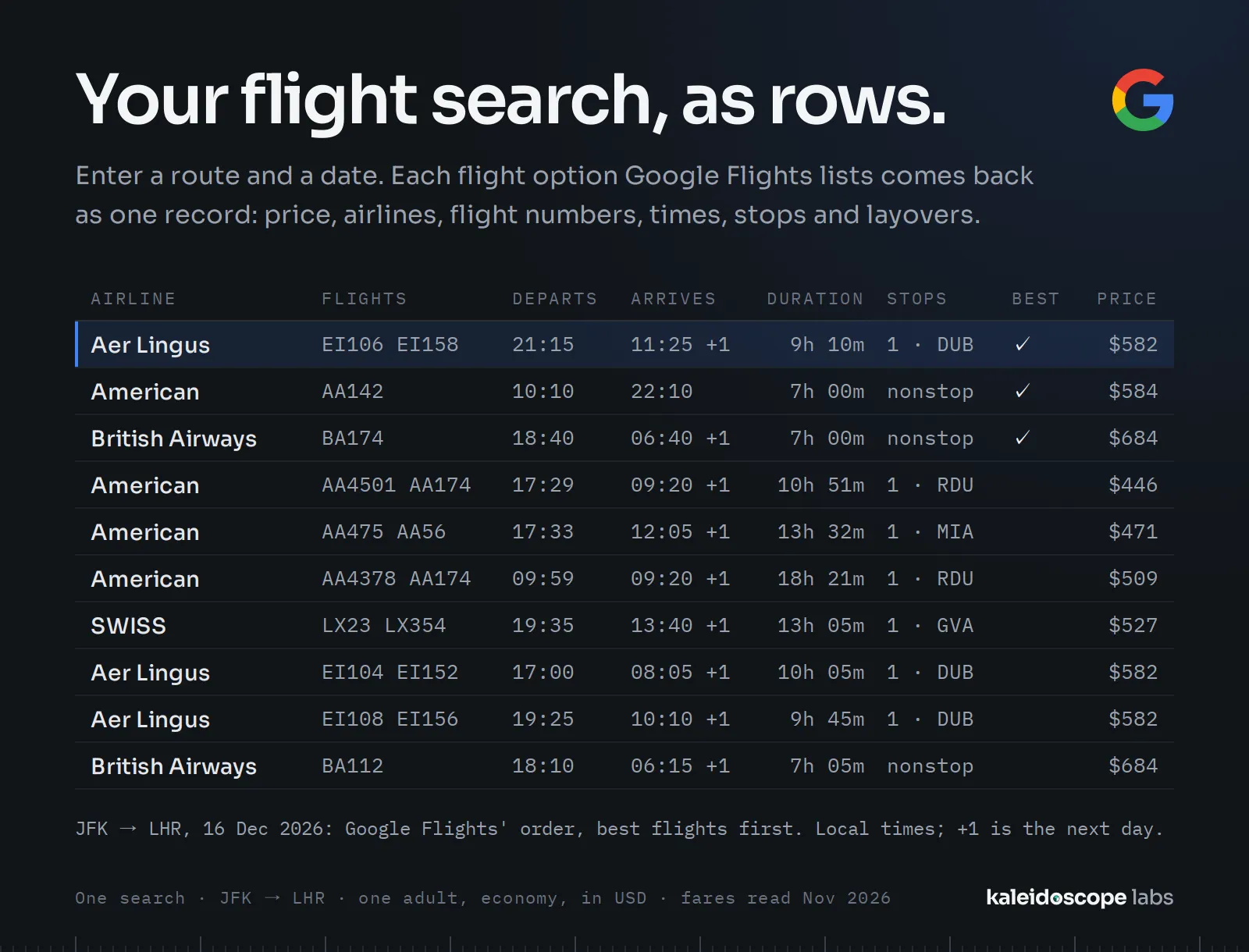
- ✈️ Flight options: what Google Flights lists for a route and date, best flights first: price, airlines, flight numbers, times, duration, stops.
- 🧳 Every flight of an option: aircraft, legroom, airports, local times and layovers.
- 🔁 Round trips: the trip's price for each outbound option, and the return flights of the first ones as pairs.
- 📊 Is the price good? Google Flights' usual price range, whether today's price is low, typical or high, about 60 days of price history, and a cheaper nearby date.
- 🎛️ Filters: airlines and alliances, a price limit, departure and arrival hours, a longest duration, stops, cabin.
- 🔔 Monitor: run after run, only new flight options and changed prices, each with the price before.
- 🌍 Any currency and country: many routes and dates in one run, or searches pasted as Google Flights links.
Run it from Apify Console, the API, a schedule or an AI agent. The prefilled input reads one search, so you see the output before a larger run.
| You want to | Use | What it costs |
|---|---|---|
| Compare fares for a route over a week | One route, a range of dates | $1.00 per 1,000 flight options |
| Price round trips of several lengths | Trip lengths | the same |
| Hear when a fare moves | A monitor name, on a schedule | $0.002 a search, plus the new and changed options (every option on its first run) |
What data can you get from Google Flights?
One record per flight option.
| Data | Field |
|---|---|
| Place in Google Flights' list; among its best flights | position, bestFlight |
| Price for the whole party, currency | price, currency |
| Airlines, flight numbers, first and last airport | airlines, flightNumbers, departureAirport, arrivalAirport |
| Local departure and arrival, minutes, stops (a round trip's outbound) | departureTime, arrivalTime, totalDurationMinutes, stops |
| Each flight: airline, number, operating carrier, aircraft, legroom, airports, times | flights |
| Each layover: airport, city, minutes | layovers |
| A round trip's return: date, flights, times, stops | returnDate, returnFlights and the other return… fields |
| Usual price range, today's price level, a cheaper nearby date | typicalPriceLow, typicalPriceHigh, priceLevel, cheaperDate, cheaperDatePrice |
| The lowest price on each of about 60 days before | priceHistory |
| CO2 in grams: estimate, typical, difference in percent; each flight's own | carbonEmissionsGrams, typicalCarbonEmissionsGrams, carbonDifferencePercent |
| With a monitor: new or changed, the price before, the difference | change, previousPrice, priceChange |
| The search on Google Flights; when it was read | googleFlightsUrl, searchedAt |
| What the record lacks and why | missing |
Every record also carries its search: origin, destination, departureDate, tripType, cabinClass, maxStops, passengers, country, language, line.
How to use Google Flights Scraper
- Open Google Flights Scraper with a free Apify account.
- In Routes, enter one route a line as two airport codes:
JFK-LHR. - In Departure dates, enter dates (
2026-12-20), ranges (2026-12-20..2026-12-27) or days from today (+30); every route is searched on every date. Or paste Google Flights results pages into Google Flights links. - For round trips, add a Return date or Trip lengths in days. Set passengers, cabin, stops, currency, country and filters as you need.
- Click Start and export the records as JSON, CSV or Excel, or read them from the API.
How much does it cost to scrape Google Flights?
Google Flights Scraper is priced per event, with no usage fees on top:
| Event | Price | When |
|---|---|---|
| Flight option | $1.00 per 1,000 | each flight option stored with a price |
| Search check | $0.002 | each search a run with a monitor reads, changes or not |
The platform also charges $0.00005 when a run starts. Prices shown are for Apify's free plan; on paid plans they are up to 30% lower.
| You read | It costs |
|---|---|
| The prefilled input (1 search, up to 10 flight options) | about $0.01 |
| 1 route on 30 dates, 10 options each (300 flight options) | $0.30 |
| 20 routes on 7 dates, 20 options each (2,800 flight options) | $2.80 |
| 1 round trip, 5 options, the return flights of 2 (up to 3 + 2 × 5 = 13 flight options) | about $0.013 |
| A monitor of 50 searches, once a day, 40 changes that day | $0.14 |
- Apify's free plan credit of $5 a month covers about 5,000 flight options.
- Not charged: a flight option listed without a price (stored, with
priceinmissing), a search with no flights (outside a monitor), a search Google Flights does not take, and anything the run could not read. A maximum total charge in the run options caps a run: the Actor stops before it.
Input recipes
Each recipe is a complete input to paste.
One route, a month from now
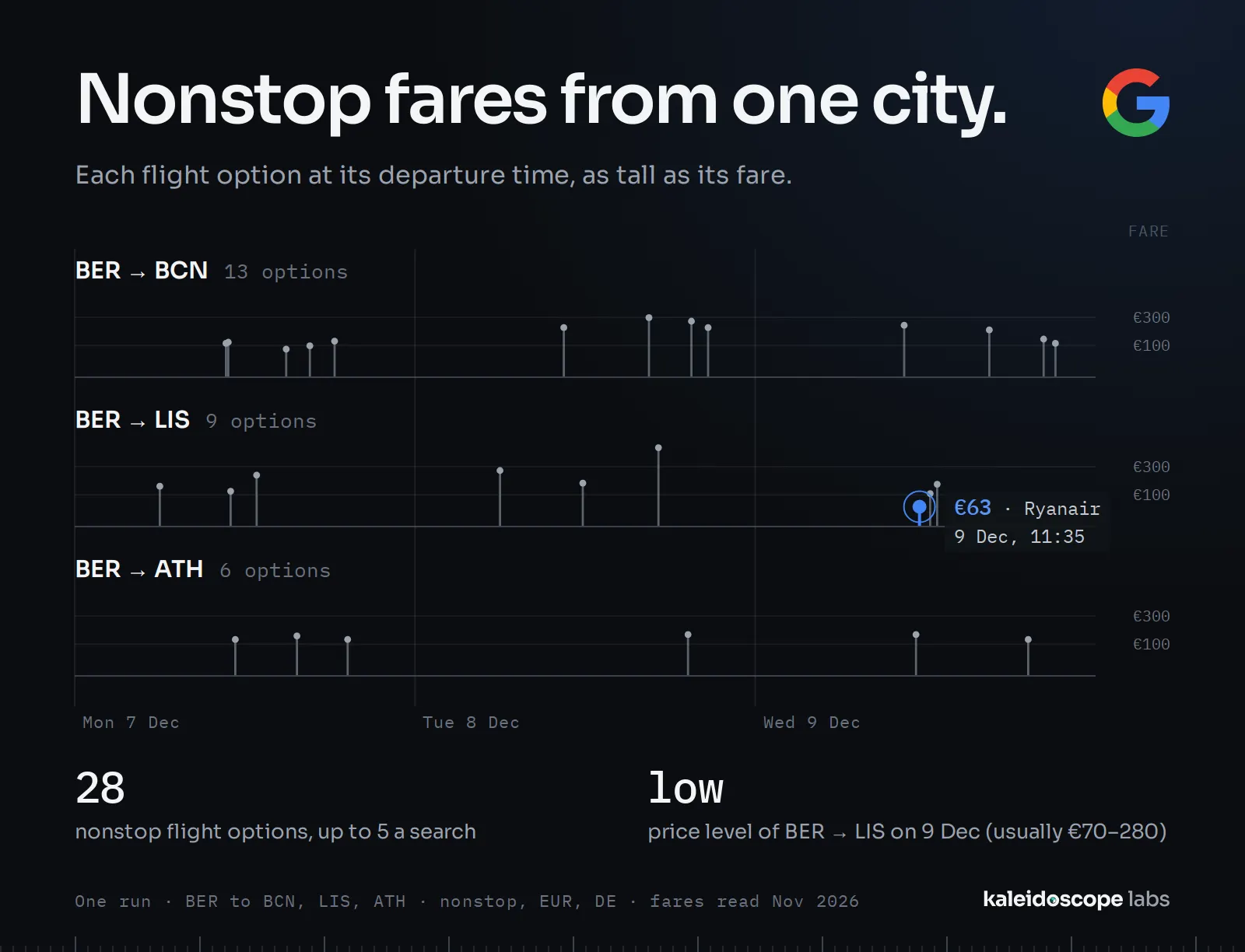
Nonstop fares from one city, in euros
A business-class round trip, with return flights
Only what changed since the last run
Output example
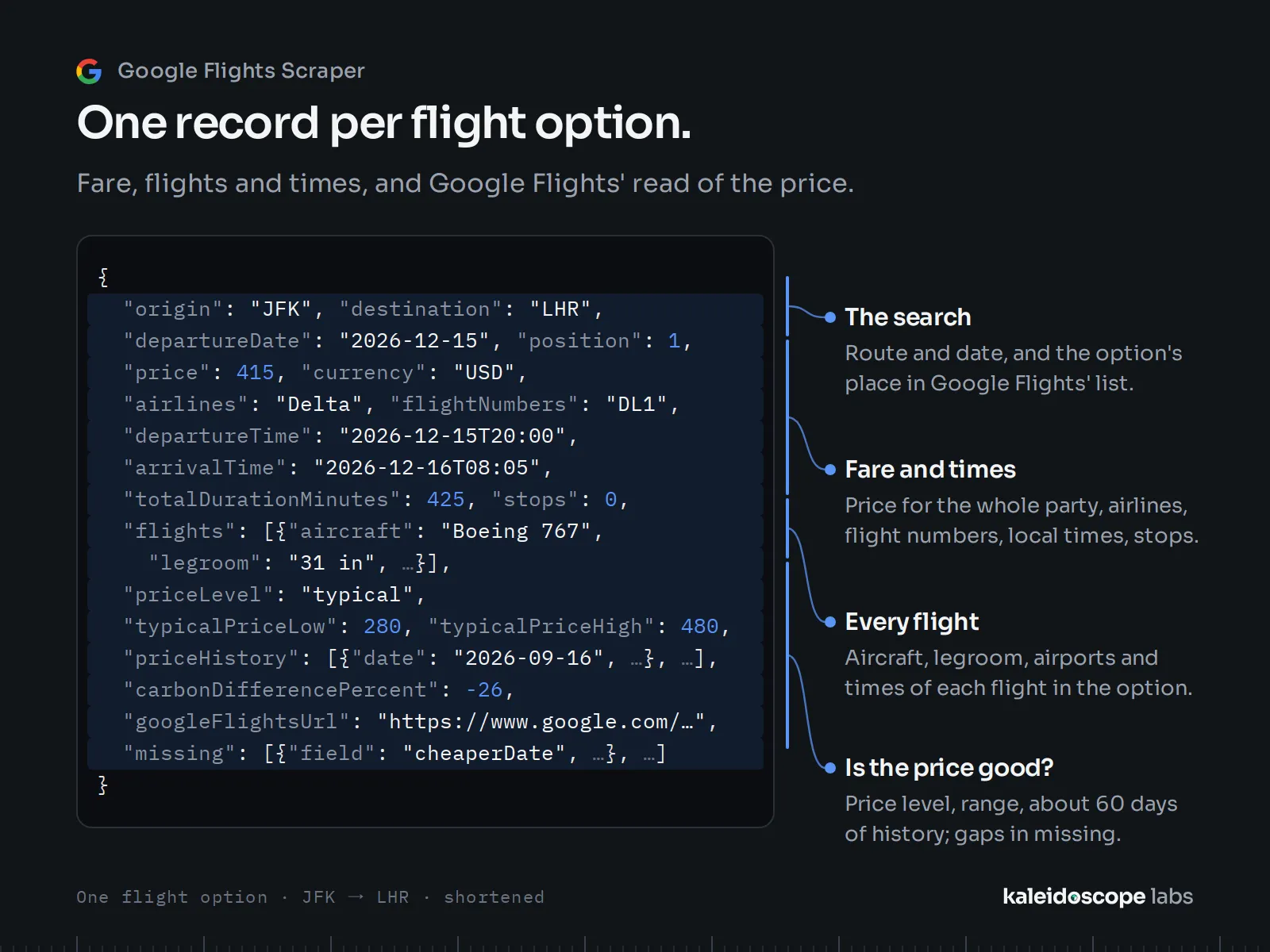
The first record of a JFK to LHR search (November 2026), shortened; a round trip adds the return… fields, a monitor fills change.
Monitoring: pay only for fares that moved
Give a run a Monitor name and schedule it. Its first run stores every flight option as the baseline; later runs store only new options (change: new) and changed prices (change: priceChanged, with previousPrice and priceChange; a price appearing where none was listed is not a change), ready for a webhook or a sheet. A search with nothing new costs one check and is listed under searchesUnchanged in RUN_SUMMARY.
Use fixed dates: +30 is another date each day, so it follows "fares 30 days out", not one flight day.
Integrations and API
Use it as a Google Flights API from any language, or from Make, Zapier, n8n, Google Sheets, webhooks and the JavaScript and Python clients. An AI agent can call it as a tool (below).
Run a recipe and get its records in one call (your Apify API key in APIFY_TOKEN):
Building on this Actor
- Output stability: fields are added, never renamed or removed without a new major version; changes are in the changelog.
- What a run's end means: a finished run read every search, or its
RUN_SUMMARYnames what it could not read (searchesNotRead,searchesReadInPart), what had no flights (searchesWithoutFlights) and what Google Flights does not take, such as an unknown airport (searchesRefused). An input mistake ends the run SUCCEEDED with nothing charged and the reason ininputError. - Cost: events and prices are on the Pricing tab; your maximum charge holds; price changes follow Apify's 14-day notice.
For AI agents
AI agents can call it through the Apify MCP server (setup prompt for your agent). Connect an MCP client to https://mcp.apify.com?tools=kaleidoscopelabs/google-flights-scraper with your Apify API key, then ask, for example: "What are the cheapest nonstop flights from Berlin to Lisbon in three weeks?"
- Minimal input:
{"routes": ["JFK-LHR"], "departureDates": ["+30"]}reads up to 30 one-way flight options for one adult in economy, in USD. - Fields to read:
price,currency,airlines,flightNumbers,departureTime,arrivalTime,stops,priceLevel;missingfor what a record lacks. - What to know: routes are airport codes, not city names. An empty dataset with
inputErrorset inRUN_SUMMARYis an input mistake, not "no flights".
Tips
- Airports, not city codes:
NYCis not taken; list a city's airports instead:JFK/EWR/LGA-LHR.departureAirportandarrivalAirportsay which each option uses. - Prices are for the whole party: two adults give the price for two.
- A round trip's price is the trip's: an outbound record carries the trip's price; set Return flights for the first outbound options for each pair's own price. A pair is one flight option, charged as one.
- An airline filter also keeps codeshares:
["BA"]lists flights another airline flies under a BA number. Hour filters are whole hours and bind a round trip's outbound. The record's link opens the search without the filters. - Position is Google's order, not a price rank: sort by
pricefor the cheapest.
FAQ
Is there an official Google Flights API?
No. Google closed its flight-price API, QPX Express, in April 2018 and offers none for Google Flights. This Actor reads what Google Flights shows anyone and returns it as records through the Apify API.
Why do my prices differ from what I see on Google Flights?
Fares change through the day and differ by country and currency. The Actor searches signed out, for the country and currency you set; searchedAt says when, and googleFlightsUrl opens the same search.
Why does a record lack a field?
Google Flights did not list it for that option, such as a price or a CO2 estimate: missing names the field with "notGiven". "notRequested" marks return flights you did not ask for.
Can I book flights or get booking links?
No. googleFlightsUrl opens the search on Google Flights, where the booking options are.
Does it collect personal data?
No. Flight records hold routes, airlines, times and prices, nothing about a person.
Is it legal to scrape Google Flights?
The Actor reads only what Google Flights shows anyone, without an account. Whether your use of the data is lawful depends on what you do with it and where; if you are unsure, ask a lawyer.
Limits
- One-way and round trips, no multi-city trips. An end takes up to 5 airports, or the city a link names. From a link, its route, dates, passengers and cabin are read, and the run's filters apply;
maxStopsshows the stops limit each search used. - In our tests (November 2026) a search listed 4 to 69 flight options, about 17 at the median; you get up to your number.
- Reading the return flights of 5 outbound options takes 6 calls a search instead of 1; a run that would outlast its timeout says so at its start.
- Google Flights takes dates up to about 11 months ahead (in our tests, November 2026).
- 200 routes, 60 dates and 2,000 searches a run; up to 9 passengers.
- No booking options or sellers, no fare rules or baggage allowances.
Other Actors
| You want to | Actor |
|---|---|
| See when travel demand for a destination peaks through the year | Google Trends Scraper |
Support and feedback
Open an issue on the Issues tab for a bug or a feature you need; we answer within 24 hours. If it saves you time, a review helps others find it.
Google Flights Scraper is an independent tool, not affiliated with, endorsed by or sponsored by Google LLC. Google and Google Flights are trademarks of Google LLC.


