

Google Maps Rank Tracker (Geo-Grid Local SEO Heatmap)
Pricing
from $2.80 / 1,000 grid point checkeds
Google Maps Rank Tracker (Geo-Grid Local SEO Heatmap)
Track where a business ranks on Google Maps across an N×N geo-grid, like Local Falcon. One row per point with organic rank, top competitors and sponsored pins, plus average rank, share of local voice and a heatmap PNG. Pay per grid point.
Pricing
from $2.80 / 1,000 grid point checkeds
Rating
0.0
(0)
Developer

LatentLark
Maintained by CommunityActor stats
0
Bookmarked
2
Total users
1
Monthly active users
2 days ago
Last modified
Categories
Share
For local SEO agencies, freelancers and business owners. See where a business ranks on Google Maps for a keyword at every point of an N×N grid over a city, the same view Local Falcon and similar tools give you, without a monthly subscription.
Outcome: one picture that shows where a business is visible on the map and where competitors take the customers, plus the numbers to track it week by week.
- 📍 Rank at every grid point: 3×3 up to 9×9 (81 points), searched as if standing at each point.
- 🥇 Who beats you there: top 3 competitors per point with rating and review count.
- 📢 Ads kept separate: sponsored pins are listed per point and never counted in the organic rank.
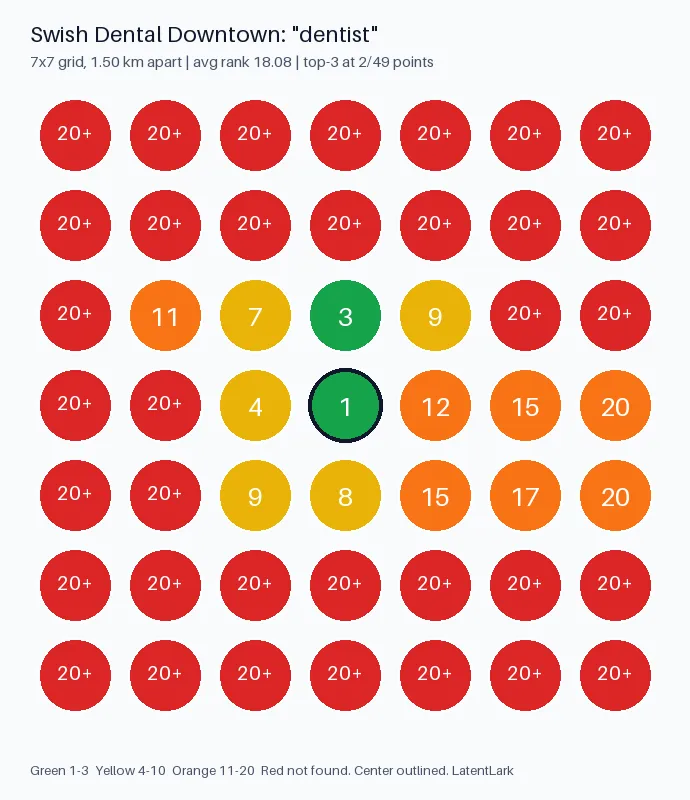
- 🗺️ Heatmap PNG + summary: average rank, share of local voice (top‑3 %) and a ready-to-share image.
- 💸 Pay per point: $0.004 per grid point checked. A 3×3 costs about $0.05, a 7×7 about $0.21. No login, no Google API key.
Need done-for-you setup (custom scrape or n8n wiring)? → Fiverr Apify scrape gig + Fiverr n8n automation gig
Quick start (first run in about 30 seconds)
- Click Try for free (or Start in Console). The form is prefilled with
Swish Dental Downtown, keyworddentist, a 3×3 grid 2 km apart over downtown Austin. - Click Start. You get 9 rows in the Output tab and a heatmap in Storage → Key-value store → HEATMAP.png, for about $0.05.
- Replace the business, keyword and center with your own (or your client's). Use 5×5 or 7×7 for a full city.
Tip: paste the business's Google Maps URL instead of the name for an exact match (useful for chains with many locations).
What you can do with it
- Local SEO audits: show a prospect where they are invisible on the map, one picture, no spreadsheet.
- Client reporting: run the same grid weekly and compare average rank over time.
- Competitor mapping: see which competitors own the top 3 in each part of town, and who runs Maps ads there.
- Before/after proof: run a grid before and after a Google Business Profile change.
- Pitch material: pair it with Google Maps Leads Website Audit & Pitch Generator for the website side.
Input
| Field | What it does |
|---|---|
businessName / mapsUrl / placeId | The business to track. URL or Place ID is the most precise |
keyword | What customers type into Google Maps (dentist, plumber near me) |
center | Address, city or lat,lng. Empty = the business's own location |
gridSize | 3, 5, 7 or 9 points per side (9 to 81 points) |
gridSpacingKm or radiusKm | Distance between points, or from the center to the edge |
maxRank | Look up to rank 20 (1 request per point), 40 or 60 |
maxCompetitorsPerPoint | Competitors listed per point (default 3) |
country / language | Google gl / hl codes |
pinLocation | Search as if standing at each grid point (default on). Makes ranks independent of the server's location |
zoom | Advanced: map zoom per point (default 15) |
proxyConfiguration | Optional. No proxy by default; use RESIDENTIAL (US) if you get blocked on big or frequent grids |
Example (7×7 over a metro area):
Output
One dataset item per grid point:
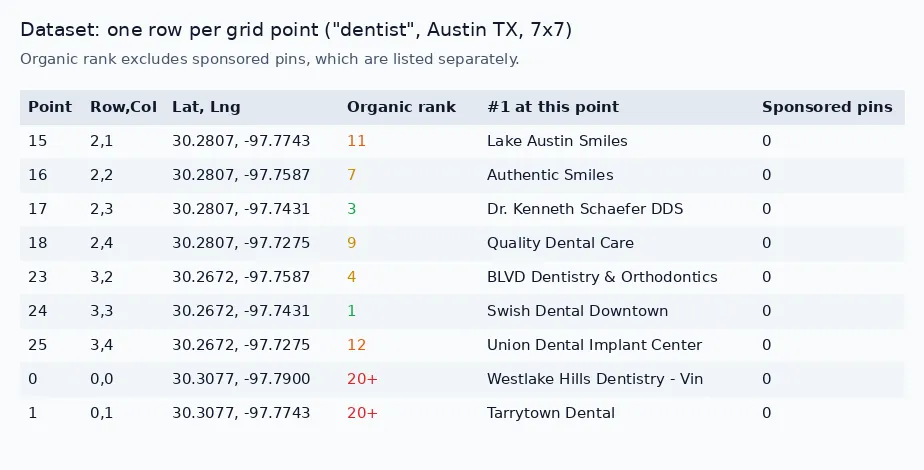
rankis the organic position (ads excluded). It isnull(label20+) when the business isn't in the results checked at that point.sponsoredlists the Maps ads shown at that point;targetAdPositionis set when your business itself runs an ad there.
The key-value store also has:
SUMMARY: average rank where found (ARP), average rank over all points with not-found counted asmaxRank + 1(ATRP), share of local voice (% of points in the top 3), points found, points with ads.HEATMAP.png: color-coded grid (green 1‑3, yellow 4‑10, orange 11‑20, red not found).
Run it on a schedule
- Fill in your business, keyword and grid, then Save as task.
- Schedule it, e.g. weekly on Monday
0 7 * * 1. - Send results to a sheet with Google Sheets Export or to Slack/email via Integrations.
| Grid | Points | Per run | Weekly (≈4.3 runs/month) | Daily (30 runs/month) |
|---|---|---|---|---|
| 3×3 | 9 | $0.046 | ~$0.20/month | ~$1.38/month |
| 5×5 | 25 | $0.11 | ~$0.47/month | ~$3.30/month |
| 7×7 | 49 | $0.206 | ~$0.89/month | ~$6.18/month |
| 9×9 | 81 | $0.334 | ~$1.44/month | ~$10.02/month |
Several keywords? Save one task per keyword (or per client) and schedule each.
Pricing
Pay per event, no subscription:
| Event | Free plan | Bronze | Silver | Gold+ |
|---|---|---|---|---|
| Actor start | $0.01 | $0.01 | $0.01 | $0.01 |
| Grid point checked | $0.004 | $0.0036 | $0.0032 | $0.0028 |
Example (free plan): a 7×7 grid (49 points) costs $0.01 + 49 × $0.004 = $0.206. Paid Apify plans pay 10–30% less per point.
Failed points and input errors are not charged. Set a maximum cost per run and the Actor stops cleanly when it reaches it. Platform usage is included.
How it works and limitations
- At each grid point the Actor loads Google Maps results for your keyword with the map centred on that point, the same list a person sees when they search there. Ranks are a snapshot at run time and can shift by a few places between runs.
- Each grid point is searched with the searcher's location set to that point, like a phone with GPS on. In our tests the same grid gave the same ranks from a German server, a US datacenter and US residential IPs.
- Sponsored (ad) pins are reported separately in
sponsoredand never counted inrank. Google shows Maps ads only some of the time, soadsCountvaries between runs. - Rank depends on the map zoom: 15 (about 4 km across) mirrors a phone search in a neighbourhood. Lower zoom (13) shows the whole city and ranks barely change between nearby points.
- Public Google Maps data only. No login, no personal data.
FAQ
My business shows "20+" (not found) everywhere. Check the name matches Google Maps exactly, or paste the business's Google Maps URL. Make sure center is near the business, use a smaller spacing, or raise maxRank to 40/60. The run status message tells you when the business wasn't found at any point.
The run returned one row with an error. That means the input could not be used (e.g. the address could not be found or the business could not be identified). The run still finishes as succeeded so your schedules stay green, and the row is not charged. Fix the input and run again.
Why is my rank different from what I see on my phone? Google personalises results by your history and exact location. This Actor searches logged-out from each grid point, which is the standard way geo-grid tools measure rank.
Can I track several keywords or locations? Yes. Save one task per keyword/location and schedule them; each run is billed separately.
Is a proxy needed? No for normal use. If you run big grids very often and see failed points, set the proxy to RESIDENTIAL with country US.
More from LatentLark
- Google Maps Leads Website Audit & Pitch Generator: audit local business websites (SSL, speed, tracking, booking), find owner contacts and get a cold-email pitch.
- Google Ads Transparency & LinkedIn Ad Library Scraper: see which competitors run Google or LinkedIn ads.
- Google Sheets Export & Import (No OAuth): send any Actor's results to a Google Sheet on a schedule.


