

Cheap Flight Destinations — Google Explore as data
Pricing
from $0.10 / 1,000 rows
Cheap Flight Destinations — Google Explore as data
[$0.20/1K rows] Where can I fly cheaply from here: the cheapest destinations from any airport with city, country, price, airline, stops, duration and the dates behind the price. Google Flights Explore as rows. No run fee, no search fee.
Pricing
from $0.10 / 1,000 rows
Rating
5.0
(1)
Developer

Matvey
Maintained by CommunityActor stats
0
Bookmarked
28
Total users
13
Monthly active users
a day ago
Last modified
Categories
Share
Cheap Flight Destinations
Cheap Flight Destinations turns Google Flights' Explore map into data: give it an airport and it returns the places you can fly to and what each one costs — city, country, price, airline, stops, duration and the dates that make that price. The "where can I go for $200" question, as rows.
$0.20 per 1,000 rows. No run fee, no search fee, no proxy fee. A full sweep of an origin is typically 60 destinations — just over one cent.
Tested head-to-head — 9 October 2026
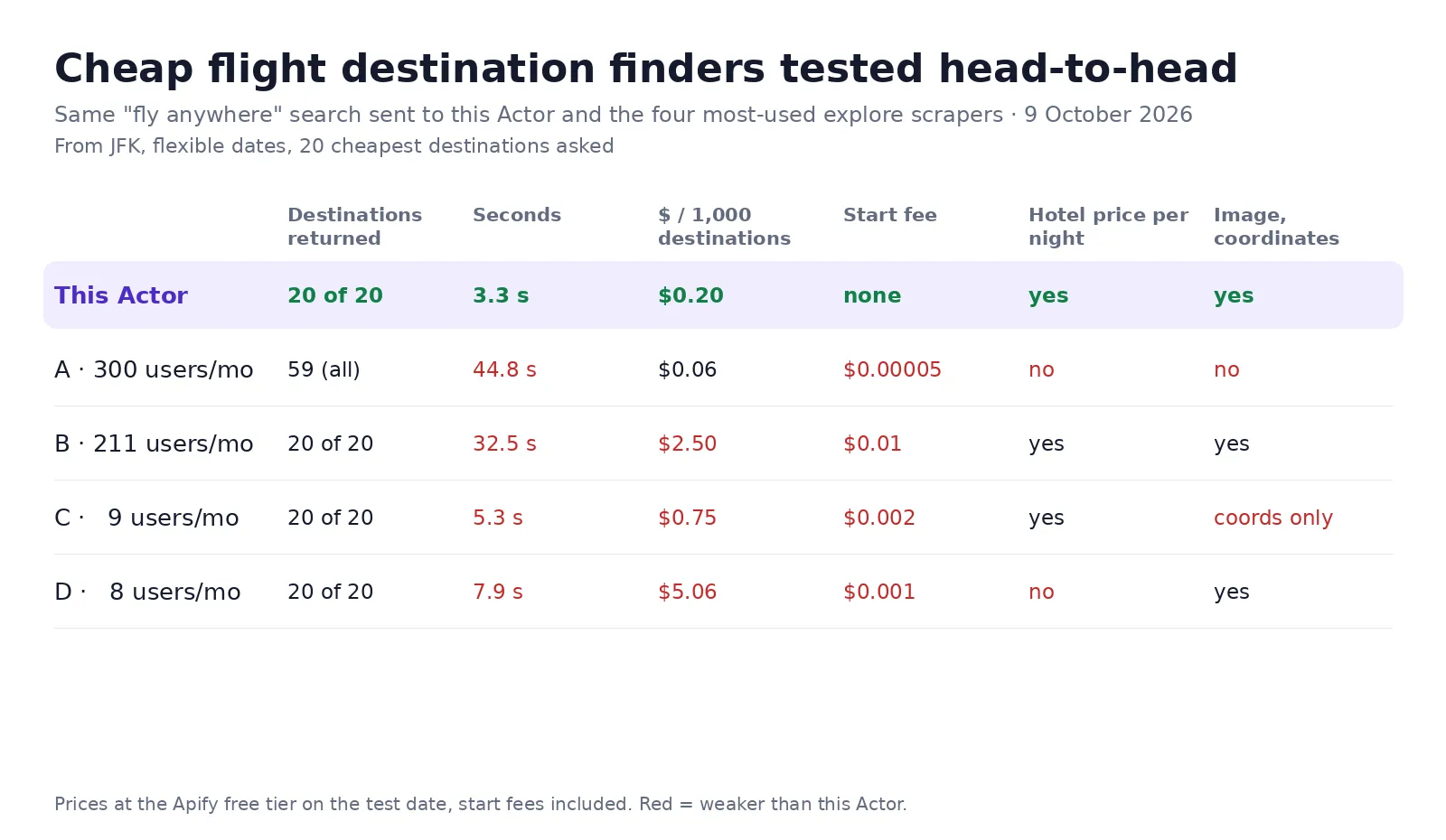
The same "fly anywhere" search — from JFK, flexible dates, the 20 cheapest destinations — went to this Actor and to the four most-used explore scrapers on Apify Store, from one test account:
| Destinations | Seconds | $ per 1,000 destinations | Start fee | Hotel price per night | Image and coordinates | |
|---|---|---|---|---|---|---|
| This Actor | 20 of 20 | 3.3 | $0.20 | none | yes | yes |
| A · 300 users a month | 59 (no limit) | 44.8 | $0.06 | $0.00005 | no | no |
| B · 211 users a month | 20 of 20 | 32.5 | $2.50 | $0.01 | yes | yes |
| C · 9 users a month | 20 of 20 | 5.3 | $0.75 | $0.002 | yes | coordinates only |
| D · 8 users a month | 20 of 20 | 7.9 | $5.06 | $0.001 | no | yes |
A is cheaper per row and returns every destination at once; it has no hotel price, image or coordinates. The hotel price, trip length and image were added to this Actor on the same day and are counted here.
What a run returns
| Field | Example |
|---|---|
city / country / destination | Singapore / Singapore / SIN |
price / currency | 92 / USD |
airline / stops | Jetstar / 0 |
durationMinutes | 175 |
departureDate / returnDate / tripLengthDays | The dates behind that price |
hotelPricePerNight | Google's typical hotel price per night at that destination |
latitude / longitude / imageUrl | For a map or a card |
googleFlightsUrl | Opens that destination's search on Google Flights |
How to use it
- Enter your origin airport (
DPS,LHR,JFK). - Optionally set a departure date — leave it empty and Google picks the cheapest dates it can find.
- Set maxDestinations (default 60) and click Start.
Filter the rows by price, duration or stops afterwards, or cap them on the way in with maxPrice,
maxDurationMinutes and maxStops.
What it is good for
- Deal sites and newsletters: a weekly "cheapest 20 places from your city" list, built from data rather than hand-checked.
- Travel agencies: answer "we have $400 and a week off, where can we go" in one run.
- Airlines and airports: see how your routes are priced next to everything else from that origin.
- Content and SEO: "cheap flights from X" pages that are actually current.
One run covers one origin; for several origins, start one run per origin (from a schedule or the API), and schedule it weekly so the list is never stale. If nothing passes your filters, one free row says so.
What it costs
One event, $0.0002 per row — $0.20 per 1,000, down to $0.10 on higher Store tiers. Sixty destinations from one origin cost about a cent. Twenty origins refreshed weekly for a month is 4,800 rows — 96 cents. Searches, retries, residential proxy and run start are free; failed rows are never charged.
Notes and limits
Explore prices are indicative: they are the cheapest fare Google can find for flexible dates, and the
exact itinerary is confirmed when you search that destination directly — the googleFlightsUrl on
every row takes you there. Coverage depends on what Google shows for that origin; small airports
return fewer destinations. If a request fails after retries, an error row explains why and is free.
The Actor reads publicly displayed prices without logging in or collecting personal data. Google's terms restrict automated access, and the legality of scraping public data depends on your jurisdiction and use.
Need something else?
Want a different shape — grouped by country, or only nonstop under five hours? Open an issue on this Actor's page — answered the same day.
Once you have a destination: Flight Price Calendar for the cheapest dates, Flight Price Tracker to watch the fare, and Google Flights Scraper for the full itinerary list with booking options.
Use via API
Run this Actor from your own code or pipeline. Get your token in Apify Console → Settings → API & Integrations. Every input field below has the same name as in the JSON tab of the input form.
Python
JavaScript
cURL (runs the Actor and returns the results in one call)


