

Instagram Reels Transcript Scraper – Reels to Text, Hooks & SRT
Pricing
from $2.50 / 1,000 videos
Instagram Reels Transcript Scraper – Reels to Text, Hooks & SRT
Turn Instagram Reels into a content library: transcript with timestamps, opening lines, hook and call to action, SRT subtitles, views, music and a viral score vs the author's usual. Profiles, hashtags, TikTok and Shorts too. No login. Export JSON, CSV, Excel.
Pricing
from $2.50 / 1,000 videos
Rating
5.0
(2)
Developer

Matvey
Maintained by CommunityActor stats
0
Bookmarked
97
Total users
34
Monthly active users
3 hours ago
Last modified
Categories
Features
Share
Instagram Reels Transcript Scraper turns public Instagram Reels into text you can search, sort and reuse: the speech-to-text transcript with timestamps, the opening lines the author says first, the hook and call to action, ready SRT / WebVTT subtitles, the text written on screen, plus views, likes, music and a viral score against the author's usual — no login, no cookies, no official API.
Paste Reel links, an Instagram profile, a hashtag or a search phrase and get one clean row per video. TikTok videos and YouTube Shorts work in the same run. Put it on a schedule to watch creators and pay only for the videos they publish after your last run. Export to Excel, CSV, JSON or Google Sheets, or call it as an API from your code, n8n, Make, Zapier or an MCP-connected AI agent.
In one sentence: a content-research library of short-form scripts — who said what in the first three seconds, how the video was built and how well it did — for the price of a transcript.
Why this one
| This Actor | |
|---|---|
| Inputs | Reel links, Instagram profiles or usernames, hashtags, search phrases, TikTok and YouTube Shorts links, another Actor's dataset |
| Speech | Transcript + timestamped segments, language, words per minute, word count |
| Opening of the video | openingLines (first sentences spoken), firstThreeSecondsSpeech, firstThreeSecondsOnScreen, hookText + hookType |
| Structure | Call to action (ctaText, ctaType), beats hook → body → cta with seconds — rules, free |
| Ready files | SRT and WebVTT subtitles in the row, RAG chunks with start/end time |
| Performance | Views, likes, comments, vsAuthorMedian and isOutlier — which videos beat the author's usual |
| About the video | Caption, caption hashtags and @mentions, music title and artist, original audio vs licensed music, cover image, author name and verified badge, pinned flag (followers when the platform shows them) |
| On-screen text (add-on) | Caption cards and title cards read from a frame every second and separated from burned-in subtitles; charged only when text is found |
| AI script breakdown (add-on) | Hook and why it works, beats with what is on screen, CTA, topic, format, audience, emotion, reusable script template |
| Music-only reels | Recognised as such — no invented "Thank you." — never charged for audio, and can be left out entirely |
| Monitoring | "Only new videos" memory per watch list, a run summary row, ceilings on videos and seconds |
| Billing | Per event, no start fee; failed, private and skipped videos are free; every row shows what it cost |
Compared with the most-used new rival — 11 November 2026
Taken from each Actor's published input and output schema, its README and our own runs of 11 November 2026.
| This Actor | The rival (337 users in 30 days) | |
|---|---|---|
| Input options | 30, in 6 sections | 19 |
| Documented fields per row | 70 | 53 |
| Sources | Reel links, profiles, hashtags, search phrases, TikTok, YouTube Shorts, another Actor's dataset | Reel links, profiles, a dataset |
| Opening lines, hook, call to action, beats | All four, free | Opening line ("hook") |
| Viral score against the author's usual | Yes — vsAuthorMedian, isOutlier | No |
| On-screen text | AI-vision reading of a frame every second, kept apart from burned-in subtitles, add-on $0.015 from 26 Nov 2026 ($0.06 until then), only when text is found | AI-vision reading, add-on $0.002, only when text is found |
| AI script breakdown (hook, beats, template) | Yes, add-on | No |
| SRT subtitles, RAG chunks, skip pinned, skip music-only | Yes, free | Yes, free |
| Photo posts and carousels (text on the images) | Yes, $0.003 | Not documented |
| Price of a 30-second Reel (Free plan) | $0.0075 | $0.006 |
| Cost shown in every row | Yes — chargeUsd | charged flag |
Pick by what you need: for the plain transcript of long Reels the rival's flat price is lower; for hooks, calls to action, viral scores, search by topic, AI breakdowns and photo posts in one table, this Actor does more per row.
Tested head-to-head — 26 September 2026
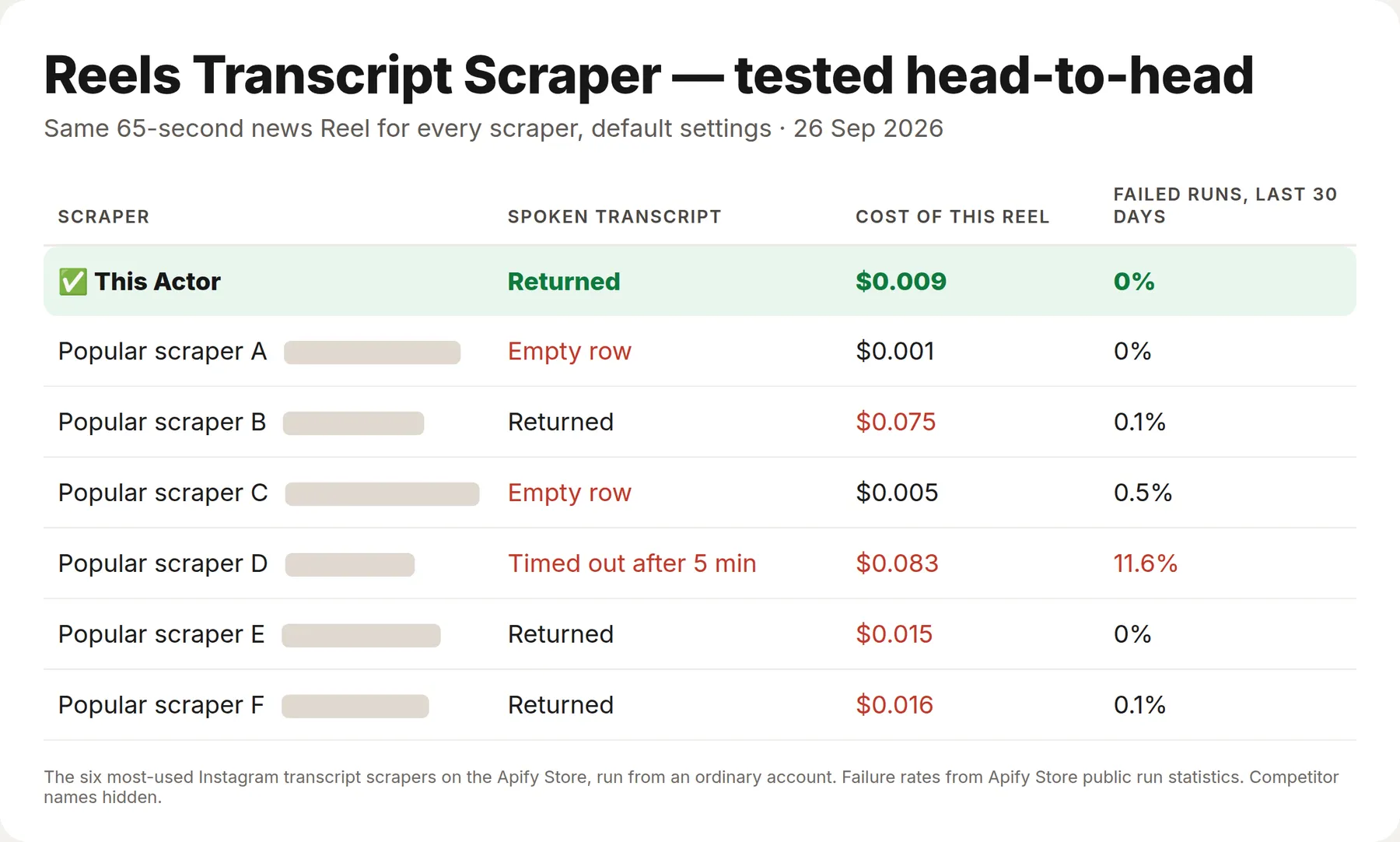
One public 65-second news Reel, run through the six most-used Instagram transcript Actors on the Apify Store from an ordinary account, every Actor on its default settings.
| This Actor | The six others | |
|---|---|---|
| Returned the spoken transcript | Yes | 3 of 6 (two returned an empty row, one ran out of time after 5 minutes) |
| Cost of this Reel | $0.009 at the prices of that day, $0.0135 at today's | $0.015–$0.075 among the three that returned it, at the prices of that day |
| Time per run | 26 s | 9–29 s among the three that returned it |
Since that test the Actor gained profile and hashtag search, opening lines, hooks and calls to action, subtitles, RAG chunks, music and cover fields and the AI breakdown — all without raising the price of a transcript.
What is Instagram Reels Transcript Scraper?
Instagram Reels Transcript Scraper turns a short vertical video into structured text: the spoken transcript, the text written on screen, and the first seconds of both — the hook. It works on Instagram Reels, TikTok videos and YouTube Shorts, with no login, no cookies and no official API needed.
Most transcript scrapers stop at the audio. In short-form video the audio is often not where the message is: in our test set of 26 real videos, only 69% carried a narrated script, 19% had no usable speech at all, and 12% ran on someone else's trending sound. 81% had text on screen. An Actor that reads only the audio returns noise or nothing on roughly a third of a real feed.
This one reads both, tells them apart, and says which kind of video you gave it.
Who uses it
- Content creators and social media managers building a swipe file of hooks and scripts from the accounts they admire.
- Agencies auditing a client's or a competitor's last 12 Reels: what they said first, which ones broke out, what the call to action was.
- Brands and UGC teams checking what creators actually say about a product before paying for a collaboration.
- Researchers and analysts collecting what is said on a topic or a hashtag, in any language.
- Developers and AI agents that need the words of a video as text — with timestamps, subtitles or RAG chunks — through one API call.
What data can Instagram Reels Transcript Scraper extract?
Every video row carries the fields below. Free means the field costs nothing beyond the video itself; add-on means it appears only when you switch that add-on on.
Speech
| Field | Example | Notes |
|---|---|---|
transcriptText | Today, I wanted to do a quick tips and tricks… | Full spoken text |
transcript | [{start: 0, end: 4.46, text: "…"}] | Timestamped segments (switchable) |
openingLines | I would visit Australia because of the wildlife. | The first sentence or two the author says (first ~10 s). Free |
firstThreeSecondsSpeech | Today, I wanted to do a quick tips and tricks or best practices for | Cut exactly at 3.0 s |
wordCount | 204 | Free |
wordsPerMinute | 150 | Speaking pace of the author's own speech |
language | en | Detected language of the speech |
transcriptSource | speech-recognition · platform-captions · no-speech | Where the words came from |
speechDetected, speechCoverage | true, 0.89 | Whether anyone speaks and how much of the clip speech covers |
srt, vtt | 1\n00:00:00,000 --> 00:00:04,460\n… | Ready subtitle files as text. Free, switch on |
chunks | [{index, start, end, wordCount, text}] | Transcript cut into N-word pieces for RAG. Free, switch on |
Hook, call to action and structure (free, rule-based)
| Field | Example |
|---|---|
hookText, hookSource, hookType, hookEndSeconds | So what brought you here?, on-screen, question, 1.3 |
ctaText, ctaType, ctaSource | 🔗 Link in bio to book, link_in_bio, on-screen |
beats | [{startSeconds, endSeconds, label: hook/body/cta, text}] |
contentClass, contentClassReason | narrated · borrowed_audio · silent · empty |
Performance and author
| Field | Example | Notes |
|---|---|---|
author, authorFullName | natgeo, National Geographic | |
authorFollowers, authorVerified | 144566, true | Filled when the platform includes them for that video or profile (often on profile runs and YouTube); empty, never guessed, otherwise |
views, likes, comments | 1107574, 19776, 84 | Instagram, TikTok and YouTube |
vsAuthorMedian, vsAuthorBasis, isOutlier | 2.18, views, false | How many times the video beat the author's median |
postedAt | 2026-11-07T20:09:27Z | |
isPinned | true | Pinned to the top of a profile's Reels tab, when known |
About the video
| Field | Example | Notes |
|---|---|---|
caption | Smooth-sided pyramids… | The post text |
captionHashtags, captionMentions | ["losttreasuresofegypt"], ["disneyplus"] | Lower-case, in order of first use. Free |
musicTitle, musicArtist, audioType | 12 to 12, sombr, licensed_music | Or original_audio for the creator's own sound |
thumbnailUrl | https://…cdninstagram.com/…jpg | Cover image (platform links expire, download if you keep it) |
durationSeconds, platform, videoId, url | 61.3, instagram, DFIWSVoy1UQ | |
searchQuery, hashtag | morning routine, morningroutine | Which search found the video |
On-screen text (add-on)
| Field | Example |
|---|---|
onScreenText | [{t: "0.33-4.33", text: "Reels Tips & Tricks"}, …] |
onScreenTextJoined | Reels Tips & Tricks\nNo Watermarks\nUnder 3 Minutes |
firstThreeSecondsOnScreen | Reels Tips & Tricks |
burnedInCaptionCount | 41 subtitle tracks recognised and kept out of onScreenText |
screenRecording | false |
Billing transparency
| Field | Example |
|---|---|
charged, chargedEvents, chargeUsd | true, {"reel-processed": 1, "audio-10-seconds": 3}, 0.0075 |
Opening lines, hook and call to action
The first seconds decide whether a viewer stays, so they get four fields of their own:
openingLines— the literal first sentence or two the author says, cut at a sentence end, at most ~30 words. This is what you paste into a swipe file. When nobody speaks it falls back to the first on-screen text.firstThreeSecondsSpeechandfirstThreeSecondsOnScreen— what the viewer heard and read in exactly the first 3.0 seconds, so hooks of different creators are compared on equal terms.hookText— the line that does the hooking. Text written on screen in the first three seconds comes first, because it is a deliberate hook; the first spoken sentence wins when the speech is the author's subtitled voice-over or when nothing is written early. Last resort: the caption's first sentence.hookSourcesays which,hookTypeclassifies it.
Hook, call to action and beats: rules, not AI
Every video row carries a short script breakdown built by fixed rules from data the row already has (the timestamped transcript, the on-screen text and the caption). There is no language model and no extra charge, and the same video always gives the same answer.
| Field | What it holds |
|---|---|
hookText, hookSource | The opening line and where it came from: speech, on-screen or caption |
hookType | how_to, question, number, warning, curiosity, callout, story, or statement when no pattern matches |
hookEndSeconds | Where the hook ends on the timeline |
ctaText, ctaType, ctaSource | The line that asks the viewer to act. Types: link_in_bio, dm, book, shop, download, comment, subscribe, follow, save, share, like, visit, watch_more, or none |
wordsPerMinute | Speaking pace of the author's speech; empty when there is no own speech |
beats | The timeline split into hook, body and cta parts with start and end seconds. The text is the real words, not a summary |
The patterns cover English and basic Russian, Spanish, Portuguese, Indonesian, French and German. Being rules, they miss what they do not know: an unusual hook comes out as statement, a call to action without a known phrase as none. They never invent text that is not in the video or the caption. Real output for a silent Reel with an on-screen question:
Build a content library (swipe file) in one run
The dataset has a ready view called Content library: author, followers, posted date, views, likes, ×-author's-usual, length, opening lines, hook, call to action, full transcript, word count, hashtags, audio and cover — one row per video, ready to export to Google Sheets or Notion.
What you get: the 12 latest Reels of each Instagram creator (TikTok and YouTube go deeper), without the
old pinned hits, without music-only clips (they are left out and not charged), and each row says how
many times it beat that creator's usual. Sort by vsAuthorMedian and read the openingLines of the
winners — that is the research most people do by hand with a notebook.
Prefer a topic over creators? Use a search phrase or a hashtag:
Subtitles: SRT and WebVTT in the row
Switch on 🎬 Add SRT and WebVTT subtitles (includeSrt: true) and every row gets two more text
fields built from the timestamped transcript:
srt— SubRip, accepted by Premiere Pro, DaVinci Resolve, CapCut, YouTube Studio and most players;vtt— WebVTT, for HTML5<track>elements and web players.
Save the field to a .srt file and drop it on your timeline — handy for re-captioning a video in
another language or for accessibility. Free.
Chunks for RAG and LLMs
Set 🧩 Split transcript into chunks (chunkWords) to, say, 150 and each row gets chunks: the
transcript cut at segment borders into pieces of about 150 words, each with start and end seconds,
wordCount and text. Feed them straight into a vector database (Pinecone, Qdrant, pgvector,
Weaviate) and every search hit points back to the exact second of the exact Reel. Free.
Find the videos that went viral for their author
Send four or more videos from the same author — or simply add the profile — and every row gets vsAuthorMedian: how many times it beat that author's usual. 5 means five times the author's median. Anything at 3× or more is flagged isOutlier: true. So one run answers two questions at once: which videos broke out, and what was said and shown in them.
Measured on @duolingo, 25 September 2026: six newest TikToks, medians from 137 K to 477 K views; the best one scored 2.18×, none crossed 3×, the weakest was 0.17×.
TikTok is compared on views. Instagram Reels carry their view counts too — from a profile and from single Reel links alike — and are compared on views; if a view count is ever missing, the comparison falls back to likes (vsAuthorBasis says which). No login and no extra charge.
On-screen text, separated from subtitles (add-on)
Switch on 🖼️ Read on-screen text and the Actor reads the text burned into the picture — caption cards, title cards, list items, meme text, price tags.
How, honestly: one frame a second (at most 28 per video; longer videos are sampled evenly), 432 px wide, goes to a vision model (DeepSeek V4.1 Flash) together with our own transcript. The model writes out each block of text and marks the blocks that are only subtitles. If the model is unavailable, the Actor falls back to reading every frame with its own OCR engine, so you still get the text. A frame is a still picture: a card shown for less than a second can be missed, and a title that types itself in letter by letter may come back cut short.
Half the videos we measured carry burned-in subtitles that simply repeat the speech. Dumping every recognised string into one field means the same sentence appears twice and the actual title cards drown in it. This Actor separates them twice: the model marks subtitles, and every text track is then checked against what is being said at that exact moment. onScreenText therefore contains what the author wrote for the viewer; burnedInCaptionCount tells you how many subtitle tracks were removed. On our 62-second test Reel with 6 caption cards over constant subtitles, all 6 cards came back (one of them cut short) and no subtitle leaked into onScreenText.
Charged only when text is found: a video with nothing written on it costs nothing extra.
Why the content class matters
Speech recognition models do not stay silent over music — they invent. On a wordless branded clip the model returned "We'll be right back.", and its own confidence score for that invention said nothing was wrong. So the class is decided from word density and how much of the clip speech actually covers.
| Class | What it means | What you get |
|---|---|---|
narrated | The voice carries the script | Transcript + on-screen text |
borrowed_audio | A trending sound or a clip from someone else — not the author's words | On-screen text; the audio is labelled, not passed off as a script |
silent | No speech; the meaning is in the captions | On-screen text only |
empty | Neither speech nor on-screen text | An explicit refusal instead of blank fields |
A looping trending sound is caught by its own repetition: when one line comes back word for word three times or more, it is a sound, not a script. The class is set when on-screen text is read; without it, speechDetected and transcriptSource tell you the same story.
AI script breakdown (paid add-on)
Switch on 🤖 AI script breakdown (aiAnalysis: true) and every video row gets an ai object written by a language model (DeepSeek V4.1 Flash). How it works, honestly: we take one frame every 2 seconds (at most 12 per video; longer videos are sampled evenly), 360 px wide, and send them to the model together with our own transcript, the on-screen text (when you switch that on) and the caption. The model sees still frames, not the moving video and not the sound itself.
Field in ai | What it holds |
|---|---|
hook | text, source (speech, on-screen, visual, caption), type and whyItWorks |
beats | 2 to 8 consecutive parts with startSeconds, endSeconds, label (hook, setup, value, proof, twist, cta, outro), visual (what is on screen) and text (the words of that part) |
cta | text and type (link_in_bio, follow, comment, dm, book, shop, save, share, other, none) |
topic, format, audience, emotion | One line each |
scriptTemplate | The script as a fill-in template with [placeholders] you can reuse |
speechIsSong | True when the audio is song lyrics rather than the author talking |
onScreenText | Text the model reads on the frames |
Descriptions are in English; spoken and on-screen words are quoted in the video's own language. aiModel names the model and aiError says why a breakdown is missing. A model can misread a frame, so treat the breakdown as a strong first draft. Shortened real output for a 9-second Reel:
How much does it cost to extract Reel transcripts?
Pay per event — no subscription, no start fee, no proxy charge. Short clips are not billed as if they were long: speech is billed in 10-second steps.
| Event | When it is charged | Free plan | Bronze | Silver | Gold+ |
|---|---|---|---|---|---|
reel-processed | One video delivered: transcript, timestamps, language, opening lines, hook, CTA, subtitles, chunks, metrics | $0.003 | $0.0028 | $0.0026 | $0.0025 |
audio-10-seconds | Each started 10 seconds of speech actually recognised | $0.0015 | $0.0014 | $0.0013 | $0.0012 |
on-screen-text | Add-on: on-screen text found and delivered for one video (from 26 Nov 2026; until then $0.06 / $0.054 / $0.048 / $0.042) | $0.015 | $0.014 | $0.013 | $0.012 |
ai-analysis | Add-on: one AI script breakdown that came back | $0.05 | $0.045 | $0.04 | $0.035 |
Worked examples (Free plan)
| What you send | Calculation | Cost |
|---|---|---|
| A 15-second TikTok | $0.003 + 2 × $0.0015 | $0.006 |
| A 30-second Reel | $0.003 + 3 × $0.0015 | $0.0075 |
| A 60-second Reel | $0.003 + 6 × $0.0015 | $0.012 |
| A YouTube Short with its own captions | $0.003, no speech recognition needed | $0.003 |
| A music-only Reel | $0.003 (audio not charged) — or $0 with "Leave out videos without speech" | $0–0.003 |
| A photo post or carousel | $0.003, text on the pictures included | $0.003 |
| 1,000 Reels of 30 seconds | 1,000 × $0.0075 | $7.50 ($6.10 on Gold) |
| 12 Reels of a profile, 30 s each, with AI breakdown | 12 × ($0.0075 + $0.05) | $0.69 |
| 12 Reels of a profile, 30 s each, with on-screen text on (from 26 Nov 2026) | 12 × ($0.0075 + $0.015), when every one has text on it | $0.27 |
Never billed: failed URLs, private, restricted and deleted videos, videos above your duration limit,
videos left out by your filters, ceilings or the "only new videos" memory, and failed add-ons. Every row
carries chargeUsd, so you see the bill per video while the run is still going.
Keep the bill predictable
- 🔢 Maximum videos in this run — a hard ceiling across links, profiles and searches.
- 👀 Only videos above this many views — skips small Reels before they are transcribed.
- 🔇 Leave out videos without speech — music-only clips cost nothing at all.
- 🆕 Only videos not processed before — scheduled runs pay only for new videos.
- Maximum cost per run in Apify's run options — the run stops cleanly at your limit; nothing beyond it is written or charged.
How to extract Instagram Reels transcripts
- Click Try for free (no credit card needed for Apify's free plan).
- Paste Reel links into 🔗 Instagram Reel URLs — or a profile, a hashtag or a search phrase. The form comes prefilled with working examples, so you can just press Start; even a completely empty run transcribes one example Reel.
- Press Start. Rows appear in the dataset as each video (or each profile, when videos are compared with their author) is done.
- Open the Content library, Hooks and calls to action or Overview view, or export to Excel, CSV, JSON or Google Sheets.
⬇️ Input
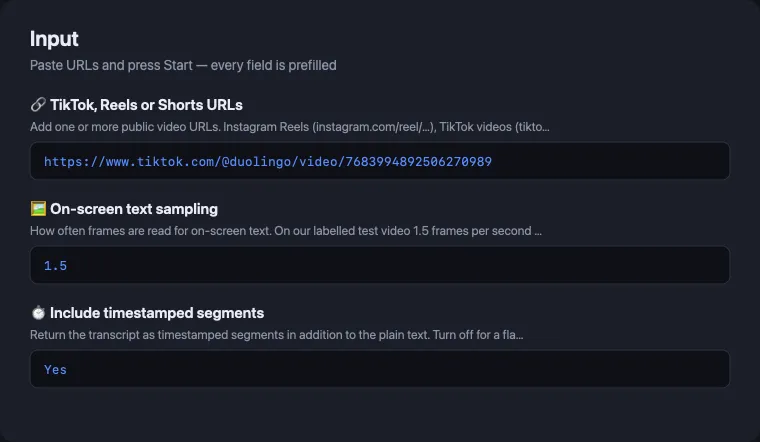
The form has 30 fields in six sections. Everything except the sources is optional.
| Section | Field | What it does | Default |
|---|---|---|---|
| Sources | videoUrls | Reel, TikTok or YouTube Shorts links; profile links pasted here are understood too | example Reels |
| Sources | profiles | Instagram profile link or username, TikTok @handle, YouTube channel | — |
| Sources | searchQueries | A word or phrase; it is turned into the closest Instagram hashtag | morning routine (prefill) |
| Sources | hashtags | Hashtags with or without # | — |
| 🎯 Which videos | resultsLimitPerProfile | Newest videos per profile (Instagram shows logged-out visitors 12) | 10 |
| 🎯 Which videos | searchSort, resultsLimitPerSearch | Most viewed or newest first; videos per search | most viewed, 10 |
| 🎯 Which videos | onlyPostsNewerThan, onlyPostsOlderThan | Date window | — |
| 🎯 Which videos | minViews | Skip videos below this view count before transcribing | 0 |
| 🎯 Which videos | skipPinned | Leave out reels pinned to the top of a profile | off |
| 🎯 Which videos | skipVideosWithoutSpeech | Drop music-only and silent videos, free | off |
| 🎯 Which videos | maxVideos | Ceiling for the whole run | — |
| 📦 Each row | compareWithAuthor | Metrics and viral score vs the author's median | on |
| 📦 Each row | includeTranscriptSegments | Timestamped segments next to the plain text | on |
| 📦 Each row | includeSrt | srt and vtt subtitle fields | off |
| 📦 Each row | chunkWords | RAG chunks of N words (0 = off) | 0 |
| 📦 Each row | includeRunSummary | A free totals row at the end | off |
| 💎 Add-ons | includeOnScreenText | Read text burned into the picture | off |
| 💎 Add-ons | aiAnalysis | AI script breakdown | off |
| 🔁 Monitoring | onlyNewVideos, watchlistName | Remember processed videos, per named watch list | off |
| 🔁 Monitoring | maxRunSeconds | Soft deadline: deliver what is done and stop | — |
| 🔗 Chaining | fromDatasetId, datasetItems | Take video links from another Actor's dataset or pasted rows | — |
| ⚙️ Advanced | transcriptionMode | Captions first / speech recognition only / captions only | captions first |
| ⚙️ Advanced | quality, language | Recognition model size; spoken language (auto-detect) | fast, auto |
| ⚙️ Advanced | maximumVideoDurationSeconds | Skip longer videos with a free error row | 0 (no limit) |
| ⚙️ Advanced | ocrFps | Frames per second for the fallback OCR engine (the vision model reads one frame a second) | 1.5 |
Example: a list of Reels with subtitles and RAG chunks
Whole profiles, not just links
Paste an Instagram profile link (https://www.instagram.com/natgeo/) or just the username (natgeo),
a TikTok handle (@duolingo), a TikTok profile link or a YouTube channel into Whole profiles, set how
many of the newest videos you want, and the Actor collects the links itself. Add a date in Only videos
newer than to keep a weekly watch cheap: anything older is skipped before it is downloaded.
Instagram shows logged-out visitors the 12 newest Reels of a public profile, so that is the most an Instagram profile gives per run (with views, likes and comments); older Reels need their own links. A private or unknown profile returns one free error row.
Search by topic or hashtag
A phrase is matched to the closest Instagram hashtag (Instagram does not show free-text search to
logged-out visitors). Each row says which search found it in searchQuery / hashtag, so several
topics in one run stay easy to split. The search itself is not charged — only the videos transcribed.
Photo posts and carousels, at the price of one video
Paste an Instagram photo post or a carousel (instagram.com/p/…) and the Actor reads the text
printed on the pictures — up to ten of them, one line of text per image in onScreenTextPerImage —
plus the caption, author, likes and comments, for the same $0.003 as one video.
Such a row comes back with type: "post", postType: "photo" or "carousel" and imageCount.
A carousel that mixes pictures with videos says so in videosInPost.
Chain it to another Actor — no code
Already scraping Instagram, TikTok or YouTube with something else? Put that run's dataset ID into
🔗 Take video links from another run's dataset and this Actor reads the links out of it itself —
url, postUrl, videoUrl, link, shortCode, or any other field that holds a video link.
Pick the dataset in the form rather than pasting an ID from memory: the field hands the run permission for that dataset. If you would rather not share a dataset at all, paste the rows into 📋 Or paste the rows themselves.
Watch a creator on a schedule — pay only for new reels
Turn on 🆕 Only videos not processed before and the Actor remembers every video it has already transcribed for your account. A scheduled run on the same profile then transcribes only what was posted since the last run; everything else is skipped before it is downloaded and is not charged.
A run that finds nothing new ends with a free notice row and charges nothing, so a daily watch on a
creator who posts twice a week costs the price of two videos a week, not fourteen. 🗂️ Name of the
watch list keeps a separate memory per scheduled task: competitors and my-brand will not skip each
other's videos. Recipe: Apify Console → Schedules → Create → pick this Actor's saved task → daily.
A time limit and a ceiling you set
⏲️ Stop the run after N seconds is a soft deadline: when it passes, no new video is taken, everything already transcribed is delivered and the run ends green with an explanation. 🔢 Maximum videos in this run caps links, profiles and searches together. Videos left out by either are not charged.
⬆️ Output
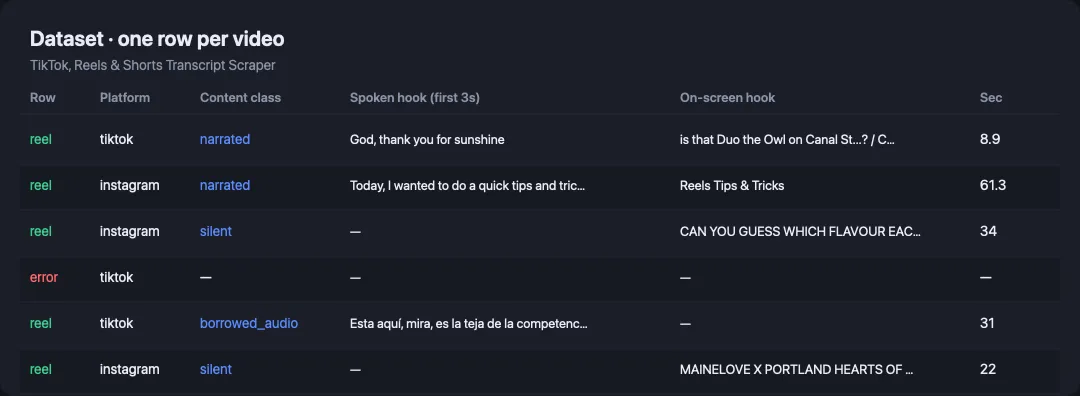
One row per video. A real row from a run on 11 November 2026 (natgeo profile, shortened):
And a licensed-music Reel, with subtitles switched on:
Ready views of the dataset
| View | Columns |
|---|---|
| Overview | Platform, class, language, length, first 3 seconds spoken and on screen, author, views, viral score, likes, opening lines, words, transcript |
| Hooks and calls to action | Hook text, source and type, opening lines, first 3 seconds, CTA text and type, speaking pace |
| Content library | Author, followers, posted, views, likes, ×-author's-usual, length, opening lines, hook, CTA, transcript, words, hashtags, audio, cover |
| AI breakdown | Hook and why it works, CTA, topic, format, audience, emotion, script template |
Error rows
A URL that cannot be processed returns a row of its own and is not billed:
Codes: download_failed, not_public, too_long, residential_too_costly, timeout, unsupported_url, audio_failed, transcription_failed, ocr_failed, processing_failed; for profiles profile_not_found, profile_empty, profile_failed; for searches search_empty, search_no_hashtag, search_empty_tag.
Use cases for Reel transcript data
A swipe file of hooks and scripts
Collect the openings of the best-performing Reels in your niche. openingLines, hookType and vsAuthorMedian side by side show which kinds of openings win for which creators — without watching a single video.
Competitive research
Feed a competitor's profile every week with "only new videos" on. You get what they said, what they wrote on screen, what they asked viewers to do and how each video did against their own usual.
Influencer and UGC vetting
Before paying a creator, read what they actually said about the products they promoted — captionMentions lists the brands tagged, the transcript holds the claims.
Content repurposing
Turn a back catalogue into blog posts, newsletters, threads and captions. srt gives ready subtitles for re-editing; onScreenTextJoined gives the written layer, which is what carries the message in silent videos.
Feeding an LLM or a RAG index
chunks come with start and end seconds, so an answer can cite the exact moment. The content class tells your prompt when the transcript is not the author's words — which stops a summarising agent from describing someone else's trending sound as this creator's message.
Trend and topic research
Search a hashtag or phrase, sort by views, and read what the top videos say. musicTitle and audioType show which sounds a trend runs on.
Accessibility and archiving
Transcripts, subtitles and on-screen text for captioning, search and long-term storage of a feed that platforms may take down.
Integrations
- API — run it from any language with the Apify API, or the Python and JavaScript clients.
- MCP — callable by Claude, ChatGPT, Cursor and other AI agents through the Apify MCP server, like any other Actor.
- No-code — Make, Zapier, n8n, Google Sheets, Airtable, Slack and Google Drive through Apify's integrations.
- Webhooks — trigger a downstream flow when a run finishes.
- Schedules — Apify Schedules plus "only new videos" turn it into a creator monitor.
Python
JavaScript
One HTTP call (curl)
n8n / Make / Zapier
Use the Apify node or module → Run Actor → lergassy/instagram-reels-transcript-scraper → Get dataset items. Map openingLines, transcriptText and views into a Google Sheet or a Notion database; with a daily schedule and "only new videos" on, the sheet fills itself.
For AI agents and LLMs — copy this block
The Actor is exposed as a tool on the Apify MCP server, so a Claude, ChatGPT or n8n agent can call it by name without any wrapper code of yours.
Limits, said plainly
- Instagram profiles: 12 newest Reels per run. That is what Instagram shows a logged-out visitor; older Reels need their own links. TikTok and YouTube profiles go up to your limit.
- Followers appear only when the platform includes them in what a logged-out visitor sees; most single Reel links and many profiles do not, so the field is often empty — we never guess it.
- Music title and pinned flag depend on what the platform includes for that video; they are empty, not guessed, when it does not.
- On-screen text is verified on Latin and Cyrillic scripts; other scripts are not claimed.
- Search goes through hashtags: Instagram does not show free-text search to logged-out visitors.
- Only public videos. Private accounts, close-friends stories and age-restricted Reels return a free error row.
❓ FAQ
How do I get the transcript of an Instagram Reel?
Paste the Reel link into 🔗 Instagram Reel URLs and press Start. The transcript, opening lines, hook and timestamps arrive in the dataset within seconds. No login and no app to install.
Is it legal to scrape Instagram Reels and TikTok?
This Actor reads only public videos, the same ones any visitor can open without logging in. Laws differ by country and by intended use; consult a lawyer before building a commercial product on scraped data.
How much does it cost to transcribe 1,000 reels?
About $7.50 for 30-second Reels and $6 for 15-second ones on the Free plan ($6.10 and $4.90 on Gold) — one event per video plus the seconds of speech actually recognised. Failed URLs are free, and music-only Reels can be left out at no cost.
What are "opening lines" and how are they different from the hook?
openingLines is literally what the author says first — the first sentence or two, from the first ~10 seconds of speech. hookText is the line that does the hooking, which is often the text on screen rather than the voice. Both are free.
Can I get SRT subtitles?
Yes: switch on 🎬 Add SRT and WebVTT subtitles and each row gets srt and vtt text fields built from the timestamps. Free.
Can I use it for RAG or a vector database?
Yes: set 🧩 Split transcript into chunks to a word count (for example 150). Each chunk carries start and end seconds, so search results point at the exact moment of the video.
Can I monitor a creator every day?
Yes: add the profile, switch on 🆕 Only videos not processed before, save it as a task and put the task on an Apify schedule. Each run pays only for videos published since the previous one; a day with nothing new costs nothing.
Does it skip music-only and silent Reels?
Their audio is never charged. Switch on 🔇 Leave out videos without speech and they are dropped from the table completely and not charged at all.
Does it return pinned Reels?
By default yes, flagged isPinned when Instagram says so. Switch on 📌 Skip pinned reels to take only the creator's latest uploads.
Can I use it with the Apify API?
Yes — it is a standard Actor. Start a run, poll it, read the dataset, or use run-sync-get-dataset-items for one call that returns the rows.
Can I use it through an MCP server?
Yes. It is exposed through Apify's MCP server and its input schema is written so an agent can call it correctly without reading this page.
Does it return one row per video?
Yes. One row per video, plus a separate free error row for any URL that failed. Nested arrays (transcript, onScreenText, chunks) come alongside flat string versions, so spreadsheets stay readable.
What languages does it handle?
Speech recognition is multilingual (90+ languages) and detects the language itself; set 🗣️ Spoken language only if a very short clip is misdetected. On-screen text is verified on Latin and Cyrillic scripts.
Why is the transcript empty on some videos?
Because the video has no speech. On music-only or wordless videos, speech-recognition models do not stay silent: they invent text such as "Subtitles by …", "Thanks for watching", "[Music]" or a word repeated. The Actor drops such invented lines using a list of known phrases in 15+ languages, the recogniser's own confidence scores, repeated-word checks, how many words fit in the time, and whether the script matches the caption. When nothing real is left, transcriptText is empty, transcriptSource is no-speech, language is null, and the audio of that video is not charged. This is intended behaviour, not a failure.
Is this an Instagram speech-to-text API?
Yes — with the plumbing already done. You send a public video URL over HTTP and get the recognised speech back as text with timestamps, no login, no cookies, no ffmpeg and no model of your own. Instagram Reels, TikTok and YouTube Shorts go through the same endpoint.
Can I get the burned-in captions, not just the audio?
Yes, and kept apart. Text written into the picture — caption cards, hard subtitles, meme text — is read from the frames when 🖼️ Read on-screen text is on and arrives in its own onScreenText field, so it never gets mixed into what the author said out loud.
Why do Instagram video URLs expire?
The media link Instagram hands out is signed and dies within hours, which is why a scraper that only returns a download URL leaves you with a dead link by the next morning. This Actor transcribes inside the run, so what you store is text — it does not expire. Cover image links (thumbnailUrl) expire too; download them if you keep them.
Does it need proxies?
No. It downloads only the audio track it needs (a few hundred kilobytes per Reel) and runs without residential proxies, which is why it is priced where it is. Only when Instagram refuses a video does it fall back to residential traffic, and only within what that video earns; a video that would cost more is skipped with a free residential_too_costly row. Each run's RUN_SUMMARY record shows the bytes downloaded.
What happens if I run it with an empty input?
It transcribes one example Reel, so you can see a full row before adding your own links.
Run health
When a run ends with many error rows, the Actor sends its developer the counts (rows delivered, error types, run ID) so the cause gets fixed fast; your input and results are never sent.
You might also like
Part of our speech-and-text toolkit — the Store only recommends within a category, so here they are:
| Actor | What it does |
|---|---|
| Whisper Transcriber | Any audio or video file to text, 90+ languages |
| YouTube Transcript Scraper | Transcripts from YouTube videos and playlists |
| SRT Subtitle Generator | Ready-to-upload subtitle files from any video |
| Audio Transcriber | Podcasts, calls and meetings to text |
| OCR Text Extractor | Text out of images and screenshots |
Use this Actor for short vertical video, where the message is split between the voice and the screen; use the others when you already have a file or a long-form video.
Your feedback
Found a video it handles badly, or missing a field you need? Open an issue on the Actor's Issues tab with the URL — that is the fastest way to get it fixed, and every issue gets a reply.


