

Instagram Reels Transcript Scraper 💰$7.5/1K — TikTok & Shorts
Pricing
from $2.50 / 1,000 videos
Instagram Reels Transcript Scraper 💰$7.5/1K — TikTok & Shorts
Instagram Reels, TikTok and YouTube Shorts to text: speech-to-text transcript with timestamps, burned-in captions, the 3-second hook, likes, views and a viral score vs the author's usual. No login. Watch creators on a schedule and pay only for new videos. Failed and private videos are free.
Pricing
from $2.50 / 1,000 videos
Rating
5.0
(2)
Developer

Matvey
Maintained by CommunityActor stats
0
Bookmarked
33
Total users
20
Monthly active users
a day ago
Last modified
Categories
Share
Instagram Reels Transcript Scraper turns public Instagram Reels into text — speech-to-text transcript with timestamps, the captions burned into the picture, and the first-3-second hook — without a login, cookies or the official API. Paste Reel links and get one clean row per video, or call it as an API from your own code, an n8n flow or an MCP-connected AI agent.
TikTok videos and YouTube Shorts work in the same run, so a mixed list of links is fine — one integration instead of three. Add a profile instead of links to watch a creator on a schedule and pay only for the videos published since your last run.
Tested head-to-head — 26 September 2026
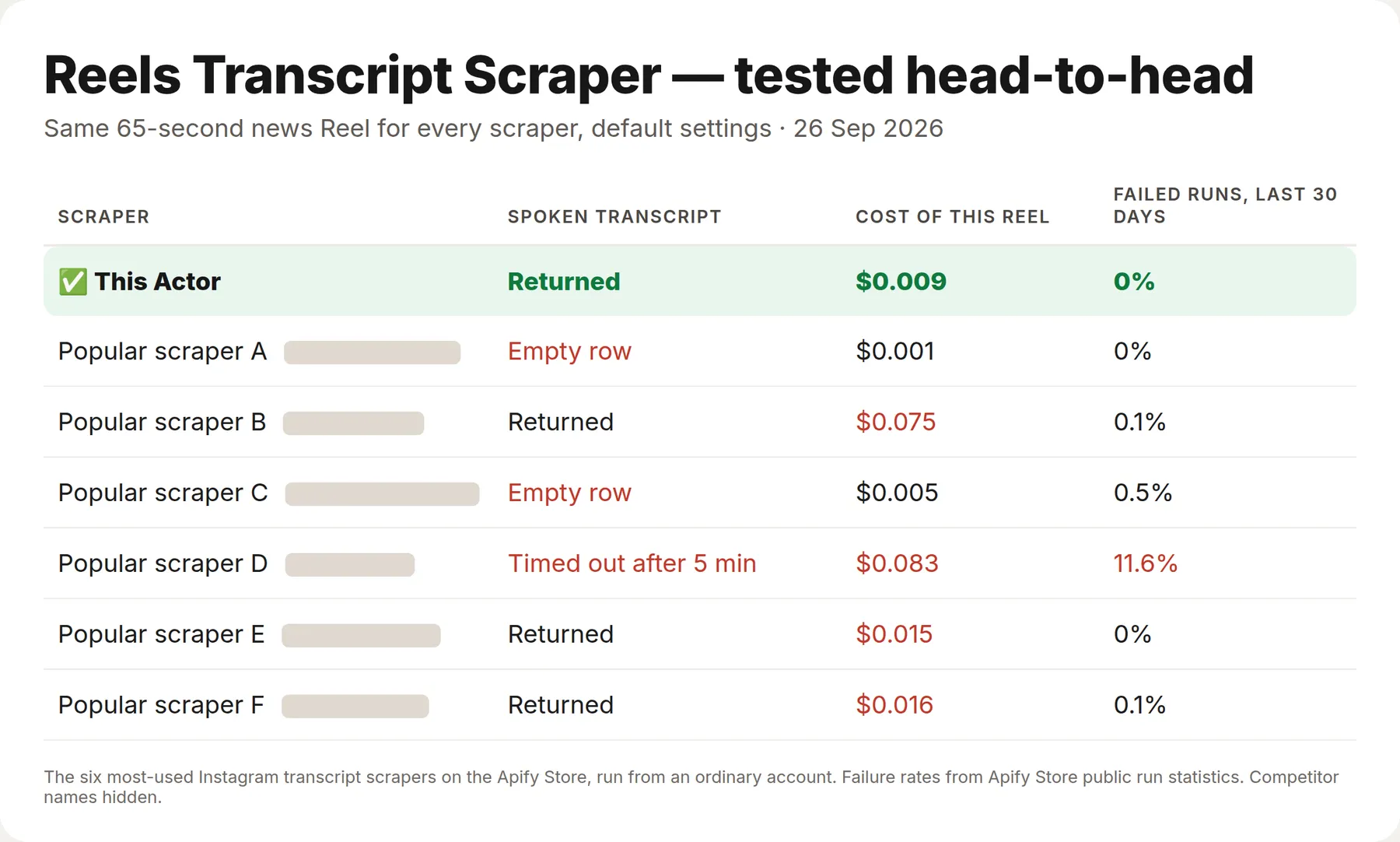
One public 65-second news Reel, run through the six most-used Instagram transcript Actors on the Apify Store from an ordinary account, every Actor on its default settings.
| This Actor | The six others | |
|---|---|---|
| Returned the spoken transcript | Yes | 3 of 6 (two returned an empty row, one ran out of time after 5 minutes) |
| Cost of this Reel | $0.009 at the prices of that day, $0.0135 at today's | $0.015–$0.075 among the three that returned it, at the prices of that day |
| Time per run | 26 s | 9–29 s among the three that returned it |
What is Instagram Reels Transcript Scraper?
Instagram Reels Transcript Scraper turns a short vertical video into structured text: the spoken transcript, the text written on screen, and the first three seconds of both — the hook. It works on Instagram Reels, TikTok videos and YouTube Shorts, with no login, no cookies and no official API needed.
Most transcript scrapers stop at the audio. In short-form video the audio is often not where the message is: in our test set of 26 real videos, only 69% carried a narrated script, 19% had no usable speech at all, and 12% ran on someone else's trending sound. 81% had text on screen. An actor that reads only the audio returns noise or nothing on roughly a third of a real feed.
This one reads both, tells them apart, and says which kind of video you gave it.
What data can Instagram Reels Transcript Scraper extract?
| Field | Example |
|---|---|
transcriptText | Today, I wanted to do a quick tips and tricks or best practices for posting reels… |
firstThreeSecondsSpeech | Today, I wanted to do a quick tips and tricks or best practices for |
onScreenText | Reels Tips & Tricks, No Watermarks, Under 3 Minutes, Add Music/Audio |
firstThreeSecondsOnScreen | Reels Tips & Tricks |
contentClass | narrated · borrowed_audio · silent · empty |
speechDetected, speechCoverage | true, 0.89 |
burnedInCaptionCount | 41 |
screenRecording | false |
language, durationSeconds, platform, videoId | en, 61.3, instagram, DFIWSVoy1UQ |
author, likes, comments, caption, postedAt | themidwesti, 6223, 90, …, 2026-08-28T00:27:36Z |
views (TikTok, YouTube) | 476800 |
vsAuthorMedian, isOutlier | 2.18, false |
Find the videos that went viral for their author
Send four or more videos from the same author — or simply add the profile — and every row gets vsAuthorMedian: how many times it beat that author's usual. 5 means five times the author's median. Anything at 3× or more is flagged isOutlier: true. So one run answers two questions at once: which videos broke out, and what was said and shown in them.
Measured on @duolingo, 25 September 2026: six newest TikToks, medians from 137 K to 477 K views; the best one scored 2.18×, none crossed 3×, the weakest was 0.17×.
TikTok is compared on views. Instagram Reels taken from a profile carry their view counts too and are compared on views; single Reel links, where Instagram hides views from logged-out visitors, are compared on likes (vsAuthorBasis says which). No login, no extra requests, no extra charge.
Long videos and on-screen text
On-screen text is read from at most 90 frames per video, spread evenly over its length — 1.5 frames a second on reels up to a minute, wider spacing on longer videos. Captions and titles stay on screen for two seconds or more, so they are still caught; the price per video stays the same.
Why on-screen text is separated from subtitles
Half the videos we measured carry burned-in subtitles that simply repeat the speech. Dumping every recognised string into one field means the same sentence appears twice and the actual title cards drown in it.
This actor separates them by two signals: how closely a line matches what is being said at that exact moment, and which horizontal band of the frame it lives in. On a labelled video with 54 text tracks the split came out with no errors. onScreenText therefore contains what the author wrote for the viewer; burnedInCaptionCount tells you how many subtitle tracks were removed.
Why the content class matters
Speech recognition models do not stay silent over music — they invent. On a wordless branded clip the model returned "We'll be right back.", and its own confidence score for that invention was 0.00 false positive — the metric that is supposed to catch this says nothing. So the class is decided from word density and how much of the clip speech actually covers.
| Class | What it means | What you get |
|---|---|---|
narrated | The voice carries the script | Transcript + on-screen text |
borrowed_audio | A trending sound or a clip from someone else — not the author's words | On-screen text; the audio is labelled, not passed off as a script |
silent | No speech; the meaning is in the captions | On-screen text only |
empty | Neither speech nor on-screen text | An explicit refusal instead of blank fields |
A looping trending sound is caught by its own repetition: when one line comes back word for word three times or more, it is a sound, not a script.
How much does it cost to extract Reel transcripts?
Pay-per-event, no subscription, and short clips are not billed as if they were long ones.
| Event | Until 7 Oct 2026 | From 7 Oct 2026 |
|---|---|---|
reel-processed — one video: transcript with timestamps, language, hook | $0.002 | $0.003 |
audio-10-seconds — each started 10 seconds of speech recognised | $0.001 | $0.0015 |
on-screen-text — one video read frame by frame for burned-in text | $0.06 | $0.06 |
From 7 October 2026 a 15-second TikTok costs $0.006, a 30-second Reel $0.0075 and a 60-second Short $0.012; a YouTube Short with its own captions costs $0.003. Apify plan discounts take up to a sixth off. Reading on-screen text is a separate switch and a separate charge, because it is a separate job: the video is downloaded and read frame by frame.
Failed URLs, videos above your duration limit and silent videos are never billed. A row you cannot use is a row you do not pay for.
Bulk export
This Actor is built for bulk jobs — put hundreds of URLs into one run, or call it from the API on a schedule. Videos are processed three at a time, and there is no fee per run, no fee per page and no proxy charge. Speech is billed in 10-second steps, not rounded up to whole minutes, so a 9-second TikTok never costs what a 59-second one does. 50,000 clips of 30 seconds cost $375 from 7 October 2026; 50,000 YouTube Shorts with captions cost $150.
Two things here that the alternatives do not do at all: three platforms in one run — TikTok, Instagram Reels and YouTube Shorts, one integration instead of three — and on-screen text read and separated from speech, so caption cards and hard subtitles do not get mixed into what the author actually said.
How to extract TikTok, Reels and Shorts transcripts
- Click Try for free.
- Paste one or more video URLs into 🔗 Reel, TikTok or Shorts URLs. The field comes prefilled with a working example, so you can just press Start.
- Press Start. Results appear in the dataset, one row per video.
⬇️ Input
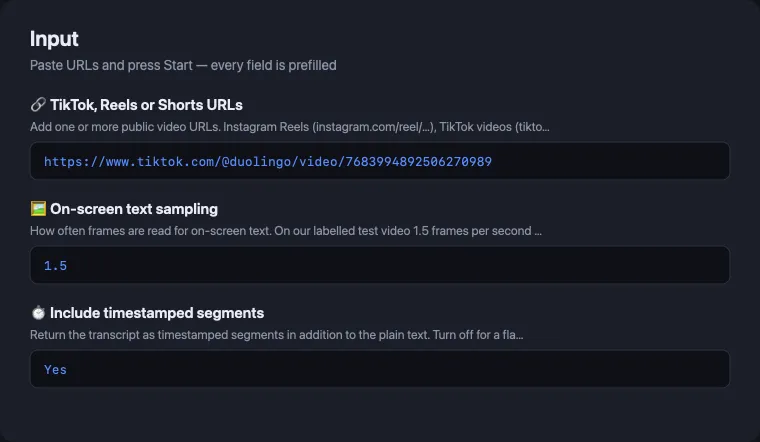
Video URLs
Public Instagram Reels, TikTok videos and YouTube Shorts. Private and deleted videos return an error row naming the reason.
On-screen text sampling
How many frames per second are read for on-screen text. On our labelled video, 1.5 frames per second found every caption card; 1 frame per second lost three of six. 1.5 is the default; raise it only for dense motion graphics.
Whole profiles, not just links
Paste an Instagram profile link (https://www.instagram.com/natgeo/) or just the Instagram username
(natgeo), a TikTok handle (@duolingo), a TikTok profile link or a YouTube channel into Whole profiles, set how many of
the newest videos you want, and the Actor collects the links itself.
Add a date in Only videos newer than to keep a weekly watch cheap: anything older is skipped
before it is downloaded, so it costs nothing.
Instagram shows logged-out visitors the 12 newest Reels of a public profile, so that is the most an Instagram profile gives per run (with their views, likes and comments); older Reels need their own links. A private or unknown profile returns one free error row. A profile link dropped into the URL field is understood too; you do not have to pick the right box.
Chain it to another Actor — no code
Already scraping Instagram, TikTok or YouTube with something else? Put that run's dataset ID
into 🔗 Take video links from another run's dataset and this Actor reads the links out of it
itself — url, postUrl, videoUrl, link, shortCode, or any other field that holds a video
link. A scraper plus this Actor becomes a two-step pipeline without a line of glue code.
Pick the dataset in the form rather than pasting an ID from memory: the field hands the run permission for that dataset, and a run cannot read a dataset it was not pointed at. If you would rather not share a dataset at all, paste the rows into 📋 Or paste the rows themselves — the same fields are scanned.
Separate watch lists, and a time limit you set
🗂️ Name of the watch list keeps a separate memory per scheduled task: competitors and
my-brand will not skip each other's videos, even when the same reel appears in both.
⏲️ Stop the run after N seconds is a soft deadline: when it passes, no new video is taken, everything already transcribed is delivered and the run ends green with an explanation. Videos that were not taken are not charged.
Every row says what it cost
Each data row carries charged, chargedEvents and chargeUsd — which events this row booked and
what it came to at your plan's prices. Free rows (errors, notices, skipped videos) carry
charged: false. No need to wait for the monthly invoice to understand the bill.
A ceiling for the whole run, and a summary row
🔢 Maximum videos in this run caps the whole run across links and profiles together, so a long list or five profiles cannot surprise you with the bill: everything above the ceiling is left out before it is downloaded and is not charged. The per-profile limit still works on top of it.
🧾 Add a free summary row appends one extra free row at the end with the run's totals — asked
for, transcribed, failed, skipped as already processed, skipped by the ceiling. It carries
"type": "notice", so a filter on type == "reel" keeps your data clean and scheduled runs still
get their one-line report.
Watch a creator on a schedule — pay only for new reels
Turn on 🆕 Only videos not processed before and the Actor remembers every video it has already transcribed for your account. A scheduled run on the same profile then transcribes only what was posted since the last run; everything else is skipped before it is downloaded and is not charged.
A run that finds nothing new ends with a free notice row and charges nothing, so a daily watch on a
creator who posts twice a week costs the price of two videos a week, not fourteen. The memory lives
in your own key-value store named reels-transcript-seen — clear it there if you want the same
videos transcribed again.
YouTube Shorts cost less than the rest
For YouTube the Actor takes the caption track YouTube has already made, instead of downloading the video and recognising speech. That means Shorts are billed at the video price alone, with no per-audio charge at all, and they come back in seconds.
⬆️ Output
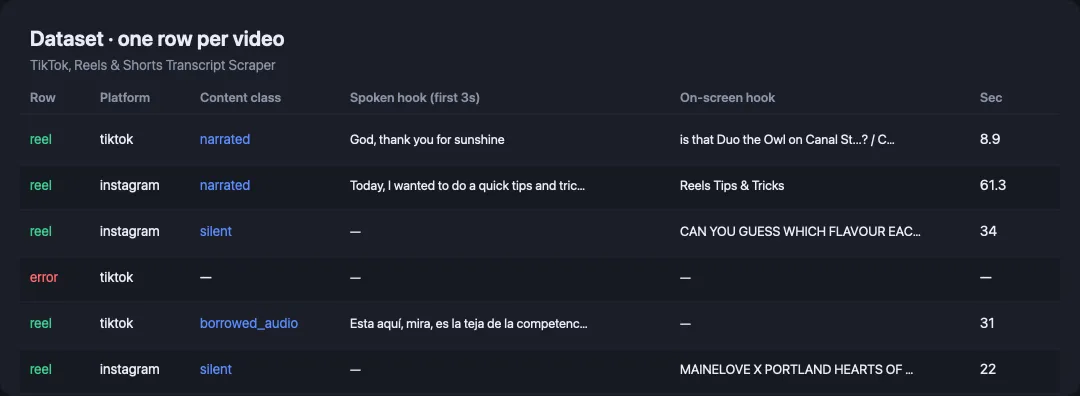
One row per video:
Error rows
A URL that cannot be processed returns a row of its own and is not billed:
Codes: download_failed, not_public, too_long, residential_too_costly, timeout, unsupported_url, audio_failed, transcription_failed, ocr_failed, processing_failed, and for profiles profile_not_found, profile_empty, profile_failed.
Use cases for Reel and TikTok transcript data
Competitive research
Feed a list of a competitor's videos and read their hooks side by side. firstThreeSecondsSpeech and firstThreeSecondsOnScreen are cut on the 3.0-second boundary, so the comparison is between what viewers actually received, not between opening sentences of different lengths.
Content repurposing
Turn a back catalogue into text for blog posts, newsletters and captions. onScreenTextJoined gives the written layer separately, which is what carries the message in silent videos.
Feeding an LLM or a RAG index
The output is flat, typed and one row per video. The content class tells your prompt when the transcript is not the author's words — which is what stops a summarising agent from confidently describing someone else's trending sound as this creator's message.
Accessibility and archiving
Transcripts and on-screen text for captioning, search and long-term storage of a feed that platforms may take down.
Integrations
- API: run it from any language with the Apify API, or the Python and JavaScript clients.
- MCP: callable by AI agents through the Apify MCP server, like any other Actor.
- No-code: Make, Zapier, n8n, Google Sheets, Slack through Apify's integrations.
- Webhooks: trigger a downstream run when a batch finishes.
For AI agents and LLMs — copy this block
Building an agent that needs the script of a short video? Give it this and nothing else:
The Actor is exposed as a tool on the Apify MCP server, so a Claude, ChatGPT or n8n agent can call it by name without any wrapper code of yours.
❓ FAQ
Is it legal to scrape Instagram Reels and TikTok?
This Actor reads only public videos, the same ones any visitor can open without logging in, and it does not collect personal profiles. Laws differ by country and by intended use; consult a lawyer before building a commercial product on scraped data.
How much does it cost to transcribe 1,000 reels?
From 7 October 2026 about $7.50 for 30-second clips and about $6 for 15-second ones (until then $5 and $4) — one event per video plus the seconds of speech actually recognised. Failed URLs are free.
Can I use it with the Apify API?
Yes — it is a standard Actor. Start a run, poll it, read the dataset, or use a webhook.
Can I use it through an MCP server?
Yes. It is exposed through Apify's MCP server and its input schema is written so an agent can call it correctly without reading this page.
Does it return one row per video?
Yes. One row per video, plus a separate error row for any URL that failed. Nested arrays (transcript, onScreenText) are provided alongside flat string versions so spreadsheets stay readable.
What languages does it handle?
Speech recognition is multilingual. On-screen text has been verified on Latin and Cyrillic scripts; other scripts are not claimed.
Why is the transcript empty on some videos?
Because the video has no speech. Rather than return an invented sentence, the Actor sets speechDetected to false and tells you the class. This is intended behaviour, not a failure.
Is this an Instagram speech-to-text API?
Yes — that is exactly what it is, with the plumbing already done. You send a public video URL over HTTP and get the recognised speech back as text with timestamps, no login, no cookies, no ffmpeg and no model of your own. Instagram Reels, TikTok and YouTube Shorts go through the same endpoint.
Can I get the subtitles and burned-in captions, not just the audio?
Both, and kept apart. Where a platform already has a caption track, the Actor takes it (that is why
YouTube Shorts cost less and come back in seconds). Text written into the picture — caption cards,
hard subtitles, meme text — is read frame by frame when 🖼️ Read on-screen text is on and arrives
in its own onScreenText field, so it never gets mixed into what the author said out loud.
Why do Instagram video URLs expire?
The media link Instagram hands out is signed and dies within hours, which is why a scraper that only returns a download URL leaves you with a dead link by the next morning. This Actor downloads and transcribes inside the run, so what you store is text — it does not expire.
Does it need proxies?
No. It downloads only the audio track it needs (a few hundred kilobytes per Reel, not the whole video) and runs without residential proxies, which is why extraction is priced where it is. Only when Instagram refuses a video does it fall back to residential traffic, and only within what that video earns; a video that would cost more is skipped with a free residential_too_costly row. A Reel the author has restricted, made private or deleted comes back as a free error row straight away — the Actor does not burn paid traffic retrying something that cannot be opened. Each run's RUN_SUMMARY record shows the bytes downloaded.
Why is a music-only Reel's transcript empty instead of "Thank you."?
Speech-recognition models invent short phrases like "Thank you." over music. The Actor recognises them, returns an empty transcript with transcriptSource: no-speech, and does not charge for audio on that video.
Run health
When a run ends with many error rows, the Actor sends its developer the counts (rows delivered, error types, run ID) so the cause gets fixed fast; your input and results are never sent.
You might also like
Part of our speech-and-text toolkit — the Store only recommends within a category, so here they are:
| Actor | What it does |
|---|---|
| Whisper Transcriber | Any audio or video file to text, 90+ languages |
| YouTube Transcript Scraper | Transcripts from YouTube videos and playlists |
| SRT Subtitle Generator | Ready-to-upload subtitle files from any video |
| Audio Transcriber | Podcasts, calls and meetings to text |
| OCR Text Extractor | Text out of images and screenshots |
Use this Actor for short vertical video, where the message is split between the voice and the screen; use the others when you already have a file or a long-form video.
Your feedback
Found a video it handles badly? Open an issue on the Actor's Issues tab with the URL — that is the fastest way to get it fixed, and every issue gets a reply.


