

Threads Replies Scraper — Conversations & Comments
Pricing
from $1.40 / 1,000 posts
Threads Replies Scraper — Conversations & Comments
The replies side of Threads as rows: every reply an account wrote with the post it answered, every reply under a post URL, and reposts. Text, author, time, engagement, media, links and reply context on each row. No login, no browser.
Pricing
from $1.40 / 1,000 posts
Rating
5.0
(1)
Developer

Matvey
Maintained by CommunityActor stats
0
Bookmarked
67
Total users
38
Monthly active users
18 hours ago
Last modified
Categories
Share
Threads Replies Scraper covers the conversation side of Meta Threads: every reply an account wrote, each carrying the post it answered; every reply under a post URL you give it; and the posts an account reposted. Each row has text, author, time, likes, replies, reposts and quotes, images and videos, links, mentions and the reply context. No login, no cookies, no browser.
$2 per 1,000 posts on the Apify free plan — you pay for delivered rows, nothing else. Higher Apify plans pay less, down to $1.4.

Paste usernames or post URLs, click Start, export as JSON, CSV or Excel — or call it from the API and from AI agents.
Tested head-to-head — 26 September 2026
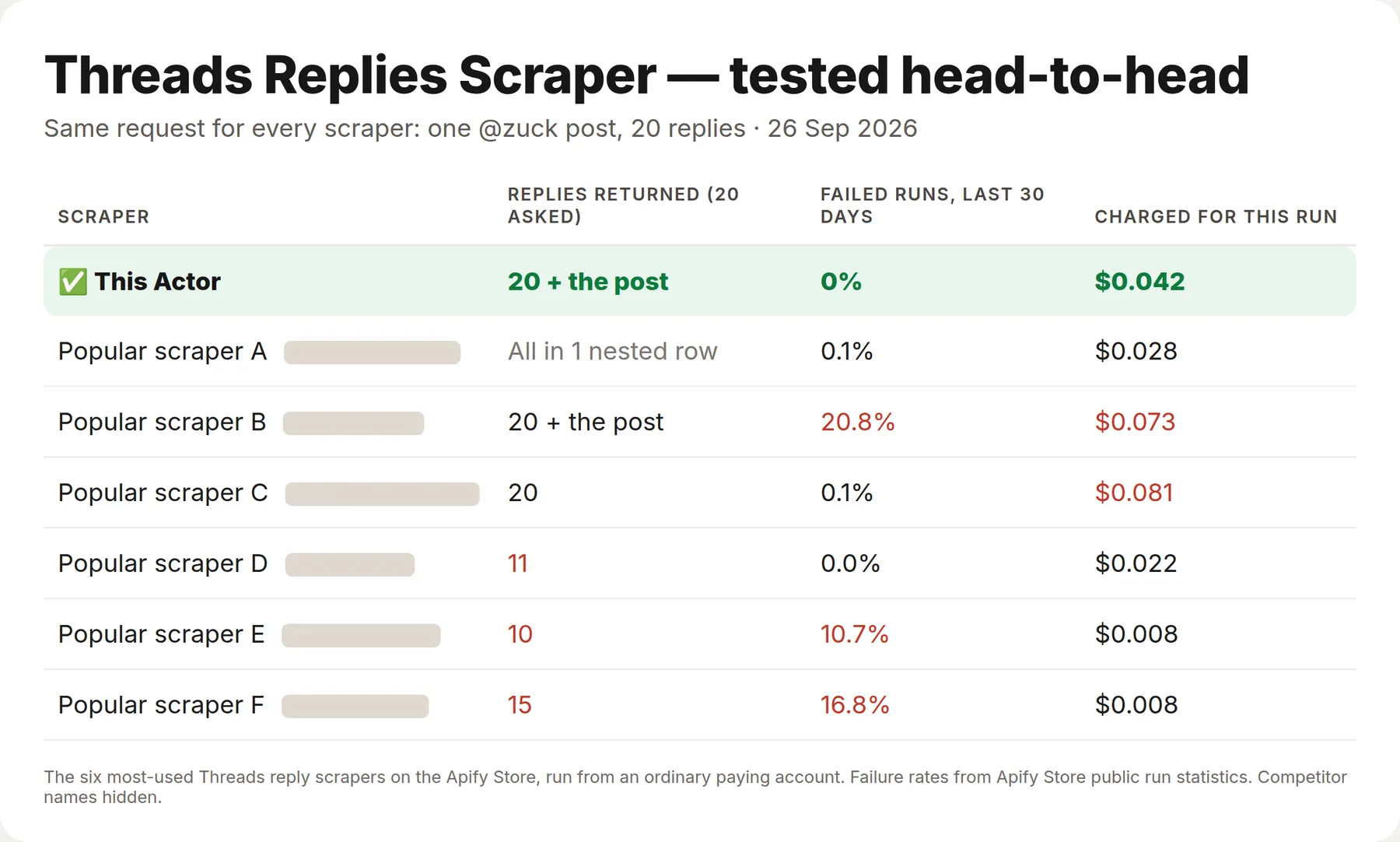
The same request went to this Actor and to the six most-used Threads reply scrapers on the Apify Store, from an ordinary paying account: one post by @zuck, 20 replies.
| This Actor | The six others | |
|---|---|---|
| Replies returned (20 asked) | 20, plus the post itself | 10–20; one packs everything into a single nested row |
| Failed runs, last 30 days (Apify Store stats) | 0% | 0–20.8% — three of six above 10% |
| Charged for this run | $0.042 | $0.008–0.081 |
Two scrapers cost less for this request, and both returned 10–15 replies instead of 20.
What is it for?
Reading what a community actually answers under a post, support and reputation monitoring, sentiment work that needs the comments and not only the original post, conversation datasets for model training, and AI agents asked "what did people reply to this".
| Mode | You give | You get |
|---|---|---|
| Replies | usernames | replies the account wrote, each with the post it answered |
| Thread | post URLs | the post with its self-thread and all its replies |
| Reposts | usernames | posts the account reposted, with the original inline |
What data does it return?
| Field | Example |
|---|---|
id, code, url | 3977518562965884838 · Dcy_A8pGo-m · https://www.threads.net/@zuck/post/Dcy_A8pGo-m |
text, language, createdAt | "totally agree, the latency is the hard part" · en · 2026-09-02T19:26:23.000Z |
username, userId, fullName, isVerified, profileUrl | who wrote the reply |
likeCount, replyCount, repostCount, quoteCount, shareCount | engagement on the reply itself |
viewCount | the views Threads prints under the post, read from its own page; null while not public yet |
isReply, replyToUsername, replyToUserId, rootPostUsername | who is being answered |
parentPostId, parentPostUrl, threadId, positionInThread, threadLength | where the reply sits in the conversation |
mediaType, imageUrl, videoUrl, images[], videos[] | media attached to the reply |
hashtags, mentions, urls, linkPreview | ["ai"] · ["natgeo"] · ["https://…"] |
isRepost, repostedPost, repostedBy | the original post behind a repost |
source | replies · reply-context · thread · reposts |
How much does it cost?
Pay per row, no start fee, and error rows are free. There is no browser here, so platform usage is close to zero.
| Row | Price |
|---|---|
| Post or reply row | $0.002 — 1,000 replies for $2 |
Profile (when includeProfile is on) | $0.004 |
Larger monthly plans get 10–30 % off.
Bulk export: what 50,000 posts actually cost
This Actor is built for bulk jobs — put hundreds of inputs into one run, or call it from the API on a schedule. There is no fee per run, no fee per page and no proxy charge: you pay for the rows you keep, and error rows are free. That is what decides the bill once you pull a whole market rather than a single account.
| Job | This Actor | Most-used Actor in this category |
|---|---|---|
| 50,000 posts across 100 runs | $100 | $127 |
Checked on the Apify Store on 21 September 2026 against the Actor with the most monthly users in this category; its per-run fee is counted in, as ours would be if we charged one. Some Actors here ask less per row — this table compares against the one buyers actually use most.
How to scrape Threads replies
- Choose 🧭 What to get: replies (what an account replies to others), reposts (what it amplifies) or thread (the full conversation under a post).
- For replies and reposts, put accounts in 👤 Usernames. For thread mode, paste the post links into 🔗 Post URLs.
- Set 💬 Replies per post in thread mode — a busy post can carry thousands, and you are billed per row.
- Click Start, then export as JSON, CSV or Excel, or read the dataset from the API.
⬇️ Input
What an account replies to elsewhere:
Complaints only, from a brand's replies:
Every input field
| Field | What it does |
|---|---|
mode | replies, reposts or thread — the account's replies, its reposts, or a post's conversation. |
usernames | Accounts for replies and reposts mode. |
postUrls | Post links for thread mode (/@user/post/CODE or a share link threads.com/share/CODE). A profile link is not a post link. |
startUrls | Mixed Threads links; post URLs are routed to thread mode automatically. |
maxPosts | Rows per account in replies and reposts mode. |
maxRepliesPerPost | How deep to read one conversation. |
postedAfter | Keep only rows newer than this date. |
filterKeywords | Keep only rows whose text contains one of these words. Applied before billing. |
includeProfile | Add a profile row for each author — followers, bio, contacts. |
includeProfileDetails | Open each author's profile page for the full set of fields. |
includeViews | Fill viewCount from each post's page (on by default, no extra charge). Turn off for the fastest bulk runs. |
maxItems | Ceiling on rows for the whole run. |
⬆️ Output
Reposts carry the original author and text, so you can tell an account's own words from what it amplified. Failures arrive as type: "error" rows and are free.
Use cases
Customer complaints and support
Read a brand's replies with filterKeywords set to refund, broken, delay — the complaints arrive as a table instead of a scroll.
Community and conversation analysis
Thread mode returns a whole discussion under one post, with each reply's author and engagement, ready for sentiment work.
Finding engaged people
Reply authors are the active part of an audience. Add includeProfile and you get their follower counts and contacts alongside.
Competitor listening
Reposts show what a competitor chooses to amplify — often a better signal of strategy than what they write themselves.
AI agents
An agent asked "what did people say under this post" gets the conversation as rows, with no browser and no login.
🤖 For AI agents and LLM apps
Compact reference for agents calling this Actor through the Apify MCP server or the API (lergassy/threads-replies-scraper).
Purpose: read the conversation layer of Threads — replies under a post, an account's replies elsewhere, and its reposts.
Minimal input:
Behaviours an agent should know:
- Thread mode needs a post URL (
/@user/post/CODE, or the app's share linkthreads.com/share/CODE). A profile URL will not do — use replies mode for an account. maxRepliesPerPostis the real cost lever: a popular post can carry thousands of replies, each one a billed row.isReply,replyToUsernameandrootPostUrlplace every row in the conversation without a second lookup.- Deleted or hidden replies are simply absent; Threads does not serve them to a visitor.
filterKeywordsruns before billing, so a narrow question costs less than a broad one.- Error rows are free — check
typebefore reading text fields.
Use via API
Run this Actor from your own code or pipeline. Get your token in Apify Console → Settings → API & Integrations. Every input field below has the same name as in the JSON tab of the input form.
Python
JavaScript
cURL (runs the Actor and returns the results in one call)
Limitations, stated plainly
- A logged-out visitor's view. Threads paginates replies and does not show everything under very large posts; the Actor reads what is served.
- No reply search. You cannot ask for "all replies mentioning X across Threads" — start from an account or a post, then filter.
- Private accounts contribute nothing. Their replies are not public.
- Keyword and hashtag search lives elsewhere — see Threads Search Scraper.
- Refusals. When Threads refuses a request, it is retried on a new address and then once through a residential address at our cost. If Threads keeps refusing most of a run, the Actor pauses once, then stops instead of grinding: the posts and accounts it did not get to are listed in the
NOT_ATTEMPTEDrecord and in the status message (not charged — run them again later). Rows of a large conversation are written as they arrive, so a stopped run keeps everything it was charged for.
Run health
When a run ends with many error rows, the Actor sends its developer the counts (rows delivered, error types, run ID) so the cause gets fixed fast; your input and results are never sent.
Integrations
Runs from the Apify API, the Python and JavaScript clients, and from n8n, Make or Zapier through the Apify app. Schedule it, send rows to Google Sheets, a Slack channel or a webhook, or let an agent call it through the Apify MCP server.
❓ FAQ
Do I need a Threads account?
No. Everything here is public and read without logging in.
What is the difference between replies mode and thread mode?
Replies mode starts from an account and returns what it wrote under other people's posts. Thread mode starts from a post and returns the conversation under it.
Why does my profile URL not work in thread mode?
Because a thread is a post. Use the /@user/post/CODE link, or switch to replies mode and pass the username.
Can I get every reply of a huge post?
You get what Threads serves to a visitor, up to maxRepliesPerPost. Very large threads are paginated and the tail is not always public.
How do I keep only complaints?
Put your words in filterKeywords. Rows that do not contain them are dropped before you are charged.
Are reposts billed like replies?
Yes, one row each, at the same post price. The row carries the original author so you can separate them afterwards.
Can I get the profile of everyone who replied?
Turn on includeProfile. That adds one profile row per author at the profile price.
Is scraping Threads replies legal?
The Actor reads public pages at a normal rate without logging in, which is ordinary public-data collection. Replies are personal data, so how you store and use them is your responsibility.
You might also like
| Actor | What it does |
|---|---|
| Threads Scraper | Search, posts, replies and profiles in one Actor |
| Threads Search Scraper | Keyword and hashtag search with filters |
| Threads Profile Scraper | Full profiles with followers, bio and contacts |
| YouTube Comments Scraper | The same conversation layer for YouTube |
Also known as
People look for this Actor as a Threads replies scraper, Threads comments scraper, Threads conversation API, Threads thread scraper, Threads reposts scraper and a Threads community analysis tool.
Notes
Public conversations only. How deep a thread goes is Threads' decision: maxRepliesPerPost caps how many replies are read under one post, and maxPosts caps the run.
Need an account's own posts, its profile and contacts, or posts by keyword? Those live in Threads Profile Scraper, Threads Search Scraper and the all-in-one Threads Scraper.


