
Shopee Scraper - Product Data, Prices & Discounts, 11 Markets
Pricing
from $0.28 / 1,000 products
Shopee Scraper - Product Data, Prices & Discounts, 11 Markets
Shopee scraper and Shopee API alternative for product data from all 11 marketplaces: price, original price, discount, rating, shop name and rating, seller city, promo labels, plus product detail with description, brand and gallery. Indonesia, Vietnam, Thailand, Brazil and more. No browser or login.
Pricing
from $0.28 / 1,000 products
Rating
5.0
(3)
Developer

Matvey
Maintained by CommunityActor stats
0
Bookmarked
476
Total users
188
Monthly active users
15 hours ago
Last modified
Categories
Share
Shopee Scraper is an unofficial Shopee API for Shopee product data: it scrapes public listings from all 11 Shopee marketplaces — Indonesia, Singapore, Malaysia, Philippines, Thailand, Vietnam, Taiwan, Brazil, Mexico, Colombia and Chile — without the official API and without running a browser. Get product cards with price, original price, discount, rating, shop name and rating, seller city and promo labels from any keyword search, category or shop, plus full product detail: description, brand, image gallery, category path and seller reputation. Costs $0.40 per 1,000 products ($0.70 per 1,000 full product pages), with no fee per run and no charge for error rows. No login, no API key, no Shopee developer account.
Use it as a Shopee product scraper for price monitoring and price comparison across countries, or as a Shopee data feed for market research. Export to JSON, CSV or Excel, call it from the API, schedule runs, or plug it into n8n, Make, Zapier, Google Sheets or an AI agent through MCP.
Who this is not for
Said up front so you do not pay to find out:
- Stock levels and units sold. Shopee serves neither to a visitor who is not logged in — not on search cards, not on shop pages, not on product pages, and its product API refuses the request (re-checked on Singapore and Indonesia, 22 October 2026). So there is no
minSoldfilter and no stock field. - Prices converted to your currency. Every price stays in the marketplace's own currency. Comparing
priceacross countries without converting it yourself will give you nonsense. - Anything behind a login. Vouchers, member prices, chat with the seller, order history. This Actor never logs in with anyone's account.
- Buying or ordering. It reads the catalogue; it does not place orders.
If what you need is products, prices, ratings and seller reputation across Shopee's Southeast Asian marketplaces — that is exactly what this is.
Tested head-to-head — 24 September 2026
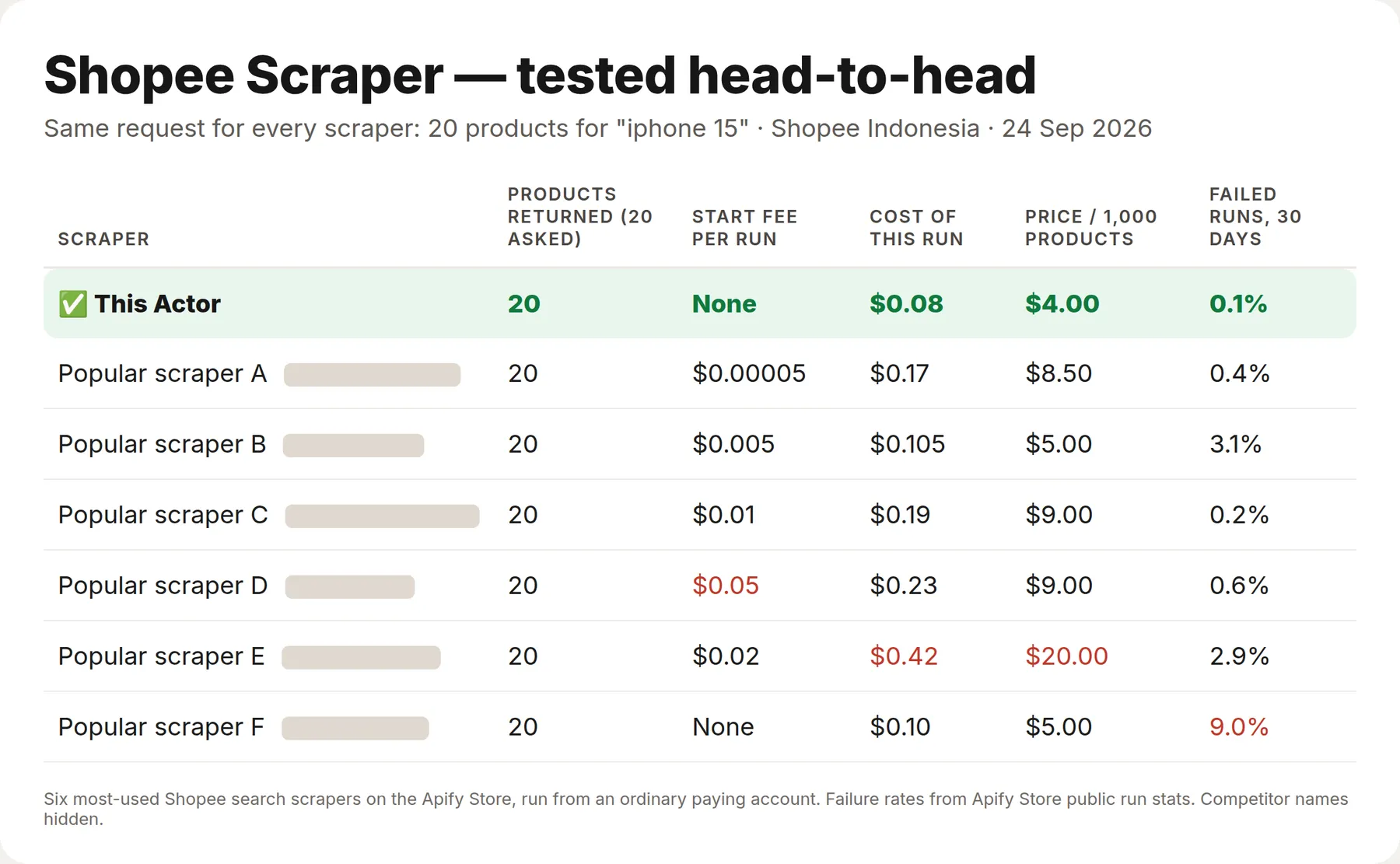
Same search for every Actor — 20 products for "iphone 15" on Shopee Indonesia — run against the six most-used Shopee scrapers on the Apify Store, from an ordinary paying account. All seven returned 20 products. Prices below are as measured on that day; our price has since dropped to $0.40 per 1,000 products (from 19 October 2026).
| This Actor | The six others | |
|---|---|---|
| Price per 1,000 products | $4 (now $0.40) | $5–20 |
| Start fee per run | None | 5 of 6 charge one (up to $0.05) |
| Cost of this 20-product run | $0.08 (now $0.008) | $0.10–0.42 |
| Failed runs, last 30 days (Store stats) | 0.1% | 0.2–9.0% |
What is Shopee Scraper?
Shopee is the largest e-commerce marketplace in Southeast Asia and one of the fastest growing in Latin America. It has no public product API, and in mid-2026 Shopee moved every product page to a client-rendered app whose internal API is guarded by a JavaScript-signed token. Because of that, most Shopee scrapers today return only what a product card shows and report description, brand and gallery as "browser only".
This Actor takes the other route: it reads the server-rendered version of the page that Shopee returns to crawlers. Listing pages carry the full product card — title, price, original price, discount, rating, shipping location and badges — over plain HTTP, with no browser and no token, so a run of 40 products costs a fraction of a cent and finishes in under a minute.
| Mode | What you get | Input |
|---|---|---|
| 🔍 Products from search | Product cards: title, price, original price, discount %, rating, shipping location, badges, image, position | keywords, search URLs, category URLs |
| 📦 Product details | Category path, gallery size and, when Shopee serves its structured record, description, brand, price, availability, rating count and the seller with rating and response rate | product URLs or shopId/itemId |
| 🏪 Shop | Shop profile (name, username, rating, rating count, product count, logo) and the products on its page | shop URL or username |
Every row carries country, marketplace, currency, shopId and itemId, so a single dataset can hold several countries at once.
Supported Shopee marketplaces
| Country | Code | Domain | Currency |
|---|---|---|---|
| 🇮🇩 Indonesia | ID | shopee.co.id | IDR |
| 🇸🇬 Singapore | SG | shopee.sg | SGD |
| 🇲🇾 Malaysia | MY | shopee.com.my | MYR |
| 🇵🇭 Philippines | PH | shopee.ph | PHP |
| 🇹🇭 Thailand | TH | shopee.co.th | THB |
| 🇻🇳 Vietnam | VN | shopee.vn | VND |
| 🇹🇼 Taiwan | TW | shopee.tw | TWD |
| 🇧🇷 Brazil | BR | shopee.com.br | BRL |
| 🇲🇽 Mexico | MX | shopee.com.mx | MXN |
| 🇨🇴 Colombia | CO | shopee.com.co | COP |
| 🇨🇱 Chile | CL | shopee.cl | CLP |
Prices are returned in the marketplace's own currency and are never converted.
What data can Shopee Scraper extract?
🔍 Product cards
| Field | Example |
|---|---|
title | Apple iPhone 15 128GB, Pink |
price / originalPrice / discountPercent | 12499000 / 14499000 / 14 |
currency | IDR |
rating / ratingCount | 5 / 23673 (review count: when the product page publishes it, about half of products) |
shopName / shopUsername / shopUrl | Digimap Official Shop / digimapofficial / shop link |
shopRating / shopRatingCount | 4.94 / 159597 |
brand / priceMin / priceMax | Apple / 15499000 / 16999000 (variant price range, when published) |
location | Jakarta Barat |
labels | ["Murah Mantap", "Garansi Harga Terbaik"] |
shopId / itemId | 241308147 / 22982495280 |
url / imageUrl | product link, main picture |
position / page / searchTerm | 1 / 0 / iphone 15 |
country / marketplace | ID / Indonesia |
Shop name and shop rating come from each shop's own page, review count, brand and price range from the product page — one extra request per card, no extra charge, on by default (includeShopAndReviews; turn it off for the fastest runs). Units sold are not available: Shopee no longer shows them to visitors who are not logged in (checked on Indonesia, Vietnam and Thailand, September 2026), and this Actor never logs in with anyone's account.
📦 Product details
When Shopee serves the structured product record for a page, the row carries description (the full seller description, thousands of characters), brand, price, originalPrice, availability, condition, rating, ratingCount, images, imageCount, breadcrumb, categoryPath and a seller object with name, username, url, logo, rating, ratingCount, productCount, chatResponse and location.
Shopee leaves that record out for some products on every request. For those the Actor looks the product up in search by its own title, inside its own shop, and fills price, originalPrice, discountPercent, rating, location and the seller from the product's search card and shop page. Such rows carry priceSource: "search-card" and are billed as a search card, not as a full product page; only description and brand stay empty, because Shopee does not publish them for that product. If even the search card cannot be found, the row comes back free with partial: true and a note.
🏪 Shops
name, username, url, rating, ratingCount, productCount, logo, country, plus the products listed on the shop page as normal product rows.
How much does it cost to scrape Shopee?
The Actor uses Apify's pay-per-event pricing, so you pay for results and nothing per page or per proxy gigabyte. Error rows are never charged.
| Event | Price | Per 1,000 |
|---|---|---|
| Product (search card, category, shop) | $0.0004 | $0.40 |
| Product detail (product page) | $0.0007 | $0.70 |
Because no browser is involved, a run of 40 products finishes in well under a minute and costs a fraction of a cent in platform usage. The Apify Free plan ($5 monthly credit) is enough for roughly 12,500 product cards or 7,100 full product records every month. Bronze, Silver and Gold Store tiers get a discount on top.
Bulk export: what 50,000 products actually cost
This Actor is built for bulk jobs — put hundreds of inputs into one run, or call it from the API on a schedule. There is no fee per run, no fee per page and no proxy charge: you pay for the rows you keep, and error rows are free. That is what decides the bill once you pull a whole market rather than a single store.
| Job | This Actor | Most-used Actor in this category |
|---|---|---|
| 50,000 products across 100 runs | $20 | $425.01 |
Our price is the current one (from 19 October 2026); the competitor's was checked on the Apify Store on 24 September 2026 against the Actor with the most monthly users in this category; its per-run fee is counted in, as ours would be if we charged one. Some Actors here ask less per row — this table compares against the one buyers actually use most.
How to scrape Shopee
- Open Shopee Scraper on Apify and click Try for free.
- Choose What to scrape — for example Products from search.
- Pick the Country (Indonesia by default).
- Enter Search keywords, or paste Shopee URLs: product links, search results, category pages or shops. Links from different countries can be mixed in one run.
- Set Max products, optionally turn on Fetch full product details, and click Start.
- Open the Output tab and download the dataset as JSON, CSV, Excel or XML, or read it through the API.
⬇️ Input
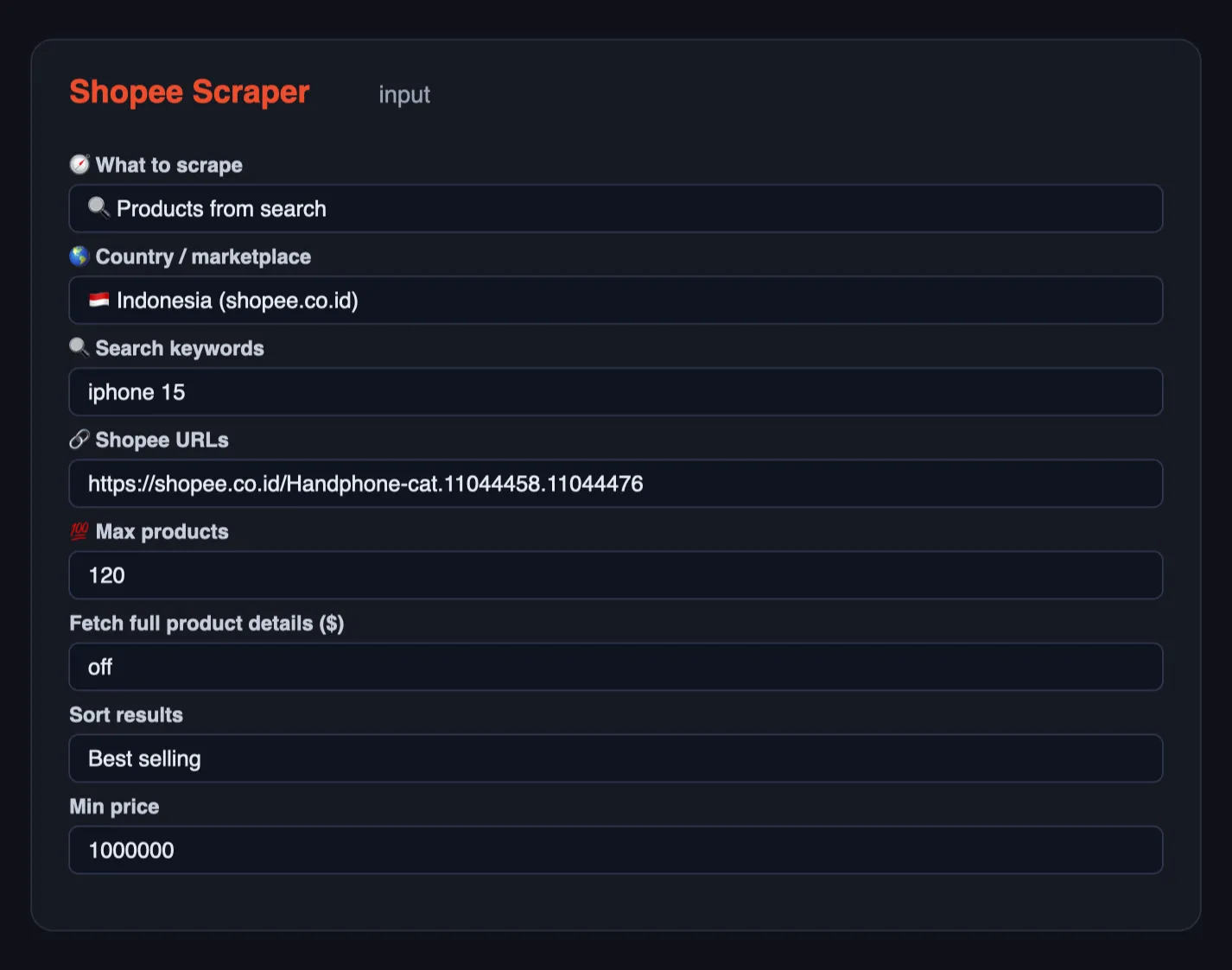
Search Indonesia for two keywords, best selling first:
Full detail for specific products (any country, product URL or /product/shopId/itemId):
A category page in Vietnam and a shop in Singapore in one run:
Search plus enrichment, where every card is opened for its full record:
Filters
Filters apply to keyword searches, pasted search URLs and category pages (a category page is read through Shopee's search for that category, because the category page itself ignores filters). Product and shop links are returned as they are.
Most filters are Shopee's own search filters: they go to Shopee with the search, Shopee returns only matching products, and nothing extra is read or charged. A few are checked on each card after download: products that fail are dropped and not charged, and the run reads further pages to fill maxItems. When the after-download checks leave few matches, a search stops once it has read 3 or more pages averaging fewer than 3 matching products per page, and says so in the log; if nothing matched at all you get one free notice row explaining which filters were applied.
| Input | What it keeps | How it is applied |
|---|---|---|
sortBy | relevancy, sales (best selling), latest, price_asc, price_desc | Shopee |
minPrice / maxPrice | price range in the marketplace currency | Shopee, then the price shown on each card is checked |
minRating | rating at least this (0–5) | Shopee (whole stars), then exact value checked on each card |
officialShopOnly | Shopee Mall stores | Shopee |
preferredSellerOnly | Preferred / Preferred+ sellers (Star / Star+ in Indonesia) | Shopee |
freeShippingOnly | free shipping | Shopee |
codAvailableOnly | cash on delivery | Shopee |
discountedOnly | discounted right now | Shopee, then the discount is checked on each card |
withVideoOnly | products with a video | Shopee |
condition | new or used | Shopee |
shippedFrom | a location from Shopee's "Shipped From" list, e.g. DKI Jakarta, Jabodetabek, Singapore, Mainland China | Shopee; an unknown name skips that search with a free notice listing the valid ones |
brand | one brand, e.g. Spigen | Shopee's brand filter when it lists the brand for your search; otherwise the brand name is matched in the title (after download) |
Filters combine the way they do on Shopee: Mall and Preferred together mean "Mall or Preferred" (they are one "shop type" group on Shopee), everything else must all match.
Not available: stock and units sold. Shopee does not put them in any page it serves without a login: not on search cards, shop pages or product pages, and its product API refuses requests without a signed app token (re-checked on Singapore and Indonesia, 22 October 2026). So there is no minSold filter and no stock field; this Actor never logs in with anyone's account.
⬆️ Output
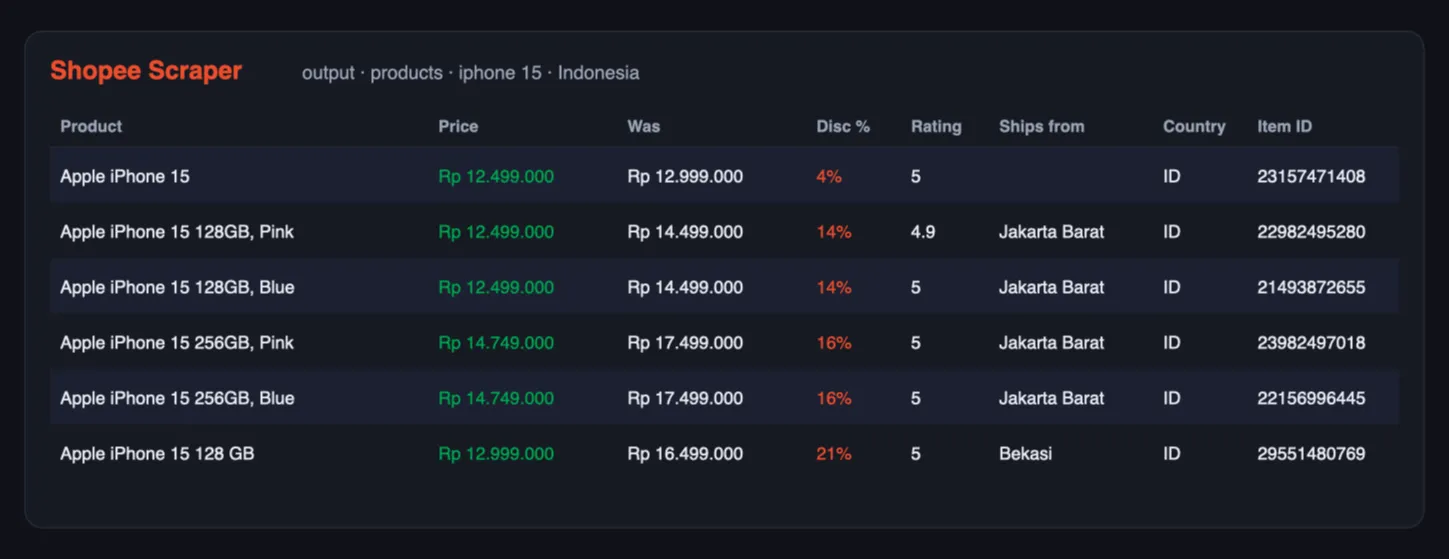
One product card:
One product detail (description shortened here):
Rows carry a type (product, product_detail, shop, error), so one dataset can be filtered in a spreadsheet or in code. Pages that fail are written as error rows with the URL and the reason instead of disappearing silently.
Use cases for Shopee data
Price monitoring and repricing
Track price, originalPrice and discountPercent for your own listings and your competitors' on a daily schedule, and feed the dataset into Sheets or your repricing tool.
Market research in Southeast Asia
Search a category across Indonesia, Vietnam, Thailand and the Philippines in one run and compare price levels, discount depth and ratings per market.
Product research and sourcing
Rating counts and discount depth show what actually moves. Full product detail adds the description and brand, so you can shortlist suppliers before contacting them.
Seller and shop intelligence
Shop mode returns the shop rating, the number of ratings and the product count, so you can size up a competitor or qualify a supplier.
Catalog enrichment
Description, brand, breadcrumb and the image gallery are enough to build product pages or enrich an existing catalog.
AI agents and RAG
Flat rows, literal field names and only optional inputs make this Actor easy to call from an agent through the Apify MCP server.
Integrations
- API — start a run and read the dataset with any HTTP client:
- JavaScript —
npm i apify-client, thenclient.actor('lergassy/shopee-scraper').call(input). - n8n, Make, Zapier, Google Sheets, Airtable, Slack, webhooks — through the standard Apify integrations.
- MCP — add the Apify MCP server to Claude, ChatGPT or Cursor and let the agent call
lergassy/shopee-scraperwith a keyword and a country.
Errors and troubleshooting
| What you see | What it means | Fix |
|---|---|---|
priceSource: "search-card" on a product row | Shopee publishes no full record for that product; price, rating and seller came from its search card | Nothing to fix — description and brand are simply not published for it |
partial: true on a product row | Neither the product record nor its search card could be read | Re-run the URL; the row was not charged |
One notice row and nothing else | Product details or Shop mode was chosen with keywords but no Shopee links — those modes read links only | Paste product or shop links, or switch What to scrape to Products from search; the run was not charged |
error rows for some URLs | The page stayed unavailable after retries | Re-run those URLs; the Actor rotates proxies and usually succeeds on a second attempt |
rating is null on a category page | Category cards omit the star rating | Enable enrichment, or scrape the same product by URL |
| Fewer results than Max products | Shopee returns about 40 cards per search page and repeats items across pages | Use several narrower keywords, or a category URL |
| Empty result for a shop | The shop page shows only its featured products | Paste the shop's listing URL, or search with the shop name |
🤖 For AI Agents & LLM Apps
Compact reference for agents calling this Actor through the Apify MCP server or the Apify API (lergassy/shopee-scraper).
Purpose: returns Shopee listings across eleven South-East Asian and Latin American marketplaces — by search term, by shop or by product URL — with price, discount, rating and seller location. Use it to answer "what does this product cost in Indonesia right now", "who are the top sellers for this query" and "how did this listing's price move".
Minimal input:
Output: one row per listing — type, partial, itemId, shopId, title,
url, country, marketplace, currency, price, originalPrice,
discountPercent, rating, location, imageUrl,
categoryPath, scrapedAt. With enrichProducts on, rows also carry brand,
description, availability, ratingCount, imageCount and a seller object.
Pages that could not be read arrive as type: "error" rows with error and kind
rather than being dropped silently.
Behaviors an agent should know:
modedefaults toauto: search terms trigger search mode, URLs trigger product or shop mode. Set it explicitly only to override that.countryselects the marketplace and therefore the currency. Prices are always in the marketplace's own currency — never comparepriceacross countries without converting.maxItems(default 40) caps rows per search term.enrichProductscosts one extra page fetch per product, so leave it off when the listing fields are enough.- Rows with
partial: truecarry only what search results expose. That is not an error; it is the cheap path. - Anti-bot pressure is real on Shopee: a run may return
errorrows for some pages while succeeding on the rest. Checktypebefore treating the dataset as complete.
❓ FAQ
Is it legal to scrape Shopee?
The Actor reads only pages that Shopee publishes to anyone, including the version it serves to search-engine and social-media crawlers. It does not log in, does not touch buyer accounts and collects no personal data. You remain responsible for using the data in line with local law and Shopee's terms; consult a lawyer for your specific case.
Do I need a Shopee API key or an account?
No. Shopee has no public product API, and this Actor never authenticates.
Does it use a browser?
No. That is why it is fast and cheap. Everything is plain HTTP against the server-rendered pages.
Why is product detail sometimes partial?
Since mid-2026 Shopee renders product pages in the browser and guards the internal API with a JavaScript-signed token. The crawler version of the page leaves the structured product record out for some products — the same products every time. The Actor then finds the product's search card in its own shop and returns price, discount, rating and seller from there (priceSource: "search-card"). Only when that fails too does a row come back with partial: true, free of charge.
Can I scrape several countries in one run?
Yes. Keyword searches use the selected country, and every URL keeps its own marketplace. Each row records country, marketplace and currency.
How many products can one search return?
Shopee serves about 40 cards per search page and reshuffles results between pages, so a single keyword realistically yields a few hundred unique products. Category URLs and several narrower keywords go deeper.
Does it return customer reviews?
Not today. Reviews load from the token-signed internal API and are out of scope for a browserless scraper. Ratings and rating counts are included for both products and shops.
Can I get per-variant prices and stock?
Shopee does not expose per-variant data on the crawler page. You get the product price, the original price, the discount and availability.
Can I use it with the Apify API, MCP or n8n?
Yes, see Integrations. The input is plain JSON and startUrls accepts product, search, category and shop links.
Run health
When a run ends with many error rows, the Actor sends its developer the counts (rows delivered, error types, run ID) so the cause gets fixed fast; your input and results are never sent.
Your feedback
Missing a field, a country or a page type? Open an issue in the Issues tab or leave a review — user requests decide what ships next.
You might also like
| Actor | What it does |
|---|---|
| Tokopedia Reviews Scraper | Shop reviews from Indonesia's Tokopedia |
| Mercado Libre Scraper | Products, prices, reviews and deals across 18 Latin American marketplaces |
| Agoda Reviews Scraper | Hotel reviews from Agoda and Booking.com |
| Google Flights Scraper | Flight prices, airlines and price insights |
| Email Verifier & Phone Number Validator | Checks e-mails and phone numbers in bulk: deliverability, throwaway and role flags, numbering plan, US state and time zone |


