

Lazada Scraper — Search, Product Data, Prices & Reviews
Pricing
from $1.40 / 1,000 products
Lazada Scraper — Search, Product Data, Prices & Reviews
Scrape Lazada data from all six Southeast Asian marketplaces: search results, full product pages and reviews. Price, discount, rating, sold count, seller, image gallery and every variant with its own price and stock, plus reviews with photos and seller replies. No login, no API key, no start fee.
Pricing
from $1.40 / 1,000 products
Rating
5.0
(2)
Developer

Matvey
Maintained by CommunityActor stats
1
Bookmarked
119
Total users
55
Monthly active users
20 hours ago
Last modified
Categories
Security
Limited permissionsShare
Lazada Scraper extracts public Lazada product data from all six Southeast Asian marketplaces — Indonesia, Malaysia, Singapore, Philippines, Thailand and Vietnam — without the official API and without running a browser. Search by keyword or paste a search, category or shop URL to get product cards with price, discount, rating, sold count and seller; give product URLs for the full product detail with description, image gallery and variants, plus customer reviews with photos and seller replies. No login, no API key, no seller account. Export to JSON, CSV or Excel, call it from the API, schedule runs, or plug it into n8n, Make, Zapier, Google Sheets or an AI agent through MCP.
$2 per 1,000 products on the Apify free plan — you pay for delivered rows, nothing else. Higher Apify plans pay less, down to $1.4.
Tested head-to-head — 24 September 2026
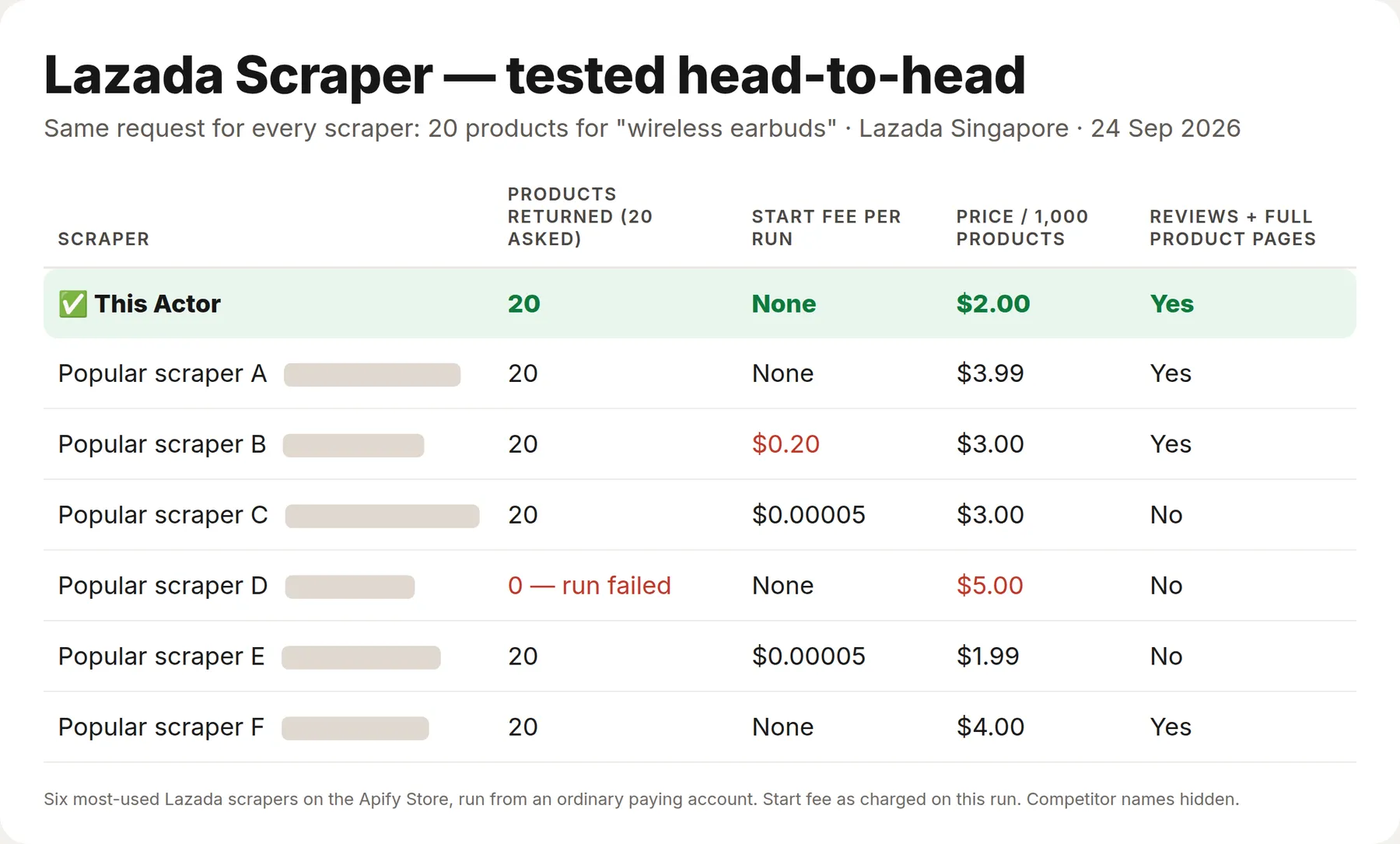
Same request for every Actor — 20 products for "wireless earbuds" on Lazada Singapore — run against the six most-used Lazada scrapers on the Apify Store, from an ordinary paying account.
| This Actor | The six others | |
|---|---|---|
| Products returned (20 asked) | 20 | 20 from five; one failed after 3 minutes with none |
| Start fee per run | None | 3 of 6 charge one (up to $0.20 for this run) |
| Price per 1,000 search products vs the most-used one | $2 | $3.99 |
| Search, full product pages and reviews on all six marketplaces | Yes | 3 of 6 |
What is Lazada Scraper?
Lazada is one of the two dominant marketplaces in Southeast Asia, with separate storefronts, currencies and catalogs in six countries. There is no public product API for buyers, and the product page renders in the browser, so most tooling either misses fields or pays for a headless browser on every request.
This Actor reads Lazada's own data endpoints directly over plain HTTP, with no browser. A product page returns the full description, the complete image gallery, the specifications table, every variant with its own price and stock, delivery options and fees, warranty and return policy, brand, seller and availability; the reviews endpoint returns each review with its star rating, the buyer's photos and the purchased variant. That makes runs fast and cheap: fifty reviews come back in seconds.
Search gets through Lazada's anti-bot gate. Since September 2026 Lazada answers most automated search requests with an anti-bot page. This Actor requests with a real Chrome fingerprint and rotates addresses — platform egress, datacenter, residential — until one gets through, then keeps that address for the following pages. The retries are on us: you pay only for the products returned. If the gate still refuses a keyword search on every address, the rest of that search comes from our backup data source — same products and prices, rows marked listingSource: "paid-api-search" — instead of an error row. Checked on all six marketplaces on 24 September 2026.
| Mode | What you get | Input |
|---|---|---|
| 🔍 Products from search | Product cards: title, price, original price, discount, rating, review count, sold count, brand, seller, location, LazMall and sponsored flags, images, position | keywords, search, category, brand or shop URLs |
| 📦 Product details | Full product page: description, highlights, specifications, image gallery, every variant with its own price and stock, delivery fees, warranty, returns, brand, category, availability | product URLs or item IDs |
| ⭐ Reviews | Customer reviews: rating, text, variant bought, buyer name, date, helpful votes, photos, seller reply | product URLs or item IDs |
| 📦+⭐ Products with reviews | Both of the above for each product in one run | product URLs |
Every row carries country, marketplace, currency and itemId, so one dataset can hold several countries at once.
Supported Lazada marketplaces
| Country | Code | Domain | Currency |
|---|---|---|---|
| 🇮🇩 Indonesia | ID | lazada.co.id | IDR |
| 🇲🇾 Malaysia | MY | lazada.com.my | MYR |
| 🇸🇬 Singapore | SG | lazada.sg | SGD |
| 🇵🇭 Philippines | PH | lazada.com.ph | PHP |
| 🇹🇭 Thailand | TH | lazada.co.th | THB |
| 🇻🇳 Vietnam | VN | lazada.vn | VND |
Prices come back in the marketplace's own currency and are never converted.
What data can Lazada Scraper extract?
🔍 Product cards
| Field | Example |
|---|---|
title | iPhone 17 Pro |
price / originalPrice / discountPercent | 22414000 / 32000000 / 30 |
currency / priceText | IDR / Rp22.414.000 |
rating / reviewCount | 4.87 / 62 |
soldQuantity / soldText | 220 / 220 sold |
brand / brandId | Apple / 127197227 |
sellerName / sellerId | Apple Authorised Reseller / 402540720932 |
location | Kota Depok |
isLazMall / isSponsored | true / false |
badges | ["Voucher save 30%", "Trade In"] |
itemId / skuId | 8737698858 / 16177996790 |
inStock | true |
url / imageUrl / images | product link, main picture, thumbnails |
position / page / keyword / totalResults | 1 / 1 / iphone 15 / 4080 |
📦 Product details
description (the seller's full description as plain text), descriptionHtml, highlights (the bullet list from the page), images (full gallery), imageCount, specs (the specifications table as {"name": "Case/Cover Material", "value": "TPU"} pairs), variants with every option combination and its own price and stock ({"skuId": "19973701508", "values": [{"name": "Color Family", "value": "Clear"}], "price": 11.0, "originalPrice": 23.1, "stock": 999}), variantCount, inStock, boxContent, warrantyType, warrantyPeriod, returnPolicy, shipsFrom, deliveryOptions (each with its fee), sellerPositiveRating, brand, brandUrl, category, categoryId, availability, sku and sellerId.
On every Apify plan, the Free plan included, the specifications, per-variant prices and availability come for every product our session can open (nearly all of them; a product it cannot open still comes with everything else from its page and is not charged for specifications). specsSource says what a row got: "own-session" — full record.
⭐ Reviews
rating, text, variant (the exact option the buyer purchased), reviewer, reviewTime, boughtDate, verifiedPurchase, likes, images (buyer photos), plus reviewId, itemId and productUrl.
How much does it cost to scrape Lazada?
The Actor uses Apify's pay-per-event pricing, so you pay for results, not for pages or proxy traffic.
| Event | Price | Per 1,000 |
|---|---|---|
| Product (search card) | $0.002 | $2 |
| Product detail (full product page) | $0.004 | $4 |
| Review | $0.001 | $1 |
| Full specifications (optional, from 13 Nov 2026) | $0.0077 | $7.70 |
A default run gives you everything. Both the full product page and the specification sheet are on out of the box: one row carries about 46 fields, including the spec table and every variant with its own price and stock. Untick Full specifications for cheaper, faster runs when the spec sheet is not what you came for, or untick Enrich products to get search cards only at $0.002 a row.
Specifications. Lazada serves the specification table, per-variant price and availability only to its own web app, behind an anti-bot slider. The Actor opens that app in a real browser with an address in the storefront's country — once per country per run — and reads the same data the shopper sees, live. They are on by default and billed as a separate event only when they actually arrive; turn Add full specifications off for cheaper runs, and rows say so: specsSource: "not-requested".
If Lazada does not let a session in, the Actor tries new addresses in the same country before giving up on that storefront (STATS.ladder in the key-value store shows how many it took). Rows from a storefront it could not open carry specsSource: "page-only" and a specsNote, and are not charged for specifications.
Search, listings and reviews need no browser, so they cost a fraction of a cent of platform usage; a run with specifications opens one browser per country for a minute. The Apify Free plan ($5 monthly credit) covers roughly 2,500 product cards, 1,250 full product records or 5,000 reviews every month.
Bulk export: what 50,000 products actually cost
This Actor is built for bulk jobs — put hundreds of inputs into one run, or call it from the API on a schedule. There is no fee per run, no fee per page and no proxy charge: you pay for the rows you keep, and error rows are free. That is what decides the bill once you pull a whole market rather than a single store.
| Job | This Actor | Most-used Actor in this category |
|---|---|---|
| 50,000 products across 100 runs | $100 | $199.50 |
Checked on the Apify Store on 24 September 2026 against the Actor with the most monthly users in this category; its per-run fee is counted in, as ours would be if we charged one. Some Actors here ask less per row — this table compares against the one buyers actually use most.
How to scrape Lazada
- Open Lazada Scraper on Apify and click Try for free.
- Choose What to scrape — for example Products from search.
- Pick the Country (Indonesia by default).
- Type Search keywords, or paste Lazada URLs: product links, search results, category, brand or shop pages. Links from different countries can be mixed in one run.
- Set Max products, optionally turn on Fetch full product details, then click Start.
- When the run finishes, open the Output tab and download JSON, CSV, Excel or XML, or read the dataset through the API.
⬇️ Input
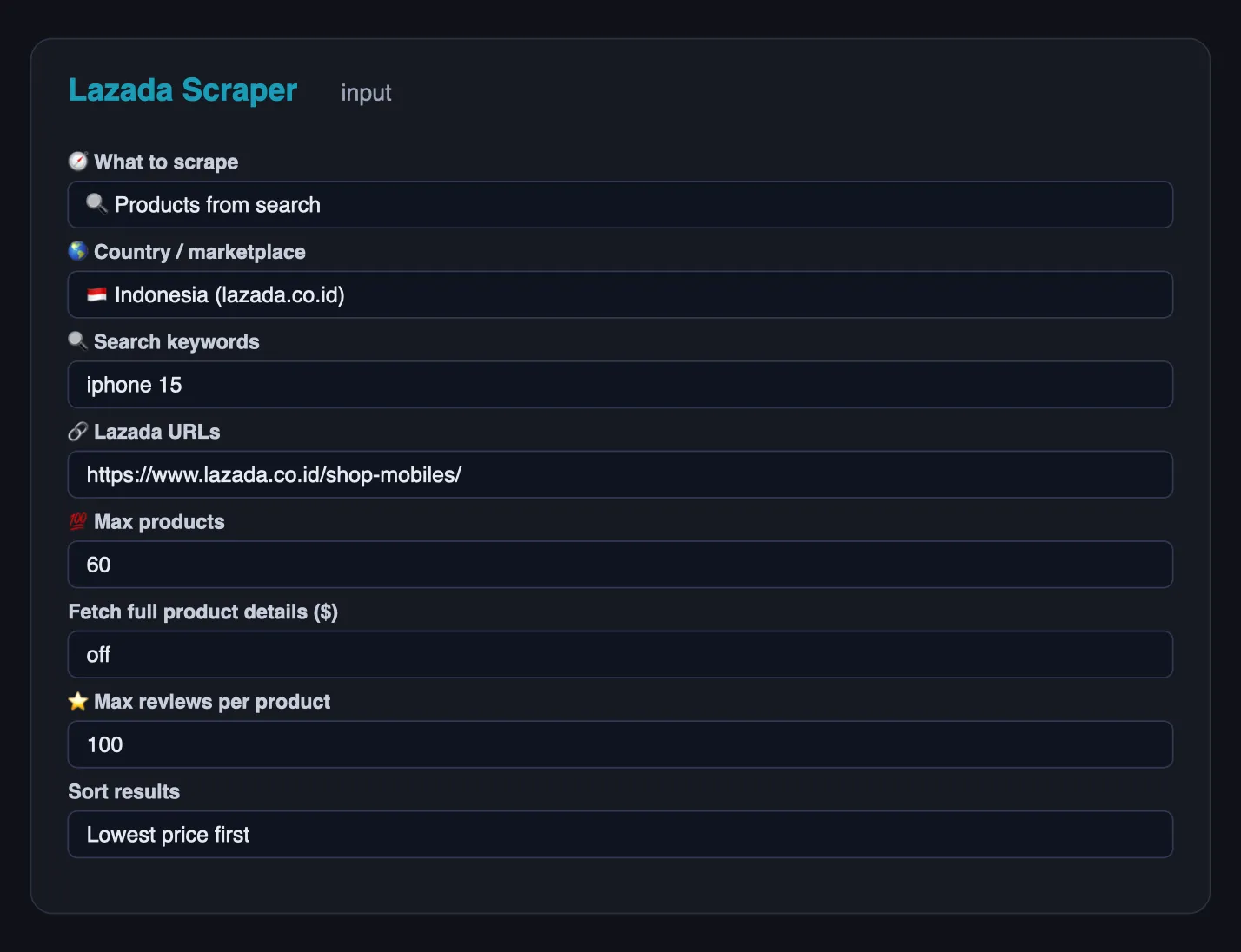
Search Indonesia for two keywords, cheapest first:
Full detail for specific products, from any marketplace:
All reviews of a product, 5-star only:
A category page in Thailand and a brand page in Vietnam in one run:
Search filters
sortBy (relevance, price_asc, price_desc, newest, rating), minPrice and maxPrice in the marketplace currency, and minRating (0–5 stars) to keep only well-rated products. Turn on Fetch full product details to open every result's page and merge description, gallery and variants into the row.
⬆️ Output
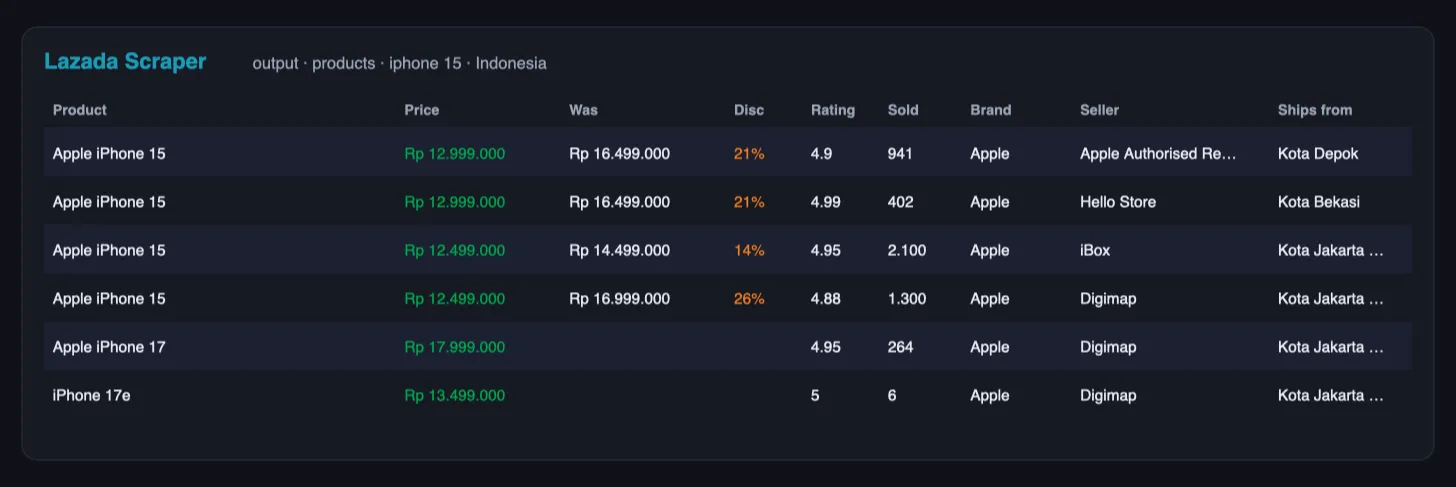
One product card:
One product detail (description shortened here):
Rows carry a type (product, product_detail, review, error), so one dataset can be filtered in a spreadsheet or in code. Pages that fail after the retries are written as error rows with the URL and reason instead of disappearing.
Use cases for Lazada data
Price monitoring and repricing
Track price, originalPrice, discountPercent and soldQuantity for your listings and competitors on a schedule, and push the dataset to Sheets or your pricing tool.
Cross-border market research
Search the same category in Indonesia, Vietnam, Thailand and the Philippines in one run and compare price levels, discount depth and demand between markets.
Product research and sourcing
Units sold, ratings and review counts show what actually moves. Product details add the description and every variant, so you can size an assortment before contacting suppliers.
Seller and brand intelligence
Cards carry the seller name and ID, the brand and the LazMall flag, so you can map who dominates a category and which brands run the deepest discounts.
Review mining
Pull thousands of reviews with star ratings, the exact variant bought, buyer photos and seller replies, then run sentiment analysis or feed them to an LLM for recurring complaints.
AI agents and RAG
Flat rows, literal field names and no required inputs make the Actor easy to call from an agent through the Apify MCP server.
Integrations
- API — start a run and read the dataset with any HTTP client:
- JavaScript —
npm i apify-client, thenclient.actor('lergassy/lazada-scraper').call(input). - n8n, Make, Zapier, Google Sheets, Airtable, Slack, webhooks — through the standard Apify integrations.
- MCP — add the Apify MCP server to Claude, ChatGPT or Cursor and let the agent call
lergassy/lazada-scraperwith a keyword and a country.
Errors and troubleshooting
| What you see | What it means | Fix |
|---|---|---|
error rows with an anti-bot message | Lazada throttled that IP for the listing endpoint | Rare: the Actor already rotated through up to 30 addresses. Re-run in a few minutes |
| Fewer results than Max products | The keyword ran out of pages | Use broader or several keywords, or a category URL |
soldQuantity is null | Lazada hides the counter on some listings | Use soldText when present, or product details |
| Reviews return nothing | The product has no written reviews yet | Check reviewCount on the product card first |
| Product detail without a price | Prices live on the card, not on the page markup | Run search mode, or enable Fetch full product details so both are merged |
Status says Stopped early and the key-value store has NOT_ATTEMPTED | The run reached its timeout (or Lazada refused 3 pages in a row after every retry) | Nothing was charged for the listed jobs. Raise the run timeout, or re-run them later |
🤖 For AI Agents & LLM Apps
Compact reference for agents calling this Actor through the Apify MCP server or the Apify API (lergassy/lazada-scraper).
Purpose: returns Lazada listings and buyer reviews across six South-East Asian marketplaces — by search term or by product URL — with price, discount, rating, units sold, seller and LazMall status. Use it to answer "what does this cost in Malaysia today", "which sellers dominate this query" and "what do buyers complain about in these reviews".
Minimal input:
Output: one row per listing — type, itemId, title, url, country,
marketplace, currency, price, originalPrice, discountPercent, rating,
reviewCount, soldQuantity, brand, sellerName, isLazMall, location,
imageUrl, scrapedAt. Enriched rows add category, description, highlights,
variants and variantCount. Review rows carry rating, text, variant,
reviewer, reviewTime, likes and images. Unreadable pages
arrive as type: "error" rows with error and kind.
Behaviors an agent should know:
modedefaults toauto: search terms run search mode, product URLs run product mode. Setreviewsorproduct_reviewsexplicitly when you want review rows.countryselects the marketplace and the currency. Prices are in the marketplace's own currency; never compare across countries without converting.maxItems(default 40) caps listings;maxReviewsPerProduct(default 100) caps reviews separately, so a review run's size is the product of the two.reviewsRatingnarrows reviews to one star value — use it instead of pulling everything and filtering afterwards.enrichProductscosts an extra page fetch per product; leave it off when listing fields suffice.- Review text is mostly Indonesian, Malay, Thai or Vietnamese depending on the marketplace. Translate before sentiment scoring, and expect masked buyer names.
isLazMallmarks Lazada's verified-brand tier — a useful proxy for whether a listing is from an official store or a marketplace reseller.
❓ FAQ
Is it legal to scrape Lazada?
The Actor reads only pages and endpoints that any visitor can open without logging in: listings, product pages and public reviews. It does not authenticate, does not touch buyer accounts and collects no private data. You are responsible for using the data in line with local law and Lazada's terms; consult a lawyer for your case.
Do I need a Lazada API key or a seller account?
No. Lazada's open API is for sellers and partners. This Actor never authenticates.
Does it use a browser?
No. Everything is plain HTTP, which is why runs cost a fraction of a cent.
Can I scrape several countries in one run?
Yes. Keyword searches use the selected country, and each URL keeps its own marketplace. Rows record country, marketplace and currency.
How many products can one keyword return?
Lazada pages listings in blocks of about 40 and reports the total in totalResults. Deep paging on a broad keyword drifts into loosely related items, so several narrow keywords beat one broad one.
Can I get per-variant prices and stock?
Yes. Product details return every variant with its option values (e.g. Color: Black, Storage: 128 GB), SKU ID, its own price, original price, availability (inStock) and image, on every Apify plan — specsSource shows which rows have it.
Does it collect buyer questions?
No. Only reviews, which include the variant bought, photos and seller replies where present.
Can I use it with the Apify API, MCP or n8n?
Yes, see Integrations. The input is plain JSON and startUrls accepts product, search, category, brand and shop links.
Run health
When a run ends with many error rows, the Actor sends its developer the counts (rows delivered, error types, run ID) so the cause gets fixed fast; your input and results are never sent.
Your feedback
Missing a field, a country or a page type? Open an issue in the Issues tab or leave a review — user requests decide what ships next.
You might also like
| Actor | What it does |
|---|---|
| Shopee Scraper | Products, prices and sellers across 11 Shopee marketplaces |
| Tokopedia Reviews Scraper | Shop reviews from Indonesia's Tokopedia |
| Mercado Libre Scraper | Products, prices, reviews and deals across 18 Latin American marketplaces |
| Google Flights Scraper | Flight prices, airlines and price insights |
| Email Verifier & Phone Number Validator | Checks e-mails and phone numbers in bulk: deliverability, throwaway and role flags, numbering plan, US state and time zone |


