

Telegram Channel Analytics — Subscribers, Reach & Stats
Pricing
from $15.56 / 1,000 channel analyses
Telegram Channel Analytics — Subscribers, Reach & Stats
Telegram channel statistics for any public channel: subscribers, median views per post, reach as a share of the audience, engagement, reactions, posting frequency, best hours to post and top posts. No API key, no phone number, no bot token.
Pricing
from $15.56 / 1,000 channel analyses
Rating
0.0
(0)
Developer

Matvey
Maintained by CommunityActor stats
0
Bookmarked
43
Total users
18
Monthly active users
a day ago
Last modified
Categories
Share
Telegram Channel Analytics turns any public Telegram channel into the numbers people actually decide on: how many subscribers it has, how many of them a typical post reaches, how often it posts, when its posts perform best, what kind of content it publishes, and which posts worked. Give it a list of channels and it returns one row per channel, ready to sort and compare in a spreadsheet.
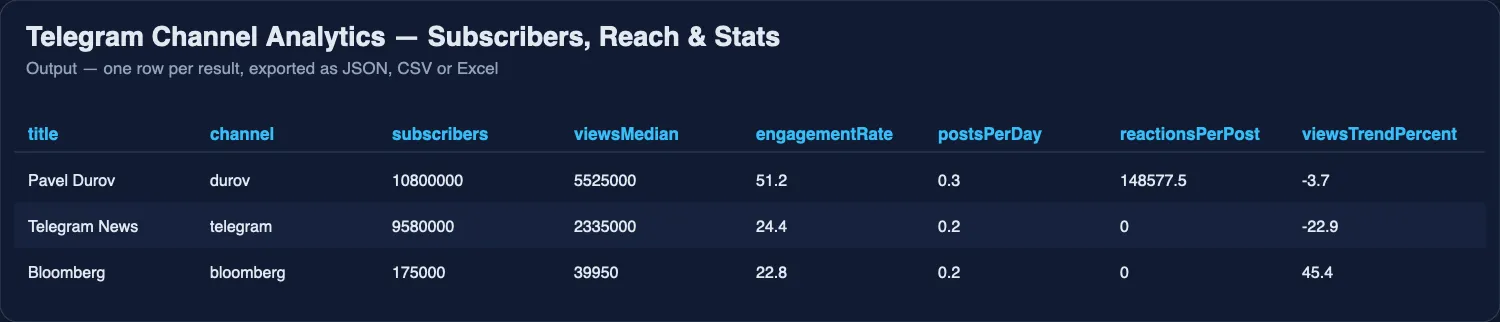
It reads the public channel page that Telegram serves to any visitor — no API key, no phone number, no account, no session string. A hundred posts per channel takes about seven seconds.
What is Telegram Channel Analytics?
Most Telegram tools in this Store dump raw posts and leave the arithmetic to you. This one does the arithmetic. It exists for the question an advertiser asks before buying a placement — is this channel worth it? — and for the question a channel owner asks about the competition: how much reach do they really get per post, and when do they publish.
The core number is reach: the median views of a post divided by the subscriber count. A channel with 172,000 subscribers whose median post is seen 45,000 times reaches 26% of its audience. Sold ad slots are priced against exactly that.
What it measures
| Metric | Example | Why it matters |
|---|---|---|
subscribers | 172,000 | The headline number, straight from the channel page |
viewsMedian, viewsAverage, viewsMax | 45,050 · 52,237 · 120,000 | Median is the honest one; a single viral post inflates the average |
engagementRate | 26.2 | Median views as a share of subscribers — the reach an ad buyer gets |
viewsTrendPercent | +59.3 | Reach in the newer half of the window against the older half: growing or fading |
postsPerDay, postsPerWeek | 0.2 · 1.2 | Cadence. A channel posting 50 times a day burns its audience differently |
reactionsTotal, reactionsPerPost, reactionRate | 11,227 · 187.1 · 0.4 | How many readers press something, and what share of viewers that is |
topReactions | ❤ 2,606 · 👍 1,715 · 🔥 1,289 | The mood of the audience in one glance |
bestHours, bestDays | 08:00 UTC · Monday | Hours and weekdays with the highest median views, from at least two posts each |
postingHours | full 24-hour distribution | When the channel actually publishes |
mediaShare, photoShare, videoShare, pollShare, linkShare | 71.7% photos | What the channel posts |
forwardShare, topForwardSources | 3.3% · LUXTA | How much is reposted, and from whom — a map of who feeds whom |
averageTextLength, topHashtags | 253 characters | Format and topics |
topPosts | five best by views, with text and link | What worked |
summary | one sentence | Ready to paste into a report, a chat or a prompt |
Turn on 📝 Also return every post and each post arrives as its own row too: date, views, viewsPerSubscriber, reactions with their emoji, media flags, forward source, hashtags, links and the text.
How much does it cost?
$0.0222 per channel report and $0.00167 per post row (posts only when you switch them on). Pay per row: one per channel analysed, plus one per post if you ask for posts. There is no browser and no proxy — plain page requests — so platform usage is negligible. See the Pricing tab.
Bulk export: what 50,000 channels actually cost
This Actor is built for bulk jobs — put hundreds of inputs into one run, or call it from the API on a schedule. There is no fee per run, no fee per page and no proxy charge: you pay for the rows you keep, and error rows are free. That is what decides the bill once you pull a whole market rather than a single channel.
The bill is the row price times the rows, nothing else: 50,000 channel reports cost 50,000 × $0.0222 = about $1,111, and every post row you ask for on top costs $0.00167. Actors that return raw messages instead of a report charge per message; this one charges once per channel for the computed numbers.
How to analyse a channel
- Paste channels into 📣 Channels, one per line.
@durov,durov,t.me/durovandhttps://t.me/s/durovall work. - Set 📊 Posts to analyse — 100 is a good default, up to 3,000 for a long history. Every metric is computed over exactly this window.
- Switch on 📝 Also return every post if you want the raw posts alongside the summary.
- Click Start, then export as CSV, JSON or Excel, or read the dataset through the API.
To track a channel over time, schedule the same run daily and keep the dataset: viewsMedian, engagementRate and subscribers become a time series.
⬇️ Input
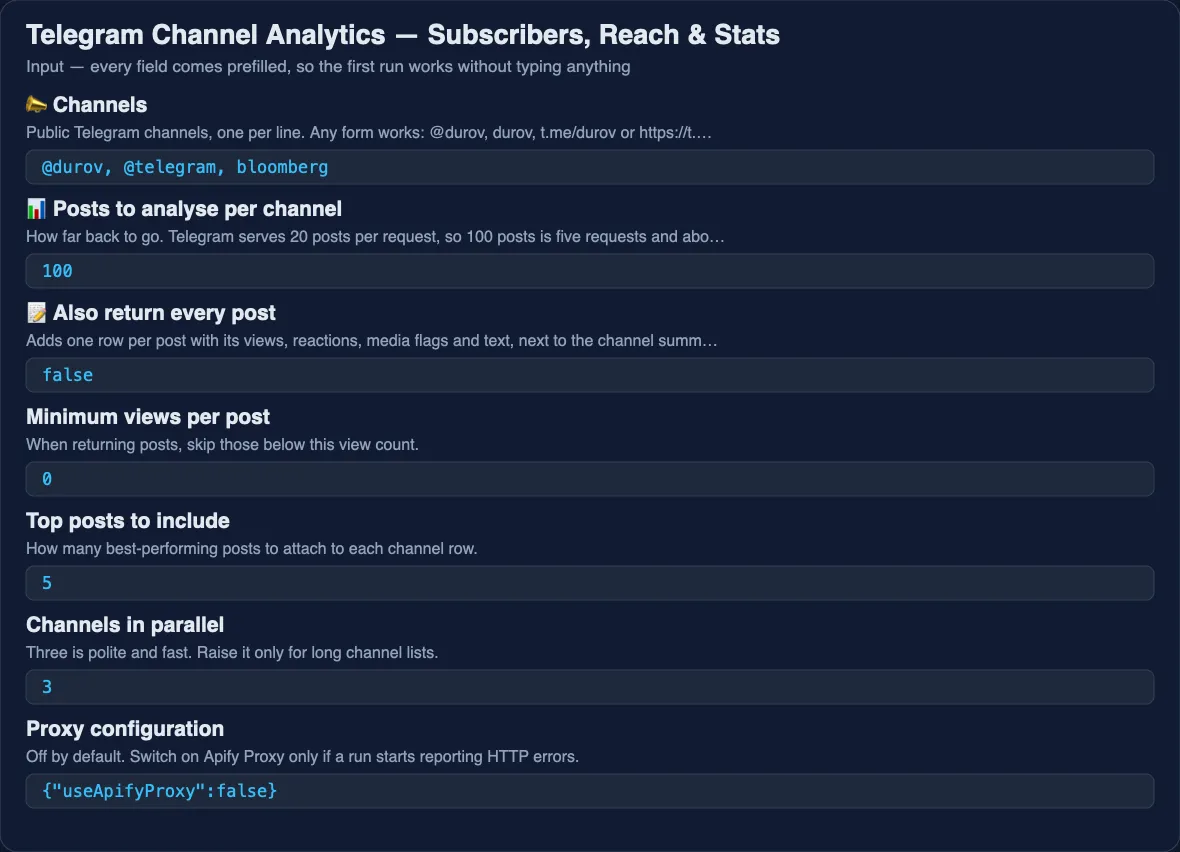
With every post
⬆️ Output
A channel that has no public page arrives as a type: "error" row explaining why, never as a missing line.
Telegram channel stats without a bot token
Subscribers, median views per post, reach as a share of the audience, reactions and posting frequency for any public channel — read from the page Telegram serves to every visitor. No bot token, no phone number, no MTProto session, so nothing can be rate-limited or banned.
Telegram engagement and channel reach, measured properly
Subscriber counts are the number everyone quotes and the one that lies. This Actor computes reach — median views divided by subscribers — which is what an advertiser is actually buying, plus the reaction rate and whether reach is climbing or fading across the window.
What it cannot do, and why
Private channels and groups are invisible. This Actor reads the public preview page. If a channel has no t.me/s/<name> page — private, invite-only, or a group rather than a broadcast channel — there is nothing to read, and the row comes back as an error. Tools that reach into private chats need a real Telegram account and a session, which is a different product with different risks.
Subscriber history is not available. Telegram publishes the current subscriber count and nothing else. Growth over time has to be built by running this Actor on a schedule and keeping the results.
Views are Telegram's own count, one per user, including forwards and web visitors. Treat reach above 100% as a sign that a post travelled beyond the channel, not as an error.
Hours are UTC, exactly as Telegram timestamps posts. Convert to the channel's own time zone before drawing conclusions about a morning slot.
Use cases
Buying advertising
Compare candidate channels on reach rather than subscriber count. A 50,000-subscriber channel reaching 40% of its audience beats a 200,000-subscriber channel reaching 5%.
Selling advertising
Export your own numbers as a media kit: reach, reactions, cadence, best hours, top posts.
Watching competitors
Run their channels weekly and track whether their reach is growing or fading, and what they post when it grows.
Content planning
bestHours and bestDays come from real median views, not from a generic best-time-to-post article.
Research and monitoring
forwardShare and topForwardSources show which channels feed which — the structure of a network of channels.
Integrations and Telegram analytics API
Run it from the Apify API, the JavaScript and Python clients, a schedule, or a webhook, and push results to Google Sheets, Slack, Notion or a database through n8n, Make or Zapier.
🤖 For AI Agents & LLM Apps
Compact reference for agents calling this Actor through the Apify MCP server or the Apify API (lergassy/telegram-channel-analytics).
Purpose: answers how big and how engaged a public Telegram channel is. Given channel names, it returns subscribers, median views per post, reach as a share of the audience, reactions, cadence, best posting hours and top posts. Use it for "is this channel worth advertising in", "how does channel A compare with channel B", "when does this channel post".
Minimal input:
Output: one row per channel — channel, title, url, subscribers, description, postsAnalysed, periodFrom, periodTo, daysCovered, postsPerDay, postsPerWeek, viewsMedian, viewsAverage, viewsMax, viewsMin, engagementRate, viewsTrendPercent, reactionsTotal, reactionsPerPost, reactionRate, topReactions, mediaShare, photoShare, videoShare, pollShare, linkShare, forwardShare, topForwardSources, averageTextLength, topHashtags, postingHours, bestHours, bestDays, topPosts, summary. With includePosts also one row per post.
Behaviors an agent should know:
engagementRateis the number to quote, notsubscribers: it is median views divided by subscribers, in per cent, and it is what tells you whether an audience is real.- Use
viewsMedian, notviewsAverage— one viral post skews the average badly. - Every metric covers exactly the
postsPerChannelwindow, which for a slow channel can span a year. ReaddaysCoveredbefore saying "per day". bestHoursare UTC and require at least two posts in an hour to appear.viewsTrendPercentcompares the newer half of the window with the older half; it is a direction, not a forecast.- Only public broadcast channels work. Private channels, groups and user accounts return a
type: "error"row with the reason — say so rather than inventing numbers. - Subscriber history does not exist in the source. To answer "how fast is it growing", schedule repeat runs; a single run cannot answer it.
- No proxy and no Telegram account are used, and nothing is posted or joined.
❓ FAQ
Do I need a Telegram account or API key?
No. The Actor reads the public web preview of the channel, the same page you get by opening t.me/s/<channel> in a browser.
Can it read private channels or groups?
No. If there is no public page there is no data, and you get an error row saying so.
Why is reach sometimes above 100%?
Telegram counts a view once per user, including people who saw the post forwarded elsewhere or opened it on the web. A post that travels beyond the channel can be seen by more people than the channel has subscribers.
How far back can it go?
As far as the channel's public history allows; the tested limit is 3,000 posts per run, paged 20 at a time.
Is scraping public Telegram channels legal?
The Actor reads a public web page and collects no personal data beyond what a channel publishes about itself. How you use the data is subject to your local law and Telegram's terms.
Can I use it with the Apify API or an MCP server?
Yes. It runs from the API and the official clients, and AI agents reach it through the Apify MCP server without extra setup.
Why do some channels show no reactions?
Reactions can be turned off by the channel owner. Those channels return zero reactions and a postsWithReactionsShare of 0.
Your feedback
A metric you need that is missing, or a channel that parses wrong? Open an issue on the Issues tab — every one gets answered.
You might also like
| Actor | What it does |
|---|---|
| Sports Scores & Schedules API | Live scores, schedules and betting lines for 33 leagues |
| Prediction Markets API | Kalshi and Polymarket odds in one table |
| Email & Phone Verifier | Checks e-mails and phone numbers in bulk |
| US New Business Leads | Newly registered US businesses with checked contacts |
Also known as
People look for this Actor as Telegram channel analytics, Telegram channel stats, a Telegram subscriber counter, a Telegram engagement checker, a Telegram views tracker, a channel reach calculator, and a Telegram media kit generator.
Use via API
Run this Actor from your own code or pipeline. Get your token in Apify Console → Settings → API & Integrations. Every input field below has the same name as in the JSON tab of the input form.
Python
JavaScript
cURL (runs the Actor and returns the results in one call)


