

PDF to Markdown & Text Extractor (Failed Files Free)
Pricing
from $0.55 / 1,000 pages
PDF to Markdown & Text Extractor (Failed Files Free)
Convert PDF, Word, PowerPoint, Excel, CSV and web pages into clean Markdown with headings and tables kept, or heading-aware chunks for a vector database. Each row has title, markdown, pageCount, wordCount, tokensApprox and needsOcr. Mixed formats in one run; failed files free. $1 per 1,000 pages.
Pricing
from $0.55 / 1,000 pages
Rating
0.0
(0)
Developer

locaihost data
Maintained by CommunityActor stats
0
Bookmarked
2
Total users
1
Monthly active users
14 days ago
Last modified
Categories
Share
Turn PDFs, Word documents, PowerPoint decks, Excel sheets, CSVs and web pages into clean Markdown with headings and tables kept, one row per file, or into heading-aware chunks with page numbers ready for a vector database. No login needed for public or signed links.
- Build a RAG index: PDFs and DOCX files to chunks with
headingPathandpage, ready for Pinecone, Qdrant or pgvector. - Chat with your documents: an LLM gets Markdown headings, tables and lists instead of a wall of PDF text.
- Give an AI agent a "read this link" tool for PDF, Word, PowerPoint and Excel URLs.
- Migrate a document library to Markdown for a wiki, static site or search index.
- Pull tables out of files: Word, PowerPoint, Excel, CSV and HTML tables become Markdown tables.
Quick start
Paste this into the JSON tab of the input and click Start. It converts a PDF paper, a Word file, a web page and an Excel sheet in one run:
You get 4 rows, one per file, in about 15 seconds, for 31 billed pages (about $0.03). Public links and signed links (S3, GCS, Azure, Dropbox) both work. Google Docs, Sheets and Slides, Google Drive, Dropbox ?dl=0, GitHub blob and arXiv abs links are turned into direct downloads for you. You can also upload a file, or pick an Apify key-value store that holds your files.
What data can I get?
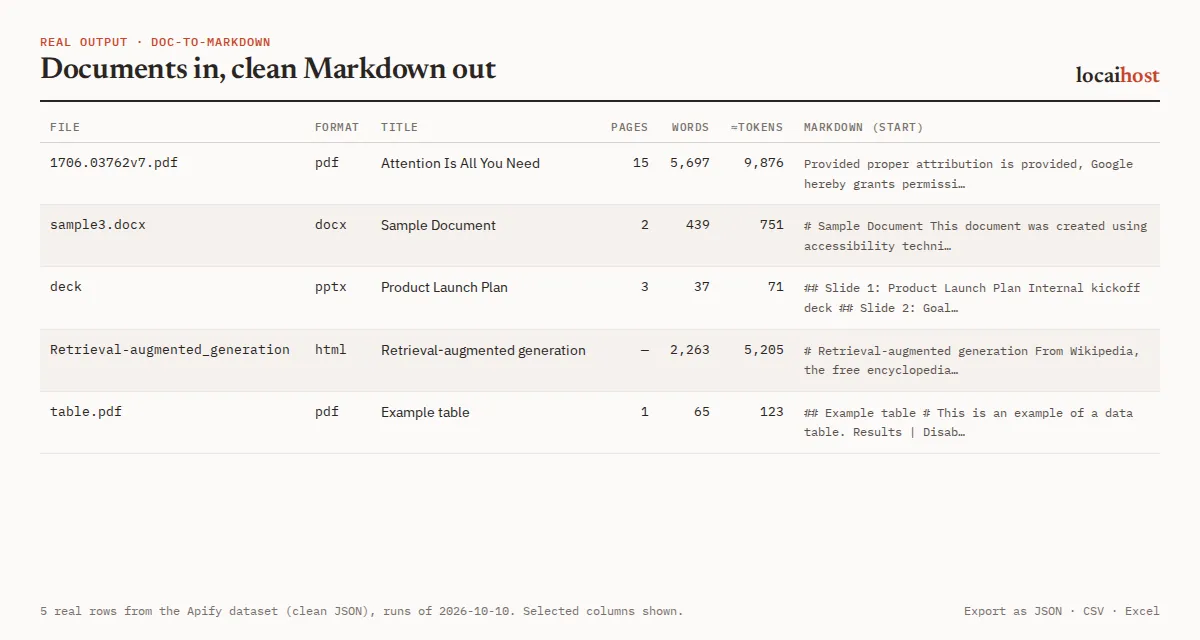
Document mode (default): one row per file.
| Group | Fields |
|---|---|
| Source | sourceUrl, fileName, mimeType, format (pdf, docx, pptx, xlsx, csv, html, markdown, text), documentId |
| Content | title, markdown (the whole document), chunks and chunkCount (only with Also add chunks) |
| Size | pageCount (PDF pages, slides or Excel sheets; null for HTML, CSV and text), wordCount, tokensApprox (characters ÷ 4) |
| Billing and checks | billedPages, needsOcr (little or no text layer, so probably scanned), truncated, warnings, error, processedAt |
One real row (run on 2026-10-18, markdown shortened):
In the same run the arXiv PDF came back as 15 pages and 5,697 words, and the Wikipedia page as 2,263 words.
Chunks mode: one row per chunk instead, with id (documentId-index, stable across re-runs, so upserts never duplicate), documentId, sourceUrl, title, chunkIndex, chunkCount, headingPath, page, pageEnd, tokensApprox and text. A chunk never mixes two sections; tables are split by rows with the header repeated, and overlap applies to prose only. Turn on Prefix chunks with their heading path to start each chunk's text with "Title > Section > Subsection".
The dataset has two views, Documents and Chunks, and exports to JSON, CSV, Excel or HTML. Every run also writes a SUMMARY record listing each input with its status, format, billed pages, chunk count and any error.
How much does it cost?
You pay per page converted, whichever output mode you pick. There is no charge for Apify platform usage on top.
| Row | Free and Starter | Scale | Business |
|---|---|---|---|
| Page converted | $1.00 per 1,000 | $0.75 per 1,000 | $0.55 per 1,000 |
Plus $0.00005 per run start (charged per GB of memory, so $0.0001 at the default 2 GB). Apify's free $5 monthly credit covers about 5,000 pages. Free-plan runs convert up to 50 documents each; the rest are listed as skipped in SUMMARY, and any paid Apify plan removes the cap.
How a page is counted: PDF and PowerPoint, each page or slide that produced text. Word, Excel, CSV, HTML, Markdown and text, one page per 3,000 characters of Markdown output, minimum 1.
What's free: documents that fail (bad or private link, unsupported or legacy format, image, timeout, oversize file), blank and scanned PDF pages with no text layer, duplicate links to the same file (converted and charged once), documents skipped by the free-plan cap, Max documents, your cost limit or the run's time limit, and runs with no usable input. To cap a run's spend, set Maximum cost per run in the run options: the run stops cleanly before the first document that would go over it. Max pages per document converts, and charges, only the first N pages of each PDF or deck.
Limits, stated up front
- Up to 1,000 documents per run (50 on the free plan). Files up to 50 MB by default, adjustable to 200 MB. Each document gets 180 seconds by default (10 to 3,600).
- Scanned PDFs are flagged, not read:
needsOcr: trueand a warning, and their blank pages are not billed. Run them through an OCR Actor first. - Not supported: legacy
.doc,.xlsand.ppt(save as DOCX, XLSX, PPTX or PDF), ODT, EPUB, ZIP archives, password-protected PDFs and images. Each gets a clear error and is not charged. - PDF tables and maths: a PDF stores positioned text, not tables, so tables are rebuilt from how the text lines up. Clean grid tables come through cell by cell; columns set very close together can merge, and multi-row headers may join. Superscripts and maths are flattened to plain text (10²⁰ becomes
1020), and text inside figures is left out. - Web pages are fetched as static HTML and reduced to the main content (no menus or footers). A page that builds its content with JavaScript may give little text. Images are dropped, and Excel formulas are not recalculated (you get the value stored in the file).
- Excel keeps the first 20,000 rows per sheet. A document row is cut at about 8 MB of text (
truncated: true, with a warning); use chunks mode for very large files. - Chunk size is 64 to 8,192 tokens, overlap 0 to 2,048. In chunks mode, failed documents appear only in
SUMMARY, so the dataset stays clean for your vector database. - Runs need at least 512 MB of memory; a very large PDF (1,000+ pages) needs 2 GB or more. If memory runs low, the document in progress is stopped (not charged) and the run carries on. If the run's own time limit comes first, the rest are listed as skipped, not charged, and the run still succeeds.
Schedules
Each run downloads every file at that moment, so you always get the current version behind each link. Save a task that points at a list of links or a key-value store, then add a schedule under Schedules in Apify Console to keep an index current. Chunk ids are built from the link and the chunk's position, so re-upserting the same document overwrites its chunks by id instead of duplicating them.
Integrations: API, n8n, Make and AI agents
API. Run it and get the rows back in one call (synchronous runs wait up to 5 minutes; use the asynchronous run endpoint for large batches):
Python, with pip install apify-client, reading chunks for a vector database:
n8n, Make, Zapier, LangChain, LlamaIndex, Pinecone, Qdrant, Google Sheets, webhooks. Apify's built-in integrations send each run's dataset wherever you need it.
AI agents (MCP). Add this Actor to Claude, Cursor or any MCP client with https://mcp.apify.com/?tools=locaihost/doc-to-markdown, then ask something like "Convert the arXiv paper 1706.03762 to Markdown and summarise section 3, keeping the tables." The minimal input is {"startUrls": [{"url": "…"}]}; for long files add "maxPagesPerDocument": 20 so the agent reads, and pays for, only what it needs.
FAQ
How much does it cost to convert PDF to Markdown?
$1.00 per 1,000 pages on the Free and Starter plans, $0.75 on Scale and $0.55 on Business. A 1,000-page knowledge base costs $1.00 on Starter. Apify's free $5 monthly credit covers about 5,000 pages.
Can I use it through the API or from Python?
Yes. Use the run-sync-get-dataset-items call above, or Apify's Python and JavaScript clients. Every run's rows are also available as JSON, CSV or Excel from its dataset.
Can I use it from an AI agent?
Yes. Through the Apify MCP server (https://mcp.apify.com/?tools=locaihost/doc-to-markdown) any MCP client can send a document link and read the Markdown back.
Is it legal to convert documents this way?
The Actor converts only the documents you supply: public links, signed links, share links, an upload, or records in your own Apify key-value store. It does not crawl websites or look for files on its own, and it does not look for or extract personal data; whatever is in your file is in the output, and it stays in your Apify account. You are responsible for having the right to process and store the documents you send.
Why are some fields empty?
pageCount is null for formats without pages (HTML, CSV, text). A failed document has markdown null, billedPages 0 and the reason in error, for example a private share link (Got a web page instead of the file…), a file over the size limit, or a legacy .doc. A scanned PDF has little text and needsOcr: true. A web page built with JavaScript can come back nearly empty.
Which formats are supported?
PDF, DOCX, PPTX (with speaker notes, optional), XLSX (one Markdown table per sheet), CSV, HTML, Markdown and plain text.
More from locaihost data
- OCR for images and scanned PDFs: read the text out of scans this Actor flags with
needsOcr. - YouTube transcript scraper: add video transcripts to the same knowledge base.
- Website screenshot API: keep an image or PDF of each page next to its text.
Did it help?
If this saved you time, a quick rating on the Store helps other people find it.
Support
Something not working, or a format or field you need? Open an issue on the Issues tab: we answer issues within 24 hours.


