
PDF & Word to Markdown Converter for RAG (Page Numbers)
Pricing
from $5.00 / 1,000 document converteds
PDF & Word to Markdown Converter for RAG (Page Numbers)
PDF & Word to Markdown is an Apify Actor that converts PDF and .docx files from URLs into clean Markdown and RAG chunks with page numbers for citing.
Pricing
from $5.00 / 1,000 document converteds
Rating
0.0
(0)
Developer

mohamed senator
Maintained by CommunityActor stats
0
Bookmarked
2
Total users
1
Monthly active users
10 days ago
Last modified
Categories
Share
PDF & Word to Markdown for RAG — Chunks with Page Numbers
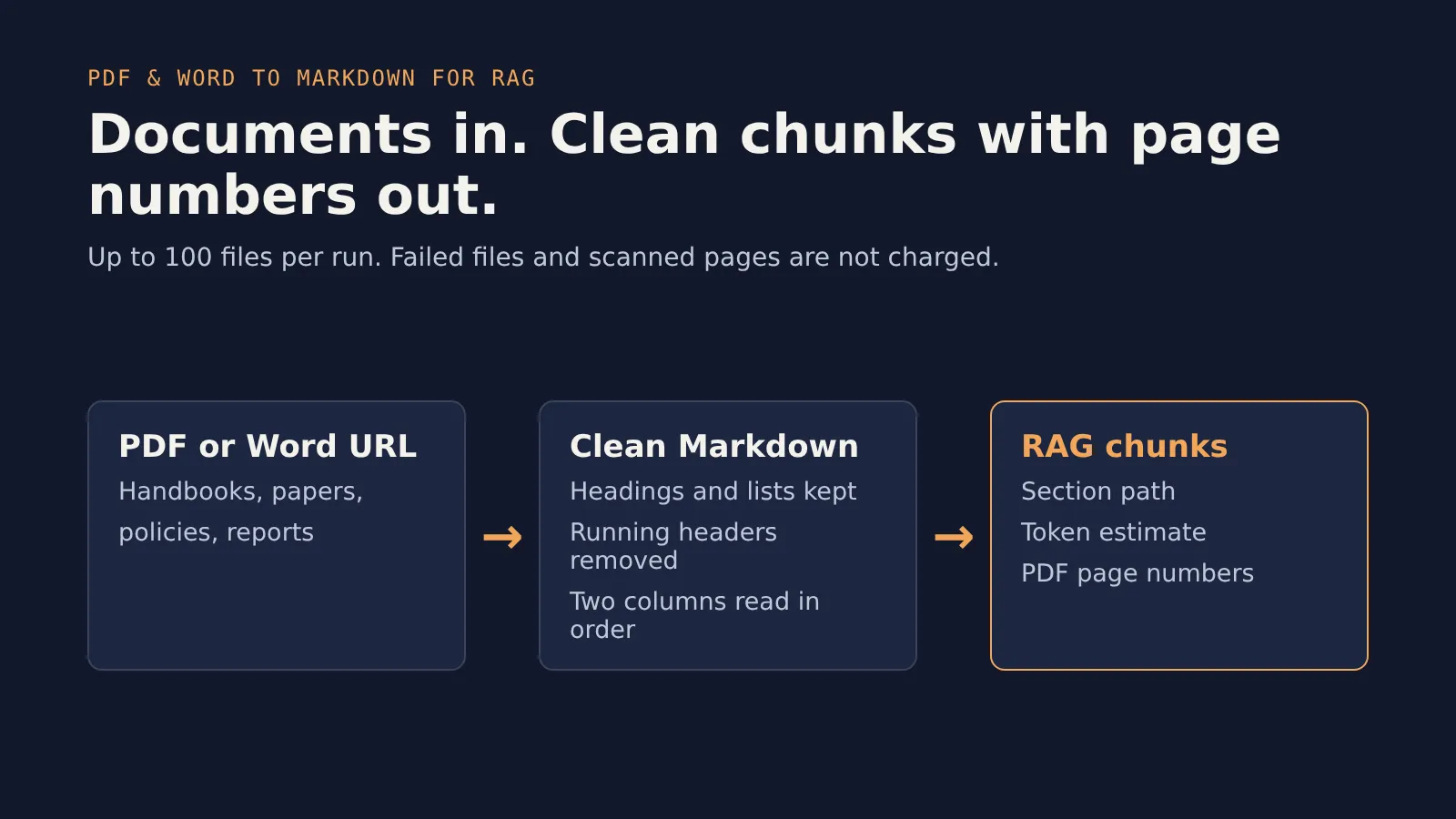
Turn PDF and Word (.docx) files from a URL into clean Markdown and RAG-ready chunks, with PDF chunks tagged with the page numbers they come from. Headings and lists are kept, and Word tables become Markdown tables (PDF tables come out as text rows), so your embeddings and your AI answers can cite the right page. No browser, no OCR, no paid third-party APIs, and you pay per document and per page, not per hour.
Why use it
- Clean Markdown:
#and##headings and lists come out as Markdown, and Word tables become Markdown tables. Repeated running headers and footers are removed. - Page numbers on PDF chunks: each PDF chunk carries
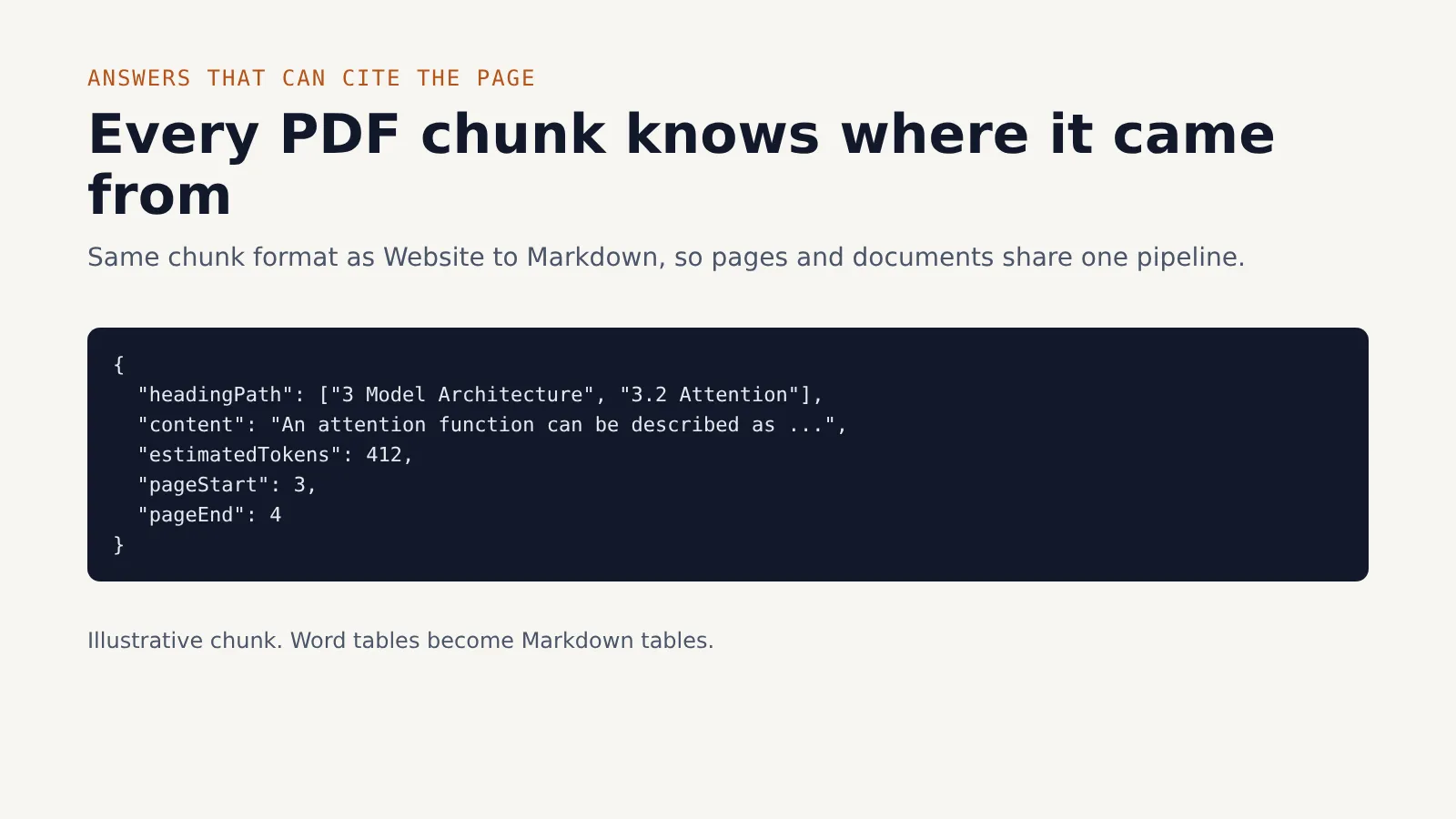
pageStartandpageEnd, so an answer can point to "page 7". - Heading-aware chunks: each chunk keeps its section path (
headingPath), with a token estimate and overlap between neighbours. - Two-column text is read column by column: when a page is two columns of running text, the left column is read first, then the right. Tables and forms with narrow cells are read row by row.
- Batch friendly: convert up to 100 files in one run, one dataset row per converted file (plus failed files when Save failed files to the dataset is on).
- Fair billing: a failed file costs nothing, a file with no text (a scan) fails and is free, and a scanned page inside a text file is not charged.
Works with Website to Markdown for LLMs & RAG
The chunk format matches the Website to Markdown for LLMs & RAG, so web pages and documents can go into the same pipeline. Both return headingPath, content and estimatedTokens for each chunk. This Actor adds pageStart and pageEnd. Use Website to Markdown for HTML pages and this Actor for PDF and Word files.
How to use it
- Paste one or more public file URLs in File URLs.
- Leave the defaults, or turn on Split into RAG chunks to get chunks.
- Click Start and download the results as JSON, CSV or Excel, or connect them to your pipeline.
Example: one PDF
Example: a batch of files, chunked for RAG
Input
| Field | Description | Default |
|---|---|---|
fileUrls | Public PDF or .docx links (1–100). | required |
outputFormat | markdown, text or both. | markdown |
chunkContent | Add a chunks array for RAG. | false |
chunkSizeTokens | Approximate maximum chunk size, in tokens (minimum 50). | 800 |
chunkOverlapTokens | Text each chunk repeats from the previous one (minimum 0). | 100 |
removeHeadersFooters | Drop running headers and footers in PDFs. | true |
startPage | First PDF page to convert. | 1 |
maxPagesPerDocument | Most pages to convert from each PDF (1–5,000). | 500 |
maxFileSizeMb | Largest file to download, in MB (1–200). | 50 |
includeFailedDocuments | Also save a dataset row for each failed file. | false |
Output
One dataset row per converted file. Failed files get a row only when Save failed files to the dataset is on (includeFailedDocuments), and they are never charged. Example (shortened, with a chunk):
The dataset has two views: Overview (one row per converted file) and RAG chunks (one row per chunk, with its page numbers).
A run summary is saved as the OUTPUT record in the run's key-value store. It lists how many files succeeded and failed, the reason for each failure, whether the spending limit stopped the run, and chargeWarnings: any saved file whose page charge fell short or failed.
Pricing
Pay per event:
| Event | Price |
|---|---|
| Per document converted | $0.005 |
| Per page converted | $0.001 |
| Per run started | $0.00005 |
A Word file has no fixed pages, so it is billed as 500-word pages, with a minimum of one page.
| File | Calculation | Cost |
|---|---|---|
| 10-page PDF | $0.005 + 10 × $0.001 | $0.015 |
| 100-page PDF | $0.005 + 100 × $0.001 | $0.105 |
| 1,200-word Word file (3 pages) | $0.005 + 3 × $0.001 | $0.008 |
- Each run also has a tiny start fee of $0.00005 (a twentieth of a cent), whatever the number of files.
- Failed files are free. A file with no text at all (a scan) fails with a message, so it is free too.
- Scanned pages with no text are free inside a file that has text (they are listed in
scannedPages). - Pages before Start at page and beyond Maximum pages per document are not converted and not charged.
- Your spending limit is respected. Before saving each file, the run checks that the limit covers its fee and page fees, and the default dataset-item event price if you have set one. If it does not, the run stops.
- You are never charged for a document that was not saved, for a failed file, or for an empty page. If a page charge fails after a file is saved, the file stays succeeded, a warning is logged, and the run summary lists it in
chargeWarnings.
Use with AI agents (MCP)
Add the Apify MCP server to Claude, Cursor, VS Code or any MCP client, and enable this Actor (s3nafps/doc-to-markdown) as a tool. Your agent can then read a PDF or Word file as clean Markdown with page-numbered chunks. See mcp.apify.com.
Use with the API
Or with the JavaScript client:
Limitations
- No OCR. Scanned pages (images of text) have no text to extract. They are listed in
scannedPagesand are not charged. A file with no text at all fails with a message and is not charged. - Tables in PDFs come out as text rows, not as Markdown tables. Each row of a table appears as a line of text.
- Columns. Two columns of running text are read column by column. A short full-width line that ends before the right column starts, such as a footer note under two columns, can be read between the two columns. A two-column table with wide cells on both sides may be read column by column, and pages with columns narrower than about a quarter of the page width are read line by line. Pages with three or more columns may also come out mixed.
- Public URLs only. The file must be reachable without a login.
- No password-protected files. Those fail with a clear message.
- PDF and Word only. PowerPoint, Excel and HTML files are not supported.
- Word files have no page numbers. Their chunks have
pageStartandpageEndset to null. - Figure pages come out as plain text. A page with 10 or more rotated text items (typically a chart or diagram) is treated as a figure. Its headings come out as plain text, and chart labels can appear as plain text lines.
FAQ
Can I use a Google Drive or Dropbox link?
Use a direct-download link. For Dropbox, change ?dl=0 at the end of the link to ?dl=1. A normal Google Drive sharing link returns a web page, not the file, so it will fail. Large Drive files may also show a confirmation page instead of the file.
Why is a page empty?
Most likely the page is a scan: an image of text, with no selectable text inside the PDF. This Actor does not run OCR, so the page is listed in scannedPages and is not charged. Run the file through an OCR tool first if you need that text.
How do page numbers work?
pageStart and pageEnd are the PDF page numbers, counted from the first page of the file, the same numbers a PDF viewer shows. If you set Start at page, numbering still counts from the first page of the file, so the chunks match the viewer. A chunk that spans two pages has both numbers.
Why does a Word file have no page numbers? Word files do not store fixed pages. Their text is converted in full, and only the billing uses 500-word pages.
Related Actors
- Website to Markdown for LLMs & RAG: the same Markdown and chunk format for web pages and whole websites (by links or sitemap), with JavaScript rendering.
- Webpage to JSON for AI Agents: pull specific fields (prices, dates, contacts) from web pages into typed JSON with AI.
- Google Trends Scraper: Bulk Compare 100+ Keywords: see which topics people search for most before you decide what goes into your knowledge base.
- YouTube Transcripts for AI: bulk YouTube transcripts from videos, channels and search as text, Markdown and RAG chunks.
Feedback
Found a file that does not convert well, or need a feature? Open an issue in the Issues tab and include the file URL, or a copy of the file if it is public. If the Actor saves you time, a short review on its Store page helps other people find it.
This Actor is intended for public or permitted documents only. Respect copyright and each site's terms of use.


