

Website Screenshot API (Full Page, Mobile, PDF)
Pricing
from $0.89 / 1,000 screenshots
Website Screenshot API (Full Page, Mobile, PDF)
Capture screenshots or PDFs of up to 5,000 web pages or your own HTML per run. Each row gives a public image link, final URL, HTTP status, title, file size and the cookie banner it closed. Full page, one element, 11 device presets, dark mode. Failed pages free. $0.89 per 1,000 screenshots.
Pricing
from $0.89 / 1,000 screenshots
Rating
0.0
(0)
Developer

locaihost data
Maintained by CommunityActor stats
0
Bookmarked
5
Total users
4
Monthly active users
9 days ago
Last modified
Categories
Share
Turn up to 5,000 URLs, or your own HTML, into PNG, JPEG, WebP or PDF files in one run, each with a public link, from a fresh browser that closes known cookie banners and blocks ads. No login, no API key.
- Monitor pages visually: schedule a daily run of your own or competitors' pages and keep a dated archive of how they looked.
- Client and SEO reports: batch-capture landing pages, ad destinations or search result pages for a report.
- Render your own HTML: social cards, invoices, certificates and email previews, sent as HTML and returned as an image or PDF.
- QA across devices: check pages on iPhone, Pixel, Galaxy, iPad and desktop presets, in light and dark mode.
- Archive and evidence: save pages as PDFs with selectable text, with the time each was taken.
Quick start
Paste this into the JSON tab of the input and click Start:
You get 3 rows, each with a link to a 1440×900 PNG, in about 25 seconds (most of that is the browser starting). Bare domains like example.com work without https://, and duplicates are removed.
To render your own HTML as a 1200×630 social card:
What data can I get?
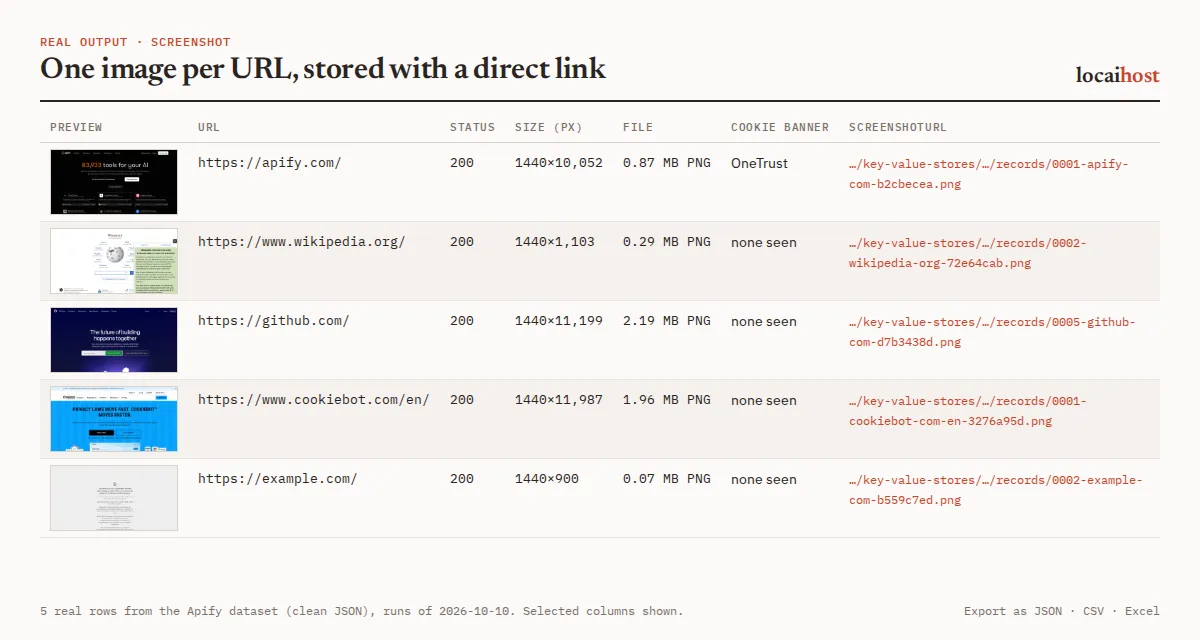
One dataset row per page. The file itself sits in the run's key-value store, and screenshotUrl is its public link.
| Group | Fields |
|---|---|
| Page | index (position in your input), source (url or html), url, finalUrl (after redirects), status (HTTP code), title |
| File | screenshotUrl, key, format, width, height (null for PDF), bytes |
| Capture | fullPage (charged at the full-page price), truncated (page taller than maxHeight), cookieBanner (the consent platform it handled), takenAt |
| Errors | error (why a page failed; null on success) |
One real row (run on 2026-10-18, signature shortened):
The Overview view shows each screenshot as a thumbnail next to its URL, status and size. Export the rows to JSON, CSV, Excel or HTML, or fetch the files through the Apify API. The run's SUMMARY record counts pages captured, failed and not run, lists invalid inputs, and says why the run stopped.
What you can control:
- Area: first screen (default), full page (
fullPage), one element (selector, e.g.#pricing) or an exact rectangle (clip, which can reach below the first screen). - Device: 11 presets with real screen size, pixel density, touch and mobile user agent (Desktop 1440×900, Full HD 1920×1080, Laptop 1366×768, MacBook Pro 14", iPhone 15/16, iPhone SE, iPhone 16 Pro Max, Pixel 8, Galaxy S24, iPad Air, iPad Pro 12.9"), or a custom size from 240 to 3840 px wide, at up to 3× density.
- Format: PNG, JPEG or WebP (with
quality, and a transparent background option for PNG and WebP), or PDF in A4, Letter, A3 or Legal. - Clean-up: cookie banners (it clicks a button only inside 19 known consent platforms such as OneTrust, Cookiebot, Didomi, Quantcast, Usercentrics and TrustArc, preferring "reject", and hides the banners of about 30 platforms plus common cookie-banner elements; buttons on unknown banners are never clicked), ad and tracker blocking (on by default),
hideSelectors,blurSelectorsto redact parts of a page, andcustomCss. - Timing:
waitForSelectorfor single-page apps,waitUntil,delayMs, andtimeoutSecs(each page is retried once on a timeout or dropped connection). - Browser:
darkMode,locale(e.g.de-DE),timezone(e.g.Asia/Tokyo) anduserAgent.
API callers can also send a single url, device names such as iphone_15, pixel_7 or galaxy_s23, and colorScheme: "dark".
How much does it cost?
You pay per screenshot taken. There is no charge for Apify platform usage on top.
| Row | Free and Starter | Scale | Business |
|---|---|---|---|
| Screenshot (first screen, element, region, your own HTML, or a PDF) | $0.89 per 1,000 | $0.89 per 1,000 | $0.89 per 1,000 |
Full-page screenshot of a web page (fullPage on) | $2.00 per 1,000 | $2.00 per 1,000 | $2.00 per 1,000 |
Plus $0.00005 per run start. Apify's free $5 monthly credit covers about 5,600 screenshots (or about 2,500 full-page ones). Free-plan runs stop at 50 screenshots each, and the log says how many pages were not run; any paid Apify plan removes the cap.
With fullPage on, element and region captures, HTML documents and PDFs are still charged as a normal screenshot. Each row's fullPage field shows which price applied. Format, device and quality don't change the price.
What's free: pages that fail (timeouts, DNS errors, a missing selector or waitForSelector element, direct file links), invalid URLs, duplicates, and pages not reached before the run's time limit. A page that loads with an error status, such as a 404 page, is captured and charged, because you get its screenshot; its status shows the code. To cap a run's spend, set Maximum cost per run in the run options: the run stops cleanly and never starts a page it can't charge for.
Limits, stated up front
- Up to 5,000 URLs and 100 HTML documents per run (each HTML document up to 5,000,000 characters). Extra URLs are skipped and counted in
SUMMARY. - Full-page captures stop at
maxHeight(16,000 CSS pixels by default) and never go past the 16,383-pixel image limit divided by the scale factor. Those rows havetruncated: true. Use PDF for longer pages. - Login-only or bot-protected pages are captured as the public sees them: a login page, or a challenge page if the site blocks automated browsers. This Actor does not get around logins or bot protection.
- WebGL (3D scenes, some maps and charts) is off by default because software rendering is slow; most sites show a normal fallback. Turn on
webglfor pages that need it. - Pages run 3 at a time at the default 2 GB memory (2 at a time for full-page and PDF captures). More memory runs more pages in parallel, up to 8, at the same price per screenshot.
- If the run's time limit is reached, it stops cleanly, keeps what it captured and counts the rest as not run (not charged).
- Files are kept for your Apify plan's storage retention period. Copy them to your own storage if you need them longer.
Schedules
Save your URL list as a task, then add a daily or weekly schedule under Schedules in Apify Console. Each run captures every page fresh, so you build a dated visual archive; takenAt records the exact time of each capture.
Integrations: API, n8n, Make and AI agents
API. Run it and get the rows back in one call (synchronous runs wait up to 5 minutes; use the asynchronous run endpoint for large batches):
Python, with pip install apify-client:
n8n, Make, Zapier, Google Sheets, Slack, webhooks. Apify's built-in integrations send each run's rows, with their image links, wherever you need them.
AI agents (MCP). Add this Actor to Claude, Cursor or any MCP client with https://mcp.apify.com/?tools=locaihost/screenshot, then ask something like "Take a mobile screenshot of the pricing section on example.com and tell me which plans are shown." The agent gets back a screenshotUrl it can open or pass to a vision model. A minimal agent input is {"url": "https://example.com", "device": "iphone_15", "selector": "#pricing"}.
FAQ
How much does it cost to screenshot a website?
$0.89 per 1,000 screenshots and $2.00 per 1,000 full-page screenshots, the same on every Apify plan. Failed pages are free. Apify's free $5 monthly credit covers about 5,600 screenshots.
Can I use it through the API or from Python?
Yes. Use the run-sync-get-dataset-items call above, or Apify's Python and JavaScript clients. Every run's rows are also available as JSON, CSV or Excel from its dataset.
Can I use it from an AI agent?
Yes. Through the Apify MCP server (https://mcp.apify.com/?tools=locaihost/screenshot) any MCP client can send a URL and read back the image link.
Is it legal to screenshot websites?
The Actor loads public pages the way any visitor's browser does. It never logs in and does not get around bot protection. The dataset records technical facts (URL, status, title, size) and the image, and a screenshot shows whatever the page shows, so avoid pages that display other people's personal details, or blur them with blurSelectors. You are responsible for having the right to capture and use each page, and for following each site's terms.
Does it accept cookie banners for me?
It prefers "reject". It clicks a button only inside a consent platform it recognises, hides banners it can't close, and never clicks buttons on banners it doesn't recognise. cookieBanner names the platform it handled.
Why are some fields empty?
width and height are null for PDFs. A failed page has no file: screenshotUrl is null and error says why, for example Timeout 45000ms exceeded, Element not found or not visible: #pricing or a DNS error such as net::ERR_NAME_NOT_RESOLVED. cookieBanner is null when no known banner appeared. HTML input has url null and source: "html".
A page timed out or shows a "verify you are human" page. What can I do?
Raise timeoutSecs, give the run more memory, or set waitUntil to domcontentloaded. A challenge or login page means the site blocks automated browsers or needs an account; this Actor captures it as it is and does not try to get around it.
More from locaihost data
- Document to Markdown converter: turn the same pages, PDFs and Office files into clean Markdown text.
- OCR for images and scanned PDFs: read the text out of images and scans.
- SEO site audit: page-level SEO checks for the sites you capture.
- Website traffic checker: monthly visits and traffic sources for a list of domains.
Did it help?
If this saved you time, a quick rating on the Store helps other people find it.
Support
Something not working, a page that doesn't capture well, or a cookie banner we don't close? Open an issue on the Issues tab with the URL: we answer issues within 24 hours.


