

Workday & Workable Jobs Scraper (myworkdayjobs, No Login)
Pricing
from $0.55 / 1,000 jobs
Workday & Workable Jobs Scraper (myworkdayjobs, No Login)
Scrape every open job from employers' Workday career sites (myworkdayjobs.com), plus Workable and Recruitee boards: title, job category, location, country, remote flag, salary range, posting date and apply link. Big sites come through past Workday's 2,000 cap. $1 per 1,000 jobs.
Pricing
from $0.55 / 1,000 jobs
Rating
0.0
(0)
Developer

locaihost data
Maintained by CommunityActor stats
0
Bookmarked
2
Total users
1
Monthly active users
3 days ago
Last modified
Categories
Share
Get every open job from an employer's own Workday career site (the …myworkdayjobs.com pages many large employers use), plus Workable and Recruitee boards, in one clean table with parsed salary ranges, one row per job. No login, no API key.
- Track big employers' hiring: see what banks, retailers and tech firms on Workday are hiring for, where, and at what pay.
- Find sales leads: hiring is a buying signal. A bank opening 40 cloud-security roles is a lead for security tools.
- Fill a job board: fresh postings straight from the employer, refreshed daily.
- Run daily job alerts: "remote data roles with a posted salary at these 30 companies", new jobs only.
- Research pay: US pay-transparency ranges by title, location and company.
Quick start
Paste this into the JSON tab of the input and click Start:
You get the machine-learning and analyst roles open at one Workday site, one Workable board and one Recruitee board (13 rows on 2026-10-18), usually in under 30 seconds. Remove titleKeywords to get every open job: the same three had 195.
| Job board | Paste | Example |
|---|---|---|
| Workday | the career-site URL (a link to any job on it works too) | https://adobe.wd5.myworkdayjobs.com/external_experienced |
| Workday (myworkdaysite) | the recruiting URL | https://wd3.myworkdaysite.com/recruiting/acme/Careers |
| Workable | URL, workable:account or a plain name | https://apply.workable.com/huggingface/, huggingface |
| Recruitee | URL, recruitee:company, a custom domain or a plain name | https://bunq.recruitee.com, recruitee:careers.acme.com |
Workday always needs the career-site URL: open the employer's job search and copy the address that contains myworkdayjobs.com.
What data can I get?
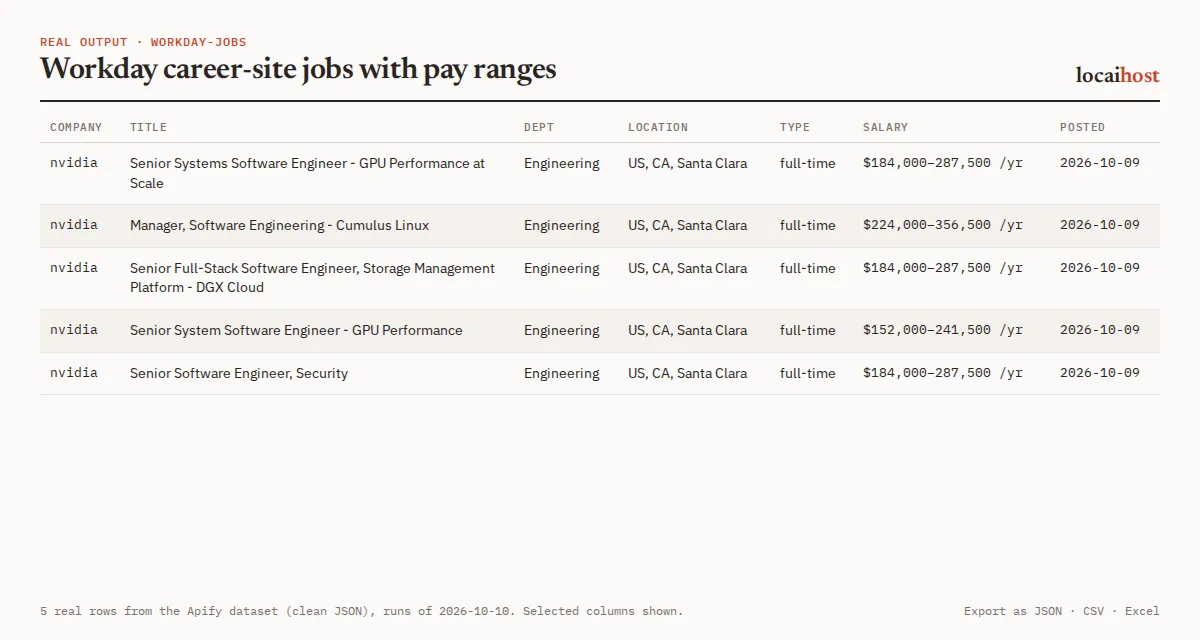
| Group | Fields |
|---|---|
| Job | title, department (Workday job category, or the Workable/Recruitee department), jobId, url, applyUrl |
| Employer | source (workday, workable, recruitee), company (the tenant or account name) |
| Location | location, locations (all of them), country (ISO code such as US, NL; null when unknown or several countries) |
| Work type | workplaceType (remote, hybrid, onsite, when the employer states it), remote (true = fully remote), employmentType (full-time, part-time, contract, temporary, internship, other), employmentTypeRaw |
| Pay | salaryMin, salaryMax, salaryCurrency, salaryPeriod (year, month or hour) |
| Dates | postedAt (YYYY-MM-DD), scrapedAt |
| Text | description: plain text, up to 20,000 characters, emails, phone numbers and "Recruiter: |
One real row (run on 2026-10-18, description shortened):
Salaries are parsed from the posting text ("184,000 USD - 287,500 USD", "$117,200 - $176,700 annually") and from Recruitee's salary field. The dataset's Jobs view exports to JSON, CSV, Excel or HTML. Each run also writes a SUMMARY record: per company, the job board, jobs found, matched and returned, and why any entry was skipped.
How much does it cost?
You pay per job returned. There is no charge for Apify platform usage on top.
| Row | Free and Starter | Scale | Business |
|---|---|---|---|
| Job | $1.00 per 1,000 | $0.75 per 1,000 | $0.55 per 1,000 |
Plus $0.00005 per run start. Apify's free $5 monthly credit covers about 5,000 jobs. Free-plan runs stop at 100 jobs each; any paid Apify plan removes the cap. You can also set your own limit with Max results.
What's free: listing career sites, jobs removed by your filters, jobs already delivered when onlyNew is on, invalid, duplicate or unsupported entries, sites skipped because of robots.txt, companies not reached before the run's time limit, and job details that could not be fetched. A run where every site is down ends with a message and no job charges. To cap a run's spend, set Maximum cost per run in the run options.
Limits, stated up front
- Three job systems: Workday, Workable and Recruitee. For Greenhouse, Lever, Ashby, Personio and Teamtailor, use Careers Page Jobs Scraper.
- SmartRecruiters and BambooHR are recognised but never fetched (SmartRecruiters' robots.txt disallows automated access; BambooHR has no public job feed and its terms forbid automated copying). They are listed in
SUMMARYat no charge. - Every Workday site's robots.txt is checked before it is read. A site the employer marks as off-limits is skipped and
SUMMARYsays so. - Each Workday job needs its own detail request, made a few at a time. A site with about 200 openings takes under 30 seconds; sites with thousands of jobs take several minutes. Title keywords, departments, posting age and
onlyNeware applied before the detail request, so they make runs faster and cheaper. - Workday's own search stops at 2,000 jobs. Large sites are listed category by category to get past it; if a single category still holds more than 2,000,
SUMMARYnotes how many were reachable. - Up to 500 companies per run. If Workday throttles some detail requests, those jobs are left out and picked up by the next run.
- Only postings that state a range have a salary, mostly US roles.
workplaceTypeis set only when the employer states it. - If a long list would outlast the run's time limit, each company gets a fair share of the time; the run stops cleanly, keeps the jobs found so far and names the companies it didn't finish.
Only new since last run, and schedules
Turn on onlyNew, save the input as a task and give it a daily schedule under Schedules in Apify Console. Each run then returns only postings it hasn't delivered before, and skipped jobs cost nothing. The memory belongs to that exact set of companies and filters: change either and it starts fresh. onlyNew is off by default, so a plain run always returns every matching open job.
Integrations: API, n8n, Make and AI agents
API. Run it and get the rows back in one call:
Apify's API clients for Python and JavaScript work the same way. Synchronous calls wait up to 5 minutes; use the asynchronous run endpoint for full pulls of large sites.
n8n, Make, Zapier, Google Sheets, Slack, webhooks. Apify's built-in integrations send each run's dataset wherever you need it.
AI agents (MCP). Add this Actor to Claude, Cursor or any MCP client with https://mcp.apify.com/?tools=locaihost/workday-jobs, then ask something like "What security engineering roles has NVIDIA posted on its Workday site in the last 7 days, and what pay ranges do they list?" Give the agent the career-site URL, not just the company name.
FAQ
How much does it cost to scrape Workday jobs?
$1.00 per 1,000 jobs on the Free and Starter plans, less on Scale and Business. Listing sites and filtered-out jobs are free. Apify's free $5 monthly credit covers about 5,000 jobs.
Can I use it through the API or from Python?
Yes. Use the run-sync-get-dataset-items call above, or Apify's Python and JavaScript clients. Every run's data is also available as JSON, CSV or Excel from its dataset.
Can I use it from an AI agent?
Yes. Through the Apify MCP server (https://mcp.apify.com/?tools=locaihost/workday-jobs) any MCP client can call it with career-site URLs and read the jobs back.
Is it legal to scrape Workday career sites?
The Actor reads each employer's public career site: the JSON behind Workday career pages, Workable's job-widget feed and Recruitee's documented Careers Site API. None needs a login, robots.txt is checked for every Workday site, requests are paced and Retry-After is honoured. It never outputs contact fields: emails, phone numbers and named-contact lines are removed from descriptions, and Recruitee's application mailbox and form questions are never read. You are responsible for how you use the results; if you republish postings, check what the employer allows.
Why are some fields empty?
Salary only exists where the posting states one. workplaceType and remote are null when the employer doesn't say, and country is null when a job spans several countries.
Can I just type "nvidia"?
Not for Workday: paste the career-site URL. Plain names work for Workable and Recruitee only.
More from locaihost data
- Careers Page Jobs Scraper: the same job format for Greenhouse, Lever, Ashby, Personio and Teamtailor boards, by company name.
- H1B Visa Sponsor Lookup: check which of these employers sponsor work visas in the US and UK.
- Indeed Jobs Scraper: Indeed job searches with no login, each job flagged with the employer's visa sponsorship record.
- Company Enrichment by Domain: company name, description, logo, socials and role contact addresses from each site.
Did it help?
If this saved you time, a quick rating on the Store helps other people find it.
Support
Something not working, or another job system you need? Open an issue on the Issues tab: we answer issues within 24 hours.


