

Google Maps Contact Leads: Emails, Phones & Websites
Pricing
from $1.73 / 1,000 delivered contact leads
Google Maps Contact Leads: Emails, Phones & Websites
Turn one or many Google Maps business searches into a deduplicated first-party contact list with public listing details, homepage contacts, social links, and conservative website-opportunity evidence.
Pricing
from $1.73 / 1,000 delivered contact leads
Rating
5.0
(1)
Developer

Luka
Maintained by CommunityActor stats
0
Bookmarked
7
Total users
1
Monthly active users
11 days ago
Last modified
Categories
Share
Turn one Google Maps search, a cross-market search list, or known Place IDs and Maps URLs into a deduplicated contact-lead dataset. Every delivered business gets the same complete workflow: stable Google identity, listing details, public phone and website, a bounded homepage contact check, social links, and conservative website-opportunity evidence.
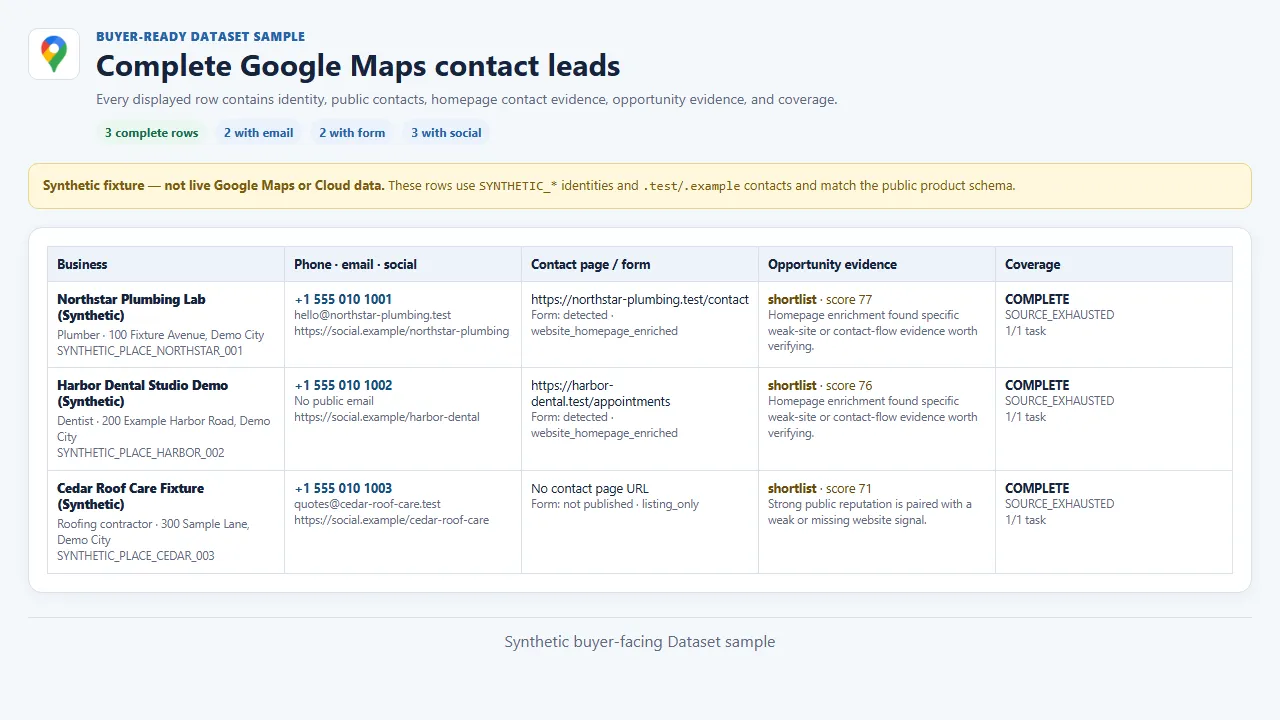
The product visual below uses clearly labeled synthetic .test and .example
data that follows the public product schema. It demonstrates the real buyer-facing
row shape without making a claim about a live business or Cloud run.
Quick start
Run this small search first:
Open the run's Dataset to export the leads as CSV, Excel, JSON, or through the Dataset API.
Choose the right workflow
| Goal | Inputs to use | Result |
|---|---|---|
| Search one market | searchQuery, locationQuery, maxPlaces | One deduplicated local contact list. |
| Search several markets | Add moreSearchQueries and moreLocations | Up to 9 extra searches and 9 extra locations share one result cap and one dedupe pass. |
| Check known places | Choose direct and add directPlaceTargets | Exact Place IDs or full official Maps URLs, without broadening the search. |
| Refine a map area | Add one coordinate center or customSearchArea | Bounded official Maps searches inside the selected area. |
Direct targeting example:
Custom-area example:
The polygon grid is a bounded search aid. It does not claim that Google exposes every business inside arbitrary geometry. The run reports exactly which planned tasks finished and why work stopped.
What you get
Every delivered row includes:
- Google Place ID or numeric CID, business name, category, address, coordinates, rating, published review count, listing phone, website, and direct Maps URL;
- public homepage emails, telephone links, social profiles, contact-page URL, and contact-form detection when the linked website exposes them;
- conservative website classification, contact-flow signals, opportunity score, outreach opening line, evidence, warnings, and do-not-claim safeguards;
- coverage status, stop reason, task/page counts, duplicate counts, rejected-row counts, and filter counts.
This compact synthetic fixture row follows the same public Dataset schema. Its identity and contacts are intentionally non-live; missing values still remain missing instead of being invented:
googleReviewCount remains null when the Google response does not publish a
total. Empty never means zero. A homepage that cannot be checked becomes
unreachable_or_uncertain, not a claimed broken website.
Input guide
| Field | What it changes | Work and price effect |
|---|---|---|
targetingMode | Broad search or exact direct-place targeting. | Direct mode uses one official place page per supplied target. |
searchQuery | Primary business type or search phrase. | One side of the search-location cross product. |
locationQuery | City, region, county, postal code, country, or service area. | One side of the search-location cross product. |
maxPlaces | Total unique output cap, 1-1,000; default 10. | More leads can require more source pages, homepage checks, runtime, memory, and paid rows. |
maxPlacesPerSearch | Per query-location cap, 1-100. | Prevents one search from consuming the whole bulk run. |
moreSearchQueries | Up to 9 extra business types. | Adds tasks; all results still share one dedupe and total cap. |
moreLocations | Up to 9 extra text locations. | Multiplies search pairs within the 20-task guard. |
directPlaceTargets | Up to 1,000 Place IDs or full official Maps URLs. | The complete listing, contact, and homepage workflow per unique target. |
searchLatitude / searchLongitude | One map center; supply both. | Refines the official Maps viewport. |
searchZoom | Zoom 3-21 when a coordinate center is present. | A tighter or wider viewport; default 13. |
customSearchArea | GeoJSON Polygon using [longitude, latitude] pairs. | Builds bounded official Maps centers inside the area. |
searchAreaGridSize | 1-9 centers inside the polygon; default 4. | More centers use more of the 20-task guard. |
language | Listing language such as en, de, or pt-BR. | Changes source text and can change the matching set. |
countryCode | Two-letter Google region such as US, DE, or ME. | Keeps regional results and repeat runs comparable. |
websitePresence | Any, only with website, or only without website. | Removed rows are not delivered or charged. |
minimumRating | Minimum published Google rating from 0-5. | Unrated rows are removed when this is above zero. |
categoryKeywords | Requires at least one Google category word. | Applied before delivery. |
nameMustInclude | Case-insensitive name filter. | Applied before delivery. |
skipClosedPlaces | Removes only listings explicitly marked closed. | Missing status is never guessed to mean open. |
Homepage contact and opportunity analysis is always included. There is no hidden cheaper basic-place mode.
Pricing
The owner-approved launch pay-per-event schedule uses two clear events. You pay only for accepted official source batches and complete contact-lead rows actually delivered:
| Event | FREE | BRONZE | SILVER | GOLD | Counted when |
|---|---|---|---|---|---|
| Verified source batch | $0.00250 | $0.00250 | $0.00250 | $0.00250 | Up to 10 official listing pages are accepted as trustworthy source work. |
| Delivered contact lead | $0.001745 | $0.001740 | $0.001735 | $0.001730 | One unique complete contact-lead row is accepted into the Dataset. |
FREE examples:
| Workload | Complete price |
|---|---|
| Confirmed empty, 1 accepted page | $0.00250 |
| 1 contact lead, 1 page | $0.004245 |
| Safe default: 10 contact leads, 1 page | $0.019950 |
| 20 contact leads, 1 page | $0.037400 |
| 100 contact leads, 5 pages | $0.177000 |
| 100 leads across 20 accepted pages | $0.179500 |
| 1,000 direct targets across 1,000 accepted pages | $1.995000 |
Blocked, failed, unrecognized, retried, and merely planned pages are not counted in source batches. Duplicate, invalid, filtered, suppressed, and rejected rows are not contact-lead events.
Coverage and reliability
| Status | Meaning |
|---|---|
COMPLETE | Every planned search reached proven source exhaustion, or every supplied direct target completed its one exact official place-page task. |
EMPTY_CONFIRMED | A recognized Google response proved zero matching listings. |
FILTERED | The source worked, but buyer filters removed some or all listings. |
CAPPED | A result, per-search, page, byte, request, runtime, or spending guard stopped more work. |
PARTIAL | Trustworthy results were found, but at least one planned task did not finish. |
BLOCKED | Google returned an access challenge; this is never reported as an empty market. |
FAILED | The source could not be read reliably before trustworthy completion. |
Production data comes only from official public Google Maps pages. The Actor does
not use a competitor Actor or third-party lead database. Access challenges are
reported as BLOCKED, never converted into empty markets or charged leads.
Rows are prepared before charging and delivery. A successful run confirms the source-batch count, atomically delivers complete contact-lead rows, records the delivery result, writes the final run output, and then clears the active receipt. An ambiguous repeat fails closed rather than risking a duplicate paid delivery.
This is a current-list product: every run reads current listings independently. It does not label a current NPI-style or business listing as a historical change.
API and automation
Use the same input from the Console, Apify API, webhooks, Make, Zapier, n8n, or
your own script. The Dataset API URL is returned in OUTPUT, together with the
coverage status, stop reason, delivered count, and stable run identity.
For repeat lead collection, save one small input per market and run it on the
cadence that suits your workflow. Store the stable placeId or cid in your CRM
to update an existing business instead of creating a duplicate. A repeated run
is a fresh current-list read; your automation decides whether a row is new or
changed for your own CRM.
FAQ and support
Why did I receive fewer rows than maxPlaces?
maxPlaces is a cap, not a promise that the source contains that many matching
businesses. Check coverageStatus, coverageStopReason, and the filter,
duplicate, rejected, page, and task counters.
Why is an email missing?
The Google listing and sampled homepage did not publish one. The Actor does not guess addresses or use a third-party lead database.
Can I send a known list instead of searching?
Yes. Choose direct targeting and provide Place IDs or full official Maps URLs.
Are review histories, images, or popular-times histories included?
No. Those are separately selected and separately priced workflows in the locked market comparison, not core contact-lead output. Rating and review-count fields are returned only when the Google listing response publishes them.


