

Naver DataLab Search Trends Scraper (네이버 데이터랩 트렌드)
Pricing
from $0.04 / 1,000 trend data points
Naver DataLab Search Trends Scraper (네이버 데이터랩 트렌드)
Enter Korean keywords and get Naver DataLab search trends (검색어트렌드) as flat rows: one row per keyword and day, week or month with the 0-100 interest ratio, filtered by device, gender and age. More than 5 keywords are put on one common scale. No Naver API key or login.
Pricing
from $0.04 / 1,000 trend data points
Rating
0.0
(0)
Developer

SUNGHWAN CHO
Maintained by CommunityActor stats
0
Bookmarked
2
Total users
1
Monthly active users
2 days ago
Last modified
Features
Share
Naver DataLab Trends Scraper (네이버 데이터랩 검색어트렌드) | Korean Search Trends by Keyword, Device, Gender & Age (2026)
Languages: English · 한국어 · 中文 · 日本語
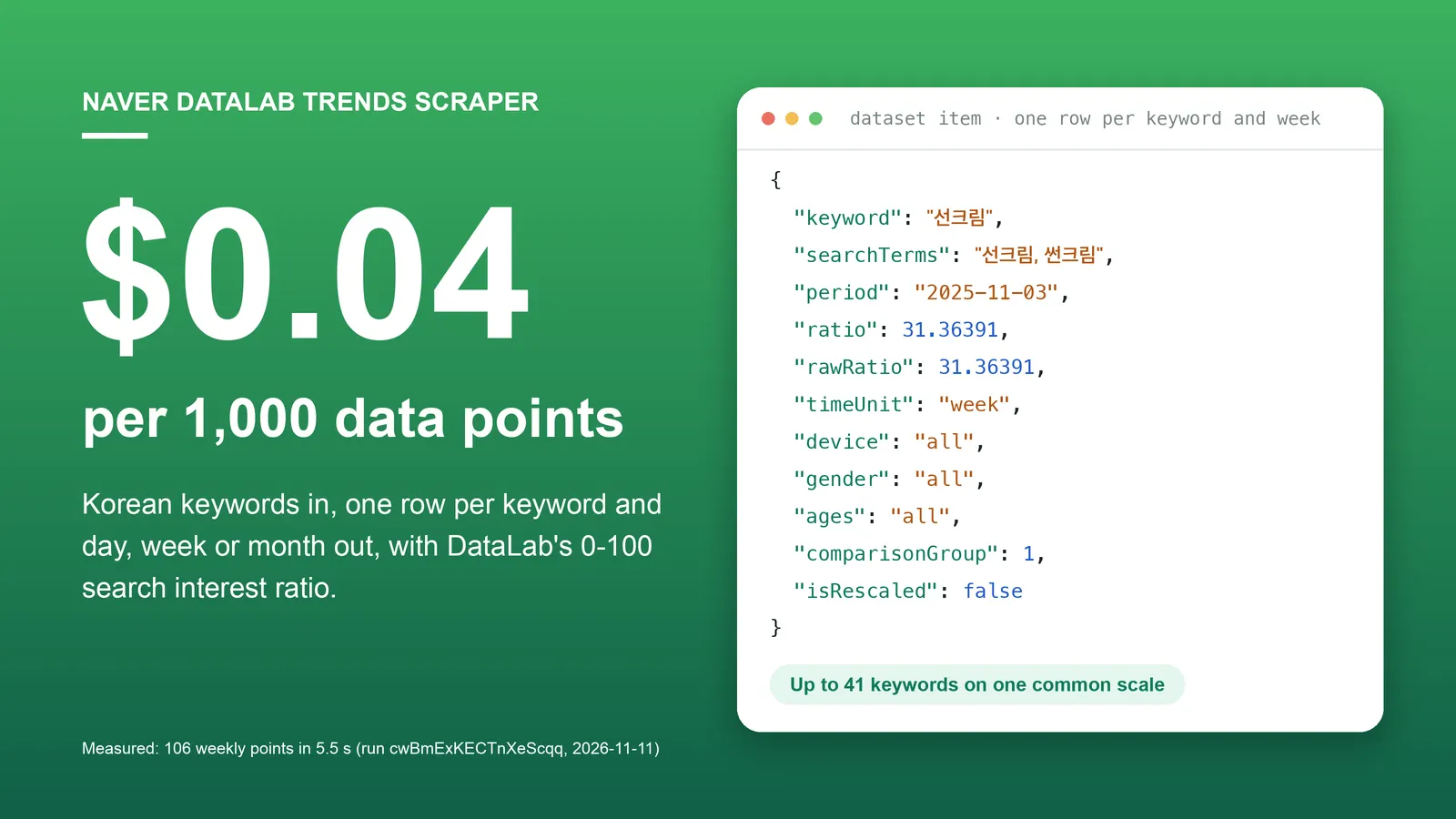
Enter Korean keywords and get Naver DataLab search trends (검색어트렌드) as flat JSON rows: one row per keyword and day, week or month, with the 0 to 100 search interest ratio, for the device, gender and age bands you choose. More than 5 keywords are put on one common scale. No Naver login, no API key, no browser.
Naver DataLab is Naver's own trend tool for its search engine, comparable to Google Trends. This Actor reads the public DataLab chart for your keywords and returns the numbers behind it. Part of a small set of Korean data Actors from one maintainer: Naver Search, Naver News, Naver AI Briefing and Naver Shopping ranks.
Free plan: Apify's $5 monthly credit covers about 125,000 data points with this Actor (at the per-row price; each run adds a $0.00005 start fee).
Why choose this Actor?
$0.04 per 1,000 data points.
You pay $0.00004 per row saved: the value of one keyword for one day, week or month. The default run (two keywords, weekly, the last 12 months) saved 106 rows in run cwBmExKECTnXeScqq, which is $0.0042. A keyword Naver has no data for returns no rows and costs nothing.
More than 5 keywords on one scale.
Naver compares at most 5 keywords at once, and every comparison has its own 0 to 100 scale. Give this Actor up to 41 keywords and it chains the comparisons through your first keyword, so ratio is comparable across all of them. rawRatio keeps the value exactly as Naver returned it.
Audience filters as plain inputs.
device (PC or mobile), gender and ages (11 age bands from 0-12 to 60+) are the same filters the DataLab page offers, and every row repeats the filters it was fetched with.
Flat rows for code and AI agents.
One required input (keywords). Dates default to the last 12 months. Each row has the same 17 keys and numbers are numbers.
Measured, not estimated. Two keywords, weekly, 12 months: 106 rows in 5.5 seconds at 256 MB (run cwBmExKECTnXeScqq, build 0.1.1, 2026-11-11, default datacenter proxy, 2 requests, no retries). Seven keywords, daily, 12 months, two comparisons: 2,190 rows in 38.1 seconds, 4 requests, no retries (run BaApMHlVoNdnegTik, same build).
Quick start
Two trend lines, weekly, for the last 12 months. This is the default input; at the current price the run above cost about $0.004.
Open the Actor input, type one keyword per line, and click Start. 선크림, 썬크림 adds up two spellings of "sunscreen" into one line; 수분크림 is "moisturizer". Export the dataset as JSON, CSV or Excel.
Copy to your AI assistant
Paste this into ChatGPT, Claude, Cursor or another assistant so it can call the Actor for you:
Use it over MCP
Add this server to Claude Desktop, Cursor or any MCP client, authenticated with your Apify token:
The agent only has to fill keywords; everything else has a default.
Key features
- Daily, weekly or monthly rows.
periodis the day, the Monday of the week, or the first day of the month, always asYYYY-MM-DD. - Data from 2016-01-01 up to yesterday in Korea time.
- Up to 41 keywords per run. The first 5 form the first comparison; every later comparison holds your first keyword plus 4 new ones, up to 10 comparisons.
- One common scale.
ratiois converted to the scale of the first comparison;isRescaled,comparisonGroupandcomparedWithshow how each row was obtained. - Spelling variants in one line.
선크림, 썬크림makes Naver add up both spellings (up to 20 terms per line). - Your own labels.
Sunscreen: 선크림, 썬크림returns the line askeyword: "Sunscreen", with the actual terms insearchTerms. - Device, gender and age filters, repeated on every row.
- A link back to the chart.
sourceUrlis the Naver DataLab result page of that comparison. - A free run summary. The key-value store record
RUN_SUMMARYhas the resolved period and filters, the status of each comparison and the keywords without data. - Clean stop at your cost limit. Rows stored equal rows charged; comparisons that did not fit are marked
budgetLimited.
How to scrape Naver DataLab search trends
Compare up to 5 keywords, weekly, last 12 months
All five are on Naver's own scale: the highest point among them is 100.
(Sunscreen, moisturizer, cleansing oil, lip balm, hand cream.)
Add up spelling variants and use English labels
Daily values for a fixed period
Monthly seasonality since 2016
For week and month Naver works with whole months, so the period is widened to full months.
One audience segment: women aged 19 to 29 on mobile
Run the same keywords again with other filters to compare segments. Each run has its own scale, so compare the shape of the curves, not the values, between runs.
More than 5 keywords on one scale
Put a reasonably popular keyword first; it is added to every comparison as the common reference.
Input parameters
| Field | Type | Default | Description |
|---|---|---|---|
keywords | array of strings | — (required) | One trend line per row, up to 41. See "Keyword lines" below. Duplicate lines are dropped. |
timeUnit | string | week | date (daily), week or month. |
startDate | string | one year before endDate | YYYY-MM-DD. Naver has data from 2016-01-01; an earlier date is moved to that day. |
endDate | string | yesterday (Korea time) | YYYY-MM-DD. A later date is moved to yesterday. |
device | string | all | all, pc or mobile. |
gender | string | all | all, female or male (as registered on the Naver account). |
ages | array of strings | [] (all ages) | Any of 0-12, 13-18, 19-24, 25-29, 30-34, 35-39, 40-44, 45-49, 50-54, 55-59, 60+. |
proxyConfiguration | object | Apify Proxy | Keep the default (datacenter). Switch to RESIDENTIAL with country KR only if the log shows repeated request errors. |
Keyword lines
| You write | Naver measures | keyword in the output |
|---|---|---|
선크림 | searches for 선크림 | 선크림 |
선크림, 썬크림 | both spellings added up (up to 20 terms) | 선크림 |
Sunscreen: 선크림, 썬크림 | both spellings added up | Sunscreen |
A line must not contain __ (Naver DataLab does not accept it).
How more than 5 keywords are put on one scale
Naver sets the highest point among the compared keywords to 100, separately for every comparison. Keywords 1 to 5 form comparison 1. Every later comparison holds your first keyword plus up to 4 new ones. Because the first keyword appears in every comparison, the Actor can compute how the two scales relate (the sum of the first keyword's values in comparison 1 divided by the sum of its values in the later comparison, over the same periods) and multiply the later values by that factor.
So ratio can be above 100 for a keyword that is more popular than everything in comparison 1. In run BaApMHlVoNdnegTik, 핸드크림 (hand cream) was fetched in comparison 2, where its peak was rawRatio: 100; on the common scale that peak is ratio: 114.41861.
Limits: if the first keyword has no search volume in a comparison, there is nothing to align on and ratio is null for that comparison's rows (use rawRatio). If comparison 1 fails, the later ones are skipped. The first keyword's own rows come from comparison 1 only.
What data can you extract from Naver DataLab?
One row per keyword and period.
| Field | Type | Description |
|---|---|---|
keyword | string | Name of the trend line: your label, or the first search term of the input line. |
searchTerms | string | The search terms Naver added up for this line, comma-separated. |
period | string | YYYY-MM-DD: the day, the Monday of the week, or the first day of the month. |
ratio | number | Search interest, comparable across all keywords of the run. 100 = the highest point among the keywords of the first comparison in the selected period. null only when the first keyword has no search volume to align on. |
rawRatio | number | The 0 to 100 value exactly as Naver returned it for this keyword's own comparison. |
timeUnit | string | date, week or month. |
device | string | all, pc or mobile. |
gender | string | all, female or male. |
ages | string | all or the selected age bands, comma-separated. |
startDate, endDate | string | The period that was requested from Naver, after defaults and widening to full months. |
comparisonGroup | integer | Which Naver comparison the keyword was fetched in. Always 1 with up to 5 keywords. |
comparedWith | string | All keywords of that comparison, comma-separated. |
isRescaled | boolean | true when ratio was converted from rawRatio to the scale of the first comparison. |
sourceUrl | string | The Naver DataLab result page for this comparison. |
scrapedAt | string | Fetch time (UTC, ISO 8601). |
schemaVersion | integer | Output schema version, currently 1. |
Run summary (key-value store record RUN_SUMMARY, not charged): status (completed, partial, budgetLimited, failed), rowsSaved, the resolved timeUnit, startDate, endDate, device, gender, ages, requests, retries, and one entry per comparison with keywords, status, rows, keywordsWithoutData and errorMessage.
Output example: weekly row
From run cwBmExKECTnXeScqq (2026-11-11, build 0.1.1), the default input. Unedited. period is the Monday of the week.
Output example: rescaled daily row from a second comparison
From run BaApMHlVoNdnegTik (2026-11-11, build 0.1.1): seven keyword lines, daily, mobile, female, ages 19 to 29. Unedited. This keyword was sixth in the input, so it was fetched in comparison 2 and converted to the scale of comparison 1.
The third keyword of that comparison was a made-up word for testing. Naver had no data for it, so it produced no rows and is listed under keywordsWithoutData in RUN_SUMMARY.
Output example: monthly row
From run UvMzUMW7M4dhPQ9rX (2026-11-15, build 0.1.1), input timeUnit: "month", startDate: "2024-01-15", endDate: "2025-12-20". Unedited. The period was widened to full months (2024-01-01 to 2025-12-31), which gave 24 rows per keyword; May 2024 was the peak of the two keywords.
Advanced usage
Find each keyword's peak month
Rank a shortlist of candidate keywords
Send up to 41 candidates in one run with a well-known keyword on the first line, then average ratio per keyword. Because all rows share one scale, the averages can be ranked against each other.
Compare audience segments
Run the same keywords once per segment (for example gender: "female" and gender: "male"). Naver rescales every query to its own peak, so values from two runs are not on the same scale: compare when each curve rises and falls, or the ratio between keywords inside each run.
Check what was actually requested
startDate and endDate on every row, and in RUN_SUMMARY, are the dates sent to Naver after defaults, the 2016-01-01 lower bound, the "yesterday" upper bound and widening to full months.
One call from the command line
How much does it cost to scrape Naver DataLab?
Pay per event, no subscription. The price below has been in effect since 2026-11-11 and is the same on every Apify plan (this Actor has no plan-tier discount).
| Event | Price | When |
|---|---|---|
| Trend data point | $0.00004 per row | Every row saved to the dataset: one keyword for one period. |
| Actor start | $0.00005 | Once per run. |
Not charged: the RUN_SUMMARY record, keywords without data, comparisons that fail, retries.
Rows = keywords with data × periods. Worked examples:
| Job | Rows | Cost |
|---|---|---|
Default run: 2 keywords, weekly, last 12 months (run cwBmExKECTnXeScqq) | 106 | $0.0042 |
2 keywords, monthly, 24 months (run UvMzUMW7M4dhPQ9rX) | 48 | $0.0019 |
6 keywords with data, daily, 12 months (run BaApMHlVoNdnegTik) | 2,190 | $0.088 |
| 41 keywords, monthly, 2016-01 to 2026-10 (130 months) | up to 5,330 | up to $0.21 |
| Any job | 1,000 | $0.04 |
Set Maximum cost per run in the console to cap a run. It stops cleanly: only the rows that fit the budget are stored and charged, and the comparisons that did not fit are marked budgetLimited in RUN_SUMMARY.
Scheduling and integrations
- Schedules. In Apify Console, create a weekly or monthly schedule and leave
startDateandendDateempty: every run then covers the 12 months ending yesterday. Each run is a fresh snapshot on its own scale; the Actor keeps no history between runs. - Webhooks and automation. Send the dataset to Slack, Google Sheets, Make, Zapier or n8n with Apify integrations, or call your own endpoint with a webhook when a run finishes.
- API clients. Any HTTP client works; official clients exist for Python (
apify-client) and JavaScript (apify-client).
FAQ
Do I need a Naver account or the Naver DataLab API key? No. The Actor reads the public DataLab search-term trend page without logging in, so there is no API key and no API quota of your own to manage.
Does it return search volume? No. DataLab publishes ratios only: the highest point among the compared keywords in the selected period is 100 and everything else is scaled to it. A ratio of 50 means half as many searches as that peak. Absolute search counts are not available here.
Can I compare numbers from two different runs? Not directly. Change the keywords, the period or a filter and Naver's scale changes. Compare rows of one run with each other. To compare many keywords, send them in one run (up to 41).
Why is ratio above 100?
With more than 5 keywords, 100 is the highest point of the first comparison. A keyword fetched in a later comparison that is more popular than that gets a ratio above 100. rawRatio never exceeds 100.
Why does a weekly run start a few days after my start date?
For week and month the period is widened to full months, and period is the Monday of each week. In run cwBmExKECTnXeScqq the requested period was 2025-11-01 to 2026-11-10; the first row was the week of Monday 2025-11-03 and the last the week of 2026-11-02, 53 rows per keyword.
Why did a keyword return no rows?
Naver has no trend data for it in the selected period and filters. Check the spelling or widen the filters. The keyword is listed under keywordsWithoutData in RUN_SUMMARY and nothing is charged for it.
What happens when Naver rejects a request?
A comparison is tried up to 5 times in total, each time on a new proxy session, with a growing pause. A query that Naver itself rejects (for example unusual characters) is not retried; that comparison is marked failed with Naver's reason. If one comparison fails, the others are still saved; the run fails only when no data could be fetched. The default datacenter proxy needed no retries in the runs named above.
Does it cover Shopping Insight or regional trends? No. Only the search-term trend (검색어트렌드) part of DataLab is read.
Is it legal to scrape Naver DataLab? The Actor reads a public page with aggregate statistics and does not log in. Whether your use is allowed depends on Naver's terms of service, your purpose and your local law; checking that is your responsibility.
네이버 데이터랩 검색어 트렌드를 엑셀로 받을 수 있나요?
네. 실행이 끝나면 데이터셋을 JSON·CSV·Excel로 내려받을 수 있습니다. 키워드가 5개를 넘어도 한 번에 넣으면 ratio가 같은 기준으로 맞춰져 나옵니다.
More Korean data Actors
| Actor | What you put in → what you get |
|---|---|
| Naver Search Scraper | Keywords → the Naver integrated search page as rows: section, rank, ad flag, title, URL, snippet, related searches. |
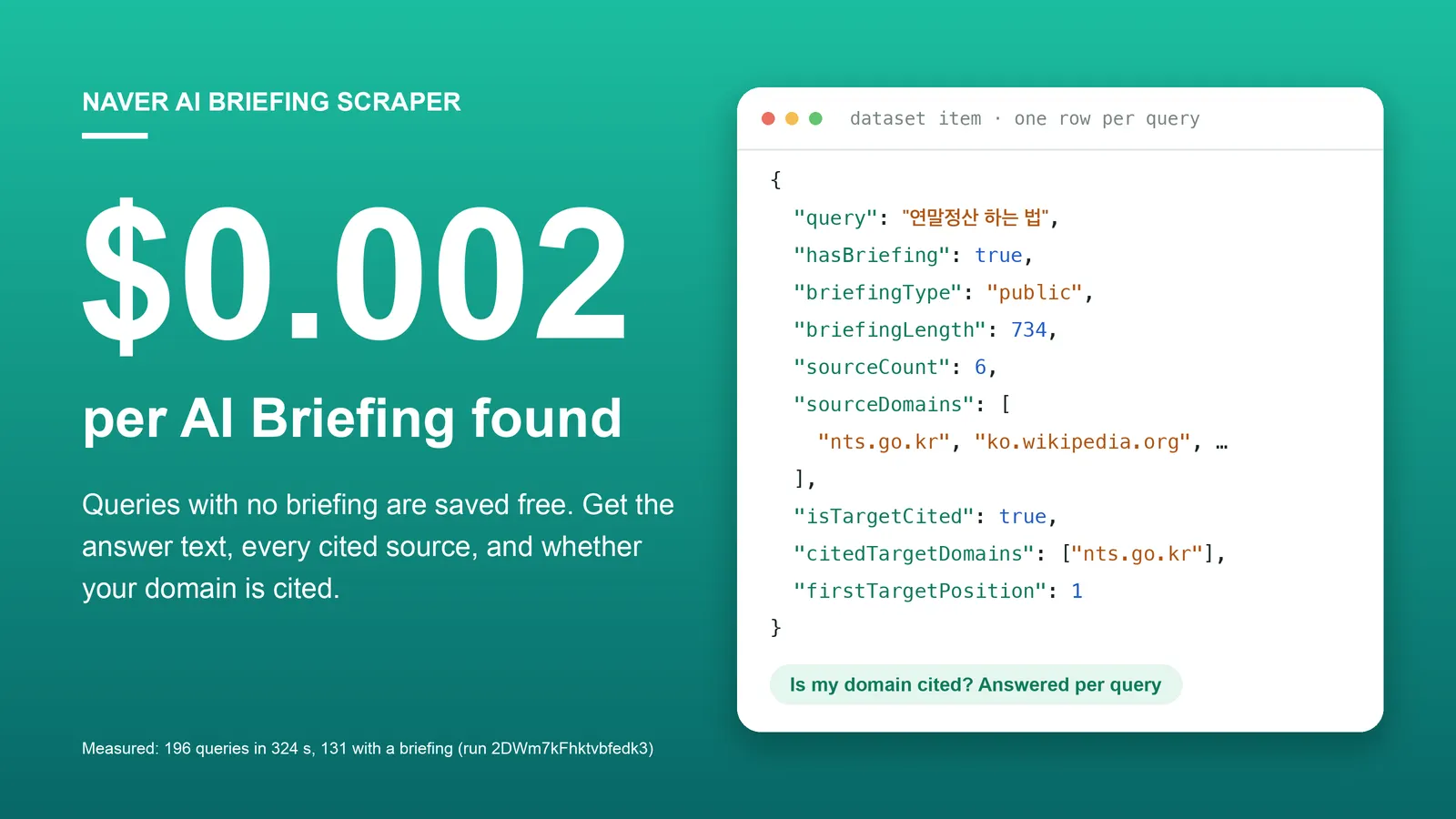
| Naver AI Briefing Scraper | Search queries → Naver's AI answer, its cited sources, and whether your domain is cited. |
| Naver News Scraper | Keywords or article URLs → Naver News articles with publisher, times, URLs and optional full text. |
| Naver Blog, Cafe & News Search Scraper | Keywords → blog, cafe and news search results with title, URL, snippet and publish time. |
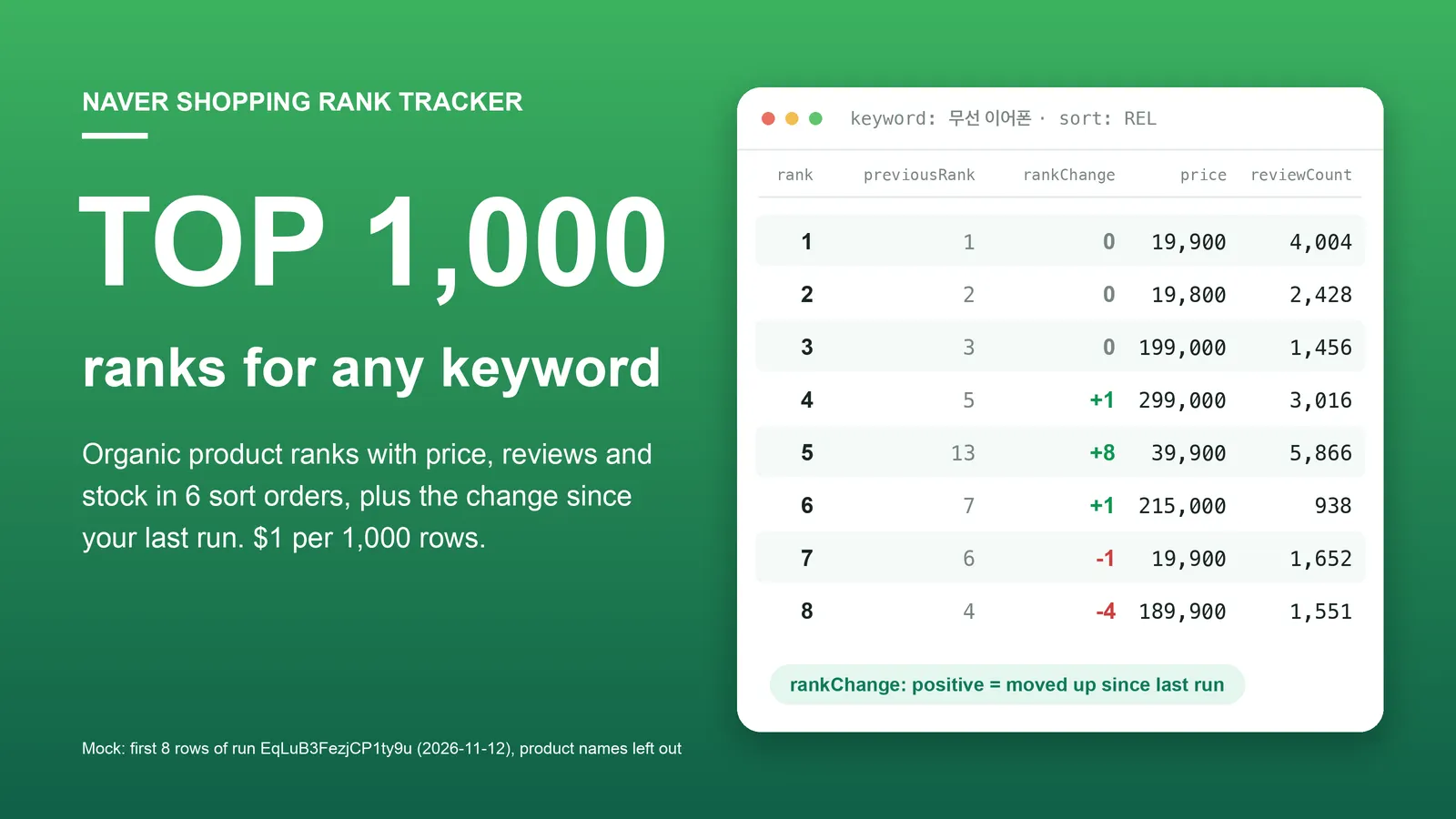
| Naver Shopping Scraper & Keyword Rank Tracker | Shopping keywords → ranked products with price, store, rating, reviews and stock. |
| Naver Map Scraper | Keyword → businesses with address, phone, coordinates, rating, review counts. |
| Naver Map Reviews Scraper | Place IDs or Naver Map URLs → visitor reviews with rating, text, dates, keyword codes and owner reply. |
| Naver Place Multi-Location Review Monitor | Your locations → new reviews, owner replies added or edited, unanswered counts per location. |
| Naver Place Rank Tracker | Keywords + your place IDs → your rank in Naver Map search, with change since the last run. |
| Kakao Map Reviews Scraper | Kakao Map place IDs → visitor reviews, no reviewer personal data. |
| Kakao Map Scraper | Keyword → Kakao Map businesses, same field names as the Naver Map Actor. |
| Korea MCP Server: Naver, Kakao Map | An MCP server with Naver Map search, Naver Place reviews and Kakao Map search as tools. |
Code examples for these Actors: github.com/experimory-crypto/naver-map-scraper-examples.
한국어 안내 (Korean)
키워드를 넣으면 네이버 데이터랩 검색어트렌드 값이 키워드와 기간(일·주·월)마다 한 행으로 나옵니다. 각 행에는 0~100 기준의 검색 관심도 비율(ratio), 네이버가 돌려준 원래 값(rawRatio), 기간, 그리고 조회에 쓴 기기(PC·모바일)·성별·연령대 조건이 들어 있습니다. 네이버는 한 번에 5개까지만 비교하지만, 이 Actor는 첫 번째 키워드를 기준으로 비교를 이어 붙여 최대 41개 키워드를 같은 기준으로 맞춥니다. 쉼표로 여러 표기를 한 줄에 합칠 수 있고(최대 20개), 2016-01-01부터 한국 시간 기준 어제까지 조회됩니다. 요금은 행 1건당 $0.00004(1,000행 $0.04)이며 요금제 등급별 할인은 없고, 실행마다 시작 요금 $0.00005가 붙습니다. 데이터가 없는 키워드는 행이 나오지 않고 과금되지 않습니다. 제공하지 않는 것: 실제 검색량(횟수), 쇼핑인사이트, 지역별 트렌드, 서로 다른 실행 사이에서 바로 비교할 수 있는 값. 로그인 없이 공개된 집계 통계만 읽으며 개인정보는 다루지 않습니다.
中文说明 (Chinese)
输入关键词,即可获得 Naver DataLab 搜索词趋势(검색어트렌드)数据,每个关键词的每个周期(日、周、月)一行。每行包含以 0–100 为基准的搜索热度比值(ratio)、Naver 返回的原始值(rawRatio)、周期,以及查询时使用的设备(PC、移动端)、性别和年龄段条件。Naver 一次最多比较 5 个关键词,本 Actor 以第一个关键词为基准把多次比较串联起来,最多可将 41 个关键词换算到同一基准。可以用逗号把多种写法合并为一行(最多 20 个),数据范围从 2016-01-01 到韩国时间的昨天。费用为每行 $0.00004(1,000 行 $0.04),没有按套餐等级的折扣,每次运行另收 $0.00005 启动费。没有数据的关键词不会产生行,也不收费。不提供:实际搜索量(次数)、购物洞察(쇼핑인사이트)、地区趋势,以及可在不同运行之间直接比较的数值。无需登录,只读取公开的汇总统计,不涉及个人信息。
日本語ガイド (Japanese)
キーワードを入力すると、Naver DataLab の検索語トレンド(검색어트렌드)の値が、キーワードと期間(日・週・月)ごとに 1 行で出力されます。各行には、0〜100 を基準とした検索関心度の比率(ratio)、Naver が返した元の値(rawRatio)、期間、そして取得時に指定したデバイス(PC・モバイル)、性別、年齢層の条件が含まれます。Naver が一度に比較できるのは 5 個までですが、この Actor は 1 番目のキーワードを基準に比較をつなぎ、最大 41 個のキーワードを同じ基準にそろえます。カンマで複数の表記を 1 行にまとめることができ(最大 20 個)、2016-01-01 から韓国時間の前日までのデータを取得できます。料金は 1 行あたり $0.00004(1,000 行で $0.04)で、プラン等級による割引はなく、実行ごとに開始料金 $0.00005 がかかります。データがないキーワードは行が出力されず、課金もされません。提供しないもの:実際の検索数(回数)、ショッピングインサイト、地域別トレンド、異なる実行の間でそのまま比較できる値。ログインなしで公開されている集計統計のみを読み取り、個人情報は扱いません。
Notes
- Ratios, not search counts. 100 is the highest point among the compared keywords in the selected period; the scale changes whenever the keywords, the period or a filter changes.
- Dates.
period,startDateandendDateare calendar dates in Korea time;scrapedAtis UTC. The default period is the 12 months ending yesterday in Korea time. - Week and month. The period is widened to full months (the end is never later than yesterday).
periodis the Monday of the week or the first day of the month. - Rounding.
ratiois rounded to 5 decimal places;rawRatiois Naver's value unchanged. - Requests. One comparison is two requests to Naver, with a pause of 1 to 2 seconds between comparisons. A run with 41 keywords makes 10 comparisons.
- Personal data. None. DataLab publishes aggregate statistics only; the gender and age filters select an aggregate, not individual users.
- Not affiliated with Naver.
Support
Missing a field, another filter, a different output format? Tell us in the Issues tab with the run ID. We answer every issue.


