
Naver Search Scraper (네이버 검색 · SERP, Related Keywords)
Pricing
from $0.08 / 1,000 result rows
Naver Search Scraper (네이버 검색 · SERP, Related Keywords)
Enter keywords and get the Naver integrated search page (통합검색) as flat rows: every result with its section, rank, ad flag, title, URL and snippet, plus Naver's related searches and autocomplete suggestions. No API key, no browser.
Pricing
from $0.08 / 1,000 result rows
Rating
0.0
(0)
Developer

SUNGHWAN CHO
Maintained by CommunityActor stats
0
Bookmarked
2
Total users
1
Monthly active users
2 days ago
Last modified
Features
Share
Naver Search Scraper (네이버 검색) | Naver SERP Ranks, Ads, Sections & Related Keywords (2026)
Languages: English · 한국어 · 中文 · 日本語
Enter keywords and get the Naver integrated search page (통합검색) as flat JSON rows: every result in page order with its section, overall rank, organic rank, ad flag, title, URL and snippet, the shopping price in KRW, plus Naver's related searches (관련 검색어) and autocomplete suggestions (자동완성). No Naver login, no API key, no browser.
A Naver result page is not a list of ten links. It is a stack of sections that changes per keyword: PowerLink ads, shopping, place, brand content, blog and cafe posts, news, clips, knowledge panels. This Actor reads that page top to bottom and tells you what ranks where, and in which kind of section. Part of a small set of Korean data Actors from one maintainer: Naver AI Briefing, Naver News, Naver DataLab trends and Naver Shopping ranks.
Free plan: Apify's $5 monthly credit covers about 50,000 rows with this Actor (at the per-row price; each run adds a $0.00005 start fee).
Why choose this Actor?
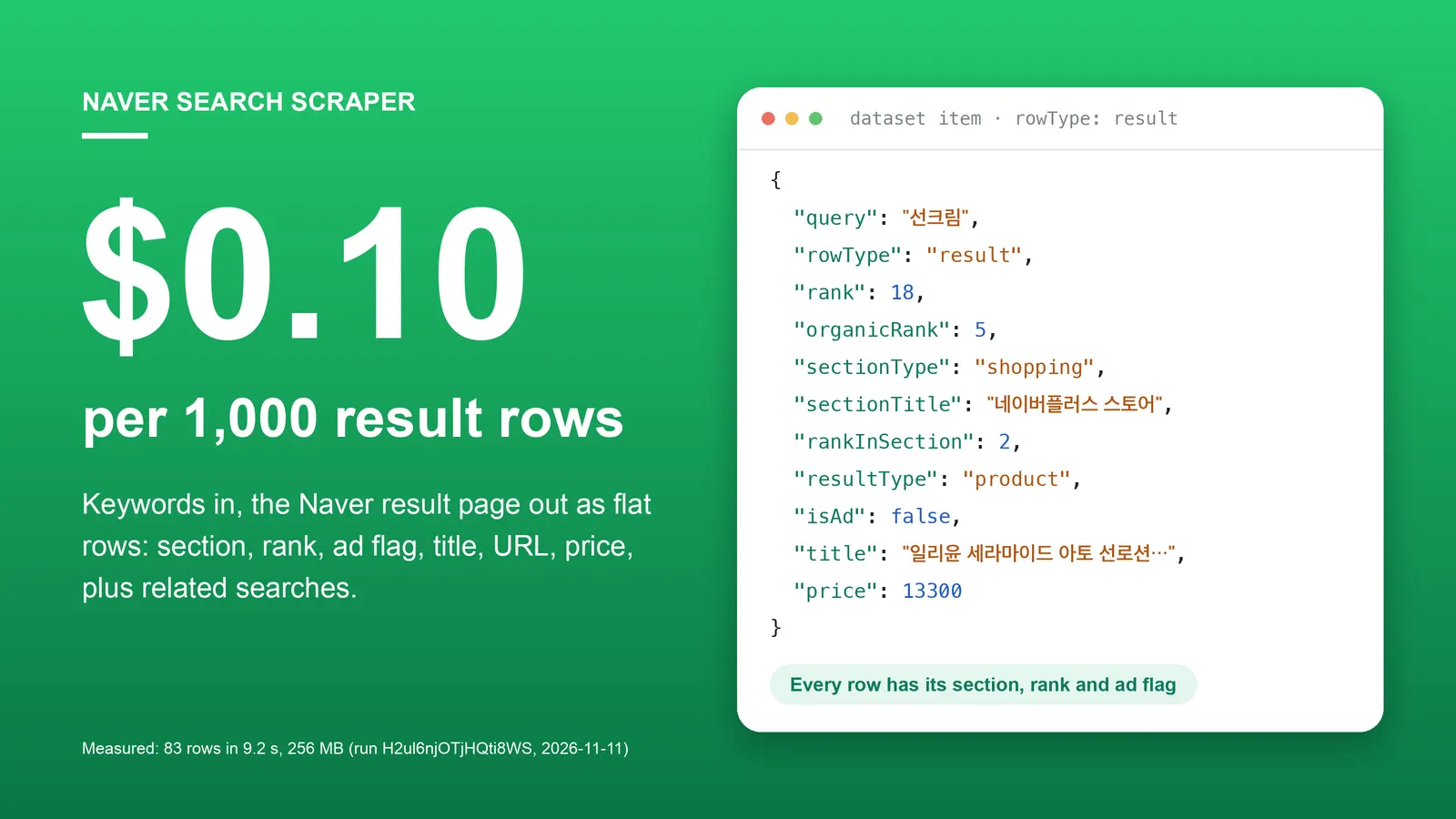
$0.10 per 1,000 rows, one price for everything.
You pay $0.0001 per row saved to the dataset, whatever the row is: a search result, a detected section, a related search or an autocomplete suggestion. The default run for one keyword saved 83 rows (run H2ul6njOTjHQti8WS), which is $0.0083.
The whole page, not one tab.
Each row says which section it sits in (sectionType, sectionTitle, sectionPosition) and where (rank over the whole page, rankInSection inside the section). You can see that a keyword is answered by shopping first and blogs fifth before you decide what to publish.
Ads are flagged and never clicked.
Paid results carry isAd: true and have no organicRank. Naver's ad click-tracking links are not returned, because opening one would bill the advertiser; for PowerLink ads url is built from the advertiser's display URL instead.
Flat rows for code and AI agents.
One required input (queries). Every row has the same 25 keys; a value Naver did not show is null; numbers are numbers.
Measured, not estimated. One keyword, one page, with related searches: 83 rows in 9.2 seconds at 256 MB (run H2ul6njOTjHQti8WS, build 0.1.4, 2026-11-11, default datacenter proxy, 2 requests, no retries). Nine keywords, two pages each, with related searches and autocomplete: 852 rows in 68.0 seconds, 35 requests, no retries (run cTkfcYbDKZqNmngS9, same build).
Quick start
The integrated search page for one keyword, with related searches. This is the default input; at the Free-plan price the run above cost about $0.008.
Open the Actor input, type keywords one per line (선크림 means sunscreen), and click Start. Export the dataset as JSON, CSV or Excel.
Copy to your AI assistant
Paste this into ChatGPT, Claude, Cursor or another assistant so it can call the Actor for you:
Use it over MCP
Add this server to Claude Desktop, Cursor or any MCP client, authenticated with your Apify token:
The agent only has to fill queries; everything else has a default.
Key features
- Every section in page order. PowerLink ads, brand content ads, shopping, place, web / blog / cafe results, news, influencer, clips.
sectionPositionis the order of the section on its page. - Two ranks.
rankcounts every result of the keyword, ads included, and continues across pages;organicRankcounts non-ad results only. - Result type per row.
resultTypeis one ofad,product,place,web,blog,cafe,kin(지식iN question),influencer,post,news,clip. - Shopping prices as numbers.
priceis the lowest price shown on the product card, in KRW. - Place results with a Naver Map link.
urlishttps://map.naver.com/p/entry/place/<id>anddescriptionis the business category. - Dates in two forms.
dateTextexactly as Naver shows it (3시간 전,2026.05.06.) andpublishedAtas ISO 8601 in Korea time. - Sections that are not itemized are still reported. The image grid, AI topic cards (숏텐츠), knowledge panels and anything unknown become one
sectionrow, so you see that they exist and where they sit. - Related searches with Naver's badge.
relatedSearchrows keep Naver's order and its badge, for example많이 찾는(popular) or최근 관심(trending). - Autocomplete suggestions as
autocompleterows, in Naver's order (optional). - Deeper pages.
maxPagesup to 10; each extra page adds the next 20 web, blog and cafe results, and a result already returned on an earlier page is not repeated. - Sort and period filters for the web, blog and cafe results: newest first, and last hour to last year.
- A free run summary. The key-value store record
RUN_SUMMARYhas the status of each keyword, row counts by type, and the section order of page 1. - Clean stop at your cost limit. Rows stored equal rows charged; keywords that were cut off or not started are marked
budgetLimited.
How to scrape Naver search results
The integrated search page for several keywords
Keywords are processed four at a time. Each row carries its keyword in query.
(강남 맛집 = Gangnam restaurants, 삼성전자 = Samsung Electronics.)
Organic results only, without ads
Ad rows are dropped, and a section that contains only ads disappears. rank then equals organicRank.
Track where a blog post, cafe post or site ranks
Read more of the web / blog / cafe feed with maxPages, then filter rows by url in your own code. Three pages cover the integrated page plus the next 40 feed results.
See who advertises on your keywords
Keep ads on and filter isAd: true. PowerLink rows have the ad title, ad text (description), the advertiser name (sourceName) and the display URL.
Keyword expansion: related searches and autocomplete
Both lists come back as rows with the keyword in title. Feed them back in as new queries.
Only recent posts, newest first
sort and period apply to the web, blog and cafe results.
Input parameters
| Field | Type | Default | Description |
|---|---|---|---|
queries | array of strings | — (required) | Keywords, one per line, as you would type them into Naver. Each is searched separately; duplicates are removed. |
maxPages | integer | 1 | 1 to 10. Page 1 is the integrated search page: ads, shopping, place, news and the first 20 web / blog / cafe results. Each extra page adds the next 20 web / blog / cafe results. |
includeRelatedSearches | boolean | true | Add relatedSearch rows. One extra small request per keyword. |
includeAutocomplete | boolean | false | Add autocomplete rows. One extra small request per keyword. |
includeAds | boolean | true | Keep paid results (isAd: true). false returns non-ad results only. |
sort | string | relevance | relevance (Naver's default) or date (newest first), for the web / blog / cafe results. |
period | string | all | all, 1h, 1d, 1w, 1m, 3m, 6m or 1y. Only web / blog / cafe results published within the period. |
proxyConfiguration | object | Apify Proxy | Keep the default (datacenter). Switch to RESIDENTIAL with country KR only if the log shows repeated request errors. |
How pages and ranks work
Page 1 is the integrated page, which already contains the first 20 results of Naver's blended web / blog / cafe feed. Page 2 continues that feed from result 21, page 3 from result 41, and so on. rank and organicRank keep counting across pages. Results whose URL was already returned for the keyword are skipped, so an extra page can add slightly fewer than 20 rows: in run cTkfcYbDKZqNmngS9 page 2 added 17 to 20 rows per keyword.
How many rows page 1 gives depends on the keyword, because Naver decides which sections to show. In the same run, page 1 gave 41 to 82 result and section rows across eight keywords, plus 18 related searches each and 2 to 10 autocomplete suggestions.
What data can you extract from Naver search?
Rows have a rowType field. Every row has every field; missing values are null.
rowType | What it is |
|---|---|
result | One search result: an ad, a product, a place, a web page, a blog or cafe post, a 지식iN question, a news article or a clip. |
section | A section Naver showed that this Actor does not break into items: the image grid, AI topic cards (숏텐츠), knowledge panels such as stock quotes, and sections it does not know. |
relatedSearch | One of Naver's related searches (관련 검색어) for the keyword. |
autocomplete | One autocomplete suggestion (자동완성) for the keyword. |
All fields:
| Field | Type | Description |
|---|---|---|
query | string | The input keyword this row belongs to. |
rowType | string | result, section, relatedSearch or autocomplete. |
page | integer | Page number within the keyword; 1 = the integrated page. null for related searches and autocomplete. |
rank | integer | Position among all results of the keyword, ads included, continuing across pages. null for non-result rows. |
organicRank | integer | Position among non-ad results only. null for ads and non-result rows. |
sectionType | string | powerlink, brandContent, shopping, place, web, news, influencer, clip, image, shortents, knowledge or other. |
sectionCode | string | Naver's own area code of the section, e.g. pwl_nop, shp_gui, shs_lis, urB_coR, nws_all. |
sectionTitle | string | The section heading as shown on the page (Korean), or an English label when Naver shows no heading. |
sectionPosition | integer | Order of the section on its page, starting at 1. |
rankInSection | integer | Position inside the section. For relatedSearch and autocomplete rows: position in that list. |
resultType | string | ad, product, place, web, blog, cafe, kin, influencer, post, news or clip. |
isAd | boolean | true for paid results; null for non-result rows. |
title | string | Result title. For section rows: the section title. For relatedSearch and autocomplete rows: the keyword. |
url | string | Link of the result (see "Notes" for ads and price-comparison products). For relatedSearch and autocomplete rows: the Naver search URL of that keyword. |
displayUrl | string | URL or breadcrumb text Naver displays under a web result or an ad, e.g. www.oliveyoung.co.kr › 선크림. |
description | string | Snippet. For place results: the business category. For PowerLink ads: the ad text. |
sourceName | string | Site name, news publisher, cafe (community) name or advertiser name. null for blog, influencer and clip results. |
dateText | string | Date exactly as Naver shows it, e.g. 3시간 전, 2026.05.06.. |
publishedAt | string | dateText as ISO 8601 in Korea time (+09:00). Approximate for relative dates. |
price | number | Product price in KRW for shopping results. |
imageUrl | string | Thumbnail URL when Naver shows one. |
badge | string | Badge on a related search, e.g. 많이 찾는 (popular), 최근 관심 (trending). |
searchUrl | string | The Naver URL that was scraped. |
scrapedAt | string | Scrape time (UTC, ISO 8601). |
schemaVersion | integer | Output schema version, currently 1. |
Run summary (key-value store record RUN_SUMMARY, not charged): run status (completed, partial, budgetLimited, failed), row counts by type, requests, retries, and one entry per keyword with status, stopReason (done, noResults, endOfResults, chargeLimitReached, notStartedChargeLimit, requestFailed), pagesScraped, row counts, sections (the section types of page 1 in page order) and errorMessage.
Output example: PowerLink ad
From run H2ul6njOTjHQti8WS (2026-11-11, build 0.1.4), keyword 선크림. All rows below are unedited.
Output example: shopping product
Same run. Overall rank 18, fifth non-ad result, second item of the third section.
Output example: web result
Same run. A site result has sourceName and displayUrl; Naver showed no snippet and no date for this one.
Output example: news result
From run cTkfcYbDKZqNmngS9 (2026-11-11, build 0.1.4), keyword 삼성전자. dateText was "5 hours ago", so publishedAt is exact to the hour only.
Output example: section row and related search
Run H2ul6njOTjHQti8WS. The image grid was the eighth section of the page; it is reported, but its images are not listed.
Advanced usage
Find your rank for a list of keywords
Schedule the same input daily and store the output to follow rank changes over time. This Actor does not keep a history between runs; each run is a fresh snapshot.
Which sections does Naver show for a keyword?
Read sections per keyword from the RUN_SUMMARY record, or group the rows by sectionPosition. For 선크림 in run H2ul6njOTjHQti8WS the order was: PowerLink, two shopping sections, brand content, web, clip, web, image, three more web blocks, AI topic cards.
Put rows back in page order
Rows of one keyword are stored in page order, but several keywords run in parallel, so rows of different keywords can be interleaved. Sort by query, then page, sectionPosition and rankInSection.
One call from the command line
How much does it cost to scrape Naver search results?
Pay per event, no subscription. Prices below are the Free-plan prices in effect since 2026-11-11; paid Apify plans get the discount shown.
| Event | Price | Bronze / Silver / Gold and above | When |
|---|---|---|---|
| Result row | $0.0001 per row | $0.000095 / $0.00009 / $0.00008 | Every row saved to the dataset: result, section, relatedSearch and autocomplete rows alike. |
| Actor start | $0.00005 | — | Once per run. |
Not charged: the RUN_SUMMARY record, keywords that fail, keywords not started because of your cost limit, and retries.
Worked examples at the Free-plan price. Row counts depend on the keyword; these use the counts measured in the runs named above.
| Job | Rows | Cost |
|---|---|---|
Default run: 1 keyword, page 1, related searches (83 rows in run H2ul6njOTjHQti8WS) | 83 | $0.0083 |
9 keywords, 2 pages, related searches and autocomplete (run cTkfcYbDKZqNmngS9) | 852 | $0.085 |
| 100 keywords daily at about 83 rows each | about 8,300 per day | about $0.83 per day |
| Any job | 1,000 | $0.10 |
To pay less per keyword, turn off what you do not need: includeRelatedSearches: false removed 18 rows per keyword in our runs, and includeAds: false removes the ad rows.
Set Maximum cost per run in the console to cap a run. It stops cleanly: only the rows that fit the budget are stored and charged, the keyword being read gets status: "budgetLimited", and keywords not started get stopReason: "notStartedChargeLimit".
Scheduling and integrations
- Schedules. In Apify Console, create a daily or weekly schedule with your keyword list to build a rank history in your own storage.
- Webhooks and automation. Send the dataset to Slack, Google Sheets, Make, Zapier or n8n with Apify integrations, or call your own endpoint with a webhook when a run finishes.
- API clients. Any HTTP client works; official clients exist for Python (
apify-client) and JavaScript (apify-client).
FAQ
Do I need a Naver account or the Naver Search API key?
No. The Actor reads the public result page of search.naver.com without logging in.
Does it return monthly search volume? No. Search volume is not on the result page. For relative search interest over time, use Naver DataLab Search Trends Scraper.
Does it return Naver's AI Briefing?
Not its content. When Naver shows an AI Briefing, this Actor reports it as a section row with sectionType: "other" (section code abL_rtX in run cTkfcYbDKZqNmngS9). For the answer text and its cited sources use Naver AI Briefing Scraper.
How many results per keyword?
Page 1 is whatever Naver shows on the integrated page: 41 to 82 result and section rows across eight keywords in run cTkfcYbDKZqNmngS9. Each extra page adds up to 20 web, blog and cafe results, and maxPages goes up to 10.
Why do some ads or products have url: null or a Naver link?
Ad click-tracking links are never returned. A PowerLink ad gets the advertiser's display URL instead; a shopping ad whose only link is a tracking link gets url: null (18 of 107 ad rows in run cTkfcYbDKZqNmngS9). Non-ad products in the price-comparison section (네이버 가격비교) carry Naver Shopping's own gateway link (cr3.shopping.naver.com/...), which is the link Naver puts on the card.
What happens when Naver blocks or rate-limits a request?
A failed request is tried up to 5 times in total, each time on a new proxy session, with a growing pause. If page 1 of a keyword cannot be read, that keyword is marked failed and nothing is charged for it; if a later page fails you keep the earlier pages (status: "partial"). One failed keyword does not stop the run; the run fails only when every keyword failed. The default datacenter proxy needed no retries in the runs named above.
What does a keyword with no results return?
Whatever sections Naver still shows. In run cTkfcYbDKZqNmngS9 a nonsense keyword returned a single section row. If Naver shows nothing at all, the keyword gets stopReason: "noResults" and no rows.
Is it legal to scrape Naver search results? The Actor collects only publicly visible search results and does not log in. Whether your use is allowed depends on Naver's terms of service, your purpose and your local law; checking that is your responsibility.
네이버 검색 결과를 엑셀로 받을 수 있나요?
네. 실행이 끝나면 데이터셋을 JSON·CSV·Excel로 내려받을 수 있습니다. 검색 결과 행만 필요하면 rowType이 result인 행을 거르고, 연관 검색어가 필요 없으면 includeRelatedSearches를 false로 두면 됩니다.
More Korean data Actors
| Actor | What you put in → what you get |
|---|---|
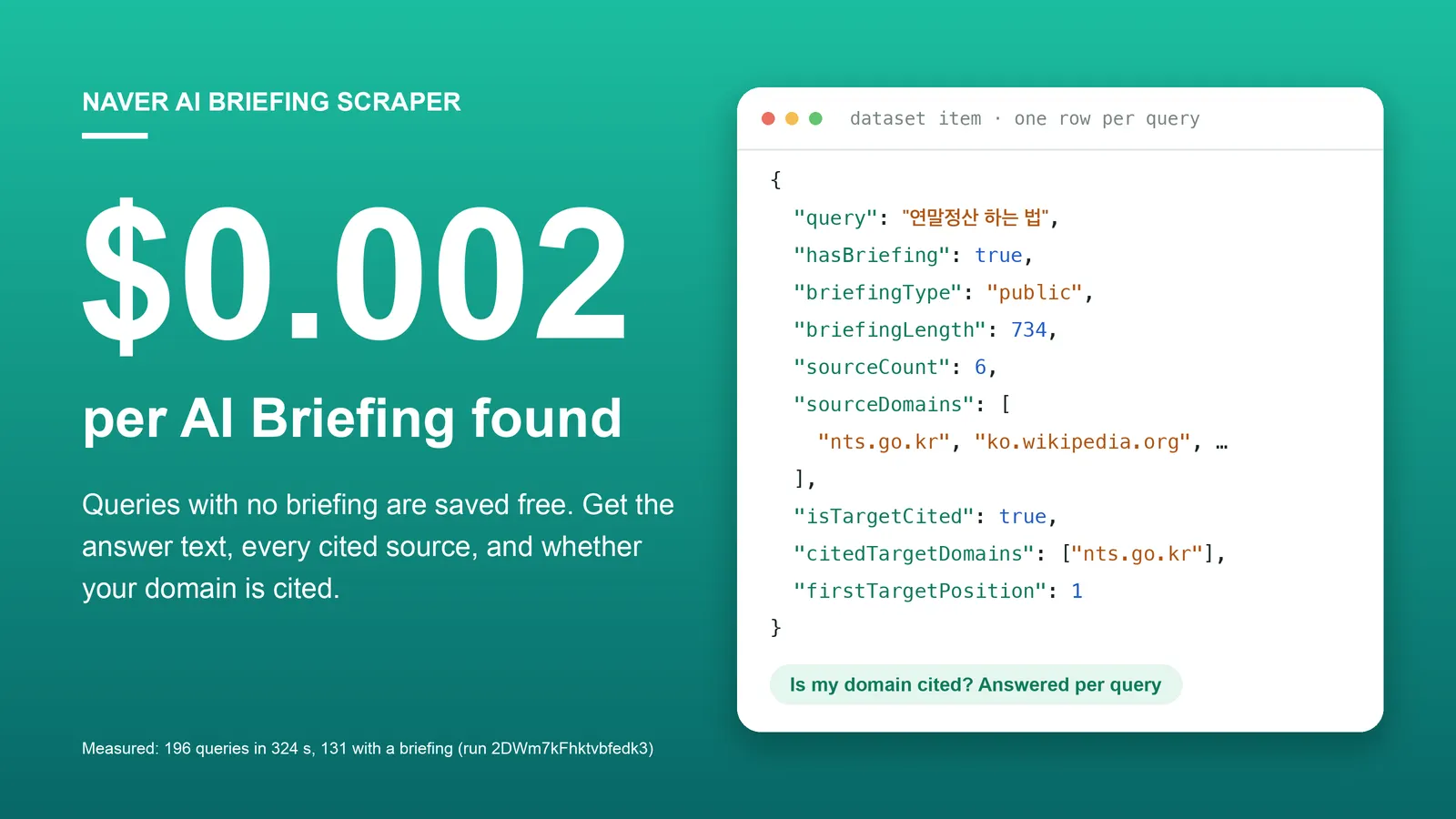
| Naver AI Briefing Scraper | Search queries → Naver's AI answer, its cited sources, and whether your domain is cited. |
| Naver DataLab Search Trends Scraper | Korean keywords → search interest (0 to 100) per day, week or month. |
| Naver News Scraper | Keywords or article URLs → Naver News articles with publisher, times, URLs and optional full text. |
| Naver Blog, Cafe & News Search Scraper | Keywords → blog, cafe and news search results with title, URL, snippet and publish time. |
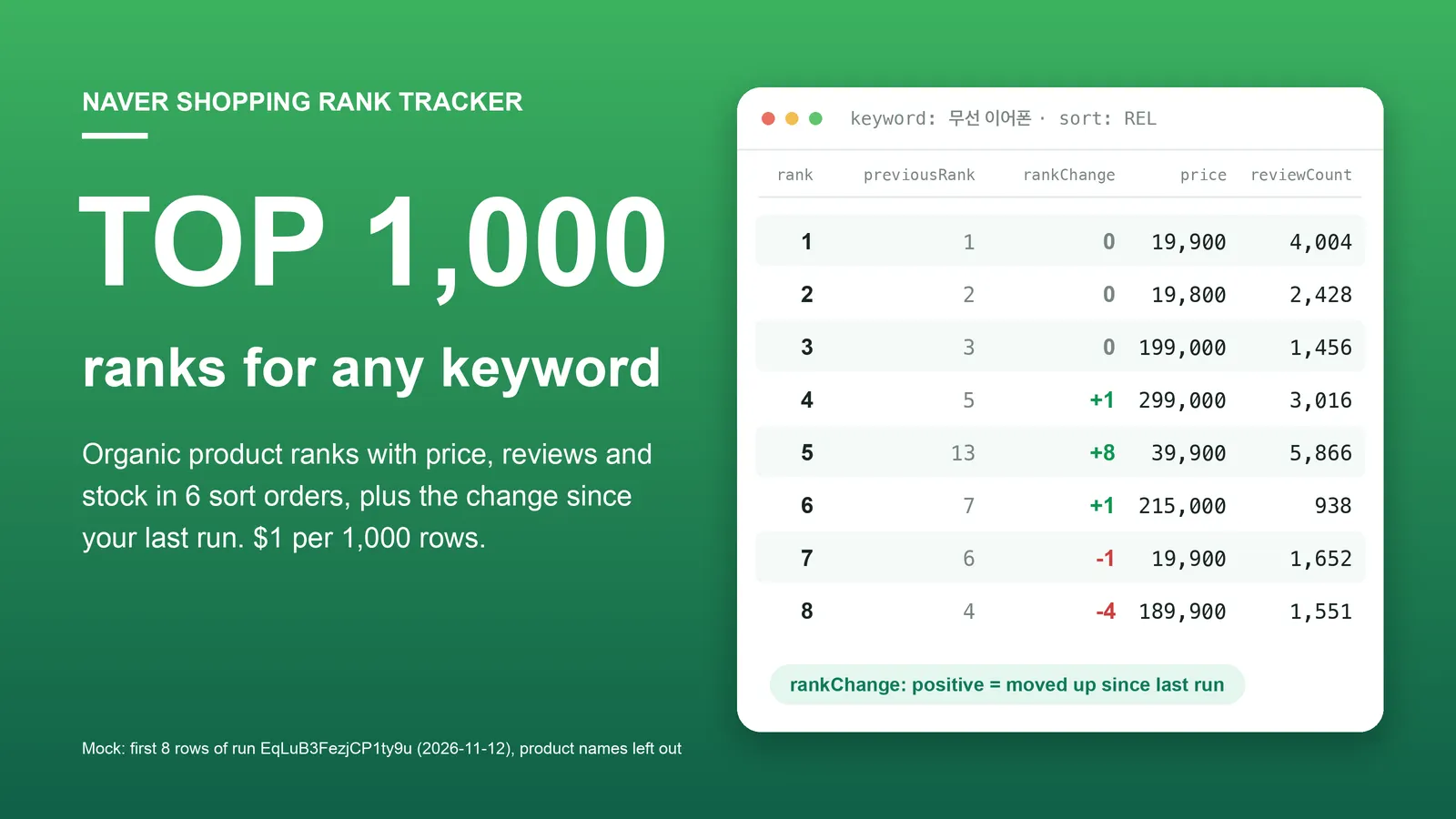
| Naver Shopping Scraper & Keyword Rank Tracker | Shopping keywords → ranked products with price, store, rating, reviews and stock. |
| Naver Map Scraper | Keyword → businesses with address, phone, coordinates, rating, review counts. |
| Naver Map Reviews Scraper | Place IDs or Naver Map URLs → visitor reviews with rating, text, dates, keyword codes and owner reply. |
| Naver Place Multi-Location Review Monitor | Your locations → new reviews, owner replies added or edited, unanswered counts per location. |
| Naver Place Rank Tracker | Keywords + your place IDs → your rank in Naver Map search, with change since the last run. |
| Kakao Map Reviews Scraper | Kakao Map place IDs → visitor reviews, no reviewer personal data. |
| Kakao Map Scraper | Keyword → Kakao Map businesses, same field names as the Naver Map Actor. |
| Korea MCP Server: Naver, Kakao Map | An MCP server with Naver Map search, Naver Place reviews and Kakao Map search as tools. |
Code examples for these Actors: github.com/experimory-crypto/naver-map-scraper-examples.
한국어 안내 (Korean)
검색어를 넣으면 네이버 통합검색 결과 페이지가 결과 한 건당 한 행으로 나옵니다. 각 행에는 섹션 종류(파워링크, 브랜드 콘텐츠, 쇼핑, 플레이스, 웹·블로그·카페, 뉴스, 인플루언서, 클립)와 섹션 순서, 전체 순위(rank, 광고 포함), 광고 제외 순위(organicRank), 광고 여부(isAd), 제목, URL, 요약, 날짜, 쇼핑 가격(원)이 들어 있고, 연관 검색어와 자동완성도 행으로 받을 수 있습니다. 요금은 데이터셋에 저장된 행 1건당 $0.0001(1,000행 $0.10)이며 결과·섹션·연관 검색어·자동완성 행이 모두 같은 값이고, 실행마다 시작 요금 $0.00005가 붙습니다. maxPages를 늘리면 페이지마다 웹·블로그·카페 결과가 최대 20건씩 더해집니다(최대 10페이지). 제공하지 않는 것: 월간 검색량, AI 브리핑 본문, 이미지 묶음의 개별 이미지, 게시글 전문, 모바일 검색 화면. 광고 클릭 추적 링크는 반환하지 않으며, 블로그·인플루언서·클립 작성자 이름은 수집하지 않습니다. 로그인 없이 공개된 검색 결과만 읽습니다.
中文说明 (Chinese)
输入关键词,即可获得 Naver 综合搜索(통합검색)结果页,每条结果一行。每行包含所属板块类型(PowerLink 广告、品牌内容、购物、地点、网页·博客·Cafe、新闻、达人、短视频)和板块顺序、整体排名(rank,含广告)、不含广告的排名(organicRank)、是否为广告(isAd)、标题、URL、摘要、日期以及购物价格(韩元),还可以把相关搜索词和自动补全建议作为行返回。费用为数据集中每保存一行 $0.0001(1,000 行 $0.10),结果行、板块行、相关搜索词行和自动补全行价格相同,每次运行另收 $0.00005 启动费。增大 maxPages 时,每多一页最多增加 20 条网页·博客·Cafe 结果(最多 10 页)。不提供:月搜索量、AI Briefing 正文、图片板块中的单张图片、帖子全文、移动端搜索页面。不返回广告点击跟踪链接,也不采集博客、达人和短视频作者的名称。无需登录,只读取公开的搜索结果。
日本語ガイド (Japanese)
キーワードを入力すると、Naver 統合検索(통합검색)の結果ページが 1 件 1 行で出力されます。各行には、セクションの種類(パワーリンク広告、ブランドコンテンツ、ショッピング、プレイス、ウェブ・ブログ・カフェ、ニュース、インフルエンサー、クリップ)とセクションの順番、全体順位(rank、広告を含む)、広告を除いた順位(organicRank)、広告かどうか(isAd)、タイトル、URL、スニペット、日付、ショッピングの価格(ウォン)が含まれ、関連検索ワードとオートコンプリート候補も行として取得できます。料金はデータセットに保存された 1 行あたり $0.0001(1,000 行で $0.10)で、結果・セクション・関連検索ワード・オートコンプリートの行はすべて同じ価格です。実行ごとに開始料金 $0.00005 がかかります。maxPages を増やすと、1 ページごとにウェブ・ブログ・カフェの結果が最大 20 件追加されます(最大 10 ページ)。提供しないもの:月間検索ボリューム、AI ブリーフィングの本文、画像セクション内の個々の画像、投稿の全文、モバイル版の検索画面。広告のクリック計測リンクは返さず、ブログ・インフルエンサー・クリップの投稿者名は収集しません。ログインなしで公開されている検索結果のみを読み取ります。
Notes
- Ads. Rows in the PowerLink and brand content sections are always
isAd: true. Shopping and place ads are flagged where Naver marks them. Ad click-tracking links (ader.naver.com,adcr.naver.com,cr*.naver.com) are never returned. - Shopping links. Products in the Naver Plus Store section have a product page URL. Non-ad products in the price-comparison section have Naver Shopping's gateway link; shopping ads there have
url: null. - Dates.
publishedAtis derived fromdateText. An absolute date becomes midnight of that day in Korea time;3시간 전is rounded to the hour;2일 전,1주 전and1개월 전become midnight of the computed day (a month is counted as 30 days). - Cafe links. Naver Cafe URLs are returned without their one-time query token, so the same post always has the same URL.
- Personal data. Names of blog, influencer and clip authors are not collected:
sourceNameis filled only for sites, news publishers, cafes (community names), Naver 지식iN (the service name) and advertisers. Result URLs are returned as Naver links them, so a blog post URL contains the blog's ID. Titles and snippets are user-written text and may contain details their authors chose to publish. - What you see is a logged-out result. The Actor requests
search.naver.com(notm.search.naver.com) through a proxy without cookies or login, so personalised results are not reflected. - Sections change. Naver decides per keyword which sections to show and changes its layout from time to time. A section this Actor does not know appears as
sectionType: "other"with itssectionCode; if a page cannot be parsed at all, the keyword fails with an error message instead of returning partial guesses. - Not affiliated with Naver.
Support
Missing a section type, a field, or an output format? Tell us in the Issues tab with the run ID. We answer every issue.


