
Naver AI Briefing Scraper (네이버 AI 브리핑 · AI Overview)
Pricing
from $1.60 / 1,000 ai briefings
Naver AI Briefing Scraper (네이버 AI 브리핑 · AI Overview)
Enter search queries and get Naver's AI Briefing (AI 브리핑) for each one: whether it appears, the answer text, every cited source with URL and domain, follow-up questions, and whether your own domains are cited. One row per query, no API key, no browser.
Pricing
from $1.60 / 1,000 ai briefings
Rating
0.0
(0)
Developer

SUNGHWAN CHO
Maintained by CommunityActor stats
0
Bookmarked
2
Total users
1
Monthly active users
2 days ago
Last modified
Features
Share
Naver AI Briefing Scraper (네이버 AI 브리핑) | AI Answers, Cited Sources & Citation Tracking (2026)
Languages: English · 한국어 · 中文 · 日本語
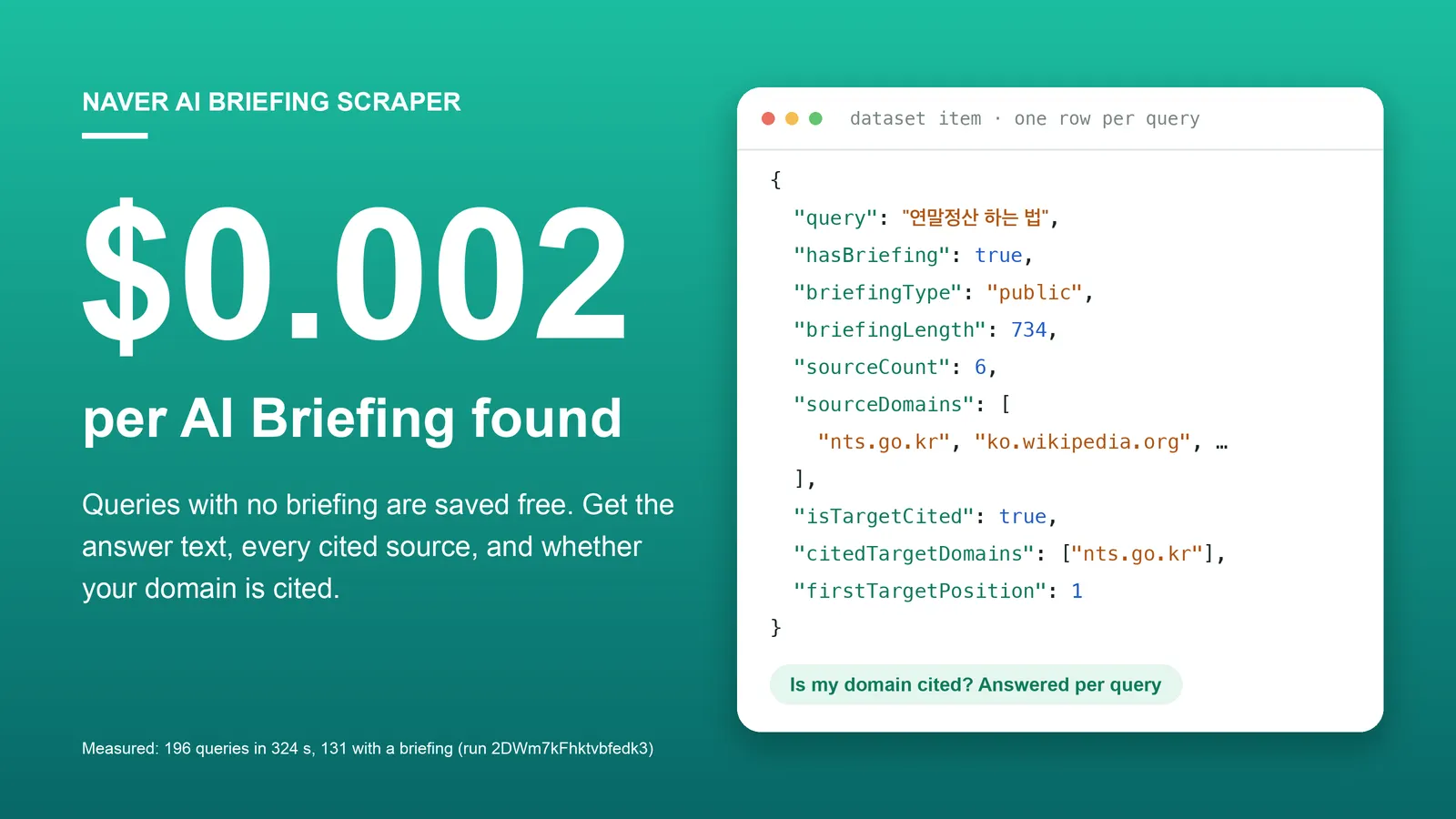
Enter search queries and get Naver's AI Briefing (AI 브리핑) for each one: whether it appears, the answer text, every cited source with URL and domain, follow-up questions, and whether your own domains are among the citations. One row per query. No API key, no login, no browser.
Part of a small set of Korean data Actors from one maintainer: Naver Search, Naver Blog, Cafe & News, Naver Shopping ranks and Naver Map reviews. Author nicknames are never collected.
Free plan: Apify's $5 monthly credit covers about 2,500 AI Briefings with this Actor. Queries where Naver shows no briefing are not charged.
What is Naver AI Briefing?
Naver is the largest search engine in South Korea. For many informational queries it now puts an AI-written answer above the regular results, with a short list of cited pages. It is the Korean counterpart of Google's AI Overviews. If you work on Korean SEO, brand monitoring or answer-engine optimization (AEO/GEO), the questions are always the same: Does my query trigger an AI Briefing? What does it say? Which sites does it cite, and is mine one of them? This Actor answers them in bulk.
Why choose this Actor?
You pay only when there is a briefing.
$0.002 per query where Naver showed an AI Briefing. Rows with hasBriefing: false are still saved, so you can tell "no briefing" from "failed", but they are not charged.
"Is my domain cited?" is a field, not a script you write.
Give targetDomains and each row returns isTargetCited, citedTargetDomains and firstTargetPosition (the citation number of your first cited page). Subdomains match, and a single Naver blog or cafe can be tracked by path (blog.naver.com/mybrand).
Sources you can analyse.
Each cited source has its citation number, title, URL, domain, site name, an official-source flag, a snippet and the publish time when Naver gives one. sourceDomains and officialSourceCount summarise them per query.
All six briefing types.
general, knowledge, health, public (government and policy), video (answer built around a short video) and place (answer that recommends businesses, returned in mentionedPlaces with Naver Place IDs).
Measured, not estimated. 196 Korean queries finished in 324 seconds at 256 MB with 0 retries in run 2DWm7kFhktvbfedk3 (build 0.1.3, 2026-11-11); 131 of them had a briefing. The live build 0.1.4 differs only in how place briefings list businesses.
Quick start
Two queries and one domain to look for. At the Free-plan price this costs at most $0.004.
Open the Actor input, enter your queries one per line, and click Start. Export the dataset as JSON, CSV or Excel. 당뇨병 증상 means "diabetes symptoms"; 연말정산 하는 법 means "how to do the year-end tax settlement".
Copy to your AI assistant
Paste this into ChatGPT, Claude, Cursor or another assistant so it can call the Actor for you:
Use it over MCP
Add this server to Claude Desktop, Cursor or any MCP client, authenticated with your Apify token:
An agent can then answer "what does Naver's AI say about X, and who does it cite?" with one tool call.
Key features
- One row per query, 25 fields, every row has every field.
- Answer as plain text and as markdown (
briefingText,briefingMarkdown), with citations as[1] [2]that matchsources[].position. - Citation check against your domains, including path-level targets for Naver blogs and cafes.
- Follow-up searches Naver links from inside the answer (
followUpQueries). - Related questions (관련질문) with their own AI answers and sources, returned even when the query has no briefing.
- Media shown with the briefing (images, videos) and businesses recommended by
placebriefings. - Run summary in the key-value store (
RUN_SUMMARY): share of queries with a briefing, queries citing your domains, per-query status. - One request per query, a few queries at a time, on the default Apify datacenter proxy.
- Clean stop at your cost limit. Remaining queries are marked
budgetLimitedinRUN_SUMMARY.
How to scrape Naver AI Briefing
Does my keyword list trigger AI Briefings?
In run 3lBNvO1sBdpblEgrX (2026-11-11) this exact list returned 4 briefings of 4 different types (health, public, place, video) and 1 row without a briefing (선크림 추천).
Is my site cited?
Read isTargetCited and firstTargetPosition on each row.
Track one Naver blog or cafe
A bare blog.naver.com matches every Naver blog. Add the path to track just yours.
Which domains does Naver's AI trust in my category?
Run your category's questions without targetDomains and count sourceDomains across rows (see the Python recipe under Advanced usage).
Which businesses does a local AI answer recommend?
For local queries with a place briefing, mentionedPlaces lists the businesses in the answer.
From the run above, the first of 6 businesses returned:
Pass placeId to Naver Map Reviews Scraper to read what customers say about those businesses.
Input parameters
| Field | Type | Required | Description |
|---|---|---|---|
queries | array of strings | yes | Search queries, one per line, as typed into the Naver search bar. Duplicates are removed. Korean informational, question-style queries trigger briefings most often. |
targetDomains | array of strings | no | Domains to look for among the cited sources, e.g. mybrand.co.kr. Subdomains match. https://, www. and trailing slashes are ignored. To track one Naver blog or cafe, add its path: blog.naver.com/mybrand. |
proxyConfiguration | object | no | Defaults to Apify datacenter proxy, which worked for Naver search in all our runs. Switch to RESIDENTIAL with country KR only if the log shows repeated request errors. |
What data can you extract from Naver AI Briefing?
One dataset row per query. Every row has every field; missing values are null and empty lists are [].
| Field | Type | Meaning |
|---|---|---|
query | string | Your input query. |
hasBriefing | boolean | Naver showed an AI Briefing on the integrated search page. |
briefingType | string / null | general, knowledge, health, public, video, place, or another label Naver introduces. |
briefingTemplate | string / null | Naver's internal template name, e.g. aibAnswer, aibHealth, aibPublic, aibVideo, aibPlace. |
briefingText | string / null | The answer as plain text. Citations appear as [1] [2]. |
briefingMarkdown | string / null | The answer as markdown (headings, bold, lists, tables). |
briefingLength | integer / null | Characters in briefingText. |
sourceCount | integer / null | Number of cited sources. |
sources | array | Cited sources: position (the [n] in the answer), title, url, domain, siteName, isOfficial, snippet, publishedAt, naverOrder. |
sourceDomains | array | Unique domains of the sources. |
officialSourceCount | integer / null | Sources Naver marks as official (government, hospital, institution). |
isTargetCited | boolean / null | One of your targetDomains is cited. null when you gave none. |
citedTargetDomains | array | Which of your targetDomains are cited. |
firstTargetPosition | integer / null | Lowest citation number among your cited pages. |
followUpQueries | array | Follow-up searches Naver links from keywords inside the answer. |
relatedQuestionCount, relatedQuestions | integer / array | Naver's AI-generated related questions: position, question, answer, sources. |
targetDomainsInRelatedQuestions | array | Which of your targetDomains are cited in the related questions' answers. |
media | array | Images and videos shown with the briefing: position, type, title, url, domain, siteName, thumbnailUrl. |
mentionedPlaces | array | Businesses a place briefing recommends: position, name, placeId, category, address, rating, reviewCount, url. |
sourceAttribution | string / null | Data provider line on some briefings. |
briefingGeneratedAt | string / null | Time stamp Naver attaches to the briefing. |
searchUrl, scrapedAt, schemaVersion | string / integer | The scraped URL, when it was scraped (UTC), output version. |
Output example: a query with a briefing
From run 3lBNvO1sBdpblEgrX (2026-11-11, build 0.1.4), query 연말정산 하는 법 with targetDomains: ["nts.go.kr"]. briefingText, briefingMarkdown and the snippets are cut short here with …, and 3 of the 6 sources are shown; everything else is unedited.
Output example: a query without a briefing
Same run, query 선크림 추천 ("sunscreen recommendations"). Not charged. Naver showed no briefing but 3 related questions with AI answers. The first question is shown with one of its two sources, cut short.
Run summary
Stored in the run's key-value store as RUN_SUMMARY (not in the dataset, not charged). From the same run, per-query list shortened to one entry:
Advanced usage
Daily citation tracking with an alert
Schedule a daily run over your keyword list with targetDomains set, then compare with yesterday:
Share of voice: which domains are cited most
In our 196-query test list (run 2DWm7kFhktvbfedk3), the most cited domain was blog.naver.com, in 91 queries. Your category will differ.
Content gaps
followUpQueries and relatedQuestions[].question are what Naver expects users to ask next. Feed them back into queries to map a topic one step deeper.
Feed the answer to your own LLM
briefingMarkdown keeps headings, lists and tables, and the [n] markers map to sources[].position, so a downstream model can quote Naver's answer with its sources.
One call from the command line
How much does it cost to scrape Naver AI Briefing?
Pay per event, no subscription. Prices below are the Free-plan prices; paid Apify plans get the discount shown.
| Event | Price | Bronze / Silver / Gold and above | When |
|---|---|---|---|
briefing | $0.002 per row | $0.0019 / $0.0018 / $0.0016 | A query for which Naver showed an AI Briefing. |
| Actor start | $0.00005 | — | Once per run. |
Not charged: queries without a briefing (their rows, including related questions, are still saved), failed queries, the run summary.
Worked examples at the Free-plan price. The share of queries with a briefing depends on your keywords, so three rates are shown:
| Job | Briefings found | Cost |
|---|---|---|
| Our test run: 196 informational Korean queries (measured, 66.8% had a briefing) | 131 | $0.26 |
| 100 queries, half with a briefing | 50 | $0.10 |
| 1,000 queries, 30% with a briefing | 300 | $0.60 |
| Daily tracking of 200 queries, half with a briefing | 100 per day | $0.20 per day, about $6 per month |
Set Maximum cost per run in the console to cap a run. The Actor stops when the limit is reached and keeps what it has stored. Checked in run nKRov3VGdSC7PtcKr: with a $0.005 limit and 5 queries, it charged 2 briefings and marked the other 3 queries budgetLimited.
How this compares. The other Actor on Apify Store for this data, johnvc/naver-ai-overview-api, lists a public Free-plan price of $0.018 per query (checked 2026-11-15), and its pricing description, when we read it on 2026-11-11, charged a query whether or not a briefing appeared. For the 196-query list above that is about $3.53 against $0.26 here. It is the more widely used of the two and returns per-paragraph citation blocks (text_blocks), which this Actor does not; here the same information is the [n] markers at the end of each paragraph.
Scheduling and integrations
- Schedules. Briefings change, so run daily or weekly on the same query list and compare
hasBriefing,sourceDomainsandisTargetCitedover time. - Webhooks and automation. Send results to Slack, Google Sheets, Make, Zapier or n8n with Apify integrations, or call your own endpoint when a run finishes.
- API clients. Any HTTP client works; official clients exist for Python and JavaScript (
apify-client).
FAQ
Do I need a Naver account or API key? No. The Actor reads the public search page.
How often does Naver show an AI Briefing? It depends on the query. In our test list of 196 informational Korean queries, 131 (66.8%) had one. We wrote that list to favour question-style queries, so expect a lower share on a typical keyword list. In that test, brand or person names alone, real-time information (weather, stock prices), local "best restaurant" queries and product recommendations mostly had none.
Can I use English queries? Yes, but Naver shows briefings mostly for Korean queries.
Why does the same query sometimes have a briefing and sometimes not?
Naver generates briefings and tunes the feature continuously. In two of our runs 6 minutes apart, the 94 queries present in both agreed on having a briefing 94 out of 94 times, and the source lists matched for all 73 with a briefing; over days, expect changes. Track RUN_SUMMARY.briefingRate over time.
What happens to a query that fails?
It is tried up to 5 times on a new proxy session. If it still fails it produces no row and no charge, and is listed with an error message in RUN_SUMMARY. The run itself fails only if every query failed.
How many queries can one run take? The largest run we have made is 196 queries (324 seconds, peak memory under 130 MB of 256 MB). Larger lists should work the same way but we have not measured them; split very large lists across runs if you want to be safe.
Does it cover mobile search or AI summaries inside other modules? No. It reads the AI Briefing block of the desktop integrated search page (통합검색). AI summaries that Naver loads inside other modules, such as the travel course module, are not covered.
Do you collect personal data?
Nicknames of blog, cafe and video authors are not collected; siteName is the publisher or platform name. The cited url is kept because it is the citation itself, and a Naver blog URL contains the blog's ID.
What is naverOrder?
Naver's own order value for the source card. It can differ from the citation number in position, which is the [n] used in the answer text.
More Korean data Actors
| Actor | What you put in → what you get |
|---|---|
| Naver Search Scraper | Keywords → the Naver integrated search page as rows: section, rank, ad flag, title, URL, snippet, related searches. |
| Naver Blog, Cafe & News Search Scraper | Keywords → blog, cafe and news search results with title, URL, snippet and publish time. |
| Naver Blog Rank Tracker | Keywords + your blog IDs or post URLs → your rank in the Naver Blog tab, with change since the last run. |
| Naver News Scraper | Keywords or article URLs → Naver News articles with publisher, times, URLs and optional full text. |
| Naver DataLab Search Trends Scraper | Korean keywords → search interest (0 to 100) per day, week or month. |
| Naver Place Rank Tracker | Keywords + your place IDs → your rank in Naver Map search. |
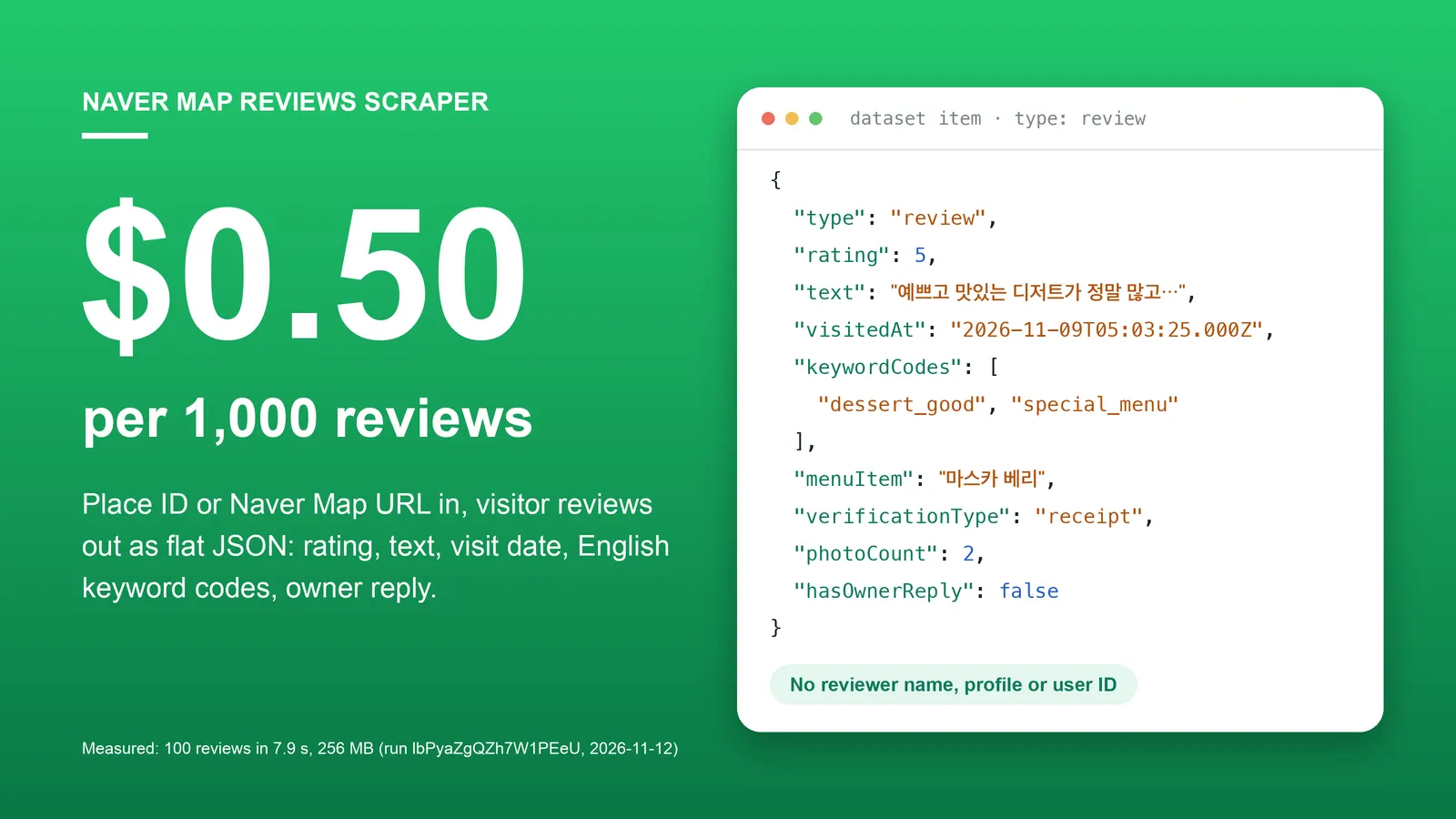
| Naver Map Reviews Scraper | Place IDs or Naver Map URLs → visitor reviews with rating, text, dates, keyword codes and owner reply. |
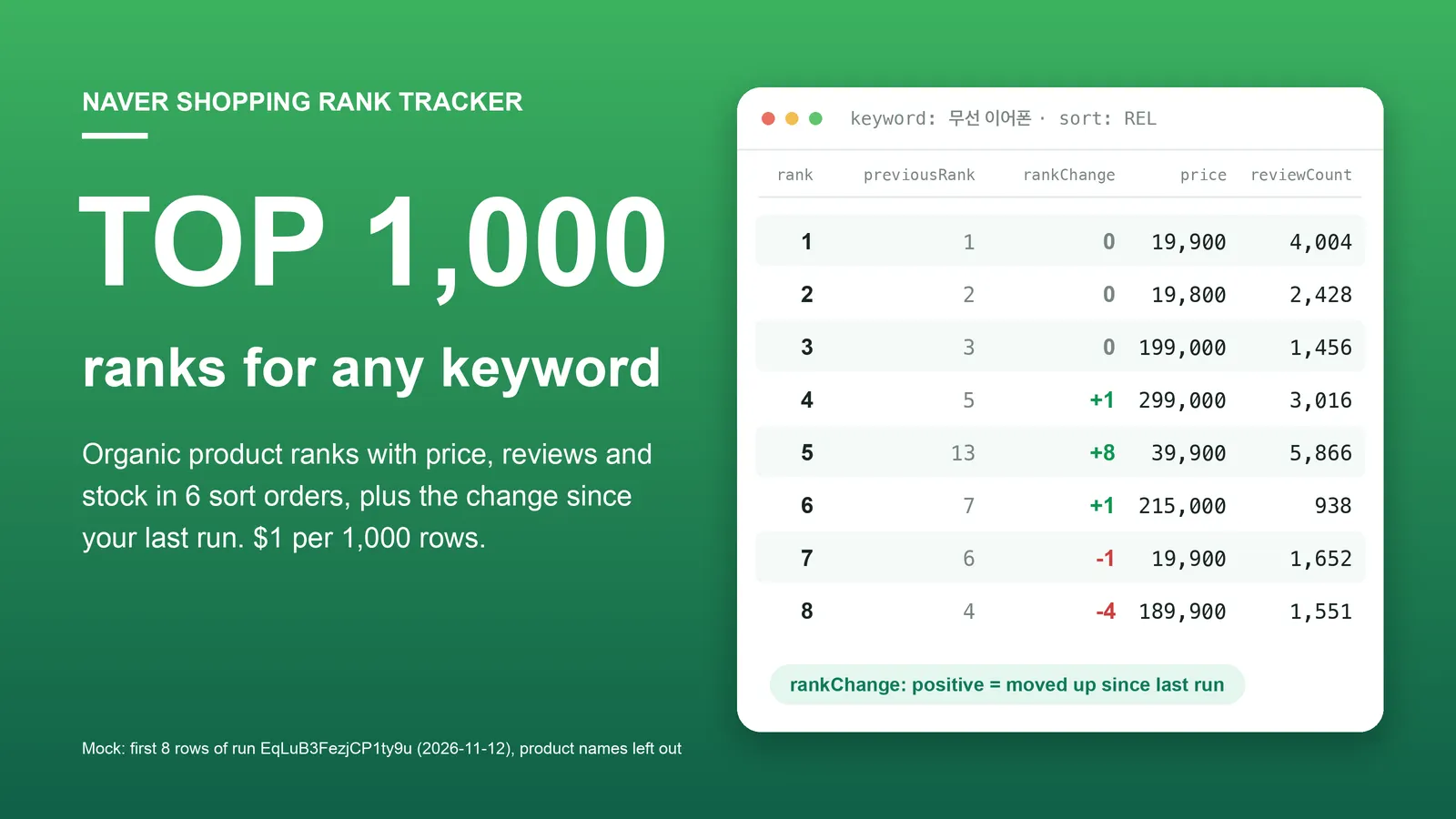
| Naver Shopping Scraper & Keyword Rank Tracker | Shopping keywords → ranked products with price, store, rating, reviews and stock. |
Code examples for these Actors: github.com/experimory-crypto/naver-map-scraper-examples.
한국어 안내 (Korean)
검색어를 넣으면 네이버 통합검색의 AI 브리핑을 검색어당 한 행으로 돌려줍니다. 브리핑이 떴는지, 본문(텍스트와 마크다운), 인용된 출처의 제목·URL·도메인·공식 여부, 후속 검색어, 관련질문과 그 답변이 들어 있습니다. targetDomains에 내 도메인(또는 blog.naver.com/아이디)을 넣으면 인용 여부와 인용 번호를 바로 알려 줍니다. 요금은 브리핑이 뜬 검색어 1건당 $0.002이며, 브리핑이 없는 검색어는 행은 저장되지만 과금되지 않습니다. 로그인·API 키 없이 공개 검색 화면만 읽고, 블로그·카페·영상 작성자의 닉네임은 수집하지 않습니다. 데스크톱 통합검색의 AI 브리핑 블록만 다룹니다.
中文说明 (Chinese)
输入搜索词,即可获得 Naver 综合搜索中的 AI 简报(AI 브리핑),每个搜索词一行。包含是否出现 AI 简报、正文(纯文本和 Markdown)、被引用来源的标题、URL、域名和是否为官方来源、后续搜索词,以及相关问题及其回答。在 targetDomains 中填入自己的域名(或 blog.naver.com/账号ID),即可直接得知是否被引用以及引用序号。费用为每个出现 AI 简报的搜索词 $0.002;没有 AI 简报的搜索词会保存数据行,但不计费。无需登录或 API 密钥,只读取公开的搜索页面,不采集博客、Cafe 和视频作者的昵称。仅支持桌面版综合搜索中的 AI 简报区块。
日本語ガイド (Japanese)
検索キーワードを入力すると、Naver 統合検索の AI ブリーフィング(AI 브리핑)がキーワードごとに 1 行で出力されます。ブリーフィングが表示されたかどうか、本文(テキストと Markdown)、引用された出典のタイトル・URL・ドメイン・公式かどうか、フォローアップ検索語、関連質問とその回答が含まれます。targetDomains に自分のドメイン(または blog.naver.com/アカウントID)を入れると、引用の有無と引用番号がすぐに分かります。料金はブリーフィングが表示されたキーワード 1 件あたり $0.002 で、ブリーフィングのないキーワードは行は保存されますが課金されません。ログインや API キーなしで公開の検索画面のみを読み取り、ブログ・カフェ・動画の投稿者のニックネームは収集しません。デスクトップ版統合検索の AI ブリーフィングブロックのみが対象です。
Support
Something looks wrong, or you need another field? Open an issue in the Issues tab with the query and the run ID. We answer every issue.


