

Naver News Scraper (네이버 뉴스 · Search, Full Text, Rankings)
Pricing
from $0.32 / 1,000 articles
Naver News Scraper (네이버 뉴스 · Search, Full Text, Rankings)
Enter keywords or article URLs and get Naver News (네이버 뉴스) articles as flat rows: title, publisher, publish and update time, Naver News URL, original URL, thumbnail, section and optional full text. Also section feeds, publisher lists, rankings and a new-articles-only monitoring mode.
Pricing
from $0.32 / 1,000 articles
Rating
0.0
(0)
Developer

SUNGHWAN CHO
Maintained by CommunityActor stats
0
Bookmarked
2
Total users
1
Monthly active users
2 days ago
Last modified
Features
Share
Naver News Scraper (네이버 뉴스) | Korean News Search, Full Article Text, Rankings & Monitoring (2026)
Languages: English · 한국어 · 中文 · 日本語
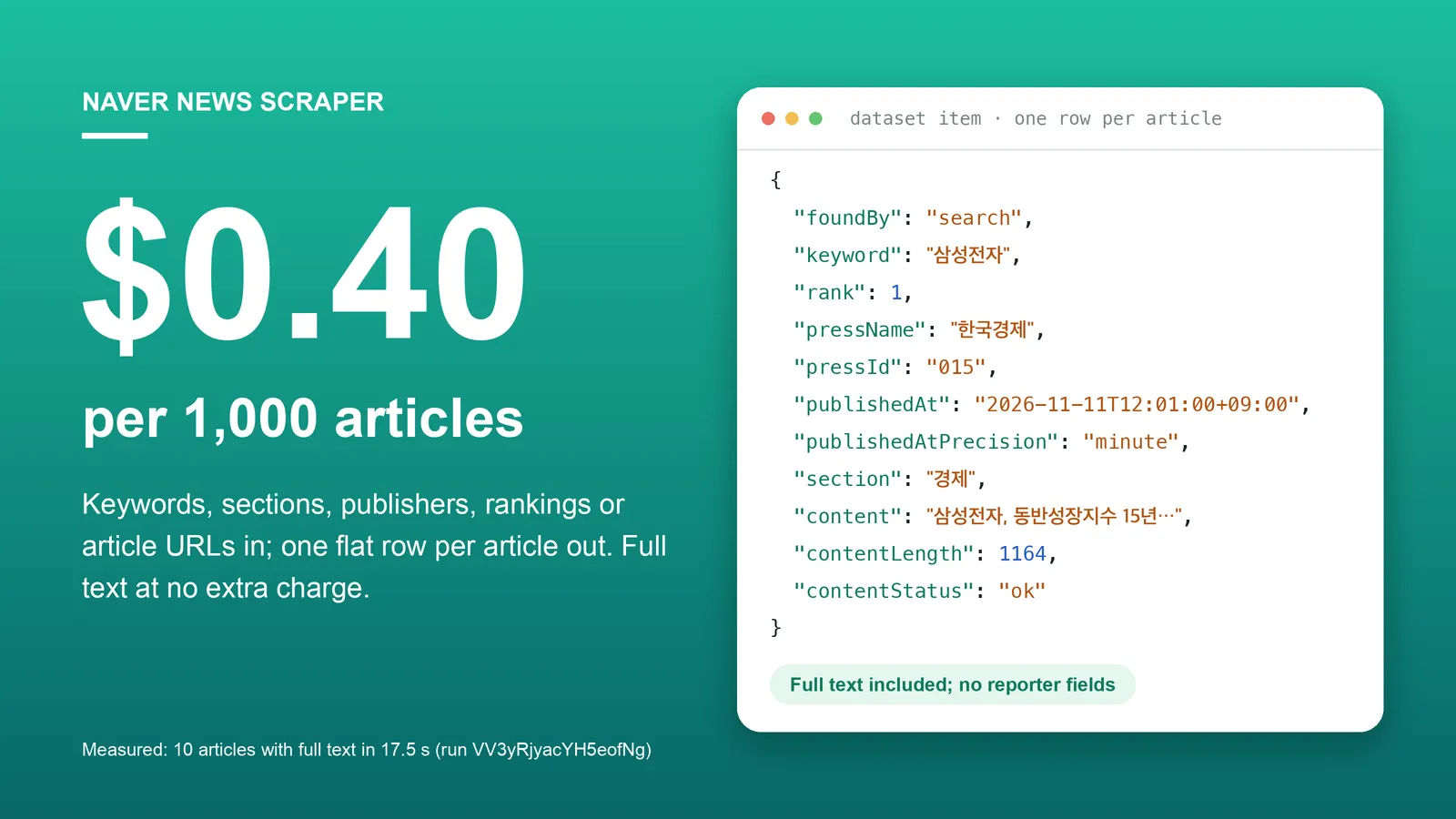
Enter keywords, article URLs, sections, publisher codes or a ranking and get Naver News (네이버 뉴스) articles as flat JSON rows: title, publisher, publish and update time, Naver News URL, original publisher URL, thumbnail, section and, if you ask for it, the full article text and body images. A monitoring mode returns only the articles you have not received before. No Naver login, no API key, no browser.
Part of a small set of Korean data Actors from one maintainer: Naver Search, Naver DataLab trends, Naver AI Briefing and Naver Map reviews. Reporter names, comments and comment writers are never read as data fields.
Free plan: Apify's $5 monthly credit covers about 12,500 articles with this Actor (at the per-article price; each run adds a $0.00005 start fee).
Why choose this Actor?
$0.40 per 1,000 articles, full text included.
You pay $0.0004 per article row saved. Turning on includeArticleContent adds the full text, exact times, sections and body images to the same row at no extra charge.
Five ways in, one row format out.
Keyword search, article URLs, section feeds, one publisher's article list, and the most-viewed or most-commented rankings all return the same 26 fields, with foundBy telling you where the row came from. Several can be combined in one run.
Built for monitoring, not only one-time exports.
onlyNewSinceLastRun remembers which articles it already returned for each list and returns only new ones. With newest-first sorting it stops reading once it reaches articles older than the previous run, so a quiet keyword reads few pages and returns few or no rows.
Honest about what Naver News hosts.
Naver's news search also lists articles that exist only on the publisher's own site. Those rows are returned with naverNewsUrl: null and the link in originalUrl; their text cannot be read, and the row says so with contentStatus: "unsupported".
Measured, not estimated. 10 articles with full text took 17.5 seconds at 256 MB, 10 of 10 texts read (run VV3yRjyacYH5eofNg, build 0.1.8, 2026-11-11, default datacenter proxy, no retries). 100 list rows without text took 56.9 seconds (run kkIzYQnrVM6s7RUtH, same build).
Quick start
The 100 newest articles for one keyword, list data only. This is the default input; at the Free-plan price it costs $0.04.
Open the Actor input, type keywords one per line (삼성전자 means Samsung Electronics), and click Start. Export the dataset as JSON, CSV or Excel.
Copy to your AI assistant
Paste this into ChatGPT, Claude, Cursor or another assistant so it can call the Actor for you:
Use it over MCP
Add this server to Claude Desktop, Cursor or any MCP client, authenticated with your Apify token:
The agent only has to fill keywords (or one of the other four sources); everything else has a default.
Key features
- Keyword search. Newest first, by relevance or oldest first; a fixed date range or the last N days; up to 1,000 rows per keyword.
- Full article text on request.
contentis one paragraph per line with photo captions removed, pluscontentLength, bodyimageUrls, allsections,updatedAtand the publisher'soriginalUrl. - Article URLs in, articles out. Accepts
n.news.naver.com,m.news.naver.comandnews.naver.comarticle links, Naver Sports and Naver Entertainment article links, oldread.naver?oid=..&aid=..links, or just001/0016436704. - Section feeds. Politics, economy, society, culture, world and science: the section's current headlines followed by its article feed.
- Publisher lists. One publisher's articles on Naver News, newest first, day by day.
- Rankings. Naver's most-viewed or most-commented ranking across publishers, or one publisher's top 20 with the view or comment count Naver shows.
- Time precision is stated. Lists often show only "3시간 전";
publishedAtPrecisionsays whetherpublishedAtis exact to the minute, hour, day, week or month. Reading the article page makes it exact to the minute. - Stable IDs for de-duplication.
idisnaver-news:<pressId>/<articleId>, orweb:<host><path>for an article that is only on the publisher site. - Incremental monitoring.
onlyNewSinceLastRunwith a separate history per keyword, section, publisher and ranking. - E-mail addresses are redacted. Addresses in titles, snippets and article text are replaced with
[email redacted]. - A free run summary.
RUN_SUMMARYhas the status and stop reason of every list, article-text counts, and forarticleUrlsevery address that was not returned with the reason. - Clean stop at your cost limit. Rows stored equal rows charged; lists that were cut off or not started are marked
budgetLimited.
How to scrape Naver News
Latest articles for keywords, last 7 days
daysBack is counted in Korea time and moves with the run date, so it stays correct in a schedule.
Articles with full text
One extra page load per article. Rows without a copy on Naver News keep content: null and get contentStatus: "unsupported".
(반도체 수출 = chip exports.)
Read specific articles in full
No keyword needed. Each readable article becomes one row with full text. Addresses that cannot be read are listed with the reason in RUN_SUMMARY and are not charged.
A fixed date range
dateFrom and dateTo are Korea-time dates and apply to keyword searches and publisher lists. Naver lists about 1,000 results per search, so for a long period run once per shorter range.
Hourly or daily monitoring: only articles you have not received before
Schedule this input. The first run returns the latest articles as usual; later runs return only new ones.
Section feeds
About 10 current headlines of the section (foundBy: "sectionHeadline") followed by its article feed (foundBy: "section").
One publisher's articles
001 is Yonhap News. Without dates the list covers the last 7 days.
A publisher's most-viewed articles with view counts
Up to 20 rows per publisher, with viewCount (or commentCount for mostCommented).
Naver's ranking across all publishers
The top 5 articles of about 80 publishers, about 400 rows, so raise maxResults to receive all of them. rank is the rank within the publisher; this page shows no counts.
Input parameters
Fill at least one of keywords, articleUrls, sections, pressIds or ranking. Only keywords is prefilled in the console.
| Field | Type | Default | Description |
|---|---|---|---|
keywords | array of strings | — | Search keywords, one per line. Each is searched separately. Korean keywords return the most results. |
maxResults | integer | 100 | 1 to 1,000. Maximum rows for each keyword, each section, each publisher and each ranking. |
sort | string | recent | Keyword search order: recent (newest first), relevance or oldest. |
includeArticleContent | boolean | false | Also open every found article on Naver News and add full text, exact publish and update minute, sections, image URLs and the original URL. |
articleUrls | array of strings | — | Naver News article addresses to read in full (formats listed under Key features). |
sections | array of strings | — | Any of politics, economy, society, culture, world, science. |
pressIds | array of strings | — | Publisher codes or publisher page addresses, e.g. 001, 015 or https://media.naver.com/press/001. With ranking set, returns that publisher's ranking instead of its article list. |
ranking | string | none | none, mostViewed (많이 본 뉴스) or mostCommented (댓글 많은 뉴스). |
daysBack | integer | — | 0 to 3,650. Only the last N days in Korea time (0 = today only). For keyword searches and publisher lists. Do not combine with dateFrom. |
dateFrom | string | — | YYYY-MM-DD, Korea time. If only dateTo is set, dateFrom is 2000-01-01. |
dateTo | string | — | YYYY-MM-DD, Korea time. If only dateFrom is set, dateTo is today. |
onlyNewSinceLastRun | boolean | false | Monitoring mode: return only articles not returned by earlier runs of the same list. |
lookbackHours | integer | 48 | 0 to 720. With onlyNewSinceLastRun: how far before the previous complete run each run re-checks for late-listed articles. |
historyStoreName | string | naver-news-monitor-history | With onlyNewSinceLastRun: the key-value store in your account that remembers returned articles. Letters, digits and hyphens, up to 63 characters. One name per monitor. |
proxyConfiguration | object | Apify Proxy | Keep the default (datacenter). Switch to RESIDENTIAL with country KR only if the log shows repeated request errors. |
Finding a publisher code: open the publisher on Naver News; the address is media.naver.com/press/<code>. The code is also the first number in every article address (/article/<code>/<article number>) and comes back in every row as pressId.
How "only new articles since the last run" works
With onlyNewSinceLastRun the Actor keeps the IDs of the articles it actually saved, one record per list, in historyStoreName in your own account. A list is one keyword with its sort and the date range as typed, or one section, one publisher or one ranking, so different searches never share history. Each record keeps the newest 5,000 IDs.
The first run returns the latest articles as usual and becomes the starting point. A later run with sort: "recent" reads from the newest article downward, skips known IDs, and stops after 5 articles in a row dated before the previous complete run minus lookbackHours. In run xWkBb863hYlazCIEm (two keywords, one section and one publisher, started about 40 seconds after the first run of the same input) the Actor made 11 requests, skipped 105 articles it had already returned and saved 10 new ones.
Limits: it is best effort, not a guarantee of complete coverage. An article that Naver lists later than lookbackHours after its publish time, or more new articles than maxResults between two runs, can be missed. If the first run was cut off by maxResults, later runs start from that cut-off and do not go back for older articles. With sort other than recent the Actor still skips known articles but cannot stop early. Do not run the same monitor twice at the same time. Use daysBack rather than fixed dates in a schedule. It does not apply to articleUrls. If the history store cannot be opened, the run behaves like a first run and says so in the log.
What data can you extract from Naver News?
One row per article. Every row has every field; a value that is not known is null.
| Field | Type | Description |
|---|---|---|
id | string | Stable key: naver-news:<pressId>/<articleId>, or web:<host><path> for an article that is only on the publisher site. |
foundBy | string | search, articleUrl, section, sectionHeadline, press, rankingMostViewed or rankingMostCommented. |
keyword | string | The keyword that found the row; null for rows not found by keyword search. |
rank | integer | Position in the list the row came from. In rankings: the rank Naver shows, within the publisher. null for articleUrls. |
title | string | Headline. |
url | string | The Naver News link when Naver News hosts the article, otherwise the publisher link. |
naverNewsUrl | string | The article on Naver News; null when Naver News does not host it. |
originalUrl | string | The article on the publisher's site. Always present for search rows without a Naver News copy; for other rows it is filled when the article page is read. |
pressId, articleId | string | Naver's publisher code and article number. |
pressName | string | Publisher name as Naver shows it. |
summary | string | The snippet or lead Naver shows. null in rankings unless the article page is read. |
thumbnailUrl | string | Thumbnail image. |
publishedAt | string | Publish time, ISO 8601 in Korea time (+09:00). |
publishedAtPrecision | string | minute, hour, day, week or month: how exact publishedAt is. |
updatedAt | string | Last update time from the article page; null when the article was not updated or the page was not read. |
section | string | Section in Korean (정치, 경제, 사회, 생활/문화, 세계, IT/과학 …): the section the row was found in, or the first section on the article page. |
sections | array of strings | All sections on the article page; null when the page was not read. |
viewCount, commentCount | integer | Only in one publisher's own ranking (pressIds + ranking). null elsewhere. |
content | string | Full text, one paragraph per line, photo captions removed. null unless the article page was read. |
contentLength | integer | Number of characters in content. |
imageUrls | array of strings | Images inside the article body. |
contentStatus | string | null = article page not requested; ok; empty (page read but no text, e.g. photo or video only); unsupported (no readable copy on Naver News); notFound; failed (the page did not answer after 3 attempts). |
scrapedAt | string | Collection time (UTC, ISO 8601). |
schemaVersion | integer | Row format version, currently 1. |
Run summary (key-value store record RUN_SUMMARY, not charged): totalReturned, chargeLimitReached, and one entry per list with kind, value, status (completed, partial, budgetLimited, failed), stopReason (maxResultsReached, endOfResults, noResults, reachedHistoryWindow, chargeLimitReached, naverResultLimit, repeatedResults, requestsFailed, layoutChanged, invalidInput), returnedCount, pagesFetched, skippedAlreadyReturned, skippedBeforeWindow and windowStart. For articleUrls: requested, returnedCount, duplicatesSkipped and notReturned with a reason per address. Also article-text counts (ok, empty, notOnNaver, unsupported, notFound, failed) and request and timeout counts.
Output example: search row with full text
From run VV3yRjyacYH5eofNg (2026-11-11, build 0.1.8), input keywords: ["삼성전자"], sort: "relevance", includeArticleContent: true. content is cut here after its first four lines (the real value has 1,164 characters); everything else is unedited.
Output example: search row without a Naver News copy
From run yGRypznVbhdUE3aGY (2026-11-11, build 0.1.7), keyword 환율 with includeArticleContent: true. The article is only on the publisher's site, so there is no pressId, the time is exact to the hour only, and the text was not read. summary is cut here because the snippet contains the reporter's byline; everything else is unedited.
Output example: publisher ranking row
From run nbaSai3VXokdCKXox (2026-11-15, build 0.1.8), input pressIds: ["001"], ranking: "mostViewed". Unedited. A publisher's ranking page gives no time or snippet, so those fields are null unless includeArticleContent is on.
Advanced usage
Send new brand mentions to your own system
Schedule the monitoring input, then read the new rows:
Combine sources in one run
Lists are read three at a time and share one dataset; foundBy, keyword and section tell the rows apart. maxResults applies to each list separately.
(코스피 = KOSPI; 015 is Korea Economic Daily.)
Large full-text runs: raise the memory
Article text is the slow part, one page load per article. The same input (three keywords and one section, 120 rows each, full text) took 297.3 seconds at 256 MB (run xQqrmIWyQIHM8YgRe, build 0.1.6) and 113.8 seconds at 1,024 MB (run yGRypznVbhdUE3aGY, build 0.1.7). Set the memory in the run options.
De-duplicate across runs and sources
The same article can be found by a keyword, a section and a ranking. Use id as the key in your own database.
One call from the command line
How much does it cost to scrape Naver News?
Pay per event, no subscription. Prices below are the Free-plan prices in effect since 2026-11-11; paid Apify plans get the discount shown.
| Event | Price | Bronze / Silver / Gold and above | When |
|---|---|---|---|
article | $0.0004 per article row | $0.00038 / $0.00036 / $0.00032 | Every row saved to the dataset, with or without full text. |
| Actor start | $0.00005 | — | Once per run. |
Not charged: full article text, the RUN_SUMMARY record, list pages that return no rows, articles skipped as already returned in monitoring mode, articleUrls addresses that could not be read, lists not started because of your cost limit.
Charged like any other row: a search row that has no copy on Naver News (contentStatus: "unsupported"), and a row whose article page did not answer (contentStatus: "failed"). Both still carry the list data.
Worked examples at the Free-plan price:
| Job | Events | Cost |
|---|---|---|
| Default run: 100 newest articles for 1 keyword | 100 articles | $0.04 |
| 1,000 articles with full text | 1,000 articles | $0.40 |
| 20 keywords, last day, 50 articles each, daily | 1,000 articles per day | $0.40 per day |
| Hourly monitor of one keyword that gets 30 new articles a day | 30 articles + 24 starts per day | about $0.013 per day |
| One publisher's top 20 most-viewed | 20 articles | $0.008 |
Set Maximum cost per run in the console to cap a run. It stops cleanly: rows already stored are kept, the list being read gets status: "budgetLimited", and lists not started are marked the same way with zero rows. In run NVymELwvYG0iunf9O a limit of $0.006 stopped a 20-row request at 14 rows, and 14 article events were charged.
Scheduling and integrations
- Schedules. In Apify Console, create an hourly or daily schedule with
onlyNewSinceLastRun: true. Use onehistoryStoreNameper schedule. - Webhooks and automation. Send the dataset to Slack, Google Sheets, Make, Zapier or n8n with Apify integrations, or call your own endpoint with a webhook when a run finishes.
- API clients. Any HTTP client works; official clients exist for Python (
apify-client) and JavaScript (apify-client).
FAQ
Do I need a Naver account or the Naver Search API key? No. The Actor reads Naver's public news pages without logging in.
Why do some search rows have no Naver News link?
Naver's news search also lists articles that live only on the publisher's own site. In run kkIzYQnrVM6s7RUtH (삼성전자, newest first) 50 of 100 rows had a Naver News copy; in run yGRypznVbhdUE3aGY (three keywords by relevance) 302 of 360 did. The others are returned with naverNewsUrl: null and their link in originalUrl.
Can it read the full text from the publisher's own site?
No. Full text is read only from Naver News, Naver Sports and Naver Entertainment article pages. Rows without such a copy get contentStatus: "unsupported".
Why is publishedAt only exact to the hour or day?
That is what Naver's list shows ("3시간 전", "2일 전"). Turn on includeArticleContent for the exact minute. Section headlines and the rows of a publisher's own ranking have no time in the list at all.
How many articles can one keyword return?
maxResults goes up to 1,000, and Naver itself lists about 1,000 results per search. To go further back, split the period with dateFrom / dateTo and run once per range.
What happens when a page is slow or blocked?
List pages are tried up to 5 times, each time on a new proxy session. Article pages are tried 3 times with a 12 to 15 second timeout; if all attempts fail the row is still delivered with contentStatus: "failed", and the count is in RUN_SUMMARY. In run xQqrmIWyQIHM8YgRe 19 of 438 article requests timed out and were repeated, and no article ended as failed. If Naver changes a page layout, the affected list is marked failed with stopReason: "layoutChanged", the run ends as failed, and the articles that could be read are still saved.
Does it collect reporter names or comments?
Not as fields. Reporter names and profiles, comments, comment writers and reactions are not read. The article text is delivered as the publisher wrote it, so a byline line inside the text (for example "(서울=연합뉴스) … 기자 =") stays part of content, and a snippet can contain one too. commentCount is a number only.
Is it legal to scrape Naver News? The Actor collects only publicly visible pages and does not log in. Article text belongs to its publisher: check the publisher's terms before you republish or redistribute it. Whether your use is allowed depends on Naver's terms of service, your purpose and your local law; checking that is your responsibility.
네이버 뉴스 기사를 엑셀로 받을 수 있나요?
네. 실행이 끝나면 데이터셋을 JSON·CSV·Excel로 내려받을 수 있습니다. 본문까지 필요하면 includeArticleContent를 true로 두면 되고, 추가 요금은 없습니다.
More Korean data Actors
| Actor | What you put in → what you get |
|---|---|
| Naver Search Scraper | Keywords → the Naver integrated search page as rows: section, rank, ad flag, title, URL, snippet, related searches. |
| Naver DataLab Search Trends Scraper | Korean keywords → search interest (0 to 100) per day, week or month. |
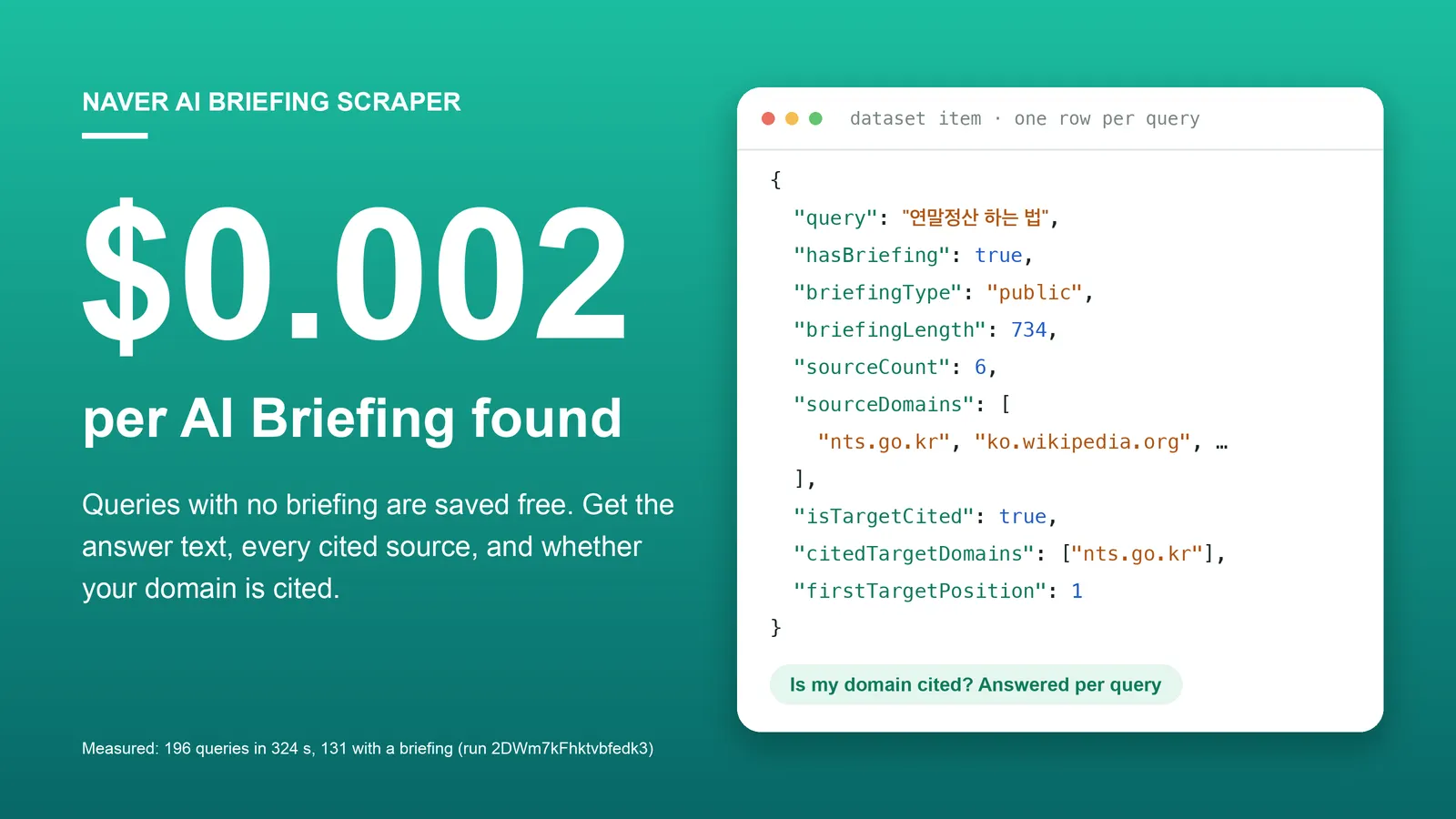
| Naver AI Briefing Scraper | Search queries → Naver's AI answer, its cited sources, and whether your domain is cited. |
| Naver Blog, Cafe & News Search Scraper | Keywords → blog, cafe and news search results with title, URL, snippet and publish time. |
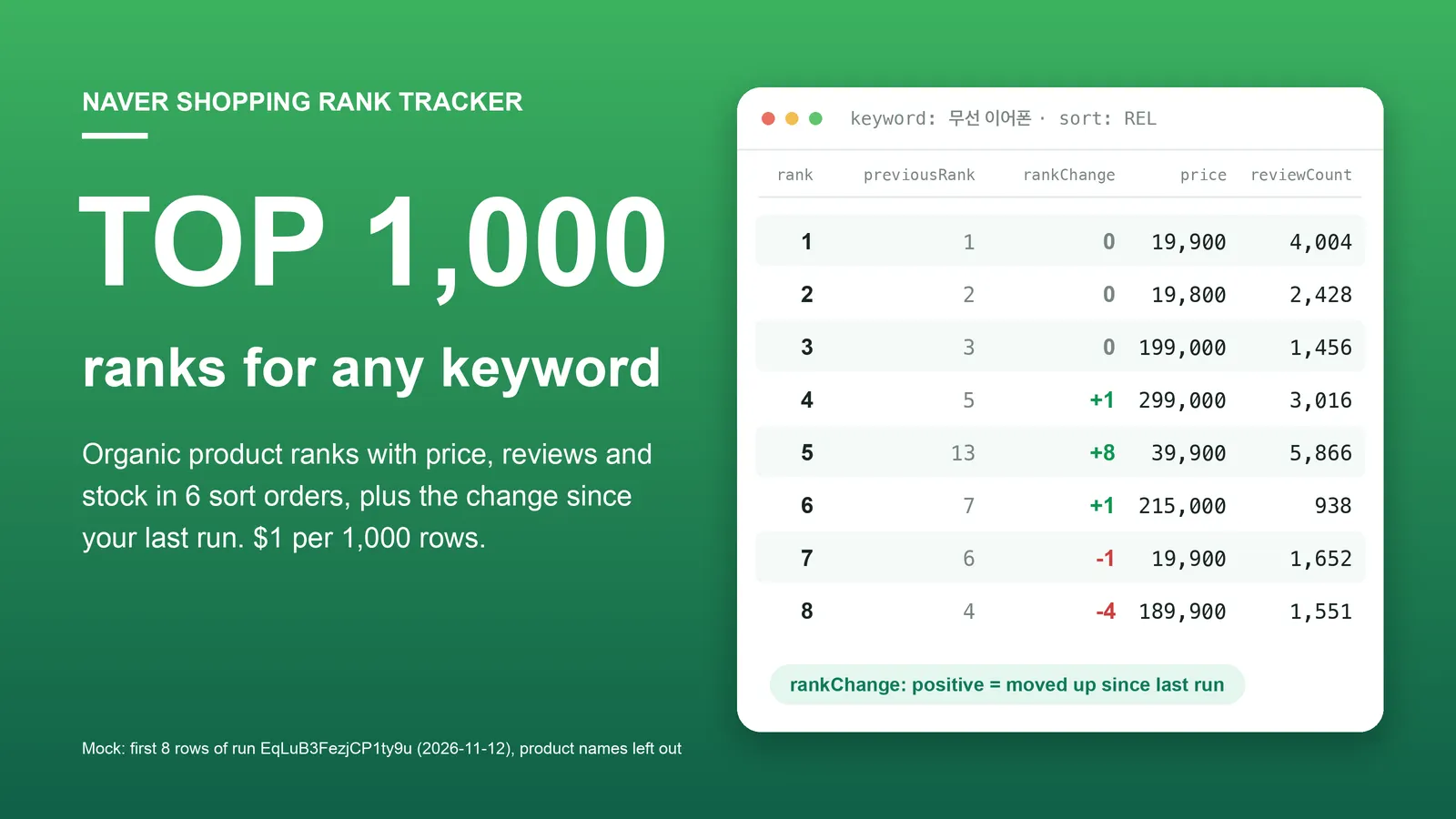
| Naver Shopping Scraper & Keyword Rank Tracker | Shopping keywords → ranked products with price, store, rating, reviews and stock. |
| Naver Map Scraper | Keyword → businesses with address, phone, coordinates, rating, review counts. |
| Naver Map Reviews Scraper | Place IDs or Naver Map URLs → visitor reviews with rating, text, dates, keyword codes and owner reply. |
| Naver Place Multi-Location Review Monitor | Your locations → new reviews, owner replies added or edited, unanswered counts per location. |
| Naver Place Rank Tracker | Keywords + your place IDs → your rank in Naver Map search, with change since the last run. |
| Kakao Map Reviews Scraper | Kakao Map place IDs → visitor reviews, no reviewer personal data. |
| Kakao Map Scraper | Keyword → Kakao Map businesses, same field names as the Naver Map Actor. |
| Korea MCP Server: Naver, Kakao Map | An MCP server with Naver Map search, Naver Place reviews and Kakao Map search as tools. |
Code examples for these Actors: github.com/experimory-crypto/naver-map-scraper-examples.
한국어 안내 (Korean)
검색어, 기사 URL, 섹션, 언론사 코드, 랭킹 중 하나 이상을 넣으면 네이버 뉴스 기사가 한 건당 한 행으로 나옵니다. 제목, 언론사, 발행 시각과 수정 시각, 네이버 뉴스 URL, 언론사 원문 URL, 썸네일, 섹션이 들어 있고, includeArticleContent를 켜면 본문 전문과 본문 이미지 URL이 같은 행에 추가됩니다. 언론사별 랭킹에서는 조회수 또는 댓글 수도 나옵니다. 요금은 기사 행 1건당 $0.0004(1,000건 $0.40)이고 본문 전문에는 추가 요금이 없으며, 실행마다 시작 요금 $0.00005가 붙습니다. "지난 실행 이후 새 기사만" 모드는 이미 받은 기사를 기억해 새 기사만 돌려줍니다(완전한 수집을 보장하지는 않습니다). 제공하지 않는 것: 네이버 뉴스에 사본이 없는 기사(언론사 사이트에만 있는 기사)의 본문, 댓글 내용, 검색 한 번당 약 1,000건을 넘는 결과. 기자 이름·프로필, 댓글과 댓글 작성자는 항목으로 수집하지 않고 이메일 주소는 가려지지만, 본문 안에 적힌 바이라인은 그대로 남습니다. 로그인 없이 공개된 페이지만 읽습니다.
中文说明 (Chinese)
输入关键词、文章 URL、版块、媒体代码或排行榜中的至少一项,即可获得 Naver 新闻(네이버 뉴스)文章,每篇文章一行。包含标题、媒体名称、发布时间和更新时间、Naver 新闻 URL、媒体原文 URL、缩略图和版块;开启 includeArticleContent 后,同一行还会加入正文全文和正文图片 URL。在单个媒体的排行榜中还会返回浏览量或评论数。费用为每行文章 $0.0004(1,000 篇 $0.40),正文全文不另收费,每次运行另收 $0.00005 启动费。“仅上次运行之后的新文章”模式会记住已返回的文章,只返回新文章(不保证完全覆盖)。不提供:在 Naver 新闻上没有副本的文章(只存在于媒体网站的文章)的正文、评论内容,以及每次搜索约 1,000 条以外的结果。不把记者姓名和个人资料、评论及评论者作为字段采集,电子邮件地址会被遮盖,但正文中写明的署名行会保留。无需登录,只读取公开页面。
日本語ガイド (Japanese)
キーワード、記事 URL、セクション、媒体コード、ランキングのうち 1 つ以上を入力すると、Naver ニュース(네이버 뉴스)の記事が 1 件 1 行で出力されます。タイトル、媒体名、公開日時と更新日時、Naver ニュースの URL、媒体の元記事 URL、サムネイル、セクションが含まれ、includeArticleContent をオンにすると本文全文と本文内の画像 URL が同じ行に追加されます。媒体ごとのランキングでは閲覧数またはコメント数も取得できます。料金は記事 1 行あたり $0.0004(1,000 件で $0.40)で、本文全文に追加料金はかかりません。実行ごとに開始料金 $0.00005 がかかります。「前回実行以降の新着記事のみ」モードは、すでに返した記事を記憶して新しい記事だけを返します(完全な網羅を保証するものではありません)。提供しないもの:Naver ニュースにコピーがない記事(媒体サイトにのみある記事)の本文、コメントの内容、1 回の検索で約 1,000 件を超える結果。記者名やプロフィール、コメントとその投稿者は項目として収集せず、メールアドレスは伏せられますが、本文中に書かれた署名行はそのまま残ります。ログインなしで公開ページのみを読み取ります。
Notes
- Times.
publishedAtandupdatedAtare ISO 8601 in Korea time (+09:00);scrapedAtis UTC. A relative label such as "3시간 전" is converted using the run time and truncated to the stated precision. - Sports and entertainment articles live on Naver Sports and Naver Entertainment. They are read too;
naverNewsUrlkeeps then.news.naver.comform. - Section feeds are what Naver shows on the section page: headlines first (no time in the list), then the article feed. The feed is Naver's own selection of recent articles; for a strict newest-first list of one publisher use
pressIds. - Rankings are per publisher; Naver has no single all-publisher top list. The all-publisher page shows about 5 articles per publisher without counts; counts come only from one publisher's own ranking.
- Dates (
daysBack,dateFrom,dateTo) apply to keyword searches and publisher lists, not to sections or rankings. - Article pages are read from
news.naver.com/article/…, with a new proxy session per attempt. Rows are still stored in list order. - Article text belongs to its publisher. E-mail addresses are replaced with
[email redacted]; the rest of the text is delivered as published. - Not affiliated with Naver.
Support
Missing a field, another input mode, a different output format? Tell us in the Issues tab with the run ID. We answer every issue.


